

Key Takeaways
- An HVAC ERP can completely connect every end of your field operations together, and be the operational backbone of your work
- Choosing an ERP that’s the right fit for your HVAC business depends entirely on the scale of work you do: commercial, residential, general contracting, etc.
- Some of the top HVAC ERPS include BuildOps for commercial, Housecall Pro for residential, and Jobber for general contractors
The HVAC industry moves fast: service calls pile up, customers expect quick turnarounds, and managing tech schedules, invoices, and inventory can feel like controlled chaos. If your current system is slowing you down, HVAC ERP software (Enterprise Resource Planning) can help you take back control.
Designed specifically for HVAC contractors, service techs, and business owners, an ERP system connects scheduling, job tracking, invoicing, and inventory into one singular platform. And with the right HVAC ERP, you can cut wasted time, improve cash flow, and keep your techs on the move.
But not all ERP solutions are built for the demands of the HVAC industry. Knowing what to look for is key, and this guide will break it down for you. To help you evaluate your options, we’ll cover:
- The 8 most important HVAC ERP features to evaluate
- 6 best HVAC ERP software & platforms for all business types
- 7 benefits of using HVAC Enterprise Resource Planning (ERP) software
- How to choose the right HVAC ERP software for your business
- 5 important HVAC ERP software FAQs answered
Let’s start by digging into the features of HVAC ERPs.
The 8 most important HVAC ERP features to evaluate
Every HVAC business owner understands the frustration of dispatching a tech only for them to arrive unprepared, missing critical details, or struggling with paperwork. When HVAC ERP software connects every end of your operations together, it eliminates wasted time and keeps everything running smoothly.
The key is making sure the HVAC ERP contains the core features that are essential to making this happen. Here are the ones we see as most critical:
1. Smart scheduling and dispatching

A strong HVAC ERP system should simplify scheduling and dispatching by optimizing job assignments based on technician availability, location, and skill set. Instead of juggling spreadsheets or whiteboards, a dynamic system ensures techs are routed efficiently, reducing travel time and improving response rates.
Imagine an HVAC business handling emergency AC repairs during a summer heatwave. Without the right scheduling tools, jobs pile up, techs waste time driving back and forth, and customers get frustrated. With smart scheduling features built into the ERP, jobs are automatically assigned to the nearest available technician with the right skills, ensuring faster response times and better service.
This is especially important for enterprise HVAC service companies, where you have multiple techs with varying certifications and skillsets, as well as multi-location projects to deal with.
2. CRM & seamless customer details management
A built-in customer management tool within an HVAC ERP system centralizes all customer interactions, service history, and equipment details in one place. This means every technician has instant access to key information before arriving on-site, reducing repeat visits and miscommunications.
Picture a technician arriving for a routine furnace check-up, only to find the homeowner complaining about inconsistent heating—something they mentioned during their last service call. Without access to past service notes, diagnosing the issue becomes a guessing game.
With CRM capabilities built into the HVAC ERP, the tech can instantly review past maintenance logs and customer notes, arriving prepared and ready to resolve the issue efficiently.
3. Integrated quoting and invoicing

A well-designed HVAC ERP software should handle everything from generating quotes to finalizing invoices in a seamless workflow. With automated pricing and real-time job cost tracking, it eliminates manual errors and ensures invoices go out faster, keeping cash flow steady.
Consider an HVAC contractor finishing a commercial HVAC installation. The job is done, but the office still needs to compile labor hours, materials, and service fees before sending an invoice. This delay can stretch payments for weeks.
With invoicing automation features like field notes that automatically turn into an invoice summary, or AI-powered PO scanning, the tech can generate an invoice on-site, collect a digital signature, and send it to the customer instantly, which really speeds up payments and cash flow.
4. Real-time analytics and fully customizable dashboards

Having real-time reporting in an HVAC ERP system helps business owners track job performance, technician productivity, and financial health. With automated data collection and custom dashboards, owners can make informed decisions without sorting through spreadsheets.
An HVAC company managing dozens of service calls daily wants to know which jobs are most profitable and which ones are dragging down revenue. Instead of guessing, they use an ERP with fully-customizable dashboards to track labor costs, job completion rates, and material expenses—allowing them to fine-tune pricing and scheduling for better profitability.
5. Tech mobile app that links to all data in the platform

An HVAC ERP system that has a tech mobile app that links to all platform data means that techs can access work orders, service history, and customer details right from their phones or tablets on the jobsite, really cutting down on manual inputs and mistakes or lost information.
For HVAC contractors, some of the most useful mobile features include AI-powered nameplate capture for HVAC systems and assets that can fill in serial numbers for you, the ability to upload photos and videos that help with work quoting or that demonstrate a record of the work done for your customers, and custom workflow checklists they work through that meet the compliance requirements of the HVAC industry.
6. Fleet tracking and management
Keeping service vehicles organized helps reduce downtime and keep jobs on schedule. A fleet management system helps track locations, fuel usage, and maintenance needs, ensuring no vehicle issues disrupt service calls. With fleet tracking, dispatchers can reroute a nearby technician if a van breaks down, avoiding delays and keeping the job on track.
7. Automated service agreements

Managing recurring maintenance contracts manually can lead to missed renewals and lost revenue. With HVAC service agreement software, businesses can automate reminders, renewals, and billing, making it easy to keep customers on a maintenance plan without extra admin work.
8. Technician time tracking

Logging hours manually can lead to payroll discrepancies and inaccurate job costing. With HVAC time tracking tools, techs can clock in and out digitally, making payroll more accurate and providing real-time data on labor efficiency.
While these features may not be necessary for every HVAC business, they can make a big impact on efficiency, cost savings, and customer satisfaction.
Next, we’ll explore the best HVAC ERP software options for commercial, residential, general contractors, and other business types.
6 best HVAC ERP software & platforms for all business types
It’s not the size of the company that primarily dictates the ERP that’s the best fit for your business—it’s the scale of the work you do. Most HVAC ERPs will offer base features like for scheduling, invoicing, and customer management, but they often fall short in handling the unique challenges of the type of work you do.
Some tools are just better suited to the complexities of large-scale commercial operations, while others work better for small contractor work or who need simpler workflows without deep data or enterprise-level accounting integrations.
We’ve compiled a list of different HVAC ERP systems that work for different business types, so you can compare the options that are best suited to the type of work you do. Here are our top choices:
1. Best ERP for commercial HVAC teams: BuildOps

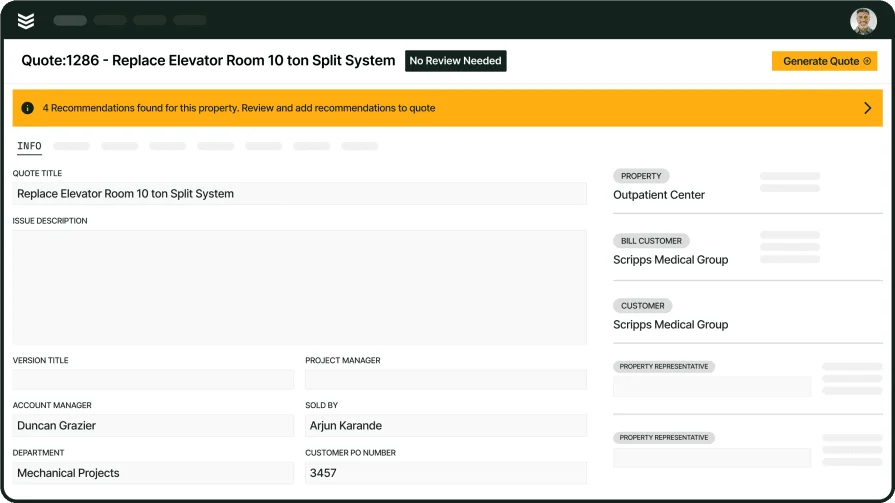
BuildOps is designed specifically for commercial HVAC businesses, helping contractors manage everything from dispatching and scheduling to invoicing and reporting—all in one place. Unlike generic ERP systems, it’s built to handle the complexity of large-scale projects, recurring service agreements, and multi-location operations.
How Pricing Works: To explore features and discover a solution that meets your needs, we provide weekly live demos and the opportunity to schedule a customized session.
Features Beyond ERP: In addition to ERP capabilities, BuildOps includes advanced reporting tools, automated service agreements, and a fully integrated mobile app for field technicians.
What Sets It Apart For Commercial: BuildOps streamlines the workflow for large-scale HVAC operations, making it easier to track high-volume work orders, manage field teams, and maintain long-term client relationships.
Rating: 4.5 on Capterra from 149 user reviews
Want to take a closer look at BuildOps?
We keep HVAC jobs moving, projects on budget, and businesses profitable
2. Best ERP for residential HVAC contractors: Housecall Pro

Image Source: Housecall Pro
Housecall Pro is a popular choice for residential HVAC businesses looking for an easy-to-use platform that handles scheduling, dispatching, and invoicing. It’s a great fit for small to mid-sized contractors who want to automate their day-to-day operations without a steep learning curve.
While Housecall Pro is a strong option for residential contractors, it lacks the depth needed for businesses managing high-volume service operations. Larger HVAC companies may find its reporting and workflow automation limited compared to more advanced solutions.
How Pricing Works: Housecall Pro offers tiered pricing plans, with options based on the number of users and features required. Monthly plans typically start at an affordable rate, making it accessible for growing businesses.
Features Beyond ERP: The software includes built-in marketing tools, customer communication features, and a client self-service portal.
What Sets It Apart For Residential: Housecall Pro simplifies appointment scheduling and follow-ups, helping contractors maintain strong relationships with homeowners while keeping their service calendar full. However, it lacks the advanced operational controls and reporting features necessary for scaling commercial HVAC businesses or managing high-volume service contracts.
Rating: 4.7 on Capterra from 2736 user reviews
See how Housecall Pro and BuildOps compare directly when it comes to the needs of enterprise HVAC teams.
3. Best HVAC ERP for general contractors: Jobber

Image Source: Jobber
Jobber is a versatile ERP solution that works well for general contractors handling HVAC, plumbing, and other field services. It’s designed to streamline business operations, offering job scheduling, invoicing, and team management tools.
Jobber works well for general contractors, but HVAC businesses needing industry-specific tools may find it lacking in advanced service agreement management and commercial job tracking. It’s a better fit for smaller teams rather than large-scale operations handling multiple service contracts.
How Pricing Works: Jobber provides multiple pricing tiers, allowing businesses to choose a plan that aligns with their team size and operational needs.
Features Beyond ERP: The platform includes automated client reminders, GPS tracking for technicians, and seamless integration with accounting software.
What Sets It Apart For General Contractors: Jobber is a flexible solution for contractors managing multiple service types, making it easier to track different job categories and maintain an organized workflow. However, for HVAC businesses focused on high-efficiency operations, it may lack the depth of industry-specific features needed for optimizing service agreements, advanced reporting, or large-scale workforce management.
Rating: 4.6 on Capterra from 1404 user reviews
4. Best for small to medium-sized HVAC businesses: Service Fusion

Image Source: Service Fusion
Service Fusion is an HVAC ERP solution designed for small to mid-sized service businesses. It offers tools for scheduling, invoicing, and customer management, making it a practical choice for companies looking to streamline their operations.
While it’s a solid option for growing HVAC businesses, it lacks robust project management capabilities, advanced reporting, and deep customization options, which can limit scalability for larger operations.
How Pricing Works: Service Fusion offers a flat-rate monthly pricing model, which includes unlimited users—making it a cost-effective option for growing businesses.
Features Beyond ERP: The platform provides built-in VoIP phone integration, text messaging capabilities, and a customer payment portal.
What Sets It Apart For Smaller HVAC Businesses: Service Fusion is an affordable solution for companies that need basic ERP functionality without per-user pricing.
Rating: 4.3 on Capterra from 287 user reviews
5. Best for niche business types: FieldEdge

Image Source: FieldEdge
FieldEdge is a well-known HVAC ERP software that focuses on field service management, allowing technicians to access job details, customer history, and invoices from a mobile device. Its features are great for niche business types like locksmithing or appliance repair.
While it excels in mobile functionality, it lacks the advanced analytics, workforce automation, and deep operational insights that larger HVAC businesses require to scale efficiently.
How Pricing Works: FieldEdge operates on a subscription-based pricing model, with costs depending on the number of users and selected features.
Features Beyond ERP: The software offers real-time job tracking, automated service agreements, and QuickBooks integration.
What Sets It Apart For Niche Teams: FieldEdge is great for businesses that rely heavily on mobile access and need a simple way to manage job schedules.
Rating: 4.2 on Capterra from 304 user reviews
6. Best for project-focused HVAC companies: Simpro

Image Source: Simpro
Simpro is a cloud-based ERP platform that provides job management solutions for HVAC, electrical, and plumbing contractors. It’s built to support project-based work, service scheduling, and asset tracking.
Its user interface can be complex, and its implementation process can be time-consuming—making it less ideal for contractors looking for a fast and intuitive solution. It also lacks some of the field-focused features that HVAC businesses need for real-time job tracking and seamless technician communication.
How Pricing Works: Simpro uses a tiered pricing structure, with costs based on business size and required features.
Features Beyond ERP: The software includes inventory tracking, estimating tools, and a built-in payment processing system.
What Sets It Apart For Project-Focused HVAC Companies: Simpro is a strong choice for contractors handling complex HVAC installations and large service contracts.
Rating: 4.0 on Capterra from 143 user reviews
See how Simpro’s features compare to BuildOps to see which one is the better fit for your enterprise business.
Get the commercial HVAC growth report
And learn how leading HVAC shops in North America are successfully scaling
7 benefits of using HVAC Enterprise Resource Planning (ERP) software
Every pro to using an HVAC ERP can be linked back to one thing: automation. Automating the aspects of your HVAC field operations that don’t need manual oversight is going to bring the biggest gains in terms of revenue growth, profitability, and customer satisfaction.
Here are some of the biggest ways you stand to see some ROI on your investment in an HVAC ERP platform:
1. Smarter and faster scheduling & dispatching

Coordinating service calls efficiently is a constant challenge. An HVAC field service planning software automates scheduling, ensuring jobs are assigned based on location, availability, and skill set. Instead of manually rearranging schedules, dispatchers can optimize daily operations, reducing downtime and improving response times.
For a deeper dive into improving your scheduling and dispatch process, this field service planning software guide walks through best practices for keeping technicians moving efficiently.
2. Improved cash flow through invoicing automation

Chasing down payments slows revenue collection, creating cash flow issues that impact day-to-day operations. With HVAC invoicing software, businesses can send accurate bills immediately after a job is completed, reducing delays and minimizing billing errors. Automated invoicing ensures that payment processing is seamless, allowing HVAC companies to get paid faster.
To better understand how to refine your billing process, check out this HVAC invoicing guide, which outlines strategies for reducing payment delays and eliminating invoicing mistakes.
3. Better customer relationship management
Maintaining strong relationships with customers is key to securing repeat business and growing your HVAC company. An HVAC CRM software centralizes all customer interactions, service history, and follow-ups in one place, making it easier to track client needs and maintain long-term service agreements. By having all customer data readily accessible, contractors can provide personalized service and improve customer retention.
This HVAC CRM software guide explores how better client management leads to increased service bookings and long-term loyalty.
4. Seamless integration with accounting and payroll
Manually transferring data between disconnected systems increases errors and wastes valuable time. A fully integrated HVAC ERP system connects invoicing, scheduling, payroll, and accounting into one unified platform, reducing administrative burdens and ensuring accurate financial tracking. By eliminating redundant data entry, businesses can avoid payroll mistakes, improve reporting accuracy, and streamline operations.
5. Increased technician productivity

Technicians lose valuable time searching for job details, handling paperwork, or waiting on manual job assignments. With HVAC field service ERP, they can instantly access work orders, update job statuses, and process payments from the field, minimizing unnecessary trips back to the office. This real-time access allows techs to complete more jobs per day, leading to higher efficiency and increased revenue.
6. Reduced operational costs
Tracking expenses, inventory, and fuel usage is crucial for maintaining a profitable HVAC business. A HVAC enterprise field service management system helps businesses monitor operational costs, optimize routes, and prevent unnecessary expenses by automating resource allocation. By reducing inefficiencies, HVAC companies can improve profit margins while maintaining high-quality service.
7. Business scaling without hiccups
As HVAC businesses expand, managing larger service teams, multiple locations, and high work order volumes becomes more complex. A scalable HVAC field service management system provides the tools needed to grow without the growing pains, ensuring seamless scheduling, reporting, and workforce management.
By adopting an ERP designed for scalability, HVAC companies can increase service capacity without sacrificing operational efficiency.

How to choose the right HVAC ERP software for your business
Finding the right HVAC ERP software is about choosing a system that fits your business. The HVAC industry has unique challenges, from managing field teams and tracking inventory to handling invoices and keeping customers happy. Your ERP software should simplify these tasks, not make them more complicated.
Here are some key questions to ask yourself when considering your options:
- Ease of use – How simple is the software for both office staff and techs in the field? Does it require extensive training, or can your team pick it up quickly? Is the mobile version just as functional as the desktop version?
- Customization and scalability – Can the software adapt to your workflow, or does it force you to change how you operate? Will it still meet your needs as your business grows, or will you outgrow it in a few years? Can you add modules or integrations later?
- Automation and efficiency – Does the system reduce manual work, or does it just shift it elsewhere? Can it automate scheduling, dispatching, and invoicing? How does it handle work orders and job tracking?
- Integration with existing tools – Can it connect with your current accounting, CRM, and scheduling tools? Does it work with the accounting software you already use? Can it sync with payroll, inventory management, or other essential systems? Will it require a complete system overhaul, or can it seamlessly fit into your current tech stack?
- Features – What essential tools does it offer? Does it have real-time job tracking, reporting, and inventory management? Are features like GPS tracking and customer communication included?
5 important HVAC ERP software FAQs answered
HVAC professionals have a lot of questions when it comes to ERP software—how it works, why it’s necessary, and whether it’s worth the investment. Below are answers to some of the most common questions contractors and business owners ask about HVAC ERP solutions.
1. What is HVAC ERP software?
HVAC ERP (Enterprise Resource Planning) software is a business management system that helps contractors streamline operations by integrating scheduling, dispatching, invoicing, inventory, and customer management into a single platform that can handle the scale of an enterprise-sized company.
By centralizing all essential business functions, ERPs eliminate the need for multiple tools and manual paperwork, improving overall efficiency. An ERP system allows HVAC companies to gain better control over job scheduling, financial tracking, and team productivity, leading to smoother workflows, increased profitability, and better customer service.
2. What does an HVAC job workflow look like in an ERP system?
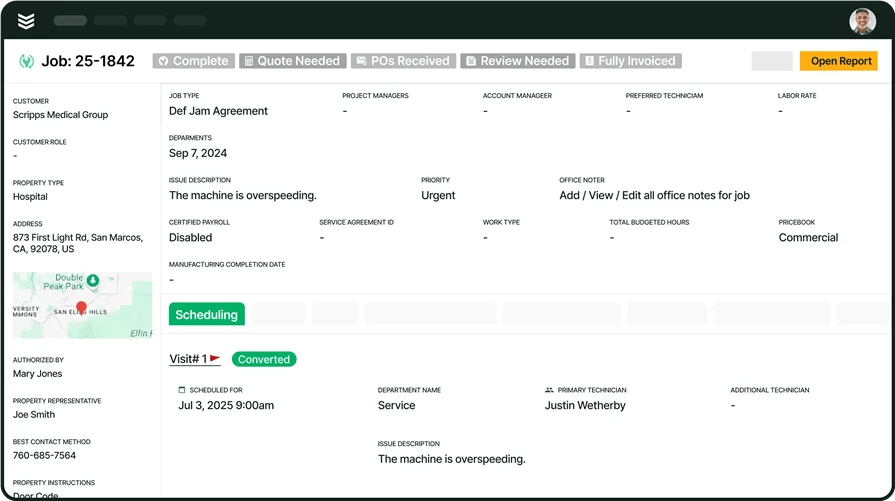
ERPs are built on a central platform, usually containing a desktop and mobile app version of the platform so that any team member can access all the features from wherever they are, and in real time. Here’s an example workflow for a simple job, but executed through the lens of an HVAC ERP, BuildOps:
- A new customer calls to request work and customer details and recorded in the CRM
- Dispatching assigns a tech to visit the jobsite and examine the scope of work, recording Notes and taking Photos
- A Quote is generated by office staff based on the tech’s assessment of the jobsite, and sent to the customer
- Customer approves the quote, and dispatching Schedules the job
- Tech arrives at the jobsite while Fleet Tracking and Route Optimization got them there at the idea time
- Custom Checklists and Workflows are all accessible to the tech through their mobile app, which they complete as they go
- Field Report Notes are completed by the tech, and then automatically turned into an Invoice Summary
- The customer receives the Invoice, and then is offered Payment options
- Custom Dashboards that pertain to this type of work, this tech, or general operations are automatically updated with job data and then reviewed by leadership to improve future operations
3. Is HVAC ERP software worth the cost?
Most enterprise HVAC companies see an immediate ROI on an investment in an HVAC ERP because of how significantly it eliminates inefficiencies, reduces administrative work, and increases profitability. While the upfront cost may seem high, the long-term savings from automating tasks, reducing errors, and improving job scheduling always outweigh the expense.
ROI for HVAC service automation platforms is always realized more quickly for bigger teams because the inefficiencies, manual work, and mistakes stack up the more people you have in your operation.
4. How does AI play into HVAC ERPs?
Not all HVAC ERPs are AI-powered or have AI features, but some tools (like BuildOps), are built with AI in the base, so all operations can be better and better automated the more you use them, as the platform becomes familiar with your operations. With BuildOps Ops AI for example, you can have features specifically useful to HVAC businesses like:
- Nameplate Capture - Snap a photo of an HVAC unit and have the serial number and other details automatically filled in
- Bluon HVAC Assist Integration - For teams that use Bluon for technical documentation reference
- Smart Recap - Field notes can be turned directly into invoice summaries
- Smart Dispatch - Dispatching suggestions are made based on technician skills and certifications
- Smart Schedule Assistant - Scheduling optimizations are suggested that better leverage everyone’s time
- AI PO Scanning / Mobile Document Scanning - Snap photos of line items and add them to other aspects of operations like field notes or invoices
- Grammar Correction - For your techs, when inputting jobsite data and field notes
5. Are there any applicable restrictions or compliance requirements when using HVAC ERP software?
Yes, depending on location and industry regulations, HVAC businesses may need to ensure their ERP software complies with data protection laws, financial reporting standards, and licensing requirements. For example, companies handling customer payment information must follow PCI compliance, while businesses managing employee payroll need to ensure tax and labor laws are met.
Additionally, HVAC contractors working with government or large commercial contracts may be required to maintain detailed records for audits and compliance checks. Choosing an HVAC ERP solution with built-in regulatory features ensures businesses stay compliant while reducing administrative burdens.
A powerful HVAC ERP platform like BuildOps connects scheduling, invoicing, dispatching, and reporting into one system of action. Many solutions cover the basics, but few offer the advanced features HVAC contractors need to manage high-volume jobs, streamline technician workflows, and keep financials in check.
For commercial service businesses, having an all-in-one ERP platform with built-in automation, integrations, and real-time data tracking is essential for scaling efficiently without the typical operational bottlenecks.
See BuildOps in action
Purpose-built for enterprise HVAC teams with large-scale jobs and multi-location projects