


BuildOps x NetSuite
NetSuite runs the back office. BuildOps runs the jobsite. Job costs, invoices, and customers stay aligned across both. No double entry, no delays.
Simplify your financial management
BuildOps and NetSuite work together to help you manage your finances more efficiently. Your accounting data stays accurate, organized, and accessible without the need for manual data entry.
- Customers, vendors, items, GL accounts, dimensions, classes, tax codes sync between BuildOps and NetSuite, two-way for customers and vendors, one-way where it makes sense.
- Jobs, construction projects, service agreements, and maintenance jobs created in BuildOps become NetSuite projects without anyone re-entering them.
- Map key financial objects, receivables, and payables directly to NetSuite so every dollar lands in the right place.
- Invoices, purchase orders, and receipts post through NetSuite's standard objects — keeping your GL current without manual journal entries.
- For project-driven work, the BlueCollar SuiteApp, a paid NetSuite add-on, unlocks full WIP reporting, budget sync, schedule of values, and change orders, keeping financials defensible and tied to real work.
- BuildOps runs operations. NetSuite runs finance. Both stay aligned.
Improve field to office sync
Accelerate your processes from the field to the office for invoicing. Review and approve tasks, notes, photos, and parts ordered, all from within BuildOps. Send invoices directly to customers via email with just a few clicks.
- When a tech completes a visit, time, materials, and job notes move straight to the office so it is ready for review before anything syncs to NetSuite.
- Purchase orders and receipts created in BuildOps push to NetSuite. AP bills sync bi-directionally, so procurement, field, and accounting all see the same numbers.
- Approved quotes convert into jobs without manual re-entry. Labor, materials, equipment, and POs tracked in the field flow into ready-to-send invoices.
- No more phone calls between the truck and the back office to confirm what was done. The data is already there.
- Send invoices to customers via email directly from BuildOps with customer and job context intact.
- Your field crew stays focused on the work. Your office stays focused on the billing.
Simplified invoicing
Create invoices quickly within BuildOps. With NetSuite integration, data entry happens only once, reducing errors and ensuring consistency between operations and financial records.
- Build invoices from completed work so labor, materials, and progress data pull in automatically from the field.
- Posted invoices push to NetSuite as customer invoices with full job context. No second entry. No mismatched records.
- Payments, payment applications, and adjustments push from BuildOps to NetSuite so your AR stays current — no manual reconciliation needed.
- Credit memos and customer refunds created in BuildOps export to NetSuite automatically — keeping your AR adjustments clean across both systems.
- For project work, invoices created via the BlueCollar SuiteApp preserve WIP reporting links, so your financial reports hold up under scrutiny.
- Audit-friendly data capture from job to journal. Every line item traces back to real work.
- Contractors using BuildOps have cut billing cycles from weeks to days.
Gain better financial insights
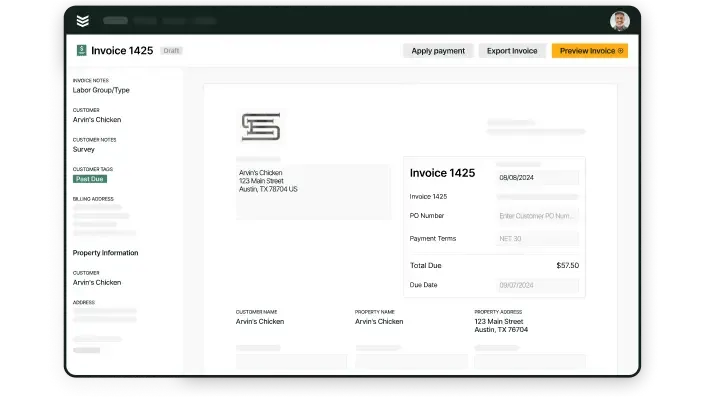
Monitor invoice statuses as they sync between BuildOps and NetSuite. Keep track of payments, overdue invoices, and customer payment histories to keep your accounting tight and your cash flow visible.
- See which invoices are posted, pending, or past due — in one view that reflects what's actually happening across your jobs.
- Payment data syncs from BuildOps to NetSuite so your AR is always current — no reconciliation scramble at month-end.
- Time, materials, and progress data from the field flow into NetSuite — so your job cost reports reflect reality, not last month's estimate.
- For project-driven work, budgets, SOVs, and change orders sync from BuildOps to NetSuite via BlueCollar. Cost codes and cost types import from NetSuite into BuildOps — so your field and your ledger speak the same language.
- Track performance across every line of business with dashboards built for operations, finance, and leadership.
- Cash flow visibility that used to take a full audit now takes a glance.
The onboarding process
Getting your NetSuite integration live is a structured, hands-on process. Our implementation team works directly with NetSuite or your third-party NetSuite partner to make sure both systems are configured and connected before your team goes live.
Every integration follows the same proven path — map it, validate it, turn it on. Your data stays clean, your team stays working, and your books stay accurate from the first sync.
Step 1: Financial mapping and configuration
We map your existing customers, vendors, items, GL accounts, and tax codes,in NetSuite to BuildOps. Jobs and projects get configured so they sync as NetSuite projects automatically. If your operation uses BuildOps Projects and requires full WIP reporting in NetSuite, we recommend the BlueCollar SuiteApp setup so budgets, cost codes, and schedule of values are ready on day one. For standard service and maintenance work, BlueCollar is not required.
Step 2: Sandbox validation
Before going live, we run end to end testing through a validation environment. Tax rates, financial mappings, and sync behavior are verified so nothing surprises your accounting team when transactions start flowing.
Step 3: The bidirectional handshake
Once validated, we trigger the live sync. BuildOps becomes your system of action for the field, while NetSuite remains your system of record — with data flowing between the two. Field to office. Office to ledger. Operations to finance. No gaps.
Peer perspective
Contractors running BuildOps and NetSuite together talk about one thing: speed to cash.
Less time wrestling with manual reconciliation. Less time re-entering data across systems. Less time wondering if the books match the field. More time running the business.
NetSuite field service software integration questions, answered
What is a bidirectional sync, and why is it important with a NetSuite integration in a field service software?
A bidirectional sync means data flows freely two ways when you have two tools talking to each other. With BuildOps and NetSuite for example, when the integration is set up, it means that when information is updated or changes in one tool, that change is automatically reflected in the other tool.
This is critical for a field service software that integrates with NetSuite, because without a bidirectional sync, teams have to continue manually updating the other tool after a change is made in the first tool. That’s not really different than using the two tools separately.
Checking for a bidirectional sync is one of the most important things to focus on when looking for a NetSuite integration in a field service software. Otherwise, the integration is unlikely to be particularly useful to you.
How do I make sure a NetSuite integration with my field service software will be successful?
Make sure your field service software vendor is there to support you during integration by setting up and testing your data in a safe environment before you launch. Before pushing the integration live, you should run a series of test work orders with at least 10 example customers in a sandbox environment. Use that test to verify that customers, vendors, items, GL accounts, dimensions, classes, tax codes are all appearing how you need them to, and you get the output you need from the integration.
Ask to see how the NetSuite integration works in a demo to make sure it really works for your business use case, and that the field service software vendor understands how it would integrate within your exact system. Ask for proof of concept.
What questions should I ask in a demo to make sure the NetSuite integration will work for my business?
Here are the things you should double check with the vendor before signing on:
- How and where are customer, vendor, item, GL account, dimensions, classes, tax codes, and other financial data synced?
- How do I prevent data duplicates using this integration?
- Can you show me what happens on both ends (in the field and in finance) when a purchase order is added?
- How do field techs access the NetSuite integration on their mobile app? Does it work that way or will it only work on desktop?
- What can NetSuite connect to in this platform? Is it just accounting, or can it connect to other things like quotes and estimates or my sales CRM?
- How can I export reports with NetSuite data?
Learn more
See other integrations