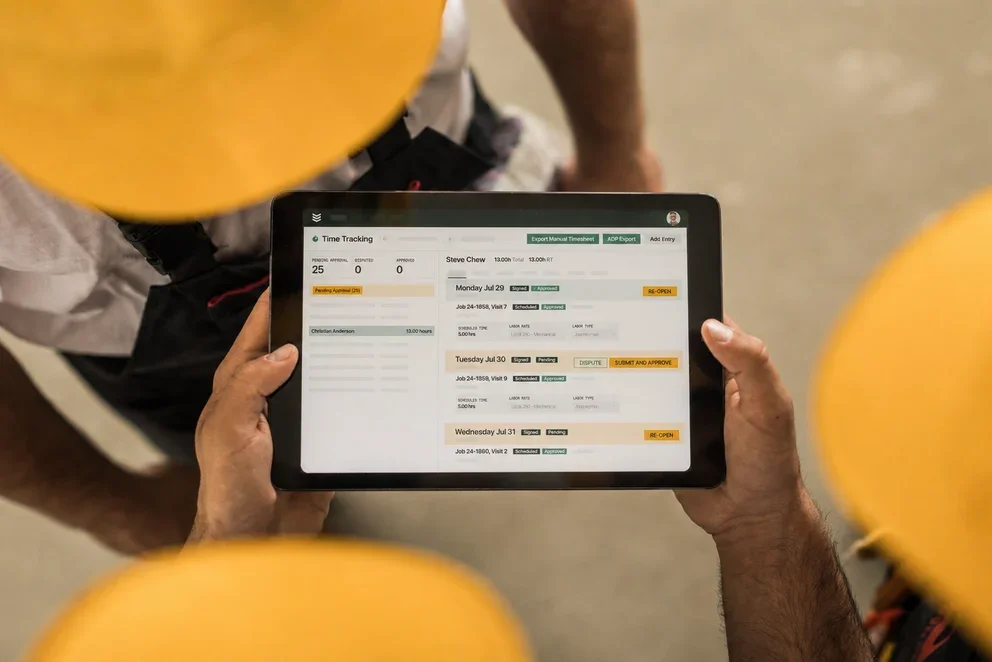


Bid day in construction rewards accuracy. One loose takeoff, and profit slips away. That’s why contractors lean on construction estimating programs to price labor, materials, equipment, and subs with confidence. Modern construction estimating software programs keep estimators and field crews in sync, then push clean proposals without spreadsheet chaos.
Tie those estimates into scheduling, dispatch, time cards, and invoices through field service management so office and site teams stay aligned from first takeoff to closeout. Here’s what this guide covers for contractors focused on speed, accuracy, and clean handoffs between office and field:
- Choosing the right estimating software for construction contractors
- 6 key features to look for in construction contractor estimating software
- 7 best construction estimating software options for every contractor
- 7 benefits of using construction cost estimating software
- 5 important construction estimating software FAQs answered
Every company runs a different mix of service calls, tenant improvements, and capital projects. Up next, we outline how estimating programs for construction handle assemblies and takeoffs, how construction cost estimating programs connect to job costing and dispatch, and which programs for estimating construction belong on your shortlist.
Choosing the right estimating software for construction contractors
Estimating drives labor plans, buyout, and schedule. Pros need control of rates, scope, and data flow, not prettier spreadsheets. A strong platform should support fast takeoff, disciplined pricing, and clean handoffs between office and field across service projects, tenant improvements, and capital work. Use the questions below to vet construction estimating programs and confirm that the estimating programs for construction match your operation.
- Usability at bid speed - Can estimators build complete assemblies with hotkeys, templates, multi-quantity takeoff, and cost code mapping without extra clicks?
- Labor, burden, and pricing control - Can you model crews, prevailing wage, fringes, equipment burden, location factors, escalation, and vendor quote alternates, then standardize rates across branches?
- System integration and handoff - Will estimates push into job costing, procurement, scheduling, and accounting with no rekeying, and create mobile work orders that preserve cost codes and phases?
- Mobile and offline execution - Can PMs and foremen review quantities in the field, capture photos and markups, complete digital forms, and sync changes from tablets when connectivity drops?
- Collaboration, governance, and audit - Do versioning, approvals, and role-based permissions keep estimators, PMs, and service managers aligned while preserving a clean audit trail for change orders?
- Features that matter - Do you get reliable 2D and 3D takeoff, assembly libraries, RFQ management, supplier catalog pricing, proposal builder with alternates and inclusions or exclusions, change order engine, and customizable field forms tied to job costing?
With that checklist in hand, the field narrows fast. Patterns show up in how high-performing teams use construction cost estimating programs to manage risk and protect margin. The standouts share traits you can use as a benchmark.
6 key features to look for in construction contractor estimating software
Winning work starts with clean scope, accurate quantities, and disciplined pricing. The strongest construction estimating programs connect that math to your field operation without friction. Pros working ground-up projects, tenant improvements, and heavy service rely on platforms that remove re-entry, standardize rates, and keep changes audited. Here are the six features that keep construction estimating software programs sharp on-site and in the office.
1. Scheduling and dispatch integration

When estimating ties directly to both scheduling and dispatch management, bid data flows into labor plans and daily assignments. As soon as a client approves a proposal, crews receive tasks with phases and cost codes intact. No duplicate entry. No lost scope. Change orders created from the estimate update the schedule and technician assignments instantly.
2. CRM and customer management

A strong platform connects estimating with a construction-focused CRM. Estimators see history, open opportunities, warranty status, and active service agreements while pricing alternates and allowances. That context produces proposals that match client standards and speeds approvals on repeat work across campuses and portfolios.
3. Fleet and vehicle tracking

Linking estimates with fleet tracking helps PMs verify vehicle location, equipment availability, and crew proximity before committing to a start date. If a trenching unit is tied up, the estimator can adjust equipment costs or timeline during the walkthrough. This keeps promises realistic and prevents reschedules that cut into margin.
4. Invoicing and payment processing

The best construction estimating programs push approved bids into invoicing and payments without a second pass. Materials, labor, markups, and retainage codes carry forward cleanly. Your office can bill progress, T&M, or fixed price with a clear link back to estimate lines, which reduces disputes and shortens cash cycles.
5. Technician mobile access

Field teams need access to scope and pricing on tablets and phones. With the technician mobile app and built-in time tracking, foremen capture photos, redlines, and quantities, complete digital forms, and submit hours against estimate phases. If conditions change, they can suggest adjustments that sync to the office for quick approval.
6. Reporting and job performance tracking

Robust reporting and analytics shows bid-hit ratios, estimate accuracy, and variance between estimated and actual hours. Leaders can review margin by project type and tighten assemblies where drift appears. This is how teams turn construction cost estimating programs into a feedback loop that improves every proposal and every buyout.
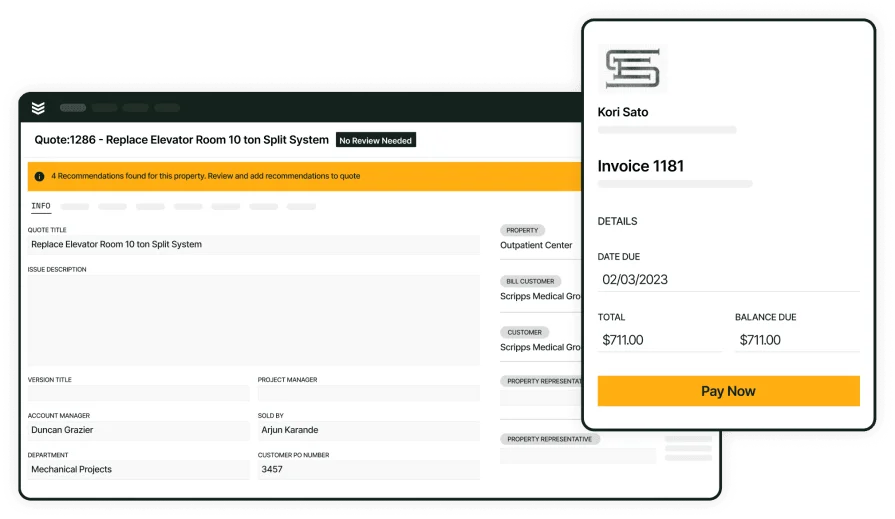
Fast, accurate construction quotes
Build assemblies, price in real time, generate proposals, and hand off to scheduling.
Other valuable features for construction contractors
Beyond the core stack, some construction estimating programs include extras that sharpen day-to-day operations. These additions may not build the estimate itself, yet they keep teams productive, protect margin, and strengthen client relationships.
- Service agreement management – With service agreement tools, contractors automate recurring maintenance contracts, track renewals in one place, and link pricing and scope from estimates to scheduled visits. This helps large sites and portfolios stay organized and billable.
- Procurement and RFQ buyout – Estimators can issue RFQs to suppliers and subs, compare alternates, level bids, and push selections into purchase orders with lead times attached. Tight linkage between estimate lines and buyout preserves scope and avoids later surprises.
- Technician time tracking – Accurate labor forecasting starts with field data. With time tracking software, crews log hours by phase and cost code from the job site. That dataset feeds assemblies and labor targets for future bids, improving the performance of construction cost estimating programs.
The best construction estimating programs pair strong assemblies with accurate job costing and mobile execution, making construction estimating software programs a force multiplier for teams that live on tight timelines and tighter margins.
7 best construction estimating software options for every contractor
For construction teams to get real value from construction estimating programs, the software must fit how crews bid and build. Estimators manage takeoff, unit assemblies, alternates, and supplier quotes while field staff handle site walks and change control. The picks below highlight platforms that deliver essential capabilities and align with day-to-day workflows.
1. Best for commercial contractors: BuildOps

BuildOps suits commercial contractors who need estimating tied tightly to field execution. The platform covers takeoff, assemblies, labor and material pricing, and proposal creation, then hands off to scheduling, dispatch, job costing, invoicing, and reporting without reentry. That end-to-end flow keeps estimates accurate and mobilization clean.
How pricing works: BuildOps provides customized pricing aligned to team size, bid volume, and operational scope, with modules matched to the functions you use.
Features beyond estimating:
- Real-time cost tracking and job costing
- Automated labor and material calculations
- Seamless integration with scheduling and invoicing
What sets it apart for commercial contractors: BuildOps emphasizes complex scopes, tight cost control, and field-first workflows. Strong assemblies, mobile access, and full integration support large service divisions and project teams from takeoff through closeout.
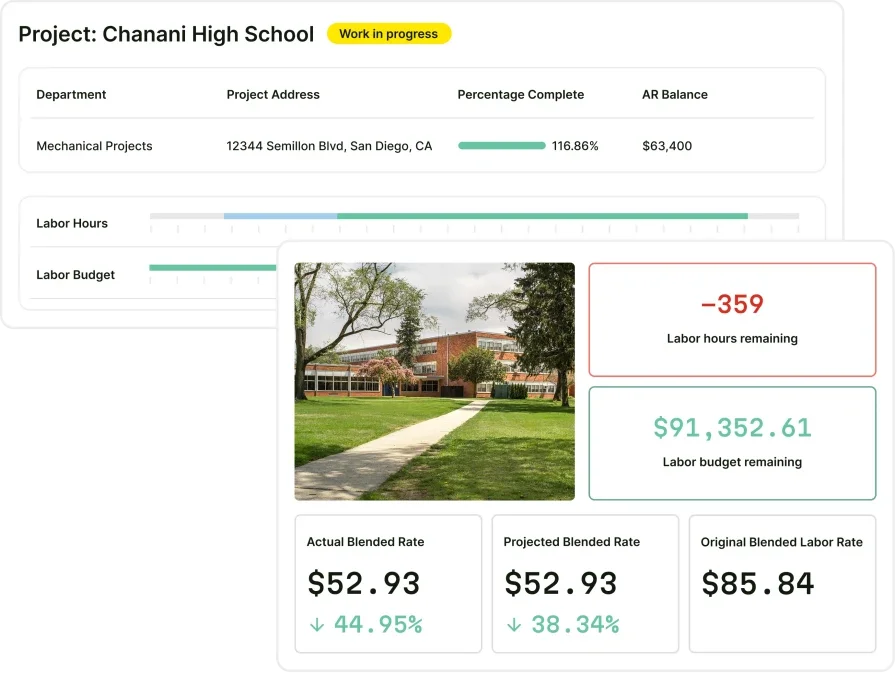
BuildOps estimating for commercial construction
Complete control over estimating, quoting, and project management—in one tool
2. Best for residential contractors: Housecall Pro

Image Source: Housecall Pro
Housecall Pro gives residential construction and service shops a straightforward path to create estimates, schedule work, dispatch crews, and manage invoices in one platform. The interface favors quick quoting and mobile use for installs and repairs. It may not be ideal for commercial outfits that require advanced job costing, robust assembly libraries, or structured buyout.
How pricing works: Housecall Pro offers tiered plans, allowing companies to choose packages that match team size and service needs.
Features beyond estimating:
- Built-in scheduling and dispatching tools
- CRM capabilities for customer management
- Mobile app for on-the-go creation
What sets it apart for residential: Housecall Pro focuses on speed and simplicity for home service work, keeping quoting, customer management, and scheduling accessible on mobile devices.
Compare Housecall Pro and BuildOps here to see which one has the better project management tools for your team.
3. Best for general contractors: Jobber

Image Source: Jobber
Jobber works for contractors that juggle varied service tasks alongside estimating and basic project coordination. The tool supports quick quotes, scheduling, and a clean mobile experience for field staff. It may not be ideal for firms that need deep reporting, detailed assemblies, or complex estimate structures common in larger commercial construction.
How pricing works: Jobber offers three subscription levels, enabling contractors to select features that fit their operation.
Features beyond estimating:
- Real-time job tracking and management
- Drag-and-drop scheduling interface
- Mobile app for field access
What sets it apart for general contractors: Jobber balances quoting, scheduling, and task management for small to midsize teams handling a wide mix of work types.
4. Best for large-scale projects: Simpro

Image Source: Simpro
Simpro delivers advanced project estimating for high-volume commercial contractors. It supports multi-phase jobs with job costing, automated takeoffs, material databases, and detailed financial reporting. The depth helps teams track complex builds from bid through handoff. It may not be ideal for smaller service shops that want a lightweight tool with minimal setup.
How pricing works: Simpro follows a subscription model that scales by business size, user count, and feature set.
Features beyond estimating:
- Inventory control with real-time material tracking
- RFQ and takeoff tools that level supplier quotes
- Accounting and job management integrations
What sets it apart for large-scale projects: Simpro favors contractors handling multi-stage builds where cost control, audit trails, and structured buyout drive profitability.
Check out our breakdown of Simpro vs BuildOps to see which one comes out ahead.
5. Best for fast quotes: Clear Estimates

Image Source: Clear Estimates
Clear Estimates focuses on speed. Prebuilt templates, a pricing database, and simple workflows help small construction teams produce clean proposals quickly. It may not be ideal for firms that need deep integrations with field operations or rigorous cost coding for complex commercial work.
How pricing works: Clear Estimates uses a straightforward monthly subscription suited to small and midsize teams.
Features beyond estimating:
- Customizable pricing catalogs
- Templates for common project types
- Basic customer management tools
What sets it apart for fast estimates: Clear Estimates lets office staff and field leaders generate professional quotes with minimal onboarding.
6. Best for electrical-heavy construction: Vision InfoSoft

Image Source: Vision InfoSoft
Vision InfoSoft targets contractors who handle electrical scopes inside larger construction projects. It offers detailed takeoff, labor units, and extensive pricing libraries tailored to electrical installs and upgrades. It may not be ideal for general contractors seeking a single platform for every trade with broad project management features.
How pricing works: Vision InfoSoft provides customized packages aligned to estimating complexity and team size.
Features beyond estimating:
- Trade-specific databases with thousands of preloaded items
- Automated takeoff with labor extensions for large jobs
- Flexible reporting to analyze bids and job costs
What sets it apart for electrical-heavy work: Vision InfoSoft brings depth for electrical assemblies, helping teams bid complex installs where labor units and material precision matter.
7. Best for sales-driven teams: Estimate Rocket

Image Source: Estimate Rocket
Estimate Rocket helps residential and light commercial contractors emphasize proposals and customer follow-up. It streamlines quote creation, signatures, and lead nurturing to keep pipelines active. It may not be ideal for operations that require tight integrations with dispatch, scheduling, and advanced job costing.
How pricing works: Estimate Rocket offers monthly subscriptions based on team size and needs.
Features beyond estimating:
- Digital proposals with e-signature
- Automated reminders to close bids faster
- Basic invoicing and job tracking for small teams
What sets it apart for sales-driven teams: Estimate Rocket shines where rapid proposal turnaround and consistent follow-up convert estimates into booked work.

7 benefits of using construction cost estimating software
Pros see real gains when they run construction estimating programs across office and field. Strong construction estimating software programs speed bids, clean up handoffs, and keep margin visible from kickoff to closeout.
1. Faster bids that actually land
Templates, assemblies, and current pricing cut hours off takeoff and proposal work. The best construction estimating programs let estimators price during a walkthrough and send a professional quote before a competitor loads their spreadsheet. When site visits stack up, an appointment booking system for construction keeps calendars tight so estimators spend time on high-value scopes, not phone tag.
2. Fewer invoicing errors and quicker cash
Approved estimates flow straight into billing with labor, materials, markup, and retainage preserved. That reduces disputes and shortens payment cycles. If your team handles progress billing or T&M, a guide to construction invoice software shows how to mirror estimate structure on every invoice.
3. Smoother schedules after client approval
Once a client signs, details move into the board without reentry. Phases, cost codes, and crew notes stay intact. That kind of data flow works best when paired with proven practices for scheduling and dispatching. These workflows prevent double-booking and keep start dates realistic, which is where construction cost estimating programs deliver real value.
4. Stronger documentation and client trust
Photos, redlines, quantities, and field notes captured against estimate lines create a defensible record. That history supports change control and avoids scope drift. If your team needs a process for daily logs and site notes, see how construction field report software ties field data back to the estimate for clean closeout.
5. Better forecasting across project types
Every bid improves the database. Actuals feed unit rates, crew productivity, and waste factors, so pricing tightens on similar scopes. Over time, leaders spot win rates by vertical, seasonality, and estimator workload and can adjust targets inside estimating programs for construction.
6. Consistent standards for every office and crew
Templates and approval rules keep proposals uniform whether the work comes from service, TI, or ground-up projects. New hires ramp faster, and veterans spend less time policing format. That level of consistency is why teams invest in programs for estimating construction to anchor company pricing.
7. Mobile estimating that keeps pace with the job
Foremen and PMs update quantities in the field, capture signatures, and request alternates without a call back to the office. The same platform pushes tasks, forms, and hours to mobile devices, which lines up with best practices in construction field service management. Teams finish estimates on-site and hand off work without delays.

5 important construction estimating software FAQs answered
Field teams already know the drill. You need speed, pricing control, and clean handoffs. These answers focus on how construction estimating programs support pros who bid, build, and service jobs every day.
1. What is construction estimating software
Construction estimating software calculates labor, materials, equipment, and markup using templates and live pricing to produce polished proposals quickly. Data then passes to the rest of FSM so the scope carries into production. Many platforms refresh vendor catalogs and support mobile takeoff.
2. How do construction estimating programs work
Systems use assemblies, cost databases, and rules to extend quantities into labor and material, then apply markups and tax to build proposals. Approved quotes create budgets, cost codes, and phases that move into production tools and mobile apps. Advanced construction cost estimating programs also manage alternates, inclusions or exclusions, and change control with audit trails.
3. Who should use construction estimating software
GCs, specialty subs, and service divisions that manage estimating in the field and the office benefit the most. Teams running TI, retrofit, and capital projects use estimating programs for construction to standardize pricing, tighten buyout, and protect margin across branches.
Did you know
Contractors like Sloan Mechanical grew to 7 technicians in the first year and hit a 75% approval rate on service repair quotes by sending same-day quotes and linking estimating to field ops in BuildOps.
4. Can estimating software integrate with other business tools
Yes. Leading platforms connect with scheduling, dispatch, CRM, accounting, and procurement so estimate data becomes work orders, POs, and invoices without reentry. That integration keeps field teams aligned and turns programs for estimating construction into an end-to-end workflow.
5. What are the best practices when using construction estimating software
Pros see consistent gains when process and tooling move together. Keep governance tight, push data both ways with the field, and refresh libraries on a set cadence.
- Use prebuilt templates and assemblies for repeat scopes.
- Update labor and material pricing through vendor feeds on a fixed schedule.
- Break estimates into labor, material, equipment, and subcontract with clear cost codes.
- Map estimate phases directly to job costing and budgets.
- Standardize markups, overhead, and contingency by market segment.
- Train office and field crews on mobile entry, photos, forms, and approvals.
- Connect estimating with scheduling, dispatch, procurement, and invoicing.
- Track actuals versus estimate and recalibrate unit rates quarterly.
- Label alternates, inclusions, and exclusions clearly in every proposal.
- Maintain separate libraries for service, tenant improvements, and capital projects using the best construction estimating programs.
Estimating sets the pace for the whole job. This guide walked through how to choose construction estimating programs, the features that count, proven options across contractor types, and the gains that show up when estimating links to the field. Pros need accuracy, speed, and clean handoffs. When scheduling, dispatch, mobile forms, invoicing, and reporting live on the same spine, bids turn into predictable jobs without reentry.
If you want an all-in-one platform for commercial field service needs, BuildOps connects estimating with scheduling, dispatch, job costing, invoicing, and field apps. The result is a single workflow from takeoff to closeout that your office and site teams can trust.
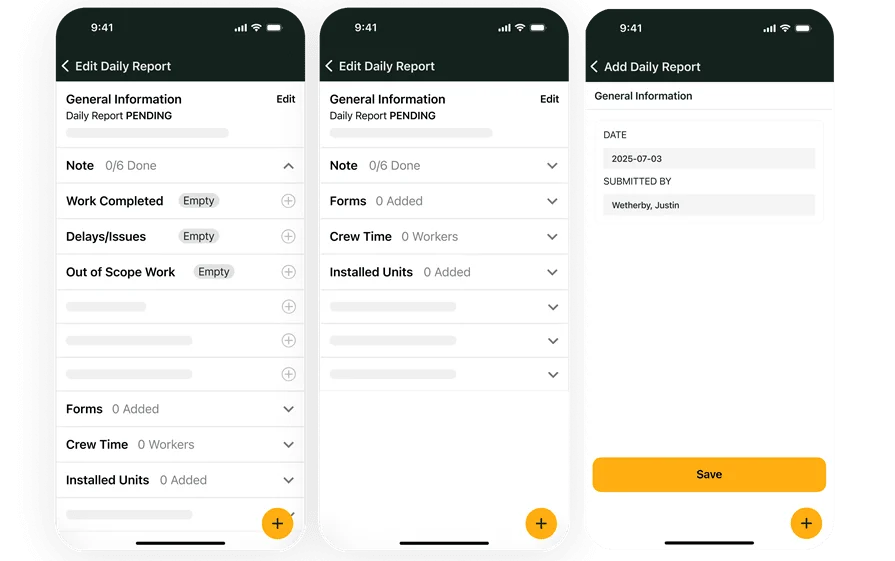
Estimate to invoice in one system
See how BuildOps links estimating with scheduling, dispatch, and billing.