Field Service Automation Software: Features and Benefits

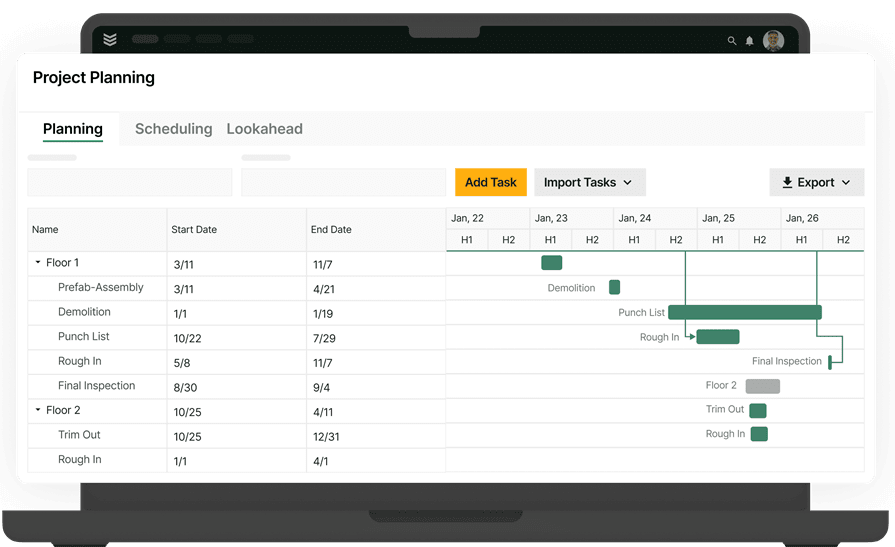
Field service work moves fast. Jobs change, techs update notes on the go, and dispatch is constantly adjusting the board. Field service automation software connects these moving parts by standardizing workflows, capturing data at each step, and pushing it to the right people at the right time. In the field service industry, that can mean fewer handoffs, fewer missed details, and a tighter loop between what happens in the field and what the office needs to keep work flowing.
Now that the basics are clear, the section below breaks down the key features essential for day-to-day field service operations, including how the workflow is prioritized for technicians, dispatch, and the back office.
7 key features to look for in a field service automation software
Jobs run long. Calls stack up. The office still needs clean notes, accurate billing, and a board the team can trust before the day is over. That’s where field service automation software earns its keep. It should cut paperwork, keep the work moving, and turn job activity into the next step without more calls, double entry, or guesswork.
1. Smart dispatch & scheduling
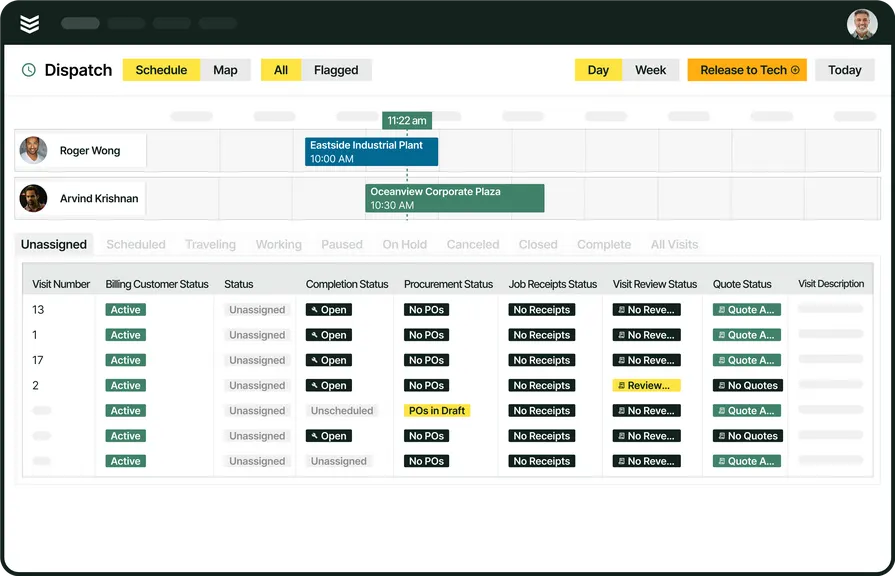
When dispatch starts slipping, the whole day gets harder to recover. Good field service automation software helps the office match the right tech to the right job, adjust the schedule when things change, and keep everyone working from the same board. BuildOps brings that together through scheduling software and dispatch software, with OpsAI built into the workflow to recommend the best tech, suggest time slots, and cut extra drive time.
2. Fleet management
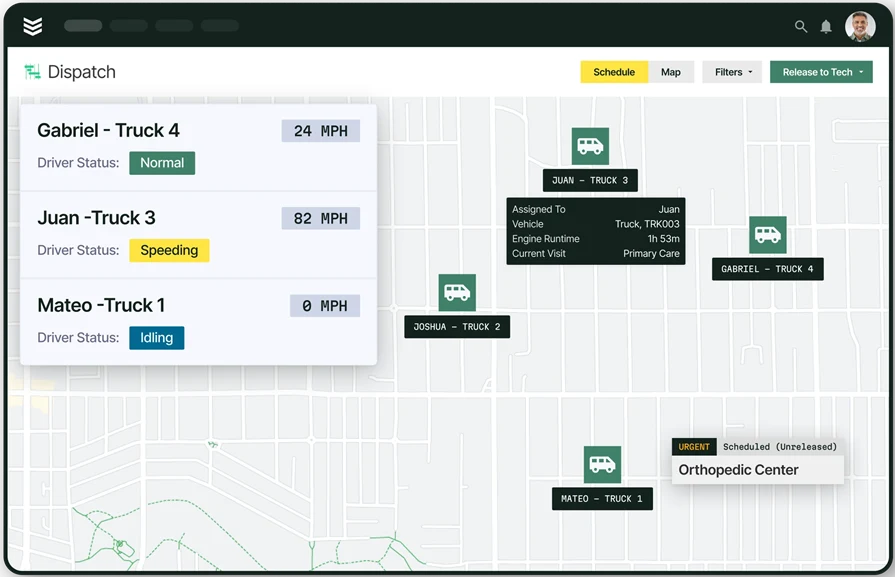
When truck locations, timecards, and jobs live in separate tools, dispatch loses time chasing answers. Strong fleet automation keeps live GPS, geofenced timecards, and job context in one place so the office can react faster. With fleet management and time tracking, BuildOps keeps that view connected to the rest of the operation.
3. Asset capture
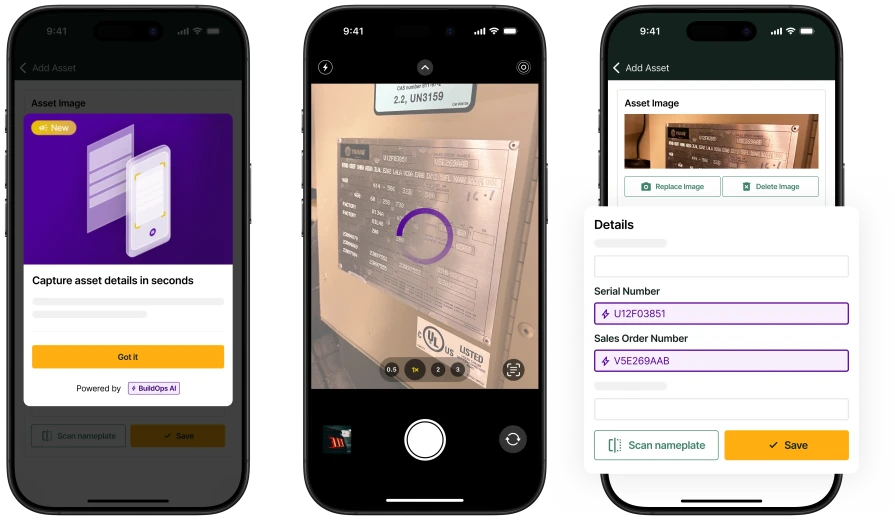
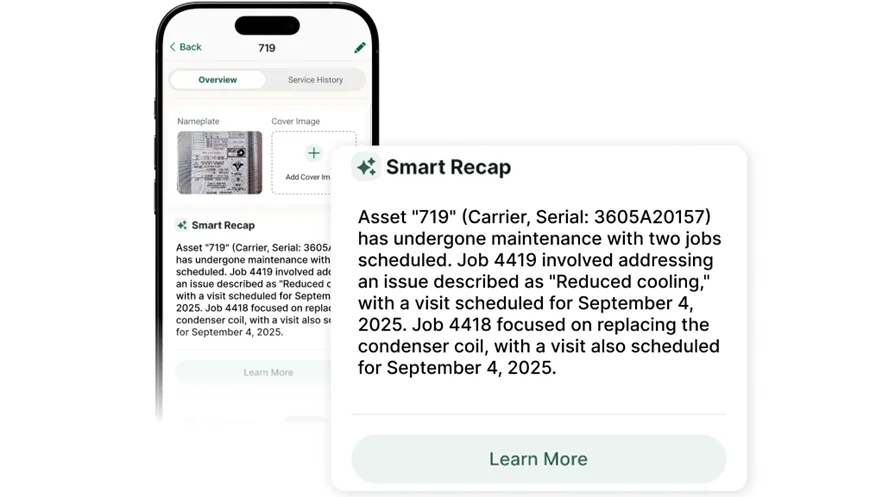
Manual asset entry slows techs down and leaves bad records behind. Field service automation software should make it easy to capture equipment data at the unit, not back at the office. In the technician mobile app, BuildOps can read nameplates from a photo and fill in equipment details fast, which is exactly where OpsAI helps clean up the record before bad data spreads.
4. Field reporting
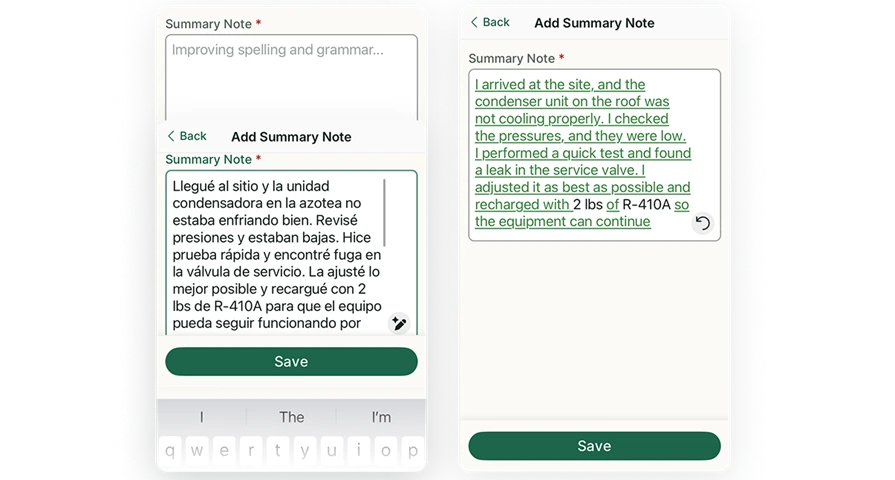
Field notes usually break down at the end of a long day, when techs are tired, and the office still needs clear documentation. Good reporting automation turns rough inputs into records people can use right away. BuildOps connects field activity to reporting, and OpsAI Visit Summary turns spoken notes into a structured summary the office can use right away.
5. Invoicing & payments
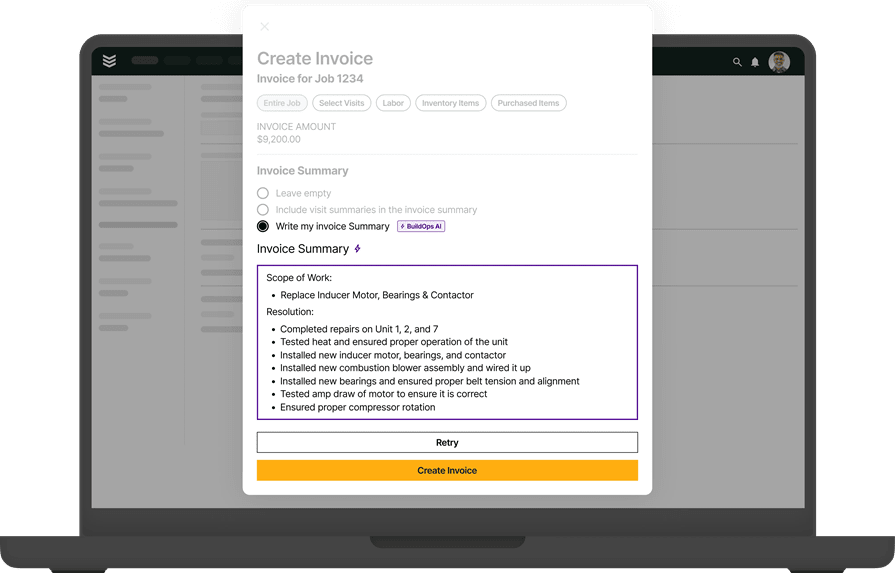
Billing slows down when the office has to rebuild the job from scattered notes, missing parts, and callbacks to the field. Field service automation software should help invoices go out while the work is still fresh. BuildOps ties invoicing and payments together so billing moves faster after the work is done. For Time & Material invoices, OpsAI can draft invoice summaries from job and visit details, giving the office a cleaner starting point before invoices go out.
6. Service CRM
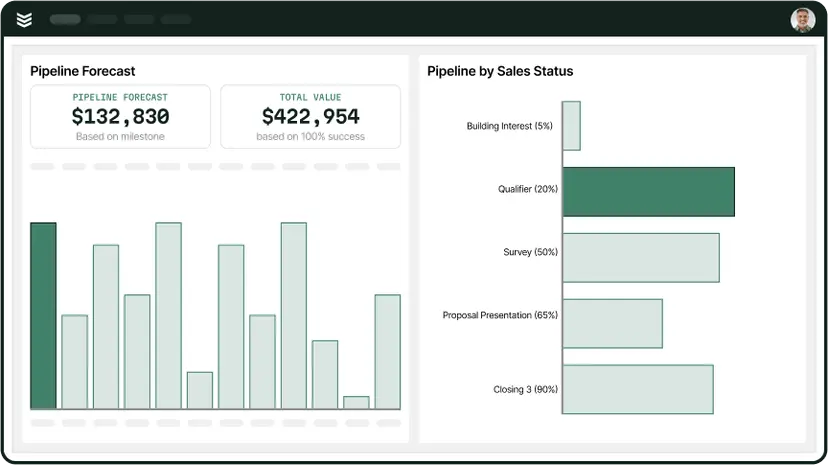
Customer context gets lost fast when sales, service, and quoting all live in different places. A strong CRM should keep accounts, properties, assets, and job history tied together so the next conversation starts with context instead of catch-up.
BuildOps connects its field service CRM with service quoting, and OpsAI can surface pull-through revenue signals from field activity so teams can turn follow-up work into quotes while the job details are still fresh.
7. Service agreements
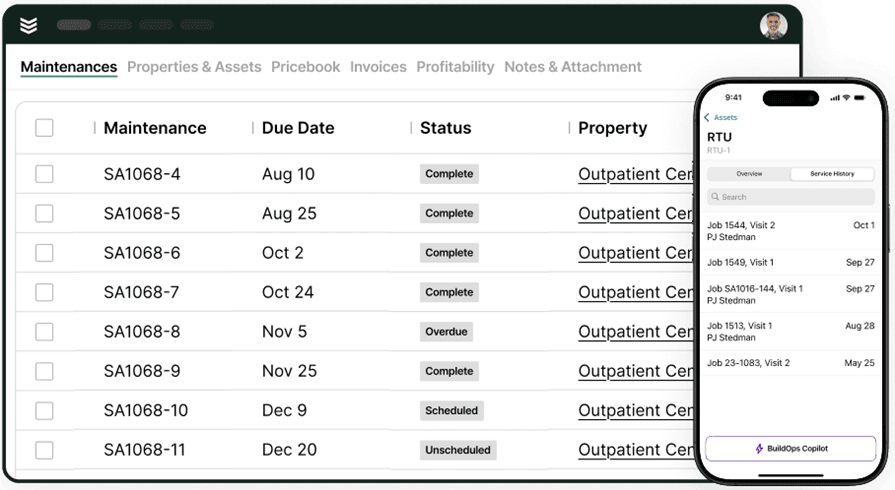
Recurring work turns messy when agreement visits depend on spreadsheets, reminders, and someone remembering what is due next. Service agreement automation should keep that work on schedule and make renewals easier to spot. BuildOps uses service agreements to auto-generate visits, track contract performance, and flag renewals, while OpsAI can help flag expiring agreements and follow-up revenue signals before they get missed.
{{related-content-block="/resources/ai-field-service-management-software"}}
5 best field service automation software to power your operations
AI shows up in the field when it automates dispatching, streamlines how techs capture and document work, and keeps billing and follow-up tasks moving without extra manual steps. Below are five platform service teams to evaluate when they want field service automation software that supports day-to-day service work plus installs, maintenance, and repair..
1. Best for commercial service teams: BuildOps
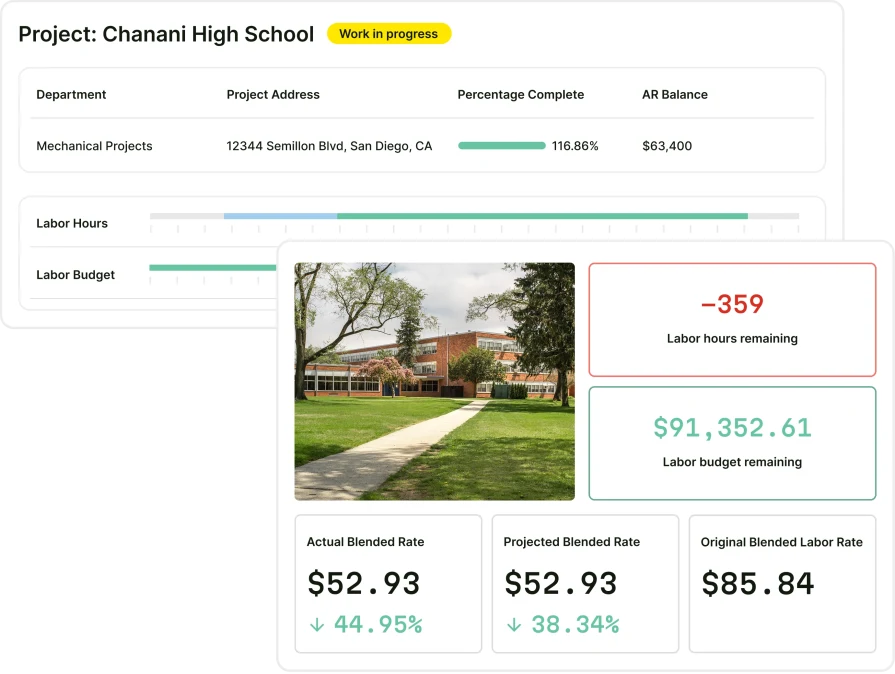
BuildOps is built for commercial contractors who need true field service automation software, bringing scheduling, dispatching, invoicing, and reporting into one connected platform. It streamlines complex operations while keeping field technicians, service managers, and office teams aligned in real time.
Most field service tools were built for simple residential work, then stretched to fit commercial use. OpsAI takes a different approach, with AI built directly into commercial workflows. It automates repetitive tasks, supports large-scale jobs and service contracts, and simplifies asset management so your entire service operation runs faster and more accurately.
How Pricing Works: BuildOps pricing is tailored to your business based on team structure, workflow complexity, and the capabilities you need. Book a demo to get a personalized walkthrough and pricing for your operation.
What Sets It Apart for Commercial: BuildOps is purpose-built for commercial contractors, simplifying complex project handoffs and closeout workflows so multi-phase jobs stay tightly coordinated across documentation, approvals, and teams.
Rating: 4.7 on Capterra from 177 user reviews
2. Best for residential teams: ServiceTitan
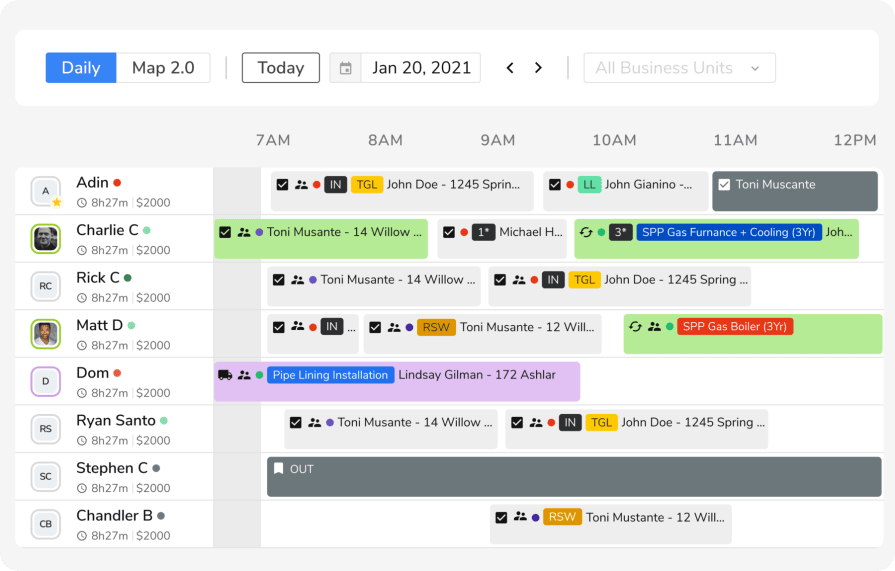
ServiceTitan is a broad field service automation platform used by trade contractors running high-volume service work who want to standardize and streamline execution across the field and office. From a field service automation and AI perspective, its initiatives focus on reducing time spent on documentation and administrative tasks, including AI-generated invoice summaries that help billing read clearly and consistently after a job closes.
It may not be an ideal choice if you are looking for a lighter rollout and faster time to adoption, since implementation and ongoing administration can require substantial internal time and resources.
How Pricing Works: ServiceTitan typically uses custom pricing based on business size, trade, and the modules selected, with tiered packaging that changes with operational scope and feature requirements.
What Sets It Apart for Residential Contractors: ServiceTitan helps residential contractors stay connected with homeowners through automated service ops and gives technicians a dashboard to track every step of each job in real time.
Rating: 4.3 on Capterra from 335 user reviews
See how BuildOps and ServiceTitan compare directly right here.
3. Best for general contractors: Jobber
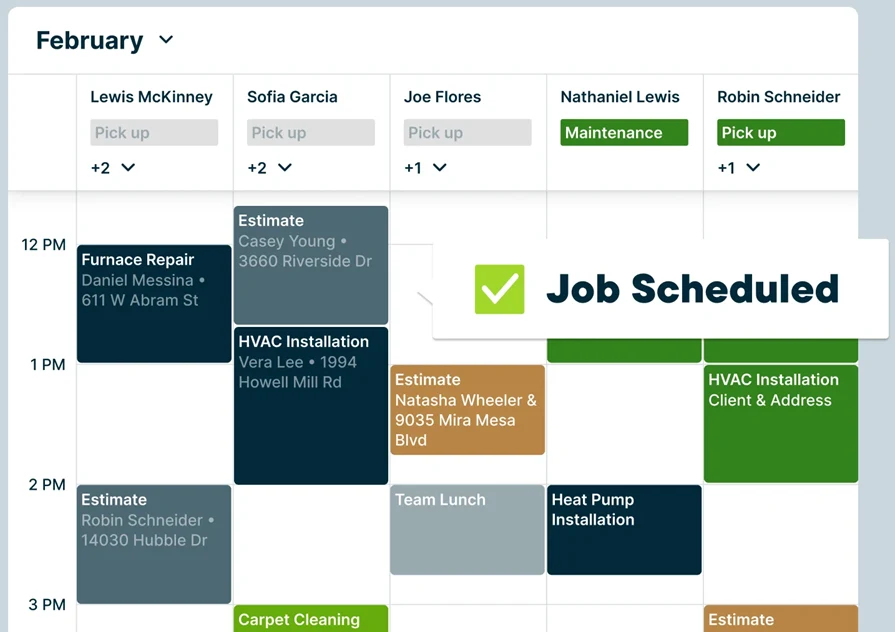
Jobber is a versatile field service automation platform designed for general contractors managing a mix of service calls, installations, and maintenance work. It provides tools for job scheduling, customer management, and invoicing in an easy-to-use interface. While it covers core workflows for many service teams, it may not be ideal for organizations that need more advanced project tracking, complex workflows, or large-scale commercial field service management.
How Pricing Works: Jobber provides multiple pricing tiers, starting with basic scheduling and invoicing features, while higher plans include automation and reporting tools.
What Sets It Apart for General Contractors: Jobber simplifies client communication with automated follow-ups and allows contractors to track job progress with a mobile-friendly dashboard.
Rating: 4.6 on Capterra from 1462 user reviews
4. Best for small businesses: Workiz
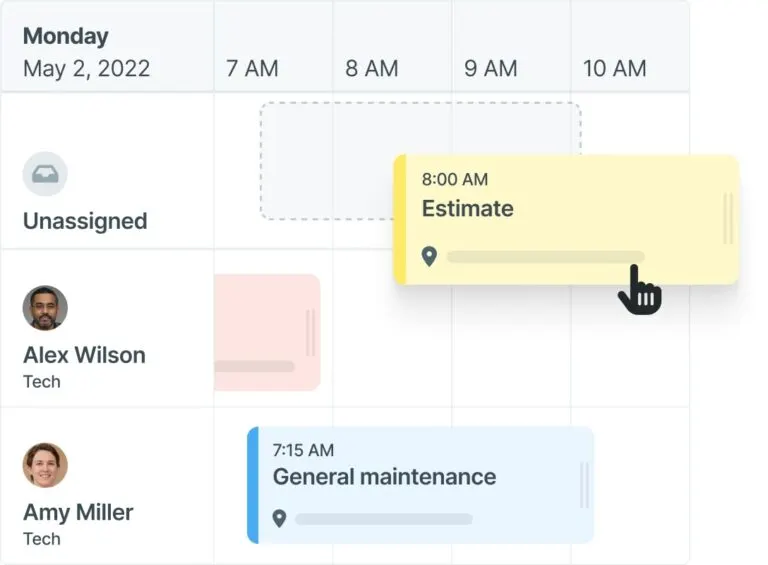
Workiz is a strong option for service teams that depend on inbound leads and sales-driven service appointments, including locksmiths, cleaning services, and appliance repair providers. It combines lead tracking, call management, and automated follow-ups to turn inquiries into scheduled jobs. That said, it may not offer some of the deeper operational and project-based capabilities that contractors handling longer-term or more complex work often need.
How Pricing Works: Workiz offers subscription-based pricing, with plans that scale based on the number of users and included features.
What Sets It Apart for Small Businesses: The built-in call tracking and lead automation tools help businesses respond to inquiries faster, reducing missed opportunities.
Rating: 4.4 on Capterra from 218 user reviews
5. Best for scalability: Service Fusion
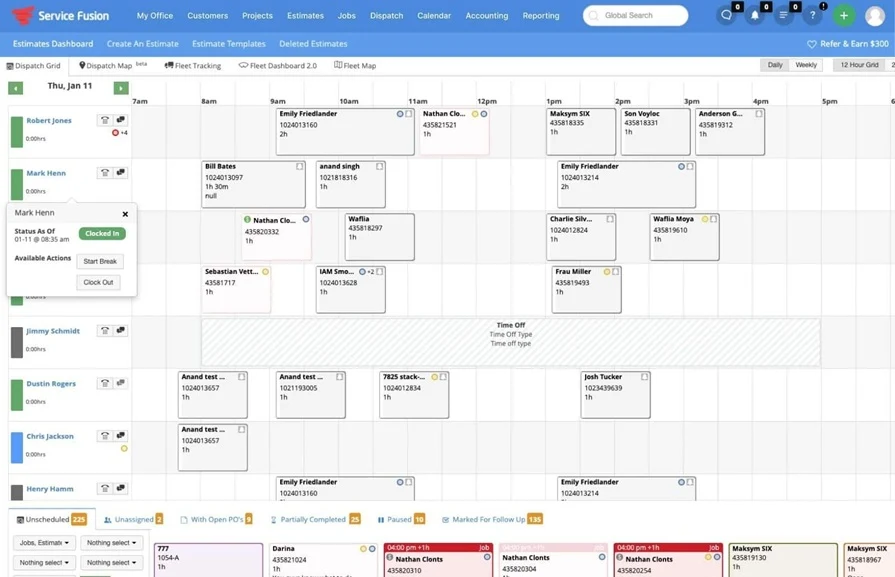
Service Fusion is a field service automation platform built for service teams that want to scale without overcomplicating operations. It offers tools like job scheduling, GPS tracking, and invoicing while maintaining a user-friendly interface. Unlike more complex platforms, Service Fusion delivers the automation and visibility growing service organizations need, without a steep learning curve or enterprise-level pricing.
How Pricing Works: Service Fusion offers flat-rate pricing with no per-user fees, making it a cost-effective option for businesses planning to expand their team.
What Sets It Apart for Scalability: The combination of unlimited users, cloud-based access, and integration with QuickBooks makes it a solid choice for businesses preparing to scale.
Rating: 4.3 on Capterra from 308 user reviews
{{related-content-block="/resources/adopting-field-service-ai"}}
7 benefits of using a field service automation software
Field service teams across the trades only feel the value of software when it changes how they work in the field. When tasks are accurate, accessible, and connected to scheduling, inspections, and billing, teams see real gains in response times, productivity, and customer satisfaction.
1. Accurate field data captured at the source
Field techs capture site details, service notes, and equipment conditions directly into the system while they work. This removes duplicate data entry, cuts down on errors, and keeps every job record current. When your team manages more on-site field services and complex installs across many locations, clean service logs mean fewer missed issues and less rework caused by outdated or incomplete notes.
2. Faster field workflows through advanced automation tools
A field service automation platform does more than replace paper or spreadsheets. Platforms with agentic AI field service help teams auto-fill job details from templates, tag assets and locations, and instantly pull up related photos and inspection reports before work even starts. Historical patterns give dispatchers and managers instant context, so they can move faster on busy days without sacrificing accuracy.
3. Stronger compliance and audit-ready service documentation
Regulated environments like hospitals, data centers, pharma, and food service depend on precise records to prove every step followed standards and codes. With AI-native software built for contractors, your field service workflows can automatically organize approvals, time-stamped photos, and service histories by job and site. When auditors, owners, or safety teams request proof, your office delivers complete records in seconds instead of chasing files across messages and folders.

AI taps thousands of past inspections and repair records to surface recurring defects, flag schedule risks, cut closeout errors, and uncover quality gaps, so you grow capacity without adding headcount.
The top AI use cases in field service breaks down exactly how leading contractors are turning field data into faster, smarter job management.
4. More profitable jobs driven by AI-informed service workflows
AI-supported workflows streamline how your team identifies issues, plans fixes, and verifies results. These systems use historical job data to flag high-risk tasks, recommend standard resolutions, and pre-check work against quality requirements. Contractors who integrate AI into their workflows complete service visits faster, reduce repeat trips, and keep techs focused on high-value work, which protects margins and reduces unplanned overtime.
5. Deeper customer relationships through service visibility
Customers expect real-time insight into the status of every job, asset, and service request. When your team can pull up each visit, including what was done, when, and by whom, it builds trust that generic providers cannot match. A strong contractor CRM ties service history to accounts and locations, giving account managers review-ready insights that turn one-off calls into long-term maintenance agreements and recurring service work.
6. Smarter scheduling aligned to real-time field status
Jobs cannot finish on time if schedulers work from static data. Using real-time service status, schedulers can prioritize crew assignments and follow-up visits based on actual completion, not assumptions. Contractors using AI field service scheduling match the right techs to the right jobs only when the site is ready, which reduces downtime, avoids unnecessary travel, and cuts costly return trips.
7. Less admin drag on your field and office teams
Digital field service workflows keep photos, notes, and approvals in sync so techs document work faster and office staff stop chasing scattered updates. Managers get accurate service logs and clean reporting without constant manual follow-up. Over time, automation turns routine field tasks into a built-in part of operations instead of a last-minute scramble that slows down the entire team.

Choosing the right field service software to automate your operations
Field service work carries real business risk. You are not just tracking jobs or tickets. You are managing liabilities tied to photos, locations, trades, timelines, and signoffs. Every open item can affect scheduling, sequencing, and cash flow at billing and closeout.
Your team needs a system that treats field operations like your executives do: as a high‑stakes, cross‑trade control point that demands accuracy, accountability, and consistency across every job. Automation can help, and AI can accelerate it, but only if the workflows match how your teams actually work.
Here are some questions to ask yourself that will help you make the decision:
- Workflow fit – Can you create, assign, and close work orders or service tasks without wading through menus or extra steps? Does it support fast creation of jobs from templates, standard task libraries, or past projects? How quickly can your team process inspections, notes, photos, and re-visits when deadlines tighten and priorities shift?
- Review and approval flexibility – Can you configure workflows by trade, location, discipline, customer, or role? Does it support clear comments, AI-assisted summaries, photo markups, and signoffs in a way that is easy to track? How easily can you manage status changes so everyone works from the latest job details in both office and field?
- Project type versatility – Does it support service management for everything from one-off calls to large, recurring, multi-site maintenance programs across trades? Are there templates for common task categories such as HVAC, electrical, plumbing, life safety, or exterior systems? Can you adapt workflows for T&M, quoted work, or maintenance contracts without rebuilding your process from scratch?
- Accessibility for field and office – Can project managers, service managers, dispatchers, and field technicians create, update, or review work items from anywhere? Is it cloud-based so customers, office staff, and field teams can collaborate on issue resolution in real time? Will the tool work on mobile devices without stripping out essentials like photos, markups, comments, AI-generated suggestions, or status updates?
- Automation features – Are there preloaded task templates aligned with your typical job types or industry standards? Does it automate reminders, due dates, and status alerts for items awaiting completion or verification? Can you generate clean, professional service reports and closeout packages with consistent branding, clear tracking information, AI-assisted documentation, and a history of who resolved what and when?
Bring these questions to any demos you schedule with a potential field service automation software provider, and make sure they can give you answers that fit your projects, your quality standards, and the way your team actually works in the real world. Automation, including AI, should remove friction from your day, not force you into someone else’s idea of how field service should run.
{{related-content-block="/resources/ai-field-service-erp"}}
3 important field service automation software FAQs for contractors
Still deciding if construction punch list software is worth the investment? If you’re tired of missed items, confused accountability, or driving back to jobs to fix preventable issues, these questions can help you decide:
1. What is field service automation software?
Field service automation software is a digital tool that helps teams capture, assign, track, and close out work and deficiencies across both projects and service calls. It replaces scattered spreadsheets, texts, and email chains with a single, accountable workflow.
Unlike generic task or note apps, field service automation software is built for the field. It connects photos, locations, trades, and responsibilities to clear deadlines and status updates, so executives and owners can see exactly what is open, who owns it, and what is at risk.
2. What kinds of roles get the most value from using construction punch list software?
Field service automation software pays off most for teams that want fewer callbacks, smoother handoffs between office and field, and a better customer experience across every trade. Here is who benefits most:
- Project managers - Standardize workflows across jobs, track open work by trade, and keep schedules and billings on track, whether teams are servicing HVAC, electrical, plumbing, refrigeration, or more.
- Field supervisors and foremen - Capture site issues with photos, assign work immediately, and verify completion before leaving the job, all from a single mobile app. AI can help with suggestions and faster lookup, but the real win is having one clean, consistent process.
- Service managers - Turn incoming calls, work orders, and warranty issues into trackable tickets, spot repeat problems across customers and equipment, and protect margins by cutting out manual re-entry and guesswork.
- Quality and operations leaders - Monitor recurring defects, response times, and backlog across jobs and branches so they can tighten processes and standardize best practices, instead of wrestling with spreadsheets and disconnected systems.
- Owners and executives - Get real-time visibility into risk, outstanding work, and customer satisfaction without waiting for status meetings, and lean on automation and AI insights to support better forecasting and growth decisions.
{{related-content-block="/resources/how-service-1st-got-rid-of-the-work-arounds"}}
3. What are some best practices when using field service automation software?
To get the most out of your field service automation software, here are proven practices that keep your workflows clear, actionable, and easy to track:
- Build an initial task list from early jobs, then refine it as work and customer needs change
- Standardize templates for common work types across all trades
- Define clear assignment rules and roles so the right person gets each task
- Update due dates, priorities, and statuses immediately to keep schedules accurate
- Train office and field teams to properly create, update, and close tasks in your software
- Review overdue and recurring issues weekly to cut rework and delays
- Use notifications and reminders so tasks aren’t missed and techs know what’s next
- Attach field photos, notes, and documents to clarify work done and what’s needed
- Use location tags and filters to group and route work by customer, region, asset, or trade
- Customize reports and use automation/AI insights to track performance and remove bottlenecks
Missed service tasks, scattered notes, and manual email chains do more than slow your day. They put timelines at risk, invite rework, and chip away at your profit on every job.
BuildOps replaces disconnected spreadsheets and inboxes with a single field service hub built for teams across the trades looking to automate their field operations. From initial work capture and assignment to field updates, photos, sign‑offs, and final completion, every task moves through one connected workflow your office and field teams can actually follow. No double entry. No hunting through email for the latest update. No guessing which version is current, just clear, auditable progress for every job on every project.
With OpsAI, every service record carries more weight. Structured notes, smarter technician recommendations, draft invoice summaries, and surfaced revenue signals help teams move faster without adding more manual follow-up.
Your data does not sit in PDFs. It drives quicker closeouts, tighter compliance, stronger documentation, and better protection against disputes across your entire portfolio. OpsAI helps you uncover insights and speed up decisions, while automation and standardization help your teams work faster and with fewer errors.
See how AI‑connected field service automation can work on your next project and how it ties into the rest of your field service. Schedule a free demo.