12 Best Mechanical Contractor Software for Tough Crews

You’ve got techs on rooftops, in plant rooms, and inside hospitals while quotes, PMs, and emergency calls stack up. Spreadsheets and disconnected tools create misses and unpaid hours.
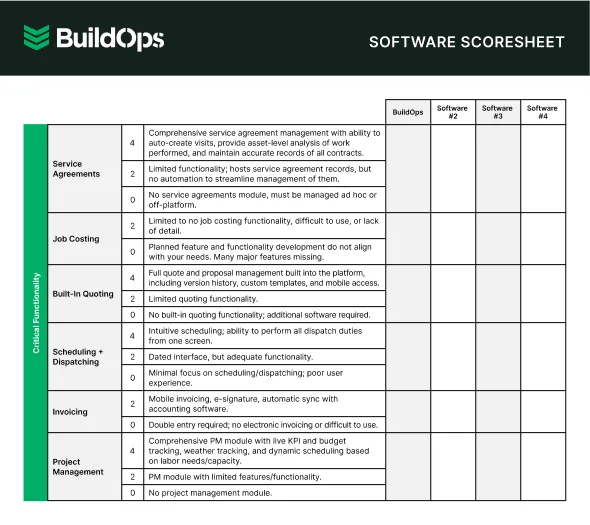
In the mechanical industry, field service management runs best when the office and field share one platform. That’s where mechanical contractor software steps in, uniting scheduling, dispatch, job history, preventive maintenance, inventory, quoting, and billing in a single system with workflows that match how crews work. The best software for mechanical contractors keeps labor, parts, and margins visible so supervisors can steer the day and techs can close out clean.
Here’s what we’ll cover:
- How to choose the right software for mechanical contractors
- 13 key mechanical contractor software features to look for
- 12 best mechanical contractor software and tools
- 7 benefits of using mechanical contractor software
- 4 common mechanical contractor software FAQs
Next, let’s dive into how to choose software for mechanical contractor teams that matches real fieldwork.
How to choose the right software for mechanical contractors
Choosing software for mechanical contractors comes down to how well the platform supports field service, project work, and maintenance agreements without adding administrative work. Field service leaders need mechanical contractor software that reflects dispatch priorities for chillers, boilers, and air handlers, keeps asset records central, and controls cost in real time.
- Contract and billing models - Can the system handle multi-year preventive maintenance agreements with visit counts and annual escalators? Does it support time and materials, fixed-price repairs, and progress billing without workarounds? Can you apply customer-specific markups and approvals before invoicing?
- Dispatch logic and scheduling controls - Can you prioritize calls by service level agreements, not-to-exceed limits, and site access windows? Can the board match technicians by skills, certifications, and travel zones? Will it keep preventive maintenance, emergencies, and projects in one view without double booking?
- Asset record depth and compliance - Can the database track equipment by serial number, location, and meter readings? Do commissioning forms, functional performance tests, and photo evidence store with the asset? Should refrigerant logs, boiler inspections, and warranties roll into history automatically?
- Cost capture and margin controls - Can technicians record labor classes, shift premiums, and parts with live pricing from catalogs? Do you see work in progress and committed cost in real time at the work order and system level? Can managers require approvals when margins fall below target?
- Inventory and purchasing flow - Does the software handle truck stock, returns, and transfers between jobs? Can purchase orders, receipts, and vendor bills attach to the correct work order and project automatically? Do you support serial and lot tracking for high-value components?
- Software features - Does the platform deliver asset-centric work orders, preventive maintenance templates, a dispatch board, digital forms, and quoting through invoicing in one flow? Can it integrate cleanly with accounting, vehicle location data, building automation systems, and building information modeling tools? Does reporting roll up contracts, customers, technicians, and equipment for planning and sales?
With those answers in hand, let’s move to the features that matter in mechanical service software.
{{related-content-block="/resources/mechanical-contractor-apps"}}
13 key mechanical contractor software features to look for
Mechanical work runs on precision. Schedules, asset data, parts, and people all need to line up or the day falls behind. Mechanical contractor software should connect the field to the office, track work in real time, and keep profitability visible without drowning teams in admin. We’ve grouped these capabilities into three categories:
- Project and field service management features
- CRM and sales management features
- Mechanical system design and simulation features
Let’s start with the features that keep jobs moving in the field.
Project and field service management features
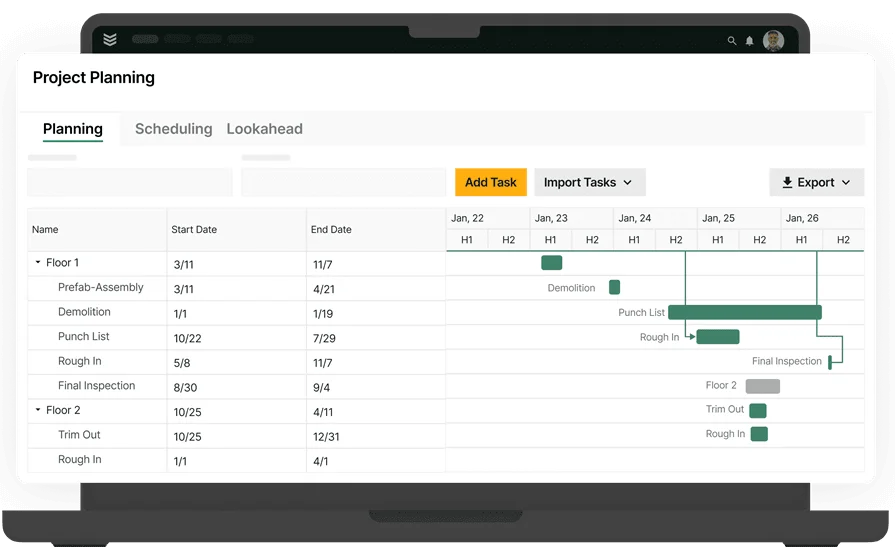
Mechanical contractors handle heavy logistics across service calls, projects, and maintenance agreements. The features below cover day-to-day execution in the field and at the office.
Here’s what to look for:
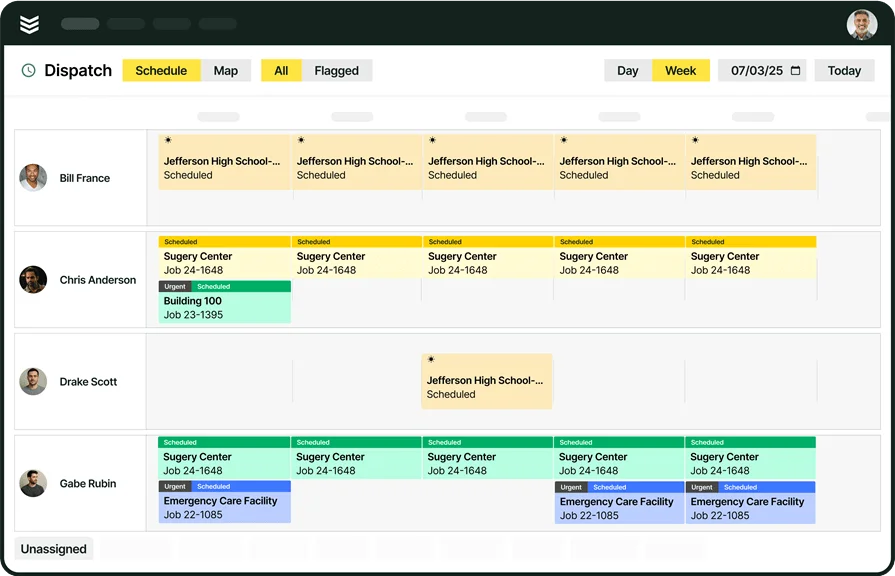
- Scheduling - Effective calendars keep trucks rolling and crews on the best route. With field service scheduling software, dispatchers can drag and drop work, see technician availability, and account for certifications and travel time. For instance, a rooftop unit repair wraps early and an urgent call opens nearby. The scheduler moves that technician to the new stop, updates the customer, and keeps the board balanced.
- Dispatching - Emergencies and service level agreements demand fast decisions. Service dispatch software shows job priority, parts readiness, and drive time so the closest qualified tech gets the call. Say a supermarket walk-in cooler is warming and the not-to-exceed limit is about to hit. Dispatch assigns a refrigeration-certified tech with COI on file and sends access notes to the device, preventing guesswork and delays.
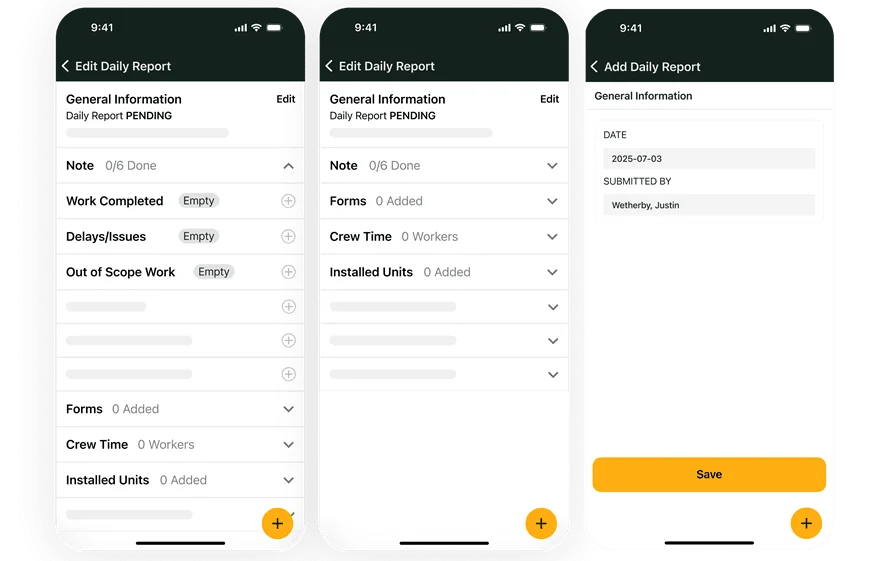
- Mobile access for technicians - Field teams need the full job record without calling the office. A technician mobile app brings work orders, checklists, photos, and signatures together and syncs when service returns. Consider a boiler tune at a university. The tech completes digital combustion checks, attaches flue photos, captures the signature, and closes the visit, which pushes clean data to billing.
- Reporting and analytics - Leaders need live numbers, not spreadsheets. Use reporting to track completion rates, first-visit resolution, revenue per technician, call response against contract, and aging work orders. End of week, the service manager spots three repeat calls on the same air handler, reviews notes, and schedules a root-cause visit before another failure.
- Service agreements - Recurring work drives stable revenue and better planning. Service agreement software manages visit counts, pricing escalators, covered assets, and warranty rules. On a municipal contract, seasonal HVAC inspections auto-generate work orders with checklists and parts lists, which keeps compliance tight and travel planned.
- Time tracking - Accurate labor feeds payroll and job costing. Time tracking software lets technicians clock to labor classes, add shift premiums, and code travel on the same ticket. During a chiller teardown, the foreman logs apprentice hours to the correct class, which gives accounting clean costs and protects margins.
CRM and sales management features
Sales and billing often happen away from the jobsite, yet they decide cash flow and capacity. These tools keep opportunities organized and money moving.
Here’s what to look for:
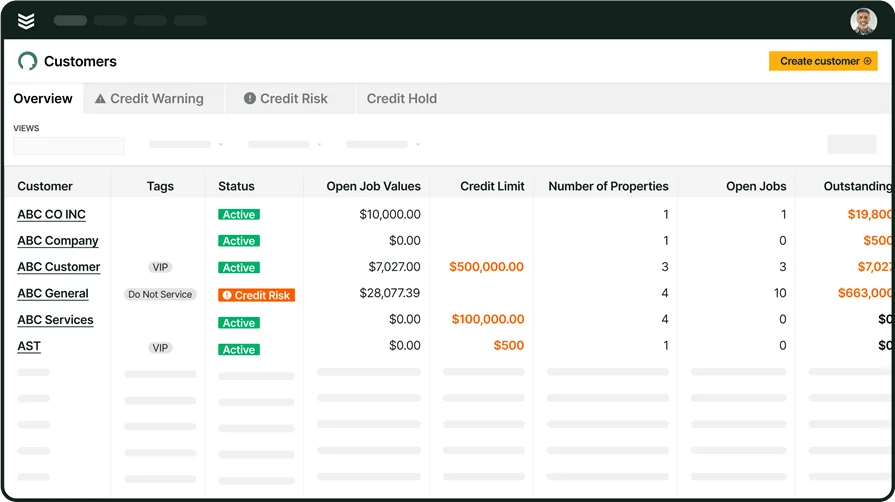
- CRM - A system built to track every customer, contact, site, and opportunity in one place. With a CRM for commercial contractors, teams log communication, proposal status, and upcoming renewals. When a property manager calls about a retrofit across three buildings, sales sees past service history and creates linked opportunities by site without retyping data.
- Quoting and estimating - Speed wins repairs and small projects. Service quoting software uses preloaded labor rates and part catalogs so techs or sales can price work from the field. During a heat pump failure, the technician builds an upsell quote for a rebuild versus replace scenario, attaches photos, and sends it to the facility manager before leaving the site.
- Invoicing - Clean tickets should turn into clean invoices. Invoicing pulls approved labor, parts, and notes straight from the work order. After a coil cleaning program finishes, the office batches invoices by building with job photos and signed forms attached, which reduces disputes and keeps aging down.
- Payments - Getting paid quickly matters. Built-in payments let customers pay by card or ACH from the invoice. A hospital maintenance lead receives an email, pays the approved repair that day, and the deposit hits accounting without manual entry.
Mechanical system design and simulation features
Not every shop needs this category. For contractors handling complex systems, large retrofits, or frequent custom assemblies, these tools help plan ahead, control material cost, and stay accurate from first sketch to final invoice. They can deliver an edge on design-heavy jobs or commercial projects.
Here’s what to look for:
- Design - Digital design tools produce accurate layouts, equipment schedules, and placement plans before pipe or duct gets installed. They help verify capacity and clearances so installs meet spec and rework stays low.
- Inventory management - Knowing stock across warehouse and trucks prevents delays. Track replenishment levels, returns, and transfers so crews arrive with the correct valves, motors, sensors, and consumables.
- Time and materials - When scope shifts during service or small projects, flexible time and materials billing keeps tickets accurate. Crews log real hours and parts in real time, which keeps invoices clean and disagreements rare.
These features round out software for mechanical contractor teams and support planning across design-heavy work. As you compare vendors, look for mechanical contractor management software that ties field execution to sales and financials without extra steps.
12 best mechanical contractor software and tools
With many tools on the market, selection can get noisy. We’ve grouped this list so you can compare options that match how field teams actually work.
- FSM and project management
- CRM and sales
- System design and simulation
These categories reflect the core functions service-first mechanical shops run each day.
Best FSM & project management mechanical software
Mechanical contractors live by the schedule. Coordinating crews, assets, and parts across service calls and installs takes tight control, and generic tools fall short. Field service management and project coordination that are designed for mechanical work keep the day moving without chaos.
1. Best for commercial: BuildOps

BuildOps focuses on commercial mechanical contractor software. It ties scheduling, dispatch, job tracking, quoting, field communication, and invoicing into one platform so office and field stay in sync. Drag-and-drop boards, asset-centric records, and reporting help leaders steer labor, parts, and margins across service, projects, and maintenance. It fits software for commercial mechanical contractors that need compliance, recurring visits, and clear cost control.
How pricing works: BuildOps uses custom pricing based on company size and needs. Request a demo for specifics.
What sets it apart: Goes beyond scheduling with a full lifecycle approach from request to payment collection. Strong choice for commercial teams that depend on coordination and repeat agreements.
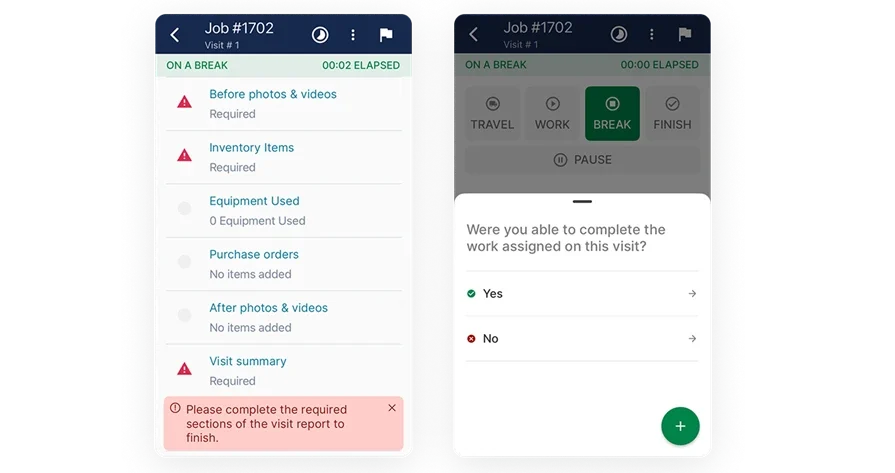
2. Best for residential: Housecall Pro
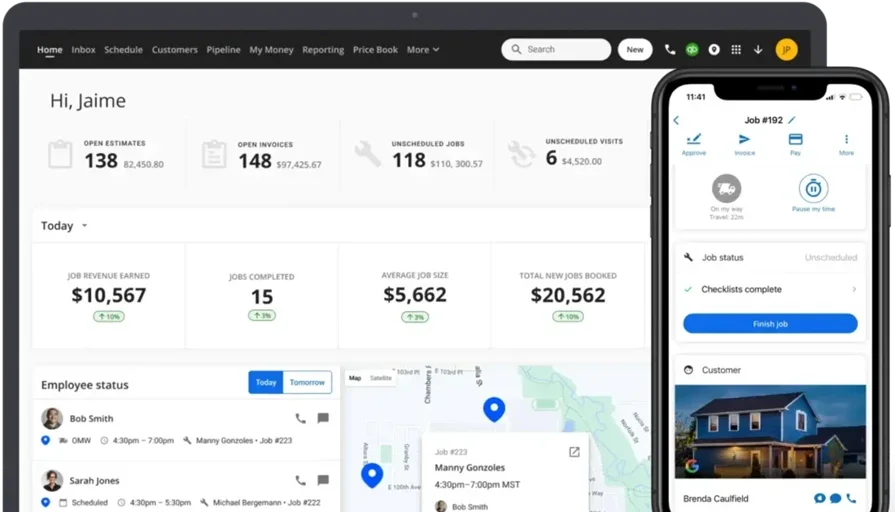
Housecall Pro offers simple setup, a friendly interface, and basics like booking, customer texting, and light dispatch for small service teams. It helps solo operators and residential-focused shops keep customer communication organized and job tracking tidy without a heavy back office. Larger commercial contractors may find mechanical workflows, union considerations, and project controls limited compared to dedicated mechanical contractor management software.
How pricing works: Starts around $59 per month for basic plans, with premium features available in higher tiers.
What sets it apart: Clean onboarding and strong customer communication tools suit small teams, but complex commercial requirements can push the platform past its comfort zone.
Check out BuildOps vs Housecall Pro here.
3. Best for general contractors: Jobber
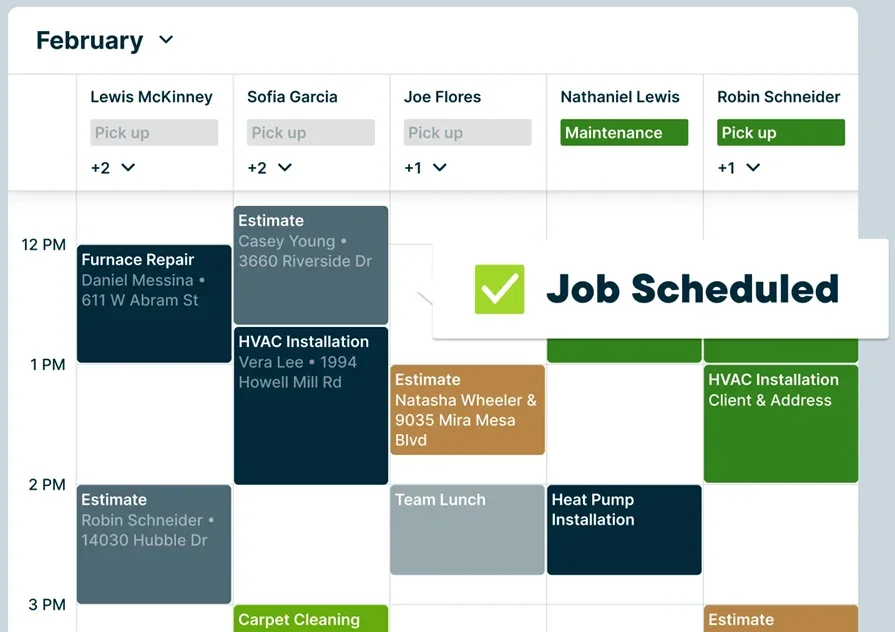
Jobber blends scheduling, quoting, and client management in one platform and supports mixed service types across trades. Real-time dispatch, client portals, and automated follow-ups help keep work organized and visible. Its generalist focus can miss mechanical-specific needs like deep asset histories, advanced maintenance agreements, and detailed job costing found in dedicated mechanical service software.
How pricing works: Tiered pricing starts around $25 per month for one user, with higher plans unlocking automation and reporting.
What sets it apart: Straightforward interface and quick setup suit teams covering several trades, but specialized mechanical workflows often require add-ons or separate tools.
4. Best for small to mid-sized businesses: Workiz
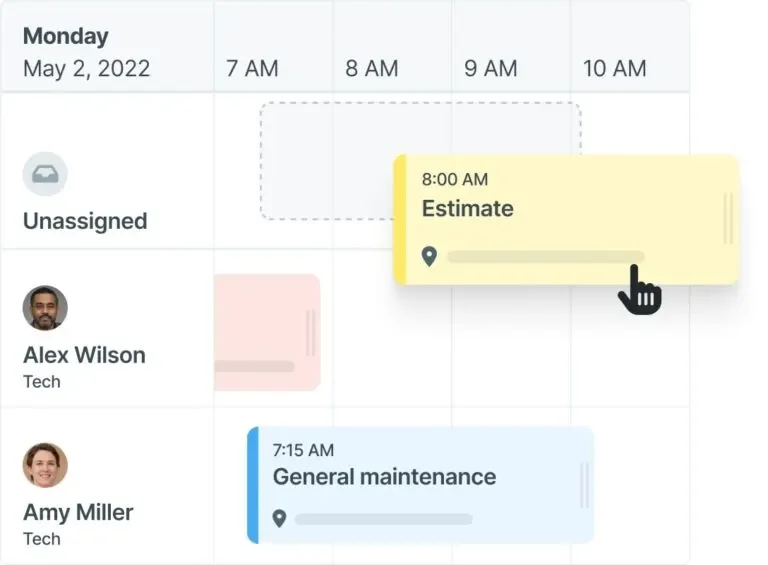
Workiz targets growing field service teams with call tracking, online booking, scheduling, and payment processing. It aims to help smaller shops scale without heavy administration, offering built-in communications and basic reporting. For commercial mechanical contractors running large preventive maintenance programs or multi-phase projects, customization depth and cost controls can feel light next to purpose-built software for mechanical contractor operations.
How pricing works: Starts at $45 per user per month, with tiers for added features.
What sets it apart: Affordable, easy to learn, and geared to businesses in growth mode, though deeper mechanical workflows and integrations are limited.
CRM & sales management mechanical software
When a service request hits the inbox, a chain starts. Qualify the lead, price the work, send the proposal, then bill cleanly once the job wraps. CRM and sales tools help mechanical teams track every contact, site, and opportunity so quoting stays fast and cash keeps moving.
5. Best for on-the-go teams: Monday
Monday gives field sales a flexible board view for accounts, contacts, and proposal stages. Automation nudges follow-ups, and mobile access helps reps update deals between site visits. Teams running residential service often like its quick setup and clean interface. It lacks trade-specific workflows, asset history, or service agreement logic, which can push mechanical contractor software users to add extra tools or custom workarounds.
How pricing works: Starts around $10–$16 per user each month, with higher tiers adding automation and integrations.
What sets it apart: Lightweight sales tracking that travels well, yet limited depth for complex mechanical service operations.
6. Best for bid management: Pipeline CRM
Pipeline CRM centers on deal pipelines from first contact through close. It gives sales leaders a clear view of stages, probability, and forecast, which helps when bids stack up across multi-site portfolios. The platform is not field-first, so dispatch, work order tracking, and technician coordination usually live in separate mechanical service software.
How pricing works: Starts at $25 per user each month with scalable plans.
What sets it apart: Simple, visual pipelines for high-volume quoting, but limited ties to day-to-day service delivery.
7. Best for scaling businesses: FieldPulse
FieldPulse packages estimating, dispatch, invoicing, and CRM in one interface, which helps smaller shops step off spreadsheets. Owners get a single view from lead to payment, and techs receive jobs with clear notes. Contractors that handle large PM programs or complex projects sometimes report less customizability and fewer advanced controls than dedicated software for mechanical contractors.
How pricing works: Starts at $99 per month for one user, plus $30 per month for each additional technician.
What sets it apart: All-in-one value that eases adoption, though intricate commercial workflows can outgrow it.
Check out BuildOps vs FieldPulse here.
8. Best for end-to-end customer management: LANA Software
LANA software focuses on the full customer lifecycle. Scheduling, communication, and follow-ups sit in a central hub so teams stay responsive from first call to final invoice. Residential service groups often appreciate the straightforward approach. Its broader industry focus can limit support for asset-centric records, maintenance agreements, or compliance that mechanical contractor management software handles well.
How pricing works: Custom quotes based on company size and usage, with no public price list.
What sets it apart: End-to-end customer touchpoint management, yet limited depth for specialized mechanical service needs.
System design architecture & simulation mechanical software
These tools serve contractors handling detailed layouts, large retrofits, or custom assemblies. They help teams move from sketch to takeoff, control material lists, and meet code before crews roll. Use them alongside mechanical contractor software for field execution and cost tracking.
9. Best for fast takeoff and quoting: Autodesk
Autodesk mechanical design workflow supports coordinated modeling, clash detection, and quantity takeoff for piping and duct. Teams working from engineered drawings can route systems, generate material lists, and prep quotes without jumping between disconnected tools. For example, during a campus upgrade, coordination flags elbow clearances around a steel beam so the crew avoids rework on install day. It remains a design suite, so dispatch, scheduling, invoicing, and service history sit inside mechanical service software or mechanical contractor management software.
How pricing works: Subscription pricing varies by bundle, seat count, and term.
What sets it apart: High accuracy and strong model coordination for spec-driven projects, while field operations live outside the platform.
10. Best for mechanical system compliance: H2X
H2X helps verify designs against regulatory codes with checks that catch issues before installation. Contractors serving hospitals or public facilities can validate layouts early and avoid costly changes once materials hit the site. During a lab build, a submittal review flags a fixture calculation that would have failed inspection, saving time and material. It does not replace software for mechanical contractors used for scheduling, work orders, or billing.
How pricing works: Custom quotes based on usage and business type.
What sets it apart: Built-in compliance logic that supports highly regulated projects, while day-to-day service workflows require other systems.
11. Best budget design option: Wondershare EdrawMax
Wondershare EdrawMax is a general diagramming tool with templates that fit mechanical schematics and planning. Crews can sketch equipment layouts, risers, and control diagrams quickly without a heavy investment. Say a service manager needs a quick pump room layout for a proposal; a fast draft communicates scope to the client and purchasing team. Trade-specific intelligence and automated takeoffs are limited, so advanced estimating and code checks will rely on software for mechanical contractor workflows and dedicated design apps.
How pricing works: Free download available, with paid plans unlocking added features.
What sets it apart: Low-cost entry and quick drafting, but minimal automation for mechanical detail.
12. Best for fast technical drawing and sharing: Rayon
Rayon offers a cloud workspace for creating and sharing technical drawings with real-time collaboration. Project managers, vendors, and techs can co-edit plans, add markups, and keep versions organized across sites. During a chiller replacement, engineering updates a valve orientation in the browser, and the foreman sees the change before demolition starts. The tool lacks sizing engines, code checks, and takeoff generation, so teams still pair it with software for mechanical contractors and other design platforms.
How pricing works: Free plan available; paid versions unlock added export and sharing options.
What sets it apart: Clean interface and live collaboration that speed coordination, while specialized mechanical features are limited.
7 benefits of using mechanical contractor software
For service-focused teams, every delay, missed invoice, or scheduling hiccup chips away at profit. Mechanical contractor software removes friction that slows crews and drains margins. Whether you manage rooftop unit repairs, boiler service, or walk-in cooler calls, the platform keeps jobs moving and cash predictable. Here’s how software for mechanical contractors helps day to day.
1. Faster job scheduling and dispatching

Coordinating crews, assets, and trucks can spiral quickly. With field service scheduling software, dispatchers assign work by availability, skill, certifications, and travel time, then reshuffle when priorities change. Crews see updates instantly and customers get accurate ETAs.
For example, a supermarket’s walk-in starts warming while a boiler tune finishes early across town. The scheduler reassigns the closest refrigeration-certified tech, updates the ticket, and keeps the board clean. A quick primer on field service management shows how this alignment works at scale with mechanical service software.
2. Accurate, automated invoicing

Manual billing creates late payments and missed charges. Automated invoicing pulls approved labor, parts, and notes straight from the work order so totals calculate instantly. Techs close the visit and the office reviews a clean packet with time, materials, photos, and signatures. Think of a chiller repair that wraps at 4:15 p.m. The invoice drafts itself from logged data, which shortens days sales outstanding and cuts back-and-forth.
3. Better visibility into the business
Real-time dashboards replace spreadsheets and guesswork. Supervisors track completion rates, first-visit resolution, revenue per tech, and aging work orders. Use field service report software to spot repeat failures on the same air handler or a crew that needs training on combustion checks. End of week, leaders act on facts, not hunches, which tightens margins.
4. Professional-looking quotes and documents
Consistent, branded quotes and invoices build trust. Line-item pricing and clear scope notes reduce disputes. Owners see the same layout whether the job is a make-up air install or an emergency compressor swap. Clean documents help teams win approvals faster and move to scheduling without delays.
5. Consistent growth tracking
Growth depends on throughput and accuracy. Historical job data highlights where crews gain time and where callbacks spike. With mechanical contractor project management software, managers connect estimates, actuals, and closeout so every phase stays aligned. A multi-site PM program shows which buildings drive the highest margin and which assets trend toward replacement, guiding sales focus.
6. Fewer dropped jobs and missed steps
Small errors become big costs. A missed signature, an unchecked safety task, or a forgotten add-on means rework. A structured field service ticketing system keeps tasks, checklists, photos, and approvals in one flow. During a hospital steam trap survey, each room visit logs results and flags exceptions for follow-up so nothing slips.
7. On-the-go access for techs
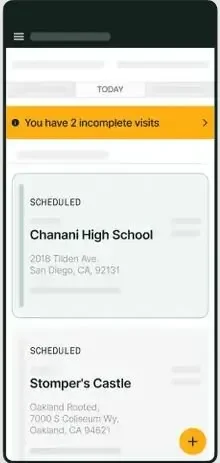
Field access keeps crews productive. Techs review history, capture readings, upload photos, and collect signatures without calling the office. During a rooftop unit restart, the tech pulls past notes, checks the asset checklist, records amperage, and closes the visit on site. The office receives a complete record that software for mechanical contractor teams can invoice immediately, which is why many shops standardize on mechanical contractor management software for every job type.

4 common mechanical contractor software FAQs
Switching platforms raises practical questions for field leaders. The answers below focus on service-heavy operations and assume a pro-level baseline.
1. What is mechanical contractor software?
Mechanical contractor software unites scheduling, dispatch, asset history, agreements, quoting, and invoicing for service-focused mechanical teams. It links office and field, enforces checklists, captures labor and parts live, and sends clean job data to accounting. Outcomes stay consistent.
2. How does software for mechanical contractors work?
A quick overview for teams that live in the field.
- Dispatchers assign visits from a calendar or live board using skills, certifications, and travel time
- Technicians execute work orders on mobile, complete checklists, capture photos and readings, and log time
- The system updates progress, generates invoices from approved labor and parts, and syncs customer records
- Managers monitor schedules, completed work, KPIs, and payments in real time
3. Is mechanical contractor software worth the price?
For service outfits juggling PM programs, emergency calls, and projects, the gains stack quickly. Faster invoicing, cleaner time capture, fewer callbacks, and asset-centric history raise labor yield and shorten cash cycles. Well-implemented mechanical service software often pays back through margin protection and reduced admin.
{{related-content-block="/resources/sloan-mechanical-build-ops"}}
4. Best practices for implementing mechanical contractor software
Keep rollout tight and field-driven. Aim for fast wins, strong data hygiene, and habits that stick.
- Assign a single owner with authority to clear roadblocks
- Involve dispatch leads and senior techs in pilot routes early
- Start with scheduling and invoicing before expanding scope
- Clean customer, asset, and price data before migration
- Lock KPIs and dashboards needed for daily decisions
- Build PM templates and checklists from your top contracts
- Train hands-on using live tickets, not slide decks
- Set a go-live calendar with cutover rules and escalation paths
- Integrate accounting and payments before full rollout
- Review margins and callbacks weekly to tune the software settings
Choosing mechanical contractor software comes down to fit with how your crews actually work. You need dependable scheduling and dispatch, asset history on every ticket, live job costing, and reporting you trust. The sections above showed what to check, which features matter, and how software for mechanical contractors supports installs, service, and maintenance without extra admin.
If you want one platform that keeps field and office in lockstep, BuildOps brings scheduling, dispatch, PMs, projects, quoting, invoicing, and reporting into a single system. It serves commercial teams across mechanical, electrical, plumbing, and fire, acting as mechanical service software that delivers the control you expect from mechanical contractor management software for field service teams.