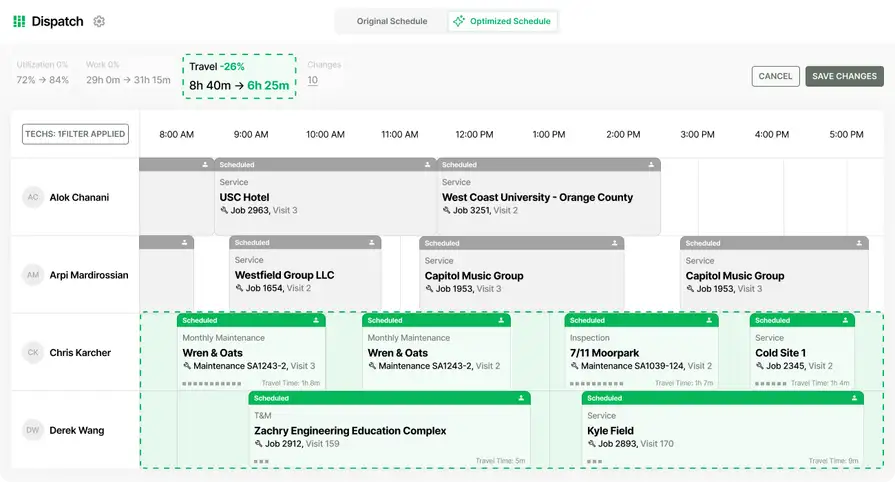
Project Management Software for Plumbing Contractors


Key Takeaways
- Plumbing project management software becomes essential once jobs move beyond a single dispatch and need tighter control over scope, labor, materials, documentation, and billing.
- For commercial plumbing teams, the biggest advantage is keeping service work and project work connected instead of splitting them across spreadsheets, portals, and disconnected apps.
- The features that usually make the biggest difference are project dashboards, daily reports, change orders, material tracking, and financial visibility.
Plumbing project work gets messy fast when the team is still bouncing between spreadsheets, folder systems, GC portals, and manual job costing just to keep one job moving. That is usually when contractors in the plumbing service industry start looking for project management software that can keep the full job connected instead of forcing the office to piece everything back together after the field has already moved on.
That pressure usually builds when quoted work gets larger, multi-day jobs start overlapping with urgent service calls, or labor, materials, and billing all live in different places. The right project management software for plumbing should keep scope, field updates, costs, and cash flow connected from setup through closeout.
What project management means for plumbing contractors
For commercial plumbing contractors, project management starts when a job stops being a simple dispatch and starts needing tighter control over scope, labor, materials, documentation, and billing. That usually happens when work becomes multi-visit, phase-based, or tied to a larger quoted project that needs to stay connected to the same customer and property record as the service side of the business.
Many plumbing shops do not operate in one clean lane. They may already be juggling recurring maintenance work, emergency response, and quoted project work at the same time. If the platform running the business treats those as separate worlds, the handoffs get slower and the office ends up doing more cleanup than the field saved.
Plumbing project management usually comes down to five areas your team needs to control:
- Scope, phases, and budget setup
- Field updates, photos, forms, and daily reports
- Change orders and added work
- Materials, purchasing, and fulfillment
- Costs, billing progress, and overall job health
The goal is not just better scheduling. It is keeping the field, office, and financial side of the job connected while the work is still moving, especially on commercial construction and plumbing project management jobs where timelines, coordination, and costs are harder to control.
{{related-content-block="/resources/commercial-construction-project-management"}}
5 key project management features for plumbers
Plumbing project work runs smoother when the team can manage labor, field updates, materials, and billing from one connected workflow. These are five essential project management features that stay closest to how commercial plumbing teams actually run larger quoted jobs.
1. Central project workspace
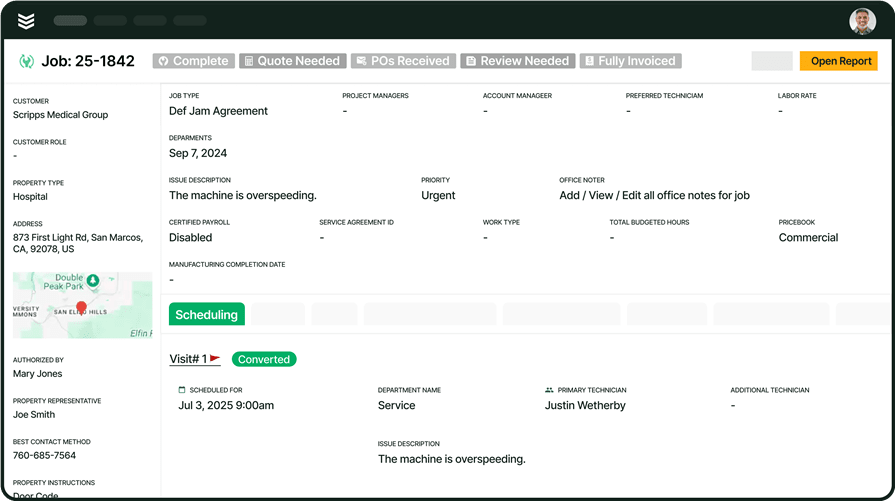
Plumbing PMs use project management software, reporting & analytics, and document control to open one project record and see job status, drawings, photos, notes, and outstanding tasks in one place. That gives the office a clearer view of what is happening on multi-visit plumbing jobs without rebuilding the story from separate systems.
2. Phase-based labor planning and job tracking
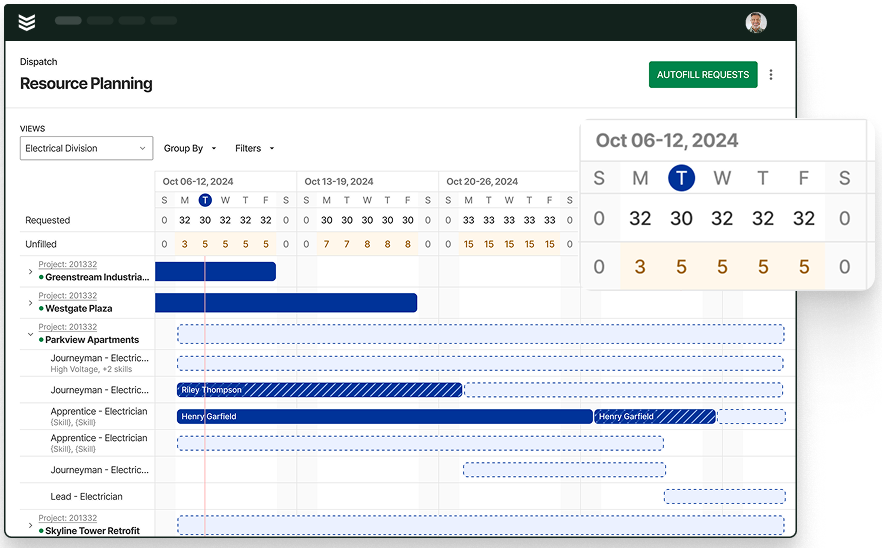
When quoted plumbing work stretches across several days or phases, PMs need a better handle on labor and job progress. Resource planning, time tracking, and field execution help teams assign labor, keep crews aligned to the work in front of them, and spot slippage before it turns into scheduling or cost problems.
3. Daily reports and mobile field updates
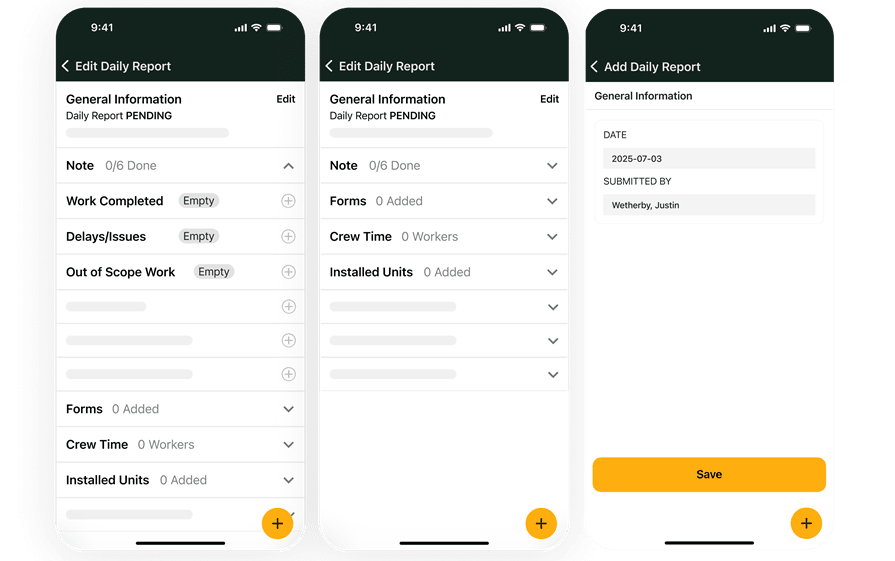
Field teams need a fast way to send back clean updates from the job site. The technician mobile app, mobile forms, and service agreements help plumbing teams capture photos, notes, completed work, and recurring-work context without waiting until the end of the day. That gives PMs and admins cleaner records to work from when service and project work overlap.
4. Change orders and material control
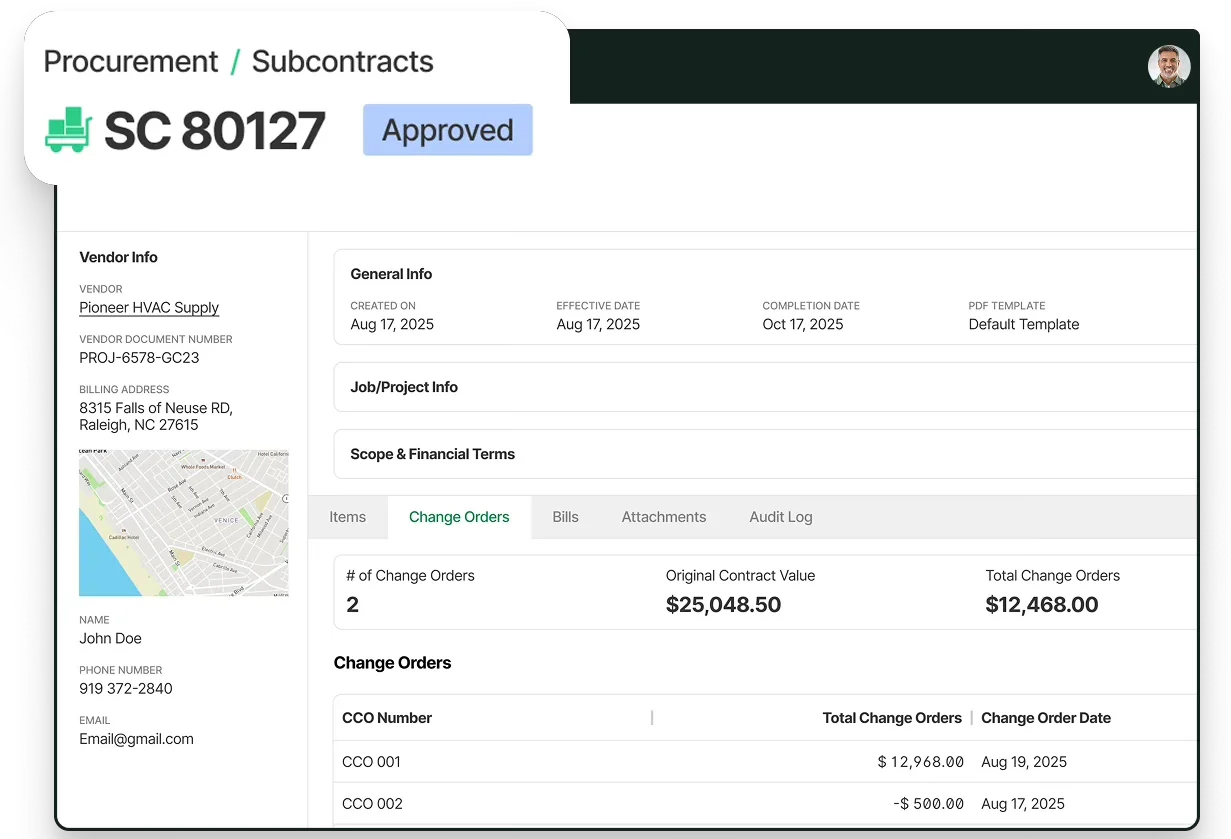
Scope changes and material issues can slow a plumbing job down quickly. Materials & subcontracts, purchase orders, and project financials help teams track what changed, what needs to be ordered, and how those decisions affect the project before the job reaches billing.
5. Billing and financial visibility

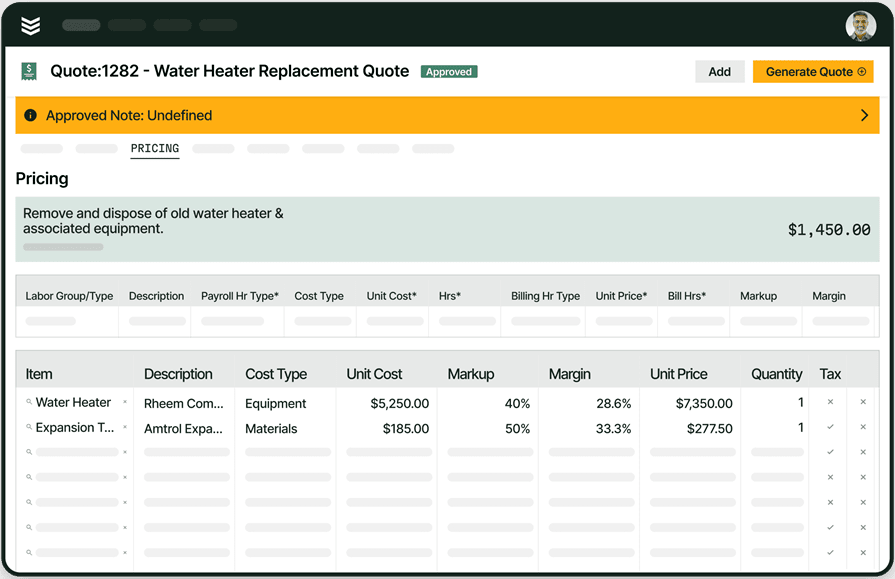
Plumbing teams need finance and operations looking at the same job picture. Financial management software, invoicing, and customer payments help connect project costs, billing progress, and cash collection so teams can see job health while the work is still active.
6 benefits of project management software for your operations
Plumbing project management software helps the operation move with fewer handoff gaps, cleaner records, and better follow-through from kickoff to billing. For commercial plumbing teams, the payoff usually shows up in these six areas.
1. Tighter coordination between service work and project work
Many plumbing companies are running quoted jobs, recurring maintenance, and urgent calls at the same time. When those workflows stay connected inside one system, the office does less re-entry and the field has better context from the start, which is exactly why connected plumbing field service software supports project-heavy operations so well.
2. Faster rollout of automation without adding confusion
Project management gets stronger when automation supports the workflow instead of sitting beside it. Teams can move faster on dispatch, documentation, and admin work when they follow a practical approach to adopting field service AI inside the same day-to-day process.
3. Better day-to-day decisions across the business
Project leads, dispatchers, and owners all benefit when labor, schedule movement, and job progress are easier to read while the work is still active. That kind of visibility is also why more teams are exploring AI for plumbing companies to support planning, follow-through, and faster decision-making.
4. Less admin drag on field and office teams
When tech updates, notes, and job records come back in a cleaner format, PMs spend less time rebuilding the story of the job. The same push for less manual entry is behind growing interest in plumbing AI tools that help office and field teams move faster.
5. Better material control across active jobs
Project margins get harder to protect when parts are missing, purchasing is delayed, or material usage is unclear. Tying project workflows more closely to plumbing inventory management gives teams a better handle on what is needed, what is available, and what is already tied to the job.
6. Faster billing and a clearer path to cash
Project work slows down financially when labor, materials, and scope changes are documented in different places. A connected workflow makes it easier to bill with less back-and-forth and fewer missed items, which is the same discipline laid out in a strong plumbing invoicing guide.
The end result is a plumbing operation that can take on larger quoted work with more control, fewer gaps between teams, and better visibility into what the job is costing while it is still in motion.
How to choose plumbing project management software
If your company is evaluating BuildOps for plumbing project management, the question is whether the platform keeps scope, field updates, materials, change orders, and billing connected once jobs become multi-visit, phase-based, and harder to control. That evaluation usually comes back to six practical capability checks.
- Can it support both service work and project work? - Plumbing contractors can use BuildOps to manage recurring service, emergency response, quoted service work, and larger project work in one platform. That keeps customer history, property context, and job activity connected instead of splitting project work away from the rest of the business.
- Does it keep one project record from setup to billing? - Within BuildOps Project Management, setup, budgets, field documentation, purchasing, change orders, and billing review stay tied to the same record. That gives PMs and admins one place to follow a plumbing job from kickoff through closeout and financial review.
- Can the field send updates the office can use right away? - With Daily Reports, Forms, and the mobile workflow, field teams can send back notes, photos, labor entries, equipment details, and out-of-scope updates in a cleaner format. That gives project managers a stronger day-by-day record of plumbing work without creating extra office cleanup.
- How does it handle change orders without losing control? - Potential Change Orders and formal Change Order Requests help plumbing teams capture scope changes early, price them, route them for approval, and keep a clearer history of contract and budget changes as the job moves.
- Can PMs and finance teams see the same plumbing job clearly? - Project budgets, actual costs, billing KPIs, and WIP review stay connected so project managers, finance teams, and leadership can look at the same plumbing job with the same context. That makes it easier to spot overbilling, underbilling, and cost drift before month-end.
- Can it handle commercial plumbing complexity without extra workarounds? - Commercial plumbing teams can use BuildOps for workflows that involve multi-property customers, multi-phase jobs, progress billing, retainage, and longer project lifecycles. That makes project-heavy work easier to manage while keeping teams out of side processes and disconnected spreadsheets.
{{related-content-block="/resources/field-service-automation-software"}}
Common project management questions and best practices for plumbers
Plumbing contractors usually start with a few common questions when they compare project management software for larger, more complex work. After that, the focus usually shifts to the habits that keep plumbing projects on track.
1. What is plumbing project management software?
Plumbing project management software helps contractors manage larger or more complex jobs that need more than a simple dispatch workflow. It keeps project setup, scope, field documentation, labor, materials, purchasing, and billing tied to the same job record.
2. Can plumbing project management software handle both service and project work?
Yes. Plumbing project management software should support both, especially for commercial contractors managing recurring maintenance, emergency response, quoted service work, and active project work under the same customer account.
3. Is plumbing project management software worth the cost?
For plumbing contractors managing larger or more complex work, the cost usually comes down to how much time and margin the team loses when scope, field updates, materials, and billing are spread across separate tools. When those workflows stay connected, teams spend less time rebuilding job information, chasing updates, and cleaning up billing issues.
{{related-content-block="/resources/how-jbs-took-back-control-with-build-ops"}}
4. 10 best practices for using project management software for plumbing
For plumbing PMs, the value of project management software comes from using it consistently across the office and field. These best practices help keep budgets, updates, materials, and billing connected from the start of the job.
- Set up budgets and phases before work starts
- Keep labor entries current
- Log field updates the same day
- Track materials against the job
- Review change requests early
- Keep PM and finance in sync
- Bill against actual job progress
- Watch overbilling and underbilling
- Keep service and project history connected
- Use one system for docs, costs, and billing
Plumbing contractors do not need more software just to keep bigger jobs under control. They need a connected system that keeps service, projects, and financial follow-through moving together while the work is still active.
BuildOps gives commercial contractors one platform to manage project setup, field updates, change control, purchasing, and financial visibility without splitting project work away from the rest of the operation. With OpsAI built directly into service, project, and financial workflows, teams can cut busywork, surface issues earlier, and keep cleaner job records as plumbing work moves from kickoff to closeout.
If your team is comparing plumbing project management software because spreadsheets, folders, and portal hopping are slowing the job down, book a demo to see how BuildOps fits the way commercial plumbing work actually runs.