


Many field service teams turn to mobile apps to help manage the growing complexity of day-to-day work, like scheduling calls, assigning techs, accessing jobsite info, tracking time, and keeping customers in the loop. As job volume increases and paperwork gives way to mobile-first workflows, field service apps have become a must-have for running efficient, responsive operations.
But here’s the catch: most contractors still aren’t using software designed specifically for field service work.
According to Gartner, 60% rely on generic third-party tools like spreadsheets, shared drives, or standalone invoicing apps. A surprising 32% still manage operations manually—a workflow that’s becoming harder to sustain as projects grow more complex and competitors invest in faster, more connected tools.
The mobile field service management market is growing fast, with apps now covering everything from real-time dispatch to offline asset tracking.
But finding the right app for your team isn’t always straightforward. Some are built for residential techs managing quick service calls. Others are designed for commercial teams juggling multiple trades, jobsite logistics, and long-term service agreements.
Whether you’re looking to replace a patchwork of tools or getting started with mobile field operations for the first time, this guide will help you make the right call. We’ll break down the top field service apps, what features to look for, and how to evaluate which one fits your technicians, your workflows, and your business model.
Here’s what we’ll cover:
- How to choose the right field service app for your technicians
- Key field service app features to look for
- 10 best apps for field service management
- 8 benefits of field service apps
- 4 field service management app FAQs answered
Now, let’s get into how to choose the right field service app for your team—and what to keep in mind to make the best call.
How to choose the right field service app for your technicians
Choosing the right field service app for your technicians means giving them a tool that works as hard as they do. Field service isn’t predictable—jobs pop up last minute, equipment fails when you least expect it, and schedules shift on the fly. A solid app helps technicians stay on top of it all, whether they’re diagnosing an issue, updating job details, or tracking equipment on-site. Here are some key things to consider:
- Real-time communication - Can technicians communicate directly with the office while in the field? Does the app offer live status updates to keep dispatchers informed about job progress and unexpected delays?
- Job documentation in the field - Can techs easily log job details, upload photos, and capture customer signatures on-site? Does the app automatically store this information for future reference?
- Route optimization and GPS tracking - Does the app provide GPS tracking and suggest efficient routes? Can it adjust in real time to avoid traffic or reroute technicians to urgent jobs?
- Mobile accessibility built for the field - Is the app intuitive enough to use with gloves on, in direct sunlight, or in tough job-site conditions? Does it work smoothly on technicians’ existing devices?
- Features - What core capabilities does the app provide? Can it handle scheduling, dispatching, inventory tracking, and invoicing in one place? Are the features designed specifically to support field service workflows?
Selecting a field service app isn’t just about checking boxes; it’s about making sure your technicians can work faster and smarter without fighting the software. Next, we'll dig into the key app features that can make or break productivity in the field.

Key field service app features to look for
A strong field service app gives technicians the tools they need to stay productive and aligned with the office, even when they’re off the grid or mid-job. The right features help crews handle tasks more quickly, avoid mistakes, and provide better service to customers.
Another important thing to keep in mind: What you think are the most important features for an FSM app may not be what your techs actually need. Gartner research found a major disconnect between what FSM software buyers rated as essential features and what users prioritized. Make sure you talk to your techs about their workflows and what would make their jobs easier.
Let’s break down some essential categories of field service app features and what to look for in each.
Key features technicians need in a field service app

When technicians are out in the field, every second counts. A good app will help them handle the work without delays or confusion. From pulling up job details to documenting completed work, these features help techs stay sharp:
- Real-time job updates - During an inspection or repair, technicians may need to be rerouted quickly. A well-built app should update schedules automatically and push the new job info straight to their devices without requiring a call or a trip back to the office. When updates aren’t delivered fast enough, it shows.
- Mobile-first interface - A mobile-friendly app for technicians should prioritize clear navigation, responsive design, and fast access to the most-used tools. Look for features like large tap targets, streamlined menus, and display modes that stay usable in bright sunlight or low light.
- Photo and signature capture - Field techs need to be able to snap a photo, log notes, and collect the customer’s signature all within the app. That documentation protects your team, reduces paperwork, and speeds up invoicing.
- Offline functionality - Techs often work in areas with poor connectivity, so it’s essential that the app has an offline mode that lets them view job details, record work, and complete forms without missing a beat. When they’re back online, the app automatically syncs those updates.
These features turn a smartphone into a technician’s best assistant, always ready, always reliable.
Explore our mobile tech app
Every BuildOps feature in the hands of your techs.
Essential app features for diagnostics and troubleshooting
Diagnosing equipment issues in the field can feel like solving a puzzle—especially when you're dealing with unfamiliar systems. Diagnostic and troubleshooting apps should assist techs with real-time data and step-by-step guidance to speed up problem-solving. Key features include:
- Interactive equipment manuals - You're standing in front of an industrial chiller you've never seen before. Instead of guessing, you open the app, search the model number, and pull up wiring diagrams, pressure settings, and maintenance history. No more flipping through bulky manuals or calling the office for help.
- Sensor integration for live diagnostics - A customer complains about inconsistent airflow, but the system seems fine at first glance. With sensor integration, you run live diagnostics and discover the blower motor's running at half power. This saves time and helps you solve the problem on the first visit.
- Step-by-step troubleshooting guides - New hires often struggle when faced with unfamiliar issues. An app with built-in troubleshooting workflows walks them through the process, like a digital mentor, reducing errors and boosting confidence on tough jobs.
- Remote diagnostics capabilities - Your dispatcher gets a call about a rooftop unit acting up. Before sending a technician, they access the app, connect to the unit’s sensors, and identify the likely cause—a clogged filter. This means techs arrive with the right parts and tools, instead of guessing.
These features help technicians troubleshoot like pros, even when they’re dealing with unfamiliar equipment or high-pressure situations.
Features for apps that help with on-site calculations
Field techs constantly deal with measurements, whether it’s calculating refrigerant loads, electrical currents, or duct sizes. An app with reliable calculation tools makes this work faster and more accurate. Here’s what to look for:
- Specialized calculators for field tasks - Look for apps that include calculators tailored to your trade, such as refrigerant charge or duct sizing tools. These features help technicians complete jobs faster and with greater accuracy, without relying on manual math or external resources.
- Instant access to industry formulas - When your team is working under time pressure, they need quick access to up-to-date standards like NEC formulas for voltage drop or pipe sizing. A good app puts this information at their fingertips, improving efficiency and reducing compliance risks.
- Unit conversion tools - Jobs involving international equipment often require switching between metric and imperial units. Conversion tools built into the app save time and help prevent miscalculations that can delay work or lead to rework.
- Automatic error detection - Some advanced apps can flag common input errors, like entering a 200-amp load on a 20-amp circuit, and prompt the technician to double-check the data. This helps catch potential issues before they result in safety problems or failed inspections.
These calculation tools give technicians confidence when dealing with complex measurements under pressure.
Features that support back office productivity and business management
Technicians rely on smooth operations in the background to stay productive in the field. Apps that enhance productivity and help manage the business behind the scenes should have these features:
- Interactive scheduling boards - Visual, drag-and-drop scheduling boards give dispatchers real-time visibility into technician availability, job progress, and location. When a tech finishes early, dispatch can quickly reassign them to a nearby call and push the job details directly to their device. This reduces idle time, improves response rates, and keeps the day moving without constant phone coordination.
- Integrated inventory tracking - Field inventory tracking software gives both technicians and office staff real-time visibility into parts and materials. This ensures techs show up prepared, reduces return visits, and keeps jobs moving without unexpected supply issues.
- Performance monitoring and reporting - Built-in dashboards track key performance indicators like job completion time, first-time fix rates, and callback frequency. Managers can use this data to spot trends, identify training needs, and rebalance workloads. Over time, these insights help improve customer satisfaction and protect profit margins.
- CRM and accounting integration - Apps that connect directly to CRM and accounting software streamline workflows across the entire service cycle. When a job is completed, the system can automatically update the customer’s profile, generate and send an invoice, and sync payment details. This reduces admin load, speeds up cash flow, and ensures records stay accurate across platforms.
These productivity-focused features keep the field and office teams in sync, improving service quality and operational efficiency.
10 best apps for field service management
Field service apps come in many forms, each designed to tackle specific challenges technicians face in the field. Some focus on day-to-day tasks like scheduling and dispatching, while others specialize in diagnostics, calculations, or overall business management. The right app can help techs respond faster, reduce paperwork, and improve job accuracy.
In this section, we’ll break down the best field service apps available today—organized into categories based on their core strengths. Whether you’re looking for an app to assist technicians on the job, streamline diagnostics, handle calculations, or improve productivity, you’ll find an option suited to your team's needs.
Best field service apps for technicians on the job
Field service technicians spend their days on the move—navigating tight schedules, unpredictable job sites, and demanding customer expectations. Apps designed for field service techs need to simplify tasks like accessing job details, updating statuses, and communicating with the office, all without slowing them down. In this section, we’ll look at the top field service apps built specifically to support technicians on the job.
1. BuildOps

BuildOps is a field service management app built specifically for commercial contractors. It’s designed by former tradespeople in product, support, and customer success who understand the real-world challenges of the field.
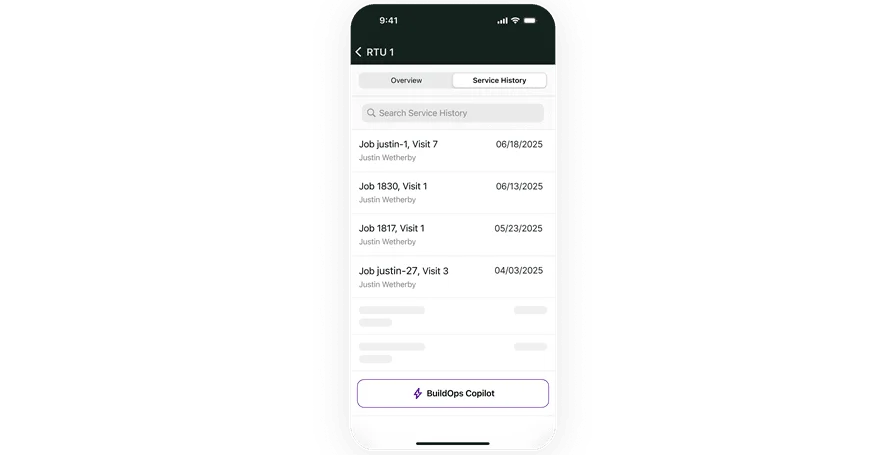
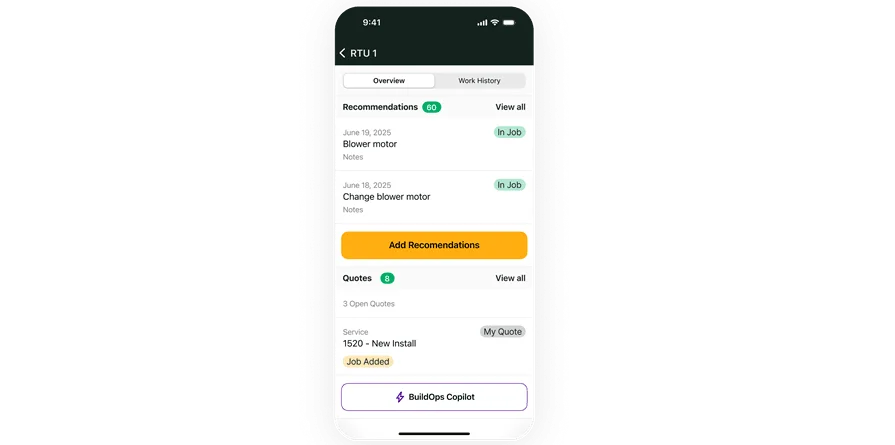
The platform brings office and field teams together with asset-centric workflows, multi-site job tracking, and built-in translation to keep every technician aligned and informed. The mobile-first app is built for the jobsite, with offline access, voice and photo capture, and a clean, intuitive interface that keeps techs moving without extra steps.
BuildOps turns jobsite activity into real-time insights that help contractors act quickly and protect margins. Every technician visit, change order, and update feeds directly into connected dashboards and reports, giving you the visibility you need to troubleshoot fast, manage costs, and keep projects on track without digging through disconnected systems.
Industry Specialization: Commercial
How Pricing Works: Per user, per month annual contract
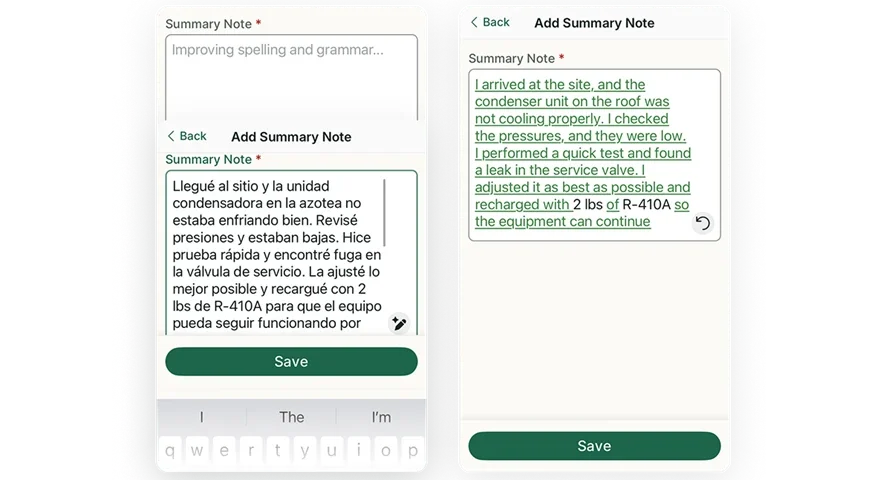
What Sets It Apart: The BuildOps app offers real-time asset tracking across multiple properties, helping technicians easily find job-critical information while on-site. The AI-powered notetaking tool also reduces paperwork time, giving techs more time to focus on the work itself.
Key Features:
- Real-time job tracking: Techs receive live updates on scheduling changes and job details, eliminating the need for back-and-forth calls
- Instant documentation: Capture job photos, collect signatures, complete reports, and scan assets on-site with just a few taps
- AI-assisted notes: Cleans up what techs type and translates it on the spot, so job notes are clear, accurate, and easy for everyone on the team to understand.
Check out the BuildOps field service app
See how we bring field techs, office staff, and essential details together.
2. Service Fusion

Image Source: Service Fusion
Service Fusion provides field service businesses with a mobile app that helps technicians manage their schedules, communicate with customers, and track job details while in the field. The app is designed for both residential and commercial operations, making it a flexible option for companies with mixed-service portfolios.
Service Fusion provides solid job-tracking and customer communication tools, but its reporting capabilities are limited in customization, making it difficult to effectively manage performance across larger, complex commercial operations.
Industry specialization: Residential and commercial field service businesses
Pricing: Monthly subscription based on selected features and team size.
What sets it apart: Service Fusion’s GPS fleet tracking lets managers monitor vehicles in real-time, helping optimize routes and reduce fuel costs.
Key features:
- Live GPS tracking: Track technician locations and adjust schedules based on real-time traffic conditions
- Mobile invoicing: Techs can generate invoices and accept payments on-site
- Two-way customer communication: Send automated appointment reminders and receive customer responses directly in the app
3. FieldPulse

Image Source: FieldPulse
FieldPulse offers a mobile-first field service app designed to help small and midsize contractors manage their day-to-day operations. Technicians can track jobs, create invoices, and access customer history while on-site, all through a simple and intuitive mobile interface.
FieldPulse offers useful tools for small and mid-sized contractors, but the app has limited scalability, particularly when managing high-volume work orders or operations spread across multiple locations.
Industry specialization: Small to mid-sized residential and commercial contractors
Pricing: Pricing is available upon request. You must schedule a demo to receive a tailored quote based on your team's needs.
What sets it apart: FieldPulse provides in-app estimates and invoicing tools that help techs close jobs faster without needing to call the office.
Key features:
- Job tracking and status updates: See job progress in real-time and track technician performance
- Built-in customer management: Access job histories, equipment records, and previous invoices with a single tap
- Customizable forms and checklists: Techs can follow standardized workflows to ensure tasks are completed correctly
Compare FieldPulse and BuildOps right here.
4. Jobber

Image Source: Jobber
Jobber is a field service app built for small residential service businesses. It helps technicians stay organized with tools for scheduling, customer communication, and on-site payments. The mobile interface is simple to use, which makes it a popular choice for smaller teams with limited time for training.
Jobber is a reliable choice for residential service businesses, but it may fall short for contractors handling complex commercial jobs that require advanced asset tracking and long-term service history management.
Industry specialization: Residential field service businesses
Pricing: Monthly subscription with tiered pricing based on user count and selected features.
What sets it apart: Jobber’s client self-serve portal makes it easy for customers to book jobs, check appointment times, and pay invoices online.
Key features:
- Route optimization: Automatically plan efficient routes to reduce drive time between jobs
- Invoicing and payment processing: Create invoices and accept payments from the app
- Task checklists: Use standardized job checklists to ensure consistent service quality
Best field service apps for diagnostics and troubleshooting
When field service technicians arrive at a job site, diagnosing the problem quickly is half the battle. Equipment failures, performance issues, and system malfunctions can be tough to pin down without the right tools. That’s where diagnostics and troubleshooting apps come in. These apps help techs run tests, access manuals, and gather live equipment data to identify issues faster—so they can get equipment back up and running without delay. Here are two of the best field service apps that assist with diagnostics and troubleshooting in the field.
5. Bluon

Image Source: Bluon
Bluon is an app designed to give technicians instant access to equipment manuals, troubleshooting resources, and refrigerant conversion tools. With a massive database covering thousands of HVAC models, Bluon helps techs identify and solve problems faster—especially when working with older or unfamiliar units.
Bluon excels at providing HVAC techs with equipment manuals and troubleshooting resources, but its focus on HVAC systems may make it less suitable for field service teams working across multiple trades.
Industry specialization: Commercial and residential
Pricing: Free to download, with additional tools available for registered users.
What sets it apart: Bluon doesn’t just offer manuals; it provides step-by-step guidance and live support to help techs troubleshoot issues in real time.
Key features:
- Equipment manual database: Access manuals, wiring diagrams, and service instructions for over 45,000 HVAC models
- Refrigerant conversion tools: Calculate retrofits and find replacements for phased-out refrigerants
- Live tech support: Connect with experienced technicians when stuck on a complex issue
6. Fluke Connect

Image Source: Fluke
Fluke Connect is a go-to app for technicians who need accurate diagnostic data when working with electrical, mechanical, and HVAC systems. The app syncs with Fluke’s range of measurement tools to give field techs live readings of temperature, voltage, current, and more—all from their mobile device.
Fluke Connect offers powerful diagnostic capabilities, but its reliance on proprietary Fluke tools means field service teams using other diagnostic equipment might not get the same level of functionality.
Industry specialization: General field service
Pricing: Pricing available upon request through Fluke’s website.
What sets it apart: Fluke Connect lets technicians compare live readings with historical data to identify trends and prevent equipment failures before they happen.
Key features:
- Wireless tool connectivity: Syncs with Fluke meters, thermal cameras, and sensors for live diagnostics
- Remote monitoring: Track equipment performance without being physically at the job site
- Data sharing and reporting: Generate reports and share live readings with colleagues directly from the app
Best FSM apps for making calculations on-site
Field service technicians often face situations where accurate calculations are critical—whether it’s determining refrigerant levels, electrical loads, or pipe measurements. Manual calculations leave room for mistakes, especially when working under pressure or in harsh conditions. FSM apps designed for on-site calculations help techs quickly perform complex equations, apply industry-specific formulas, and avoid costly errors. Here are two top field service apps that make on-site calculations faster, easier, and more reliable.
7. Simpro

Image Source: Simpro
Simpro is an all-in-one app designed to support field service technicians with job management tools, including robust calculation features for estimating materials, labor, and job costs on-site. It helps techs accurately measure and price jobs without depending on spreadsheets or manual calculations.
Simpro provides helpful tools for material calculations and job costing, but its user interface can feel overwhelming for technicians unfamiliar with more advanced job-costing workflows.
Industry specialization: Commercial and residential
Pricing: Subscription-based, with pricing available upon request.
What sets it apart: Simpro Mobile offers built-in calculation tools directly tied to job estimates and invoicing, allowing techs to provide accurate, real-time quotes while on-site.
Key features:
- Material and labor cost calculators: Automatically calculate required materials, labor time, and associated costs
- Job cost estimates: Generate on-site quotes with real-time calculations based on preset price lists
- Measurement conversion tools: Easily switch between units for dimensions, pressure, and capacity
Compare Simpro and BuildOps side by side to see who comes out on top.
8. ServiceWorks

Image Source: ServiceWorks
ServiceWorks provides field service professionals with tools for scheduling, invoicing, and real-time calculations in the field. The app is especially useful for teams that need to perform calculations for material usage, job costing, and equipment performance while on-site.
ServiceWorks covers essential field service tasks well, but the app’s performance slows noticeably when handling larger datasets, causing delays when managing multiple concurrent jobs.
Industry specialization: General field service
Pricing: Monthly subscription with pricing based on team size and feature selection.
What sets it apart: ServiceWorks combines job management with calculation tools that help field techs accurately price jobs, measure materials, and avoid costly miscalculations.
Key features:
- Job cost calculator: Calculate material quantities, labor hours, and total job costs instantly
- Performance measurement tools: Track equipment performance and run calculations for efficiency testing
- Customizable calculation templates: Create custom calculation tools for job-specific requirements
Best field service apps for improving productivity and business management
Field service apps that focus on productivity and business management help you stay organized, track performance, and cut down on busywork.
Teams often struggle with missed time windows, job updates getting lost, and constant back-and-forth between the field and office. The right app helps eliminate those friction points, keeping everything running more smoothly without adding complexity.
9. Kickserv

Image Source: Kickserv
Kickserv is a field service management app designed to help teams stay organized and efficient, from initial customer contact to job completion and invoicing. Its mobile app gives technicians real-time access to job details, schedules, and customer notes, while managers can monitor team performance and handle billing tasks remotely.
Kickserv does a good job with CRM and invoicing, but it can be tough to customize reports or manage complex, multi-site jobs so it may not be a great fit for larger commercial teams.
Industry specialization: Commercial and residential
Pricing: Subscription-based, with a free plan available for small teams and paid plans starting at $59 per month.
What sets it apart: Kickserv offers built-in CRM and invoicing tools, allowing service teams to manage customer relationships and payments in one place.
Key features:
- Live job tracking: Track job progress and technician location in real-time
- Automated invoicing: Generate and send invoices directly from the field
- Performance reporting: Analyze team performance with customizable reports
10. FieldRoutes

Image Source: FieldRoutes
FieldRoutes is a field service management app known for its robust automation features, helping teams handle everything from scheduling to payment processing without unnecessary manual work. It caters to businesses with growing service teams who need better visibility and control over daily operations.
FieldRoutes is great at optimizing routes, but its reporting tools can be harder to use, especially when you're dealing with detailed equipment data or managing multiple client sites.
Industry specialization: General field service
Pricing: Pricing available upon request.
What sets it apart: FieldRoutes stands out with its dynamic routing engine, which automatically plans technician schedules based on location, job priority, and available resources.
Key features:
- Smart scheduling: Optimize technician routes to reduce travel time and fuel costs
- Automated communications: Send reminders, updates, and follow-ups to customers automatically
- Field reporting tools: Generate reports on job performance, revenue, and technician productivity
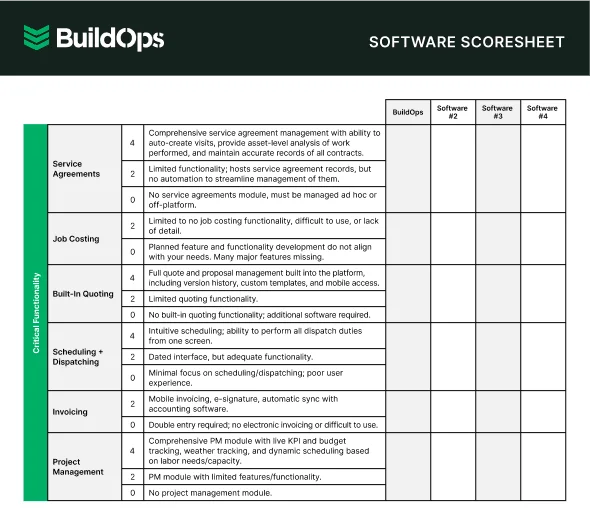
Get the software scoresheet
Compare field service teams with this easy-to-use software scoresheet.
8 benefits of having field service apps for your technicians
The right field service app can make that job easier by giving techs access to the tools, information, and communication channels they need, right from their mobile devices. From faster job updates to fewer paperwork headaches, here are eight key benefits of field service apps for technicians in the field.
1. Access to real-time job information

Field service mobile workforce management software keeps everyone in sync by giving technicians live access to job details on their mobile devices. They can check assignments, view updated instructions, and access service history without needing to call the office. The result is faster decision-making, fewer errors, and smoother operations in the field.
As Page Rosenlund, General Manager at Jolma Electric, puts it: “The office loves BuildOps because the technician has the information all at their fingertips and isn't calling them every ten minutes.”
2. Improved communication with the office
When a tech is working on a rooftop HVAC unit and realizes they need more parts, calling the office might result in hold times or miscommunication. Field service apps with built-in messaging and status update features allow seamless communication between field and office teams.
Dispatchers can instantly see job status changes, assign tasks, and relay important updates without endless phone calls. Many teams use a field service dispatching app to simplify this communication, reducing errors and speeding up response times.
3. Faster and more accurate invoicing

No more handwritten invoices or waiting until the next day to bill a completed job. With a field service app, technicians can generate invoices immediately after finishing the work—complete with time logs, materials used, and digital signatures.
For example, a plumber who wraps up a water heater replacement can send an invoice from the app before even leaving the property, speeding up payment and reducing billing errors. Apps integrated with field service billing software make this process even smoother by syncing invoices directly with accounting systems.
4. Streamlined equipment tracking and management

Nothing slows down a job like showing up with the wrong part or missing equipment. Field service apps with built-in tracking help techs check inventory in real time.
Field service asset management tools take this a step further, giving teams full visibility into equipment usage, maintenance history, and availability so every job starts on the right foot and costly delays are easier to avoid.
5. Simplified documentation and reporting

Manually filling out forms after a long day in the field leads to missed details and sloppy paperwork. Field service apps make documentation easy by allowing techs to upload job photos, record notes, and complete reports right from their mobile devices.
Many companies utilize field service reporting to streamline this process and ensure data is recorded accurately for future reference.
For example, a fire safety technician inspecting a sprinkler system can document their findings, attach images, and submit a completed inspection report before heading to the next job, all with a few quick taps.
6. More efficient scheduling and dispatching

Manual scheduling, especially across spreadsheets or whiteboards, leaves too much room for double bookings, missed appointments, and last-minute chaos. A field service scheduling app takes the pressure off by automatically assigning jobs based on factors like location, availability, and technician skill set.
Instead of tracking down techs by phone, dispatchers can instantly see who’s nearby and available, update schedules in real time, and keep the day running smoothly. It’s no surprise that scheduling and dispatch is ranked by users as the most essential feature in field service management software.
7. Increased technician productivity and job satisfaction

Technicians get into this work to solve problems—not to battle paperwork or chase down job details. Field service apps remove these obstacles by simplifying time tracking, job updates, and task management. A refrigeration tech who once had to juggle paper work orders, call dispatch for updates, and manually track job hours can now manage everything from one app.
Less frustration means more focus on the job and, ultimately, better job satisfaction. With 43% of contractors facing turnover costs between 20% and 200% of an employee’s salary, even small improvements in retention can deliver major ROI. Field service optimization software can streamline daily tasks, reduce burnout, and give technicians the tools they need to stay productive (and stay on the job).

8. Faster, more accurate time tracking and payroll
Reliable time tracking helps control labor costs, avoid payroll errors, and improve job costing accuracy. Field service apps with built-in tracking let technicians log hours and job durations directly from the field, replacing paper timesheets and reducing the need for manual entry.
Managers can review and approve timesheets right in the app, make revisions, and notify techs instantly. Real-time syncing between the mobile app and platform means payroll submissions are smoother, more accurate, and easier to manage.
That accuracy can make a big financial difference.
The average company makes 15 payroll corrections per pay period, and each one costs about $291 in direct and indirect expenses. A good field service app helps reduce those mistakes and speed up payroll processing from several days to just hours.
Did you know
“With BuildOps, we see [customers’]…payroll processing time drop by sometimes 70, 80, 90 percent.”
— Alok Chanani, co-founder and CEO of BuildOps
4 important field service management app FAQs answered
Field service apps can feel like a game-changer for technicians, but many still have questions about how these tools work, who needs them, and what they cost. Here, we break down the most common questions field service techs ask about these apps—so you can get the answers you need, fast.
1. What is a field service app?
A field service app helps technicians access job details, update work status, communicate with the office, and manage tasks from a mobile device. It reduces paperwork, improves communication, and enables real-time job tracking. They are designed to keep technicians connected wherever they are.
With features like GPS tracking, digital forms, and equipment history, these tools simplify day-to-day tasks, improve job accuracy, and help businesses deliver better service.
2. How do field service management apps work?
Field service management apps work by connecting field technicians with office teams through a centralized, cloud-based system. These apps give techs access to job schedules, work orders, customer histories, and equipment details right from their mobile devices.
When a technician completes a job, the app updates the status in real-time, automatically notifying the office. It can also generate invoices, track inventory, and provide GPS-based routing to optimize schedules. The goal is to reduce manual work and streamline field service processes.
3. Who needs field service management apps?
Any business that sends technicians into the field can benefit from field service management apps. This includes HVAC, plumbing, electrical, fire protection, and mechanical contractors, as well as companies in healthcare, facilities maintenance, and construction.
These apps help field teams stay organized, improve response times, and enhance communication between the field and the office. For businesses with multiple jobs, technicians, or customers to manage, a field service app is a game-changer for productivity and service quality.
4. How much do field service management apps cost?
The cost of field service management apps varies depending on the provider, features, and user count. Some apps offer free versions or tiered pricing, while others charge per user, per month. Costs can range from $30 to over $150 per user, depending on the tool’s capabilities.
Factors like advanced reporting, GPS tracking, and integration with other systems often affect pricing. For more insights into pricing structures and what features to expect, check out this guide on field service software pricing.

Field service work moves fast, and your tools should help your team move even faster. From last-minute schedule changes to complex service agreements and real-time troubleshooting, techs face constant pressure in the field. You need a mobile platform that cuts through the chaos, not one that adds to it.
The BuildOps mobile app, OpsAI, is purpose-built for commercial contractors. It brings together smart scheduling, real-time job tracking, offline access, and asset-level visibility in one streamlined, mobile-first platform designed by people who know the work.
OpsAI is your field team’s built-in assistant. It takes care of the busywork, refines field notes, translates text, scans invoices and assets, and even supports live troubleshooting so your team can stay focused on what matters most.
Ready to see what a field service app looks like when it’s actually built for you? Book a demo today.
See BuildOps in action
See how the right tools can help make a tough job a whole lot easier.