

When you’re responsible for hundreds of extinguishers across multiple sites, inspections, tagging, and documentation can quietly eat your day. Fire extinguisher tracking software built for the fire safety industry pulls everything into one place—so you can schedule inspections, log results, and stay ahead of code without chasing paper or updating spreadsheets.
This guide shows how FLS contractors use tracking tools to simplify scheduling, ensure compliance, and track every extinguisher.
Here's what we'll cover:
- Choosing the fire extinguisher tracking software for your team
- 6 key features in fire extinguisher tracking software
- 8 best fire extinguisher tracking software options for busy crews
- 7 benefits of using fire extinguisher tracking software
- 4 important fire extinguisher tracking software FAQs
Look at how your team actually handles inspections and asset tracking today before you shop for software. From there, you can focus on the features that support your workflow and stay reliable across every property on your route.
Choosing the fire extinguisher tracking software for your team
Choose software that matches how your fire protection team really works. It should track every extinguisher’s location, history, and real-time status, so the field and office instantly see what’s due, flagged, or cleared—without extra clicks.
Here’s what to look for before you commit to a system:
- Inspection scheduling flexibility – Does it support monthly, annual, and six-year inspection cycles? Can you adjust schedules on the fly if a property manager reschedules access or a tech finishes a route early? Will the software let you set different intervals by extinguisher type or jurisdiction?
- Portfolio size and growth – Does the tool handle a 200-unit building just as well as a portfolio with 5,000 extinguishers across 40 properties? Can it keep up if you add new service contracts or expand into adjacent territories next quarter?
- Field coordination – Can techs see their assigned inspections, scan barcodes or QR codes, and log deficiencies directly from their phones? Can you assign inspections based on certifications, route proximity, or past site familiarity?
- Compliance visibility and accountability – Can office managers see which extinguishers are overdue, which have open deficiencies, and which properties are at risk of falling out of compliance, all without digging through spreadsheets?
- Connection to wider field ops – Does the software tie into your dispatching, scheduling, and invoicing workflows, or does it sit in its own silo? Can inspection data flow directly into service agreements and billing without manual re-entry? Does it give your back office a unified view of fire extinguisher tracking alongside the rest of your field operations—so nothing gets lost between the inspection and the invoice?
Next, we’ll break down the key features to watch for so you can choose a platform that actually holds up under pressure.

6 key features in fire extinguisher tracking software
Fire extinguisher tracking software keeps fire protection teams sharp, compliant, and moving. From tighter inspection schedules to fast, on-site deficiency notes, the right tools give FLS contractors real control over every inspection.
Every feature here is built for how fire protection teams actually work—so you wrap inspections faster, stay ahead of code, and never get blindsided by compliance.
1. Inspection scheduling and dispatch coordination
Fire extinguisher inspections run on strict timelines—monthly visual checks, annual maintenance, six-year teardowns—and missing a single cycle can put an entire property out of compliance. A strong field service scheduling engine lets you build and manage recurring inspection routes by property, extinguisher type, and jurisdiction, while AI-assisted optimization helps balance workloads across your crew automatically.
On the dispatch side, a smart dispatch tool gives your office real-time visibility into who's available, where they are, and which inspections still need coverage—so reassignments happen in seconds, not hours.
2. Mobile-first field access for techs
Your techs spend their days in stairwells, mechanical rooms, and parking garages—not sitting at a desk. A dedicated technician mobile app lets techs open their route, scan each extinguisher, log pass/fail, snap deficiency photos, and push everything to the office—no phone calls, no double entry. Even offline, the app caches their work and syncs when signal returns, so documentation happens in real time, right inside the inspection.
3. Recurring inspection blocks with service agreements

Fire extinguisher inspections are almost always tied to ongoing contracts—quarterly walkthroughs, annual certifications, multi-year hydrostatic testing schedules. Service agreement tools let you lock in those recurring inspection blocks by property and contract term, so your dispatch board auto-populates with upcoming work, and nothing falls off the radar. Renewals never sneak up. Your team gets an early nudge to re-quote or refine scope, keeping revenue steady and every extinguisher accounted for.
4. AI-powered workflow optimization
As inspection volumes grow, manually routing techs, prioritizing overdue units, and balancing workloads across properties becomes unsustainable. Platforms with built-in field service AI capabilities can analyze historical inspection data, travel times, and technician certifications to recommend optimized daily routes and flag scheduling conflicts before they happen.
AI streamlines field service inspections by automatically flagging common issues, suggesting fixes based on past jobs, and embedding intelligence directly into technicians’ workflows so inspections get faster and more accurate as you scale.
5. Integrated quoting, invoicing, and payment collection

When inspections find issues that need repair, your team should be able to quote, approve, complete, and bill the work without re‑entering data. Service quoting software lets techs or office staff generate estimates directly from inspection findings, while integrated invoicing and payment processing tools close the loop by tying completed work to billable line items and collecting payment on the spot or through automated follow-ups. This end-to-end flow eliminates the revenue leakage that happens when deficiency work gets quoted but never invoiced—or invoiced but never collected.
6. Compliance reporting and inspection analytics
Stay ahead of NFPA 10 and AHJ rules with searchable records that flag overdue work and track fix times across your portfolio. AI-driven reporting and analytics can flag patterns—like a specific building consistently producing deficiencies at a higher rate—so you can address root causes before they become audit findings. For fire safety contractors managing hundreds or thousands of units, this level of visibility turns raw inspection data into actionable compliance intelligence.
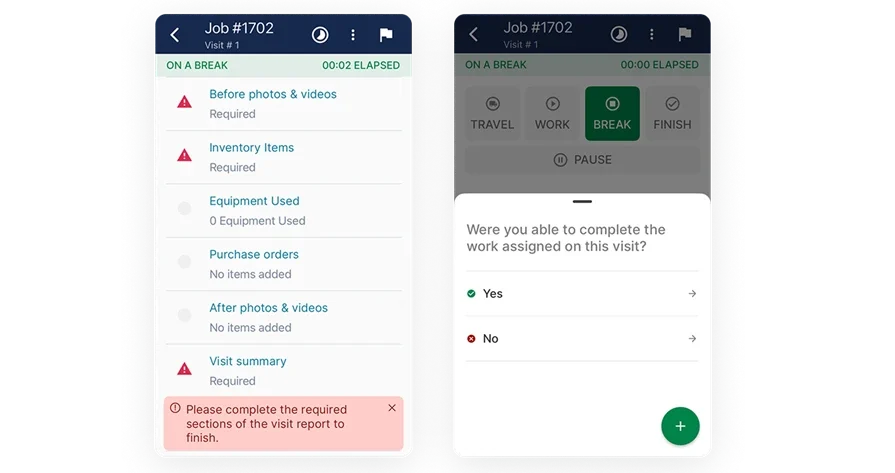
Plan, bid, and execute with BuildOps
See how quantities move from dispatch to billing without duplicate entry.
Other notable tracking features for fire protection teams
Think beyond inspections and compliance. The right extra tools keep your techs moving, your data clean, and your extinguisher portfolios under control—no matter how many sites or clients you manage.
- CRM – A field service CRM helps your team manage property contacts, track inspection history by building, and keep everyone aligned across sales, service, and compliance—all in one place.
- Fleet tracking – Fleet tracking tools help you monitor vehicle locations, manage mileage, and stay ahead of equipment scheduling conflicts. This is especially useful for crews covering wide service territories with inspection vans loaded with replacement extinguishers and parts.
- Time tracking – Time tracking tools let techs log hours directly from their phones as they move between properties, giving your office accurate labor data tied to each inspection job without chasing timesheets at the end of the week.
Add-ons are powerful, but only after you nail the basics of extinguisher tracking. Next up: a breakdown of leading software options to help you choose what works best for your team.
8 best fire extinguisher tracking software options for busy crews
Fire protection teams juggle nonstop inspections, scattered sites, and strict deadlines. Here are eight fire extinguisher tracking options—from simple apps to full field platforms—and how they stack up for busy contractors.
1. Best for commercial contractors: BuildOps

BuildOps uses AI to centralize inspection history, asset records, and deficiencies, then connects them to dispatch, quoting, and billing so office and field stay in a single, connected workflow. Crews complete NFPA 10 tasks in the mobile app, capture photos, and generate compliant PDFs while AI instantly builds estimates and approved work orders from the findings.
From one dashboard, dispatchers can see and schedule everything, and managers get real-time visibility into inspection progress, compliance status, and crew performance across every property—without jumping between tools.
How Pricing Works: Per-month cost based on the number of users; set up a demo for a personalized quote.
What Sets It Apart for Commercial Contractors: Handles multi-site portfolios, dense routes, and service agreements with strong scheduling, job costing, and reporting. Inspection and service teams share the same data, which removes handoffs.
Key Features:
- Inspection, service, and follow-up work in a single workflow
- Deficiency capture that converts to quotes and approved work orders
- Central system for inspection histories, asset data, and service records
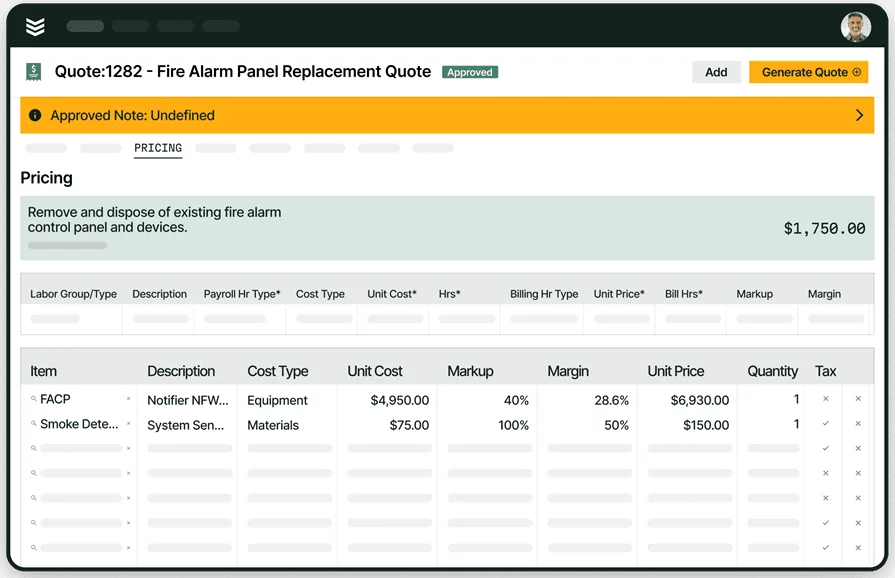
Built for commercial fire safety teams
Manage inspections, service, and compliance in one connected workflow.
2. Best for regulations compliance: Inspect Point

Image Source: Inspect Point
Inspect Point supplies code-aligned templates, checklists, and reports with a capable mobile app for signatures, messages, proposals, and PDF output.
Its integration with The Compliance Engine helps align deliverables with AHJ expectations and keeps field results synced to the office. Teams that want tightly connected dispatch, inventory, and accounting in the same platform may need extra systems alongside Inspect Point.
How Pricing Works: Silver, Gold, and Platinum tiered plans; contact Inspect Point for specifics.
What Sets It Apart for Regulations Compliance: Deep library of code-driven forms and workflows, plus connections that support AHJ review and documentation.
3. Best for an all-in-one fire safety platform: ZenFire

Image Source: Zenfire
Zenfire combines inspections, reporting, scheduling, CRM, and mobile tools so teams can manage NFPA 10 work, capture evidence, and track proposals and jobs from one database.
Field users complete routes, attach photos, and generate PDFs while the office sees pipeline and service activity tied to each site. Organizations that require heavy construction management or custom integrations may prefer a system with broader enterprise connectors.
How Pricing Works: Contact ZenFire for current plan details.
What Sets It Apart for a Unified Platform: One environment for inspections, service, and customer records that reduces admin time and keeps site history intact.
4. Best for fire alarm system design: FireCAD

Image Source: FireCAD
FireCAD runs as an AutoCAD plugin or a standalone program, providing project templates, a device database, coverage visualizations by device, wirepath labeling, riser diagram tools, and report generation.
Strong design drives clean installs, fewer conflicts, and handoffs that make fire extinguisher inspection tracking software workflows smoother down the line. Teams that mainly design sprinklers may find hydraulic modeling outside its wheelhouse, so it can require pairing with a sprinkler-focused tool.
How Pricing Works: Requires a demo for custom pricing.
What Sets It Apart for Fire Alarm System Design: Built on Autodesk standards with features fire protection pros expect, including fast riser layouts and circuit checks that keep submittals tight.
5. Best for fire sprinkler system design: AutoSPRINK

Image Source: AutoSPRINK
AutoSPRINK supports 3D sprinkler layout, hydraulic calculations, and materials lists in one environment.
Designers model pipe, heads, fittings, and coordination with other trades, then produce a parts list directly from the model. It also offers spool-ready outputs and options that align with shop and field workflows. The breadth can bring a learning curve, and some shops may plan for onboarding time or integration work before fire extinguisher tracking connects cleanly to the design side.
How Pricing Works: Contact AutoSPRINK for a demo and pricing.
What Sets It Apart for Fire Sprinkler System Design: In-model hydraulic calculations and materials takeoff, reducing dependence on separate applications.
6. Best for users of Bosch equipment: Bosch Safety Systems Designer

Image Source: Bosch Fire Safety Systems Designer
Bosch Fire Safety Systems Designer works with the ENS4 product line to streamline planning and documentation for fire alarm layouts.
It coordinates input from planners, specialists, and customers, provides templates for planning documents, and links with AutoCAD for teams that draft in that environment. The catch is obvious: it targets Bosch hardware, so vendor-agnostic shops may prefer a different path.
How Pricing Works: Free, limited to Bosch ecosystems.
What Sets It Apart for Bosch Equipment: AutoCAD plugin access to Bosch design elements with fast templating and portfolio-wide consistency.
7. Best for ease of use: Uptick

Image Source: Uptick
Uptick focuses on inspections and maintenance management for fire protection teams, offering code-aligned forms, route automation, analytics, and a mobile app that pushes checklists and captures signatures.
Sales can translate deficiencies into repair or upgrade estimates without retyping, which suits fast-moving service groups. Shops needing deep construction, inventory, or accounting coverage in the same platform may need extra systems alongside Uptick.
How Pricing Works: Appears to be per-user, per-month; contact Uptick for specifics.
What Sets It Apart for Ease of Use: Quick path from findings to priced estimates that field and office can approve without long workflows.
8. Best for value-for-money: Field Promax

Image Source: Field Promax
Field Promax delivers core FSM functions at small-business pricing, covering CRM, scheduling and dispatch, work orders, estimates with upsells, a customer portal, and invoicing with payment acceptance through services such as QuickBooks Go and Stripe.
It handles inspection-driven sales, yet advanced features can feel less intuitive, and the platform is not heavily specialized for fire safety, which may limit fit for complex extinguisher workflows.
How Pricing Works: Tiered subscriptions with flat monthly or annual rates; user counts capped per tier, starting at $99/month.
What Sets It Apart for Value-for-Money: A broad set of FSM tools in one package at a modest price point.
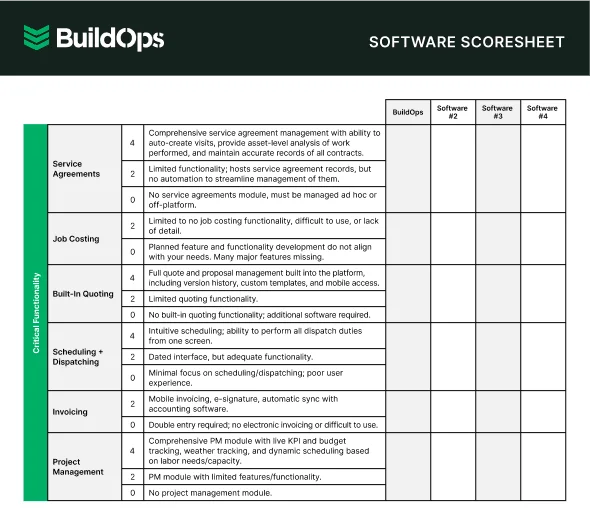
Find the best software fit
Compare software scores at a glance so you can make the best choice for your team.
7 benefits of using fire extinguisher tracking software
Veteran FLS teams run tight routes, tough AHJs, and busy portfolios. Dialed-in fire extinguisher tracking software keeps data clean, moves work forward fast, and gives leaders clear visibility across every building on the schedule.
1. Cuts double entry across the stack

Log readings, notes, and photos once—use them everywhere. Asset IDs, barcodes, and QR tags keep every check tied to the right unit and location. Teams that standardize their ops on a fire protection service software keep a single source of truth that prevents mismatches between field and office.
2. Replaces paper packets with clean, code-ready PDFs
Fire extinguisher inspections, captured and done: readings, tags, photos, and code notes roll into a clean PDF AHJs can approve without the back-and-forth. Practices covered in the fire alarm inspection report software resources translate directly to extinguisher reporting, including signatures, delivery, and record retention.
3. Keeps crews productive when signal drops
Basements, stairwells, and parking garages kill connectivity. Offline forms let techs capture pressure readings, visual inspection results, and unit counts without stopping work, then sync automatically when service returns. That protects billable time and eliminates gaps that stall closeout.
4. Converts findings into revenue with clear follow-up paths

Deficiencies turn into priced estimates and scheduled work without retyping line items. Recharge kits, replacement units, and labor rules move repairs from quote to calendar while the service agreement updates future tasks. Teams that track buyers and portfolio contacts in a dedicated fire CRM align proposals to budget cycles and never lose a renewal.
5. Sharpens dispatch and route efficiency
Monthly, annual, and six-year visits auto-generate from contracts and are clustered by geography. Capacity rules account for certifications, time windows, and travel, while customer alerts cut no-shows. Tactics described in scheduling and dispatching best practices, like capacity planning and travel buffers, fit perfectly for dense NFPA 10 routes.
6. Simplifies six-year maintenance and hydrostatic testing cycles
Fire extinguishers have a life beyond the annual tag—six‑year internal exams and twelve‑year hydro tests, depending on the agent. Centralized tracking keeps manufacture dates, last service, and upcoming milestones in one place, so you can batch tests by due date and keep units from slipping out of compliance.
7. Delivers portfolio-level visibility for owners and nationals
Dashboards highlight pass/fail trends by building, recurring deficiency types, and aging follow-ups. Leaders using fire extinguisher tracking software can target replacements, plan recharge work ahead of peak seasons, and defend budgets with data. That level of insight keeps portfolios compliant and contracts healthy.
4 important fire extinguisher tracking software FAQs
Fire extinguisher tracking software isn’t just another tool—it’s your backbone for compliance, documentation, and fixing issues fast. Here are the key questions fire and life safety teams ask before trusting a platform with their operation.
1. What is fire extinguisher tracking software?
Fire extinguisher tracking software replaces spreadsheets and paper tags with one clean, centralized system. Every unit’s location, inspection, service, and compliance date is logged and easy to find.
Techs scan barcodes or QR codes, capture deficiencies with photos and notes, and trigger reports that actually make sense. Field and office stay in sync—no double entry, no guessing, no missing tags.
2. How does fire extinguisher inspection tracking software work?
Fire extinguisher inspection software connects schedules, assets, and techs in one workflow. Dispatch builds smart routes, techs scan barcodes to log results and photos from their phone, and everything syncs online or offline to reduce missed units, double entry, and compliance gaps.
3. Is fire extinguisher tracking software worth the investment?
Still tracking extinguishers in spreadsheets and paper logs? You’re bleeding time, missing inspections, and leaving revenue on the table. Purpose-built software gives you live visibility into overdue and deficient units—and turns every flagged issue into a paid work order.
For growing fire protection teams, modern extinguisher tracking isn’t a perk. It’s infrastructure.
4. What are best practices when using fire extinguisher tracking software?
Set-up is easy. The real win? Using it every day. These habits help fire protection teams get lasting value from their tracking platform—from day one through every renewal.
Here are 10 best practices to follow:
- Tag every unit with a scannable barcode or QR code before the first inspection cycle
- Standardize naming conventions for locations, floors, and unit types across all properties
- Build recurring inspection templates by contract and NFPA 10 interval: monthly, annual, six-year, twelve-year
- Train techs on how to log deficiencies with photos and notes directly from their mobile device
- Review the inspection schedule daily before crews leave the shop
- Use mobile notifications so no tech misses a last-minute route change or property access update
- Connect deficiency findings to quoting workflows so corrective work gets priced and scheduled immediately
- Audit inspection logs weekly to catch missed units or incomplete entries before they become compliance gaps
- Tie inspection data to service agreements so renewal scope reflects actual asset conditions
- Keep your office, dispatch, and field teams operating from one system, not three
Keep your fire extinguisher tracking sharp, your data aligned, and every inspection closed without loose ends.
Fire extinguisher tracking at scale isn’t just about logging units—it’s about holding your entire operation together. BuildOps ties extinguisher inspections directly to dispatch, quotes, service agreements, and invoicing, so your team stays in sync, your inspections stay current, and your compliance records are always audit-ready. One platform, zero paper-chasing.
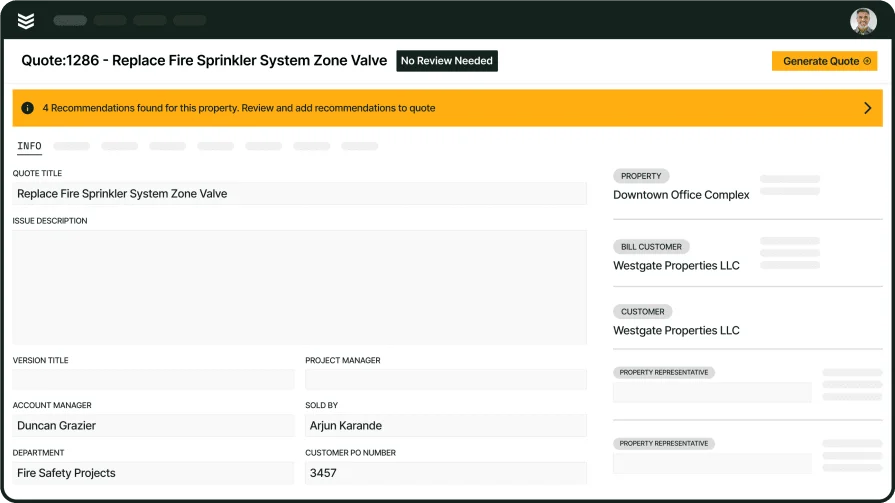
Unify inspections, service, and projects
See how BuildOps connects inspections and reporting across your whole operation.