

Running fire and life safety crews takes speed and clean documentation. A fire management system connects inspections, testing, maintenance, and repairs with scheduling, quoting, and reporting. Without it, techs juggle paper tags, scattered photos, and AHJ forms while the office rebuilds reports.
Fire management software keeps device records, NFPA checklists, and deficiency follow-ups in one place. Teams across the fire safety industry rely on fire safety management software to keep field work and HQ in sync. It also supports field service management tasks such as dispatch, routing, and parts control. Think of it as a fire safety management tool your techs actually use on site.
Here’s what we’ll cover:
- Choosing a fire management system for field service jobs
- 6 key fire management system features
- Best for commercial contractors
- Best for residential contractors
- Best for general contractors
- Other notable fire management systems
- 7 benefits of using a fire safety management system
- 4 important FAQs about fire management systems answered
Use this guide as a field brief. We start with selection basics, then highlight features that matter in daily FLS work. After that, we call out strong options for different contractor types, note other platforms, list seven benefits, and answer four common questions. Next, we dive into how to choose a fire management system.
Choosing a fire management system for field service jobs
Out in the field, your crew needs fast inspections, clean evidence, and clear next steps without calling the office. The fire management system you choose will shape how quickly you close out ITM work, how tight your records look to an AHJ, and how smoothly repair work spins up from a failed step. When you evaluate fire management software, pressure test it with questions your senior techs and coordinators would ask every day.
- Scalability and coverage: Can the platform handle one-off inspections and large service agreements without slowing dispatchers down? Will it support mixed portfolios that include alarms, sprinklers, extinguishers, kitchen hoods, pumps, and clean agent systems across many sites?
- Speed and offline access: Can techs complete checklists, capture photos, and log results when the basement has no signal? Do updates hit the office in real time once the device reconnects?
- Compliance and documentation: Do ITM templates track to NFPA standards with version control? Are time stamps, GPS, technician sign-offs, and photo evidence locked to each device so reports hold up with an AHJ?
- Automation and lifecycle flow: Can a failed step convert to a priced quote, then to a scheduled work order with parts and labor pulled from your catalog? Will the system create recurring inspection cycles and reminders without manual setup
- Integrations and data continuity: Does it connect to your CRM, inventory, and accounting stack so coordinators avoid retyping data? Will customer portals give property managers and authorities immediate access to reports and deficiency status?
- Features: Does the fire safety management software include barcode or NFC scanning, asset hierarchies, customer portals, technician certifications and skills for routing, parts usage on the ticket, and payment capture in the field? Are there mobile-first controls that make the app a dependable fire safety management tool for daily work?
Once you lock in these priorities, you can compare fire management systems with confidence. The next section highlights feature sets that matter inside a fire safety management system used by experienced FLS teams.

6 key fire management system features
A strong management system helps seasoned FLS teams finish ITM work on site, document every step, and convert red tags into booked repairs without handoffs breaking down. The features below target daily field service management at scale for alarms, sprinklers, extinguishers, kitchen hoods, pumps, and clean agent systems.
1. Smart scheduling and dispatching

Routes fall apart when certifications, access rules, or AHJ windows get missed. Use field service scheduling with dispatch software to assign by NICET level, trade, and device type. Lock in cycles for NFPA 10, 25, and 72. Group visits by building stack, batch multi-tenant inspections, and reserve time for impairment checks so crews arrive with permits, keys, and the correct parts.
2. Mobile tools for technicians

Work happens in stairwells, pump rooms, and garages with weak signal. A fire safety management system should give techs offline ITM forms, QR or NFC scanning, and instant photo capture. Scan a device tag to pull history, complete the checklist, and attach evidence that satisfies an AHJ. If a valve fails, the app creates a priced follow-up and reserves labor automatically through the mobile app for technicians.
3. CRM integration and customer tracking

Context closes gaps between field, estimating, and billing. With CRM software for contractors, your fire management system surfaces property contacts, access notes, AHJ requirements, device inventories, and past ITM results inside the ticket. Estimators see who approves work, which panels sit on site, and what failed last visit so pricing lines up with scope without guesswork.
4. Sales pipeline visibility

Repairs stall when no one owns the next step. Pipeline views tied to inspections show stage, owner, and days aging. Sort by AHJ due dates, expired tags, and high-risk sites. When a district approves a block of sprinkler repairs, managers can check crew load and truck availability through fleet management and shift resources before the window closes. This keeps fire management systems aligned with revenue targets and compliance timelines.
5. Invoicing and payment readiness

Billing should not require a rewrite. Approved quotes convert to invoices with scope, rates, and device references intact. A tech can take card payment after a tamper switch replacement while the office handles progress billing on a panel upgrade. Tie billing to invoicing, field collection to payments, and labor capture to time tracking. Cash moves faster and records stay clean.
6. Reporting and job data insights

Leaders need numbers that guide routes, pricing, and training. Use reporting and analytics to track pass rate by property, deficiency density by asset class, quoted-to-won ratios, first-visit completion, and compliance aging by AHJ. Compare travel time with wrench time to tighten routes. Export device history for audits and portfolio bids.
Other notable features to look for in a fire management system
Core capabilities carry your FLS operation. A few add-ons sharpen handoffs, reduce delays, and keep records airtight. These extras help fire management systems run tighter in the field and at HQ.
- Time tracking integration – Quoted labor should match actual hours. Pulling technician time from time tracking tools keeps estimates honest, aligns invoices to the work performed, and highlights labor-heavy routes that need attention.
- Service agreement management – For recurring ITM work or long-term contracts, linking service agreement software to your fire management software loads coverage, pricing tiers, and renewal dates right into the ticket. That prevents missed scope and keeps customers informed.
- Fleet and asset visibility – Truck locations and equipment readiness affect timelines. Connecting fleet tracking software gives dispatchers live status for vehicles, ladders, and cylinders so schedules reflect real availability and your fire safety management system stays accurate end to end.
Each feature above supports smoother cycles across inspections, repairs, and billing. Together, they turn fire safety management software into a dependable fire safety management tool for seasoned fire safety teams.
Best for commercial contractors: BuildOps

BuildOps gives commercial fire and life safety contractors a unified fire management system that runs inspections, deficiency capture, quoting, scheduling, dispatch, and reporting in one workflow. Techs complete NFPA checklists on site, attach photos and readings to each device, then convert failed items into priced repairs that coordinators can schedule immediately. Office teams track progress in real time while customers and AHJs receive clear reports and full history.
How pricing works: BuildOps offers package-based pricing tailored to team size and required modules. The team will map pricing to your process during a walkthrough.
Features beyond quoting: Offline mobile ITM forms with barcode and NFC scans. Skill-based routing and recurring inspections. CRM, inventory, and accounting integrations. Customer portals and AHJ-ready PDFs. Analytics that surface pass rates, close times, and labor trends.
What sets it apart for commercial contractors: Device-level records, fast deficiency-to-work-order flow, and reliable offline performance help large teams manage multi-site portfolios with confidence. BuildOps operates as fire management software that scales for strict compliance and heavy field volume.
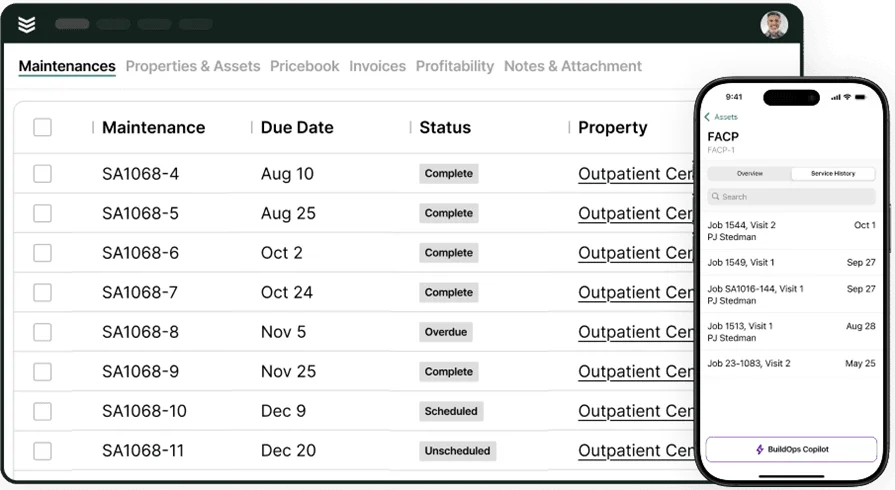
See BuildOps in action
Quick tour of inspections, deficiency-to-work-order, and reporting for fire service teams.
Best for residential contractors: FieldEquip

Image Source: FieldEquip
FieldEquip suits residential-focused teams that want quick estimates tied to simple scheduling and customer history. Techs can create quotes from a phone, attach photos, and move approved work into basic work orders with minimal admin. It may not fit larger fire safety companies that need deep NFPA template control, advanced automation, or coordination across many branches.
How pricing works: Modular pricing that varies by users and features. You will work with their sales team to shape a package.
Features beyond quoting: Work order tracking, asset records, and service history in one place. Helpful for recurring visits and small property portfolios.
What sets it apart for residential contractors: Fast setup and a light learning curve help smaller FLS teams move off spreadsheets while keeping a dependable fire safety management system for day-to-day service.
Best for general contractors: Fieldpoint

Image Source: Fieldpoint
Fieldpoint targets general contractors handling complex projects that span estimating, scheduling, labor tracking, and project accounting. Detailed estimates can include equipment, parts, labor, and subcontractors, and the platform connects with ERPs for tight back-office control. It may not be ideal for FLS providers that rely on robust mobile workflows for on-site quoting and instant office-to-field updates.
How pricing works: Quote-based pricing shaped by operation size and required modules. Expect a tailored estimate.
Features beyond quoting: Job costing, project planning, dispatch, and integrations with CRMs and inventory tools. Solid for teams that split time between construction and service.
What sets it apart for general contractors: Strong support for project-driven work with layered budgets and long timelines, giving contractors a fire safety management tool that maintains cost visibility while handling complex engagements.
Other notable fire management systems
Beyond the primary platforms, several options can strengthen a fire management system stack for specific needs. These summaries highlight fit, pricing approach, standout traits, and where each tool may fall short for field-heavy teams that run inspections and remediation at scale.
Simpro

Image Source: Simpro
Simpro covers quoting, scheduling, inventory, asset maintenance, and job costing in one suite geared to trade service. Fire protection teams can manage recurring testing, price deficiency repairs, and track parts usage from warehouse to truck. Larger FLS operations may need deeper configuration to match device-level NFPA records and AHJ-specific report layouts.
How pricing works: Subscription pricing varies by user count and modules. Their team provides a tailored quote.
Features beyond quoting: Inventory control, planned maintenance cycles, purchase orders, and project job costing. Useful for firms that connect service with install work.
What sets it apart for fire service: Strong operational backbone with asset and inventory depth that supports high-volume service and retrofit programs inside a single fire management software platform.
Compare Simpro vs BuildOps features directly here to see which one has the necessary features to handle fire management system inspections, reporting, and anything else in your custom workflow.
FSM Global

Image Source: FSM Global
FSM Global supports service and maintenance across many industries with scalable workflows. Teams configure quote templates, tiered pricing, and regional labor rates that stay consistent across branches. Field-first crews may find the system heavy if they want lightweight mobile quoting with rapid sync during inspections.
How pricing works: Package pricing tied to implementation scope and features. Onboarding and configuration are typical.
Features beyond quoting: Inventory tracking, contract management, and lifecycle modules that connect asset programs with service delivery.
What sets it apart for fire service: Highly configurable quote logic for regional rules and contract types while keeping a single customer record inside your fire safety management software stack.
PlanRadar

Image Source: PlanRadar
PlanRadar focuses on site documentation and task tracking for fire safety work. Inspectors capture evidence, tag rooms and devices on drawings, assign remedial tasks, and track them to closeout. It may not cover deep estimating or granular NFPA templates that a full fire safety management system would provide.
How pricing works: Tiered subscription plans based on seats and project volume.
Features beyond quoting: Markups on plans, photo logs, punch items, and document control that help managers coordinate corrective actions after inspections.
What sets it apart for fire service: Strong field evidence and task flow that complements a fire safety management tool when documentation and follow-up tracking drive the workload.
ZenTrades

Image Source: ZenTrades
ZenTrades Zenfire targets service contractors with mobile-first estimates, jobs, and invoicing. Crews can create quick estimates, collect signatures, and convert approvals into job tickets without heavy admin. Larger FLS providers may outgrow it if they require extensive NFPA-driven templates, complex pricing, or deep accounting and inventory integrations.
How pricing works: Subscription tiers with optional add-ons. Contact sales for a package aligned to team size.
Features beyond quoting: Client portal access, offline capability, and simple assignments that keep smaller teams moving.
What sets it apart for fire service: A direct path from inspection finding to estimate to job ticket that favors speed and clarity inside compact fire management systems.
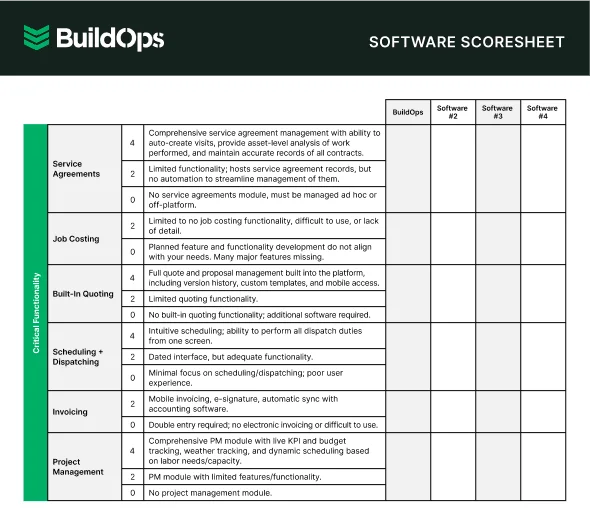
Check out the software scoresheet
Easily compare the top quotation management tools so you can find the right fit.
7 benefits of using a fire safety management system
A well-run fire management system delivers real gains for FLS contractors. The payoffs span speed, compliance, revenue, and customer confidence, all driven by fire management software that connects field work with the office.
1. Faster handoff from inspection to scheduled work
Techs flag a fail code, the system preloads labor types, parts kits, and pricing from your book, then dispatch locks a slot without retyping. Coordinators auto-route by NICET level and device type so repairs land with the correct skills and truck stock. Use the proven playbooks in scheduling and dispatching to tighten rules around priority, travel windows, and SLAs.
2. Stronger compliance posture
Versioned ITM templates align to NFPA 10, 25, and 72. The app anchors evidence to each asset with gauge readings, flow data, cylinder weights, serials, and signatures. Leads standardize steps across branches using guidance from fire safety inspection software. This is where fire safety management software prevents drift and protects licenses.
3. AHJ-ready reporting without rework
Reports pull device IDs, deficiency codes, tagged photos, and timestamps straight from the asset record. Admins export the packet in the format your local authority expects and avoid repeat site visits. Teams often mirror layouts described in fire alarm inspection report software so fire management systems meet regional requirements.
4. Shared visibility for field and office
Dispatchers, coordinators, estimators, and PMs view a single status board by property, building stack, and deficiency type. Aged items trigger escalations. Parts pulls sync with the calendar so trucks leave with the kit list that fits the job. The overview on field service manager software shows how a connected fire safety management system sustains this alignment.
5. Higher win rates on deficiency repairs
Quotes leave the site with photos, device history, and clear scope. Estimators bundle work by building or floor, set expiration rules, and track acceptances through the portal. This context shortens approval cycles and raises hit rates on repair revenue.
6. Tighter cost control
Actual labor and travel flow from the ticket with rounding rules that match payroll. Inventory usage posts against the job, including valve kits and heads pulled from truck bins. PO sync keeps costs attached to the same work order, which protects margin before invoicing.
7. Stickier customer relationships
Property managers get portals with pass rates, renewal calendars, and deficiency status across sites. Account teams run targeted follow-ups using a dedicated fire CRM. That record turns the platform into a dependable fire safety management tool and keeps renewals steady year after year.

4 important FAQs about fire management systems answered
Managing inspections and repairs at scale takes structure. These FAQs address how a fire management system and related tools support seasoned FLS teams in the field and at the office.
1. What is a fire management system
A fire management system centralizes ITM inspections, device histories, deficiency tracking, scheduling, quoting, and reporting so field techs, coordinators, and estimators work from the same record. It ties evidence to assets, creates AHJ-ready reports, and turns failures into booked repairs.
2. How does fire management software work in the field
Think of fire management software as a single workflow. Techs run NFPA templates offline, scan assets, capture photos, and flag fails. Deficiencies convert to priced repairs and land on the board with the correct skills and truck stock. Office teams review, approve, and report without retyping. Customer and AHJ portals keep everyone aligned.
3. Is fire management software worth the cost
Yes. Gains show up in faster closeout of deficiencies, lower revisit rates, and fewer disputed invoices. Leaders see pass rates, labor mix, travel time, and quote win rates in one place, which tightens pricing and staffing. Over a year, those improvements offset licensing while raising recurring revenue and audit readiness.
4. What are best practices for implementing a fire safety management system
Rollout requires focus from leadership and the field. Keep it simple, prove value on day one, and lock standards before expansion.
- Train by role with field scenarios
- Standardize NFPA templates and deficiency codes
- Map dispatch rules to skills, certs, and regions
- Enforce device tagging and barcode or NFC use
- Turn fails into quotes on site every time
- Attach photos, readings, and signatures to the asset
- Automate recurring inspections and renewal reminders
- Integrate CRM, accounting, and inventory before go-live
- Monitor KPIs weekly and adjust pricing or routes
- Document playbooks so new hires match veteran output
These practices help fire management systems operate as a durable fire safety management system and elevate the platform into a dependable fire safety management tool for your crews.
Choosing a fire management system comes down to one thing: helping seasoned crews close the loop from inspection to repair without friction. Field-first checklists, device history, clean deficiency flow, and steady reporting give leaders the control they need while keeping jobs moving. That is the thread running through the selection checklist, the six must-have features, the vendor snapshots, the benefits, and the pro-level FAQs.
Different teams need different fits. Residential operations lean toward lighter tools. Project-heavy groups value cost control and integrations. Commercial contractors often prefer an all-in-one platform that handles dispatch, ITM, quoting, invoicing, and analytics in one place. BuildOps serves that use case as a unified hub for fire management software and broader field service work.
However you proceed, treat configuration like a playbook. Lock templates, codes, and routing rules, then coach the habits that turn fire management systems into daily discipline. When the platform functions as dependable fire safety management software, it supports clear audits, higher hit rates on repairs, and smoother handoffs across the business. In time, it operates as a durable fire safety management system and a practical fire safety management tool your crews trust on every site.
If you want to trace a live inspection through deficiency capture, pricing, scheduling, and payment, we can walk that path together. Book a short session to see whether the flow fits your teams and timelines, no pressure attached.
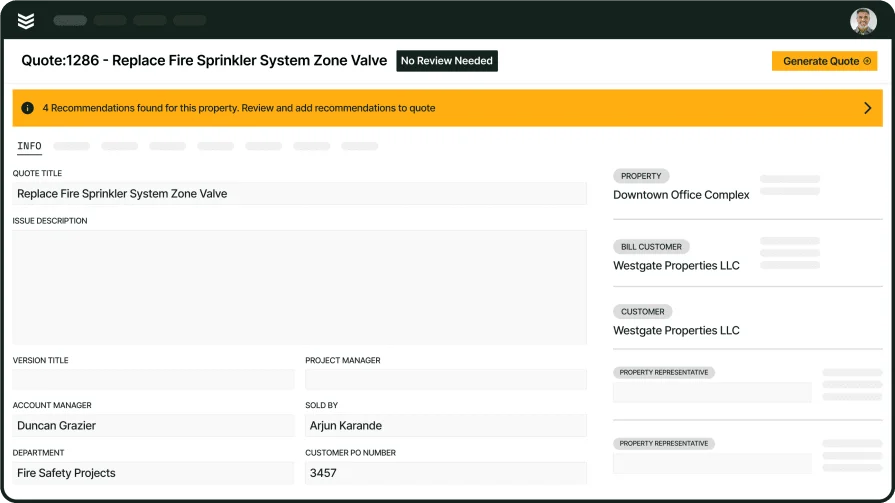
Run your FLS operation with BuildOps
From inspection to invoice, see ITM, repairs, and AHJ reporting move in one clean flow