


Key Takeaways
- Some of the top HVAC estimating Excel spreadsheet templates come from ArcSite, VRF Wizard, HVAC Simplified, and Freshbooks
- HVAC estimating spreadsheets are suitable for some teams, but HVAC software with built in estimating have a few more pros than Excel sheets
- BuildOps has built-in estimating tools that could help your HVAC business scale better than an Excel template
Pricing out HVAC jobs is a grind. One wrong number, and your margins shrink before you even set foot on-site. Having a solid estimating process in place isn’t just nice to have, but can be the difference between profit and loss.
For many HVAC contractors, Excel spreadsheets are the go-to tool for estimates. They’re customizable, familiar, and—when set up right—can help you quote jobs faster without second-guessing your numbers.
But there’s a catch: not all HVAC estimating spreadsheets are built the same. Some are simple, some are feature-packed, and others integrate with software to take estimating to another level.
Whether you’re a field tech crunching quick job costs, a contractor pricing out full system installs, or a business owner looking to standardize estimates across your team, the right spreadsheet can make or break your workflow. To help you choose one, here’s what we’ll cover in this guide:
- The top 7 HVAC estimate templates for Excel
- Pros and cons of using an HVAC estimating Excel spreadsheet
- What an HVAC estimating Excel spreadsheet looks like vs BuildOps estimating
- Final verdict: why HVAC estimating software is the better option
We’ve rounded up seven HVAC-specific Excel templates to help you price jobs accurately and efficiently. Let’s break them down:

The top 7 HVAC estimate templates for Excel
Many pros still rely on Excel for its flexibility, especially when working with standardized pricing, labor costs, and material markups. Whether you need a free template for quick quotes or a feature-packed option that integrates with your workflow, there’s something here for every HVAC business.
Here are seven options we recommend for your HVAC estimating templates built for Excel:
1. ArcSite

Image Source: ArcSite
ArcSite’s estimating template is designed for HVAC professionals who need to build estimates on-site and turn them into professional-looking proposals. It’s simple, mobile-friendly, and helps teams cut down on manual data entry.
Cost: Free
Most Useful For: HVAC techs and sales teams who provide estimates directly to customers.
Template Features:
- Drag-and-drop functionality for quick estimate creation
- Ability to attach jobsite drawings and measurements
- Customizable pricing and parts database
Integration: Connects with CRM systems and invoicing software to streamline the transition from estimate to final invoice.
Access ArcSite’s HVAC estimating template to explore its features.
2. MEP WORK

Image Source: MEP Work
Designed for commercial HVAC projects, MEP WORK’s estimating spreadsheet includes ASHRAE-based heat load calculations and detailed cost breakdowns. It’s a solid choice for contractors handling large-scale installations.
Cost: Free
Most Useful For: Commercial HVAC contractors working on large installations.
Template Features:
- ASHRAE-based heat load calculation formulas
- Equipment cost estimator
- Built-in duct and piping material lists
Integration: Compatible with AutoCAD and Revit for seamless design-to-estimate workflows.
Download MEP WORK’s Excel template for commercial HVAC estimates and heat load calculations.
3. FreshBooks

Image Source: FreshBooks
FreshBooks offers a user-friendly HVAC estimating template that integrates seamlessly with its accounting software. This template is best for contractors who want to generate estimates and convert them directly into invoices.
Cost: Free
Most Useful For: HVAC business owners and office managers handling both estimates and invoicing.
Template Features:
- Customizable estimate fields with tax and discount options
- Converts estimates into invoices with one click
- Cloud-based storage for easy access on any device
Integration: Fully integrated with FreshBooks accounting software for seamless bookkeeping.
Try the FreshBooks HVAC estimate template with invoicing features.
4. ServiceFolder

Image Source: ServiceFolder
ServiceFolder provides a free HVAC estimate template that works well for service businesses looking for a digital, easy-to-use estimating solution. It’s a great option for companies wanting to reduce paperwork while keeping estimates professional.
Cost: Free
Most Useful For: HVAC service companies looking for a digital estimating tool.
Template Features:
- Mobile-friendly design for field technicians
- Built-in customer details section for easy record-keeping
- Pre-filled sections for labor, materials, and additional charges
Integration: Connects with ServiceFolder’s full suite of field service management tools.
Download the ServiceFolder HVAC estimate template for digital job quoting.
5. VRF Wizard

Image Source: VRF Wizard
VRF Wizard offers a more advanced estimating tool for contractors working with Variable Refrigerant Flow (VRF) systems. It’s built to handle complex multi-zone HVAC projects while keeping calculations accurate.
Cost: Fixed price of $195
Most Useful For: HVAC estimators and engineers specializing in VRF system installations.
Template Features:
- Detailed load calculations for VRF systems
- Automatic equipment selection suggestions
- Multi-zone project estimating capabilities
Integration: Works with various VRF manufacturer specs to ensure proper sizing and system performance.
Download the VRF Wizard Excel template for VRF system estimates.
6. HVAC Simplified

Image Source: HVAC Simplified
This all-in-one estimating template is ideal for small to mid-sized HVAC contractors who need a simple, effective way to price out jobs. It covers everything from labor costs to material markups.
Cost: Free
Most Useful For: Small HVAC businesses and independent contractors.
Template Features:
- Pre-loaded material and labor cost sections
- Adjustable profit margin calculations
- Customizable tax and discount fields
Integration: Can be imported into most accounting software for easy invoicing.
Get the HVAC Simplified’s estimating spreadsheet for small contractors.
7. Etsy

Image Source: Etsy
For contractors who want a fully customizable estimating template, Etsy sellers offer a variety of HVAC Excel spreadsheets tailored to different business needs. Prices vary, but many templates come with advanced cost-tracking features.
Cost: Prices vary per seller
Most Useful For: HVAC professionals looking for a fully tailored estimating spreadsheet.
Template Features:
- Wide selection of customizable estimating templates
- Options for residential and commercial HVAC work
- Advanced formatting for tracking costs and profits
Integration: Many templates are designed for easy import into Excel and QuickBooks.
Browse Etsy’s collection of HVAC estimating Excel templates and see what’s right for you.
Pros and cons of using an HVAC estimating Excel spreadsheet
Excel estimating templates may be the go-to for HVAC professionals because of its cost and familiarity, but spreadsheets come with their share of limitations: manual data entry, version control issues, and lack of automation — all of which can really slow down estimating and lead to costly mistakes when it comes time for the work to get done.
To help HVAC contractors weigh their options, we’re breaking down the pros and cons of using an HVAC estimating Excel spreadsheet. If you’re looking for a deeper dive into HVAC estimating methods, look to our Guide to HVAC Service Pricing for Teams To Get It Right.
Pros
- Low cost and widely accessible – Excel is inexpensive (or even often free with some versions), making it an easy choice for small HVAC businesses. It doesn’t require a subscription, and most contractors already know how to use it.
- Fully customizable templates – HVAC pros can tailor spreadsheets to their exact needs, adding pricing tables, labor rates, and formulas for quick calculations.
- No internet required – Unlike cloud-based estimating software, Excel can be used offline, allowing contractors to build estimates even in areas with limited connectivity.
- Simple and familiar interface – Many technicians and office staff already know Excel, so there’s no learning curve or need for training.
- Works with other tools – Spreadsheets can be imported into accounting software or CRM systems for invoicing and record-keeping.
Stop using clunky spreadsheets
Turn field tech notes into project summaries so you can build accurate quotes
Cons
Here are some of the drawbacks to Excel estimating templates that slow down HVAC businesses:
- Prone to human error – A single misplaced decimal or formula mistake can throw off an entire estimate, leading to profit loss or underbidding jobs.
- Time-consuming manual data entry – Unlike HVAC estimating software, Excel doesn’t pull in real-time material costs, requiring constant updates.
- No built-in job tracking – Spreadsheets don’t connect estimates to work orders, scheduling, or job progress, leading to inefficiencies.
- Version control issues – Multiple people working on the same spreadsheet can lead to lost changes, outdated pricing, or duplicate files.
- Limited scalability – As HVAC businesses grow, Excel becomes harder to manage. Larger teams need cloud-based solutions that sync across devices.

What an HVAC estimating Excel spreadsheet looks like vs BuildOps estimating
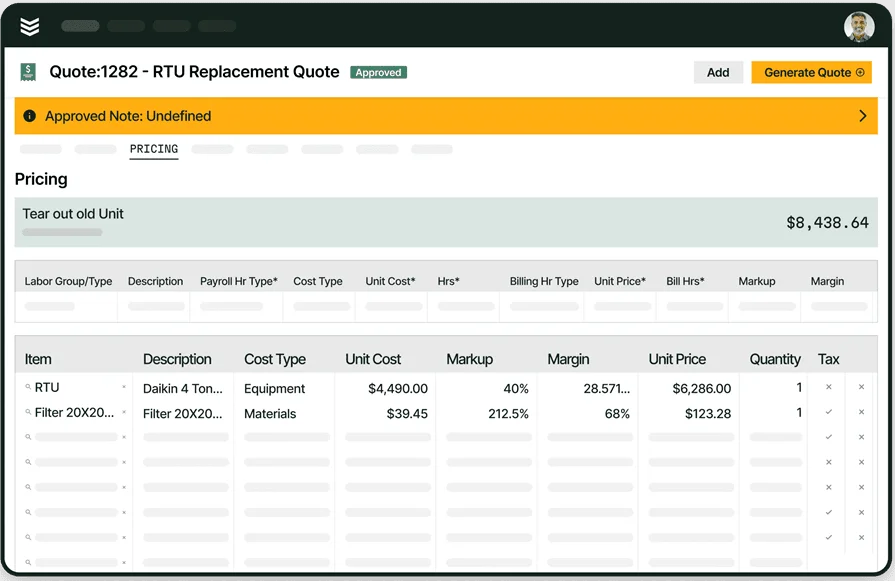
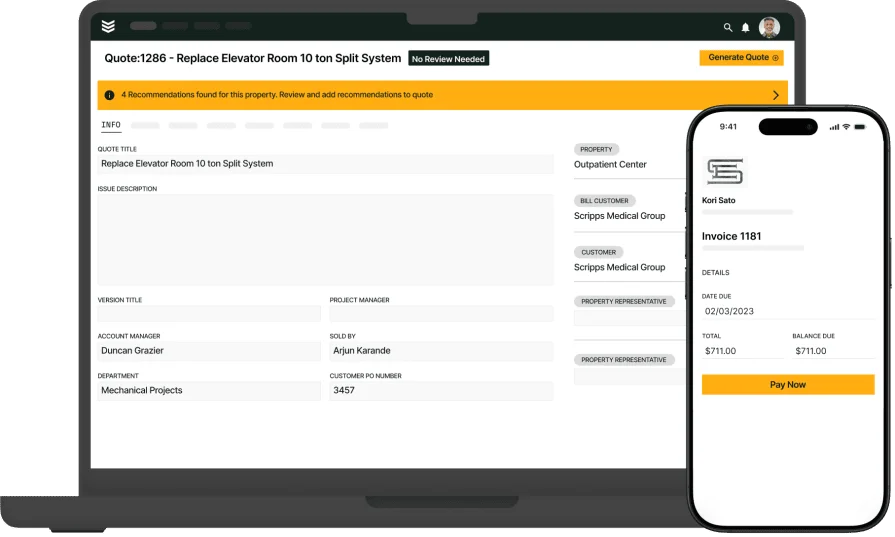
Spreadsheets are a low-cost option for starter businesses that aren’t really scaling up, but when a team needs a more comprehensive tool that connects HVAC estimating to other business processes to save on manual time, BuildOps is a great option. Here are some things you get from BuildOps Quoting that you won’t be able to do with a spreadsheet:
- Quotes are directly connected to Invoices - The same information that was entered at Quote can just turn into an invoice (and be modified if needed). You don’t need to enter information twice.
- Mobile app accessibility - If your tech is out on the jobsite to check out the scope of the work, they can add and edit work and materials right on the spot. Back office can take a look, and then approve the work on the spot - your tech might not even need to schedule a new visit to do the work!
- Supports photos / videos - When these are added to a quote, customers are much more likely to approve the work. You can even take before and after shots that get attached to the Estimate and the Invoice.
- Updates are done in a single file - No versioning. No team members working off of yesterday’s out-of-date information because no one sent them the newest Excel file. Updates take place in a central quote, with version history tracked for everyone.
- Proactive pipeline follow ups - BuildOps can send alerts when quotes have been ignored and it’s time to follow up with your leads.
See for yourself how BuildOps compared to an HVAC estimating Excel spreadsheet:

Final verdict: why HVAC estimating software is the better option
While Excel can work for small HVAC businesses, it struggles to keep up as operations scale. Dedicated HVAC estimating software automates pricing updates, integrates with dispatch and invoicing systems, and reduces errors—saving time and boosting profits. Investing in a proper estimating tool isn’t just about convenience; it’s about running a more efficient, accurate, and profitable HVAC business.
47% of contractors we surveyed in 2025 are already using AI in some capacity for estimating, according to The Pivot Point: AI And The Future of Commercial Contracting. Don’t get left behind in an Excel nightmare, and make the switch to HVAC estimating software like BuildOps.
We automate estimating, integrating quotes with dispatch and invoicing, and keeping everything in one place. It means fewer headaches and more profitable jobs. While many tools offer the bits and pieces of what HVAC pros need, BuildOps brings it all together—from estimating to scheduling to invoicing—built specifically for commercial contractors. Try it out today:
Try BuildOps estimating
One tool and one unified estimate, that later turns into job notes and invoices