Top Contractor Field Tech Management Software Priorities


We talk to commercial contractors every week who are trying to tighten up field execution, dispatch, and billing without making the day harder on their crews. When they look at field tech software, they usually are not asking for another feature list. They want to know if techs can walk into a job with the right history, if dispatch can react when the day changes, and if the office can keep billing moving without rebuilding the job after the work is done.
That is what this guide is built to sort out. Looking at the patterns we keep hearing in conversations with contractors across the field service industry who are considering BuildOps, we pulled together the priorities they keep coming back to, the questions they ask in demos, and the pressure points worth checking before a system touches your day-to-day work. If you run a commercial field service management business, this should help you tell pretty quickly whether a platform fits the way your team actually runs.
What contractors prioritize when choosing field technician management software
We hear a version of the same conversation from commercial contractors managing field techs when they start evaluating software. They want to know whether techs can see full job context before they roll, whether dispatch can rework the day without losing control, whether closeout gets back to the office cleanly, and whether service work can move into quoted or project work without the team starting over in a second system.
Those are usually the priorities that rise to the top first. When contractors compare field tech management software, they are usually trying to solve for better field execution, tighter office coordination, and cleaner follow-through after the job is done.
1. A system that keeps service work and project work connected
Commercial contractors often move from reactive service calls into quoted repairs, approved scope, and active project work inside the same customer account. Field tech software has to support that chain without forcing office teams to build a second workflow every time work expands beyond a single visit.
A disconnected system breaks momentum at the exact point where revenue should move forward. Office teams end up re-entering customer details, project managers lose job context, and leaders get a weaker view of labor, cost, and scope as service work turns into larger jobs.
How BuildOps prioritized this too: BuildOps was built to keep those handoffs connected. A lead can move from quote to contract into sales-to-ops handoff, then into project management software without losing the job story along the way. For contractors who run both service and projects, that makes it easier to carry scope, labor, and customer context forward instead of starting over every time work gets bigger.
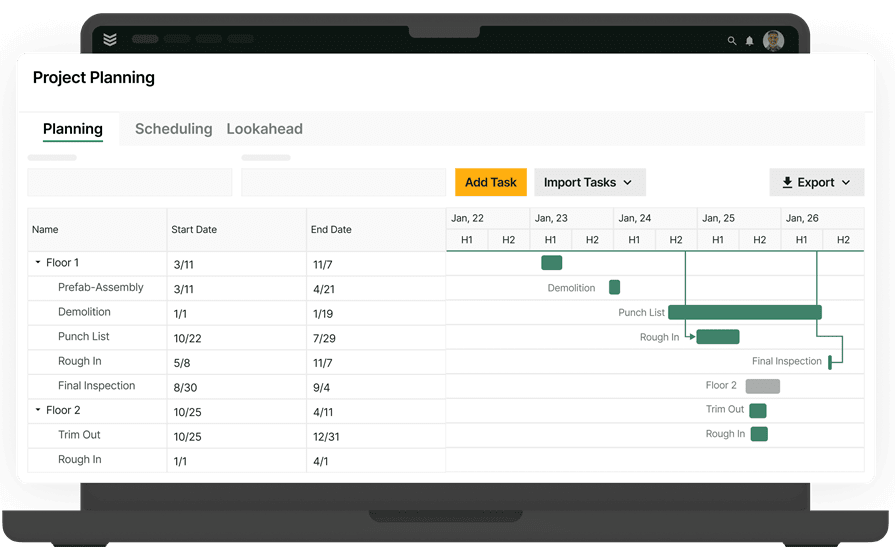
A strong field tech platform should make a larger job feel like a continuation of the same work, not a restart. Contractors evaluating software should look for clean handoffs from service into quoted and project work before they spend time comparing surface-level features.
2. Field techs get the right job context before they walk in
Commercial field teams need more than a schedule and an address before a tech arrives on-site. Field tech software should put job history, asset records, site notes, photos, and attached documents in one place so techs can walk in with enough context to make good decisions.
Missing job context creates avoidable delays on commercial accounts. Techs lose time calling the office, dispatch loses time answering basic questions, and customers lose confidence when crews show up without a clear picture of the site, the equipment, or the last service visit.
How BuildOps prioritized this too: BuildOps keeps that job record tied to the work. The technician mobile app gives techs field access, asset management keeps service history attached to the right equipment, and document control keeps drawings, forms, and job files inside the same record.
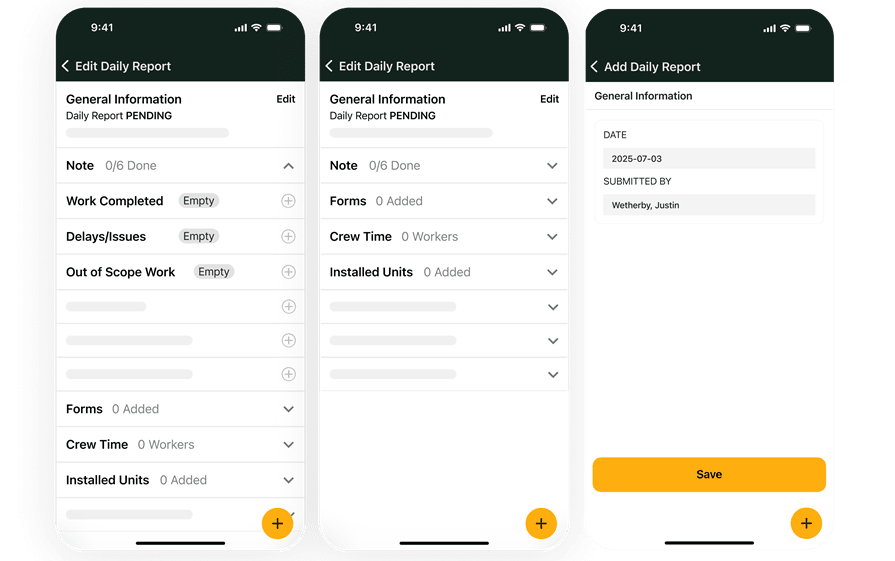
Contractors shopping for field tech software should test whether a tech can understand a job without calling back to the office. A complete field record cuts wasted trips, supports better diagnosis, and gives the customer a crew that arrives prepared instead of piecing the story together on-site.
3. Dispatch and labor decisions hold up when the day changes
Commercial dispatch changes fast once the day starts. Field tech software has to help schedulers react to overruns, urgent calls, traffic, and labor gaps while still matching the right tech to the right work across a full board.
Weak dispatch tools create problems that spread across the whole operation. A poor assignment raises drive time, pushes other jobs late, increases callback risk, and forces the office to spend the rest of the day correcting decisions that should have been clear from the start.
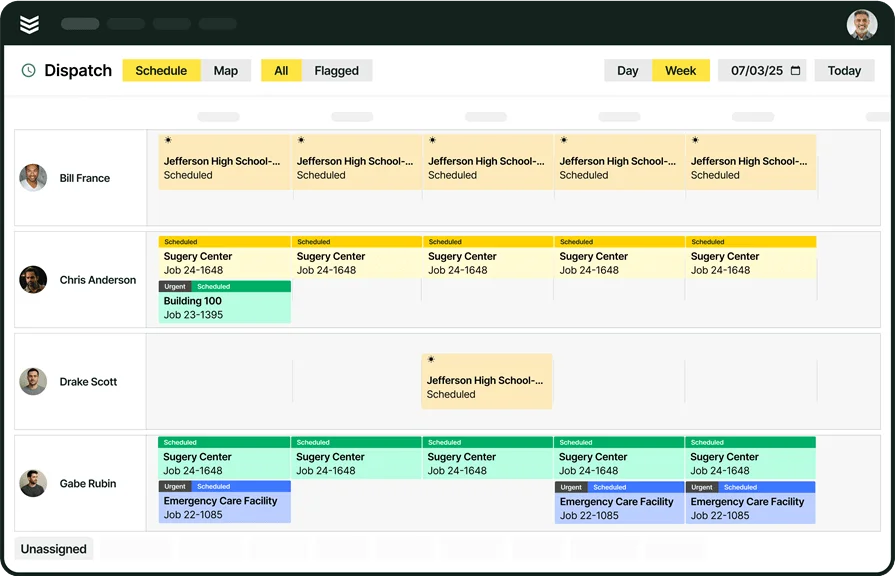
How BuildOps prioritized this too: BuildOps gives dispatchers more control inside live operations. Scheduling & dispatch helps teams assign work with better field context, resource planning helps leaders see labor pressure across upcoming work, and OpsAI for Field helps surface what needs attention inside the workflow.
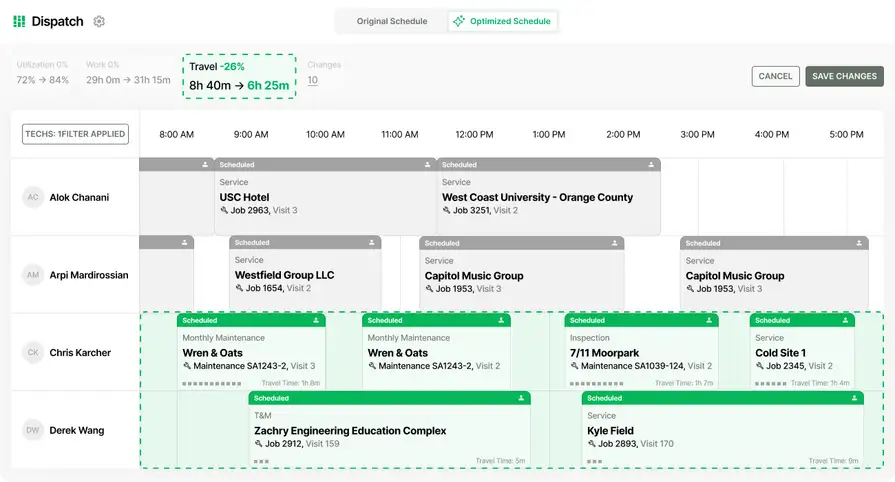
Contractors evaluating a platform should watch how the schedule holds up after the first disruption, not just how it looks in a clean demo. A useful system helps the team rework the day without losing visibility, stacking delays, or burying dispatch in extra admin.
4. The field-to-office handoff is clean enough to bill fast and protect margins
Commercial contractors rarely judge field tech software by the field screen alone. Field teams still have to send back accurate labor, notes, photos, materials, and closeout details so billing can move without the office rebuilding the job after the tech leaves.
A weak field-to-office handoff slows cash collection and blurs job performance. Billing delays, missing cost detail, and inconsistent closeout records make it harder to invoice quickly, protect margin, and see whether the work was actually profitable.
How BuildOps prioritized this too: BuildOps supports that follow-through inside the same workflow. Field execution helps teams capture what happened on the job, work order closeout helps standardize what must be completed before the work moves on, and invoicing ties billing back to the same job record.
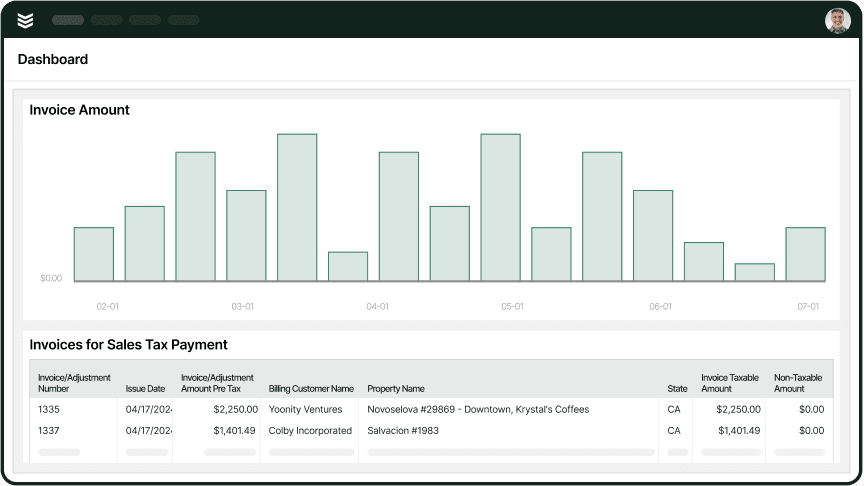
Contractors comparing platforms should look closely at what comes back from the field after a job closes. A complete closeout record supports faster invoicing, stronger cost control, and less time spent chasing missing details before the office can finish the work.
5. Commercial contractors want a platform that fits the work they actually run
Commercial contractors need field tech software that fits a business with service calls, project work, larger customers, and longer job histories running at the same time. A platform built around lighter work often adds friction once labor, purchasing, and financial follow-through start overlapping.
Commercial complexity shows up in the daily handoffs between the field, the office, and project teams. Software that cannot hold those handoffs together creates cleanup work, weakens visibility across the job, and leaves leaders managing growth through workarounds instead of one connected operating system.
How BuildOps prioritized this too: BuildOps was built for that operating model from the start. Materials & subcontracts supports the purchasing side of project work, construction operations speaks to teams managing field progress and margin, and financial management software helps connect job activity back to financial performance.
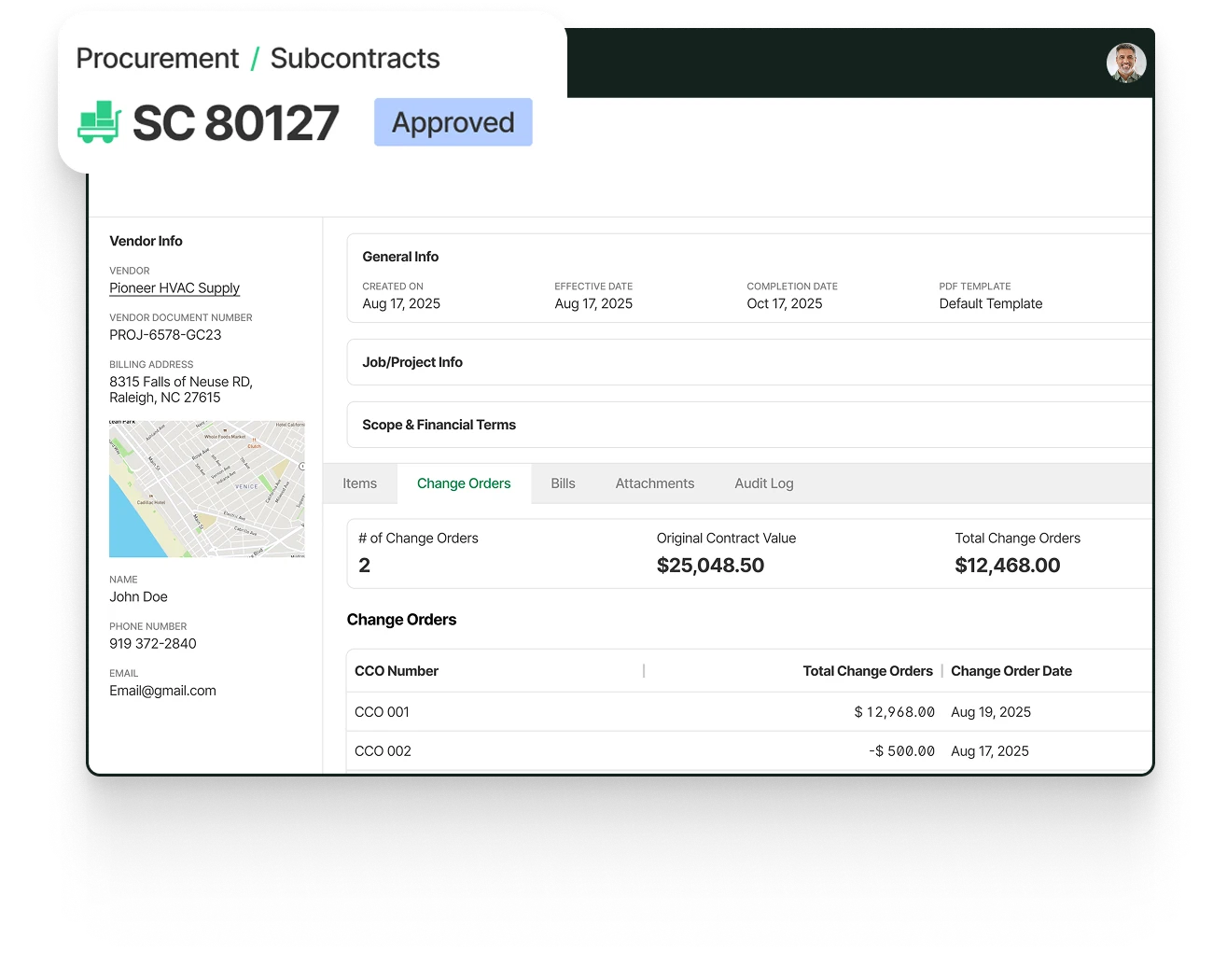
Contractors choosing software should look past polished screens and ask whether the platform can support commercial work at full scale. A strong fit shows up when service, projects, and financial follow-through stay connected even as job volume, scope, and customer expectations keep rising.
Choosing the right field tech management software for you: questions to ask in a demo
The priorities above tell you what to look for. A demo tells you whether the platform can actually hold up inside your workflows. Contractors usually get better answers when they ask direct questions about field execution, scheduling pressure, closeout, and billing instead of sitting through a generic product tour.
These are the questions contractors ask when they want to know how the system will work for the field, dispatch, and the office.
- Can you show me exactly what a tech sees before they head to the site? — Field teams need more than a job assignment before they arrive. A useful demo should show the full work order view, including service history, site notes, asset details, customer contacts, and attached files, so you can judge whether techs will show up prepared or spend the first part of the visit tracking down basic context.
- Can a tech still work if they lose signal on-site? — Signal drops are common in mechanical rooms, rooftops, basements, and large facilities. A serious demo should show whether techs can still capture notes, photos, forms, and closeout details without service, then sync the record later, because the field cannot stop working every time the connection gets weak.
- What happens when a service call turns into quoted work or a larger project? — Service work often leads to repairs, quoted scope, and project follow-through. A strong demo should show how the system carries job details forward when work gets bigger, because duplicate entry between service and project workflows slows the office down and breaks the continuity contractors need across the customer account.
- How does dispatch handle the day when priorities change at 10 a.m.? — Dispatch pressure usually shows up after the schedule is already built. A useful demo should show how the team reassigns work when jobs run long, urgent calls come in, or labor availability changes, so you can see whether the platform supports real-time decisions instead of falling apart once the day stops going to plan.
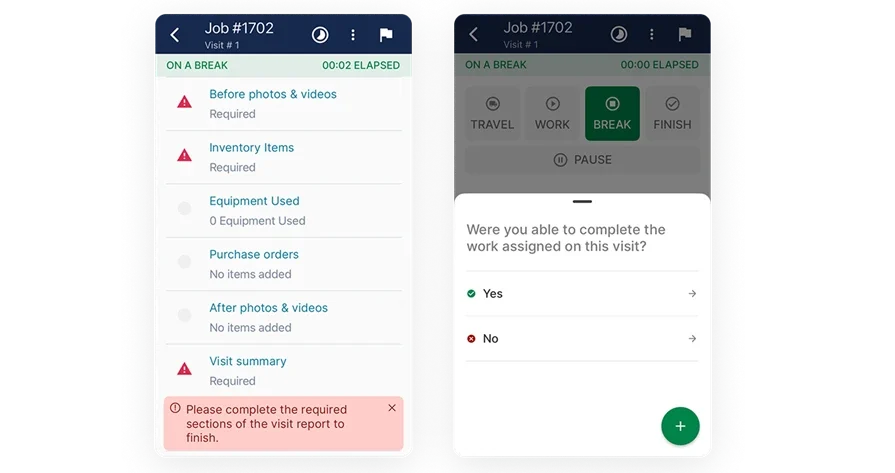
- What does the office get back when a tech closes the job? — Closeout quality affects billing speed, follow-up work, and margin visibility. A worthwhile demo should show whether labor, notes, photos, materials, approvals, and next steps come back in one clean record, because the office should not have to rebuild the job story after the truck has already left the site.
- How do those field notes turn into an invoice or job follow-up? — Billing speed depends on how cleanly field execution connects to the back office. A demo should show how job documentation moves into invoicing, follow-up work, and internal review, so you can see whether the platform helps the office move faster or creates another layer of cleanup before anyone can close the loop.
- What will this look like for our techs after the first week, not just on demo day? — Crew adoption decides whether the rest of the workflow holds up. A strong demo should show whether the field experience is simple enough to use every day, because better dispatch, cleaner records, and faster billing only happen when techs actually work inside the system instead of working around it.
{{related-content-block="/resources/adopting-field-service-ai"}}
6 other field technician management software FAQs asked by our customers
Teams usually have a few practical questions before they choose a platform. These are the ones that come up most often when contractors compare field tech software side by side.
1. What is the best field technician management software?
The best field tech software depends on the type of work your company runs every day. A commercial contractor managing service calls, quoted repairs, service agreements, and project work needs a different platform than a team handling simpler one-off residential visits.
- For commercial contractors: BuildOps is built to connect service, projects, and financials in one system. That makes it a strong fit for teams that need better field context, cleaner office handoffs, service agreement visibility, and a clear path from a service call into quoted or project work without starting over.
- For lighter-weight operations: If your team mainly handles one-off residential visits and does not need to connect service agreements, quoted repairs, or project workflows, a simpler residential-focused platform can be enough.
2. How do field technician management software work?
Field technician management software gives the office and the field one shared job record. Dispatch builds the schedule, the field tech works from a mobile app, and every status update, labor entry, photo, note, and closeout detail flows back into the same system instead of getting scattered across calls, texts, paper, and separate apps.
A strong platform connects more than the daily schedule. A strong platform keeps customer history, asset details, job notes, and billing records tied to the same workflow so the office can move work forward without rebuilding the job once the field portion is done.
3. How does AI automate workflows in a field tech management software?
AI helps most when it lives inside the workflow instead of adding another screen to manage. OpsAI for Field shows how intelligence built into the workflow can help surface job context, speed up documentation, and shorten the admin that usually follows a completed work order.
Field teams get the clearest value when AI removes routine steps that slow the day down. Faster recaps, cleaner field documentation, and clearer next actions for the office give contractors a practical way to cut extra admin without adding another layer of work.
4. Can field technician management software support both service and project work?
Commercial contractors regularly move from service work into quoted repairs, approved scope, and larger project execution. Field tech software has to carry that job story forward without forcing the office to recreate customer records, labor context, or job details in a second system.
Connected workflows separate commercial platforms from lighter tools built for simpler operations. Sales to operations handoff and construction field operations give teams a clearer path from field discovery to approved work and active execution.
5. What are the top benefits of using field technician management software?
The strongest benefits show up when the platform cuts cleanup work across the whole operation. Better field tech software gives the team cleaner handoffs, stronger schedule control, better job context in the field, and faster follow-through once the job is ready for billing or the next step.
- Better job history in the field
- Faster scheduling changes
- Cleaner field-to-office handoffs
- Less double entry across service and projects
- Faster invoicing and follow-up
- Better visibility into labor and job performance
6. Is field tech management software really worth the cost?
Field tech software is worth the investment when it gives the team time back and helps finished work turn into collected revenue faster. Contractors usually judge the price against billing speed, field productivity, schedule control, and how much cleanup the office still has to do after a job closes.
Public customer results show what that can look like in practice. Jackson Mechanical cut job creation and scheduling time by 50% and doubled the number of service tickets they could handle. Jolma Electric improved efficiency by 50% after replacing outdated field software.
“In our first year on BuildOps, we had 44% revenue growth, and year to date, we’re at 60% growth,” says Karly, from Rolls Mechanical. See how they closed their first year with BuildOps.
{{related-content-block="/resources/how-rolls-mechanical-closed-their-first-year-on-buildops-with-a-44-revenue-increase "}}
The stronger path is a system that keeps field execution, service follow-through, and project handoffs connected in one place. That is how commercial contractors get cleaner workflows, faster closeout, and a better read on the work while it is still moving.
BuildOps gives commercial contractors one system for service, projects, and financials, with OpsAI built into the workflow to help teams move faster without adding more admin. Book a demo to see how BuildOps fits the way your techs, dispatchers, and office actually work.