The Hidden Costs of Callbacks: Cut Returns, Build Trust

You close a ticket, then the phone lights up again. Another service callback. It drains paid hours, fuel, and patience. Strong callback management keeps crews billable and customers steady. That’s how teams run cost-effective field service across HVAC, plumbing, electrical, refrigeration, fire, and mechanical work.
In a mature field service management program, every return visit skews your callback rate, reshuffles routes, and chips away at margins you already fought to win.
Here’s what we’ll cover:
- What are service callbacks?
- Understanding the hidden costs of callbacks
- What is an average callback rate?
- Callback management: How to keep service callbacks down
Callbacks pile up quietly, then derail a day’s plan. Before we unpack the hidden costs, let’s align on a clean definition so your office and field are speaking the same language.
What are service callbacks?
Service callbacks are return visits on a closed ticket to fix issues tied to the original scope. They produce no new revenue and burn labor, fuel, and parts. Each service callback disrupts routes and squeezes margins. Even one can snowball into a day of missed work during peak service season.
Veteran teams define what qualifies and how it gets logged. Effective callback management assigns ownership, sets SLA timers, and routes photos and notes back to the office. It also checks warranty coverage and vendor responsibility, which keeps jobs billable and supports cost-effective field service.
Software ties it together across dispatch, mobile, and accounting. With asset history, cause codes, digital checklists, and warranty flags in field service management software, leaders track callback rate by tech, asset, and customer, then aim training and inventory where it counts.
{{related-content-block="/resources/field-service-management-software"}}
Understanding the hidden costs of callbacks
What looks like a quick service callback often turns into a chain reaction. Unpaid hours, overtime risk, fuel, and parts handling pile up. Schedules shift, clients wait, and profits slip. The real bill hides in capacity loss and reputation damage that rarely shows on a single ticket.
Where the costs hide:
- Direct job costs: nonbillable labor, overtime multipliers, fuel, tolls
- Lost capacity: a truck pulled off revenue work, delayed PMs and quoted projects
- Admin overhead: dispatcher and manager time rebooking, calling the client, updating notes
- Parts and vendors: restocking fees, emergency runs, warranty disputes and RMAs
- Revenue leakage: missed upsells, contract renewals at risk, churn from trust hits
- Risk and safety: rushed fixes, site access fees, shutdown windows, penalty exposure

To see the full impact, track causes and outcomes inside a modern field service ticketing system. Cause codes, warranty flags, and checklists reveal patterns that guide callback management and protect cost-effective field service.
Dialing in these factors turns guesswork into a plan. With clean data and ownership, you can measure the drag through your callback rate, then decide where training, parts standards, or workflow changes will hit hardest.
What is an average callback rate?
Callback rate is the share of closed tickets that require a return visit tied to the same job. Healthy operations keep this low. A rising callback rate signals gaps in diagnostics, parts readiness, QA, or communication that drag on profit and crew capacity.
Rates vary by trade and job mix. HVAC often sees wider swings due to equipment variety, controls, and seasonal loads. Electrical service tends to run tighter because work must pass inspection and follows strict standards. Install vs. repair, warranty work, and asset age also shift the baseline, so benchmark against your own history first.
Track callback rate by tech, customer, asset family, and task type. Segment maintenance vs. break-fix and install vs. service. Use those cuts to aim training, tighten checklists, and stock the kits that prevent a repeat service callback. Pair that analysis with disciplined callback management to protect cost-effective field service and keep trucks on revenue work.
Callback management: how to keep service callbacks (and costs) down
Callbacks happen. Pros plan for them. The goal stays simple: cut repeat visits, protect margin, and keep trucks on paid work. Use the plays below to tighten callback management across HVAC, electrical, plumbing, refrigeration, fire, and mechanical. The payoff shows up in a lower callback rate and steadier, cost-effective field service.
1. Build scheduling guardrails

Overstuffed routes lead to rushed exits and loose handoffs, which create the next service callback. Cap daily capacity by crew, block late-day starts for complex work, and reserve a small pool for callback slots so dispatch does not rob revenue jobs. Pair skills to task risk, and keep an unassigned queue that supervisors can groom each morning. Guardrails steady the day and give techs enough runway to verify fixes before leaving.
2. Set a clear callback policy
Define what qualifies, how it is logged, and who owns the fix. Put the rules in your mobile app so techs can pull them on site. Include SLA timers, photo and reading requirements, warranty checks, and a simple client update script. A clean policy strips debate, speeds approvals, and limits free work to the cases that deserve it.
3. Forecast workload to protect capacity

A realistic forecast prevents whiplash. Blend maintenance calendars, open quotes, and seasonality to predict load by trade and crew. Staff to that picture and hold a small buffer for priority returns. When leaders see the pile coming two weeks out, they can stage parts, reshuffle installs, and keep callback windows tight without starving paid work.
4. Upgrade diagnostics before dispatch
Root cause beats repeat travel. Pull asset history, prior tickets, and cause codes before the truck rolls. Add a short triage call with a senior tech when symptoms suggest a tricky fault. Package a simple plan with suspected causes, tests to run, and documents the tech will need. Better diagnostics shrink drive time and keep a fresh callback off tomorrow’s route.
5. Measure, coach, and recover costs
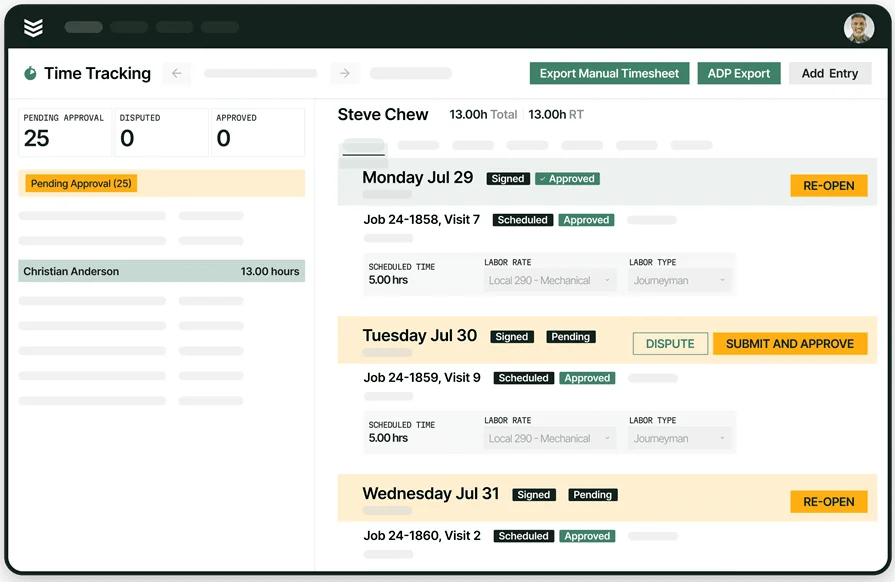
Track every callback with labor, parts, cause, and warranty status. Review trends weekly by tech, asset family, customer, and task type. Use quick tailgate coaching to close skill gaps and update checklists when a pattern appears. File RMAs and vendor claims when parts fail. This discipline lowers your callback rate, strengthens training, and keeps operations cost-effective.
6. Tighten office-to-field handoffs
Clarity blocks rework. Use work order templates that capture scope, site rules, and shutdown windows. Match quotes to conditions with current photos. If the scope shifts, push a clean change order with price and proof. Straight handoffs limit scope drift, prevent returns, and keep crews moving.
7. Raise first-time-fix readiness
Standardize van stock, stage parts for scheduled jobs, and give techs instant access to manuals and wiring diagrams. Track picks and returns so the warehouse stays accurate. When the kit matches the fault and the documentation sits in the mobile app, fixes stick and repeat visits fade.
The numbers tell a simple story. Every service callback chips away at capacity, cash, and trust. When teams tighten diagnostics, handoffs, QA, and scheduling, they reclaim hours and protect customer relationships. That shift powers cost-effective field service without adding headcount.
Many tools cover one slice of the workflow while leaving gaps that create return visits. BuildOps brings ticketing, asset history, checklists, skills-based dispatch, warranty flags, inventory, time tracking, and reporting into one platform. Those capabilities give leaders a clear callback rate, fast root-cause insight, and steady callback management across HVAC, electrical, plumbing, refrigeration, fire, and mechanical. These are not standard in most systems, and having them together keeps crews focused on paid work.
Curious how this would look with your operation? We can walk through a typical day, show the flow from call to close, and you decide if it fits. If the demo does not click, no hard feelings. If it does, your team gains a cleaner path to zero return visits.
Want to take a closer look? Book a short session to see how BuildOps supports callback management and cost-effective field service. No pressure, just a practical walkthrough with your use cases.