Knowledge Management in the Construction Industry

If experience is the best teacher, how do construction teams communicate the years of experience their tenured employees have so that newer workers don’t have to make the same mistakes to learn the same lessons? Sharing this experience and information is knowledge management (KM) in the construction industry, a key factor in contractors’ continued success.
The most important part of construction knowledge management is sharing knowledge with others. A bank of information is not worth much if no one knows it exists or how to use it. Often, team members store the information they need in their own systems. Design team members, such as architects and engineering consulting firms, store drawings in AutoCAD or Revit, while contractors store budget and cost data in their accounting software. Other project participants don’t have access to this data, creating information silos that lead to communication breakdowns.
In the field, retiring experienced workers need to transfer their knowledge and experience to the younger workforce entering the industry. If they don’t, their younger counterparts are doomed to repeat mistakes that could have been avoided, wasting time and money.
The good news is that the rise of artificial intelligence (AI) has made it possible to search across all project information, past and present, to find answers to questions or assistance in resolving issues. Teams can use this information to make better-informed decisions and prevent problems, saving everyone time and money.
In this article, we’re going to cover:
- What is “knowledge management” in construction?
- Why mastering knowledge management is crucial in construction
- How to establish a knowledge management system in a construction company
- Effective tools for your construction knowledge management system
Let’s get started with a deeper look at construction knowledge management.
What is “knowledge management” in construction?
Knowledge management in construction refers to knowledge sharing, which can include insights, data, and information, among construction project teams, both across an individual project and within a company. Building on past experience, it helps teams improve efficiency, reduce waste and errors, and enhance decision-making.
Because the construction industry is project-based and teams are often fragmented into strict roles, information and knowledge sharing is always a challenge. Due to the pace of today’s projects, which often require quick decision making, there’s no time to consult more experienced colleagues for guidance. This can result in preventable delays and costly rework.
Implementing a knowledge management system requires construction companies to shift their culture toward open information sharing rather than hoarding it. This shift must come from company leadership first before workers in the field will buy in.
Key aspects of knowledge management in construction
The following are key aspects of a knowledge management system:
- Knowledge capture, particularly mistakes and how they were resolved
- Digitization and distribution of information into formats that are accessible
- Capturing personal experiences and the knowledge gained from them
- Technological tools that are used to capture, distribute, and find construction data when it’s needed
What “construction knowledge” needs to be documented and passed on?
On any given construction project, a large amount of data and documentation is created. It’s collected throughout a project and helps contractors and construction project teams by providing legal protection, preventing mistakes in future projects, and supporting ongoing maintenance.
Here are a few types of information that construction teams need to document:
- Project documentation – Including plans, as-built drawings, specifications, calculations, contracts, scope changes, etc.
- Material and product information – Shop drawings, product data, testing reports, and other documentation showing quality control.
- Daily reports and field notes – A daily log of site events, manpower, inspections, weather, issues, visitors, etc.
- Safety information – Safety citations, site photos, and inspection reports.
- Operations and maintenance information – Documentation provided by product or equipment manufacturers regarding the care and maintenance of their products.
- Punch lists – A list of items or tasks that need attention or are defective or missing just before the work is complete. Also documents the owner’s or customer’s approval of the work.
- Lessons learned from mistakes – This is the most difficult, but important, knowledge to capture to prevent issues on future projects.
This list does not include all the knowledge on a construction project, as each project is different, but it is meant to illustrate the types of information that need to be captured.
What are the main challenges teams face when trying to establish a construction knowledge management system?
Most construction companies can expect to face a few challenges when establishing a KM process.
- Getting team member buy-in – It can be difficult to convince everyone about the advantages of establishing a system for collecting knowledge and getting them to adapt to new processes.
- Process development – For knowledge management to be successful, structured, repeatable processes need to be created to capture knowledge during all phases of a construction project.
- Selecting tools or technology – Teams must determine the best tools and technology to fit their specific needs and the needs of their employees.
- Lack of training – All workers need to understand how the knowledge management system works and the direct benefits of using it.

Why mastering knowledge management is crucial in construction
An effective construction knowledge management process enables construction companies to improve efficiency, retain critical knowledge, achieve continuous improvement, and increase profitability, all of which lead to improved business performance. Here are they key reasons to make sure you have a good construction knowledge management system in place:
- Increases productivity and efficiency - By reducing errors and proactively addressing potential problems, sharing construction industry knowledge can increase productivity and work efficiency.
- Helps teams retain critical knowledge - Experiential knowledge, such as lessons learned, is often the most valuable, and with the high rate of turnover in the construction industry, capturing expertise and passing it down becomes crucial to continued company success.
- Fosters continuous improvement - Building on others' knowledge and experience gives teams actionable knowledge that allows them to focus on improving their performance over time. When information is lost, it can slow innovation.
- Boosts profitability - By reducing costly rework and avoiding mistakes, knowledge management increases company profitability and lowers costs for construction project owners.
How to establish a knowledge management system in a construction company
These steps will help guide you through the process for establishing a knowledge management system:
Step 1. Identify the information you want to capture
Identify the critical information and/or experiences that need to be documented or captured for sharing with others. Examples include project documents, error and resolution records, daily report data, and safety investigations and citations.
Step 2. Research and select the proper tools
Search for technological and/or software tools that will allow you to capture the information identified above. The tools should support the storage and retrieval of information in all forms and be accessible from both the office and the field.

Are your techs ever wasting time on the jobsite unable to get access to a building because they don’t have the right security codes? Or try to call the site manager at the wrong phone number? Or their schedule got changed at the last minute to respond to an emergency, but they drove to their originally scheduled appointment because they didn’t get the update? This is what happens when jobsite information updates aren’t contained in a single source of truth.
BuildOps has a service management suite of tools that connect all team members from first quote to dispatch to jobsite work, and right through to invoicing. All information including customer details, job notes, and even reporting are synchronized in the app for both field techs and back office. It’s all accessible in one place, so when information is updated, it’s updated everywhere.
Step 3. Develop construction data collection processes
Using the selected tools, create processes and procedures for employees to follow to ensure all construction data is captured and how they will be distributing knowledge to others. Include what tools are to be used, how they will be used, and what information needs to be recorded.
Step 4. Perform a trial with a small group of users
Before releasing the tools and procedures, test them with a small group of users to identify any issues or bugs. Adjust processes or tools as needed to ensure a smooth workflow.
Step 5. Train all personnel on how to use the system
Everyone should have access to the system's information and receive thorough training on how to add and search for it, as well as know which KM activities they are responsible for.
Step 6. Assess and make changes
Periodically assess how the system works, and don’t be afraid to make changes when necessary. Ensure that all changes are communicated to all workers affected.
Effective tools to use for your construction knowledge management system
Here is a list of some of the tools you can use to create your own construction knowledge management system.
1. BuildOps
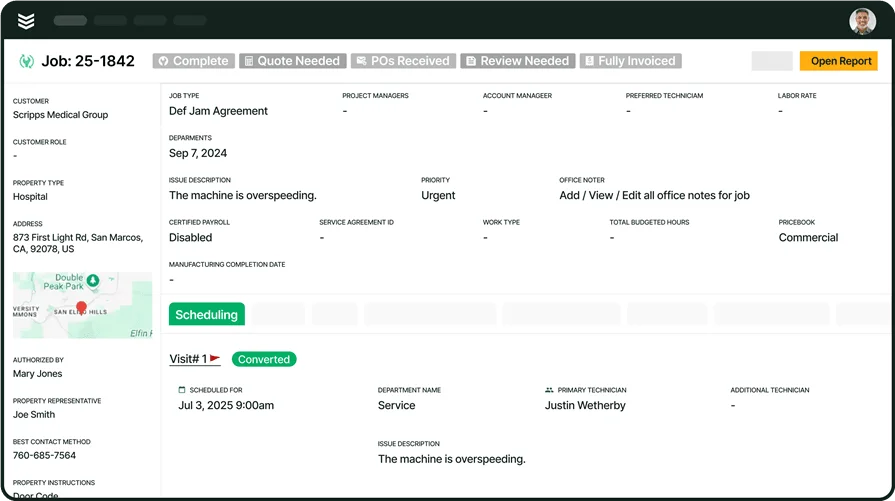
BuildOps provides comprehensive information storage for service contractors, including documents, quotes, scheduling, costs and cash flow, and invoicing, ensuring that everyone on your team is on the same page, no matter where they are located. The BuildOps desktop and app have the same functionality and information, so no matter which team member it is, they have access to the critical jobsite information—right in the palm of their hands.
By consolidating all your records and information in one location, you simplify the search process without training your team on multiple tools, thereby increasing implementation speed.
2. Document management
This type of software allows you to store and retrieve documents and files based on search criteria. It can also provide tools for digital markups and quantity takeoffs to increase productivity and track changes, as well as version control to ensure everyone is working from the latest revisions.
Document management software will help ensure all project participants have access to real-time versions of documents and drawings, which is essential for avoiding field issues and preventing rework.
3. Project management or ERP software
Keep all your project data, including documents and cost information, on a single all-in-one platform. By integrating accounting and project information, these tools give teams access to all data without having to search across multiple tools.
Having all your information on one platform simplifies searching and ensures workers receive everything they need to make key decisions.
4. Field collaboration
These tools enable quick sharing of information between the office and the field, providing up-to-date information, including drawings, specifications, and responses to field questions. Some also allow field personnel to record markups and as-built changes digitally.
These tools enable critical communication with the field, with real-time information updates and the ability to search for in-field experiences that are time-sensitive.
5. Productivity and task management
General productivity or task management tools include Notion for organizing knowledge and notes, and ClickUp for task management and project tracking.
No matter which tools you select, look for those that provide:
- Centralized storage for RFIs, field notes, submittals, drawings, and other documents
- Version control to help ensure teams are working with the latest documentation
- Mobile accessibility
- Robust search parameters
Construction knowledge management helps ensure that all project participants are on the same page, have the most up-to-date information, as well as have access to a wealth of experiential data that traditional methods don’t allow for. By sharing knowledge and lessons learned, teams can improve their efficiency and help save project owners time and money.
BuildOps is designed to capture all your information in one platform, so you don’t have to go searching through multiple tools to find the construction data you’re looking for.