

Keeping equipment online, staying ahead of preventive schedules, and closing out work orders on time—that’s the backbone of any maintenance team. But when service calls pile up and asset histories are buried in scattered spreadsheets, everything slows down. Maintenance management software steps in as the central system that keeps field crews coordinated and gives the back office clear, real-time control.
Maintenance operations sit at the core of the field service management industry, and getting this piece locked down has a direct impact on uptime, profitability, and customer retention.
In this guide, we'll break down the following:
- Choosing the best maintenance management software for your team
- 6 key features to look for in a maintenance management system
- Best software for commercial contractors
- Best software for residential contractors
- Best software for general contractors
- Other notable maintenance management service software
- 7 benefits of using maintenance management software
- 4 important maintenance management software FAQs answered
A five-truck residential platform will snap under a multi-site commercial load. Start by mapping real workflows, asset types, and roles. Then pick software that fixes your real problems, not the ones a sales demo dreams up.
Choosing the best maintenance management software for your team
Choosing maintenance software starts with how your crews, assets, and workflows actually run each day. Whether you manage preventive work across multiple properties or tackle urgent breakdowns, the platform should mirror the real flow of work from office to field.
The right setup cuts manual tracking, closes scheduling gaps, and gives coordinators clear visibility—without adding extra steps or new bottlenecks.
- Team structure and work order flow - Are your maintenance coordinators and field techs operating from the same system? Does the platform handle both scheduled preventive tasks and on-demand emergency requests? Can techs pull up asset history and work order details without calling back to the office?
- Communication and real-time visibility - Can dispatchers and field crews stay synced without constant phone check-ins? Do techs receive instant updates when priorities shift mid-day? Are customers or facility managers notified automatically when a tech is en route or when work wraps up?
- Tool integration and data syncing - Does the system connect with your existing accounting, inventory, and invoicing tools? Can it centralize asset records, labor hours, and parts usage in a single view?
- Scalability as operations grow - Can the platform handle additional locations, larger asset inventories, and bigger crews without performance issues? Does pricing remain predictable as your team scales, or do per-user fees stack up fast?
- Features tied to broader field operations - Does it include automated scheduling, mobile work order access, and equipment tracking to keep techs productive between stops? Can the system feed data into your wider field service workflows, like dispatching, quoting, and reporting, so maintenance does not run in a silo?
Once you understand how your team actually works in the field and what your tech stack needs to support, the next step is zeroing in on the features that truly move the needle. Next, we’ll unpack the six must‑have capabilities every modern maintenance management platform needs to deliver real, measurable results.

6 key features to look for in a maintenance management system
Maintenance teams need tools that pull their weight from first work order to final closeout—connecting schedules, tracking crews, automating follow-ups, and keeping every asset and job on track. Here are six features that separate a capable platform from one that adds clutter.
1. Work order scheduling and technician dispatching
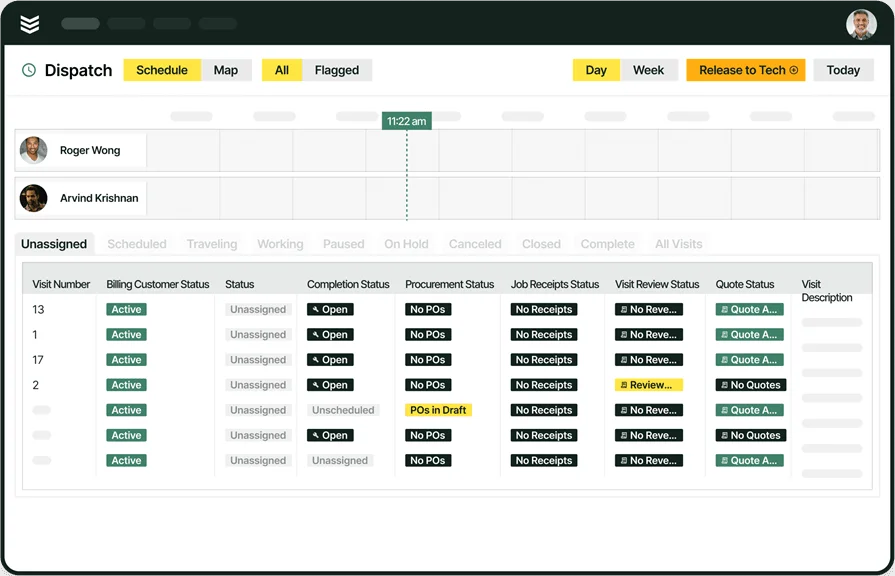
A maintenance management system lives and dies by how it handles work orders and crew assignments. Drag-and-drop scheduling tied to a real-time smart dispatch board gives coordinators full visibility into who is available, what equipment is needed, and which jobs carry priority. Missed windows and idle techs cost money, and a platform that automates assignment logic and updates the board instantly eliminates the guesswork that bogs down daily operations.
2. Technician mobile access to work orders

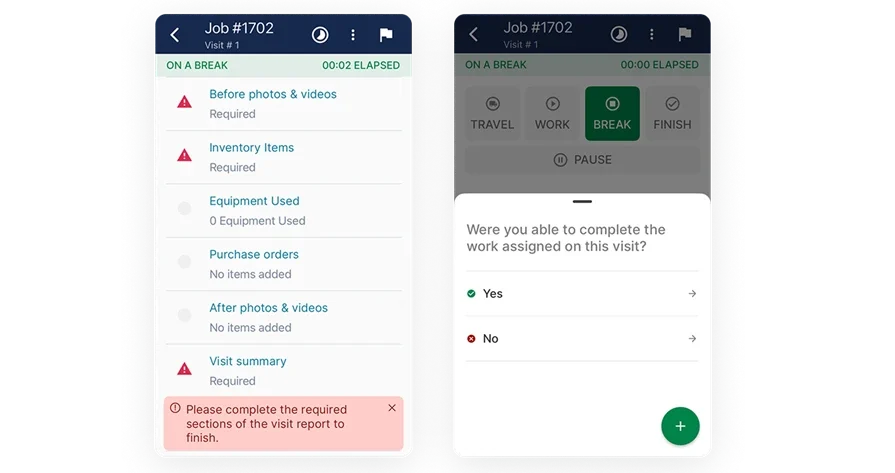
Field techs need instant access to work order details, asset history, checklists, and customer notes without calling the office. A reliable technician mobile app puts everything in their hands the moment a job is assigned. The less time spent chasing information, the faster work gets completed and the fewer callbacks your team has to manage.
3. Preventive maintenance and service agreement tracking
Recurring maintenance contracts and preventive schedules are revenue anchors for field service businesses. Software that automatically tracks contract terms, visit cadences, and task requirements through built-in service agreement tools keeps those commitments from falling through the cracks. Techs know when and where to show up, and the office stops wasting hours on manual reminders and spreadsheet tracking.
4. Time tracking for labor and job costing

Accurate labor data drives profitability analysis and payroll accuracy. Built-in time tracking captures clock-ins, job duration, and breaks directly from the field, giving managers a clear picture of how labor hours align with job estimates. When every minute is logged automatically, the admin team stops chasing timesheets and starts making decisions based on real numbers.
5. Invoicing and payment processing

Delays between job completion and billing erode cash flow. The best maintenance management software connects completed work orders directly to invoicing and payment tools, so your team can bill the same day a job wraps. Automated invoice generation tied to field data removes the back-and-forth between techs and accounting, and gets revenue collected faster.
6. AI-powered maintenance insights and reporting
Maintenance data only has value when it surfaces patterns and drives action. Platforms with AI capabilities for field services can analyze asset performance trends, flag equipment approaching failure thresholds, and recommend proactive service intervals.
Paired with robust reporting dashboards, software for maintenance management turns raw field data into operational intelligence that helps managers allocate crews, forecast parts needs, and identify underperforming assets before they become emergencies.
Want to see how we can help?
Equip your maintenance crew with the tools they need to get jobs done faster.
Best software for commercial contractors: BuildOps

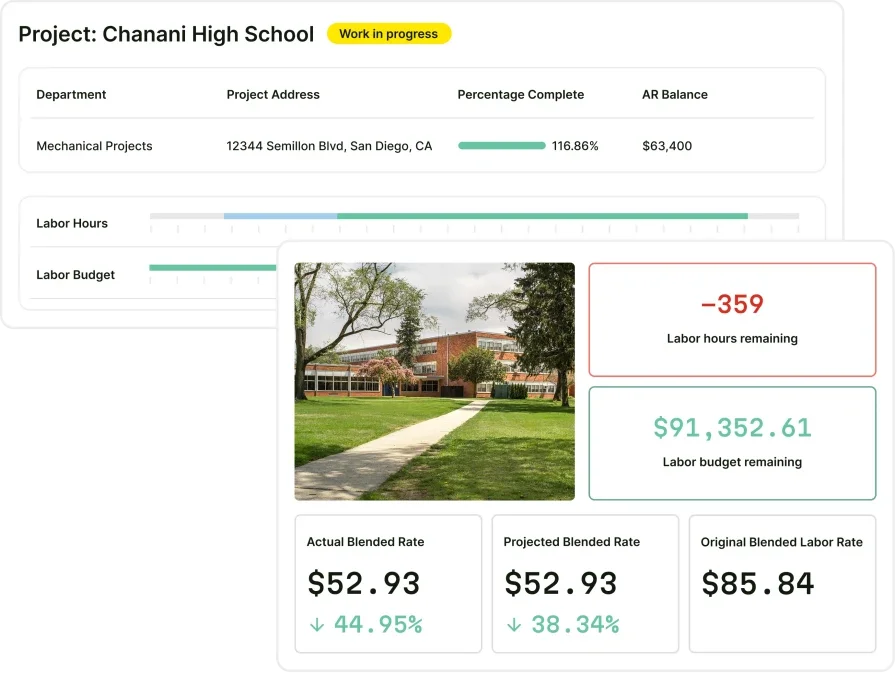
BuildOps is the AI‑native platform built for commercial contractors running high-volume maintenance operations, multi-site facility programs, and field teams that demand real-time coordination between the office and the job site.
By combining an intelligent, real-time dispatch board with AI-driven work order automation, BuildOps gives maintenance coordinators a single place to schedule, assign, and actively manage preventive and reactive work as it happens—so every asset, technician, and site stays one step ahead.
How pricing works: BuildOps offers live weekly demos and customized sessions to walk teams through the features that match their maintenance workflows.
Features beyond maintenance management: Quoting, invoicing, project management, time tracking, CRM, and detailed service records.
What sets it apart for commercial contractors: BuildOps stands out with its ability to handle complex asset structures, recurring service agreements, and technician routing from a single screen, keeping large-scale maintenance operations aligned without bouncing between disconnected tools.
Keep crews moving with BuildOps
Always dispatch the right tech for the job, so your maintenance contracts run without gaps.
Best software for residential contractors: Housecall Pro

Image Source: Housecall Pro
Housecall Pro gives residential contractors a streamlined hub for scheduling, dispatching, and managing maintenance work orders across smaller service teams. It offers drag-and-drop scheduling, automated customer notifications, online booking, and built-in payment processing that simplifies day-to-day operations for crews handling routine home maintenance.
The platform is accessible and quick to set up, making it a practical option for teams that need to get organized fast. That said, contractors managing larger asset inventories or multi-location commercial accounts may find its reporting and workflow customization too limited for sustained growth.
How pricing works: Plans start at $59/month for a single user, with tiered pricing based on team size and feature access.
Features beyond maintenance management: Online booking portal, in-app customer chat, and automated review requests.
What sets it apart for residential contractors: Housecall Pro's consumer-facing tools, like online booking and automated follow-ups, help residential maintenance teams stay connected with homeowners without extra admin effort.
Deep Dive
If you want to dig in and see which tool has better electrician management features that meet your specific team’s needs, check out our side-by-side comparison of our tool and Housecall Pro.
Best software for general contractors: Jobber

Image Source: Jobber
Jobber delivers a clean, all-in-one platform for general contractors juggling mixed job types, from scheduled maintenance visits to on-demand repairs across residential and light commercial properties. It covers scheduling, quoting, invoicing, and client management in a single interface, giving smaller teams centralized control without a steep learning curve.
However, teams running high-volume commercial maintenance with deep asset tracking needs or multi-tier customer hierarchies may find the platform lacks the operational depth required at that scale.
How pricing works: Plans start at $29/month for a single user, with scaling tiers based on team size and feature needs.
Features beyond maintenance management: Client hub with self-service options, automated quoting, and batch invoicing.
What sets it apart for general contractors: Jobber balances simplicity with enough operational coverage to keep general contractors organized across varied job types, making it a practical starting point for teams that need to centralize maintenance workflows quickly.
Other notable maintenance management service software
Field service companies come in all sizes. The software that fits a ten-tech commercial team can be way too much for a three-person residential outfit. Some platforms prioritize simplicity and speed; others are built for contractors juggling varied job types across multiple sites.
Here are five more maintenance management tools known for their flexibility and trade-specific strengths.
ServiceM8

Image Source: ServiceM8
ServiceM8 is a cloud-based job management and scheduling solution designed for small service businesses handling routine maintenance work. It includes real-time scheduling, live job tracking, and a mobile app that keeps techs and office staff in sync. Automation features handle scheduling follow-ups, job notifications, and instant invoicing once a task is marked complete.
It fits smaller maintenance teams well, though businesses managing larger asset portfolios or complex preventive schedules may find its customization options limited.
How pricing works: Starts at $29/month, based on usage tier.
Features beyond maintenance management: Digital forms, automatic follow-ups, and online booking.
What sets it apart: ServiceM8 simplifies field admin with automation and a clean mobile experience that keeps small crews organized.
FieldPulse

Image Source: FieldPulse
FieldPulse delivers a service platform that combines CRM, invoicing, dispatching, and time tracking into one interface. It provides real-time job status, GPS integration, and built-in communication between coordinators and field techs, making it a practical option for small to midsize maintenance teams.
That said, contractors who need advanced reporting or granular asset tracking may feel constrained as their operation scales.
How pricing works: Offers a three-tiered pricing model, available upon request.
Features beyond maintenance management: Customer relationship management, mobile invoicing, and team messaging.
What sets it apart: A solid all-in-one choice for growing contractors who need centralized control over maintenance workflows without bouncing between tools.
Want to see how FieldPulse stacks up against BuildOps? Check out our comparison of BuildOps vs. FieldPulse.
WorkWave Service

Image Source: WorkWave
WorkWave Service targets contractors in HVAC, plumbing, and electrical trades who need tight control over maintenance scheduling and route logistics. It includes route optimization, automatic job scheduling, and customer self-service portals. While the platform carries solid depth for trade-specific maintenance teams, it may feel overly complex for operations with straightforward scheduling needs.
How pricing works: Custom pricing based on company size and use case.
Features beyond maintenance management: Route optimization, customer self-service, and automated billing.
What sets it apart: Strong fit for specialized contractors who need to minimize drive time and tighten maintenance route efficiency across dense service areas.
FieldEdge

Image Source: FieldEdge
FieldEdge helps HVAC and field service teams manage maintenance operations with built-in scheduling, live status updates, and integrated customer tracking. Its real-time dispatch board gives teams visibility across service calls, job progress, and open time slots.
That said, FieldEdge leans heavily toward HVAC-specific use cases, which may not suit contractors operating across multiple trades or managing diverse maintenance portfolios.
How pricing works: Offers tailored pricing based on business type and team size (Select, Premier, Elite).
Features beyond maintenance management: Service agreements, quoting, maintenance tracking, and performance dashboards.
What sets it apart: A clean interface and specialized features make it a strong option for HVAC-focused maintenance workflows.
ServicePower

Image Source: ServicePower
ServicePower delivers an enterprise-grade platform aimed at complex field maintenance operations with large technician pools and distributed service territories. It supports intelligent job matching, workforce automation, and real-time communication between field teams and maintenance coordinators.
The scale and customization options fit national or multi-regional operations, though it may be too feature-heavy for contractors who need something lean and fast to deploy.
How pricing works: Quote-based pricing tailored to enterprise requirements.
Features beyond maintenance management: AI-driven scheduling, warranty management, contractor network integration, and mobile workforce support.
What sets it apart: Designed for enterprise field service firms managing hundreds of techs and maintenance coordinators across wide service territories.
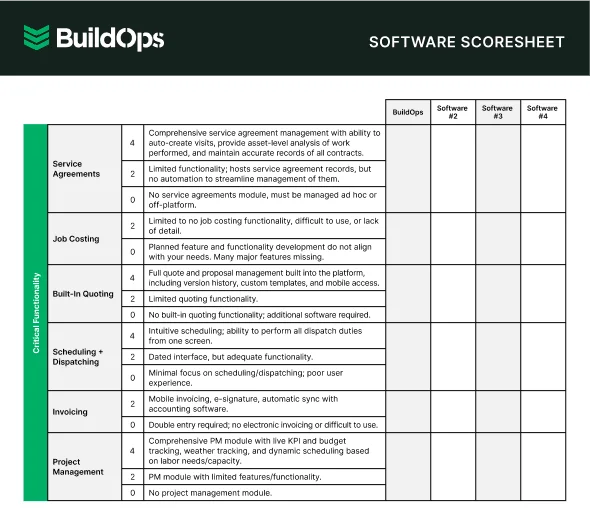
Get the software scoresheet
Find the best tool for you with an easy-to-use comparison scoresheet.
7 benefits of using maintenance management software
Maintenance operations are key to uptime, asset reliability, and customer retention. The right maintenance software tightens preventive schedules, reduces emergencies, and keeps technicians synced with real-time office-to-field updates—turning daily maintenance into measurable results.
1. Fewer equipment failures and emergency calls
When preventive maintenance schedules are automated and tracked in one system, assets get serviced on time and breakdowns drop. Teams that rely on manual tracking or spreadsheets inevitably miss cycles, which leads to costly emergency repairs.
Platforms with built-in field service automation keep PM tasks on schedule and reduce the volume of unplanned work orders that eat into margins.
2. Tighter scheduling with fewer gaps
The busier the board gets, the easier it is for maintenance visits to slip through the cracks. A connected platform that links scheduling, tech availability, and customer communication prevents double-bookings and missed appointments.
When everything syncs in one place, coordinators spend less time reworking the calendar and techs stay productive between stops.
Deep Dive
AI is changing how maintenance teams manage assets, predict failures, and allocate field resources. From intelligent work order routing to asset-level pattern detection, contractors are tightening PM programs, catching issues before they escalate, and scaling maintenance operations without adding headcount.
The top AI use cases in field service show how leading contractors turn maintenance data into proactive decisions that protect uptime and grow profitability.
3. Faster response to high-priority work orders
When an urgent maintenance request lands, coordinators need to know who is available, where they are, and how quickly they can arrive. A system that updates in real time allows teams to reassign calls, notify techs, and get to critical jobs without delays. In fast-paced service environments, that speed separates contractors who hold accounts from those who lose them.
4. Full visibility across field and office teams
Knowing what is happening on every job site without chasing down phone calls keeps operations running clean. Coordinators, managers, and techs all work from the same live data, which eliminates crossed wires and duplicate work. With proper field service reporting, teams can monitor work order status, asset conditions, and job resolution at any point during the day.
5. Centralized data that drives smarter decisions

A strong maintenance platform stores the patterns behind every work order, asset, and tech assignment. Over time, that data helps managers identify which techs are most efficient, which assets drain the budget, and where service requests cluster. Clean, real-time data from field service dashboards gives contractors the insight to adjust staffing, forecast parts needs, and improve without digging through spreadsheets.
Teams tracking the field service metrics and KPIs that matter can tie maintenance performance directly to revenue outcomes.
6. Stronger customer experience from first call to closeout
No facility manager or property owner wants to chase updates. With automated alerts, clear ETAs, and job summaries sent straight from the field, customers stay informed without calling in. That consistency adds up to smoother service, fewer complaints, and longer contract retention.
7. Greater technician accountability on every job

When every job check-in, status update, and completed task gets logged directly from a mobile device, techs stay focused and accountable. There is no guessing who handled what or when. It is all tracked, time-stamped, and visible to the team. That visibility builds trust, speeds up admin, and helps everyone stay on task.
4 important maintenance management software FAQs answered
Field service teams moving from manual or disconnected tools usually ask the same questions about maintenance software. Whether you’re comparing vendors, justifying the investment, or planning a rollout, the four answers below focus on what contractors actually care about: functionality, workflows, ROI, and implementation.
1. What is maintenance management software?
Maintenance software helps field service teams schedule, assign, and track maintenance work orders from first call to closeout—keeping the office and field in sync with real-time updates.
It centralizes asset histories, labor, parts, and service agreements so nothing slips through the cracks when the board fills up.
2. How does maintenance management software work?
The system creates a live connection between maintenance coordinators, field techs, and facility managers or property owners. Here’s how a typical workflow runs:
- Coordinators create and assign work orders based on tech availability, skill set, and proximity.
- Techs receive full job details, asset history, and step-by-step checklists on their mobile devices instantly.
- Preventive maintenance tasks trigger automatically based on time-based schedules, meter readings, or asset conditions.
- Office teams monitor progress in real time, reassign work as priorities shift, and follow up with customers upon completion.
It replaces the patchwork of whiteboards, spreadsheets, and phone calls with a centralized hub that keeps field and office teams working from the same real-time data.
3. Is maintenance management software worth the investment?
For contractors running multiple techs on recurring maintenance, the ROI is immediate. Automated PM scheduling cuts missed visits and protects contract revenue. Digital work orders reduce rework, and centralized labor and parts data helps you price every job with confidence.
The real cost isn’t the platform—it’s revenue lost to gaps in scheduling, callbacks, and churn from inconsistent service. Teams that move to a unified maintenance system see tighter margins, faster invoicing, and stronger customer retention in just a few months.

4. What are the best practices for implementing maintenance management software?
A smooth rollout is won in the prep, not the flip of a switch. Skip planning, and you get low adoption and software that just sits. Here are ten rollout habits top contractors rely on when launching maintenance management tools.
- Audit current maintenance workflows to find delays, errors, and data gaps.
- Define the work order types, asset categories, and service agreements required at launch.
- Choose a platform that integrates with your accounting, CRM, and inventory systems.
- Migrate asset histories, customer records, and open work orders before go-live.
- Train coordinators/dispatchers first, then roll out mobile access to techs in phases.
- Configure automated triggers for PM schedules, contract renewals, and parts reorders.
- Create standardized work order templates to ensure consistent job data capture.
- Set KPIs for completion time, first-time fix rate, and PM schedule adherence.
- Gather tech and office feedback after 30 days and refine configurations.
- Review dashboards monthly to spot trends in asset performance, labor, and profitability.
When every work order, preventive schedule, and asset record lives in one system, maintenance stops being a guessing game and starts running like an operation built to scale. The features covered in this guide, from automated PM scheduling to AI-powered insights and real-time field visibility, separate platforms that carry weight from those that create extra steps.
Most tools cover a few of these capabilities. BuildOps brings them all together in a single, AI-native platform designed for the trades, giving commercial contractors full control over maintenance workflows without stitching together disconnected software.
If you want to see how that looks in practice, BuildOps offers a free demo with zero obligation. Walk through the platform at your own pace, ask the questions that matter to your operation, and decide if it fits.
Unify Your Field Service with BuildOps
Connect technicians, trucks, and teams so jobs run smoothly and finish on time.