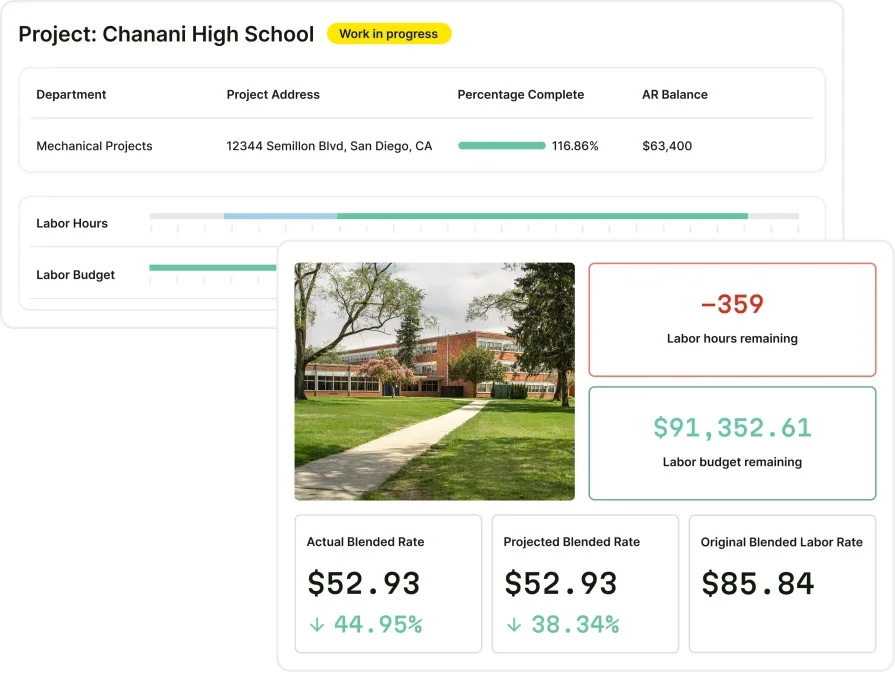
How to Increase Software Adoption for Field Crews

Tech adoption often breaks down in the field for a simple reason: work moves fast, and crews default to whatever keeps the job on schedule. When your dispatch board, work orders, asset history, and invoicing all live in one system—but techs are still calling the office for answers—you do not have a tools problem, you have an adoption problem.
In the field service industry, that gap turns into late closeouts, missing notes, unreliable job costing, and an office team forced to recreate what should have been captured in real time on-site.
Here’s what we’ll cover:
- 6 stages of software adoption for field service teams
- Software adoption benefits for FSM contractors
- Software adoption best practices all FSM teams should follow
- Software adoption metrics: how to measure success
Next, we will walk through the six stages and show you how to increase software adoption without slowing down production.
6 stages of software adoption for field service teams
Rolling out new software to a field service team isn’t a single “go live” moment; it’s a staged journey. The most successful contractors avoid rushing. They first confirm the software is the right fit, then move through design and configuration, hands-on training, real‑world testing, and ongoing optimization.
The six-stage framework below helps you explain to leadership, office staff, and technicians what will happen, when it will happen, and why each step matters for long-term success.
Stage 1: Demo & evaluation
This stage is about proving the system can run your business. Your team walks through real scenarios: emergency calls, quoted jobs, projects, maintenance visits, and billing. You test dispatch, mobile workflows, job costing, and accounting exports. By the end, you’ve confirmed must‑have requirements, spotted any gaps, and aligned internally on why a new platform is worth the change.
Stage 2: Discovery & planning
Here the project team learns how your operation actually works today. Workshops map the flow from lead to job to invoice, and how office, field, and accounting teams hand work off. You document data sources, integrations, constraints, and success metrics. That all rolls into a dated plan with clear owners, milestones, risks, and a rollout order for branches or divisions.
Stage 3: Configuration & data migration
With the plan locked in, a non‑production environment is set up to mirror your business. Service types, project templates, price books, forms, permissions, and approval rules are configured to match agreed workflows. In parallel, your data is pulled from legacy systems, cleaned, mapped into standard templates, and checked by your subject‑matter experts. That data is then imported so the system behaves like your operation, not a generic demo.
Stage 4: Training & testing
Next, real users get hands‑on time before anything goes live. Office staff and field leads are trained in the test environment using short role‑based sessions and simple online modules. They run full scenarios: create a quote, schedule the job, log time and materials, issue purchase orders, and send invoices through to accounting. Every issue they find—missing fields, confusing screens, integration hiccups—is logged and fixed while the impact is still low.
Stage 5: Go-live
Go‑live is a controlled cutover, not a surprise. A clean production environment is prepared by copying the final configuration and loading fresh customers, open work, and balances. Numbering, email settings, and integrations are finalized so nothing conflicts with existing records. Clear rules define what stays in old systems and what must start in the new one, and the first weeks are treated as hypercare with tight monitoring of invoicing, payroll, and user questions.
Stage 6: Post-go-live optimization & expansion
Once the system is stable, the focus shifts to results. You review adoption, data quality, and key metrics like time‑to‑invoice, project visibility, and callback rates. Reports and dashboards are tuned so leaders manage from one source of truth instead of scattered spreadsheets. From there, you can confidently roll out to more branches, turn on advanced capabilities like maintenance programs or inventory, and put light governance in place so future changes stay intentional.
{{related-content-block="/resources/field-service-management-software"}}
Software adoption benefits for FSM contractors
When field service teams move off spreadsheets and legacy tools, the impact goes far beyond “going digital.” A modern platform pulls scheduling, field work, projects, and billing into one place. That means fewer dropped balls, faster cash, and a lot less firefighting for your office staff. For FSM contractors, the right software becomes core infrastructure, not just another app.
- Faster cash flow: Work is captured once in the field and flows straight into review and invoicing. No re‑keying, fewer missed billable items, and cleaner backup on every job. Contractors see days‑to‑invoice shrink, which improves cash flow and reduces painful month‑end crunches.
- Stronger visibility and control: Dispatchers, project managers, and executives can see what’s happening in real time—who’s where, which jobs are at risk, and how work is performing against budget. That visibility makes it easier to prioritize, jump on issues early, and run the business by numbers instead of guesswork.
- Happier, more productive techs: Technicians have everything they need on a mobile app—work details, history, forms, photos, and parts—without constant calls back to the office. Jobs move faster, mistakes drop, and techs spend more time fixing equipment and less time chasing information.
- Tighter job costing and margins: Labor, materials, equipment, and change orders are tracked consistently across service and projects. You know which contracts, customers, and crews make money and which don’t. That insight lets you price work correctly, tighten scopes, and protect margin instead of finding out after the fact.
- Simpler compliance and documentation: Safety forms, inspections, photos, and customer signatures live with the job record, not in random folders. It’s easier to prove work, respond to disputes, and meet contract or regulatory requirements. That reduces risk and gives your team confidence when customers or auditors start asking questions.
When contractors understand these benefits up front, it’s much easier to justify the effort of a rollout and bring the whole team along for the change.
Software adoption best practices all FSM teams should follow
Field teams do not adopt a platform because leadership announces a rollout. They adopt it when daily work gets easier, standards stay consistent, and supervisors reinforce the same habits every week. These software adoption best practices focus on what veteran dispatchers, service managers, and foremen care about: fewer surprises, clean handoffs, and job records that hold up when a customer pushes back.
1. Run dispatch from one schedule board with clear status rules

Your schedule board sets the tone for the day. When dispatch splits work across texts, calls, and side sheets, techs stop trusting what they see and default to phone tag. Lock adoption by making the schedule board the single source for assignments, changes, and status updates, then enforce a short list of statuses that match how your work actually moves (en route, on site, waiting on parts, complete).
Once the team follows one rhythm, dispatch can spot gaps early and protect capacity using proven scheduling and dispatching habits that keep “unassigned” from turning into missed revenue.
2. Standardize the work order flow from dispatch to closeout
A work order should answer the questions a seasoned tech asks before the truck rolls: scope, site notes, asset history, access details, and what success looks like at closeout.
Adoption sticks when you set a single job flow that every dispatcher and tech follows, including required fields for labor, parts, photos, and a closeout checklist tied to the job type. Train dispatch to send complete work orders and train techs to close them on-site, then reinforce the standard through weekly reviews based on work order dispatch fundamentals that reduce rework and keep calls from bouncing back to the office.
3. Make quoting consistent with templates, guardrails, and approvals
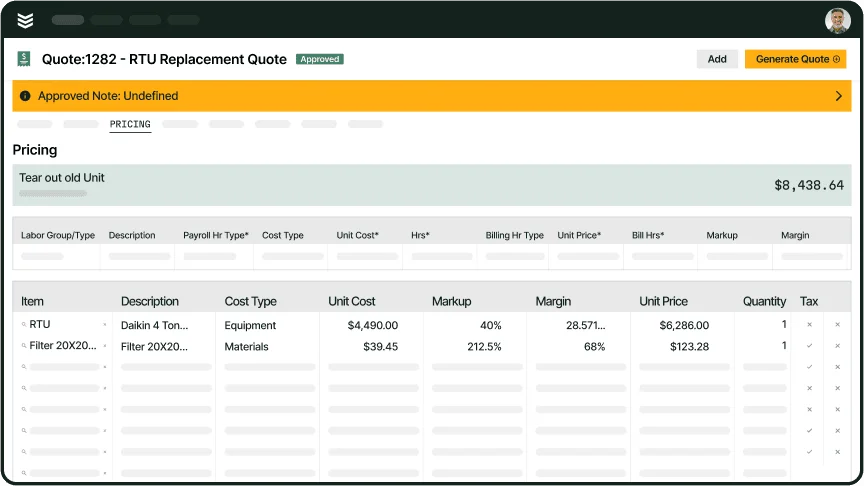
Quoting breaks adoption fast when every estimator builds pricing their own way and techs cannot trust what they can offer on-site. Fix that with a template-driven quote process: standard service codes, approved labor rates, set markups, and an approval path for exceptions.
When the system handles repeatable work—common repairs, replacements, and small upgrades—your team spends time on scope accuracy instead of rebuilding the same quote from scratch. Tie those habits to a structured quotation management system approach so pricing stays consistent and margin stays protected.
4. Connect field capture to invoicing with a same-day closeout rhythm
Adoption stalls when techs finish a job and the office rebuilds the invoice later. Put a simple rule in place: the tech captures time, materials, notes, photos, and signatures before the job leaves their screen, and the office bills from that same record. That single habit removes the “missing detail” chase and cuts disputes because you can point to job backup in one place.
Teams reinforce this standard when they align dispatch, tech closeout, and billing review around a dependable field-to-invoice workflow that keeps cash moving without turning invoicing into a scavenger hunt.
5. Treat service agreements like scheduled work, not a spreadsheet project

Agreement work only pays off when visits, coverage, and renewal timing stay visible to operations, not trapped in someone’s inbox. Adoption improves when your team runs agreements as scheduled jobs with planned visits, defined scopes, and clear coverage rules that techs can see before they arrive.
Assign ownership for renewals, review upcoming expirations on a set cadence, and keep service history tied to the customer record so techs stop calling in for basics. That discipline becomes easier to run when your process follows a structured service agreements model that links renewals, scheduling, and delivery.
Once these practices become routine, you can track progress without guesswork. Next up: the software adoption metrics that show where usage holds strong, where it slips, and which teams need coaching before small misses turn into big problems.
Software adoption metrics: how to measure success
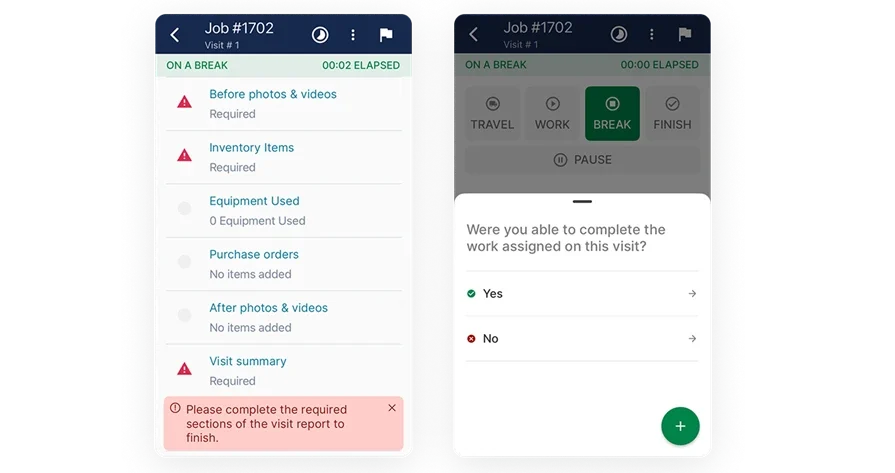
A rollout only sticks when crews use the system during the rush, not after the fact. That is why software adoption metrics have to track behavior inside the workflow—dispatch discipline, field documentation habits, and billing follow-through. al intro
1. On-time arrival rate
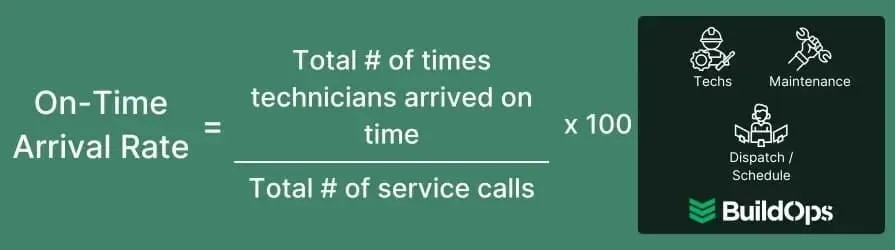
On-time arrival rate measures how often techs show up by the scheduled time, calculated as on-time arrivals divided by total scheduled calls, then multiplied by 100. Use it as an adoption signal for your schedule board and status updates: when the rate drops, managers should audit whether dispatch and techs update the job record in real time or rely on calls and texts that never hit the system.
Tighten the rules on job durations, drive-time assumptions, and required status changes until arrivals stabilize.
2. Reschedule rate
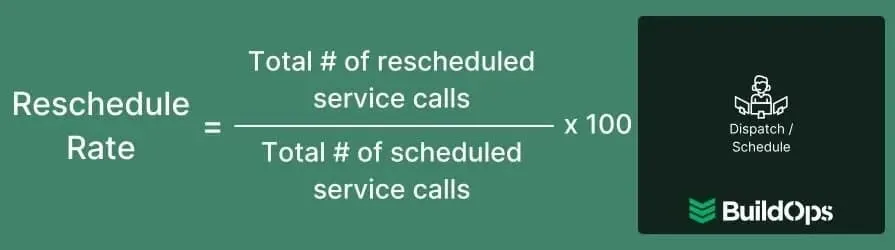
Reschedule rate tracks how often you move appointments after booking, calculated as reschedules divided by total scheduled calls, then multiplied by 100. This metric matters because repeat schedule changes usually come from process drift—dispatchers working outside the platform, techs not acknowledging assignments, or job durations living in someone’s head.
Use this KPI in weekly ops reviews to force one standard: every schedule change gets logged in the job record with a reason, so leadership can fix the pattern instead of fighting fires.
3. Technician utilization rate
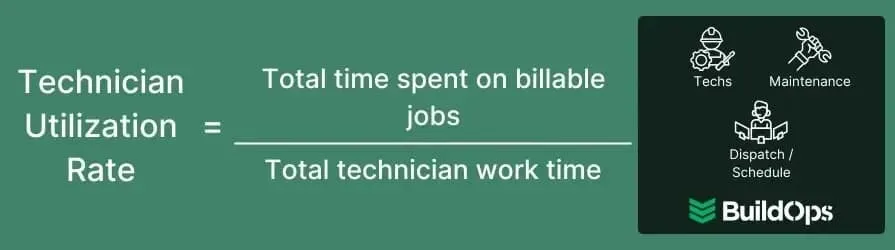
Technician utilization rate measures the share of on-duty time spent on billable tasks, calculated as billable time divided by on-duty time, then multiplied by 100. It becomes an adoption check because bad data often hides inside missing time entries, vague labor codes, and end-of-week catch-up.
Use this metric to enforce same-day time capture and consistent job coding, then coach by crew so supervisors correct habits at the source.
4. Mean time to repair (MTTR)
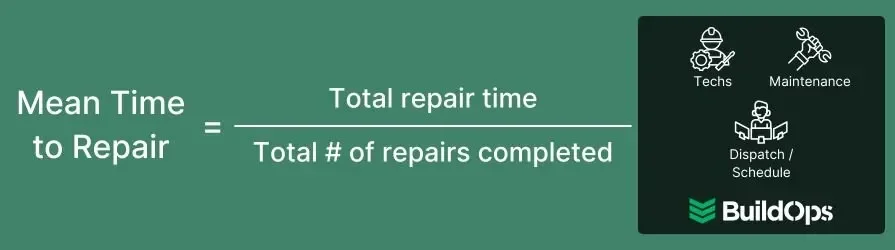
MTTR measures the average time to finish repair calls, calculated as total repair time divided by the number of repair service calls. Track it by job type so you compare like work to like work, then use it to catch adoption gaps that slow repairs down—techs skipping asset history, missing site notes, or failing to document what they found.
When MTTR climbs, managers should review job records for missing diagnostics, photos, and parts usage and tighten expectations on what “complete” means in the field.
5. Repeat visit rate
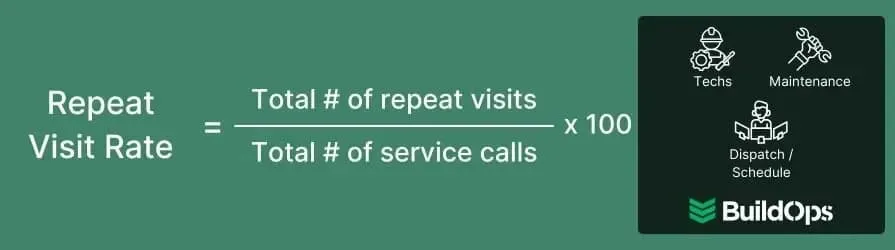
Repeat visit rate measures how often calls require a return trip, calculated as repeat visits divided by total scheduled calls, then multiplied by 100. This KPI exposes two things: work quality and job record quality.
Use it to hold teams accountable for closeout standards—clear notes, proof photos, and a complete parts list—so the next tech does not walk in blind and the office does not reopen jobs to chase missing details.
6. First-time fix rate (FTFR)
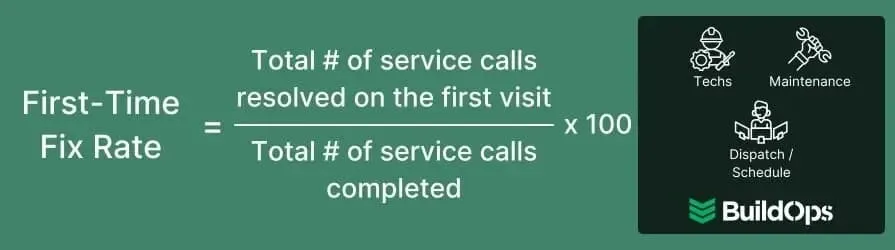
FTFR measures the percentage of calls resolved in one visit, calculated as one-and-done service calls divided by total service calls (excluding maintenance), then multiplied by 100.
Treat this as a direct adoption score for diagnostic documentation and parts capture: when FTFR slips, check whether techs document the root cause, attach photos, and log parts used in the job record instead of sending a quick text summary. Pair the metric with targeted coaching on the job types that keep missing first-visit resolution.
7. Revenue leakage
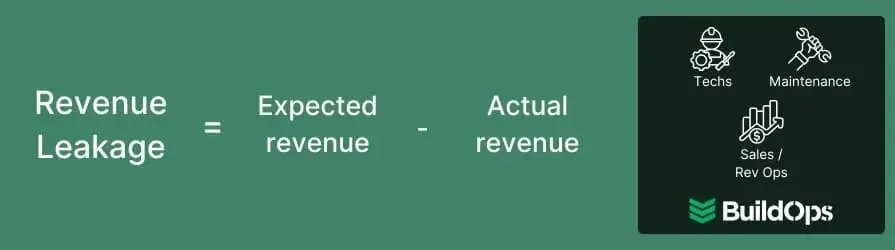
Revenue leakage measures the gap between what you expected to bill based on standard pricing and what you actually billed, calculated by subtracting actual revenue from forecasted revenue.
This KPI ties straight to adoption because missed billables usually come from weak field capture—unlogged materials, labor that never hits the work order, or discounts that skip approvals. Use it to tighten required fields on parts and labor, lock down price overrides, and run spot checks on closed jobs that show thin invoices versus the work performed.
8. Service-to-cash rate
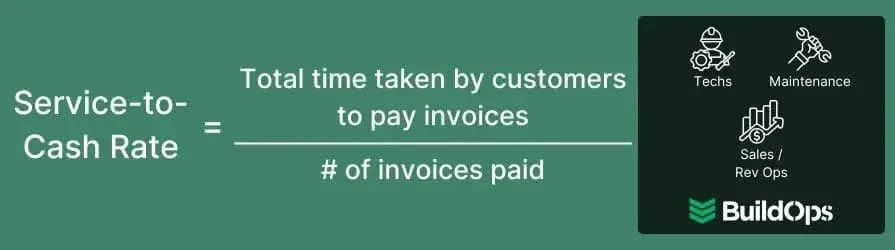
Service-to-cash rate measures the average time it takes customers to pay after service, calculated as total payment time across invoices divided by the number of invoices.
This metric becomes your scoreboard for field closeout quality and billing handoffs: when it trends the wrong direction, you usually see late closeouts, incomplete backup, and invoice disputes that slow collections. Use it to focus software adoption training on the moments that protect cash—same-day closeout, clean documentation, and invoice-ready job records that billing can send without rebuilding the story.

If you want a wider KPI list to compare against, the field service metrics and KPIs guide lays out dozens of options, but the eight above will tell you fast if adoption changed how work actually runs.
You’ve seen what happens when adoption slips: dispatch runs on side conversations, techs close tickets from memory, and billing spends Fridays fixing gaps. A real adoption plan turns your software into jobsite standards—clear rules, consistent checks, and accountability baked into every work order, not pinned to one office champion.
Most tools only own a slice of your operation. They schedule, but leave quoting, asset history, service agreements, and billing in separate tabs and separate systems. Your team pays the price, rebuilding context on every call.
BuildOps pulls those lanes into one commercial field service platform, so schedule changes, work orders, photos, approvals, and invoices all live on the same job record—without the duct-tape workflows you’ve had to invent.
Want to see it with your jobs, your workflows, your team? Grab a demo. Even if you’re happy with your current setup, use it as a gut-check and keep moving.