

Key Takeaways
- Sending an invoice for electrical services out within 10 days can significantly reduce your payment cycle (and we have data to prove it!)
- Tools like BuildOps can automate invoicing and payments by connecting them to your jobsite data and field notes
- Avoiding the most common mistakes electrical service businesses make when invoicing can save you money you might not even realize you are burning right now
Invoices keep the cash flowing. Whether you're wiring a new panel or troubleshooting a faulty circuit, getting paid on time starts with a clear, professional invoice. But too many electricians deal with late payments, missing details, and messy records. The right invoicing system cuts through the chaos and keeps your business running smoothly.
This guide covers everything you need to know about electrician invoicing, from essential invoice components to the best tools for the job. To help you better your process, we’ll go over:
- 7 key components every electrician invoice should include
- When is the best time to send an electrician service invoice to customers?
- Different types of electrician invoices to build your process off of
- Top 3 electrician invoicing software for commercial & residential contractors
- 10 electrician invoicing best practices to follow to make fewer mistakes
No matter the size of the job, sending out clean, accurate invoices is a key part of running a tight electrical business. Let’s get started with what to include in an invoice, and the best time to send them out.
7 key components every electrician invoice should include
A professional invoice ensures clear communication and faster payments. Here are the must-have elements every electrician invoice template should include:

- Business name, logo, & contact information: Your company name, phone number, email, and address should be clearly visible at the top. This makes it easy for clients to reach you and keeps things professional.
- Invoice number: Make sure you have a unique identifying number, ideally the same PO or work order number you used throughout the work.
- Customer details: Including the customer’s name, address, and contact information. This avoids confusion and ensures the invoice goes to the right person.
- Invoice dates: Both the date you sent the invoice, and the payment due date to bring expectation clarity, and ensure your customers knows when the payment cycle starts.
- Job description, materials, labor, & summary line items: Break down the services provided, including labor, materials, and any additional costs. A detailed list prevents disputes and makes charges easy to understand.
- Payment terms & methods: Define when and how you expect to be paid, like whether it's due upon receipt, in 30 days, or another agreed timeline. Adding late fee policies encourages timely payments. Make sure you explain what payment methods are accepted, making it easier for your customers to pay.
- Total amount due: Clearly display the total cost, including any taxes or additional fees.
- Sign off: Give your customer a thank you or some recognition for using you to do their work.
A complete and well-structured invoice keeps payments on track and reduces back-and-forth with clients. But beyond having the correct template, using the right invoicing tools can help you get paid even faster.
Deep Dive
To learn more about best practices and tools for electrician invoicing, check out our detailed guide on electrical invoices, complete with real-life examples from leading brands.
When is the best time to send an electrician service invoice to customers?
Getting paid starts with when you hit "send." If you’re waiting until the end of the month to send your invoices, you’re likely adding weeks—or even months—to your payment timeline.
Here’s how invoice timing plays out in the field, according to our research into thousands of contractor invoices:
- 0–10 Days: This is your sweet spot. Whether you’re replacing a panel, running new circuits, or doing a service call, send that invoice within a few days—ideally within 24 to 48 hours. Clients remember the job, the cost, and the conversation. Electricians who invoice during this window are more likely to get paid on time without chasing it down. If you’re already using software to close out jobs in the field, there’s no reason to wait. Knock it out while you’re still fresh in their inbox—and their memory.
- 10–20 Days: This range might work for repeat customers or larger projects with set billing schedules, but it’s a gamble. If you wait over a week to send an invoice, clients start to forget what the work involved—or they’re onto other things. That turns into follow-up emails, approval delays, and slower payments. For electricians juggling multiple jobs a week, this delay adds up fast. If you’re relying on manual systems, this is usually where things fall through the cracks.
- 20+ Days: Now you’re holding up your own money. Invoices sent after the three-week mark often take twice as long to get paid—sometimes over 60 days. It doesn’t matter if the work was solid. The longer you wait, the harder it is for clients to prioritize your bill. If you’re sending invoices at the end of the month for jobs you finished weeks ago, that’s a red flag. You’re not just delaying one payment—you’re slowing down your entire cash cycle.

Sending invoicing for recurring electrical service work or maintenance contracts
Recurring invoices are ideal for ongoing electrical maintenance contracts or service agreements. These are based on a set schedule, usually monthly, quarterly, or annually depending on the terms of the agreement, rather than sending a new invoice for every electrician visit.
Recurring invoices ensure consistent cash flow for the electrician and predictable billing for the customer. They are perfect for:
- Preventive maintenance contracts
- Multi-site commercial accounts
- Long-term service agreements
Use electrician software that automates these invoices so you’re not manually recreating the same bill over and over. Just set it, review it, and let the system handle the rest. This saves you time and reduces the chance of errors.
When to send an electrical work invoice ahead of time
There are instances where electricians need to invoice clients before starting a job. This is to safeguard their time and resources, especially for projects that require upfront costs. If the project necessitates ordering custom or non-refundable materials, securing permits, or hiring additional labor in advance, it's advisable to invoice ahead of time.
It's essential to set clear expectations with clients from the outset. Electricians should clearly outline the terms and payment schedule in their estimate or proposal and promptly send an invoice once the project is approved. This practice demonstrates professionalism and helps prevent payment disputes later on.

Wrap up jobs + unlock cashflow in no time
Learn how top commercial shops in North America enable better & faster invoicing
Different types of electrician invoices to build your process off of
Electricians handle all kinds of jobs—everything from a quick outlet repair to long-term service agreements. And each type of job calls for a different type of invoice.
Choosing the best template that helps you bill clearly, get paid faster, and avoid confusion is all that matters, and to make that easier, we’ve broken down the most common electrician invoice formats and what each one is used for.
1. Electrical service work invoice
This is your bread-and-butter template for everyday work—like replacing outlets, installing dimmer switches, tightening up loose wiring, or labeling panels. It covers short visits and straightforward jobs where you’re on-site for an hour or two. Service invoices are ideal for residential work, warranty calls, or small-scale commercial visits.
These typically include your labor rate, a brief description of the task, and any materials used on the spot (like receptacles, wire, or connectors). Since these jobs are often billed immediately after completion, this format should be quick to fill out—perfect for mobile invoicing in the field.
2. Repair invoices
When a customer calls because something’s not working—a breaker keeps tripping, lights are flickering, or they smell something burning in the panel—you’re stepping into repair mode. These jobs often start with diagnostics and can shift depending on what you uncover.
A repair invoice should break down the labor spent identifying the issue, the fix itself, and any replacement parts. Think failed GFCIs, fried switches, damaged wiring, or melted terminations. This format helps you show the problem, your solution, and the cost—all in a clear way that builds trust with the customer.
3. Installation invoice
Use this template anytime you're installing new systems or equipment—whether you're upgrading an old 100-amp panel to 200, wiring a detached garage, or setting up EV charging stations. Installation work is more involved and usually includes planning, permitting, and inspection coordination.
This invoice format should list out all installed materials (fixtures, breakers, service wire, etc.), labor hours by task, and any third-party fees (like permit costs). It’s also helpful for quoting add-ons or showing change orders, especially if the scope shifted during the job. A well-documented installation invoice gives the client full transparency on what they paid for—and protects you if questions come up later.
4. Project-based invoice
Longer jobs need structure. For full remodels, multi-room rewiring, or phased commercial buildouts, this invoice type keeps you covered from start to finish. Break it down by key milestones—rough-in, trim-out, final walkthrough—and assign billing to each stage. You might also include an upfront deposit and progress payments tied to percent completion.
This type of invoice helps you avoid front-loading costs or waiting until project completion to get paid. It also keeps your customer in the loop and avoids surprise bills. If you're managing multiple days of work or coordinating with other trades, this structure brings clarity to the chaos.
5. Recurring electrical maintenance invoice
Have recurring clients who rely on you to keep things running? Maintenance invoices are perfect for jobs like checking exit lighting in commercial spaces, tightening panel connections, or verifying GFCIs in apartment units. These often come as part of monthly, quarterly, or annual agreements—so the invoice should be simple to replicate and consistent in what it includes.
List the systems inspected, any preventive tasks performed (like cleaning connections or replacing breakers), and notes for follow-up. This format is especially useful for electricians who offer service contracts or do regular work with property managers and facilities.
6. Emergency or after-hours invoice
Late-night power outage? Holiday callout for a sparking panel? This is the format that makes sure your time is valued. Emergency invoices should call out after-hours rates clearly, as well as any premium charges tied to short notice or weekend work. Include a timestamp, breakdown of emergency services rendered, and any parts used.
These invoices also act as a paper trail in case there are insurance claims or landlord reimbursements involved. The key is to show that the urgency was real, the work was critical, and the bill reflects that level of response.
7. Time and Materials (T&M) invoice
Not every job is easy to scope. When you're working on an old house with hidden junction boxes, unknown circuit layouts, or inconsistent breaker loads, you don’t always know what you're walking into. T&M invoices give you the flexibility to bill accurately as the job evolves. Log labor by hour, materials as they’re used, and any rental or tool fees if applicable.
This type of invoice is also useful when working with contractors or homeowners who want transparency in real time. It protects you when jobs expand mid-way and ensures you’re paid for everything you touch, install, or troubleshoot—nothing left on the table.
Deep Dive
If you're looking for free templates you can use today, check out our full guide to electrician invoice templates.
Top 3 electrician invoicing software for commercial & residential contractors
No two electricians run the same kind of shop. Some handle high-volume service calls. Others focus on long-haul projects or facility maintenance. That’s why invoicing software shouldn’t be one-size-fits-all. What works great for a residential crew might slow down a team managing job sites across multiple buildings.
The way you invoice should match the pace and style of how you work—whether it’s fast turnaround installs or staged billing across larger jobs. Below are three invoicing tools that stand out for different types of electrical work, from commercial to residential and everything in between.
1. Best for commercial electrical teams: BuildOps

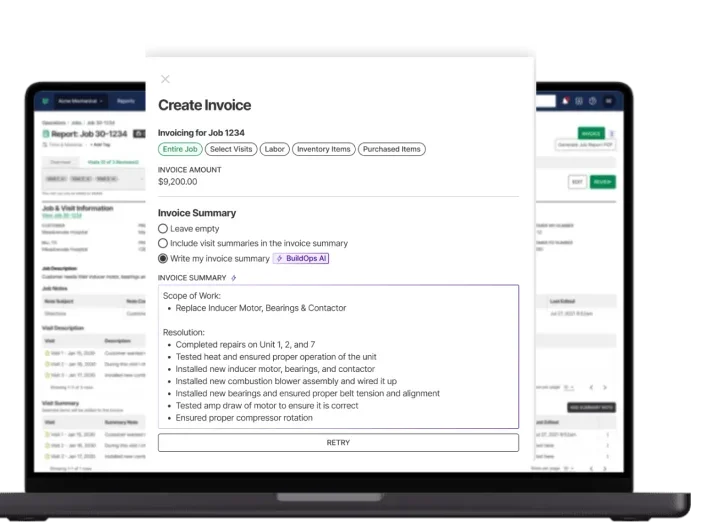
For electricians taking on commercial work—like tenant improvements, scheduled building maintenance, or large multi-system installs—BuildOps gives you serious control over invoicing without the mess. It ties each invoice to what’s actually happening on the job: labor hours from the field, material usage, even notes from your techs. Everything flows from the worksite into your invoice automatically.
OpsAI also automates many aspects of invoicing with its PO scanning feature that can add line items to your invoice, and invoice summaries automatically built from field notes including grammar correction for your techs.
If you're juggling dozens of open work orders, frequent change requests, or clients who want breakdowns by phase or location, BuildOps lets you bill with confidence. You're not chasing paper. You're not entering the same info twice. You just open the invoice, and it's already got what you need.
What Sets This Apart for Commercial Electrician Teams: BuildOps pulls real-time data from your job sites—so every invoice reflects the actual work done, down to the wire pulled or panel installed. It’s a solid fit for commercial electricians who need billing that keeps up with how fast their jobs move.
Rating: 4.5 on Capterra from 149 user reviews
Invoicing automated, in just seconds
Stop the admin and double entry, and cut down your payments cycle significantly
2. Best for residential electrical contractors: Housecall Pro

Image Source: Housecall Pro
Housecall Pro is a solid choice for electricians doing mostly residential work—think panel upgrades, ceiling fan installs, hot tub circuits, or basic troubleshooting. The platform lets you quote, schedule, and send invoices right from your phone, which is perfect when you're in and out of houses all day.
It’s built to be easy: fewer screens, fast workflows, and automatic follow-ups so you can focus on the next call, not paperwork. You can even set up payment reminders so you're not chasing down homeowners days after the job's done. But if you’re managing more complex billing needs—like multi-phase work, field team tracking, or job-specific documentation—Housecall Pro can start to feel limiting.
What Sets This Apart for Residential Electricians: Housecall Pro gives residential electricians a fast, mobile-first way to invoice as soon as the job is wrapped—no office time needed.
Rating: 4.7 on Capterra from 2736 user reviews
Want to see how BuildOps stacks up against Housecall Pro? Deep dive into our comparison of the two here.
3. Best for electricians and general contractors: Jobber

Image Source: Jobber
Jobber works well for electricians who want a lightweight, all-in-one tool that can handle quoting, job tracking, and invoicing without the learning curve. It’s especially helpful for solo techs or small teams tackling service calls, smaller installations, or light commercial work. You can send estimates, book the job, and push out the invoice—all from one dashboard.
If you're jumping between jobs throughout the day, Jobber keeps everything in sync and gives clients a clear view of what they’re being billed for. That said, electricians running multiple crews or dealing with more advanced reporting or cost tracking might outgrow what Jobber offers.
What Sets This Apart for General Contractors: Jobber lets you knock out invoices in real time—from quote to payment—while keeping everything organized in one place.
Rating: 4.6 on Capterra from 1404 user reviews

10 electrician invoicing best practices to follow to make fewer mistakes
For electricians handling a high volume of jobs, it's easy to let the paperwork lag behind. The problem is, small mistakes on invoices lead to bigger problems down the line: late payments, customer confusion, and even project disputes.
These 10 invoicing best practices are built for electricians—whether you’re working solo, managing a crew, or running service jobs back-to-back all week. If your goal is fewer mistakes, faster payments, and more trust from your clients, start here.
1. Send invoices as quickly as possible after the job to get paid much faster
Waiting until the end of the week (or worse, the end of the month) slows everything down. If you're finishing a panel swap or wrapping up a service call, invoice while it's still fresh. Clients remember what you did, you remember what you used, and the billing is more accurate. Many electricians miss small line items—like wire connectors or breakers—when they try to batch everything later. Invoicing right away cuts down on forgetfulness and shows clients you're organized and professional.
Expert Tip
Across thousands of invoices analyzed in the Invoicing Sweet Spot report, BuildOps found that even a single-day delay in invoicing can impact how fast electricians get paid. The data shows a consistent drop in payment speed starting as early as Day 11.
That means even a small backlog—like holding off invoicing until the weekend—can set off a chain reaction that delays payment by weeks. The faster you invoice, the faster clients act. It’s a small habit that makes a big difference when you’re billing daily.
2. Use the same template for every invoice
Your invoices should be as consistent as your wiring. Build one clean format that covers all the essentials: client info, job location, scope of work, labor hours, parts, and payment terms.
Whether you're billing for a recessed lighting install or a quick GFCI swap, keeping the layout the same reduces mistakes and makes life easier when clients have questions or your team needs to double-check something. It also makes your business look more buttoned-up—especially when you're competing for repeat clients.
3. Separate labor and material costs clearly in line items to reduce questions
Clients want to know what they're paying for—and when you bundle everything into one lump sum, it can create confusion. Instead, show labor time on one line (3 hours at $125/hour), and parts on another (2 dimmers, 1 switch plate, 12 feet of wire).
This method builds trust and helps avoid disputes, especially if your job changed on-site or materials were added last minute. For bigger installs or commercial work, this detail becomes even more important.
4. Always include job site address and contact name
If you’re working with realtors, landlords, or property managers, odds are you’re doing work across multiple properties. Leaving out the job site address (or worse—copy-pasting from an old invoice) creates confusion and slows down payments.
Always confirm and include the exact address where the work was done, the unit number if needed, and the contact who was on-site. This helps accounting teams process faster and reduces back-and-forth when approvals are needed.
5. Add simple job notes to explain the work
Don’t just send numbers—back them up with a line or two explaining what was done. Something as simple as “Diagnosed tripping breaker, replaced with new 20A unit” tells the client exactly what they’re paying for.
For residential jobs, it clears up confusion. For commercial clients, it helps their teams track service history. It also protects you if a client tries to dispute the invoice down the road.
6. Set clear payment terms—and stick to them
Whether you’re using net 7, net 15, or due on receipt, your terms should be spelled out on every invoice. That includes late fees, preferred payment methods, and who to contact with billing questions. Too many electricians leave this off, then chase down payments with no leverage, wasting a lot of unnecessary time.
Setting terms helps you get paid faster and gives your client clear expectations. If you’re working with larger commercial clients, make sure your terms match what was agreed to in writing upfront.
7. Always confirm who the invoice should go to
You might work with a project manager, but the invoice has to go to accounting. Or maybe all invoices should go directly to corporate, not the location where you did the work. Either way, getting clarity on this before sending the first invoice invoice helps avoid delays. It’s a simple question that saves days (or weeks) of waiting when your invoice gets lost in someone’s inbox.
8. Double-check all math before hitting send
It sounds basic, but it's one of the most common mistakes. You wrap a job at 4 hours, but you accidentally enter 3. Or you add up materials, but forget a small item. A single error can cost you hours of follow-up—or worse, lost income, because a custom is not going to miss that mistake.
Before sending any invoice, check the math, make sure the rates are correct, and confirm the totals. Better yet, use invoicing software that automates what’s added based on the work already done in the field.
9. Use invoicing software that connects to your job info
Still writing invoices manually? It’s easy to miss job notes, forget parts used, or duplicate entries. Tools like BuildOps pull info directly from the field—time logs, materials used, even technician notes—and populate your invoice for you. It cuts down on busywork and makes your billing way more accurate.
You can still review everything before sending, but at least you’re not starting from scratch.
10. Keep a running log of sent invoices and payments
Don’t just rely on your memory or your email inbox. Maintain a simple system (or better, use software) that tracks every invoice you’ve sent, what’s been paid, and what’s still outstanding. This makes tax time easier, helps you follow up on unpaid jobs, and gives you a full view of your cash flow. If you’re doing more than a few jobs a week, this practice alone can keep your operation from spiraling into chaos.
Having the right invoicing system makes a difference. Whether you're using simple templates or a full FSM platform, efficiency matters. Most invoicing tools handle the basics—customizable templates, payment tracking, and automated reminders—but few offer a seamless connection to job scheduling, work orders, and technician dispatch. That’s where electricians need to think beyond standalone templates and look at tools built for the way they work, like BuildOps.
For electricians managing multiple jobs, clients, and invoices daily, an all-in-one platform simplifies the process. Instead of juggling separate tools for invoicing, scheduling, and job tracking, having everything in one system eliminates errors, speeds up payments, and keeps operations running smoothly.
Connect your payments cycle from end to end
We automate invoicing with AI so you cut down the mistakes, and get paid faster