
BuildOps vs Housecall Pro
See how the BuildOps platform can help:
- 250% profit increase seen by our commercial contractors
- 40% increase in productivity by reducing the time for invoicing, scheduling, and managing projects
- 90% faster payment processing by automating invoices out and payments





Trusted by 1,500+ commercial contractors across North America















TECHNICAL CHECKLIST
See the difference
Housecall Pro was designed for residential home services: one-off jobs, card-on-file billing, and simple dispatch. When you layer commercial contracts, multi-site portfolios, and complex projects on top, the gaps turn into margin risk. BuildOps is architected for commercial first — asset-level data, project controls, and ERP-grade financials in a single backbone.
User-friendly interface
Scheduling & dispatch
Mobile application
invoicing & payment processing
Automated customer communications
QuickBooks integration
Project management
Platform customization
Analytics & reporting
Inventory management
Scalability & enterprise readiness

"Commercial work isn't just bigger residential. We outgrew residential apps like Housecall Pro the moment we needed true project control and asset history. BuildOps finally gave our field, office, and finance teams the same source of truth."








Partners
Trusted by leading commercial operators
Every month, commercial contractors move off residential-first tools like Housecall Pro and onto a backbone built for their real work — multi-location portfolios, multi-trade scopes, and long-term maintenance contracts.
Specialized Infrastructure
What makes a "commercial backbone" different?

Data granularity
Housecall Pro tracks visits and addresses. BuildOps tracks buildings, systems, units, and sub-components — so quotes, PM, and replacements are all driven by asset history.

Financial logic
Residential platforms think “job done, invoice sent.” BuildOps models commercial reality — retainage, WIP, committed costs, and contract terms your CFO actually manages.

Offline-first engineering
Techs capture complex commercial work — photos, checklists, time — even with no signal, then sync automatically. No fragile mobile workflows designed only for quick residential calls.
One System, Every Workflow
A single operating backbone
AI that already knows your business
OpsAI is built into BuildOps. It already knows your jobs, your crews, and your data. It handles the busywork, flags what matters, and keeps your team focused on the work that actually moves the needle.


Service that scales without slipping
More service work only pays off if margins hold and customers come back. BuildOps keeps every job on track from first dispatch to final invoice, so growth doesn't come at the cost of control.


Find, quote, and close more work
Good contractors lose deals not because they can't do the work, but because follow‑ups slip and quotes go cold. BuildOps keeps your pipeline moving so the right jobs don't get away.


The Industry Standard
Proven outcomes. Industry verified





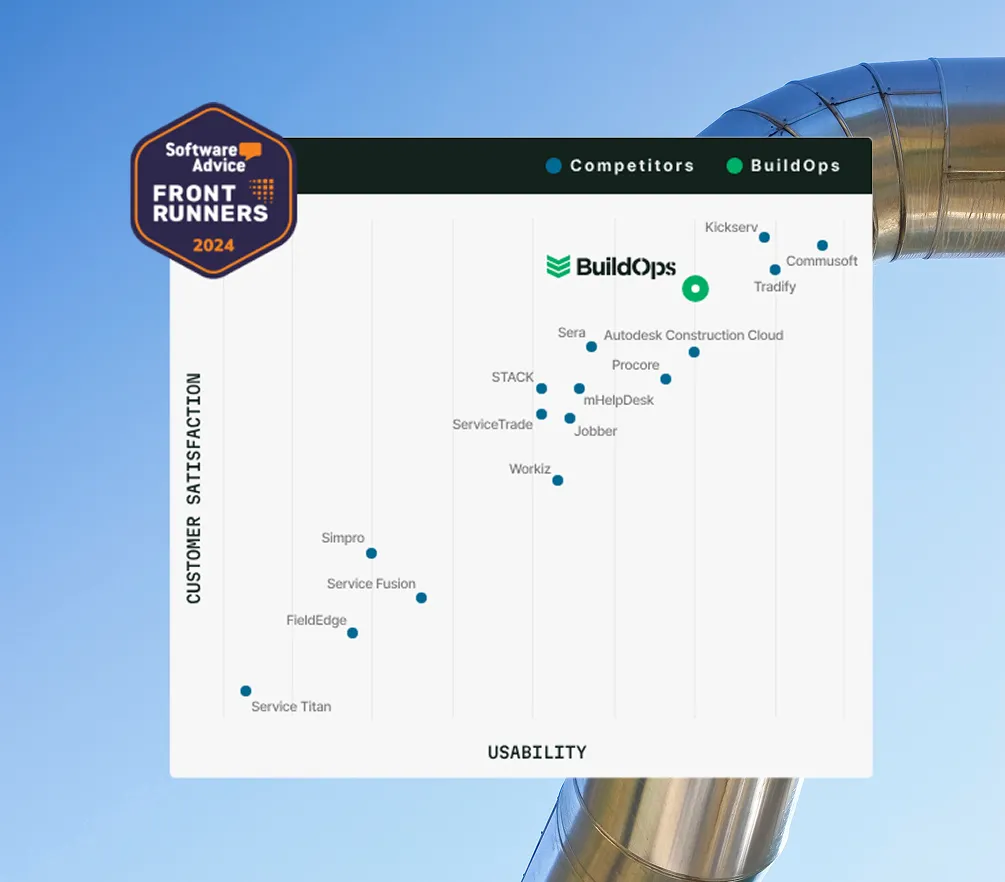

Proven Results
Real-world impact for commercial leaders


"We've seen an increase in day-to-day operations efficiencies that's going to add up to significant savings in time and energy over the course of a year."

"If we didn't have BuildOps and the additional cyber security they give our company, we would be dead in the water."

"The ability to produce reports either on an individual job basis, a quarterly basis, or a project basis is something we'd never seen before in other software that we've used."

"We've cut down in our receivables from about 120 days to 30 days on average."


"Before we knew it, we were seeing quicker turnaround times on job closeout and a huge improvement in the time it took for quotes to be accepted by our customers."


"With BuildOps, we feel like we can go after anything. The sky is the limit as far as the size of the project."
.webp)

"BuildOps gave us an all‑in‑one system for both service and projects. Once we saw that, it was a no‑brainer."

"With the integration of BuildOps and Sage Intacct, our accounting system, we've been able to speed up the time it takes for us to bill customers."


"Our consulting division increased 300% because we were able to free up more time from the office to help other customers."

![Service First Logo]](https://cdn.prod.website-files.com/69cad9cd3a5ef3196ea9bb65/69fa0ca0adc28a56d26717c9_Service%201st%20white.webp)
"Sometimes systems promise you the moon, then you use them and see the weaknesses. It's been the exact opposite with BuildOps. Everything we wanted it to do, it could do."

"We used to be two weeks behind on job costing. Now we're up to date daily."
Customer stories


How Jolma Electric Sparked a 50% Leap in Efficiency with BuildOps

How Jolma Electric Sparked a 50% Leap in Efficiency with BuildOps

How Jolma Electric Sparked a 50% Leap in Efficiency with BuildOps




Common Questions
Clear answers for
serious contractors
Can BuildOps really replace HouseCall Pro for our commercial work?
Yes. BuildOps replaces residential-first tools like HouseCall Pro with a single commercial operating system. Service, projects, sales, and financials all run on one platform tuned for asset-level tracking, complex contracts, and ERP-grade reporting.
What is the typical implementation timeline?
BuildOps features a bidirectional, ledger-sync engine. Data flows from the field directly into your ERP's job costing and payroll modules, ensuring Financial Truth without manual re-entry.
How does BuildOps handle multi-site, multi-asset portfolios?
BuildOps models buildings, systems, and individual assets — with history, inspections, and work orders tied to each unit. That’s how commercial teams manage risk and renewals, far beyond the address-based structure of residential service apps.
What does implementation look like coming off HouseCall Pro?
You get a dedicated implementation manager who maps your commercial workflows, migrates data, and trains your teams. Most customers are fully live in 8–12 weeks, with job costing and billing running smoothly throughout the transition.
How does BuildOps improve visibility for executives and finance?
BuildOps surfaces real-time WIP, backlog, and margin across service and projects in one view. Executives and CFOs get the financial truth they can’t see in residential-first tools: committed costs, profit erosion, and risk — before it hits the P&L.
Will our field technicians find BuildOps harder than HouseCall Pro?
No. The mobile app is built for commercial jobs but stays simple in the field — offline-friendly, asset-linked forms, and fast time entry. Techs adopt it quickly because it makes their day easier, not more complicated.