Construction Financials
Know your numbers before they move
Connect field activity directly to your bottom line. BuildOps gives PMs, controllers, and owners real-time visibility into project costs, billing, and margin so you catch drift before it costs you.
Trusted by 1,500+ commercial contractors across North America















Financial Visibility
Stop discovering margin problems at closeout

Margin confidence
See projected cost vs. budget across every active project so you know where you stand before WIP hits.

Billing accuracy
Track over- and under-billing in real time. Catch cash flow gaps before they turn into month-end surprises.

Change tracking
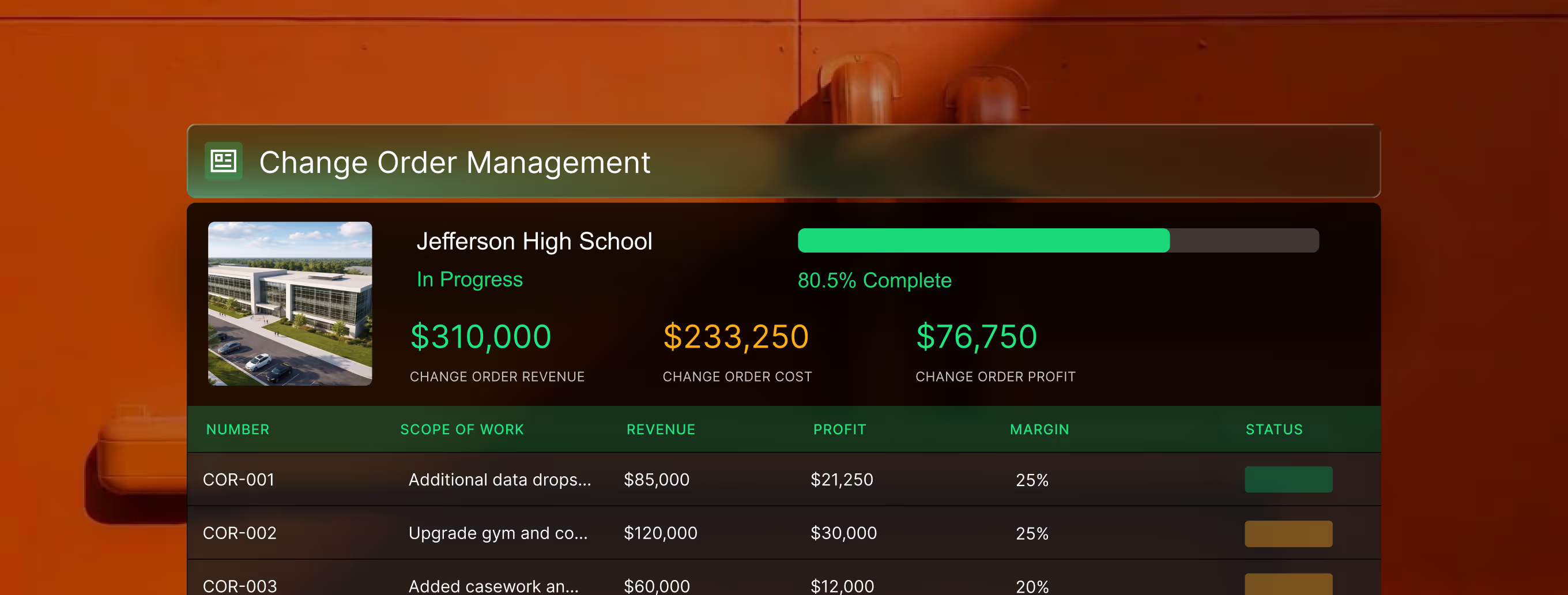
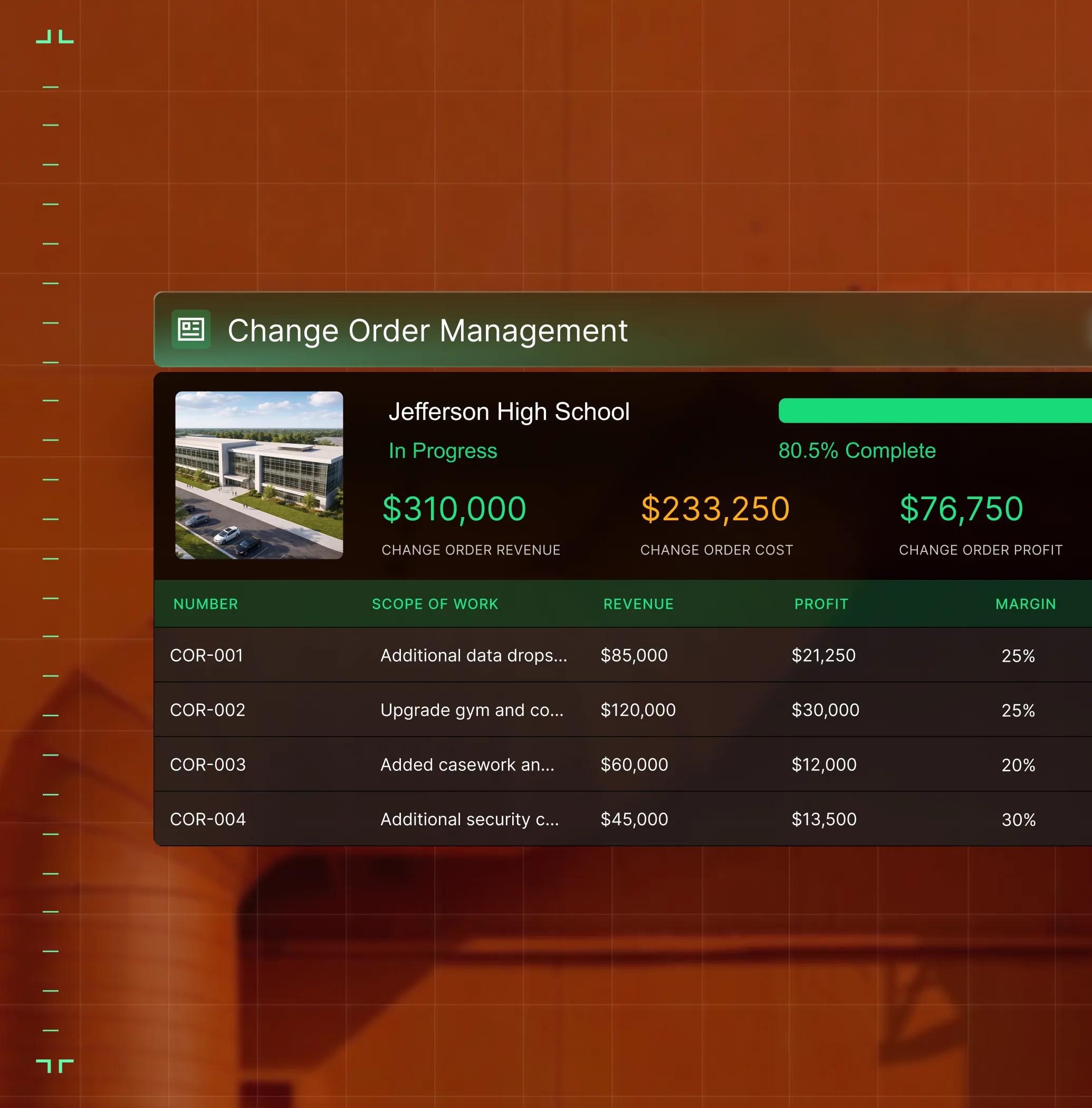
Log change order requests as scope changes happen so extra work converts to revenue instead of hiding forever in a field note.
For the complexity of project work
Built for projects, not just invoices
In service, you invoice per job and move on. In construction, revenue and cost stretch over months—with WIP, retainage, and change orders in between. BuildOps is built for that complexity.

Auto-Sync Your ERP
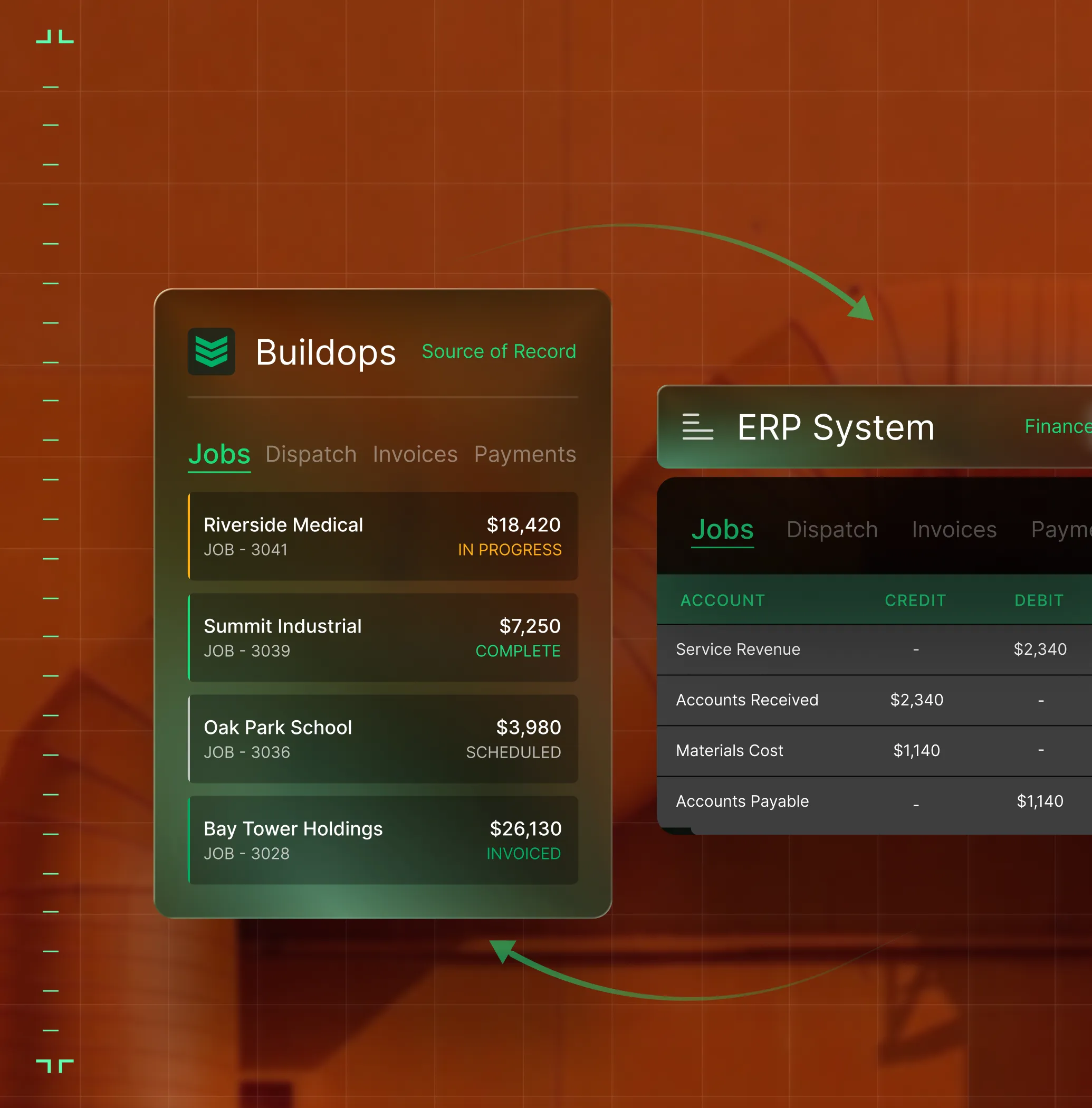
Connect project data directly to Sage Intacct, NetSuite, Vista, or Spectrum. Budgets, contracts, and change orders flow into your ledger without double entry.
Master your reporting
Get real-time visibility into over- and under-billing to keep your cash flow positive.

Protect Your Profit
Track scope changes and CO requests as they happen—stop unbilled work from silently chipping away at margin.
One number, every role
Field to finance, one source of truth

"We've cut down our receivables from about 120 days to 30 days on average."
Track billing status and cash flow across your project portfolio in real time.

"Our margin dollars have improved just by keeping a closer eye on everything."
See cost-to-complete by phase so you catch drift before closeout.

"We were probably bleeding money, and just didn't know it."
Stop unbilled scope changes from silently eating margin — see every cost as it happens.

Proven Results
Real-world impact for commercial leaders


"We've seen an increase in day-to-day operations efficiencies that's going to add up to significant savings in time and energy over the course of a year."


"If we didn't have BuildOps and the additional cyber security they give our company, we would be dead in the water."


"The ability to produce reports either on an individual job basis, a quarterly basis, or a project basis is something we'd never seen before in other software that we've used."
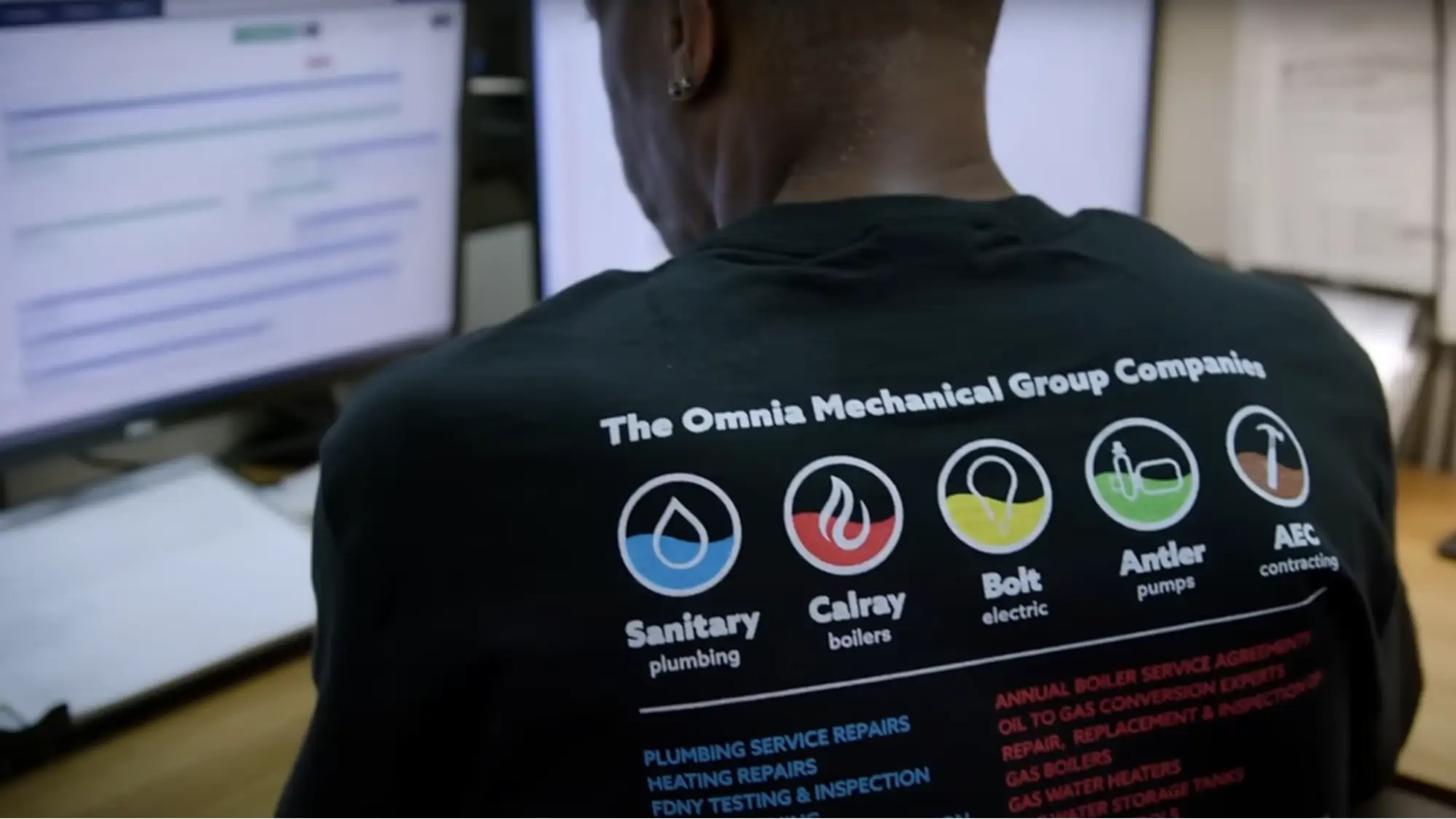

"We've cut down in our receivables from about 120 days to 30 days on average."


"Before we knew it, we were seeing quicker turnaround times on job closeout and a huge improvement in the time it took for quotes to be accepted by our customers."


"With BuildOps, we feel like we can go after anything. The sky is the limit as far as the size of the project."
.webp)

"BuildOps gave us an all‑in‑one system for both service and projects. Once we saw that, it was a no‑brainer."


"With the integration of BuildOps and Sage Intacct, our accounting system, we've been able to speed up the time it takes for us to bill customers."


"Our consulting division increased 300% because we were able to free up more time from the office to help other customers."

![Service First Logo]](https://cdn.prod.website-files.com/69cad9cd3a5ef3196ea9bb65/69fa0ca0adc28a56d26717c9_Service%201st%20white.webp)
"Sometimes systems promise you the moon, then you use them and see the weaknesses. It's been the exact opposite with BuildOps. Everything we wanted it to do, it could do."

"We used to be two weeks behind on job costing. Now we're up to date daily."
What makes BuildOps different
Built from the ground up for contractors who run projects, service, and everything in between. Not adapted. Made for the work.
Commercial work isn't an add‑on
Most platforms started in residential and stretched to fit. BuildOps starts with the complexity of commercial work.
Run the work in one connected system
Field, office, finance, and sales — all in one place. No duct-taped tools, no double entry, no dropped balls.
OpsAI is built in, not bolted on
OpsAI is already in your workflows. It recaps the day, calls out risks, and gives every role a clear next step.


Connected across every workflow
Construction Financials is just the beginning
Financial data doesn't live in a silo, it's the pulse that powers the entire Project Management platform. Explore the other modules that turn field activity into executive-level financial intelligence.
Project Management features






Common Questions
Your questions on construction financials, answered
What construction project financial software features are the most valuable for commercial teams?
Construction project financial software should cover the full money cycle from the moment costs hit a job to the moment cash lands in your account. Here's what matters most for commercial work, and how BuildOps delivers each one:
- Invoicing—Build invoices from actual job data: time, materials, and tech notes. No re-keying. BuildOps gets invoices out the day the work closes, not weeks later.
- Time Tracking—Log hours by job, apply overtime thresholds, and export payroll-ready data. For contractors who need certified payroll, prevailing wage, or complex union rules, BuildOps partners with Miter — which handles that complexity natively.
- Purchase Orders & Procurement—Create POs, track commitments against budgets, and match receipts to vendor bills. BuildOps ties every purchase to a job and cost code so committed costs are visible before invoices arrive.
- Job Costing—See labor, materials, and subcontractor costs against budget as work is recorded. Know where every job stands before the invoice goes out, not in the post-mortem.
- Inventory Tracking—Track parts across warehouses and trucks. When field teams log what was used, BuildOps ties every item to the job it touches, keeping material costs accurate before the invoice goes out.
- ERP Integrations—Sync with Sage, QuickBooks, or Intacct so your books stay accurate without double entry. BuildOps moves data both ways and keeps job-level financials aligned across systems.
- OpsAI for Finance—OpsAI writes invoice summaries from field notes, surfaces what needs attention in billing workflows, and keeps the back office in sync with the field.
- Real-time Operations Dashboard—Sales pipeline, service volume, and labor utilization, all connected, all in one place, all with up-to-date data.
- Financial Source of Truth—All team members see the same information, because it’s all up to date for everybody. All teams update data in one place, even through integrated tools like QuickBooks through a bidirectional sync, so everyone sees the same financial truth.
- Custom Saved Views—Build your own saved views by role and quick filter what you need. No need for manual exports.
- Job Health Metrics—You want the ability to track costs, margin creep, labor usage, and billing progress inside your jobs before you send invoices.
- Project Analysis Reports—Month-by-month billing, costs, profitability, and over/underbilling all in one connected report.
- Labor Analytics—Track profits, tech usage, and productivity how you need: by job, by location, by crew, and so on.
What are the key benefits of using construction financial report software for commercial teams?
Real-time field reporting cuts end-of-month surprises, eliminates manual exports, and helps you identify margin issues before they compound. Field service reporting software connects field data to financials automatically, so you make faster decisions without waiting on finance.
Can I build custom project financial reports in BuildOps? How flexible are they?
In BuildOps you can filter, save, and share report views that are completely tailored to your role, and the roles of your team members. Whether you're tracking overdue invoices, technician profitability, or job cost variance, you can stop with spreadsheet exporting or manual rollups.
The level of customization available in BuildOps for reporting is one of the features our commercial construction project management customers love the most, because they find that other tools often just don’t fit for commercial work. As our customer Austin Hamlin from Certified Fire puts it: “A lot of alternatives treat a $1m project the same as a $2k service.” We think that just doesn’t cut it when it comes to the needs of commercial construction financials.
How does BuildOps handle integration with my existing ERP?
BuildOps integrates with the ERPs frequently used by commercial field service teams including Sage, Viewpoint, and Quickbooks. BuildOps syncs field data (time tracking, POs, invoicing, etc.) directly with your ERP's job costing and payroll modules. Data flows both ways, keeping financials accurate without manual re-entry.
BuildOps is an operational backbone for commercial construction teams to build on top of, no matter what other tools are in your tech stack.
Does BuildOps replace my ERP for WIP reporting?
BuildOps captures the operational side (contracts, projected costs, budgets, and COs) and feeds that into your ERP. Your ERP remains the system of record for booked actuals, revenue recognition, and audited financial statements, while BuildOps becomes your system of action, enabling each team member to confidently take next steps on the project.
How does OpsAI help with project financials? Is OpsAI ready now?
OpsAI is live and in production today. Teams are using it now across dispatch, field documentation, asset capture, invoicing, and payment matching. It ships as part of BuildOps, not as a separate add-on.
Finance teams primarily use OpsAI to pull information from PO photos, extracting vendor, date, and line items to fill in records, and to match bulk payment to open invoices across multiple lines.
Finance teams have seen results like 80% less data entry using our PO scanning tools, have saved hours every month using our invoice automation, and love the ability to turn tech voice notes into structured field notes that convert to invoice notes in seconds.
Can I customize the WIP report to match my process in BuildOps?
Yes. BuildOps WIP reports are built on a custom reporting engine where columns, calculations, and filters are all configurable. Every contractor does WIP differently, so we help you to make it yours during implementation.
What financial data can PMs see vs. controllers?
Custom Views let you configure role-specific dashboards from the same underlying data. PMs see forecasting and cost-to-complete, controllers see portfolio WIP and over/under-billing, and owners see margin across every active project.