Contractor Workforce Management
The right crews on the right jobs
See every crew, every project, every open need in one place. BuildOps connects your project plans to your people so you staff by phase and skill, not by gut feel or last-minute scrambles.

Trusted by 1,500+ commercial contractors across North America















Planning that fits how you work
From spreadsheets to a real manpower plan

Cross-project clarity
See crew demand across every active project, and catch staffing conflicts early.

Phase-based planning
Assign crews by phase, skill, and cost code tied to your schedule and budget.

Forward-looking view
See what's coming 60–90 days out so you can hire, shift crews, or make the right call on a new bid.
Across every active project
Built for projects, not just dispatch
Service planning fills tomorrow's board. Project planning is a multi-month manpower exercise: crews by phase, cost code, and skill set across overlapping jobs. BuildOps was built for that complexity.

Multi-Project Manpower View
Request labor from any project plan. See requests, allocations, and gaps on one resource board so you balance crews across jobs without spreadsheets.
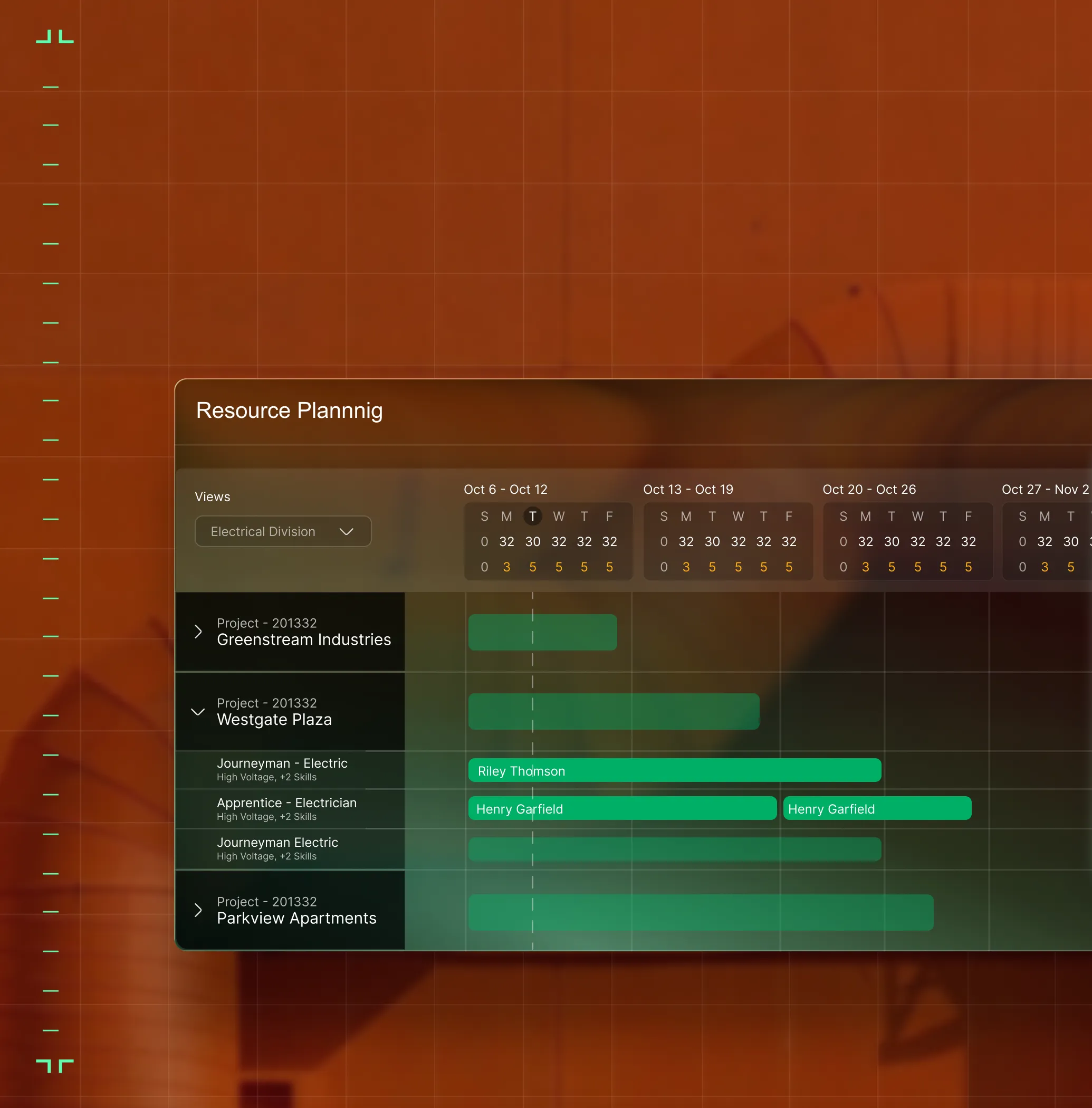
Gantt-to-Field Pipeline
Labor requests start in your project plan and flow to the resource board to keep planned hours tied to cost codes and budgets.
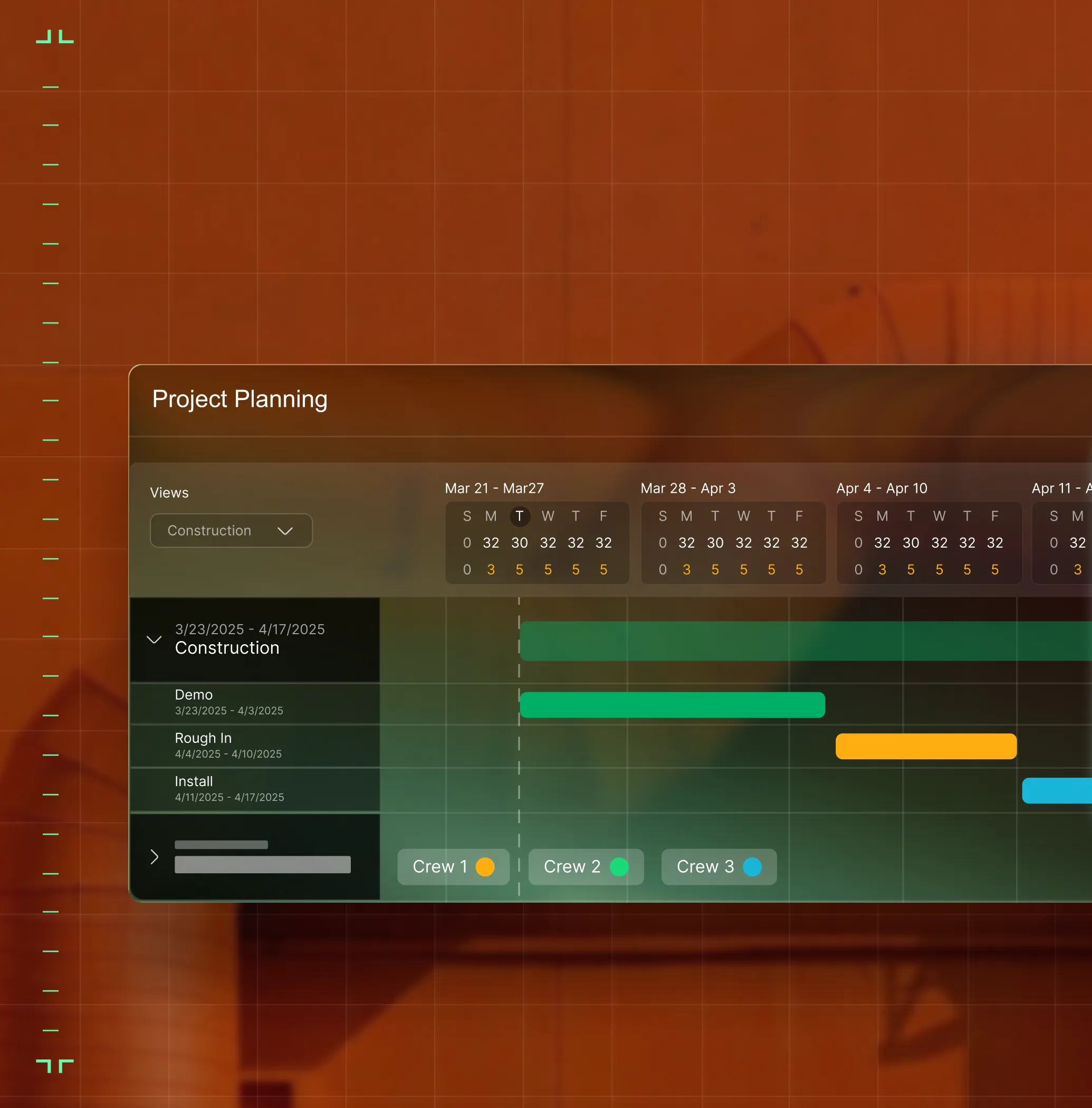
Cost-Code Alignment
Same cost codes across planning, timesheets, and reporting. Every hour lands in the right budget bucket.

From the PM to the field
One plan every role can trust

"We can access real-time information and know what manpower is available."
See crew availability and project needs without calling the office.

"If we were still on the legacy system we used at my old company, we'd already need another person. BuildOps gives us leverage. Full stop."
Scale the work without scaling headcount, plan crews across jobs from one board.

"Our margin dollars have improved just being able to keep a closer eye on everything."
Track labor against budget by phase and cost code before the job closes out.

Proven Results
Real results from commercial contractors


"We've seen an increase in day-to-day operations efficiencies that's going to add up to significant savings in time and energy over the course of a year."

"If we didn't have BuildOps and the additional cyber security they give our company, we would be dead in the water."

"The ability to produce reports either on an individual job basis, a quarterly basis, or a project basis is something we'd never seen before in other software that we've used."

"We've cut down in our receivables from about 120 days to 30 days on average."


"Before we knew it, we were seeing quicker turnaround times on job closeout and a huge improvement in the time it took for quotes to be accepted by our customers."


"With BuildOps, we feel like we can go after anything. The sky is the limit as far as the size of the project."
.webp)

"BuildOps gave us an all‑in‑one system for both service and projects. Once we saw that, it was a no‑brainer."

"With the integration of BuildOps and Sage Intacct, our accounting system, we've been able to speed up the time it takes for us to bill customers."


"Our consulting division increased 300% because we were able to free up more time from the office to help other customers."
![Service First Logo]](https://cdn.prod.website-files.com/69cad9cd3a5ef3196ea9bb65/69fa0ca0adc28a56d26717c9_Service%201st%20white.webp)
"Sometimes systems promise you the moon, then you use them and see the weaknesses. It's been the exact opposite with BuildOps. Everything we wanted it to do, it could do."

"We used to be two weeks behind on job costing. Now we're up to date daily."
What makes BuildOps different
Built from the ground up for contractors who run projects, service, and everything in between. Not adapted. Made for the work.
Commercial work isn't an add‑on
Most platforms started in residential and stretched to fit. BuildOps starts with the complexity of commercial work.
Run the work in one connected system
Field, office, finance, and sales — all in one place. No duct-taped tools, no double entry, no dropped balls.
OpsAI is built in, not bolted on
OpsAI is already in your workflows. It recaps the day, calls out risks, and gives every role a clear next step.


Total Platform Synergy
Workforce planning is just the start
Your labor plan doesn't live in a silo, it feeds project scheduling, daily reports, cost tracking, and WIP. When crews log time, the budget updates. When a product manager requests labor, the dispatch team sees it on the resource board.
Project Management features






Common Questions
Your questions on contractor workforce management solutions, answered
What is contractor workforce management software for commercial teams?
Contractor workforce management software helps commercial teams better plan the work across a large team of commercial contractors and Project Managers, and then execute on that work effectively by unifying the requirements of the work in a single solution. Contractor workforce management software unifies an entire project from end to end, optimizing who goes where to complete what work, and then tracks completed progress against project scope requirements to keep margins tight and work moving without interruption.
For commercial teams, contractor workforce solutions need to be able to operate within the scope and complexity of commercial scale work, which includes multi-site jobs and large-scale, long-term projects. Because complex projects also typically include changing requirements (which update costs and timeline), it’s also critical that the resource planning software can track these changes, and present updated scope for any project at any time.
What contractor workforce management software features matter most for commercial teams?
For the complexity of commercial work, a contractor workforce management software can’t be a separate tool. By far, the most important “feature” is that workforce planning is directly connected to other aspects of the entire field operation, as this is what helps keep the project fully aligned with everything that’s going on. Look for a contractor workforce management software that has these features directly tied to resource planning:
- Financials—Connect field activity directly to the bottom line with real-time visibility into costs, billing, and margins to catch drift before it becomes a problem.
- Document Control—Manage RFIs, submittals, and drawings in a single platform so every document is linked to the right project and ready to defend work scope.
- Procurement—Track POs, receipts, and vendor bills from the field directly to your ERP so a job's true cost is always visible right now, not weeks after the project is done.
- Purchasing Inventory—Field teams see what's on hand, can create POs from the field, and log exactly what was used without ever leaving the app.
- Reporting & Analytics—Create custom reports and dashboards that work for you based on your in progress projects.
- Technician Mobile App—Sync data instantly right from field to office, across all team members, in real-time.
- Scheduling & Dispatching—Plan the whole week with the ability to make changes on the fly and optimize tech schedules based on skills and certifications.
- Time Tracking—Enter job details and time spent on work instantly in the app, so everything is accounted for right in the moment.
- Integrations—With whatever other tools that are essential to you, or work within your ERP. Most platforms should integrate with key tools used by field teams like QuickBooks, Sage Intacct, NetSuite, and Viewpoint.
What is the best contractor workforce management software for commercial teams?
We think it depends most on the type of work you do.
For commercial contractors in HVAC, electrical, plumbing, fire & life safety, and refrigeration, BuildOps is built specifically for you. It's the only contractor workforce management software that was designed from day one for how commercial trades actually operate, connecting every aspect of workforce management service, projects, financials, and AI in a single system.
For residential contractors focused primarily on home service and repair, tools like Jobber or Housecall Pro may be a better fit for simpler workforce management, where you’re typically sending 1-2 people out to each job. Those platforms are designed around the residential workflow with shorter jobs, homeowner-facing features, and lighter documentation requirements.
The key difference: residential tools weren't built to handle the complexity of commercial construction workforce management like multi-phase schedules, GC coordination, long-term margin scope tracking, or formal document control. If your work involves any of that, you need a commercial workforce management software that actually speaks the language of commercial projects.
Do you have any proof of how BuildOps has helped customers with contractor workforce management?
Yes we do! Using BuildOps, our customers have seen huge efficiency gains including:
- Certified Fire saw service employee billable time increase from 75% to over 95%
- Jackson Mechanical saw a 100% increase in tickets handled with no headcount added and a 50% reduction in time taken to create a job and get it scheduled
- Jolma Electric saw a 50% leap in overall efficiency
There’s a clear reason scaling commercial teams trust BuildOps to handle contractor workforce management.
How does OpsAI help with contractor workforce management? Is it available to use now?
OpsAI helps with contractor workforce management planning by helping teams make faster staffing decisions, recommend the right technician for the job, surface scheduling conflicts, and catch issues earlier inside the workflows they already use.
BuildOps already has AI solutions available today across the full workflow, supporting teams from the field to the office with solutions like Smart Dispatch, Smart Recap, Purchasing Document Scanner, Revenue Finder, and more.
How is BuildOps resource planning different from a dispatch board or a GC scheduling tool?
Dispatch boards fill tomorrow's service calls. BuildOps resource planning handles multi-month crew assignments by phase, skill, and cost code across every active project, tied to your schedule, budget, and GC milestones
Can I plan service and project crews together in BuildOps?
Yes. BuildOps connects your service dispatch board and project resource planning board in one platform so you see where every crew member is, whether on service calls or construction phases, without switching tools.
How does resource planning connect to my project budget in BuildOps?
Every labor request ties to a phase and cost code. As crews log time, BuildOps tracks planned vs. actual hours so PMs and finance see labor cost performance live, not after the job closes out.
How does BuildOps handle integration with my existing ERP?
BuildOps integrates with many of the tools frequently used by scaling businesses including QuickBooks and Sage, and has a bidirectional sync with these tools, so data can flow from the field directly into your accounting system, job costing, payroll, and other tools, cutting out the need for manual double or triple entry.
BuildOps also integrates with tools commonly used in different trades and industries, and features an integration with Bluon for HVAC teams, and an integration with Inspect Point for fire and life safety service teams.
We see BuildOps as the operational backbone you can build your commercial field service business on top of, no matter what other tools you need in your tech stack.
Can BuildOps handle both high-volume service and complex project staffing?
Yes. Service dispatch and project resource planning run from one platform. Techs, project crews, and shared people all appear in one view, giving ops full visibility into utilization, demand, and capacity across the business.