SMALL BUSINESS
Stop running your business from memory
You built this company with grit, now scale it with a system. BuildOps replaces spreadsheets, group texts, and late-night paperwork with one platform that moves as fast as you do.
The Real Cost
You can't scale on scattered systems
One System, Every Workflow
Run your whole operation in one place
AI that already knows your business
OpsAI is built into BuildOps. It already knows your jobs, your crews, and your data. It handles the busywork, flags what matters, and keeps your team focused on the work that actually moves the needle.


Service that scales without slipping
More service work only pays off if margins hold and customers come back. BuildOps keeps every job on track from first dispatch to final invoice, so growth doesn't come at the cost of control.


Find, quote, and close more work
Good contractors lose deals not because they can't do the work, but because follow‑ups slip and quotes go cold. BuildOps keeps your pipeline moving so the right jobs don't get away.


Your Time Back
Reclaim your nights, weekends, and margins

Finish Fridays on Friday
Job data syncs as soon as techs leave the site. No weekend paperwork. No chasing timecards on Monday morning.

Get paid in days, not weeks
Instant invoicing with QuickBooks and Sage keeps cash flow steady and predictable, not stuck behind a pile of paper.

Do more with the same crew
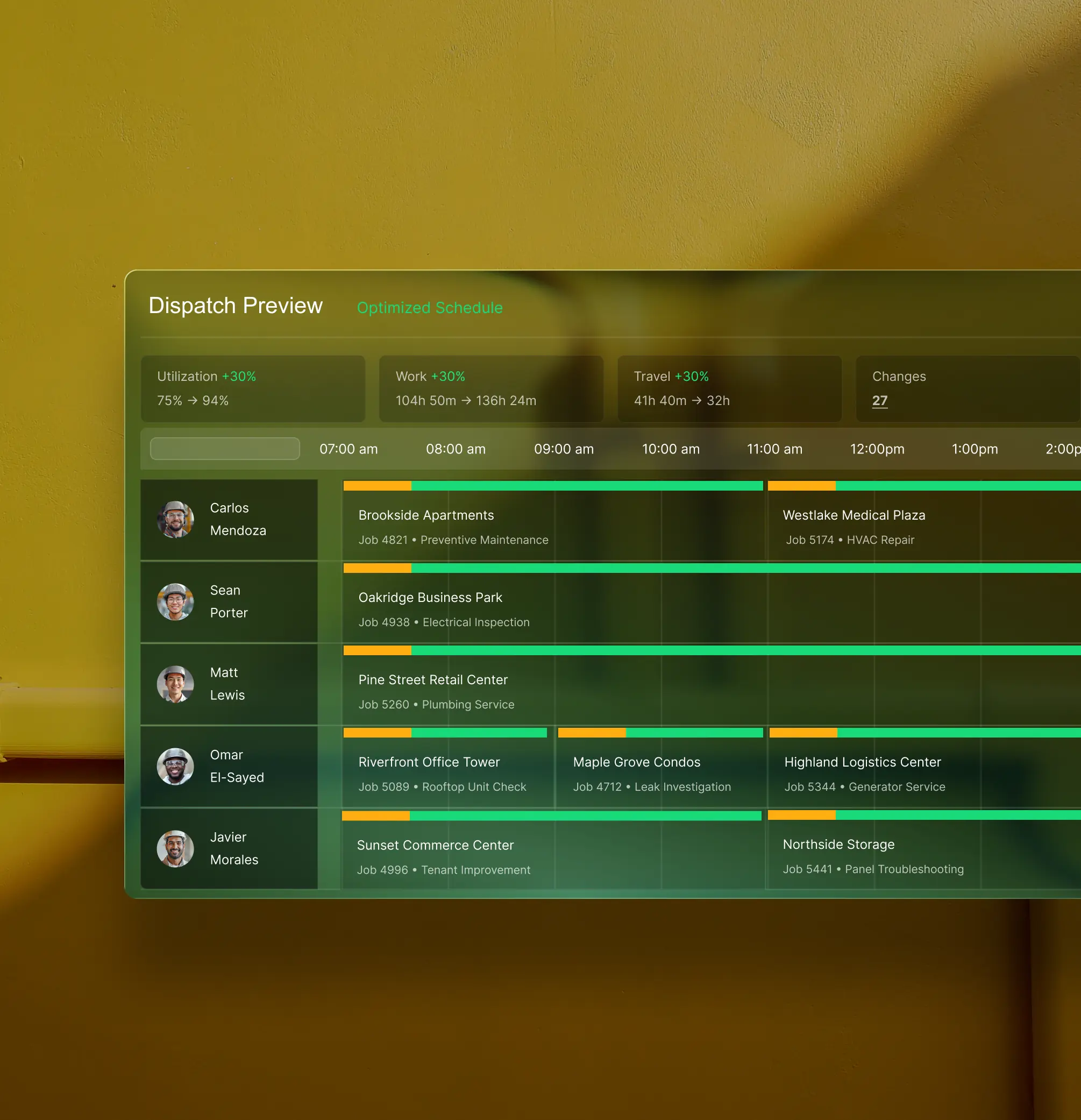
Automated routing and smart scheduling free up capacity, so you can take on more work without adding headcount before the revenue is there.
Proven Results
Built to perform
More crews in the field, faster invoices out the door, and margins you can see, that's what BuildOps delivers.
More revenue per tech
Get more out of every tech in the field.
Tools replaced on average
Scale without stacking more tools.
More work without more overhead
Handle more volume without adding headcount.
Results collected from the BuildOps benchmark report.
What makes BuildOps different
Built from the ground up for contractors who run projects, service, and everything in between. Not adapted. Made for the work.
Commercial work isn't an add‑on
Most platforms started in residential and stretched to fit. BuildOps starts with the complexity of commercial work.
Run the work in one connected system
Field, office, finance, and sales — all in one place. No duct-taped tools, no double entry, no dropped balls.
OpsAI is built in, not bolted on
OpsAI is already in your workflows. It recaps the day, calls out risks, and gives every role a clear next step.

"Our very ambitious goal is going nationwide. I know BuildOps is going to take us there. We have the system. There is nothing that's going to stop us now."
Common Questions
Your contractor small business software questions, answered
What features should I prioritize in a contractor software built for small business?
If you focus on commercial service and projects, a contractor software for small business should have core features that handle the complexity of that type of work. Here are the key things that are especially useful to enable commercial contracting work for scaling small businesses:
- Real-time Job Costing—You should be able to see labor, materials, and margin mid-month when you need it, not three weeks later in a spreadsheet. This is a critical feature for small businesses because you can’t wait weeks to then identify where your margins are off or when a project is going off the rails. You need to know today, so you can fix it before tomorrow’s contractors go out to the job. Small businesses don’t have the leeway to wait for monthly financial meetings to fix these kinds of mistakes.
- Smart Dispatch By Contractor Skill & Certification—Regardless of which trades your small business operates in, there’s undoubtedly unique contractor skills more useful to certain jobs, and industry certifications required by your contractors. A tool that can make suggestions that optimize your dispatch board—even when there’s an emergency—by contractor certification and skill cuts down manual work significantly, and this is the kind of task you need a small business contractor software to automate for you, because it’s not necessary for the owner or office staff to do this kind of manual task.
- Customizable Workflows—You should be able to build your own templated workflows that match the type of commercial contracting work and projects your team actually does, using built-in forms that contractors work through step by step on the jobsite. Each contractor will check off work requirements including necessary compliance step by step so that industry requirements are followed with a perfect record of what was done.
- Advanced Reporting & Custom Dashboards—Commercial work requires the ability to look at the smallest data point all the way to the big picture. In BuildOps for example, you can build your own reports using every single data input in the platform. You build your dashboards, your way, for your needs. You don’t have to piece together out of the box reports that come with software not built for commercial work.
- AI Powered Mobile Tools for Your Contractors in the Field—Use AI to scan assets in the field to fill in nameplate data, mobile document scanning, PO scanning, voice to text field note summaries that run downstream to invoice summaries—all of these things cut down on manual work, and help keep your contractors doing more work on the job than focusing on paperwork.
My business is small, but we don’t handle small jobs. Can BuildOps handle complex commercial-scale work?
BuildOps was purpose-built from day one to handle commercial-scale work—we didn’t tack those features on later. In BuildOps, service work and project management all run on the same platform with shared data. The same board that dispatches your contractors to jobs talks to the dashboard that covers recurring maintenance contracts. The boots on the ground contractors flagging deficiencies and making future work recommendations can instantly pull up the full service history for that location, and see all the work done previously.
At BuildOps, we don’t think one size fits all, and we don’t treat a $2k quick service job the same as a multi-month ongoing commercial project where your needs are much more complex. In the BuildOps platform, everything you do lives in a central system built for the scale of commercial work, for recurring maintenance contracts, and for large-scale, multi-location projects.
How does BuildOps help small business commercial contractors protect their margins?
BuildOps tracks labor, materials, and costs in real time, not after the fact. You can spot margin erosion while a job is still active and adjust before it hits the bottom line. Faster invoicing and automated field-to-office data flow help small shops see measurable profit improvements.
How does BuildOps integrate with QuickBooks, Sage, or my existing accounting system?
BuildOps integrates with many of the tools frequently used by scaling small businesses including QuickBooks and Sage, and has a bidirectional sync with these tools, so data can flow from the field directly into your accounting system, job costing, payroll, and other tools, cutting out the need for manual double or triple entry.
BuildOps also integrates with tools commonly used in different trades and industries, and features an integration with Bluon for HVAC teams, and an integration with Inspect Point for fire and life safety service teams.
We see BuildOps as the operational backbone you can build your commercial field service small business on top of, no matter what other tools you need in your tech stack.
What does the timeline for a BuildOps integration look like for small businesses?
Most small businesses are up and running on BuildOps within 8-12 weeks. We map your legacy data, configure custom workflows that match your specific operation and the work you do, and we train your crew—office staff and field techs alike. Our integration specialists will be with you every step of the way to help you build out your new operational architecture.
BuildOps was created specifically for commercial companies, and continues to be guided by input from small business owners, dispatchers, and contractors.
How do I make sure my contractors are going to actually use BuildOps in the field?
The BuildOps platform was built so even the least tech-savvy contractor can use it effectively, and most team members become comfortable with BuildOps with only 1-2 training sessions. During implementation, we help you build the custom workflows your small business actually uses, so when your contractors are starting out with the platform, they’re learning how to use it to complete the exact type of work they are going to do out in the field. This ensures they are set up for success.
Once your contractors see how much time the BuildOps technician mobile app is going to save them on manual tasks out on the job, they’ll be eager to use it! For example, OpsAI’s Smart Recap that uses AI to generate visit notes that feed directly into invoice summaries has 6500 monthly active users on BuildOps right now.
What are some ways small businesses can automate operations with OpsAI? Is OpsAI ready now?
OpsAI is ready for use right now, and isn’t just a chatbot or bolted on feature. It was built to truly understand and automate the work of commercial field service teams.
Our customers have seen results like 80% less data entry using our PO scanning tools, have saved hours every month using our Smart Dispatch and invoice automation, and love the ability to turn tech voice notes into structured field notes in seconds—all powered with OpsAI.
OpsAI learns from your jobs and project data to flag issues, identify recommended work, suggest next actions, and cut busywork, getting sharper with every visit. It turns your legacy system of record (showing you the history of what was done) into a modern system of action, guiding every team member from field to office on what steps to take next.
More specifically, here are the key ways OpsAI would help a small business field service operation across different roles at your company:
- Contractors out in the Field: Sends the right contractor to the right job, briefs the foreman before the crew gets there, captures visit voice notes and turns them into work summaries, and summarizes daily reports from jobsites.
- Back office service operations: Turns visit notes into invoice summaries to close out billing faster, provides summaries and daily reports from jobsites, optimizes dispatch boards and scheduling based on which contractors have the skills or industry certifications required for each job.
- Finance team members: Generates invoice summaries that customers can actually read and understand, matches bulk payments to open invoices, and pulls line items from PO photos.
- Sales and marketing teams: Identifies pull-through revenue and work recommendations from completed visit notes so you can make fast recommendations to customers.
- For small business owners: Surfaces jobs, trends, and risks you might not catch before it’s too late, so you spend time making decisions, not looking for information.
How does role-based access work in BuildOps? What can my contractors see vs office staff? How is the data secured?
Role-based permissions ensure your team only sees what they need to, and you are in full control of that. You can set permissions for contractors, for dispatchers, for office admin, for leadership, for business owners—whatever you need. BuildOps is a platform where all the data is accessible to anyone, whether they’re using a desktop or using their phone, but you are in total control of who sees what.
Maybe you want to build a custom report for each contractor to see their individual job performance stats, but you want a different dashboard for leadership to compare job profitability for all your contractors. BuildOps lets you do that.
BuildOps is also SOC 2 compliant with enterprise-grade encryption for data in transit and at rest, so you can be assured: your data is secure, and your data stays yours.
Can you point to any success for teams already using BuildOps as their small business contractor software?
Of course we can. Using BuildOps:
- Jackson Mechanical saw a 100% increase in tickets handled with no headcount added, a 50% reduction in time taken to create a job and get it scheduled, and a 30% growth in revenue
- Jolma Electric saw a 50% leap in overall efficiency after having continued growth year after year and not being able to stay organized while they scaled quickly
- JBS Plumbing Services used Fleet tracking to notice no one was wearing their seatbelt, and brought that up from 0% to 90% compliance with just one message
- Dane Electric cut invoicing time by over 30%
There’s a clear reason scaling small contractor businesses trust BuildOps.
Why do scaling commercial small businesses need a system of action like BuildOps over basic records like paper, spreadsheets, and one-size-fits-all software?
These older tools are basic systems of record. They show you what happened last month and leave you as a business owner to spend your time investigating, looking for risks and the cause of problems yourself, rather than making the decisions that stop the problems and increase profit margins so you can scale.
BuildOps is not a system of record, it’s a system of action. It doesn’t just record events, it understands your commercial operation, flags deficiencies and potential work, and brings problems to your attention before you even realize they are there so you can take action. BuildOps takes care of the manual and the repetitive (that you don’t need to do), so you can take care of making decisions and leading the company (which is where your attention should be).
Your old system and way of doing things is telling you what happened, and it doesn’t understand your dispatch logic or custom workflows. BuildOps and OpsAI is built to already understand it out of the box, so it can help you and your team members take their next action.
