Sales to Operations Handoff
Close the deal. Start the job
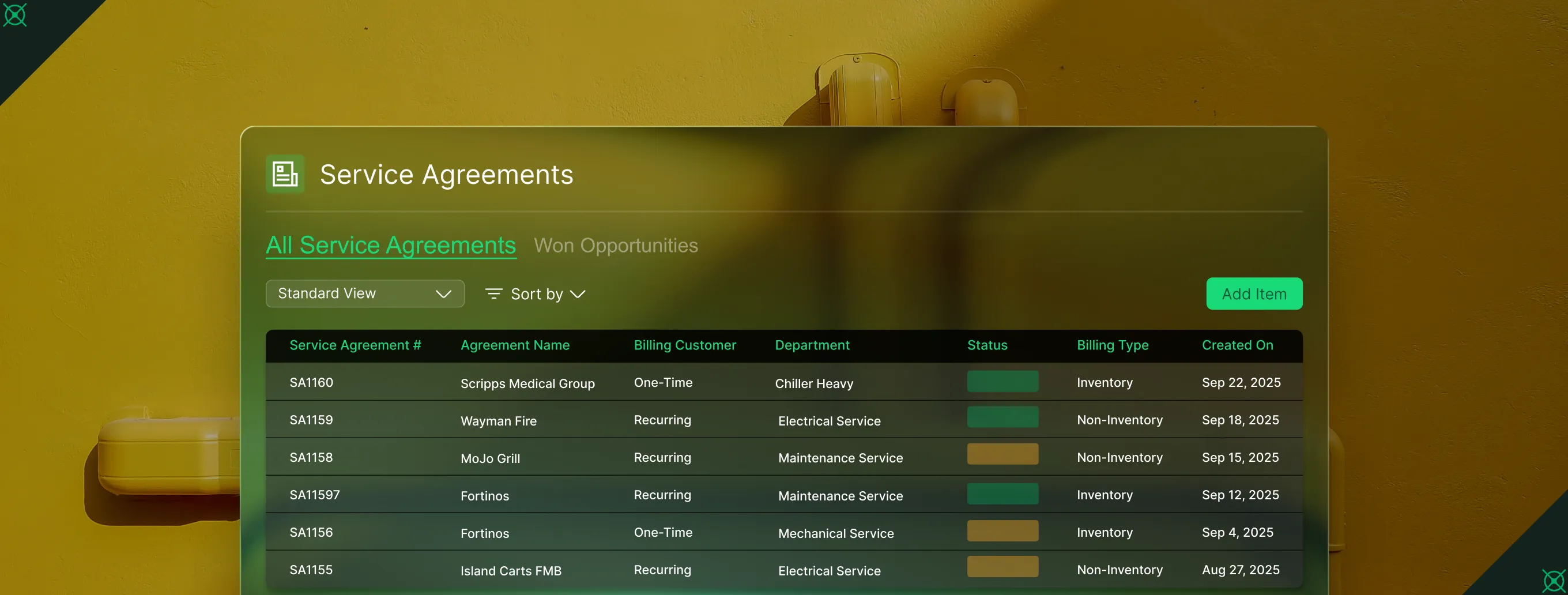
When a deal closes, budgets, scope, and customer details carry straight from CRM into a project or service agreement, so there's no re-entry, no starting from scratch.
Trusted by 1,500+ commercial contractors across North America















Why This Handoff Matters
Everything sales promised, ops gets on day one

Zero re-entry
Budgets, scope, and customer data flow to ops. No re-keying, no lost context.

Complete context
Every file, note, and proposal carries forward, so ops never starts blind.

Faster job kickoff
Closed deals convert to projects or service agreements directly from CRM+. No re-entry, no rework, no delay.
How the Handoff Works
From closed-won to job-started, fast
With other tools, sold jobs get re-entered by hand. Details change, context gets lost, and the job goes wrong before it even starts. CRM+ keeps every detail intact from deal to delivery.

Direct Conversion, Full Context
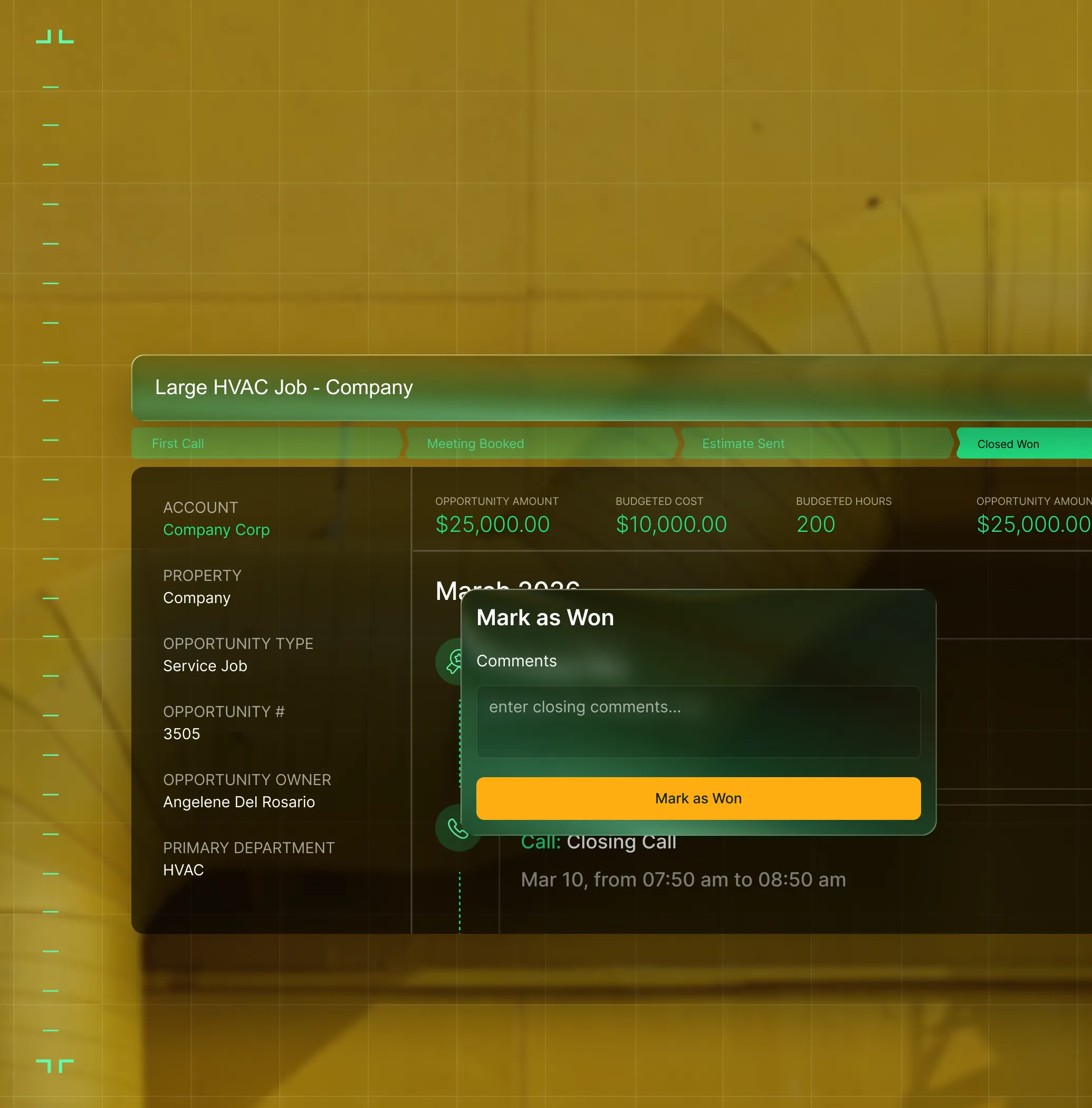
Mark a deal as won and convert it to a project or service agreement with budgets, contacts, files, and scope carried forward automatically.
Required Field Guards
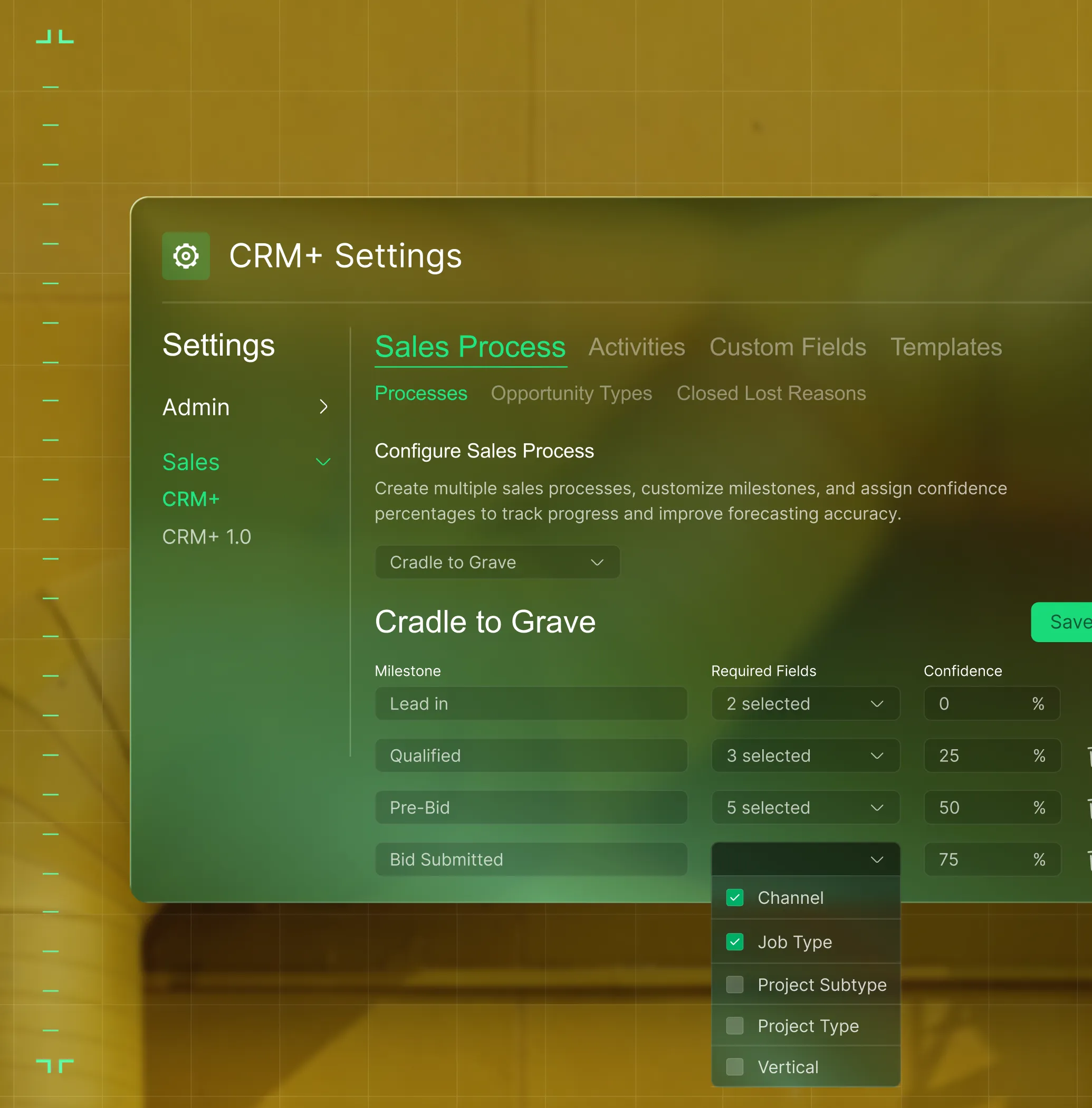
Set required fields at each sales stage so nothing's missing when the deal moves to operations.
Shared 360° View
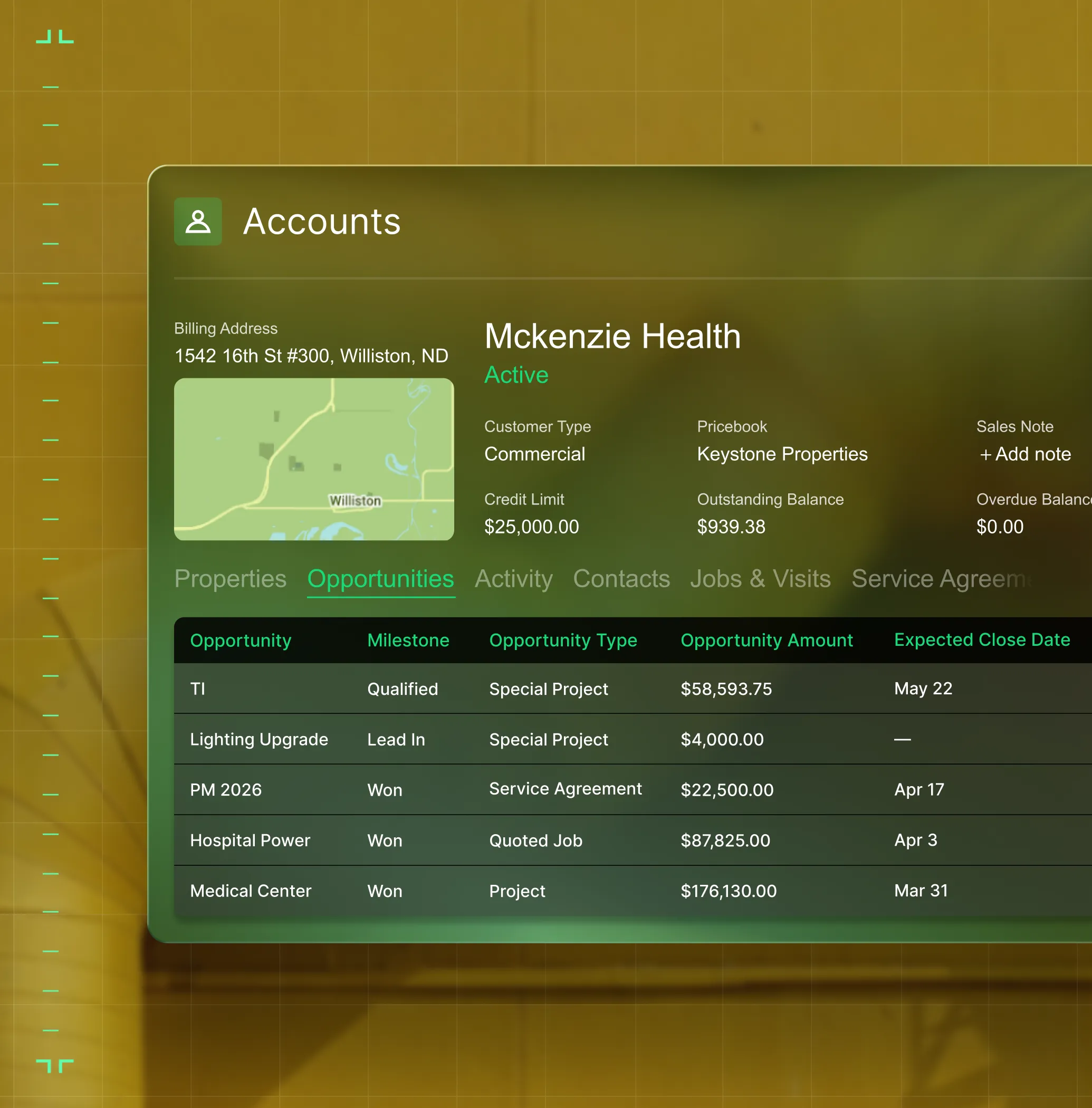
Sales and ops share the same customer, property, and asset records. Nothing falls between teams.
One Team, One System
Sales and ops on the same page

"With BuildOps CRM+ we are seamlessly building out pipeline."
Win more work without chasing it.

"Before, everything was on me, sales, ops, you name it. But with BuildOps, I can finally delegate. I still see what's going on, but I don't have to be in the middle of everything."
Run the business without being buried in it.

"All the different metrics we couldn't see before we now see in one place. Sales and ops, same page."
One view of the whole business. No blind spots.

Proven Results
Real-world impact for commercial leaders


"We've seen an increase in day-to-day operations efficiencies that's going to add up to significant savings in time and energy over the course of a year."

"If we didn't have BuildOps and the additional cyber security they give our company, we would be dead in the water."

"The ability to produce reports either on an individual job basis, a quarterly basis, or a project basis is something we'd never seen before in other software that we've used."

"We've cut down in our receivables from about 120 days to 30 days on average."


"Before we knew it, we were seeing quicker turnaround times on job closeout and a huge improvement in the time it took for quotes to be accepted by our customers."


"With BuildOps, we feel like we can go after anything. The sky is the limit as far as the size of the project."
.webp)

"BuildOps gave us an all‑in‑one system for both service and projects. Once we saw that, it was a no‑brainer."

"With the integration of BuildOps and Sage Intacct, our accounting system, we've been able to speed up the time it takes for us to bill customers."


"Our consulting division increased 300% because we were able to free up more time from the office to help other customers."
![Service First Logo]](https://cdn.prod.website-files.com/69cad9cd3a5ef3196ea9bb65/69fa0ca0adc28a56d26717c9_Service%201st%20white.webp)
"Sometimes systems promise you the moon, then you use them and see the weaknesses. It's been the exact opposite with BuildOps. Everything we wanted it to do, it could do."

"We used to be two weeks behind on job costing. Now we're up to date daily."
What makes BuildOps different
Built from the ground up for contractors who run projects, service, and everything in between. Not adapted. Made for the work.
Commercial work isn't an add‑on
Most platforms started in residential and stretched to fit. BuildOps starts with the complexity of commercial work.
Run the work in one connected system
Field, office, finance, and sales — all in one place. No duct-taped tools, no double entry, no dropped balls.
OpsAI is built in, not bolted on
OpsAI is already in your workflows. It recaps the day, calls out risks, and gives every role a clear next step.


Where Sales Meets the Field
The handoff is just the beginning
Sales data doesn't stop at the handoff. It powers dispatch, scheduling, purchasing, and invoicing across BuildOps. One deal. One entry. Every downstream team connected.
Sales & CRM capabilities at a glance






Common Questions
Sales-to-ops handoff, answered
What is a sales to operations handoff platform in commercial field service?
In field service, a sales to operations handoff platform enables sales teams to keep track of and follow up on opportunities for new business or upsell opportunities in the field, storing and organizing customer details during the prospect stage of the customer lifecycle, but then automates the following stages by leveraging the information collected by sales for use by other roles within the field service business.
Customer detail information like property manager and contacts names, addresses, phone numbers, and security/jobsite access information becomes accessible to all team members with no double or triple entry, which helps work on a job begin nearly instantly, rather than being delayed by an information blocker.
The sales to operations handoff will normally be featured within a larger field service management platform that directly connects the work sales is doing to dispatching, the tech mobile app, field report notes, invoicing, and reporting, unifying everything in a single source of truth so each team member can automatically take next steps.
What features does a field service platform need to enable successful sales to ops handoffs?
Field service management tools are built for different industries and different use cases, so most aren’t built for the needs of commercial contractor field service sales teams. If you do commercial scale field work, these are the sales to ops handoff features most important to look for in a field service management platform:
- When a deal is marked as “Won”, it can immediately be converted to a project or service agreement
- Contacts, budgets, work scope, files, and any other information is carried forward automatically
- Sales managers can set required fields at each sales stage so all essential information must be included before the deal moves to ops
- Sales and ops share the same customer, property, and asset records in one platform
- Hierarchical organization of customer details that map to multi-location, large-scale commercial projects
- Pull-through work recommendations where techs can identify work on the job & sales can follow up immediately with a Quote
- Custom reporting so sales teams can build the reports they need based on what they need to track
- Photos and videos can be attached to Quotes so customers are more likely to approve
Do you have any proof of how BuildOps has helped improve sales to ops handoff for field service businesses?
We have tons of examples. Here are some of the biggest benefits teams have seen using BuildOps for sales to ops handoffs:
- Layer One fixed their job costing process, saving 1 week of manual work every month
- Jackson Mechanical saw a 50% reduction in time taken to create a job and get it scheduled and 30% growth in revenue
- Certified Fire saw service employee billable time increase from 75% to over 95%, monthly service billing rose 54%, and an incredible 250% increase in profit margins
- Classic Electric unified their whole operation in a single platform, achieving 300% growth
There’s a clear reason that sales teams love BuildOps.
What are some ways OpsAI automates the sales to ops handoff? Is OpsAI ready now?
OpsAI is live and in production today. Teams are using it now across dispatch, field documentation, asset capture, invoicing, and payment matching. It ships as part of BuildOps, not as a separate add-on.
Our customers have seen results like 80% less data entry using our PO scanning tools, have saved hours every month using our invoice automation, and love the ability to turn tech voice notes into structured field notes that convert to invoice notes in seconds—all powered with OpsAI.
OpsAI learns from your jobs and project data to flag issues, identify recommended work, suggest next actions, and cut busywork, getting sharper with every visit. It turns your legacy system of record (showing you the history of what was done) into a modern system of action, guiding every team member from field to office on what steps to take next.
More specifically, here are the top ways OpsAI automates sales tasks, enabling a more efficient sales to ops handoff:
- Identifies pull-through revenue and work recommendations from completed visit notes to make faster recommendations to customers for additional work
- Reads what your techs write up including aging equipment, recurring failures, missed agreements and surfaces a ranked list of opportunities your sales team can act on the same day
- Surfaces jobs trends and risks that can lead to changes in quoting or updated change orders for customers
- When OpsAI flags a replacement opportunity, the signal connects to field execution, service agreements, and financial forecasting so a quote becomes a job and then an invoice and then a new quote for pull-through work, all in the same system
What happens to my sales data when an opportunity is marked as won in BuildOps?
When you close a deal in CRM+, you can convert it directly into a project, service agreement, or job. Customer details, budgets, contacts, and files carry over automatically. No re-entry required.
Do I need a separate CRM to use sales to operations handoff in BuildOps?
No. CRM+ is built into BuildOps. No separate login, no sync issues, no duplicates. Sales and ops work from the same platform and the same records. One system of action.
Can I customize my sales process stages in BuildOps?
Yes. Create custom sales processes with configurable stages and required fields at each milestone. Guard rails keep your data clean so ops gets everything they need when the deal closes.
How does the sales handoff support OpsAI in BuildOps?
Every handoff captures structured, clean data: customer details, scope, budgets, and files. That structured foundation is what powers OpsAI to surface insights and recommendations across your operations.
What if my team already uses a CRM like Salesforce or HubSpot?
Most contractors re-enter every closed deal into their ops system. CRM+ removes that step. Sales and ops live in one platform, so what's sold flows directly into delivery. In BuildOps, your sales team shares the same customer, property, and asset data as ops with no integrations and no duplicate records. It's a CRM made for how commercial construction contractors actually sell, not a generic sales platform that can’t understand contractor workflows or construction estimating.
Can CRM+ hand off both service agreements and construction projects?
Yes. From a closed-won opportunity, you can create a service agreement, project, or job, depending on the work type. Budgets, contacts, files, and scope transfer automatically every time.
Handling both of these use cases is what BuildOps is built for, so we support multiple sales processes, each with its own stages, required fields, and workflows. Today, closed-won opportunities convert directly into service agreements, quoted jobs, or projects inside BuildOps. For service work and special projects like tenant improvements or retrofits, CRM+ handles the full pipeline-to-handoff workflow. For larger new construction bids with dedicated estimating needs, CRM+ manages the pipeline while estimation is handled through your preconstruction tools.
How does BuildOps CRM+ keep prospect and customer data separate?
New accounts created in CRM+ automatically default to "Prospect" status. Once a deal is won, the account converts to "Active." This keeps sales data clean and prevents prospect info from cluttering your ops environment.
Can my sales team see full service history for existing customers in BuildOps CRM+?
Yes. CRM+ and BuildOps share the same database. Your reps can see every past job, service agreement, property note, and asset record for existing accounts, so they sell with full context, not a blank screen.
How does BuildOps CRM+ handle multi-property accounts?
Each account in CRM+ links to multiple properties. Each property links to its assets, service history, and contacts. Your team can drill from account to property to asset in seconds without digging through spreadsheets.