


Key Takeaways
- Field service management software typically costs anywhere from $60-$350 per seat per month
- The biggest factor that affects overall cost is team size, because in these ranges, small team costs can be in the $60-$5250/month range, while enterprises could be looking at $20,000+ per month
- Going to vendor demos with a planned list of things to ask for and check is the best way to make sure you choose the right tool
Field service companies are increasingly adopting management software to help run their operations – both in the field and in their back offices. If your company is thinking of doing so for field service management as well, a question that’s probably on your mind is: “Can we afford it?”
Field service software pricing varies based on how big your company is, how many features you need, and a few other things. The main thing to remember is to look at these costs as an investment instead of an expense. When used properly, field service management software helps your team communicate better, work more efficiently, and get more jobs done, and it can actually save you a lot of money.
This guide will help you get real value out of the cost of field service software by explaining what affects how much field service management software costs, what features are typically available in the software, and how you can weigh features against costs to find a solution that gives you the best value. We’ll cover key topics, including:
- What does field service software cost typically?
- The 6 biggest factors that affect field service software pricing
- Top features to evaluate that bring ROI from the cost of field service software
- 5 steps to choosing a field service software platform
- Top 5 field service management software options
- How to maximize value from the cost of field service software
Let’s start by looking at the general price ranges for field service software, and explaining the major factors behind how much it costs.
What does field service software cost typically?
Field service management software prices are typically anywhere from $60-$350 per seat per month. The price is usually calculated as a monthly rate based on the number of users (which can count both field techs and admin staff), and varies based on the software’s specific features and tiers of service.
How much will company size affect the cost of field service management software?
The size of your company plays the biggest role in how much you’ll pay in total for field service software. Here are some price ranges to give you an idea of how much software costs for different-sized companies:
- Small businesses / SMB with 1-15 techs: $60-$5250/month
- Medium-sized to mid-market businesses with 15-40 techs: $5250-$12,000/month
- Large to enterprise businesses with 40+ techs: $12,000-$20,000+/month
What are the most common field service software pricing models?
Different tools can price in different ways, but these are the most common ways you’ll see field service software priced:
- Per user per month pricing model: You pay a flat cost per month times the number of users you need to access the platform.
- Tiered features model: Platforms will bundle features into tiers of service where you pay a higher flat fee for each tier, stil often per user per month.
- Only office staff model: This is still typically per user per month, but you might not have to pay for each individual field tech. Typically if the tool doesn’t have a mobile app, or they don’t charge per user on the mobile version.
- Per location fees: Some tools will charge extra flat rates per location you operate in.
- Flat rate pricing: You pay a monthly fee for your entire team to use the platform, more typical for larger enterprises with custom builds or integrations.

The 6 biggest factors that affect field service software pricing
While the number of users generally makes up a big chunk of how field service software is priced, it’s not the only pricing model or potential cost. Here are six cost-affecting variables you should know about:
1. Number of users
Many field service management companies price their software based on how many employees at a company will be using it. Because ‘per user per month ’ pricing is the most common model, the number of users you need will likely be the biggest thing affecting total bottom line price.
Some models will only count back office people who need to use the software for scheduling, dispatching, invoicing, analytics, and so on, but this pricing tends to include one-time licensing fees plus monthly subscription fees. Other models count both your in-field techs and back office people as users, but may only charge monthly subscription fees.
Expert Tip
Some software providers offer discount pricing for purchasing a larger number of user licenses. Ask about it if you have an enterprise-sized team.
2. Number of locations
If you have offices in multiple locations where you want to use the field service software, you may have to pay to get the software implemented at each of them. This may involve one-time setup fees, monthly subscription fees, or both, so be sure to think about how large an area you can serve with each location.
This model may be worth it if your locations are far enough apart that it’s advantageous enough to manage them separately.
3. Upfront / onboarding fee
Some field service software providers will charge a one-time fee to use their software rather than a monthly subscription-based pricing model. This can be somewhere around $500-$1500 for smaller businesses, $1500-$3000 for medium-sized businesses, and $3000-$5000+ for large enterprises.
Important
Be sure to check if the price of field service software includes implementation costs. It sometimes doesn’t cover things like software installation, system setup, and data migration, and this can add several thousand dollars to your bill.
4. Included or available functions and features
Field service management companies may use a tiered subscription service that bundles different groups of functions or features, and then charges different per-user-per-month rates based on which tier you pick. For example: a software provider may charge $100/user/month for basic-tier service with limited functions, $150/user/month for professional-tier service with standard features, or $200+/user/month for a full-featured enterprise plan.
Field service management software providers often provide certain features as separate services that you can add on to your main package. You can be charged a one-time fee for them, a recurring monthly subscription fee, or a pay-per-usage cost.
Look carefully at what you get with each tier of a subscription service and which features you have to pay for separately. Try to find a mix where you don’t end up paying for much more than you need.
Important
If you can, find out how long a commitment you need to make for each service tier, or for the software overall. You don’t want to be stuck for months or even years using a tool that doesn’t do what you need it to or continually rises in price.
5. Industry
Field management software may be tailored to specific industry sectors and niches. For example, some field service management software for small businesses may be designed for contractors who specialise in residential jobs, so they’re less expensive but not as feature-rich. Others will include more functions needed by contractors who specialise in more complex, commercial-scale jobs.
6. Enterprise-level customizations
Some field service businesses need specific niche functions and features beyond what standard FSM software packages offer. In these cases, they may ask a software provider to build a custom solution that integrates the advanced functions they need. This usually costs extra, as the software provider has to put together a package outside of their normal service offerings.
Top features to evaluate that bring ROI from the cost of field service software
Now that you understand how much field service software can cost, the next question is: “What am I going to get out of it?” Here are some key functions you definitely want to check for and ask about when shopping for field service software.
Core features that field service software absolutely needs to be worth the cost:
These are must-haves that are vital to what field management software is supposed to do. If they aren’t part of the standard package of features for a particular piece of field service software, you’re probably not getting a lot of value out of the tool.
- Quoting and invoicing—A field service management solution should help you to quickly itemize costs for field service calls so you can get accurate estimates out to customers as soon as possible. It should leverage the information entered during estimating directly into field notes that then turn into invoices so you can automate this process with no data re-entry. With field service, the sooner you get invoices out, the faster they will get paid, so this is a critical component of a good platform.
- Customer relationship management (CRM)—A good field service software platform should be able to store, access, and analyze customer information like contact details, interaction history, and service history. Field service CRM software helps you whip up proposals quickly using templates, while still making personalized suggestions on what they might want in the future.
- Scheduling & dispatching—Your software should be able to schedule and dispatch field techs to jobs based on schedule availability, as well as technician skills and certifications, making AI-optimized recommendations to your dispatching board to remove manual oversight on this repetitive daily task.
- Job tracking & reporting—Your software should include field service reporting that tracks progress with an overall job or project in terms of milestones reached. It should also allow field techs to track and report on their hours worked so you have details on what happened during a work session, including how each employee performed.
- Inventory management—You need to keep track of your products, materials, and equipment so you know what you’re able to sell and whether you have what you need to complete a job or not.
- Mobile app connectivity—With most field techs these days using a mobile device to help with work, it’s virtually mandatory for field management software to have a mobile field service app. It saves a ton of time and travel distance by allowing techs in the field and back office staff to remotely communicate and share information with each other in real time.
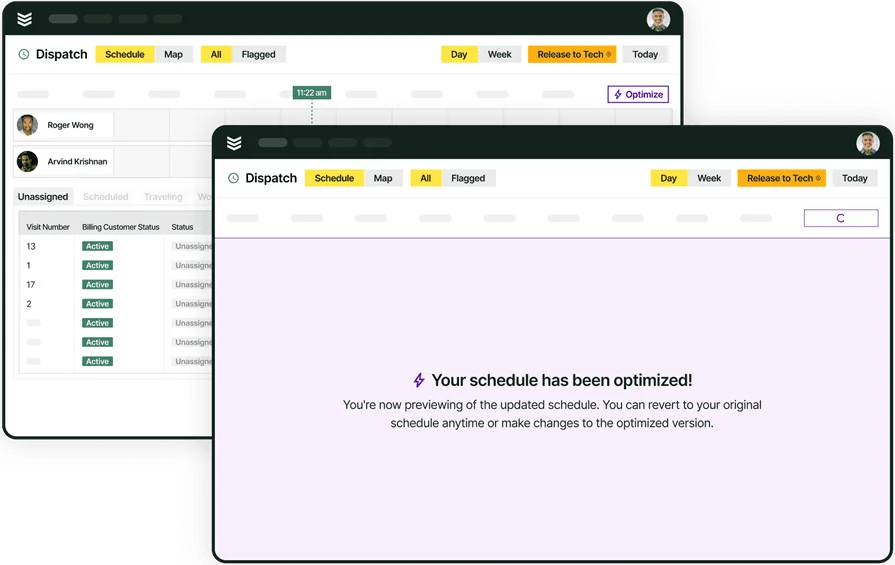
Explore BuildOps Service tools suite
Our AI-powered platform generates value by automating field service ops from end to end
Other features that are very useful to have in a field service solution
- AI-powered features—According to our survey, 78% of contractors are already using AI tools on the jobsite. Utilizing features like this is how you don’t fall behind your competition in the next few years. Things like recommended optimizations to your dispatching board, nameplate asset capture that can turn a photo into inventory items, and a platform that learns from you the more and more you add to it — these will all be key to full field service operations automation.
- Fleet management—If your company uses a lot of vehicles, field service routing software can be handy to track your vehicles’ conditions and locations. You can optimize service routes and overall vehicle use so gas and maintenance aren’t as big of expenses.
- Lead generation—Do you know where your next job is coming from? Lead generation helps you find places where customers are looking to hire companies like yours, so you can bid for their business.
- Cloud-based platform—Cloud-based tools are essential to connecting field to office, ensuring information can be accessed from anywhere, and is up-to-date in real time for whoever is accessing it.
5 steps to choosing a field service software platform
Now that you know what you can get and what you can have to pay for when shopping for field service management software, how do you balance those two elements to get the best value? We can save you a lot of time now and just tell you that BuildOps gives you the most bang for your buck if you’re a commercial-scale business, but we’re biased.
However, we’re also so confident you’ll choose us over the competition that we’ll outline exactly what you should do to compare field service management solutions to find the best fit for your business.
Here’s a checklist, or you can go through each step below in detail:

Step 1: Research available options for your industry
The first thing you should do when looking for a field service software provider is check that their software caters to your industry. Not every solution will have the functions necessary for every industry.
Next, check their service tiers and general brand messaging to see if they have a package that fits your company’s size. Build a spreadsheet to compare pricing and features for each option that seems like a decent fit.
Remember that the lowest per-user-per-month rate doesn’t always amount to the cheapest option. Implementation fees and needing to purchase add-on modules for essential functions can drive up the price pretty quickly. Be wary of solutions that lock you into multi-year contracts, because you don’t want to end up overpaying for an underperforming tool any longer than you need to.
Finally, remember that the cheapest option isn’t always the best investment. You may be slowed down by frequent maintenance and having to find workarounds, and miss out on features and scalability that help you down the road as your business grows.
Step 2: Set up personalized demos with the providers you shortlist
Go over your research spreadsheet and pick a few software providers that offer packages close to what you’re looking for. Contact each of them and ask for a personalized demo, giving them the specifics of what your company does and needs. This is a good opportunity to see the software in action and determine if it can actually do what you need it to.
It’s also a chance to ask the software provider additional questions not only about the software’s features, but also about pricing specifics. We’ll expand on that point in the next step.
Expert Tip
Look or ask for a free trial as well. That way, you can explore the software on your own to see if it does what you need it to, or can be adapted to do so.
Step 3: Arrive at each demo prepared with questions
You should show up at each demo not just to see if the software meets your needs, but also to clarify what the software’s pricing and usage terms look like. Be prepared to ask field service management vendors questions such as:
- What pricing model do they use? Upfront fee? Per user? Per location? A combination of these?
- Which of the software’s functions and features are standard, and which need to be bought separately?
- Do they have a tiered subscription model? If so, what functions and features are bundled with each tier?
- Do they offer custom enterprise pricing and packages for larger companies?
- Are installation, training, and other implementation fees included in the price, or are they separate? How much are they?
- Is there a long-term commitment for the software where the provider could raise the price in the middle of the contract?
Expert Tip
If a demo isn’t tailored to what your company specifically does, that’s a bad early sign. It implies a software provider doesn’t care enough about winning your business to show how their product can solve your company’s particular challenges.
It also casts doubt on how well they can accommodate your company’s unique needs when implementing the software and training your staff to use it.
Step 4: Demand live proof that the features you need are usable
There’s nothing more frustrating than having a field service software provider claim their platform has a feature your company needs, but then when you go to use it, you find out that feature is ‘still in development’. Don’t let this happen to you! While at a demo, insist that a software provider show you that all of the features you need are actually functional in the demo space. If they can’t do this in a live session, then their sales team overpromised, and you should take your business somewhere else.
Step 5: Re-evaluate your options
Once you’ve seen what each field service management solution you shortlisted is really capable of, and clarified pricing and use terms with each provider, you should do another side-by-side comparison. Which ones proved to actually have the functions your company needs? Which ones included those features as standard in affordable packages? What were each of them charging for implementation and training? Which ones did or didn’t have long-term contracts attached? Asking questions like this should help you narrow down your ideal choice for a solution.
If you’re still unsure, reach out to the software providers again. Tell them what you liked about the other platforms you got demos of, and ask what they have that’s better and why. Then you can make your final decision.
Did you know
Our customers choose BuildOps and switch from our competitors because no one can touch our feature suite that's built for (and loved by) commercial contractors.
At BuildOps, we don’t think one size fits all, and we don’t think you should try to force your commercial-scale workflows into residential-driven service platforms and watch them fall flat. Check out our full service management suite of features to see what we mean.
Top 5 field service management software options
Now, how does BuildOps stack up against other popular field service software platforms? Here’s a breakdown of what we can offer for field service management, as well as profiles of four other common choices so you can decide for yourself.
1. Best for commercial contractors: BuildOps

BuildOps is an all-in-one field service management platform designed specifically for commercial contractors. It provides powerful real-time scheduling & dispatching, automated estimates & invoicing, and an AI-enhanced technician app that makes notetaking and report-writing a breeze.
Why BuildOps is Best for Commercial: BuildOps is one of the few field service management platforms that features asset management: the ability to nest properties under a common owner for easier searching, service history tracking, and scheduling & dispatching.
How Pricing Works: Per-user monthly cost
Rating: 4.5 on Capterra from 149 user reviews
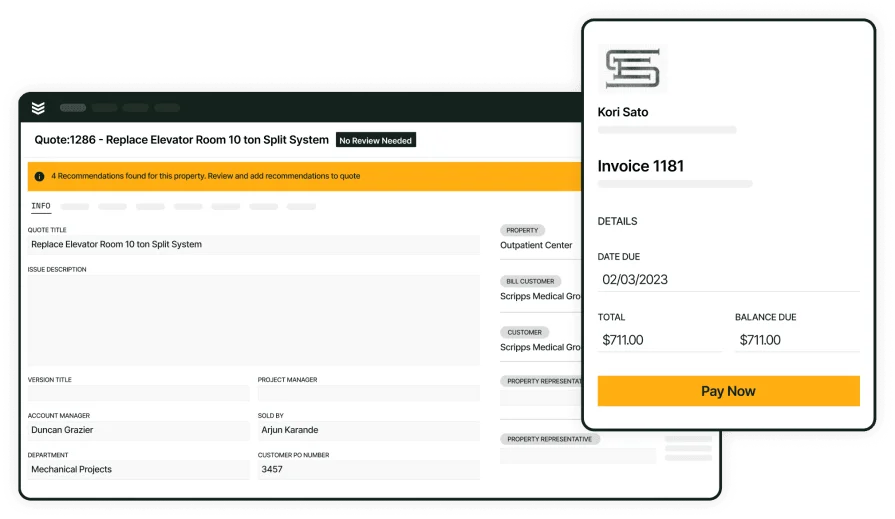
An automated, value-driven field platform
See exactly how our AI-powered platform handles everything from first call to closeout
2. Best for residential contractors: Housecall Pro

Image Source: Housecall Pro
Housecall Pro works well for residential contractors with its focus on making things easy for customers. Its simple yet powerful appointment scheduling, customer communication, and payment processing features make it ideal for high volumes of short-term projects. Unfortunately, it isn’t built to handle more complicated projects and large workforces often seen in commercial field service.
Why Housecall Pro is Best for Residential: It has features and interfaces such as a self-serve booking system, automated appointment reminders, and customer-to-tech communication tools that make it user-friendly for individual homeowners.
How Pricing Works: Tier-based monthly or annual subscription, and a limited number of users allowed at each tier
Rating: 4.7 on Capterra from 2736 user reviews
Check out our comparison of Housecall Pro vs BuildOps to see how their features stack up side-by-side.
3. Best for general contractors: Jobber

Image Source: Jobber
Jobber is a reliable field service management solution with simple-to-use job scheduling, customer management, work tracking, and invoicing. That makes it great for general contractors who take on a mix of projects, including installation, maintenance, and repair calls. However, its capabilities are limited when it comes to managing complicated large-scale commercial projects.
Why Jobber is Best for General Contractors: Its easy-to-use interface for job scheduling, work tracking, and customer communication make it ideal for contractors who handle one-time or recurring short-term jobs.
How Pricing Works: Tier-based monthly or annual subscription, and a limited number of users allowed at each tier
Rating: 4.6 on Capterra from 1404 user reviews
4. Best for speciality and niche contractors: Workiz

Image Source: Workiz
Workiz is ideally suited for niche contractors like cleaning services, appliance repair, and locksmiths. Its lead management features work well for small businesses that rely on referrals and upselling during service calls to get new work. It also has scheduling, team communication, and invoicing capabilities. The downside is that its management features aren’t suited as well to large, long-term projects.
Why Workiz is Best for Specialty Contractors: Its lead management tools, including call tracking and automated follow-ups, help niche contractors miss fewer precious opportunities by responding to them quicker.
How Pricing Works: Tier-based monthly or annual subscription; limited number of users allowed at each tier
Rating: 4.4 on Capterra from 218 user reviews
5. Best for scaling teams: Service Fusion

Image Source: Service Fusion
Service Fusion provides standard field service management functions such as job scheduling, field employee tracking, and invoicing. What sets it apart is that it’s not only easy to use, but also very flexible in terms of scaling – its pricing plans don’t depend on or limit the number of employees using the software. It’s also a cloud-based platform, so it offers plenty of storage space. It may not have the features that established contracting businesses working on big commercial projects need, though.
Why Service Fusion is Best for Scalability: Each of its plans allow for unlimited users, so you won’t end up paying more for it if you expand your business and hire new staff.
How Pricing Works: Flat monthly or annual rate
Rating: 4.3 on Capterra from 287 user reviews
This is just our list of the top 5 choices for different types of businesses. If you want a much bigger list to look through, check out our full list of the best field service management software with over 20 options to choose from.

How to maximize value from the cost of field service software
We urge you to view field service management pricing as an investment instead of an expense.
But that doesn’t mean just buying the most powerful software on the market though (unless that’s what you actually need). It means finding a solution that gives you what you need, plus a little bit more (to plan ahead for future growth), and then making the most out of everything you get.
Here are some ways to do that:
- Shop with scaling in mind—When shopping for field service software, don’t just go for the bare minimum to save money in the short term. Remember that you’re buying a field management solution to boost your company’s productivity – but that’s tough to do if you’re constantly fixing things and finding workarounds for functions your platform can’t natively do. Get a solution that can handle more than exactly what you need right now so you’re not in the same situation a year from now as your business scales.
- Look for integrations—Even if a field service platform doesn’t have exactly everything you need bundled together, it may have built-in workarounds: integrations with other common tools you may use. Scout these out while shopping for field service software, and see if you can find out if they cost extra to use (they usually don’t). For example, if you don’t want to pay to have advanced accounting functions baked into your field service platform, try looking for field service management software compatible with QuickBooks.
- Remember to think about staff training—No matter how many handy features it has, your field service management software is only as good as how well your staff know how to use it. Ask the software provider what training programs are included with the software purchase, how long they take, and whether there’s any extra cost involved. Overly expensive or lengthy staff training can cut into the value you get from field service software.
- Automate manual processes—Doing field service management tasks like taking inventory, writing invoices, and tracking work hours by hand is time-consuming and prone to errors (or even abuse). Using software to automate parts of these tasks means they get done faster and with fewer mistakes.
- Communicate in real time—Your techs shouldn’t have to drive back to headquarters every time they need to get info about their next job or report on their previous one. Take advantage of mobile apps and other information-sharing features in field service software to keep your team up to date and on the same page.
- Access from anywhere—Though it can come with some security risks, choosing cloud-based field service management software allows you to access it from almost anywhere you can get an Internet connection. This can be useful if your employees need to do admin work but can’t make it into the office.
The value of BuildOps lies in the advanced features we include that are purpose-built specifically for commercial contractors. These include customer management hierarchies that work well for multiple work locations, AI-powered scheduling & dispatch boards that update in real time, and an AI-powered mobile app that simplifies notetaking, report writing, and invoice generation.
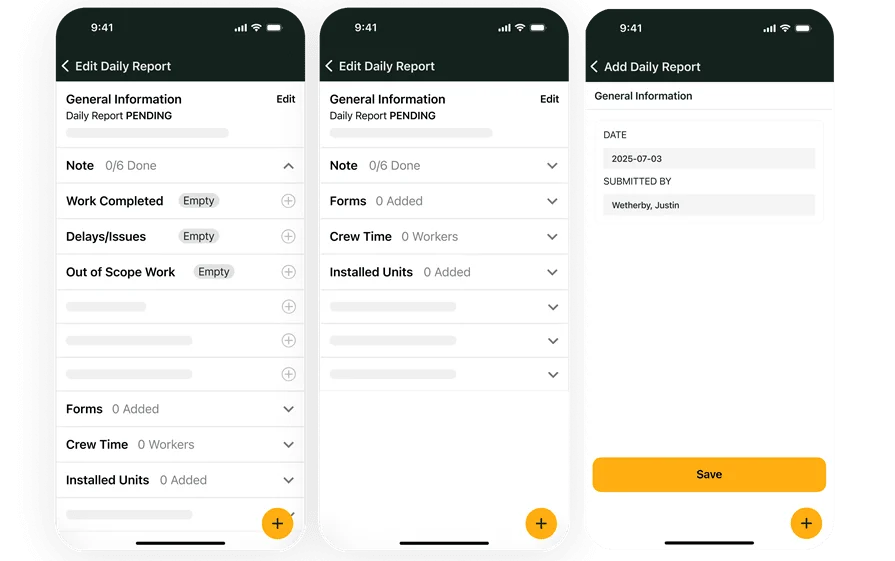
The value will be obvious from 1 demo
Explore how BuildOps helps field service teams cut down time and scale up revenue