AI Field Management Pricing & Review Comparison Guide

Key Takeaways
- AI field management software is priced in different ways by vendors
- You should look through reviews on software websites like G2, Capterra, or Software Advice to compare your options
- Use our list of 7 questions to ask in a demo that will help you select a great AI field tool while shopping around
AI field management pricing varies widely across the tools available today, and if you're running a commercial contracting operation, understanding those differences before you commit to a platform can save you thousands in annual software spend.
As AI in field service management continues to reshape how contractors handle dispatching, estimating, and real-time job tracking, the cost structures behind these capabilities have become a critical factor in choosing a platform that actually fits your operation.
You also need a clear review process that measures how an AI field tool actually performs in the field—beyond sales pitches and demos.
In this article, we're going to cover
- How does AI field management pricing work in most tools?
- Top AI field management features to look for in a review
- Where to look for AI field management reviews online
- AI field management review checklist: what to ask in a demo
Let's start with how pricing is typically structured across AI-powered field management platforms, and why the sticker price rarely tells the full story.
How does AI field management pricing work in most tools?
Most field service platforms you look at today come with AI baked right into the product. The real difference is in how each vendor decides to bundle and price those capabilities.
Some platforms include AI-driven tools like smart dispatching, predictive maintenance alerts, and automated estimating across every plan. Others hold those features back for mid-tier or top-tier subscriptions.
What usually happens is this. The base plan covers the fundamentals of field service management. You can schedule jobs, manage work orders, and keep your team organized. But the AI layer that speeds everything up and makes those workflows truly efficient often sits behind an upgrade or an add-on fee.
Pricing for AI-powered field management can vary a lot, even when platforms look similar at first glance. One might promote AI scheduling, but on a starter plan, that same feature could be missing or stripped down. Before you sign up, compare plans line by line. Confirm which AI tools you actually get at each tier so you do not end up paying for a plan that cannot support your team once they start depending on it.

Field service software pricing typically follows a per-user, per-month model with multiple tiers that scale based on feature access, user count, and integration depth.
For a full breakdown of how these pricing structures work across the industry, check out our complete guide on field service software pricing.
Top 7 AI field management features to look for in a review
AI field management pricing gives you a baseline, but what really matters is what your team gets in return. Prioritize AI features that cut manual work, speed up decisions, and keep jobs moving. The capabilities below are where AI delivers the biggest day-to-day impact in the field—and should top your evaluation checklist.
- Scheduling and dispatching - AI analyzes tech skill sets, location, availability, and job priority to assign the best-fit technician automatically, while field service scheduling keeps your board optimized in real time. On the dispatch side, smart dispatch software uses AI to reassign calls instantly when emergencies come in or a tech runs long, keeping response times tight without manual intervention.
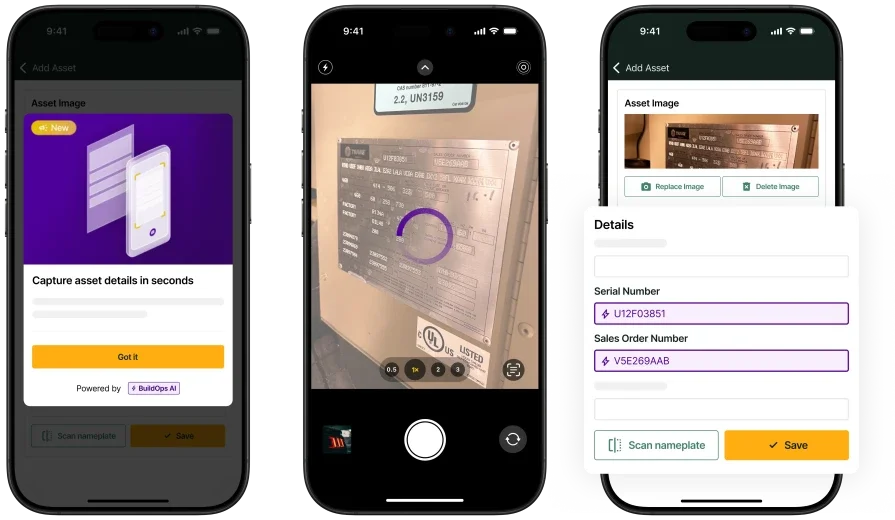
- AI for field service - A dedicated AI for field service layer works across your entire platform to surface patterns in job history, flag workflow inefficiencies, and recommend operational adjustments that would take a human weeks to identify on their own.
- Service quoting - AI-assisted service quoting software pulls from your pricebook, factors in current material costs and labor rates, and generates accurate quotes on-site — reducing approval delays and helping techs close jobs before they leave the property.
- Field service CRM - A field service CRM enhanced with AI gives your team instant access to a customer's full service history, equipment records, and past diagnoses the moment a call comes in, so techs walk into every job with the context they need instead of starting from scratch.
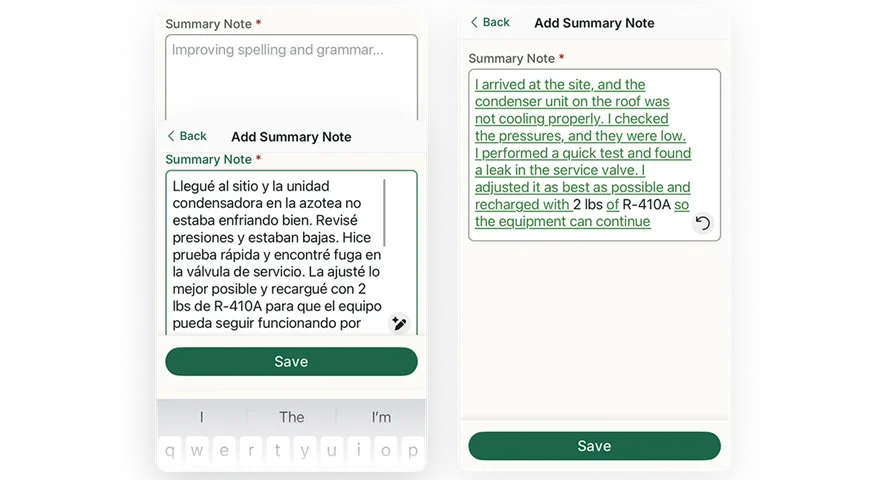
- Technician mobile app - A technician mobile app with AI capabilities lets field workers access job details, capture notes, pull equipment history, and update statuses from their phone or tablet without toggling between systems or calling the office for information.
- Reporting and analytics - AI-driven reporting automatically identifies trends across your job data — which techs are most efficient, which job types are eating margin, where callbacks are spiking — without anyone having to build a custom report or export a spreadsheet.
- Invoicing and payments - AI-assisted invoicing paired with integrated payments automates invoice generation directly from completed work orders, applies correct rates, and sends the bill to the customer — cutting down on billing errors and the back-office hours spent chasing paperwork.
Where to look for AI field management reviews online
Marketing pages and sales demos only tell part of the story. The most valuable insights come from contractors and ops managers using these platforms every day—and you’ll find those on third-party review sites. The key is knowing where to look and how to filter for what actually matters to your evaluation, especially around AI features and their true cost.
Here are three sites worth spending time on when conducting an AI field management review:
1. G2
G2 is one of the largest B2B software review platforms, and it lets you filter field service management products by specific feature categories, including AI and automation. To find what you need, navigate to the Field Service Management category, then use the feature filters on the left sidebar to narrow results by capabilities like "AI/Machine Learning," "Automated Scheduling," or "Predictive Analytics." Each product profile includes a breakdown of features alongside verified user reviews, and many reviewers mention pricing details, contract terms, and whether certain features required an upgrade or add-on. Pay attention to the "Pros and Cons" sections — that's where users tend to call out whether AI features delivered on their promises or fell short once the team started using them on real jobs.
2. Capterra
Capterra organizes its field service software listings with detailed feature checklists and side-by-side comparison tools. When you land on a product page, scroll to the "Features" tab to see which AI-related capabilities the vendor claims — things like intelligent routing, automated work order generation, or smart scheduling. From there, read through the user reviews and look for mentions of those specific features. Capterra reviewers frequently comment on pricing transparency, hidden costs, and whether the AI tools they were shown in a demo actually worked the way they expected. You can also sort reviews by company size, which helps if you want feedback from contractors running operations similar to yours.
3. Software Advice
Software Advice, which operates under the same parent company as Capterra, takes a slightly different approach by offering guided recommendations based on your specific needs. You can use their comparison tool to evaluate multiple field service platforms side by side, filtering by features like AI scheduling, automated dispatching, and predictive maintenance. What makes this site particularly useful is the "FrontRunners" quadrant, which ranks products based on user ratings for both capability and value, giving you a quick read on whether a platform's AI field management pricing aligns with the results users are actually reporting. Reviewer comments here also tend to be detailed, often covering onboarding experience, feature gaps, and how responsive the vendor was when something didn't work as expected.

AI field management review checklist: what to ask in a demo
Use this time to test whether an AI platform truly works for field service. Ask real, job‑specific questions and treat it like a field operations review so you don’t end up with something that demos well but fails in daily use.
- How does the AI handle scheduling conflicts and last-minute changes? — This tells you whether the system can reassign jobs automatically when your board gets disrupted, or if your dispatcher is still doing it manually.
- What data does the AI need before it starts delivering value? — Some platforms require months of job history before AI features produce useful results. Knowing the ramp-up period sets realistic expectations for your team.
- How will your team support our techs during implementation? — AI adoption fails when field workers don't trust the tools. Ask what onboarding looks like specifically for techs, not just office staff.
- How does AI field management pricing break down across your plans? — Get a clear, line-by-line view of which AI capabilities are included at each tier and whether usage-based charges could increase your bill as you scale.
- How does the AI integrate with tools we already use? — If the platform can't connect with your existing accounting, fleet, or communication systems, you'll end up with more manual work instead of less.
- What does the AI actually learn from our data over time? — A platform that adapts based on your job history and technician performance delivers compounding value. One that applies the same static logic to every job won't.
- What happens to our data if we leave? — Ask whether you retain full ownership, what export formats are available, and how long the process takes. This also signals how confident the vendor is in their own product.
Evaluating AI for your field operations should be simple: know what you’re paying for, and know that it actually works in the field. Pricing, feature gating, and vague promises from vendors can quietly drain both margin and productivity.
BuildOps is purpose‑built for commercial contractors, not residential or generic field service. Scheduling, dispatch, quoting, CRM, mobile, reporting, and billing all live in one connected platform, so our AI is working off a single source of truth—not stitched‑together systems. That’s the difference between insights you can act on and AI that just adds noise.
If you’re comparing platforms, a live BuildOps demo lets you see those AI capabilities under real‑world conditions, not just in a slide deck.