

Contractors managing field teams need intelligent software that assigns the right tech to the right job, every time. Smart AI dispatch automatically matches contractor skills to job requirements, optimizes routes, and updates schedules in real time so work orders stay on track and profitable.
For contractors across the field service industry, this reduces guesswork, manual scheduling, and dispatcher bottlenecks that slow response times, drive up labor costs, and lead to missed SLAs and unhappy customers.
Here's what we'll cover:
- Key features to look for in a smart dispatch software
- 8 best smart dispatch software for contractors
- 5 benefits of smart contractor dispatch software
- Questions to ask when choosing a smart dispatch software
- 4 important smart dispatch software FAQs answered
Smart contractor software uses AI dispatch to match jobs to the right techs and streamline tracking, inspections, and compliance.
Key features to look for in a smart dispatch software
Smart dispatch software unifies scheduling, technician skills, and customer data into one workflow—unlike tools that handle only a single piece. When you evaluate options, focus on the five key features that keep field operations running.
1. Real-time scheduling and dispatch coordination

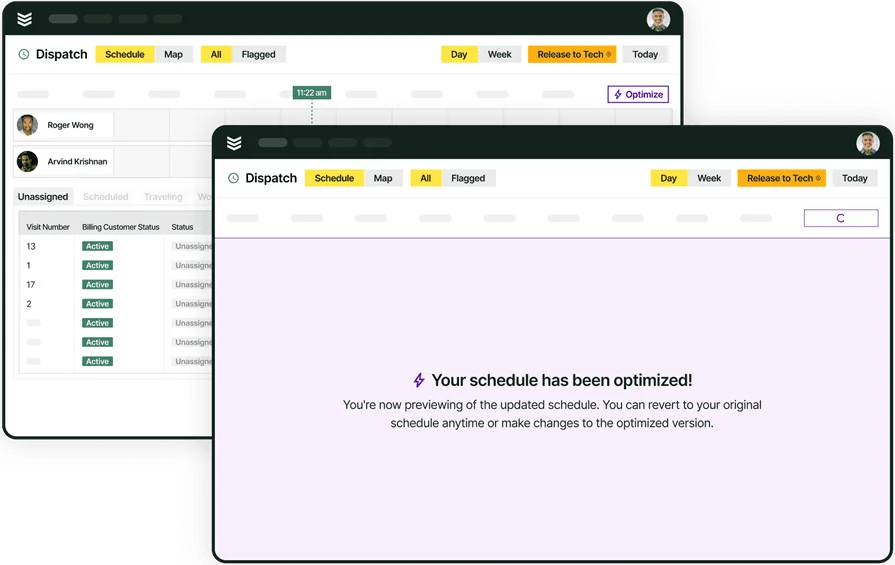
Scheduling sets the job time and assignee; dispatching gets a qualified tech there on time with full job context. A platform with field service scheduling lets dispatchers drag and drop assignments, adjust for cancellations or emergencies, and balance workloads across the team — all in real time. Scheduling flows straight to dispatch, so jobs run instantly, routes auto-update, and your board stays accurate.
2. AI-powered dispatch optimization
This is where smart dispatch software separates itself from a standard scheduling platform. AI built into field service platforms can analyze technician skill sets, location, availability, and job urgency to recommend optimal assignments automatically. It spots conflicts early, optimizes routes in real time, and uncovers hidden trends — cutting manual decisions, speeding response, and making your dispatch board smarter over time.
3. Fleet management

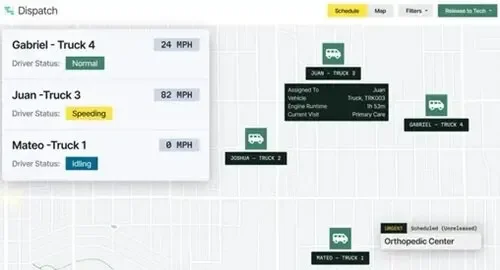
Dispatch is only effective if the vehicle makes it there. Fleet management gives dispatchers real-time visibility into truck availability, location, and condition. It lets you monitor vehicle locations, track mileage and fuel usage, and schedule preventive maintenance before a breakdown sidelines a crew. That data powers smarter dispatching — assigning the closest truck, rerouting around delays, and balancing vehicle use across your operation.
4. Time tracking tied to field operations

Knowing where your techs are matters, but knowing how long they're spending at each stop matters just as much. Built-in time tracking captures clock-ins, travel time, break duration, and on-site hours without requiring manual entry. It feeds payroll, job costing, and productivity reports, while showing actual vs. estimated job times so dispatchers can schedule better and spot inefficiencies early.
5. Technician mobile app
Your techs are the ones doing the work, so the platform they use in the field has to keep up. A dedicated technician mobile app gives field crews real-time access to job details, customer history, checklists, and notes — all from their phone or tablet. It lets techs upload photos, capture signatures, and update job statuses on site, instantly syncing with the office so dispatchers always have current information when making the next assignment.
Keep jobs running smoothly with BuildOps
Align your crews, trucks, and projects so your techs always arrive to jobs on time.
Other notable features for field contractors
Beyond the five core dispatch-focused capabilities above, several additional features support the broader workflow around field service operations:
- Service quoting — Techs can log recommendations in the field, and the office can convert those into service quotes with photos, labor, and materials already populated.
- Field service CRM — Customer and property records, contact hierarchies, credit limits, and communication history are centralized in a field service CRM that both office staff and techs can access.
- Invoicing & payments — Completed jobs flow directly into invoicing workflows, and techs can collect payments on-site via mobile to shorten the cash cycle.
- Reporting — Dashboards built on a strong reporting engine let you track technician productivity, job profitability, and dispatch efficiency across your entire operation.
- Service agreements — The platform lets you build service agreements for specific assets at specific properties with set maintenance intervals, auto-generating tickets when visits are due and linking pull-through work back to the contract.
Features set the baseline. The next step is seeing how specific platforms put them to work across field service operations.
8 best smart dispatch software for contractors
We’ve compiled smart dispatch platforms for field service contractors, from AI-driven assignments to real-time schedule optimization, so you can choose the one that best fits how your team works in the field.
1. BuildOps: best for commercial field service teams

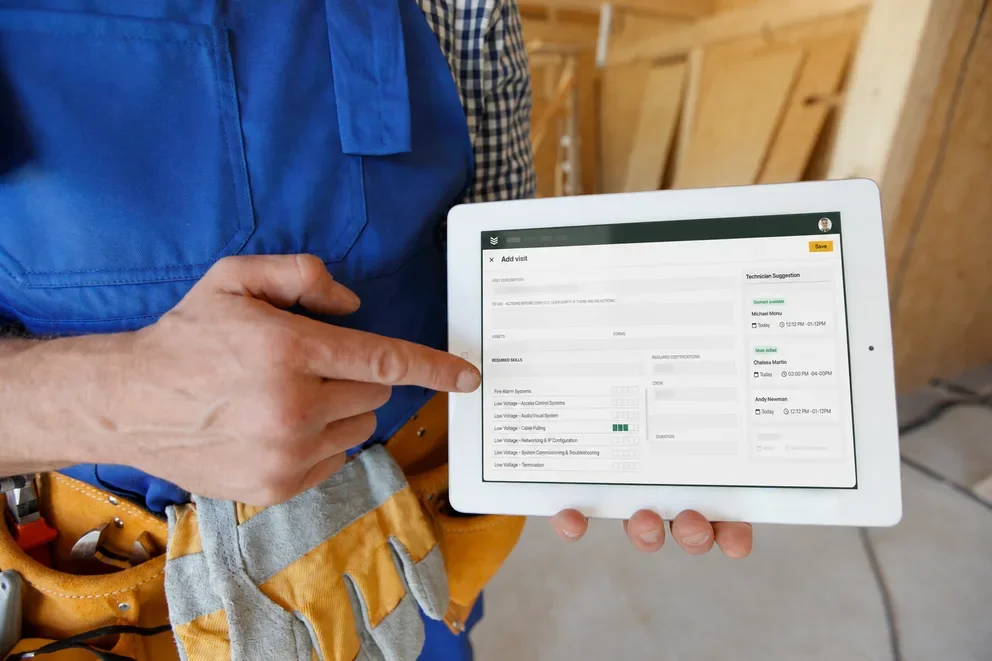
BuildOps unifies dispatching, scheduling, and field operations in one platform built for commercial service contractors running multi-trade crews across multiple jobsites. The AI-powered dispatch board automatically recommends technician assignments based on skill sets, certifications, proximity, and live availability, so every call is routed to a qualified tech faster.
Dispatchers can drag and drop jobs, reshuffle for emergency calls, and rebalance workloads across the team from a single screen. Every AI-driven update syncs instantly to technicians in the field, eliminating lag between office schedule changes and what techs see on their mobile device. Beyond dispatch, BuildOps connects every downstream workflow — quoting, invoicing, fleet tracking, time tracking, CRM, and reporting — so a single dispatch action feeds the rest of the operation without duplicate entry.
How Pricing Works: BuildOps provides weekly live demos and an opportunity to arrange a personalized session to help you explore features and choose a solution that suits your needs.
Features Beyond Dispatch:
- Real-time scheduling and dispatching with drag-and-drop functionality
- AI-powered technician assignment based on skills, location, and availability
- Advanced customer hierarchy management for multi-location clients
- Technician mobile app with real-time job updates and automated checklists
What Sets It Apart for Commercial Service Teams: BuildOps keeps your board optimized in real time, coordinating multi-location, multi-trade dispatch while giving office and field teams a shared live view of every job — from installs to maintenance to emergency calls.
Rating: 4.5 on Capterra from 151 user reviews
See how AI keeps your crews on track
Coordinate dispatch to your field ops from one AI-native field service platform.
2. ServiceTitan: best for high-volume residential and light commercial contractors

Image Source: ServiceTitan
ServiceTitan is a well-known field service management platform with strong dispatch and scheduling capabilities geared toward residential and light commercial contractors. Its dispatch board lets managers view technician availability, assign jobs, and track progress across the day, while built-in pricebook management and marketing performance tracking give office teams visibility beyond dispatch.
However, fleet tracking and advanced route optimization are limited compared to platforms purpose-built for commercial operations, and the platform's orientation toward residential workflows may leave larger commercial teams needing workarounds for multi-property account management and complex skill-based routing.
How Pricing Works: ServiceTitan offers custom pricing based on business size and feature requirements, with demos available to evaluate the platform before committing.
Features Beyond Dispatch:
- Pricebook management with flat-rate and dynamic pricing options
- Marketing performance tracking tied to revenue metrics
- Customer communication tools with automated appointment reminders
- Reporting dashboards connecting dispatch activity to business outcomes
What Sets It Apart for High-Volume Residential and Light Commercial Contractors: Its tight integration between dispatch, pricebook, and marketing analytics connects technician assignments to revenue performance in one view, helping high-volume shops track which jobs and campaigns drive the most margin.
Rating: 4.3 on Capterra from 325 user reviews
Check out our breakdown of how ServiceTitan stacks up when compared to BuildOps.
3. Housecall Pro: best for small to mid-size contractors prioritizing ease of use

Image Source: Housecall Pro
Housecall Pro focuses on simplicity. Its drag-and-drop dispatch board lets small teams assign jobs, notify techs, and track completion without a steep learning curve. The platform covers core workflows — online booking, estimates, invoicing, and payment collection — and its mobile app gives techs access to job details, customer notes, and GPS navigation from their phone.
Dispatch capabilities are functional but manual. There is no AI-powered technician matching or automated skill-based routing, which means dispatchers handle every assignment decision themselves, a limitation that becomes noticeable as crew sizes grow and job complexity increases.
How Pricing Works: Housecall Pro offers tiered pricing starting at $59/month, with additional features like automated marketing and QuickBooks integration available at higher tiers.
Features Beyond Dispatch:
- Online booking and customer self-service portal
- Automated email and text notifications for appointment reminders
- Integration with QuickBooks for accounting sync
- In-app payment collection and invoicing
What Sets It Apart for Small to Mid-Size Contractors Prioritizing Ease of Use: Fast setup and an intuitive interface get a small team dispatching and invoicing within days, not weeks, making it a practical starting point for contractors moving off paper or spreadsheets.
Rating: 4.7 on Capterra from 2,739 user reviews
4. FieldEdge: best for mid-size service contractors focused on repeat customers

Image Source: FieldEdge
FieldEdge offers a dispatch board designed around technician status tracking — dispatchers can see at a glance who is available, en route, or on-site, and reassign jobs as conditions change throughout the day. The platform connects dispatch directly to its built-in CRM, so customer history, equipment records, and past service notes are visible before a tech is assigned. That CRM-to-dispatch connection reduces callbacks and improves first-visit resolution for contractors who rely heavily on repeat service at known properties.
FieldEdge relies on manual dispatch and only basic route optimization, without AI-driven matching or scheduling. It integrates with QuickBooks, supports pricebook management, and offers dashboards (e.g., revenue per tech, average ticket value) to show how dispatch impacts profits. Contractors needing automated skill-based or AI scheduling will need add-on tools or a platform with native AI dispatch.
How Pricing Works: FieldEdge offers custom pricing based on business size and feature needs. Demos are available to evaluate the platform before committing.
Features Beyond Dispatch:
- Built-in CRM with full customer and equipment history per property
- QuickBooks integration for accounting sync
- Pricebook management with flat-rate pricing options
- Performance dashboards tracking revenue per tech and average ticket value
What Sets It Apart for Mid-Size Service Contractors Focused on Repeat Customers: Its direct CRM-to-dispatch connection surfaces full customer and equipment history before a tech is assigned, helping dispatchers make informed decisions that reduce repeat visits and improve first-call resolution.
Rating: 4.2 on Capterra from 306 user reviews
5. Jobber: best for growing contractors transitioning from manual scheduling

Image Source: Jobber
Jobber provides a clean scheduling calendar with drag-and-drop job assignment, automated client notifications, and a mobile app that keeps techs updated on their daily routes.The platform handles quoting, invoicing, and payment collection, and offers client-facing features like online booking and a customer hub where clients can approve quotes and pay invoices.
Jobber offers AI tools for quote follow-ups and job descriptions, but dispatching is still manual, with no skill-based matching or real-time route optimization—fine for simple, fast workflows, but limiting for contractors who need dispatch driven by certifications, urgency, and proximity.
How Pricing Works: Jobber offers tiered pricing with a free trial available. Plans scale based on feature access and team size.
Features Beyond Dispatch:
- Online booking and customer self-service hub for quote approvals and payments
- Automated client notifications via email and text
- AI-assisted quote follow-ups and job description generation
- Integration with QuickBooks and other accounting tools
What Sets It Apart for Growing Contractors Transitioning Off Manual Processes: Its client-facing tools — online booking, quote approvals, and a self-serve customer hub — reduce back-and-forth between the office and the customer, giving small teams a professional workflow without a steep learning curve.
Rating: 4.6 on Capterra from 1,420 user reviews
6. Service Fusion: best for budget-conscious contractors who need dispatch and fleet visibility

Image Source: ServiceFusion
ServiceFusion bundles dispatching, customer management, invoicing, and inventory tracking into a flat-rate pricing model with no per-user fees. Its dispatch board supports drag-and-drop scheduling, and the platform includes GPS fleet tracking so dispatchers can see where trucks are in real time and assign the closest available tech. Automated text and email notifications keep customers informed about technician arrival times.
The platform lacks AI-powered dispatch and skill-based matching; assignments are manual, and reporting is limited, so high-volume contractors with complex routing or multi-trade crews may find dispatch too basic.
How Pricing Works: Service Fusion offers flat-rate pricing with unlimited users, starting at $225/month. No per-user fees apply regardless of team size.
Features Beyond Dispatch:
- GPS fleet tracking with real-time vehicle monitoring
- Automated customer notifications via text and email
- Estimate creation with field-to-office conversion
- Contactless eSign and mobile invoicing
What Sets It Apart for Budget-Conscious Contractors Who Need Dispatch and Fleet Visibility: Flat-rate pricing with unlimited users removes the per-seat cost barrier, and built-in GPS fleet tracking ties directly to the dispatch board — giving growing teams dispatch and fleet visibility without scaling costs per technician.
Rating: 4.3 on Capterra from 289 user reviews
7. mHelpDesk: best for owner-operators and small teams

Image Source: mHelpDesk
mHelpDesk covers the fundamentals — scheduling, dispatching, invoicing, and a customer self-service portal — with an emphasis on ease of use and personalized onboarding. Its drag-and-drop calendar lets dispatchers assign and reschedule jobs quickly, and the mobile app gives techs access to job details, customer info, and navigation. The customer portal allows clients to request service, view job status, and pay invoices online, reducing inbound calls to the office.
AI and automation are very limited, reporting is basic, and the platform doesn’t scale well, so growing commercial contractors will likely outgrow it.
How Pricing Works: mHelpDesk offers custom pricing with personalized onboarding and dedicated success coaches. Contact mHelpDesk for a quote.
Features Beyond Dispatch:
- Customer self-service portal for booking, job status, and online payments
- Personalized onboarding with dedicated success coaches
- Data migration support from previous systems
- Mobile app for work order management and invoicing in the field
What Sets It Apart for Owner-Operators and Small Teams: Its personalized onboarding experience — including dedicated success coaches, data migration, and live training — gets small teams up and running faster than most platforms, reducing the learning curve for contractors who are new to field service software.
Rating: 4.3 on Capterra from 823 user reviews
8. Kickserv: best for multi-location contractors needing configurable dispatch rules

Image Source: Kickserv
Kickserv works well for residential service contractors who need straightforward tools to schedule and dispatch smaller crews. It emphasizes customer-facing features like a self-service portal where homeowners can review job history, approve estimates, and track upcoming visits. The scheduling interface keeps things simple, making it easy for office staff to assign techs and manage daily routes without a steep learning curve.
However, it lacks AI-powered dispatch optimization and advanced technician assignment logic, which limits its usefulness for commercial teams scaling across multiple jobsites and trades.
How Pricing Works: Kickserv offers tiered pricing, with key features like payment processing and customer management available at higher tiers.
Features Beyond Dispatch:
- Customer self-service portal for easy interaction
- Integration with payment systems like Stripe and QuickBooks
- Simplified job scheduling for smaller-scale teams
- Basic estimate and invoice management from the field
What Sets It Apart for Residential Teams: Its customer portal streamlines communication between office staff and homeowners, reducing administrative back-and-forth and keeping residential service visits on schedule.
Rating: 4.4 on Capterra from 387 user reviews
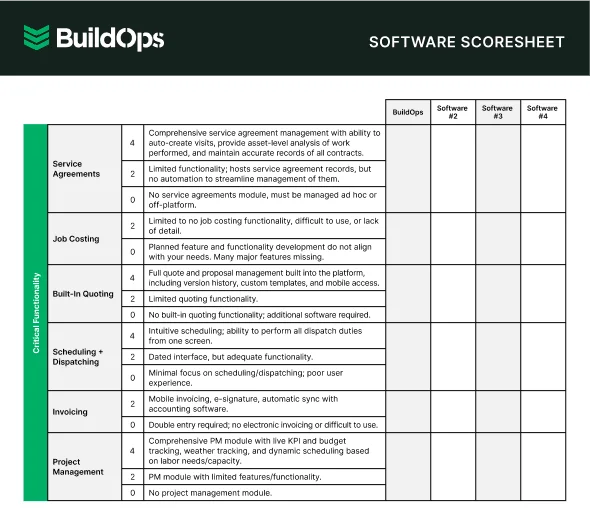
Get the software scoresheet
Compare top tools at a glance with this easy-to-use scoresheet.
5 benefits of smart contractor dispatch software
Running field service operations across multiple trades, jobsites, and shifting schedules creates daily pressure. Smart dispatch software eases that load by automating repetitive coordination and replacing gut calls with data-driven decisions.
1. Faster technician assignments
Manual dispatching requires checking boards, availability, and skills before a tech is even notified. AI evaluates certifications, proximity, workload, and urgency in seconds, so dispatchers can focus on the few cases that truly need human judgment.
2. Fewer scheduling conflicts and missed appointments
Double-bookings happen when too many variables are managed by hand. Smart dispatch software continuously monitors the schedule, flags conflicts, and automatically adjusts when there are delays or cancellations, preventing cascades of rescheduled visits.
Did you know
A Kickstand report based on a survey of 606 contractors across the U.S. and Canada found that 78% are using AI tools on the jobsite, while 47% say one in five positions remain unfilled. That combination explains why AI-backed workflows matter in field ops: they reduce admin load and help teams keep output steady with the headcount they have.
3. Reduced drive time and fuel costs
Assigning jobs by list instead of location wastes time and fuel. AI dispatch uses real-time location, traffic, and job order to minimize drive time, cutting fuel costs and increasing billable hours per technician over time.
4. Stronger first-time fix rates
AI-driven assignment matches each job's requirements with technician skills and history, helping ensure a qualified tech shows up and completes the work on the first visit. Agentic AI tools in field service operations take this further by surfacing asset history, service records, and troubleshooting guidance the moment a tech arrives on site.
5. Better visibility across field operations
When dispatchers, project managers, and office staff are all working from different data, decisions get made in silos. AI dispatch software centralizes job status, technician location, and schedule changes into one real-time view. That shared visibility means fewer phone calls chasing updates, faster escalation when something goes wrong, and tighter coordination between on-site field service teams and the back office.

Questions to ask when choosing a smart dispatch software
Choosing an AI-powered field service platform impacts everything from dispatch speed to job closeout.
- Dispatching speed and AI automation — How does the platform handle technician assignments? Can it automatically recommend a qualified tech based on skills, certifications, and proximity, or does it still require manual input for every job? Does the AI improve its recommendations over time as it learns your team's patterns?
- Compatibility with your current workflows — Will the platform complement how your dispatch team already operates, or will it force a complete rebuild of your processes? Can it adapt to how your office and field crews communicate today?
- Scalability as job volume grows — As you add techs, trucks, and service areas, will the platform keep up without requiring a major overhaul? Can it handle seasonal spikes or rapid growth without slowing down your dispatch board?
- Training and onboarding support — How quickly can your dispatchers and techs get up to speed? Does the vendor offer hands-on implementation support, or are you left figuring it out on your own? Is there a dedicated team assigned to your account during rollout?
- Features that connect dispatching to wider field operations — Does the platform tie dispatching into scheduling, fleet management, CRM, and invoicing? Can job details, technician updates, and customer records flow across your entire operation without re-entering data between systems? Does it give dispatchers and field techs a shared, real-time view of every active job?
The answers to these questions will point you toward a platform that strengthens your entire field service operation rather than just checking a box. The next step is seeing how the leading platforms stack up across these criteria.
4 important smart dispatch software FAQs answered
Field service teams using AI dispatch face similar core issues—these four focus on what matters most when you’re running crews and deciding how AI fits your workflow.
1. What is AI dispatch software?
AI dispatch software uses machine learning to automate technician assignments, fine-tune scheduling, and adapt field operations in real time based on skills, location, availability, and job urgency — replacing manual coordination with data-driven decisions.
Most solutions unify scheduling, CRM, fleet tracking, and invoicing, with AI ranging from simple suggestions to full automatic optimization.
2. How does AI for field service dispatch handle emergency calls and last-minute schedule changes?
When an emergency call comes in, AI instantly finds the best technician, adjusts the schedule and routes for the whole day, sends updates to techs’ phones, and keeps improving its recommendations over time—without anyone managing complex rules.
3. Is an AI-powered dispatch tool worth the investment for field service contractors?
Once you're running 10+ techs, manual scheduling gets expensive fast. Automated scheduling and routing typically pay for themselves within months through fewer misses, better first-time fixes, and lower overtime — while sticking with manual means more windshield time, conflicts, and billing delays that end up costing more.
4. What are the best practices for getting the most out of AI dispatch software?
Sustained value from AI dispatch software depends on good setup and team alignment, which drive accurate job assignment and dispatcher trust.
- Clean technician profiles pre-go-live so AI uses accurate skills, areas, and availability.
- Standardize job types so AI can match complexity to the right tech.
- Let AI run through two full cycles before overriding to allow proper learning.
- Assign a single owner for dispatch rules, thresholds, and escalations.
- Connect dispatch, CRM, time tracking, and invoicing from day one.
- Use AI reports to find scheduling bottlenecks and adjust coverage or territories.
- Define which jobs AI must never auto-assign (high-risk, VIP, or specialized work).
- Train dispatchers to treat AI suggestions as a guide, not a replacement for judgment.
- Review AI assignment accuracy monthly and refine skills and job classifications.
- Scale AI automation slowly, starting with routine calls, then adding complex scenarios.
Dispatch is where field service operations either hold together or fall apart. Wrong techs, missed calls, and constant reshuffling don't just frustrate customers — they compress margins and burn out your dispatchers.
AI flips the script on dispatch. Connected to scheduling, fleet, CRM, and invoicing, it considers not just who’s available—but who’s closest, most qualified, and least likely to roll a second truck. That’s the difference between a board that reacts and one that runs your day for you.
BuildOps connects all of it in one platform, with AI powering every dispatch decision from the first call to the final invoice. Smarter assignments, tighter boards, higher first-time fix rates — and a team that scales without adding headcount.
Your dispatch board, fully connected with BuildOps
Dispatch and field ops in one place—techs arrive prepared, your office stays in control.