


Across the field service industry, inventory discipline shows up in the basics: stocked trucks, accurate counts, and parts that are ready when a work order starts. Field service inventory management ties together the warehouse, the office, and technicians in the field so teams can track what is available, what is committed, and what needs replenishment before it disrupts the schedule.
Here’s what we’ll cover:
- Essentials of successful field service inventory management
- 9 key components of the field service inventory management process
- 10 field service asset management best practices
- How to measure the effectiveness of your field service inventory management
- Top 5 field service inventory management software for contractors
When inventory stays visible and accountable across trucks, jobsites, and the shop, service work runs cleaner and closeouts go faster. That is the practical goal behind field service inventory management, and it is what this guide is designed to support.
Essentials of successful field service inventory management
To run a clean inventory operation in the field, you need control over parts, tools, and equipment as they move between the warehouse, trucks, and jobsites. This section will:
- Give a field service inventory management definition
- Break down what field service inventory management has to actually control day to day (parts flow, ownership, and accountability)
- Highlight common problems that throw off counts and create margin leakage
- Explain why tying inventory activity to work orders and job costs keeps reporting and billing accurate
- Explain how software helps standardize field inventory management across locations, trucks, and technicians
What is field service inventory management?
Field service inventory management is the set of processes and controls used to track, move, and account for materials and equipment used in field work. It covers how items are received, stored, issued, transferred, and returned, while keeping visibility into where each item is, who has it, and which job it supports.
Operationally, it lives in the transactions that happen every day:
- Receiving and putaway with vendor, cost, and location captured
- Picks and issues to a work order so usage can be tracked and billed
- Transfers between warehouse, trucks, and technicians to maintain chain of custody
- Returns, warranty swaps, and disposition decisions so items do not disappear from the system
- Cycle counts and adjustments with reasons and approvals so variances are understood, not ignored
When these actions follow a consistent structure, teams stop relying on memory and side conversations to find parts. That consistency is what makes field service inventory management reliable in real conditions.
What does a successful field service inventory management look like?
When inventory is running well, the field feels it first. Techs have what they need, dispatch can commit with confidence, and closeout does not turn into a detective story. A successful setup keeps the field supplied while keeping the office confident in the numbers.
Here is what that looks like in practice:
- One source of truth - Warehouse bins, staging areas, trucks, and jobsites reflect the same record, so availability is based on facts, not assumptions.
- Chain of custody - If an item changes hands or locations, there is a logged transfer that shows from/to, time, and responsibility.
- Work-linked usage - Parts issued and used tie back to the work order, keeping job cost and billing aligned without extra entry.
- Truck stock control - Stock levels and replenishment rules keep vehicles ready without loading trucks with dead inventory.
- Count discipline - Cycle counts focus on fast movers and shrink-prone items, with approvals around material variances so write-offs are not silent.
- Field service inventory optimization - Stock decisions aim for higher fill rates, fewer return trips, less emergency purchasing, and fewer schedule hits caused by missing materials.
- Field service asset management - Tools and equipment stay assigned, tracked, and maintained so crews are not blocked by missing gear or unserviceable equipment.
When these fundamentals hold, field service inventory stays visible across trucks, jobsites, and the shop, and inventory stops acting like a daily risk to the schedule.

9 key components of the field service inventory management process
Parts do not stay put in a field operation. They get received, staged, loaded, transferred, issued, returned, and counted across multiple touchpoints in the same day. That is why field service inventory management lives or dies by how well your core operational systems stay connected. The components below are the operational backbone that keep inventory accountable while work keeps moving.
1. Field service scheduling & dispatching

Field service scheduling is where inventory demand becomes real, because every scheduled job creates a parts requirement with a date, location, and scope. When scheduling is tied to your item catalog and work order workflow, teams can reserve materials, generate pick lists, stage kits, and prevent double-allocation across overlapping jobs. Pair that with dispatch software and inventory control gets operational: dispatch can assign work based on technician coverage and truck stock reality, while protecting chain-of-custody through transfers, issues, and returns tied to the work order.
2. How to track field employees

A technician mobile app is where inventory accuracy either holds up or collapses, because it captures usage where it happens. Inventory control in the field depends on simple, repeatable actions: issuing items to a work order, recording substitutions, documenting returns, and noting what moved between trucks or techs. When those actions happen on the job, the office does not have to reconstruct material usage from memory, photos, or handwritten notes. That keeps parts tied to the job record, supports clean replenishment, and reduces the gap between what the system says and what the field actually has.
3. Time tracking for field techs

Time tracking connects inventory discipline to labor efficiency, because inventory problems show up as lost minutes on the clock. When tech time is tracked against jobs and activities, it becomes easier to isolate time spent on supply runs, waiting on staged materials, hunting for tools, or rework tied to incorrect parts. That data helps validate stocking standards, tighten kitting, and reduce operational drag without guessing. It also supports field service inventory optimization by identifying which job types, branches, or crews experience recurring inventory friction that can be addressed through better staging, replenishment rules, or item standardization.
4. Field service asset & fleet management

Trucks are inventory locations, and inventory locations need accountability. Fleet management supports inventory control by treating each vehicle as a structured stock point with defined replenishment routines, transfer rules, and visibility into what is onboard. When truck stock is managed as a real location, it becomes possible to audit inventory drift, control who can move items between vehicles, and keep restocks predictable. This is also where field service asset management stays practical: high-value tools and equipment can be assigned, tracked, and maintained with ownership clarity, reducing loss and preventing jobs from stalling due to missing gear.
5. Maintenance scheduling

Recurring work should create predictable inventory demand, not repeating surprises. With service agreements, planned visits can be tied to standard parts lists, expected quantities, and replenishment triggers that keep trucks and staging aligned with upcoming work. That consistency helps prevent last-minute purchasing, reduces substitutions that muddy costing, and makes returns processing cleaner when planned kits are staged and issued consistently. For contractors managing service volume, agreements provide structure that strengthens field service inventory control across weeks and months, not only day-to-day.
6. Field routing optimization

Inventory performance needs visibility that the field and office can trust. Reporting supports inventory control by turning raw transactions into operational signals: fill rate trends, recurring stockouts, transfer volume, usage by job type, variance by location, shrink indicators, and materials not billed. When those reports are tied to work orders, locations, and technicians, teams can pinpoint where process breakdowns happen and correct them with targeted changes: item standardization, kitting updates, cycle count focus, or revised truck stock rules. This is how field service inventory optimization becomes measurable and repeatable, instead of relying on gut feel.
7. Estimating & pricing your field services

Inventory discipline protects margins before the work starts. With service quoting software, estimates can reference standardized items, units of measure, and pricing logic that align with how inventory is actually tracked and consumed in the field. That reduces quoting errors caused by inconsistent part naming, missing unit conversions, or outdated cost assumptions. It also supports cleaner planning by clarifying which materials are expected for the job, which items require lead time, and how substitutions should be handled so job cost stays defensible when the field has to adjust.
8. Invoicing, billing, & payments for field work

Inventory accuracy has to flow through closeout, or the loop never closes. When invoicing is tied to the work order, parts used in the field can carry through to billing based on recorded issues and usage, reducing missed line items and manual reconciliation. That alignment keeps job cost credible and helps prevent inventory shrink disguised as “unbilled materials.” Then payments support inventory operations by stabilizing cash timing tied to materials-heavy work, which helps purchasing maintain replenishment cadence and avoid disruptions when high-cost items need replacement or restock.
9. New customer acquisition & pipeline generation

Inventory pressure changes when the work mix changes, and planning needs earlier signal than “the job is scheduled.” A connected service CRM supports inventory planning by giving visibility into pipeline and account patterns: recurring customer demand, common equipment types, service history, and upcoming opportunities that may require specific parts or staged kits. That helps purchasing and operations prepare stock levels, adjust truck standards, and plan lead-time items with fewer surprises. When CRM and work execution stay connected, field service inventory management becomes proactive instead of reactive.
10 field service asset management best practices
You have already covered the operational backbone behind field service inventory management. These best practices are the habits that keep parts, tools, and equipment accountable when inventory moves fast across the shop, the warehouse, trucks, and jobsites.
1. Digitize inventory workflows while maintaining data security
Inventory falls apart when the process lives in texts, notebooks, and “we will fix it later” spreadsheets. Standardize every transaction in one workflow - receiving, putaway, picks, issues, transfers, returns, and adjustments - so the audit trail stays intact from dock to jobsite. Protect that workflow with role-based permissions, required fields, and approvals for high-impact actions like write-offs, cost edits, and inventory adjustments. When controls are consistent, the team spends less time reconciling and gets clean accountability without slowing the field down.
2. Use a centralized customer record to keep asset context attached to inventory

Inventory decisions get easier when customer and site context stays connected to what your team services - equipment histories, repeat failures, approved parts, and site constraints that affect staging. When that context is organized and easy to access, you can standardize what gets stocked and staged for recurring work, reduce part substitutions that throw off costing, and keep asset details ready when a warranty swap or serialized component replacement comes up. This also supports consistent field inventory management because item usage is guided by real service patterns, not guesswork.
3. Set up customer hierarchies to prevent site-level inventory surprises
Commercial customers often span multiple buildings, managers, and equipment types. A clean hierarchy that links customers to properties, and properties to equipment, helps your team stage parts correctly and avoid repeat trips caused by missing site-specific components. It also supports predictable stocking for customers with recurring patterns, because you can align parts lists and staging rules with each property’s equipment footprint rather than treating every call like a first-time visit.
4. Focus on the customer experience that inventory enables
Inventory discipline shows up directly in schedule reliability and closeout quality. When parts are staged correctly, appointments hold, techs stay productive onsite, and return visits drop. Standardize how your team communicates lead times, substitutions, approvals, and what gets billed when materials change mid-job. Internally, require clean documentation for what was used and what was returned so customer updates stay consistent and the office does not chase details after the job closes.
5. Optimize scheduling and dispatching around parts readiness

Scheduling and dispatching drive inventory demand and inventory movement. When work is booked, parts stop being general stock and become committed job requirements with dates attached. Tight scheduling discipline helps your team reserve, stage, and issue materials to the correct work orders, while dispatch discipline prevents assignments that ignore parts readiness and create last-minute supply runs. This is where field service inventory optimization becomes operational: fewer emergency purchases, fewer duplicate pulls, and fewer transfer gaps that leave the team guessing.
6. Give techs mobile tools to keep inventory accurate at the point of use

Inventory accuracy depends on capturing what happens in the field at the moment it happens. That includes issuing parts to the work order, recording substitutions, documenting returns, and attaching notes or photos that explain exceptions. When field capture is consistent, job cost stays defensible, billing stays complete, and truck stock stays aligned with reality instead of drifting week after week.
7. Use real-time visibility to keep trucks and tools accountable
Trucks function as rolling stockrooms, and rolling stockrooms need rules. Treat every truck as a controlled location with defined stocking standards, transfer discipline, and replenishment routines. Apply tighter controls to serialized parts and high-value tools: assignments, check-in/check-out steps, and clear responsibility when items move between crews. That is the difference between tools “somewhere out there” and field service asset management that holds up under day-to-day pressure.
8. Move toward proactive replenishment and disciplined returns
Reactive restocks create chaos: shortages, inconsistent truck loads, and inflated carrying cost from panic buys. Proactive replenishment starts with simple, repeatable triggers based on actual usage, plus a reliable returns process that gets unused materials back into inventory quickly and accurately. When returns are handled consistently, you reduce ghost stock, protect availability, and prevent slow-moving piles from building up on trucks and in staging areas.
Expert Tip
A consistent chain of custody keeps tools and equipment from slipping through the cracks across trucks, jobsites, and the shop. That discipline is at the core of field service asset management, where every check-out, transfer, and return stays traceable.
9. Monitor metrics and make data-driven decisions
Inventory needs operating metrics that reflect what the field experiences. Track fill rate, stockouts, transfer volume, usage variance by job type, shrink signals, aging inventory, returns volume, and unbilled materials. Review those metrics by location and by truck so you can pinpoint where process breaks, tighten standards, and protect service delivery. When the numbers stay trustworthy, field service inventory becomes predictable instead of a constant fire drill.
10. Never stop tightening standards as the operation evolves
Inventory discipline erodes when procedures live in tribal knowledge. Document your item standards (names, units, substitutions), transfer rules, truck stocking expectations, count routines, and tool accountability steps. Train new hires on the exact workflow you expect in the shop and in the field, then refresh it after changes in scope, growth, or process updates. Consistency keeps audits straightforward and prevents slow drift that later shows up as write-offs and schedule disruption.
How to measure the effectiveness of your field service inventory management
You cannot watch every part handoff across the warehouse, trucks, and jobsites. That is why measurement matters: it turns daily inventory activity into something you can verify, compare, and improve using reporting tied to work orders, locations, and technicians. This section will go over inventory reporting: what to measure in your operation, and what the numbers actually mean.
7 key field service dashboards to set up to measure inventory success
Dashboards make it easier to see how inventory performance ties back to execution without pulling reports all day. When your dashboards reflect live work orders, usage, transfers, and purchasing activity, you can spot patterns early and tighten process before it turns into write-offs or schedule misses.

Here are seven dashboard areas to monitor and control:
- Invoicing & Payments - Track billed vs. issued materials and flagged exceptions where parts were used but not invoiced, then follow how quickly invoices convert to cash so replenishment stays steady.
- Scheduling & Dispatch - Track upcoming work against parts readiness: reservations, staged kits, transfer requirements, and jobs at risk due to missing materials.
- Resource & Inventory Management - Track on-hand, committed, in-transit, on-order, stockouts, aging inventory, cycle count variance, returns, and shrink indicators across every location.
- Fleet Management - Track truck stock health by vehicle: replenishment cadence, transfer volume, variances, and patterns that signal drift or weak restock routines.
- Technician Productivity - Track time lost to inventory friction: supply runs, waiting on materials, repeat trips tied to missing parts, and rework tied to incorrect items.
- Customer Satisfaction - Track repeat visits, delays caused by material shortages, and parts-related call-backs that show where stocking standards or staging processes need correction.
- Financial Analytics - Track inventory value, usage vs. budget, margin impact of material variance, and the cost signals behind substitutions, write-offs, and emergency buys.
Deep Dive
For a deeper breakdown of dashboard types and how teams use them day to day, reference the guide on field service dashboards.
4 types of field service inventory report templates
Inventory data is only useful when it is consistent. That is why templates matter: they give your techs and warehouse team a structured way to capture the same details every time - item, quantity, unit, location, reason, and the work order it ties back to. That structure makes field service inventory management easier to audit, easier to reconcile, and easier to improve, because you are comparing clean data instead of piecing together fragments from notes and one-off spreadsheets.
There are several places you can get field service inventory report templates, including:
1. Field service reporting software with built-in templates
The most reliable option is reporting software that includes structured templates directly inside the system. Built-in templates can standardize inventory logs such as truck restocks, transfer slips, cycle count sheets, adjustment requests, and return-to-stock reports. Because the templates live where the work happens, the data can stay connected to the correct location, technician, and work order - which reduces duplicate entry and lowers the risk of inventory drifting from what the field actually used.
2. Free downloadable templates
Free templates can add structure quickly if you do not have reporting tools that match how your operation tracks inventory. They are typically used for basic inventory tracking like stock counts, restock lists, or simple usage logs. The downside is consistency: templates often require manual entry, manual filing, and manual reconciliation, which increases the risk of missing details like location, reason codes, and work order references. Over time, that creates scattered files that are hard to validate when a count is off or a high-value item goes missing.
3. Spreadsheet & document templates
Spreadsheets and documents are common because they feel flexible, especially for teams that are used to building their own sheets for truck stock, warehouse counts, or tool logs. They can also create problems fast: duplicate versions, inconsistent naming, manual copying, and errors when someone changes the structure without telling the rest of the team. For field inventory management, those issues show up as conflicting counts between the warehouse and trucks, unclear responsibility for transfers, and adjustments that cannot be traced back to a clear event.
4. Online template libraries
Online template libraries often include a wide variety of forms, including ones designed for specific trades. Like other templates that live outside your system, they usually require manual work to copy, customize, and file, which increases the chance of human error and inconsistent recordkeeping. They can still be useful for standardizing early processes like return forms, cycle count worksheets, or tool sign-out sheets, but they tend to break down once inventory volume and transfer frequency increase.
Deep Dive
For some samples of field reporting templates we like, read our article on the top 12 field service report templates.
Our guide to writing and using field service reports has more information about the full process of reporting on field service work. It covers what a report is, what it should include, and how to write one effectively. It also explains how to automate some reporting steps with field management software, and how that can save time and reduce manual cleanup compared to filing physical reports.
To see a practical example of that, take a look at our analytics and reporting software.
Top 5 field service inventory management software for contractors
Choosing software for field service inventory management comes down to how parts and tools move between the shop, trucks, and jobsites across installs, maintenance, and repair. The best fit supports field inventory management with clear location control, transfers, and usage tied to the work order, plus visibility that drives field service inventory optimization. If your operation also tracks tools and serialized equipment, field service asset management becomes part of day-to-day field service inventory accountability.
1. Best for commercial: BuildOps
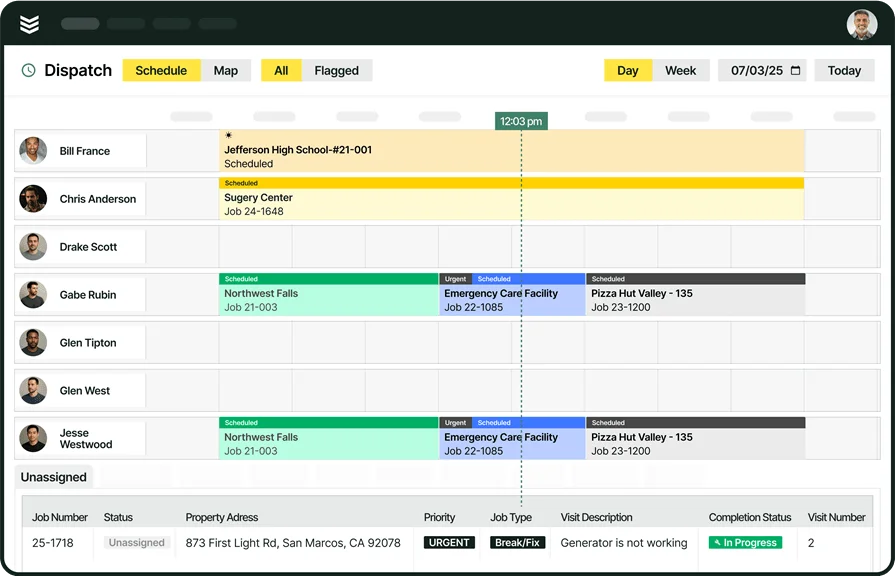
BuildOps helps commercial service contractors keep inventory and materials accountable across multi-site customers, staged jobs, truck stock, and on-site changes. Instead of relying on after-the-fact notes, teams can tie parts usage, returns, and exceptions to the job record while keeping customer and property context close at hand, which reduces missed billables and inventory drift.
That flow matters when techs are moving between service calls and projects and the office needs inventory status they can trust.
Industry Specializations: HVAC, refrigeration, electrical, plumbing, fire safety
How Pricing Works: Per-month-per-user cost
What Sets It Apart: Customer asset management hierarchies that make it easy to see information on all properties a customer owns
Take a closer look at BuildOps
Optimize your field service operations so your teams stay aligned on all jobs.
2. Best for residential: Housecall Pro

Image Source: Housecall Pro
Housecall Pro works well for residential teams that want a clean workflow from booking to closeout while keeping parts and materials captured on the job. It can help standardize the items techs use on common calls and keep job records consistent so the office can reconcile what got used without chasing down details at the end of the day. If your inventory process depends on multi-location stock control, frequent truck-to-truck transfers, and tight audit trails, it may not be the ideal choice.
Industry Specializations: HVAC, plumbing, electrical, cleaning, locksmithing, appliance repair
How Pricing Works: Tiered subscription; add-ons vary by plan
What Sets It Apart: Strong front-to-back workflow for recurring residential service with consistent job documentation
Compare Housecall Pro and BuildOps right here to see which has the features that meets your teams needs better.
3. Best for small service teams: Jobber

Image Source: Jobber
Jobber is a solid pick for smaller field teams that want scheduling, quoting, and job tracking in one place while keeping material usage organized per job. For inventory, it can support a consistent catalog of items and services so techs and office staff stay aligned on what got used, what should be billed, and what needs restocking based on completed work. If your operation requires robust on-hand tracking across warehouses and trucks with strict transfer discipline, it may not be the ideal choice.
Industry Specializations: HVAC, plumbing, electrical, cleaning, landscaping, general home services
How Pricing Works: Tiered per-user subscription
What Sets It Apart: Fast setup for teams that want consistent job records and itemized work without heavy system overhead
4. Best for high-volume service operations: ServiceTitan

Image Source: ServiceTitan
ServiceTitan is often considered when service operations run high call volume and need tighter purchasing, inventory control, and parts accountability across multiple locations and vehicles. It is typically used to connect purchasing activity, stock levels, and job usage so the business can reduce stockouts, keep replenishment predictable, and tighten job costing when parts move quickly through the field. If you want a lighter setup with fewer implementation demands, it may not be the ideal choice.
Industry Specializations: HVAC, plumbing, electrical, garage door, water treatment, residential service trades
How Pricing Works: Quote-based; varies by size and scope
What Sets It Apart: Strong operational depth for inventory, purchasing, and reporting in service environments with high transaction volume
For a deeper look into the features, we break them down side-by-side here in our comparison of ServiceTitan vs BuildOps.
5. Best for straightforward setups: mHelpDesk

Image Source: mHelpDesk
mHelpDesk is known for practical field workflows that help teams track jobs and keep service records consistent, including the items used on a call. For inventory management, that can be enough when you mainly need clear documentation of materials per job and a dependable way for techs to log usage in the field. If you need deeper inventory controls for complex commercial workflows and strict location-level accountability, it may not be the ideal choice.
Industry Specializations: HVAC, electrical, plumbing, landscaping, security, home cleaning + 22 others
How Pricing Works: Contact them for a quote
What Sets It Apart: Strong core field service management capabilities at an affordable price
You can compare a wider set of platforms in our roundup of the best field service management software. If mobile-first workflows matter, our list of the 10 best field service apps covers options, and you can also review what a field service mobile app can support for techs.
Expert Tip
If you need a starting point for comparing pricing and what to expect across platforms, our Field Service Management Software Pricing Comparison Guide breaks down cost drivers and includes a checklist you can use when evaluating vendors.
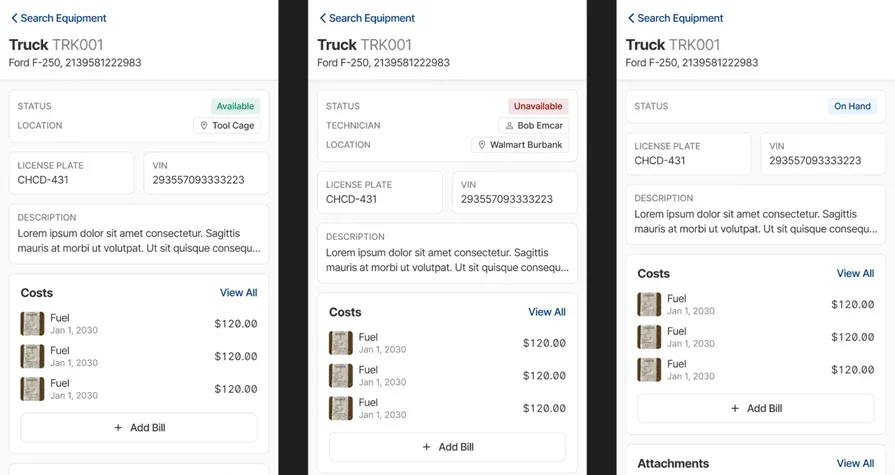
BuildOps supports commercial contractors who need inventory, materials, and job execution to stay connected across multi-property customers and multi-phase work. When parts usage, transfers, and returns are captured against the job as work happens, the office can keep billing accurate, keep replenishment on track, and reduce inventory clean-up after the fact.
Curious to see BuildOps in action?
Keep teams aligned on the jobsite so you can stay organized and boost profits.