

When bids drive your backlog, guesswork hurts. Fire sprinkler estimating software puts takeoff, assemblies, labor rates, and pricing rules in one place your team can use in the office and on-site. It helps FLS contractors turn walkthrough notes into accurate quotes fast—then hand those jobs to dispatch without double entry. In the fire safety industry, keeping estimating tied to field service management means clean handoffs, fewer misses, and estimates your techs can actually deliver against.
Here’s what we’ll cover:
- How to choose the right fire sprinkler estimating software
- Key features to look for in an estimating software for a sprinkler system
- 7 best fire sprinkler estimating software tools for contractors
- 7 benefits of using fire sprinkler estimating software for your operations
- 4 common fire sprinkler estimating software FAQs answered
We’ll jump straight into what to consider when shopping for fire sprinkler system estimating software that supports field work end to end—from mobile takeoffs and assemblies to approval capture, purchasing, and job costing that syncs with dispatch and the back office.
How to choose fire sprinkler estimating software for your team
Every sprinkler business runs a different bid mix. Scope, AHJ demands, delivery method, and crew productivity shape the tool you pick. Pressure-test any fire sprinkler estimating software against the checkpoints below. Then match fire sprinkler system estimating software to how your crews actually work in the field.
- Bid mix and delivery – What share of bids are plan/spec vs design-build? Do you chase ground-up packages, tenant improvements, or service change orders? Which AHJs, verticals, and GC partners drive your pipeline?
- Takeoff and assemblies – Do you measure in CAD/BIM or from PDFs with auto-count and linear tools? Will the platform handle risers, standpipes, and special hazards with prebuilt assemblies? Can estimators push alternates, adders, and value-engineering options without rework?
- Labor modeling – How do you want to apply labor: per fitting, per assembly, or crew-based rates? Do you need union, prevailing wage, and regional productivity factors in the same bid? Should travel, lifts, permits, and night work price as quick toggles?
- Material pricing and vendors – Does the database support manufacturer catalogs and size-specific pricing? Can vendor quotes update item costs automatically with approval controls? Will purchasing export a buy list by zone, phase, and delivery date?
- Handoff to ops and finance – Does an awarded estimate convert to a job with phases, cost codes, and budgets? Do change orders, submittals, and purchase orders originate from the estimate? Will data sync with dispatch, inventory, and accounting without double entry?
- Software features to prioritize – Do you need multi-estimator collaboration with audit trails and versioning? Should the system support templates, alternates, and proposal builders with e-signature? Do dashboards show win rate, GC hit rate, and variance to actual job cost?
Lock these answers and your shortlist gets clear fast. Next, we’ll break down the key features FLS teams rely on for service and maintenance estimating.
Key features to look for in an estimating software for a sprinkler system
Pros quote fast, defend assumptions, and hand off cleanly to ops. Fire sprinkler estimating software has to keep pace with precon pressure while speaking the same language as service, install, and accounting. The points below focus on what seasoned FLS teams need in fire sprinkler system estimating software—from intake to award.
1. Bid intake and calendar control
Pre-bid meetings, site walks, and deliverables live on dates. Estimators need slot control that respects access windows and crew availability so takeoffs start on time. Tie intake to scheduling and live dispatch to keep assignments moving when GCs shift milestones or AHJs revise review windows.
2. Field scoping on mobile that feeds takeoff

Walkdowns drive quantity accuracy. Estimators and senior techs should capture photos, notes, and counts by zone—riser rooms, mains, standpipes, heads, special hazards—then tag issues to RFIs. Offline mode and quick barcode or QR capture prevent gaps in plants, garages, and basements. A focused technician mobile app keeps evidence tied to the job record.
3. Cost database, vendor pricing, and proposal flow
A living database wins bids. Look for prebuilt assemblies for CPVC, steel, and specialty systems with fitting-level labor and waste factors. Item costs should update from vendor quotes with approval gates. Proposal builders must handle alternates, adders, VE options, and e-sign, then stamp deliverables for the GC and AHJ package.
4. Labor modeling and production factors that reflect reality

Apply labor by assembly, by fitting, or by crew size—then adjust with regional multipliers, night work, lift usage, and access limits. Tie estimates to actuals using native time tracking so variance reports expose where productivity slipped: stair towers, congested ceilings, or pump rooms.
5. Estimate-to-award handoff and billing triggers
Awarded bids should convert to jobs with phases, cost codes, and budgets without retyping. Purchasing lists, submittals, and change orders must originate from the estimate. For cash control, deposits and progress draws should flow through invoicing with secure payments, while revenue schedules mirror contract terms.
6. Sales pipeline and GC relationship tracking
Precon lives in follow-ups and deadlines. Track bid status by GC and vertical, set reminders for addenda, and keep contact history tied to each package. Pipeline views in a service CRM help leaders forecast hit rate, allocate estimator time, and protect key accounts.
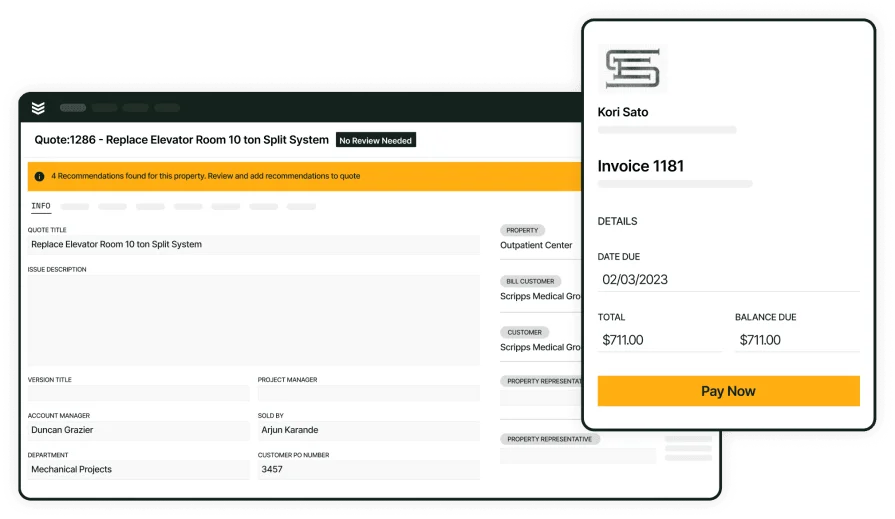
Convert winning bids to jobs with BuildOps
Create estimates, track alternates, and hand off to ops without retyping.
Other notable features to look for in a fire sprinkler estimating tool
Estimating only wins when it plugs cleanly into field service management. The extras below help fire sprinkler estimating software stay aligned with dispatch, crews, and accounting so fire sprinkler system estimating software data flows from precon through closeout without retyping.
- Reporting and forecasting – Track hit rate by GC and vertical, estimate-to-actual variance, and backlog value by month with flexible reporting dashboards.
- Service agreement intelligence – Pull pricing rules, renewal logic, and bundled inspection or repair packages straight into bids using service agreements.
- Fleet context for labor and access – Use live vehicle locations, gate notes, and travel time from fleet management to set realistic mobilization and productivity factors.
- CAD/BIM and PDF interoperability – Import quantities, run auto-count checks, and flag addendum deltas quickly.
- Version control and approvals – Compare revisions, lock pricing snapshots at submission, and keep an audit trail.
- Vendor quote and buyout management – Track expirations, evaluate alternates side by side, and push phase-based buy lists.
With these add-ons wired in, precon and field stay on the same page. Next, we’ll move into design and takeoff details that tighten quantities and accelerate submittals.
7 best fire sprinkler estimating software tools for contractors
Estimating lives on speed, accuracy, and clean handoffs. The picks below highlight fire sprinkler estimating software that helps pros bid fast, defend quantities, and pass clean budgets to ops. We focused on tools contractors actually use day to day and how each one supports fire sprinkler system estimating software workflows—from site walks and takeoff to proposal and award.
1. Best for commercial: BuildOps

BuildOps centers precon for sprinkler contractors. Estimators pull asset history, prior tickets, and live vendor pricing from the same system crews use in the field. The workflow covers takeoff, assemblies, labor factors, alternates, VE, and proposal e-sign. Awarded bids convert to projects and work orders with phases, cost codes, and budgets that connect to dispatch and accounting.
How Pricing Works: Subscription pricing based on users and required modules; talk with the team for a configuration and quote.
What Sets It Apart for Commercial Contractors: Multi-site clients, GC coordination, and AHJ submittals demand a tight link between estimating and operations. BuildOps ties pricing to scheduling, mobile, purchasing, and job costing, delivering clean handoffs with no retype.
Key Features: Sprinkler assemblies with fitting-level labor, vendor quote capture with approvals, alternates and adders, proposal builder with e-signature, and one-click conversion to jobs and work orders with budgets synced to dispatch and accounting.
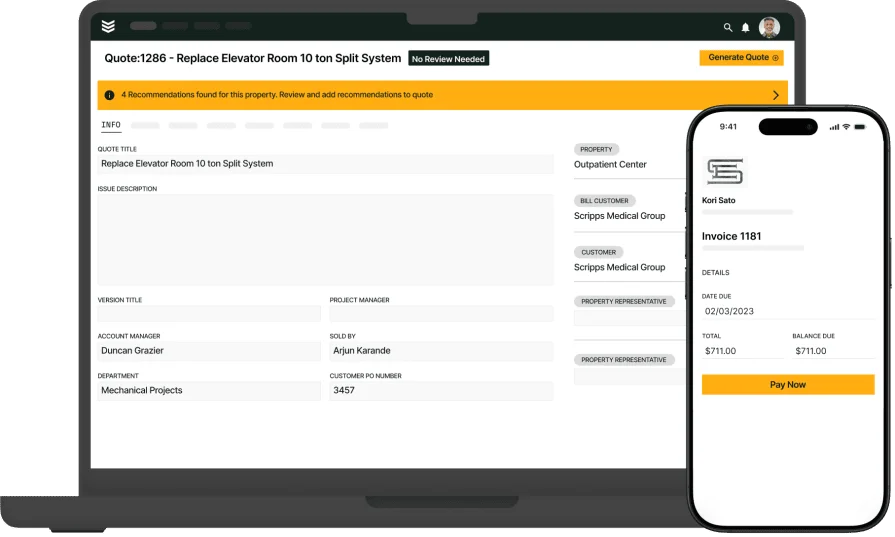
Built for commercial fire safety teams
Manage inspections, service, and compliance in one connected workflow.
2. Best for residential: Service Fusion

Image Source: Service Fusion
Service Fusion delivers a broad FSM toolkit with scheduling, dispatch, invoicing, and QuickBooks connectivity that small residential outfits appreciate. Estimators can build simple quotes, track jobs, and keep customer notes in one place, which helps teams that run installation and service under a single umbrella. Shops seeking NFPA-specific estimating assemblies, AHJ-aligned outputs, or deep preconstruction controls may find gaps for sprinkler work.
How Pricing Works: Tiered subscriptions with monthly or annual billing.
What Sets It Apart for Residential Contractors: Clean UI, easy setup, and accounting integrations support lean back offices, making it approachable for residential sprinkler work that favors speed over heavy customization.
Key Features: Dispatch and scheduling, QuickBooks sync, optional inventory and job costing at advanced tiers, customer communication tools, and a basic quoting flow suitable for small jobs.
3. Best for general contractors: ZenFire

Image Source: ZenFire
ZenFire combines inspections, CRM, scheduling, reporting, and mobile tools in one environment. Estimators can pull site history, create proposals, and track awards alongside service work, which helps GCs and fire protection subs who want a single database across teams. Organizations that need heavy construction management, deep integrations, or advanced buyout controls may prefer a platform with broader enterprise connectors.
How Pricing Works: Contact ZenFire for current plan details.
What Sets It Apart for General Contractors: Unified records for inspections, proposals, and jobs reduce admin churn and keep site context attached to every bid and change order.
Key Features: End-to-end flow from field evidence to quotes and invoices, mobile photo capture and signatures, and CRM plus scheduling tied to each property record.
4. Best for regulations compliance: Inspect Point

Image Source: Inspect Point
Inspect Point focuses on inspection workflows and AHJ-ready documentation, which helps sprinkler teams turn deficiencies into quotes with clean traceability. Estimators can pull device data from inspections, build proposals, and keep history tied to each property for audit trails and follow-ups. Teams that need deep preconstruction controls, complex assembly libraries, or large takeoff packages may find its estimating depth limited for major bid work.
How Pricing Works: Subscription pricing with plan tiers; contact the vendor for current details.
What Sets It Apart for Regulations Compliance: NFPA form libraries, photo evidence with time/GPS stamps, and AHJ output standards support compliance-heavy portfolios where every line ties back to an inspection record.
Key Features: Deficiency-to-quote flow, customer proposals with e-signature, scheduling and inspection records linked to estimates, and simple parts/labor price books.
5. Best for asset-centric service teams: FieldEquip

Image Source: FieldEquip
FieldEquip centers on equipment history, mobile work orders, and connected assets, which suits contractors pricing repairs, small installs, and service change orders off what techs find on site. Estimators can create quotes from field notes, attach photos, and keep proposals tied to the asset tree. Firms chasing large plan/spec bids or deep BIM-driven takeoff may want heavier precon features than FieldEquip provides.
How Pricing Works: Tiered subscriptions; implementation and module choices affect cost.
What Sets It Apart for Asset-Centric Teams: Strong equipment hierarchies, IoT options, and service records help scopes reflect real conditions, producing accurate repair and retrofit pricing.
Key Features: Mobile capture feeding quotes, asset-based price books, customer approvals, and basic job costing tied to awarded estimates.
6. Best for enterprise integrations: Fieldpoint

Image Source: Fieldpoint
Fieldpoint blends projects and field service with ERP connectors that larger contractors value. Estimators can price by phase, align cost codes with accounting, and push awarded work into projects and work orders without retyping. Setup and governance can take effort, so smaller teams or fast-moving bid shops may prefer a lighter tool.
How Pricing Works: Quote-based pricing tailored to modules and integration scope.
What Sets It Apart for Enterprise Teams: Deep links to ERPs and strong project controls let leaders manage budgets, purchasing, and progress billing from an approved estimate.
Key Features: Phase-based estimates, cost code mapping, purchasing and submittal flow from the quote, and project dashboards tied to job cost.
7. Best for inventory-driven contractors: Simpro

Image Source: Simpro
Simpro offers quoting, purchasing, and inventory control in one platform, helping sprinkler firms that price installs and service work with item catalogs, kits, and supplier links. Estimators can assemble packages, track margins, and convert quotes to jobs with committed stock. Teams that require NFPA-specific deliverables or advanced BIM/CAD takeoff may need add-ons or external tools.
How Pricing Works: Subscription plans with implementation services; contact Simpro for details.
What Sets It Apart for Inventory-Driven Teams: Strong stock control, catalogs, and purchasing make material-heavy bids easier to cost and execute.
Key Features: Assemblies and kits, tiered pricing, change order handling, purchase orders from the estimate, and margin tracking across parts and labor.
Thinking about Simpro? Compare Simpro vs BuildOps features directly to see which one can handle the custom fire sprinkler estimating workflows and reporting your team does.
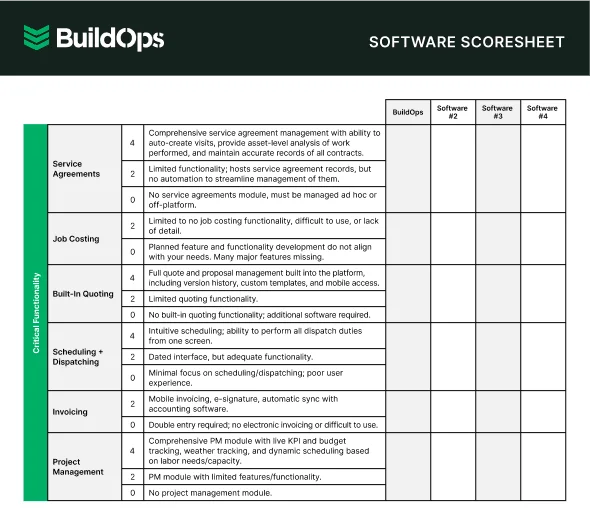
Easily compare tools at a glance
Compare top tools at a glance with this easy-to-use software scoresheet.
7 benefits of using fire sprinkler estimating software for your operations
Winning bids takes speed and certainty. Fire sprinkler estimating software aligns precon with field and finance so quantities, labor, and pricing hold up on-site. The gains below show how fire sprinkler system estimating software strengthens daily operations end-to-end.
1. Quicker bid cycles with fewer schedule misses

Calendar-aware estimating keeps site walks, addendum reviews, and takeoff deadlines on track. Intake tied to crew capacity and access windows lets managers pivot when GCs slide milestones. The approach mirrors practices covered in scheduling and dispatching, helping estimators hit delivery dates without scrambling.
2. Clean estimate-to-invoice flow without retyping
Quotes should become invoices with the same items, taxes, retention, and progress-billing rules. A unified flow cuts mistakes, shortens DSO, and gives accounting traceable detail by phase and cost code. This follows the guidance in the contractor estimate and invoice app resource, applied directly to sprinkler projects.
3. AHJ-ready packages that mirror field evidence

Proposal templates that embed photos, notes, and NFPA references stand up during plan review. Estimating pulls structured data from walkdowns, so every line item ties to a location and an image. The standard echoes the clarity highlighted in fire alarm inspection report software, adapted here for submittal pages and scope narratives.
4. Consistent methods across every crew and branch
Centralized assemblies, labor tables, and proposal language create one estimating playbook. Senior estimators govern libraries while new hires stay within approved factors. This mirrors portfolio practices discussed in fire sprinkler inspection software, giving national clients uniform estimates across campuses and regions.
5. Stronger pipeline insight and faster follow-ups

When estimating data sits next to accounts, contacts, and hit rates, leaders coach with facts. Teams prioritize callbacks by GC, vertical, and stage, and forecast labor demand against likely awards. These lines up with the relationship tactics covered in CRM for fire safety contractors.
6. Unified view across connected fire systems
Sprinklers operate beside alarms, special hazards, and extinguishers. Estimates that reference that broader picture avoid duplicate scope, catch interlocks, and flag access or drain-down constraints early. The portfolio perspective matches the themes in fire safety inspection software and brings that visibility into preconstruction.
7. Tighter buyout and cost control
Item-level pricing, vendor quote comparisons, and phase-based buy lists keep purchasing aligned with the bid. Early procurement locks key materials against lead-time risk, while variance reports against actuals reveal where productivity assumptions slipped so the next proposal lands closer to reality.
4 common fire sprinkler estimating software FAQs answered
Pros already know the codes and the grind. These answers focus on how fire sprinkler estimating software supports day-to-day bid work, field handoffs, and margin control with fire sprinkler system estimating software practices.
1. What is fire sprinkler estimating software?
Fire sprinkler estimating software is a preconstruction system that converts site notes, quantified takeoff, assemblies, labor tables, and live vendor pricing into bid-ready proposals with cost codes and budgets, then passes awarded scopes to projects and purchasing without reentry.
Used well, it becomes the pricing source of truth for buyout and variance tracking across branches.
2. How does fire sprinkler estimating software work?
Estimators capture site conditions, quantities, and constraints on mobile, then apply assemblies and labor tables tuned to building type, access limits, and schedule risk. Vendor quotes update item costs, while markups, bonds, and retention follow company rules. Proposal builders package alternates, VE options, and e-sign.
When a GC awards the job, the estimate converts to phases, cost codes, budgets, and buy lists. Dispatch receives labor plans; purchasing receives dated releases; accounting mirrors contract terms. Reporting exposes win rate and estimate-to-actual variance so leaders tune factors before the next bid.
3. Is fire sprinkler estimating software worth the cost?
Yes—if you bid regularly. Teams cut turn time, raise hit rate, and reduce rework. Approved estimates land in ops without retyping, which lowers admin hours and billing errors. Vendor price control strengthens buyout. Variance reporting tightens future bids and protects margin when access or lift time balloons.
4. Best practices to follow when using fire sprinkler estimating software
Great teams win on discipline. Standardize how data enters the system, govern libraries, and close the loop with actuals every week.
- Standardize assemblies and labor factors by system type and ceiling congestion
- Capture site photos and access notes during the walk and tag them to quantities
- Keep vendor quotes current and lock expirations to bid dates
- Model alternates and VE with clearly scoped inclusions and exclusions
- Map cost codes to accounting before you submit
- Push awarded estimates to jobs with budgets and phase dates on day one
- Compare estimate labor to actuals weekly and adjust factors by crew and building type
- Use proposal templates that mirror AHJ expectations and GC language
- Track hit rate by GC and vertical, then allocate estimator time accordingly
- Review variance causes at closeout and update the library the same week
Strong bids come from clean field data, solid assemblies, and handoffs that never drop a detail. That’s the core promise of fire sprinkler estimating software. Lock your playbook—intake, mobile scoping, labor modeling, vendor pricing, and proposal rules—and you give ops a budget they can trust. Standard libraries and weekly variance checks keep estimates tight across branches. Pair that with fire sprinkler system estimating software that converts awards to jobs, purchasing lists, and billing schedules, and your crews hit the site with clear scope, timelines, and costs.
BuildOps ties estimating to scheduling, dispatch, mobile, purchasing, job costing, and reporting in one platform for commercial field service work. If your team wants one system from precon to closeout, it’s worth a look.
If you’re weighing tools, a quick walkthrough can help. We’ll pull up a job like yours, run a takeoff-to-award flow, and show how estimates land in ops without retyping. Schedule a free demo if you’d like—no pressure, just a straight look at whether it fits your crews.
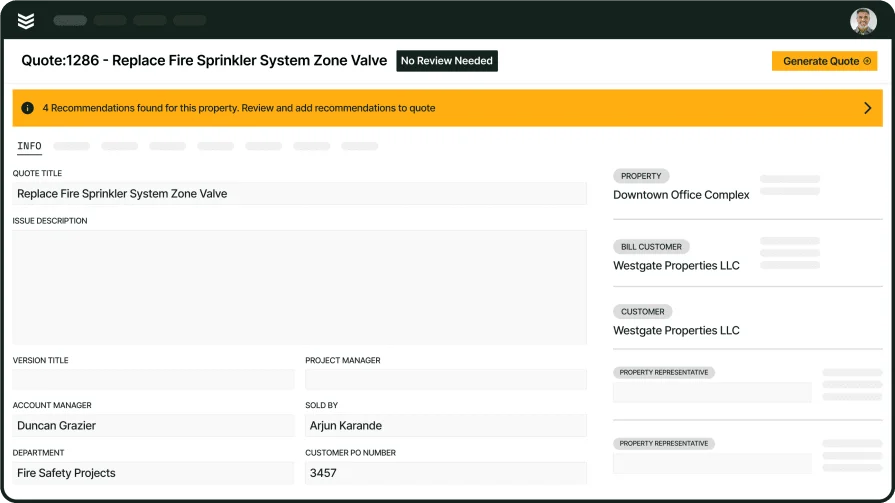
Unify inspections, service, and projects
See how BuildOps connects estimating and follow-up work across your whole operation.