


When you run sprinkler inspections, the margin for error drops to zero. If a valve sticks or a flow test fails when it counts, the fallout hits fast. Fire sprinkler inspection software gives your team one place to schedule inspections, record results, and keep assets tagged to every building.
Pair that with fire sprinkler inspection report software and you’ve got clean, code-ready reports your office and techs can trust. In the fire safety industry, dedicated tools help contractors coordinate jobs, sites, and NFPA tasks across the office and the field without juggling paperwork.
Here’s what we’ll cover:
- How to choose the right fire sprinkler inspection software for your team
- Key features to look for in fire sprinkler maintenance inspection software
- Key features to look for in fire safety system design & architecture software
- Key features to look for in fire safety system sales software
- 9 best fire sprinkler inspection software for all types of niche teams
- 6 benefits of using fire sprinkler inspection software for your operations
- 4 important FAQs about fire sprinkler inspection software
We’ll jump right into what to consider when shopping for fire sprinkler system inspection software to run field service work, from dispatch and mobile apps to reporting and compliance.

How to choose the right fire sprinkler inspection software for your team
Every sprinkler contractor runs a different playbook. Scope, AHJ rules, and route density all shape the tool you need. Evaluate any fire sprinkler system inspection software against the checkpoints below, then match it to how your crews actually work in the field.
- Services and cadence – Which inspection types do you handle: acceptance, quarterly, annual, five-year internal? Do crews cover wet, dry, preaction, deluge, and standpipes? Do you need backflow and pump tests inside the same workflow?
- Compliance footprint – Which AHJs receive your deliverables? What do they require—evidence photos, GPS stamps, e-signatures? Do you need impairment tags, color-coded deficiencies, and NFPA 25 references in line?
- Workforce and dispatch – How many techs and routes run on peak days? Do you need skill-based and certification-based assignments? Does offline mobile use matter for basements, garages, and pump rooms?
- Customer portfolio and SLAs – Do you serve national accounts or high-rise campuses? What response windows and penalties sit in your contracts? Do clients need a portal for self-scheduling, asset history, and prior reports?
- Data and integrations – Which systems must sync: accounting, CRM, inventory, CAD/BIM? Do you require open APIs or native connectors? How will item-level parts, labor, and travel feed invoices and job costing?
- Software features to prioritize – Does your fire sprinkler inspection report software create NFPA 25 PDFs in one tap? Can techs scan QR/barcodes on risers, valves, and heads to pull history instantly? Are deficiencies converted to estimates on-site with pricing rules and approval capture? Do dashboards show pass/fail trends by building, route, and tech?
Lock these answers, and the shortlist gets clear fast. Next, we’ll break down the key features FLS teams rely on in fire sprinkler maintenance inspection software.
Key features to look for in fire sprinkler maintenance inspection software

Maintenance and recurring inspections carry the heaviest volume and risk. FLS contractors need fire sprinkler inspection software that pushes clear checklists to the field, captures evidence, and returns compliant PDFs without office back-and-forth. For pro teams, fire sprinkler system inspection software should deliver the essentials below.
- Custom NFPA 25 forms and logic – Start with standard templates, then tailor by system type, component, and AHJ rules. Require critical readings and use conditional questions for wet vs. dry. Lock fields that drive pass/fail so fire sprinkler inspection report software outputs citations, acceptable ranges, and impairment details without rework.
- Automated scheduling and route planning – Generate recurring events from service agreements and cluster stops by geography. Push reminders to facility contacts and enforce certification rules to keep workloads balanced. The field service scheduling engine should also surface conflicts and travel load for dispatch.
- Mobile-first, offline, real-time sync – Crews operate in basements, garages, and pump rooms where signal drops. The app must cache forms offline, timestamp results, capture e-signatures, and sync the moment connectivity returns. A capable technician mobile app keeps techs moving without office calls.
- Evidence capture and attachments – Tie photos and videos to each asset and question with labels, GPS, and time data. Record gauge readings, drain times, and flow results, and add plan markups and deficiency photos. Clean evidence shortens AHJ reviews and closes customer disputes quickly.
- Integrations and downstream actions – Turn deficiencies into estimates with pricing rules, then into approved work orders without reentry using quoting software. Connect CRM, inventory, and accounting so materials, labor, and travel land in job costing automatically.
Key features to look for in fire safety system design & architecture software
Solid design prevents inspection headaches. Coordinated models, clean submittals, and traceable asset lists cut rework and set your crews up for smooth handoffs to inspection and maintenance tools.
- BIM and clash coordination – Use 3D modeling or dependable IFC/Revit exchange to route mains, branches, and drops while checking clearances against duct, conduit, and structure. Include head placement rules, hanger and seismic bracing layouts, valve and riser locations, and pump room geometry. Persist asset IDs from model to turnover so inspectors receive exact devices and locations.
- Hydraulic calculations and sizing – Rely on engines that handle area–density, room design, and ESFR scenarios with K-factor selection, hose stream allowances, elevation adjustments, and antifreeze calculations. Keep standpipe, fire pump, and backflow demand in the same project so calc sheets and safety margins stay consistent across the submittal.
- Code-driven automation – Apply rule sets aligned to NFPA 13 and 14 for hazard classification, spacing, coverage, obstruction checks, and seismic requirements. Let automated checks flag violations in context, cite references, and generate schedules, legends, cut sheets, and narratives that speed AHJ reviews and reduce redesign cycles.
- Change management and field feedback – Track RFIs, change orders, and layout deltas with version control and side-by-side comparisons that show hydraulic impact. Capture as-builts through field markups or scans, then export an asset register with tags, test points, and locations so maintenance and inspection teams start with accurate data.
Key features to look for in fire safety system sales software

Sales teams in sprinkler outfits juggle walkthroughs, budgets, and approvals across long project cycles. The tools below help convert inspection findings and capital plans into booked work without handoffs getting lost.
- CRM built for long-cycle contracting – A centralized record of contacts, sites, past work, and open opportunities keeps bids organized by building and portfolio. With a dedicated service CRM, reps track decision makers, renewal dates, and prior deficiencies so proposals reference real site history and expected scope.
- Pre-bid site walk coordination – Sales needs fast access to calendars and field resources for surveys, pump tests, and and as-built verification. Tying opportunities to dispatch software makes it simple to book a qualified tech for the walk, capture notes and photos, and return clean requirements to estimating.
- Contract and renewal management – Service programs drive recurring revenue across quarterly, annual, and five-year tasks. Using structured service agreements keeps frequencies, pricing, inclusions, and escalation terms consistent, while surfacing renewal alerts early enough to quote upgrades or retrofits.
- Sales analytics and forecasting – Pipeline views and win/loss reporting reveal which verticals, AHJs, and system types close fastest and at what margin. With built-in reporting, leaders can forecast backlog, track attach rates from inspection findings, and set targets by branch or rep.
- Frictionless closeout and cash collection – Once a deal is won, billing should start from the same data used in the proposal. Integrated invoicing and secure payments accelerate deposits and progress draws, shorten DSO, and keep the handoff from sales to operations clean for installation or corrective work identified by fire sprinkler inspection software.
9 best fire sprinkler inspection software for all types of niche teams
Seasoned FLS crews need tools that handle NFPA 25 routes, capture clean evidence, and kick off follow-up work without copy-paste. Below are strong options for teams that live in the field and close loops quickly with fire sprinkler inspection software.
Fire sprinkler maintenance inspection software
This category covers platforms used day to day for recurring inspections, corrective work, and service programs. Look for mobile checklists aligned to NFPA 25, photo and video capture tied to each asset, automated scheduling, and fast handoffs to quoting and work orders. When done well, findings flow from the riser to a compliant PDF and into the backlog without retyping.
1. Best for commercial contractors: BuildOps

BuildOps centralizes inspection history, asset records, and deficiencies, then links them to dispatch, quoting, and billing so office and field operate in one workflow. Crews complete NFPA 25 tasks in the mobile app, attach photos, and produce compliant PDFs using fire sprinkler inspection report software while the system creates estimates and approved work orders straight from the findings.
How Pricing Works: Per-month cost based on the number of users; set up a demo for a personalized quote.
What Sets It Apart for Commercial Contractors: Handles multi-site portfolios, dense routes, and service agreements with strong scheduling, job costing, and reporting. Inspection and service teams share the same data, which removes handoffs.
Key Features:
- Inspection, service, and follow-up work in a single workflow
- Deficiency capture that converts to quotes and approved work orders
- Central system for inspection histories, asset data, and service records
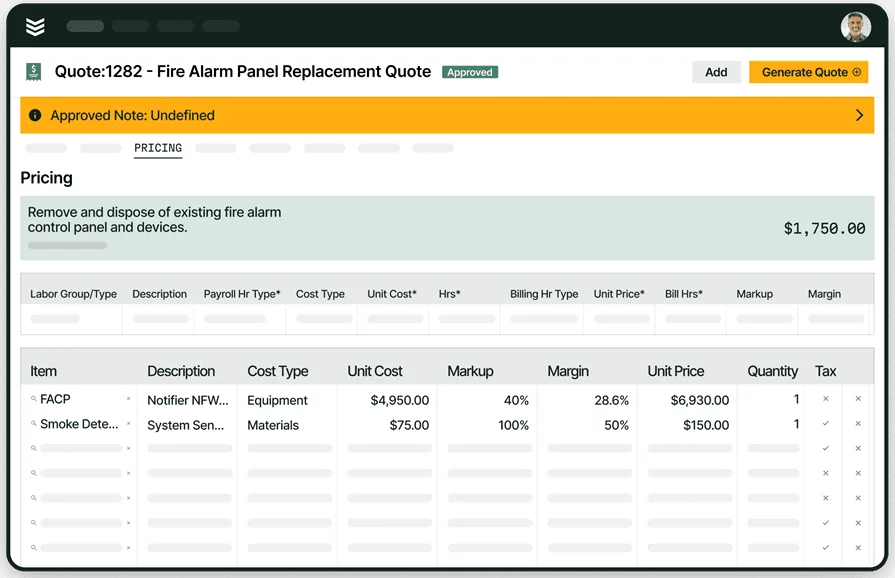
Built for commercial fire safety teams
Manage inspections, service, and compliance in one connected workflow.
2. Best for regulations compliance: Inspect Point

Inspect Point supplies code-aligned templates, checklists, and reports with a capable mobile app for signatures, messages, proposals, and PDF output. Its integration with The Compliance Engine helps align deliverables with AHJ expectations and keeps field results synced to the office. Teams that want tightly connected dispatch, inventory, and accounting in the same platform may need extra systems alongside Inspect Point.
How Pricing Works: Silver, Gold, and Platinum tiered plans; contact Inspect Point for specifics.
What Sets It Apart for Regulations Compliance: Deep library of code-driven forms and workflows, plus connections that support AHJ review and documentation.
Key Features:
- Templates and checklists based on current codes
- Automated recurring scheduling tied to maintenance cycles
- Mobile app for messages, signatures, proposals, and report generation
3. Best for an all-in-one fire safety platform: ZenFire

ZenFire combines inspections, reporting, scheduling, CRM, and mobile tools so teams can manage NFPA 25 work, capture evidence, and track proposals and jobs from one database. Field users complete routes, attach photos, and generate PDFs while the office sees pipeline and service activity tied to each site. Organizations that require heavy construction management or custom integrations may prefer a system with broader enterprise connectors.
How Pricing Works: Contact ZenFire for current plan details.
What Sets It Apart for a Unified Platform: One environment for inspections, service, and customer records that reduces admin time and keeps site history intact.
Key Features:
- End-to-end flow from inspection to work order and invoice
- Mobile evidence capture with photo attachments and signatures
- CRM and scheduling linked directly to inspection history
Fire safety system design & architecture software
These tools guide layout and calculations for sprinklers and related systems. Strong design drives clean installs, fewer conflicts, and handoffs that make inspections and maintenance smoother with your fire sprinkler inspection software down the line.
4. Best for fire alarm system design: FireCAD

FireCAD by Inspect Point runs as an AutoCAD plugin or a standalone program. It provides project templates, a device database, coverage visualizations by device, wirepath labeling, riser diagram tools, and report generation. Teams that mainly design sprinklers may find hydraulic modeling outside its wheelhouse, so it can require pairing with a sprinkler-focused tool.
How Pricing Works: $1,900/year for the AutoCAD plugin, $3,000/year for the standalone program.
What Sets It Apart for Fire Sprinkler System Design: Built on Autodesk standards with features fire protection pros expect, including fast riser layouts and circuit checks that keep submittals tight.
Key Features:
- Automated riser diagram creation and circuit calculations that speed drafting
- Built-in database with records on thousands of parts
- Instant reports such as battery and voltage drop summaries
5. Best for fire sprinkler system design: AutoSPRINK

AutoSPRINK supports 3D sprinkler layout, hydraulic calculations, and materials lists in one environment. Designers model pipe, heads, fittings, and coordination with other trades, then produce a parts list directly from the model. It also offers spool-ready outputs and options that align with shop and field workflows. The breadth can bring a learning curve, and some shops may plan for onboarding time or integration work.
How Pricing Works: Contact AutoSPRINK for a demo and pricing.
What Sets It Apart for Fire Sprinkler System Design: In-model hydraulic calculations and materials takeoff, reducing dependence on separate applications.
Key Features:
- 3D design with fitting coordination against other building systems
- Automatic materials lists generated from the model
- Training available through Q&A forums and instructor-led virtual classes
6. Best for users of Bosch equipment: Bosch Safety Systems Designer

Bosch Safety Systems Designer works with the ENS4 product line to streamline planning and documentation for fire alarm layouts. It coordinates input from planners, specialists, and customers, provides templates for planning documents, and links with AutoCAD for teams that draft in that environment. The catch is obvious: it targets Bosch hardware, so vendor-agnostic shops may prefer a different path.
How Pricing Works: Free, limited to Bosch ecosystems.
What Sets It Apart for Bosch Equipment: AutoCAD plugin access to Bosch design elements with fast templating and portfolio-wide consistency.
Key Features:
- Backend validation that flags configuration errors or element limits exceeded
- Templates and documentation available in 17 languages
- AutoCAD plugin workflow for device placement, cable routes, and export-ready plans
Fire safety system sales software
Sales in sprinkler outfits span surveys, estimates, renewals, and approvals. This category highlights CRM-heavy tools that turn inspection findings into quotes and contracts, then keep revenue visible across pipelines and branches. Each option here pairs well with fire sprinkler inspection software by pulling clean data from reports into proposals and service agreements.
7. Best for ease of use: Uptick

Uptick focuses on inspections and maintenance management for fire protection teams. You get code-aligned forms, route automation, analytics, and a mobile app that pushes checklists and captures signatures. Sales can translate deficiencies into repair or upgrade estimates without retyping, which suits fast-moving service groups. Shops needing deep construction, inventory, or accounting coverage in the same platform may need extra systems alongside Uptick.
How Pricing Works: Appears to be per-user, per-month; contact Uptick for specifics.
What Sets It Apart for Ease of Use: Quick path from findings to priced estimates that field and office can approve without long workflows.
Key Features:
- Visual dashboards tracking equipment performance and related metrics
- AI-assisted scheduling that optimizes routes between service calls for each tech
- Customer portal for viewing reports and service updates
8. Best for value-for-money: Field Promax

Field Promax delivers core FSM functions at small-business pricing. The system covers CRM, scheduling and dispatch, work orders, estimates with upsells, a customer portal, and invoicing with payment acceptance through services such as QuickBooks Go and Stripe. It handles inspection-driven sales, yet advanced features can feel less intuitive, and the platform is not heavily specialized for fire safety, which may limit fit for complex sprinkler workflows.
How Pricing Works: Tiered subscriptions with flat monthly or annual rates; user counts capped per tier, with optional extra licenses at $25 per month on Premium.
What Sets It Apart for Value-for-Money: A broad set of FSM tools in one package at a modest price point.
Key Features:
- Simple interface that shortens onboarding
- Many essential FSM functions included at a reasonable price
- Integrations with QuickBooks, Google Calendar, and Paylocity
9. Best for those on a budget: Service Fusion

Service Fusion is a general FSM platform used across trades. It offers an easy interface, efficient scheduling and dispatch, QuickBooks integration, and an affordable pricing model. Inventory, job costing, and fleet tracking exist at higher tiers or as add-ons, which can help growing service divisions. Fire protection teams needing NFPA-specific templates or granular AHJ deliverables may find limited native support, and customizations focused on fire safety are thin.
How Pricing Works: Tiered subscription plan with flat monthly or annual rates.
What Sets It Apart for Those on a Budget: Competitive pricing with a clean UI and accounting integrations that reduce admin time.
Key Features:
- Scheduling and dispatch tied to QuickBooks for streamlined billing
- Optional modules for inventory, job costing, and fleet tracking at advanced tiers
- Customer portal and communication tools that keep clients in the loop
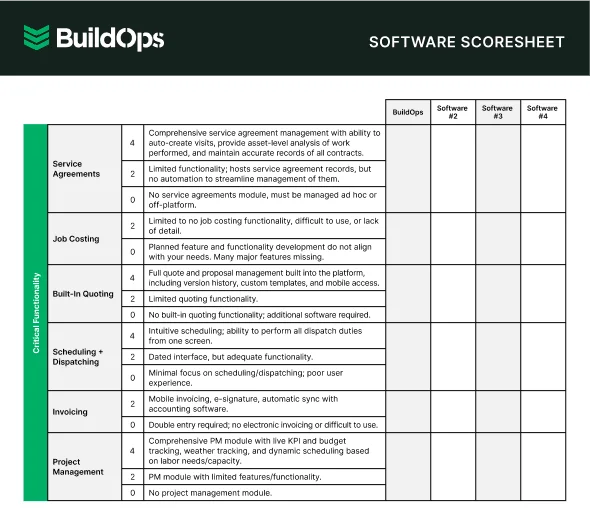
Easily compare tools at a glance
Compare top tools at a glance with this easy-to-use software scoresheet.
6 benefits of using fire sprinkler inspection software for your operations
Veteran FLS teams run tight routes, tough AHJs, and busy portfolios. Dialed-in fire sprinkler inspection software keeps data clean, moves work forward fast, and gives leaders clear visibility across buildings.
1. Cuts double entry across the stack

Enter readings, notes, and photos once, then reuse the same record for estimates, work orders, invoices, and dashboards. Asset IDs and QR tags tie every gauge reading, valve test, and impairment to the exact riser or floor. Teams that standardize on fire safety inspection software keep a single source of truth that prevents mismatches between field and office.
2. Replaces paper packets with clean, code-ready PDFs

Strong fire sprinkler inspection report software packages evidence, timestamps, and code citations the moment routes finish. Pump curves, flow results, and deficiency photos land in a polished PDF that AHJs can review without back-and-forth. Practices covered in the fire alarm inspection report software resources translate to sprinkler reporting, including signatures, delivery, and record retention.
3. Keeps crews productive when signal drops
Basements, garages, and pump rooms kill connectivity. Offline forms let techs capture drain times, pressures, and head counts without stopping work, then sync automatically when service returns. That protects billable time and eliminates gaps that stall closeout.
4. Converts findings into revenue with clear follow-up paths

Deficiencies turn into priced estimates and scheduled work without retyping line items. Parts kits, labor rules, and approval capture move repairs from quote to calendar while the service agreement updates future tasks. Teams that track buyers and portfolio contacts in a dedicated fire CRM align proposals to budget cycles and never lose a renewal.
5. Sharpens dispatch and route efficiency
Quarterly, annual, and five-year visits auto-generate from contracts and cluster by geography. Capacity rules account for certifications, time windows, and travel, while customer alerts cut no-shows. Tactics described in scheduling and dispatching—like capacity planning and travel buffers—fit perfectly for dense NFPA 25 routes.
6. Delivers portfolio-level visibility for owners and nationals
Dashboards highlight pass/fail trends by building, recurring deficiency types, and aging follow-ups. Leaders using fire sprinkler system inspection software can target upgrades, plan pump or backflow work ahead of peak seasons, and defend budgets with data. That level of insight keeps portfolios safe and contracts healthy.
4 important FAQs about fire sprinkler inspection software
You run dense NFPA 25 routes, juggle AHJ quirks, and manage national accounts. These FAQs speak to that reality and how fire sprinkler inspection software fits field and office work.
1. What is fire sprinkler inspection software?
Fire sprinkler inspection software is a unified platform for NFPA 25: scheduling & dispatching routes, pushing mobile checklists, capturing evidence during inspection, and generating compliant PDFs while syncing assets, deficiencies, quotes, invoices, work orders across the office and field.
2. How is AHJ and NFPA 25 compliance handled?
Compliance must be enforced at the question level. Expect templates mapped to NFPA 25 and local variants, GPS/time stamps, e-signatures, impairment logs, and mandatory photo capture. Strong fire sprinkler inspection report software also outputs AHJ-specific PDFs, tracks reinspection status, and stores immutable audit trails.
3. Can forms and deliverables be customized for contracts and national accounts?
Pros need conditional logic by system type (wet, dry, preaction, deluge, standpipe), portfolio branding, bilingual sections, and QR/barcode asset IDs. API access should export device-level results to ERP/BI, while role permissions keep design, service, and inspection teams aligned without duplicate records.
4. Is fire sprinkler inspection software worth the investment?
Yes—when it replaces paper and disconnected tools, the payback shows up in first-pass AHJ acceptance, higher conversion on deficiency quotes, tighter route density, and lower DSO. Expect fewer re-visits, less duplicate entry, faster closeout, and cleaner audits when fire sprinkler system inspection software ties inspections, quoting, and billing to the same record.
Our customer, Certified Fire, certainly thinks BuildOps is worth the investment:
Sprinkler work never lets up—acceptance tests, quarterlies, five-year internals, then back to repairs. The contractors who stay ahead keep assets, schedules, and evidence flowing through a single system. When inspections, reporting, quoting, and billing share one record, your office stops chasing files and your field stops re-entering data.
That means cleaner AHJ interactions, fewer return visits, and faster path from deficiency to work order. If you want an all-in-one platform that ties commercial field service and construction together, BuildOps brings inspections into the same workflow your dispatch, estimating, and accounting teams already use.
Curious how it would handle your routes and reports? Take a look with us and kick the tires. We’ll walk through your use cases, you decide if it earns a spot in your stack.
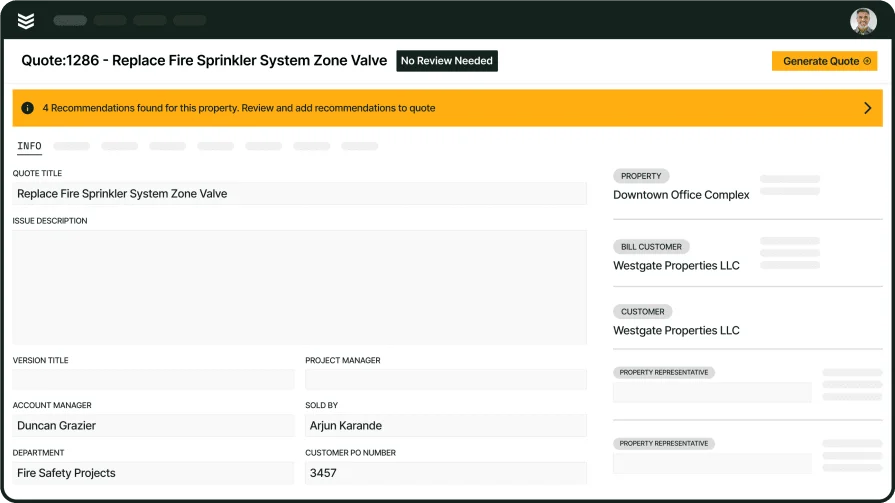
Unify inspections, service, and projects
See how BuildOps connects inspections and follow-up work across your whole operation.