

Key Takeaways
- An HVAC platform for service teams automates field operations from end to end, but unifying quoting, dispatching, field work, invoicing—and everything in between
- Choosing the right HVAC platform for your business depends entirely on your scale of work, like commercial, residential, general contracting, or something else
- Some of the top HVAC platforms include BuildOps for commercial service teams, Housecall Pro for residential, and Jobber for general contractors
An effective HVAC platform can unify all field operations in a single place, and be the backbone of your operation on which you build your ERP, integrate other tools, and automate operations using AI. But in the HVAC industry, a platform requires certain capabilities to be effective.
An HVAC platform should offer you complete automation of manual tasks that don’t require oversight, it should connect every piece of field data together to make it accessible to both techs and office staff in real time, and it should offer deep insights in your operations so you can continue to improve internal processes as you scale.
Because HVAC businesses come in many different types, we’ve put together an HVAC platform selection guide to help you identify which type of tools suit your business type, and how to choose between the options out there. To do that, here’s what we’ll cover:
- 9 key features to look for in an HVAC platform for service teams
- 8 best HVAC platforms for different contractors & service types
- 7 benefits of using an HVAC platform to automate service operations
- Choosing the right HVAC platform for your business needs
- 5 important HVAC service platform FAQs answered
Let’s start with a feature breakdown, that will show you what’s most important to look at when starting to research your list of HVAC platforms.
9 key features to look for in an HVAC platform for field service teams
If your HVAC software only handles some of your operations tasks—like scheduling or invoicing—it’s just that: a tool. But a comprehensive HVAC platform built for service? That’s something else entirely.
A true HVAC platform connects your whole operations from first customer call to final invoice, with features that speak to how field service actually works for HVAC teams. These 9 features form the core of any solid HVAC service platform, and when all included, make it possible to manage jobs, teams, and customers in real time, without the clipboard shuffle or mid-day check-ins that throw everything off track.
Here’s what to look for when you’re researching platforms and setting up demos:
1. AI-powered Smart Scheduling by tech skills & capabilities

Your HVAC platform should have an AI-powered Smart Scheduling feature that can make suggestions to your schedule based on technician skill, certification, who is available, and so on. Drag-and-drop calendars, filtered tech availability, and smart conflict alerts make scheduling less of a chore and more of a control center. Your platform should help balance workloads, avoid overlaps, and adjust job sequences as needed without manual cleanup.
2. Real-time dispatching & technician tracking

A top-tier HVAC service platform should let you assign and update jobs in real time, track technician locations, and make adjustments on the fly. When techs get job details instantly on their mobile devices—and dispatchers can see who’s closest to the next site, it tightens turnaround time and reduces miscommunication.
Consider a scenario where a technician finishes an AC service call ahead of schedule. With proper dispatching features, dispatch can spot their availability immediately and assign them to a nearby call—cutting downtime and keeping your day on track.
3. Field-ready mobile app access

Techs need to be able to pull up job history, upload photos, complete forms, and collect signatures right from the job site on their mobile technician app. Mobile access is a must-have for HVAC service, especially when crews are constantly moving.
You want AI-powered nameplate capture that lets your tech snap a photo of a unit’s nameplate and have the serial number and other critical information filled in automatically is key. The photo capabilities are also important for keeping detailed records of work for your customer service history, and are great to attach to quotes to get them approved more quickly by potential customers.
Think about a technician mid-way through diagnosing a rooftop unit. They spot damage tied to an older issue and need to verify the service history. With mobile access, they can pull it up, snap a few photos, and document everything without heading back to the office or calling for backup.
4. Connected quoting, work approvals, and invoicing

From the first moment you receive a call and details are recorded about a customer, all of that information should be leveraged into a quote for the work, on an HVAC platform that lets you integrate your price book and build templated checklists that you can use to get quotes out with far more detail, but much faster.
A powerful quoting engine within your platform lets techs or office staff build accurate estimates using real parts, labor rates, and scopes of work—then send them for approval instantly. When customers approve on the spot, jobs can move forward without delays.
Let’s say your estimator finishes a site walkthrough and needs to send a multi-zone VRF bid. Using built-in quoting tools lets them pull up templates, tweak quantities, and fire off the proposal—all before leaving the site. The customer signs that afternoon, and the job is booked before the day’s over. Your tech may not even have to leave the jobsite before the work is approved!
5. Time tracking and job logging

With time tracking tools, techs can log hours directly from the job site, while managers get accurate labor costs tied to each project. It’s a critical tool for both payroll accuracy and project profitability. You want to ensure your techs can submit their hours and office admin can approve them—all right in the app.
Giving your techs the ability to enter hours while still on the jobsite when they complete their notes is also critical to cutting down on time tracking or billing mistakes, because information is tracked while it’s still fresh, and just happened.
6. Capabilities for recurring HVAC maintenance & service management contracts

Your HVAC platform needs to have service agreement features that keep you on track with preventive maintenance and recurring service contracts you have with your customers. You should be able to set up custom forms for any recurring agreement, build out contract templates, set up notifications to remind you to send invoices or check on payments, and let your techs make recommendations in their app right on site for preventive work.
7. Integrated invoicing and payment collection

No HVAC platform is complete without baked-in invoicing and payment tools. You want to be able to create invoices directly from completed jobs, automate payment reminders, and collect digital payments from your customers—whether you’re in the office or in the field. No delays. No paperwork limbo.
8. Deep dive analytics & custom dashboards that bring insights based on KPIs you set

HVAC platforms are typically built for different types of work like commercial or residential. When the reporting isn’t customizable and you’re using a ‘one-size-fits-all’ type of solution, you’ll find that it does not fit you.
Having insights into the field service metrics & KPIs that you deem most important is as critical as being able to set those KPIs up in any number of custom dashboards built for different team members. You want each tech to be able to see how long their jobs are taking and which targets they are hitting, but maybe you only want leadership to see a tech vs tech profitability comparison.
In BuildOps reporting for example, you can set up a report using every. single. field. in the platform, which means it could not possibly be more customizable. This is a very useful feature for commercial field teams working on multi-location jobsites or long-term projects who need accurate margin tracking and to be able to identify revenue leakage before it’s too late.
9. Fleet and asset tracking

A fully equipped HVAC platform should also include fleet management features that can monitor vehicle usage, maintenance status, and location history. This not only protects your assets but also helps optimize routing and dispatching decisions. Fleet tracking, inventory management, asset preventive maintenance analysis—these are all key to running a smooth operation.
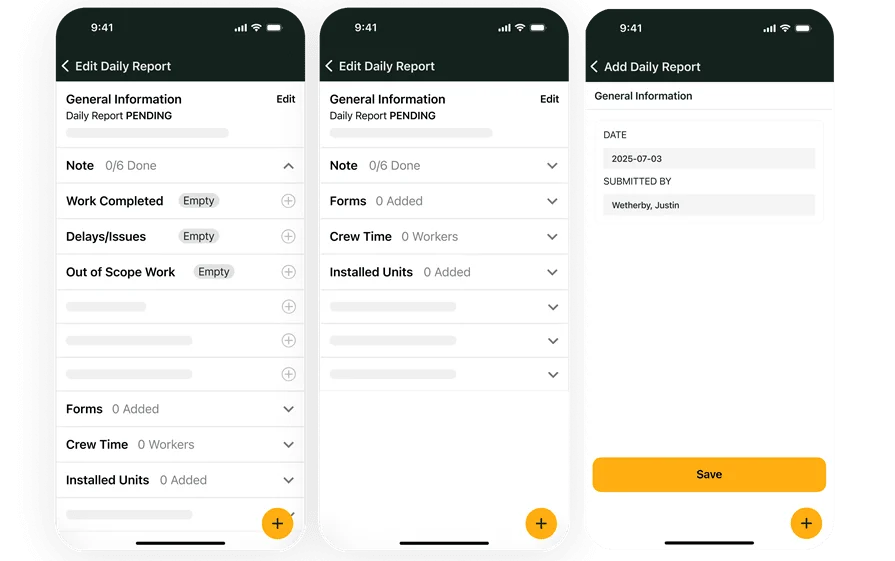
BuildOps has all of these features, and more
See how BuildOps connects HVAC work from end to end in an AI-native platform
8 best HVAC platforms for different contractors & service types
No two HVAC businesses run the same, and the platform you choose needs to reflect that. Whether you're managing five techs or fifty, focusing on residential service or large-scale commercial installs, your HVAC platform needs to support the way your crew actually works.
We’ve compiled a list of full-service HVAC platforms that rise to the challenge for different types of businesses. Look for yours below to see which one might be the best fit for you.
1. Best HVAC platform for commercial service teams: BuildOps

BuildOps was made for commercial HVAC teams handling job volume, multiple techs, big contracts, and tight timelines. It connects quoting, dispatching, scheduling, asset tracking, service agreements, invoicing, and reporting—all without forcing your team to bounce between different tools apps.
BuildOps is an AI-powered, full service HVAC platform that uses automation where it needs to be, and lets your leadership put manual oversight where you need it. Other tools are legacy systems of record, telling you what you’ve already done. BuildOps is an AI-native system of action, telling you what to do next. That means both office staff and techs in the field know what the next steps is, so jobs keep moving.
How Pricing Works: Custom pricing, tailored based on your operation’s size and what features you need. You'll walk through the platform fully to make sure it suits your business before getting a quote.
What Sets It Apart for Commercial HVAC Teams: This platform supports complex workflows out of the box, like scheduling multiple techs to the same job, tracking asset maintenance by site, managing multi-property client relationships, and handling PM contracts. It’s not a generic service app trying to adapt to HVAC, and is designed to handle the jobs your commercial crew runs every week.
Rating: 4.5 on Capterra from 149 user reviews
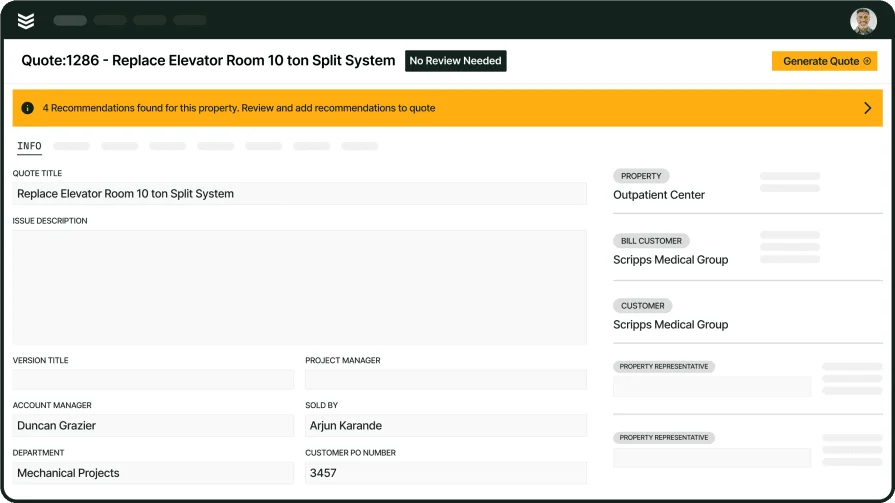
See BuildOps in action for complex commercial HVAC service
2. Best for residential service teams: Housecall Pro

Image Source: Housecall Pro
Housecall Pro is geared toward residential contractors who want something simple, clean, and mobile-friendly. You get features like online booking, automatic job reminders, basic estimates, and payments. It’s fast to learn, easy to use, and works well for smaller teams doing high-volume residential calls.
How Pricing Works: Plans start at $49/month. More advanced features (like custom workflows and reporting) are available in higher tiers up to $199/month.
What Sets It Apart for Residential Service: The customer-facing tools are its standout. Homeowners can schedule appointments, view past work, approve estimates, and make payments online through a client portal. It’s lightweight and great for solo techs or smaller teams—but might hit its limit for larger operations or commercial needs.
Rating: 4.7 on Capterra from 2736 user reviews
Compare Housecall Pro directly to BuildOps right here to see which one is a better fit for the scale of your HVAC work.
3. Best for general contractors: Jobber

Image Source: Jobber
Jobber is made for field service businesses that wear a lot of hats—HVAC, plumbing, lawn care, you name it. It’s flexible enough to cover multiple trades and good at keeping track of scheduling, quotes, and payments across service types. But if you're looking for features specific to HVAC like detailed asset tracking or PM workflows, it might fall short.
How Pricing Works: Starts at $69/month with higher-tier plans offering automation, quote follow-ups, and custom fields at $169/month.
What Sets It Apart for General Contractors: It’s ideal for shops doing a mix of HVAC and other field services. You get one system to run most of your business, with fast setup and good mobile access. But HVAC-heavy operations may find it lacks the depth for job costing, service agreements, or detailed tech tracking.
Rating: 4.6 on Capterra from 1404 user reviews
4. Best for independent HVAC contractors: FieldEdge

Image Source: FieldEdge
FieldEdge is designed with independent techs and small businesses in mind. It includes scheduling, dispatch, quoting, invoicing, and a decent CRM—all within a single app. The dashboard is simple enough to use without needing a dedicated office staff. That said, scaling up can expose some workflow gaps.
How Pricing Works: FieldEdge offers custom pricing based on business needs. Generally suited for smaller shops starting with basic features and scaling up over time.
What Sets It Apart for Independent Contractors: It’s built to help solo or small-team contractors stay organized on the go. The mobile app keeps jobs, invoices, and customer info in one place—without needing an admin to manage it all. For growing operations, however, it may fall short on advanced reporting and project-level tracking.
Rating: 4.2 on Capterra from 304 user reviews
5. Best for mobile-focused HVAC teams: Workiz

Image Source: Workiz
Workiz is tailored for service teams that run lean and prioritize mobile operations. The platform supports real-time job dispatching, two-way customer texting, and voice over IP—all from one app. It integrates with Google, QuickBooks, and payment tools like Stripe. However, it lacks the operational depth larger commercial contractors may need.
How Pricing Works: Starts at $225/month for up to 3 users. Custom pricing available for larger teams.
What Sets It Apart for Mobile Teams: Built for techs in the field, Workiz gives teams the tools to quote, dispatch, message customers, and collect payments on the go. Great for fast-moving residential service teams—less ideal for complex commercial jobs.
Rating: 4.4 on Capterra from 218 user reviews
6. Best for small to mid-sized HVAC businesses: ServiceTrade

Image Source: ServiceTrade
ServiceTrade targets commercial service contractors, especially those doing ongoing maintenance, inspections, and emergency repairs. It handles recurring jobs well and supports basic dispatching, customer records, quoting, and asset management. However, real-time field communication, dispatch flexibility, and end-to-end reporting are limited unless you stack add-ons.
How Pricing Works: Pricing is quote-based and varies by user count. Expect base plans to start around the $100–$150/user/month mark, with add-ons for integrations and mobile features.
What Sets It Apart for Small to Mid-sized HVAC Businesses: The platform shines when it comes to managing inspections, recurring service routes, and asset histories across multiple customer sites. If your business is built on PM agreements and service visits, it fits the workflow. But for businesses needing live dispatch control, advanced job costing, or flexible mobile features, it may feel a bit behind.
Rating: 4.6 on Capterra from 339 user reviews
7. Best for field-to-office visibility: Kickserv

Image Source: Kickserv
Kickserv focuses on syncing what your HVACtechs see in the field with what your office needs to manage behind the scenes. It offers tools for job scheduling, real-time updates, customer communications, invoicing, and mobile work order management. While it’s not as feature-heavy as larger HVAC service platforms, it’s reliable for contractors looking for solid visibility without a bloated system.
How Pricing Works: Free tier available with basic tools. Paid plans start at $59/month and scale up depending on features and users.
What Sets It Apart for Field-to-Office Sync: Kickserv lets field techs update job notes, upload photos, and complete tasks directly from their devices—while office staff sees changes in real-time. Ideal for smaller teams looking to reduce miscommunication and cut down on phone tag between the field and dispatch.
Rating: 4.4 on Capterra from 386 user reviews
8. Best for customer communication and scheduling: Service Fusion

Image Source: Service Fusion
Service Fusion focuses heavily on customer experience. With features like automated reminders, live GPS tracking for techs, customer portals, and call masking, it’s designed to help teams maintain a polished front-end without needing a massive backend system. The HVAC platform also handles job scheduling and invoicing, but reporting and contract tools are limited. However, if your team needs advanced project management or asset tracking, this one might not be the fit.
How Pricing Works: Flat pricing model starting at $195/month for unlimited users, making it attractive for growing companies.
What Sets It Apart for Customer-Facing Operations: The front-end tools shine—automated updates, real-time location sharing, and branded communication make a strong impression.
Rating: 4.3 on Capterra from 289 user reviews
Commercial HVAC Business Growth Report
See how top HVAC shops in North America are achieving business growth that lasts
7 benefits of using an HVAC platform to automate service operations
An HVAC service platform becomes the central tool your team leans on to run the entire operation. From boosting job accuracy to improving customer relationships, an HVAC platform helps field service businesses stay sharp, efficient, and in control.
Whether you’re managing commercial sites, residential contracts, or a mix of both, these are the real outcomes teams see when their tools are working the way they should, and the top ways you stand to see an ROI on your investment in a full service HVAC platform.
1. Increased technician productivity

With job details, service history, and asset data available in one place, techs spend less time checking in and more time getting work done. They can upload photos, complete forms, and track tasks from the field—cutting out downtime and guesswork.
Teams using HVAC field service management platforms often report faster job turnaround and fewer callbacks simply because everyone knows exactly what’s happening at the site before rolling up.
2. Better job tracking and accountability
Every job has a digital paper trail. From dispatch to invoicing, managers can see who did what, when, and how long it took. That visibility makes it easier to address bottlenecks, assign resources, and keep jobs moving without chasing updates.
When systems include real-time updates and mobile reporting, it’s easier to enforce checklists, flag delays early, and track what’s complete. Platforms with this kind of field service visibility for HVAC teams build stronger habits across both field and office roles.
3. Higher close rates on service quotes
Platforms with built-in quoting tools make it easier to send proposals while the job is still fresh—often right from the job site. The faster the quote goes out, the better the odds of winning the job. Your techs become part of the sales engine, not just the service team.
With tools that track open quotes and flag follow-ups, HVAC service platforms designed to improve quote-to-close performance give teams a better shot at locking in revenue without leaving money on the table.
4. Improved customer experience
Automatic reminders, real-time ETA updates, and easy access to job history help customers feel more informed and in control. That translates to fewer inbound calls, less frustration, and better reviews. When customers know what to expect—and can approve work, pay online, and get updates without calling in—it reflects the kind of professional experience that top HVAC service operations are known for.
5. Accurate reporting for smarter decisions
Managers can pull reports on completed jobs, labor hours, margins, equipment usage, and more—all in one dashboard. That kind of data helps you price jobs better, schedule more efficiently, and identify top-performing techs.
Our commercial HVAC growth report shows how contractors using digital platforms were able to adjust strategy faster than those using manual systems—because they could actually see what was working.
6. Reduced administrative overhead
No more juggling spreadsheets, separate invoicing systems, or duplicate data entry. Office staff can handle more with fewer errors when the platform ties everything together—dispatch, estimates, invoicing, and payments. That reduction in rework and paperwork not only saves time but helps your team focus on customer communication and strategic work instead of chasing job info.
7. Easier onboarding for new team members
Whether it’s a new dispatcher, service manager, or tech, having one system that lays out schedules, job info, and standard processes makes training simpler. New hires can start learning real workflows right away, instead of shadowing for weeks before touching the tools.
An HVAC service platform turns your process into something that’s repeatable—not something stuck in a few people’s heads. That structure helps companies grow without the growing pains.
Choosing the right HVAC platform for your business needs
The way your HVAC business runs should shape the tools you use, not the other way around. Before comparing platforms or sitting through sales demos, it helps to step back and understand the key areas where a service platform can make or break your day-to-day.
These points below will help guide the conversation during demos, and when deciding with your team.
- Job types—Does the platform support the kind of work you take on—commercial installs, residential repairs, recurring maintenance? Can it handle multi-day jobs and one-off service calls with equal ease? Does it offer flexibility for tracking long-term projects?
- Scheduling and dispatch—How does it handle job booking and tech assignments? Can dispatchers see availability and move things around fast? Does it help reduce long drive times or downtime between jobs? Will it make scheduling more efficient, or just add another layer?
- Team fit—Can your office staff manage jobs without getting buried in admin tasks? Is the mobile app simple enough for techs to use without a learning curve? Does it support the way your team already works—or force them into a new process?
- Customer communication—Will it keep customers informed with job updates and appointment reminders? Can they review work, approve quotes, or pay online? Does the system help build trust with clear records of past service?
- Features—Does it offer route optimization, real-time job costing, or digital forms? Can you manage assets and warranties in one place? Are reporting tools easy to use and built for the kind of metrics that matter to your shop?
Dialing in these questions first will save time—and keep your crew from getting stuck with software that looks good in a demo but slows them down on the job.
5 important HVAC service platform FAQs answered
HVAC service platforms are becoming the backbone of how modern service businesses operate, helping connect everything from the first work order to the final invoice. If you still have questions about how this might work and how the platform can integrate with your operations, here are the answers:
1. What is an HVAC service platform?
An HVAC service platform is a digital system that connects scheduling & dispatch, quoting, CRM, invoicing, and reporting into one place, built specifically for field service operations. These platforms help HVAC contractors manage everything from daily job flow to long-term service agreements.
It pulls all core functions—like scheduling, dispatch, job tracking, and customer info—into a single interface. Techs get updates on their phones, office staff tracks job progress in real time, and everything from quotes to invoices flows through one system.
2. How are operations all connected in an HVAC platform?
HVAC platforms are built on a central system, usually containing a desktop and mobile app version, so any tech, office, or leadership team member can access all the features from wherever they are.
Here’s an example workflow for a simple HVAC job, executed through BuildOps as an example:
- A new customer calls to request work and customer details and recorded in the CRM
- Dispatching assigns a tech to visit the jobsite and examine the scope of work, recording Notes and taking Photos
- A Quote is generated by office staff based on the tech’s assessment of the jobsite, and sent to the customer
- Customer approves the quote, and dispatching Schedules the job
- Tech arrives at the jobsite while Fleet Tracking and Route Optimization got them there at the idea time
- Custom Checklists and Workflows are all accessible to the tech through their mobile app, which they complete as they go
- Field Report Notes are completed by the tech, and then automatically turned into an Invoice Summary
- The customer receives the Invoice, and then is offered Payment options
- Custom Dashboards that pertain to this type of work, this tech, or general operations are automatically updated with job data and then reviewed by leadership to improve future operations
3. Is an HVAC service platform worth the cost?
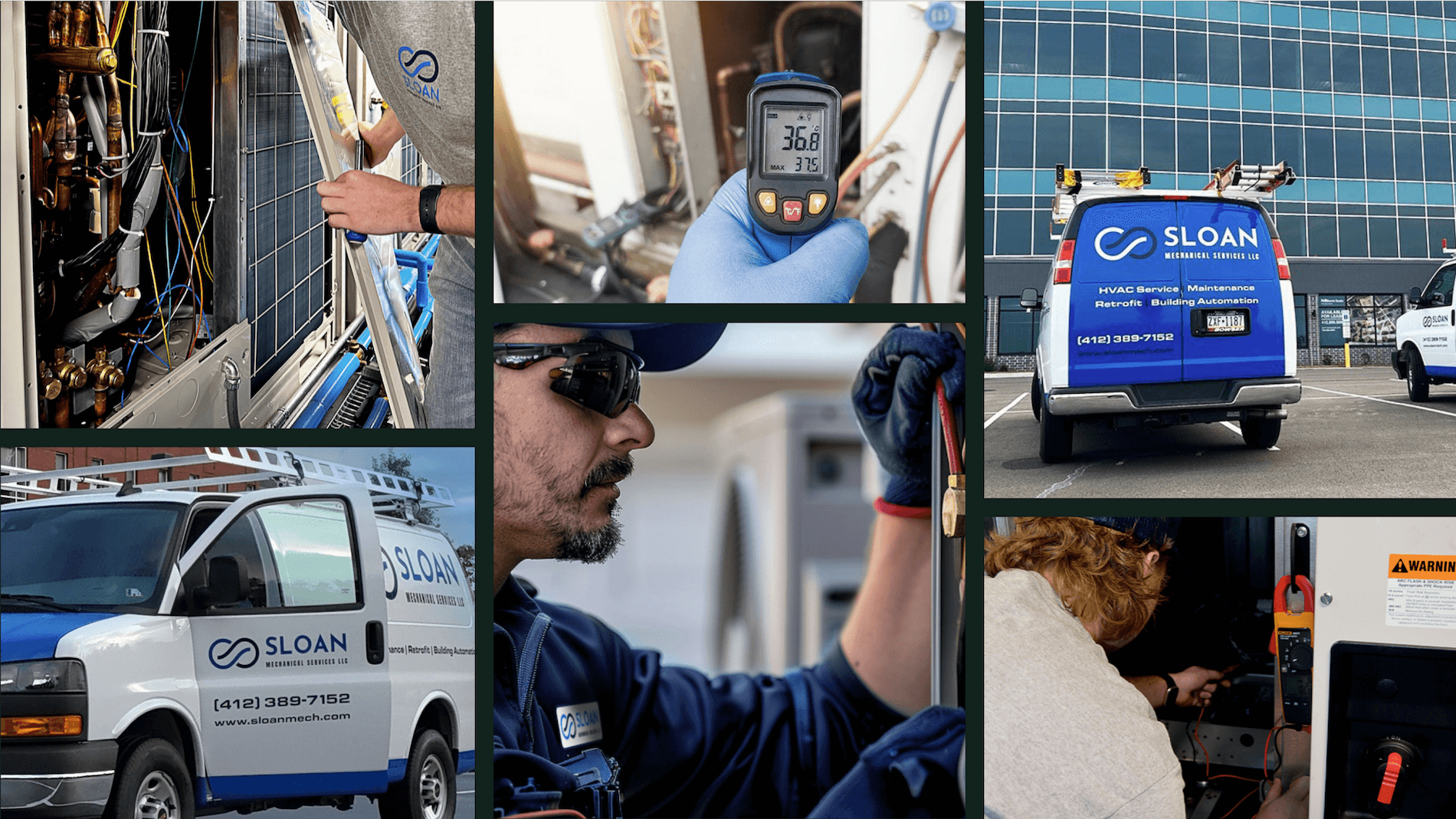
Yes—especially for contractors managing multiple techs, recurring work, or commercial clients. These platforms reduce errors, speed up workflows, and help track costs more accurately. That time and money saved more than covers the investment. And our HVAC & mechanical customers certainly think the investment in BuildOps is worth the cost:

4. Who needs an automated HVAC service management platform?
Anyone who deals with:
- Missed or overlapping appointments
- Lost paperwork or miscommunication
- Slow approvals and delayed invoices
- Manual tracking of assets or service history
- Field teams that rely on office calls for job info
If any of that sounds familiar, it’s time for a platform that automates the chaos.
5. Should I get a stand-alone HVAC platform, or FSM software with service management capabilities?
If HVAC is your primary business, go with a purpose-built HVAC service platform. FSM tools often spread wide across industries and may lack depth where you need it most—like equipment tracking, technician workflows, and service agreement handling. Choose the tool built for your work, not one that tries to fit every trade.
When you’re running a growing HVAC business, your tools shouldn’t hold you back. Whether you're sending out a single tech or managing dozens across service routes, the right HVAC service platform ties everything together—scheduling, dispatch, quotes, field updates, and job completion tracking.
A lot of tools out there promise automation or "all-in-one" fixes, but only cover the basics. Many of the features we broke down—like asset-level tracking, technician load balancing, integrated quoting, or field-to-office updates—aren’t standard. They're often scattered across separate apps or locked behind expensive add-ons.
That’s where platforms like BuildOps stand out. It brings all of those functions into one system, purpose-built for commercial contractors who manage big jobs, repeat service calls, and multiple techs in the field. If you’re trying to get everything under one roof and run a tighter operation without duct-taping tools together, that’s what sets it apart.
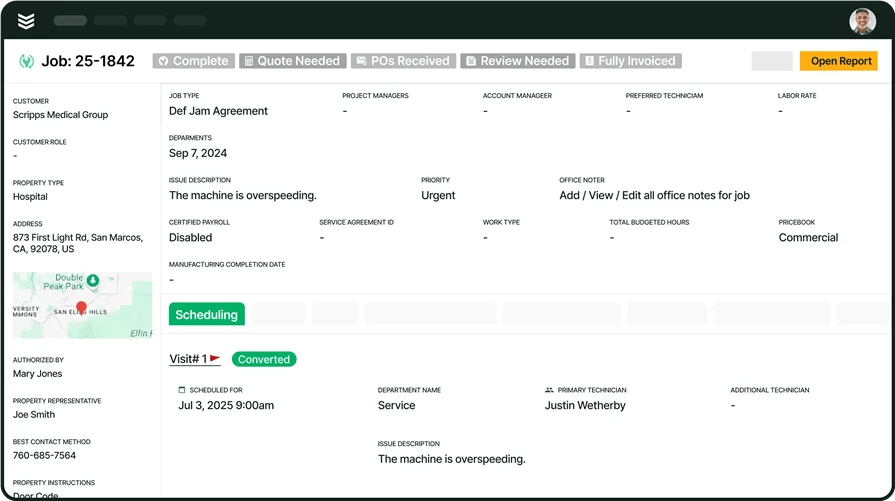
Take a closer look at BuildOps for HVAC
75% Quote Approval Rating + 30% Revenue Growth for Mechanical teams using BuildOps