


Warranty work has a way of exposing every gap in job documentation and asset history. One missed model number, an unclear install date, or a labor allowance that never made it into the work order can turn a covered fix into a disputed charge, a denied claim, or a tech stuck on-site waiting for an answer. That is when the office starts chasing PDFs and email threads, and the field loses time that should be spent completing work, not reconstructing it.
Tying warranty details into day-to-day field service management keeps eligibility, parts rules, labor terms, and proof-of-work connected to the customer, asset, and job record. It also supports cost-effective field service by making warranty decisions faster and cleaner in the field, while keeping warranty tracking software aligned with how techs actually run install, maintenance, and repair work.
Here’s what we’ll cover:
- What is warranty tracking software?
- Types of warranties to keep track of
- 5 key features of warranty tracking software
- 6 best warranty tracking software for field service teams
The next step is getting specific about what warranty tracking software actually does inside field operations—how it connects assets, install history, coverage rules, and documentation to the work order so techs can verify eligibility on-site and the office can close out warranty claims without rework.
What is warranty tracking software?
Warranty tracking software is a system that records warranty terms, coverage dates, labor allowances, and required proof for each asset, then ties that data to work orders so techs can confirm eligibility on-site, document the fix, and route claim details to the office without delays on every call.
In day-to-day service, it pairs best with field service management software that keeps customer, asset, parts, photos, and job history in one place, so coverage checks, approvals, and claim notes stay attached to the work order from dispatch through closeout.

7 benefits of using a warranty tracking software
Warranty work gets expensive when a service callback turns into an eligibility debate after the truck roll. Warranty tracking software keeps callback management anchored to verified coverage, asset history, and job documentation, which supports cost-effective field service and protects your callback rate.
- Coverage checks before the roll: When warranty terms, start dates, and labor allowances live on the asset record, your team can verify eligibility early and document it in the field service ticketing system instead of chasing emails mid-call.
- Claim-ready proof captured on-site: Techs can log model/serial, photos, readings, and parts used from the equipment pad through a field service app, so the claim has the proof distributors and manufacturers expect.
- Dispatch decisions that account for warranty constraints: Warranty flags and job history sharpen scheduling and dispatching so the first assignment aligns with required certs, access needs, and known failure patterns tied to the covered asset.
- Parts and returns tied to coverage rules: Tracking which parts qualify, which swaps require pre-approval, and which components must be returned reduces chargebacks and prevents “untracked warranty parts” from becoming write-offs.
- Fewer denied claims from missed steps: Automated prompts for filing windows, required fields, and approvals keep warranty workflows tight, especially when the office is closing out multiple calls across crews and regions.
- Clean separation between covered and billable work: When warranty labor and parts are tagged correctly at the job level, handoff into invoice automation software stays clean—customer invoices, vendor credits, and internal cost lines do not get tangled.
- Reporting that exposes repeat failures fast: Standardized closeout notes and outcomes, paired with a field service report template, make it easier to spot recurring issues by asset, tech, site, and vendor so you can reduce repeat visits.
Next, it helps to map the warranty types you deal with day-to-day, since each one carries different proof requirements, approval paths, and timelines.
Types of warranties to keep track of
In the field, warranties rarely fall apart because coverage does not exist. They fall apart because the team cannot prove coverage fast, or the job record does not match the asset record. For experienced contractors, the priority is tracking the warranty types that drive approvals, parts decisions, and whether a return trip turns into a write-off.
- Product warranty tracking software: Tracks manufacturer or distributor coverage tied to specific equipment and components, including model/serial, registration status, coverage windows, parts rules, and labor allowances. It helps techs confirm eligibility on-site and capture the documentation required before a repair or swap moves forward.
- Customer warranty tracking software: Tracks warranty commitments your company provides, such as labor warranties, workmanship guarantees, and coverage tied to service agreements. It keeps terms consistent across the office and field, so coverage decisions do not vary by dispatcher, supervisor, or tech.
Once you separate product coverage from customer commitments, the next requirement is keeping each warranty tied to the correct equipment record across installs, replacements, and recurring service history.
This is where field service asset management becomes the backbone of warranty accuracy, and it sets up what matters in the next section: the key features that let techs locate the asset fast, capture proof at the unit, track approvals, and close out warranty work cleanly.

5 key features of warranty tracking software
Warranty tracking only pays off when it works at the jobsite, under time pressure, with a tech staring at a data plate and a customer asking, “Is this covered?” The strongest systems keep warranty details attached to the work order, asset, and service history, so service callback decisions happen fast, callback management stays consistent across dispatch and the field, and cost-effective field service does not get dragged down by avoidable repeat trips that inflate callback rate.
1. Warranty-aware scheduling + dispatch controls

When warranty context shows up before the truck rolls, you prevent bad assignments and wasted travel. Look for scheduling and dispatch views that flag warranty status on the ticket, surface asset history, and route the job to the tech who already has the certs, parts access, and site context—especially when warranty rules require photos, readings, or pre-approval before work begins. This is where scheduling paired with dispatch software matters: the office can staff the call based on coverage constraints, not guesses.
2. Warranty billing separation with clean invoicing + payment handling
Warranty work often includes a covered portion and a customer-billable portion (after-hours upgrades, uncovered accessories, owner-caused damage, scope creep, add-on labor). The software should let the tech and office tag labor, parts, and notes as “covered vs billable” at line-item level, then carry that separation through closeout so billing stays defensible. A tight flow into invoicing and payments helps keep customer charges accurate while warranty claim details stay complete for reimbursement.
3. Mobile proof capture tied to the asset and work order

Warranty disputes are usually documentation disputes. The system needs fast on-site capture for model/serial, equipment photos, install condition, readings, part numbers, and customer sign-off—then lock that proof to the exact asset and ticket so nothing gets lost between the truck and the office. A field-ready workflow through a technician mobile app is a must, because techs cannot rely on memory when a claim gets reviewed weeks later.
4. Warranty rules, approvals, and coverage history that follow the customer relationship
Strong warranty tracking stores warranty terms in a structured way: coverage start/end, labor allowances, exclusions, required proof, approval steps, and claim submission windows—then keeps that logic visible across future calls. It should also tie warranty commitments to customer profiles (labor warranty, workmanship guarantee, site-specific terms) and carry forward what happened on prior visits, so the office does not re-litigate the same coverage question on every repeat issue. This fits naturally alongside a customer system like sales & CRM and contract coverage like service agreements when warranty obligations extend past manufacturer coverage.
5. Warranty performance reporting that exposes repeat failures and claim leakage

You need visibility into what warranty work is doing to labor utilization, revisits, and vendor performance. The software should report warranty volume by asset class, site, tech, and manufacturer; highlight repeat failure patterns; and track claim outcomes (submitted, approved, denied, aged, paid) so you can pinpoint where money gets lost. Dashboards and exports through reporting make warranty trends actionable, not buried in job notes.
6 best warranty tracking software for field service teams
Warranty work breaks down when a service callback forces a second roll because coverage could not be confirmed on-site. The best tools tighten callback management by keeping warranty terms, asset history, photos, and job documentation tied to the ticket, which supports cost-effective field service and helps stabilize callback rate across installs, maintenance, and repair.
1. Best for commercial: BuildOps

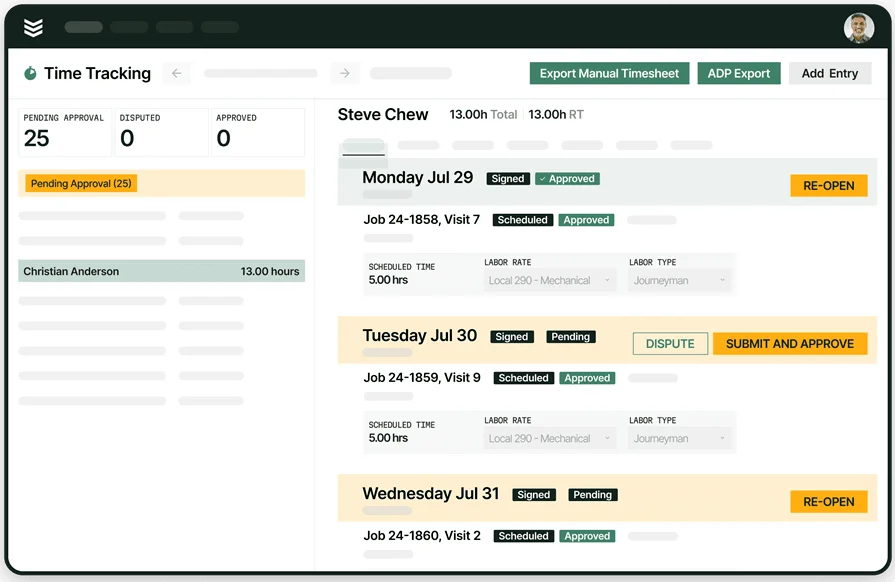
BuildOps is a strong fit for commercial contractors who need warranty tracking to live inside real job execution: techs capture proof at the unit, the office sees the full service trail, and warranty context stays attached to the work order from dispatch through closeout.
That matters on ground-up projects and long-tail maintenance contracts where the warranty answer depends on install history, prior repairs, and who touched the asset last.
Best for commercial: Commercial teams juggling multi-site customers, layered approvals, and heavy documentation requirements for warranty work tied to installed assets and service history.
How pricing works: Subscription pricing typically varies by team size and the modules you run, and it is commonly provided via quote.
Take a closer look at BuildOps
Estimate jobs precisely, cut project management costs, and boost profits
2. Best for residential: Housecall Pro

Image Source: Housecall Pro
Housecall Pro works well for residential service teams that want warranty tracking tied to straightforward job history, customer details, and tech notes, especially when your warranty workflows center on quick eligibility checks and clean documentation from the field.
It can help techs keep install and repair records organized so warranty decisions do not rely on memory after the fact. If your warranty work depends on deep asset lineage, complex approval chains, and commercial-style documentation across sites, it can feel limiting.
Best for residential: Residential contractors handling high call volume where fast documentation and consistent job records drive warranty follow-through.
How pricing works: Tiered subscription plans are common, with pricing based on the plan level and user count.
Considering Housecall Pro? Check out our head-to-head feature comparison of Housecall Pro & BuildOps to see which one has the warranty-tracking tools that suit your crew better.
3. Best for general contractors: PTC

Image Source: PTC
PTC focuses on warranty programs and warranty data management at scale, which can be valuable when you need structured warranty terms, claim workflows, and analytics that span many products, vendors, or warranty rules.
For GCs coordinating warranty responsibilities across stakeholders, it can provide a centralized place to govern warranty policies and track outcomes over time. If you need a field-first workflow where techs live inside the system all day for dispatch, job execution, and closeout, it can feel heavyweight for daily service operations.
Best for general contractors: Teams managing warranty obligations across multiple vendors, products, and stakeholders where governance and warranty process controls matter.
How pricing works: Enterprise licensing is commonly quote-based, with cost tied to scope, users, and implementation requirements.
4. Best for growing service teams: Workiz

Image Source: Workiz
Workiz supports warranty tracking through solid job history, asset-related notes, and technician workflows that help crews document what happened on-site during install, maintenance, and repair. For teams trying to reduce a repeat roll after a service callback, it helps keep coverage-related details and proof tied to the ticket so the office can verify what the tech found without back-and-forth.
It may not be ideal when your warranty process depends on complex manufacturer claim rules, multi-step approvals, and deep asset lineage across large commercial sites.
Best for growing service teams: Contractors scaling dispatch and field execution who need consistent warranty documentation tied to day-to-day work orders.
How pricing works: Subscription pricing is typically tiered, often based on features and user count, with details provided by plan.
5. Best for warranty claim workflows: WarrantyHub

Image Source: WarrantyHub
WarrantyHub focuses on organizing warranty claims and the paperwork trail that goes with them, which can help when your shop is handling frequent coverage submissions and needs tighter control over claim status, required documentation, and timelines. It can be useful for office teams coordinating warranty outcomes across vendors while field techs feed in the proof from the jobsite.
It may not be ideal if you want warranty tracking to live inside dispatch, mobile job execution, and closeout in a single field service system.
Best for warranty claim workflows: Teams that deal with steady claim volume and want structured claim tracking, documentation control, and status visibility.
How pricing works: Pricing is commonly provided via quote and varies by scope and usage.
6. Best for expiration and renewal tracking: ExpirationReminder

Image Source: ExpirationReminder
ExpirationReminder is geared toward tracking expiration dates and sending reminders, which fits contractors who need a simple way to stay ahead of warranty end dates, coverage renewals, and time-bound obligations tied to installed equipment. It can help prevent coverage lapses that lead to awkward customer conversations and avoidable revisits when a warranty quietly expires. It may not be ideal for crews that need deep, on-site proof capture and warranty logic connected directly to the work order and asset history during active service work.
Best for expiration and renewal tracking: Contractors who prioritize warranty timelines and renewal reminders as a lightweight control.
How pricing works: Subscription pricing is typically plan-based, with costs depending on list size and features.
Warranty tracking gets judged in the moments that do not slow down: the tech is on-site, the equipment is down, and everyone needs a clear answer on coverage and next steps. The best warranty tracking software keeps warranty terms, asset history, and documentation tied to the work order, so your team can make clean decisions in the field and close them out in the office without chasing details later.
When that foundation is solid, warranty work stops feeling like a special case and starts running like the rest of your operation—repeatable, auditable, and predictable across install, maintenance, and repair.
As you compare options, focus on how each platform handles both product warranties and customer warranties across the full life of the asset. You want fast asset lookup, structured warranty rules, proof capture that holds up, and a clean handoff from field execution to billing and reporting.
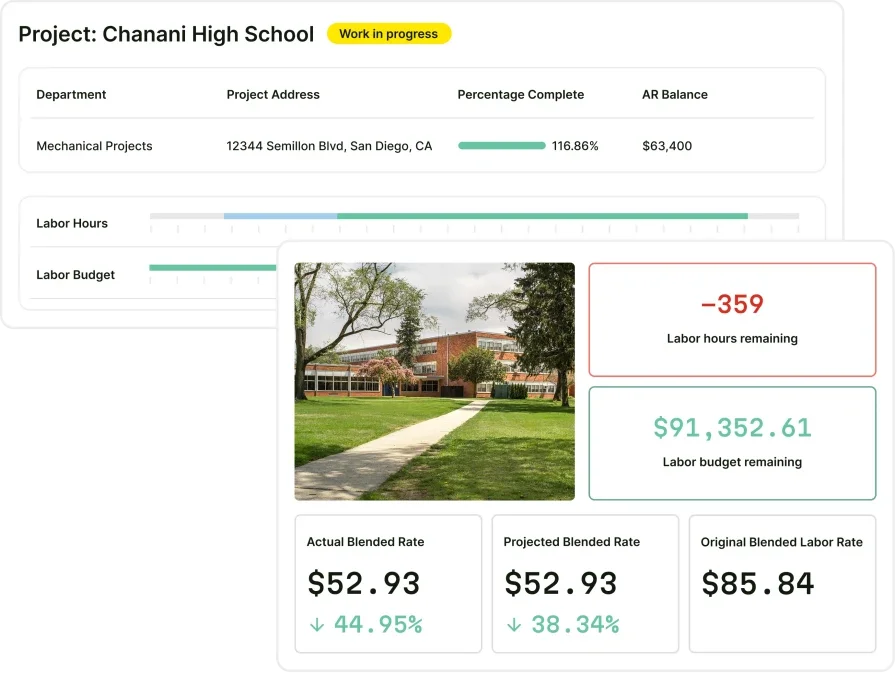
If you run commercial field service, it also helps when warranty tracking lives inside a single system that can support scheduling, dispatch, mobile execution, invoicing, and performance reporting without splitting the story across tools. That is where an all-in-one platform such as BuildOps can fit naturally for commercial teams that need warranty tracking to stay connected to day-to-day field service management.
If you want, you can schedule a free demo to see how warranty tracking looks when it is connected to the full field workflow—from the first ticket to closeout—so you can judge whether it matches the way your team actually runs work, on-site and in the office.
Want to see how BuildOps can help?
Keep coverage, proof, billing, and reporting connected from dispatch to closeout