

AI turns everyday field activity into clean job records that power scheduling, documentation, invoicing, and reporting. For contractors operating in the field service industry, that can mean fewer gaps between what crews do on site and what the office needs to keep jobs moving.
We’ll break down how to choose the right AI tools for your field teams and highlight the platforms leading the way. Here’s what we’ll cover:
- Key features to look for in an AI construction software
- 8 best AI construction software & tools to power your operations
- 7 benefits of using an AI-powered construction software
- How to choose an AI-capable software for construction
- 4 important FAQs about AI tools for construction
Now that the scope is clear, the next section explains how to choose AI construction software for daily field operations.
Key features to look for in an AI construction software
AI construction software can support your operations in many different ways, and not every platform covers the same ground. Some tools focus on a specific function, like field documentation or scheduling, while others aim to be an all-in-one management suite.
To make it easier to evaluate what matters, we've grouped AI construction software features into three categories (and these are the same categories we've used to sort the top AI construction software below).
Field operations & project execution features

Field operations features in AI construction software focus on the day-to-day execution of construction work: getting crews to job sites, keeping documentation clean, and making sure the office has what it needs to keep projects moving without chasing updates after the fact.
- AI-powered scheduling & dispatch – Construction schedules shift constantly, especially when contractors juggle multi-month projects alongside break-fix service calls that land without warning. AI construction software with strong scheduling capabilities uses job type, crew availability, location, and priority to suggest assignments and restructure the board when conditions change mid-day. Pair that with construction dispatch software and dispatch can react to real-time updates — like a foreman pulling a journeyman off an install to cover an emergency — without manually reshuffling every other assignment on the board. For construction contractors running both long-term projects and reactive service work, this feature determines whether your dispatcher spends the morning planning or firefighting.
- Technician mobile app & AI-powered field documentation – Field crews generate the data that drives every downstream decision, from billing to asset history to customer updates. A technician mobile app that lets crew members capture notes, photos, checklists, and voice inputs directly from the job site keeps that data structured and consistent across teams. When paired with field service AI capabilities, those raw field inputs get turned into clean visit summaries, auto-populated asset records from nameplate photos, and grammatically correct documentation — even when a tech is logging notes in Spanish or shorthand at the end of a 10-hour day. For field service business owners, this means fewer callbacks to the field asking "what did you actually do on that job?" and faster closeouts that the office can trust.
- Fleet management, time tracking & reporting – Knowing where your trucks are and how long crews spend on each phase of a job feeds directly into labor costing, route planning, and utilization analysis. Fleet management tools that use job locations, traffic patterns, and schedule constraints help cut dead drive time and reduce late arrivals, while time tracking tied to cost codes gives you cleaner labor records that match what actually happened on the road and on site. Roll that data into reporting dashboards and ops leaders can see where hours go, which job types run long, and where travel time is eating the schedule — supporting practical staffing decisions and route planning based on real patterns rather than guesswork. For construction contractors managing crews across multiple active sites, these three features working together replace the manual reconciliation that typically eats up the first half of every Monday morning.
Customer management & sales features

Customer, sales, and financial tools in AI construction software help you win work, manage relationships, and keep cash flowing. For contractors with many clients and service agreements, these features decide whether your CRM and billing speed up the office or slow it down.
- Service CRM & service agreements – A field service CRM becomes a real operational tool when it keeps context close to the job — centralize all customer data in one searchable hub, while AI summarizes past visits, surfaces key notes, and flags patterns like upcoming maintenance or at-risk accounts. Connect that to service agreements, and your service coordinators can see upcoming maintenance, fill coverage gaps, and schedule visits early, while AI flags unscheduled agreement visits and helps dispatch prioritize workload—keeping agreement work profitable and preventing missed tasks that cause callbacks.
- Invoicing, payments – Fast invoicing needs clean data. AI invoice scanning pulls details from invoices and receipts, matches them to jobs, and flags issues before billing, which strengthens the workflow inside invoicing and reduces rework for the back office. When you combine that with payments processing, the path from job completion to cash collection stays tight and trackable.
- Field service quoting – On the estimating side, service quoting software helps teams move from diagnosis to approved work without delays caused by scattered details — techs capture job details and photos in structured notes so the office can send clean quotes faster, reducing follow-up delays and keeping cash flow predictable.
Construction design management features

Construction design software streamlines pre-construction by visualizing systems, calculating requirements, managing RFIs/submittals, and simulating performance. AI further speeds up document review, takeoffs, and design checks, cutting manual work.
- AI-assisted design, planning & simulation – AI construction tools help teams quickly read and analyze drawings, automate quantity takeoffs, and catch design conflicts before work starts. By linking building models to your material inventory, they confirm you have what you need before crews arrive. For commercial installs, retrofits, and new builds, AI-assisted design closes the gap between plans and field work, cutting RFIs, change orders, and project timelines.
Some AI construction tools focus on a few categories, while others cover all three. The features that matter most depend on your job mix, service vs. project work, and how much of your workflow is spread across different systems.

8 best AI construction software & tools to power your operations
AI construction software only matters if it speeds dispatch, streamlines field documentation, and keeps invoices moving. Here are eight platforms contractors and field service teams use for builds, installs, maintenance, and emergency repairs.
1. Best for commercial construction teams: BuildOps

BuildOps connects AI directly to the field workflows that drive construction operations forward, from dispatch adjustments and technician documentation to asset capture and invoicing, all feeding into a single job record that the office can act on without chasing updates.
OpsAI turns messy field inputs—crew notes, photos, receipts—into clean, trusted data your back office can act on. From emergency break-fix calls to tenant improvements and large HVAC retrofits, every job runs with the same operational discipline, so nothing slips between the field and the office from first dispatch to final closeout.
AI Field Ops Features: AI powers Smart Dispatch that recommends the right tech for every job, in real time—based on skills, workload, and location. Nameplate capture builds asset records from a single photo. Field notes write themselves from quick bullets or voice. And invoice scanning pulls in line items and catches what’s missing before you bill.
Features Beyond AI: The platform covers scheduling and dispatch workflows, quoting and approvals, customer and job history with multi-property hierarchies, invoicing and payments, reporting dashboards for utilization and performance, service agreements for recurring work, fleet tracking, and time tracking tied to cost codes for payroll accuracy and job costing.
How Pricing Works: BuildOps prices based on team size, user count, and the capabilities your operation needs, quoted per user per month with options scaled for larger construction teams.
Rating: 4.5 on Capterra from 151 user reviews
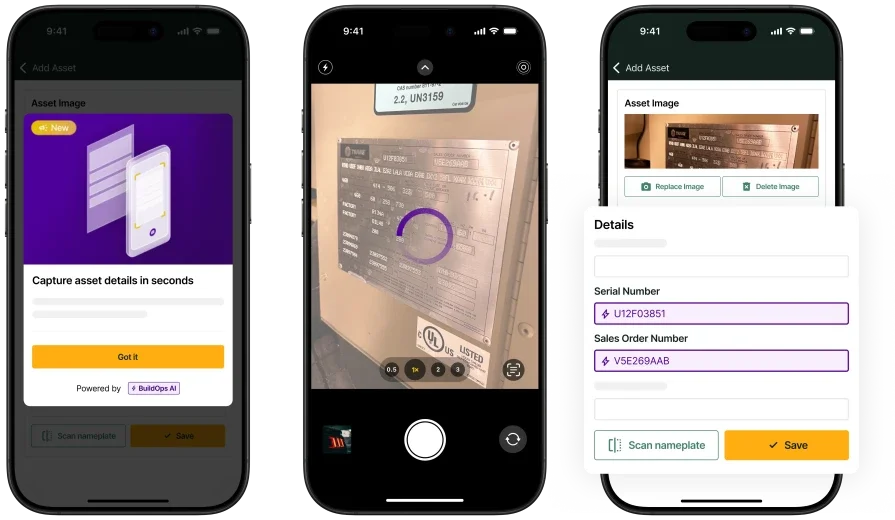
OpsAI supports day-to-day construction work
The on-site AI-powered features your crew needs to cut down manual data double entry
2. Best for field documentation cleanup: ServiceTrade

Image Source: ServiceTrade
ServiceTrade centers on job documentation and customer-ready wrap-ups, which matters when construction techs are closing out tickets from the field and the office needs polished records before the next phase of work begins. As AI construction software, it leans into converting what crews capture during a visit — notes, photos, equipment details — into consistent, usable job data, especially across teams where documentation quality varies from tech to tech.
For contractors with recurring maintenance or multi-visit work, that consistency cuts billing delays and improves customer reporting. It’s less suited to teams needing one platform for complex dispatch, layered approvals, and large-scale field operations across many crews and job types.
AI Field Ops Features: ServiceTrade's AI capabilities focus on converting technician audio into text, refining raw job notes into professional-grade language, generating consolidated job summaries from full ticket histories, scanning nameplate details into asset records, and surfacing operational answers from historical data so managers spend less time searching through past tickets.
Features Beyond AI: Outside of AI, the platform supports day-to-day construction service operations with dispatching and recurring work management, a technician mobile workflow for photos and on-site updates, and customer-facing reporting and documentation that helps standardize closeouts across accounts.
How Pricing Works: Pricing is typically provided by quote and varies based on team size and the package selected.
Rating: 4.6 on Capterra from 339 user reviews
3. Best for service and project cost tracking: Simpro

Image Source: Simpro
Simpro handles both service and project work inside one system, which can help construction contractors who move between reactive maintenance, scheduled repairs, and longer installation jobs while still needing to track costs against each one.
From an AI construction tools perspective, Simpro’s mobile AI helps techs write clearer job notes and simplifies cost tracking for mixed work, but its AI depth and configurability vary by plan and rollout stage, so it may not fit teams needing more advanced AI.
AI Field Ops Features: Simpro's AI support targets mobile closeout workflows, including generating work-completed notes from job details and improving writing quality with grammar and spelling corrections, which helps reduce follow-up calls between the field and office when documentation needs to read consistently across different crews and trades.
Features Beyond AI: Beyond AI, the platform offers core field operations coverage including scheduling, job management, quoting, reporting, and tools that connect field activity to financial tracking, plus an ecosystem of integrations that can extend the platform depending on how your construction team runs service and project work.
How Pricing Works: Pricing is quote-based and often depends on user count and selected modules, with setup and onboarding costs common for configuration, training, and data migration.
Rating: 4.0 on Capterra from 145 user reviews
See how Simpro stacks up against BuildOps.
4. Best for day-of schedule adjustments: Praxedo

Image Source: Praxedo
Praxedo centers on planning, work order execution, and technician mobility, with AI positioned as a way to keep the schedule realistic as construction jobs shift throughout the day. For teams evaluating AI construction software, Praxedo's value shows up when automation and AI signals help dispatch stay ahead of delays, tighten on-site documentation, and keep customers updated without piling admin work on crews running between job sites. It may not be an ideal choice if your operation needs deeply connected financial workflows, layered approval chains, and end-to-end controls across every system you run from a single platform.
AI Field Ops Features: AI-assisted planning supports dispatch decisions and day-of schedule adjustments, plus AI keeps field activity data consistent so job records stay usable for office review and billing after crews leave the site.
Features Beyond AI: The platform covers core field service execution with scheduling, work orders, a technician app for on-site updates, real-time visibility for coordinators, and tools that support service delivery across maintenance, repair, and installation work.
How Pricing Works: Pricing typically reflects plan tiers, with $39 as an entry tier, $69 and $99 as higher tiers with expanded capabilities, $149 as a tier that includes AI, and custom pricing for larger deployments.
Rating: 4.6 on Capterra from 43 user reviews
5. Best for call capture and lead routing: Workiz

Image Source: Workiz
Workiz emphasizes communication-heavy service workflows where speed to answer, qualify, and schedule work drives the day. As AI construction software, Workiz leans into AI tied to calls and lead handling so office teams can capture incoming demand quickly and route it into dispatch, while techs stay focused on work orders and on-site closeouts. For contractors who win work from inbound calls, fast front‑end response can mean the difference between winning or losing the job. But this isn’t ideal if you need deep operational controls for complex dispatching, approvals, or large multi‑crew projects.
AI Field Ops Features: AI capabilities support answering and routing calls, capturing leads, and generating call insights so teams can respond faster and keep job details accurate from the first customer touchpoint through dispatch.
Features Beyond AI: Beyond AI, it supports common field workflows like scheduling, dispatch, estimates, invoicing, customer communication, and mobile execution so construction service teams can run the day without bouncing between separate tools.
How Pricing Works: Pricing commonly reflects package tiers, with $225 as an entry package, $275 and $325 as higher packages that add expanded capabilities, and custom pricing for larger teams or advanced needs.
Rating: 4.4 on Capterra from 218 user reviews
6. Best for high-volume residential service: ServiceTitan

Image Source: ServiceTitan
ServiceTitan is a broad platform used by trade contractors running high-volume service work and aiming to standardize execution across the field and office. From an AI construction software angle, its AI initiatives focus on reducing time spent writing and cleaning up documentation, including AI-generated invoice summaries that help billing read clearly and consistently after a construction job closes. For contractors managing a steady flow of residential installs, maintenance visits, and repair calls, that documentation consistency can reduce the review cycle between field closeout and final billing. It may not be an ideal choice if you want a lighter rollout and faster time to adoption, since implementation and ongoing administration can take significant internal time and resources.
AI Field Ops Features: AI-driven documentation support, including invoice summary generation, helps reduce manual write-ups and keeps closeout details consistent across technicians and office review on construction service jobs.
Features Beyond AI: The platform spans core service operations such as dispatch and job management, customer communication, reporting, and financial workflows that support field execution at scale across multiple trades and job types.
How Pricing Works: ServiceTitan typically uses custom pricing based on business size, trade, and the modules selected, with tiered packaging that changes with operational scope and feature requirements.
Rating: 4.3 on Capterra from 325 user reviews
Want to see how ServiceTitan stacks up against BuildOps? Check out our comparison of BuildOps vs ServiceTitan right here.
7. Best for pre-construction and tender management: Procore

Image Source: Procore
Procore is a construction management platform designed for general contractors and specialty subcontractors who need to move cleanly between pre-construction planning, bid management, and active project execution. Among its notable capabilities are pre-construction tools that facilitate accurate proposals, with AI automations that help teams count items, review material and labor rates, and format documents so the transition from estimate to budget happens without manual rework. Procore is strong at linking project financials to operations for commercial bidders, but it’s less suited if you mainly need AI-driven field service workflows like technician documentation or dispatch optimization.
AI Field Ops Features: Procore applies AI and filtering tools to quantity takeoffs, item counting, and document formatting during pre-construction phases, helping teams move between bidding, estimating, and project setup with fewer manual steps.
Features Beyond AI: The platform integrates with over 500 apps, including 15+ accounting integrations, and covers project management, document control, RFIs, submittals, and financial tracking that connects pre-construction work to active job execution.
How Pricing Works: Procore uses custom pricing based on the scope of your operation; contact them for a quote.
Rating: 4.5 on Capterra from 2656 user reviews
8. Best for sales management and lead nurturing: Buildertrend

Image Source: Buildertrend
Buildertrend is a customer and sales management platform for construction professionals, designed to help them capture and close leads through customized proposals, targeted email marketing, and clear client communication throughout the project lifecycle. Buildertrend is best for contractors who want AI tools for business development—managing prospects, proposals, and client communication—while tracking jobs with logs and progress records. It’s a weaker fit if you prioritize AI-driven field execution like smart dispatch, technician documentation cleanup, or automated asset capture.
AI Field Ops Features: Buildertrend applies automation to lead funnels, proposal generation, and outreach sequencing, helping construction sales teams move prospects through the pipeline without manual follow-up on every touchpoint.
Features Beyond AI: The platform includes a CRM hub for lead creation and tracking, contract proposal drafting, email marketing execution, and daily logs that let techs and project managers track construction job progress with a running record of on-site work.
How Pricing Works: Buildertrend uses a monthly subscription model, with custom pricing.
Rating: 4.5 on Capterra from 2483 user reviews
7 benefits of using an AI-powered construction software
This is where the features you just reviewed show up on real construction jobs. AI construction software pays off when it turns day-to-day field inputs into actions the office can trust, so dispatch, crews, and billing spend fewer cycles chasing missing details.
1. Faster board changes when the day shifts
When a high-priority call comes in, AI dispatch suggests the best tech and schedule tweak, and the dispatcher confirms and sends the updated plan to their phone in minutes. That replaces the usual chain of calls, manual reshuffling, and "where are you now" checks that slow construction teams down, and it's one of the clearest advantages of using AI dispatch software on active job sites.
2. Cleaner closeouts without chasing crews
When techs finish a job at the end of a long day, AI-assisted note summaries can turn quick bullets, voice notes, and checklist items into a clear visit recap that reads like a professional field report. It speeds up closeout approvals and gives billing a clear record, so the office can move the job forward without chasing the crew for details.
Did you know
A Kickstand report based on a survey of 606 contractors across the U.S. and Canada found that 78% are using AI tools on the jobsite, while 47% say one in five positions remain unfilled. That combination explains why AI-backed workflows matter in field ops: they reduce admin load and help teams keep output steady with the headcount they have.
3. Asset records stay accurate across repeat visits
Nameplate capture lets construction techs scan a unit’s plate once, and the system automatically fills in key asset details—no manual typing or unlogged photos. Next time a different crew shows up, they have the equipment history and details ready, which cuts diagnostic time and prevents repeat questions to the customer, a pattern that shows up across the top use cases for AI in field service operations today.
4. Faster invoicing with fewer billing disputes
Invoice scanning helps the office pull key details from receipts and invoices, match them to the construction job, and flag missing items before anything is sent out. Think about when a tech snaps a receipt on their phone; AI pulls in the details so the invoice is accurate, needs fewer fixes, and gets approved faster.
5. Quotes move from site visit to approval with fewer handoffs
AI organizes job details so techs capture issues and photos, and the office can quickly turn structured notes into clean quotes. That keeps customers from waiting days for a follow-up and helps service managers keep work in motion, which is one reason why evaluating contractor software with AI features matters when comparing platforms.
6. Recurring work stays predictable even during busy seasons
Service agreement workflows get easier when AI supports planning and documentation consistency across repeat construction visits.
A service coordinator can see upcoming maintenance, spot gaps in coverage, and schedule visits before the calendar fills up. In the field, technicians follow standardized checklists and produce consistent summaries, which keeps agreement work profitable and prevents missed tasks that lead to callbacks, and understanding how AI field management pricing works across platforms helps you budget for these capabilities before you commit.
7. Fewer office follow-ups across the full job lifecycle
When AI helps techs capture assets, produce clear notes, and attach supporting documentation, the office can move straight to billing, customer updates, and scheduling the next step. That turns field activity into office-ready records automatically, which reduces rework and keeps service delivery consistent across crews, the kind of operational shift that agentic AI in field service is designed to support as construction teams scale.
How to choose an AI-capable software for construction
Before comparing feature lists, pressure-test whether the tool fits how your construction operation actually runs. These are the questions that matter before you get into capabilities.
- Workflow alignment – Does the platform follow how your jobs move from call intake through dispatch, field execution, and closeout? Can it handle your job types and handoffs without forcing you to rebuild your process around the software?
- Field adoption – Will your techs actually use it on site? Can a crew member run a full job, from checklist to photo upload to notes, without fighting the interface or falling back to paper?
- AI data quality – What inputs does the AI rely on to generate recommendations, summaries, or schedule changes? How does the system handle gaps, like missing asset history or incomplete job notes, without producing unreliable outputs?
- Implementation and training – How long does rollout take, and what does your team need to provide? Are job templates, price books, asset fields, and permissions something you configure, or does the vendor own that setup?
- Integrations – Does it connect cleanly to accounting, payroll, CRM, and the phone systems you already depend on? What data migrates without manual cleanup, and what requires work before you switch?
- Full field service ops coverage – Does the AI connect across dispatch, documentation, invoicing, fleet, asset tracking, and reporting inside one platform, or are you stitching together separate tools to cover the full lifecycle of a construction service call?
Next, we'll break down the key features to look for so you can compare AI construction software with a consistent checklist.
4 important FAQs about AI tools for construction
These FAQs address what that looks like in practice for experienced construction teams, what changes operationally, and what to confirm before committing to a platform.
1. How does AI show up in construction software during daily field operations?
AI auto-builds the best crew and route based on skills, location, workload, and traffic—then reshuffles the board when priorities change midday. It cleans up the back office too, catching missing invoice items, extracting asset details from photos, turning field notes into summaries, and matching receipts to the right job so coordinators can stay focused on the work, not the paperwork.
2. Will AI construction software replace dispatchers, project managers, or field crews?
No. AI cuts repetitive admin and prep work while people keep full control over decisions and customer interactions. It suggests boards, crew assignments, ETAs, and clean summaries, but dispatchers, field crews, project managers, and CSRs always make the final call.
3. Is AI construction management software worth the investment?
AI boosts margins for construction contractors by automating the manual work that causes errors, delays billing, and slows cash flow. When quotes, work orders, invoices, and payments run in one AI-powered workflow, you cut mistakes, accelerate billing, and scale without adding headcount.
The real ROI comes when AI is built into everyday workflows: faster scheduling, cleaner closeouts, fewer billing disputes, and better reporting across hundreds of jobs quickly turn the investment into a competitive advantage.
4. What are the best practices for getting sustained value from AI construction software?
AI construction software pays off only when your team uses it consistently and with discipline.
- Let AI handle dispatch based on skills, certifications, proximity, and workload.
- Keep customer and asset data current so AI, invoices, and equipment history stay accurate.
- Require crews to use the mobile app for all updates, photos, time, and sign-offs.
- Integrate with accounting from day one to sync invoicing, payments, and payroll.
- Use AI reports to track performance, job duration, and margins by service type each month.
- Turn on automated customer notifications for ETAs, status, and invoices.
- Link inventory and parts to work orders so AI can flag missing materials before dispatch.
- Review AI quoting and approval insights quarterly to refine pricing and fix stalled quotes.
- Hold quarterly training so office and field teams stay current on AI features and workflows.
- Regularly audit and update dispatch rules, escalations, and workflow triggers as your business changes.
AI construction software should turn today’s field chaos into clean, office-ready job data—without the constant calls, texts, and board rebuilds.
BuildOps gives commercial construction teams one platform to run the whole operation, with OpsAI tightening every handoff: dispatch changes, routing, asset capture, field documentation, and billing. Field and office stay on the same job record, from first scheduled visit to the final invoice.
If you want to see how that looks against your routes, job types, and closeout standards, you can jump into a free demo as part of your evaluation.

Unlock Data-Driven Insights with BuildOps
See how AI is shaping the future of commercial contracting