6 Simple Construction Estimating Software That Win Bids

Running a construction crew means every number must be tight—labor, material, subs, travel, and late change orders. Simple construction estimating software puts accurate pricing in your team’s hands without a spreadsheet chase.
In field service management, those estimates flow straight into work orders, dispatch, scheduling, and job costing so office and field stay in sync from takeoff to closeout. You want easy construction estimating software techs can use between site walks, and easy-to-use construction estimating software the office trusts for cost history, assemblies, and margin rules
This guide will walk you through:
- Why simple construction estimating software matters on every job
- What to consider before picking a platform for your construction business
- 6 key features every construction team should look for
- 6 best easy-to-use estimating software picks for contractors
- 7 real-world benefits of using simple construction estimating software
- Answers to 4 common questions construction teams ask about estimating tools
Let’s start with why simple estimating tools change the pace on every project—especially when margins run thin and timelines stay tight.
Why simple construction estimating software is useful for crews
Every project rides on numbers that hold up in the field. When estimates live in emails, spreadsheets, or a foreman’s notebook, gaps creep in; scope slips, outdated pricing sneaks through, and teams miss change orders. Simple construction estimating software gives your team one place to build, review, and share pricing with zero guesswork. The office sees what the field quoted. The field sees what the office approved. Everyone prices against the same labor, material, and subcontractor data.
That single source tightens bid turnaround, protects margins, and keeps revisions traceable. Templates speed repeat work. Assemblies capture true install cost. Version tracking shows exactly what changed and why. Connect estimates to work orders and scheduling to stop rekeying the same data. The result: faster bids, clean handoffs, and a higher hit rate without extra admin.
What to consider before picking a simple construction estimating software
Confirm the tool matches how your team actually runs. Estimating ties into precon, project management, and accounting, so the platform must keep pace with crews and shifting scopes. Use this checklist while you evaluate easy construction estimating software and easy-to-use construction estimating software.
- Workflow compatibility — Will it handle alternates, value engineering, and change orders without breaking your process? Do estimates feed work orders, purchasing, and job cost without double entry? Can it mirror your cost codes and phase structure?
- Ease of use — Can a PM or foreman build a clean estimate in minutes without calling IT? Does it run on phone, tablet, and laptop with offline capability? Are templates and assemblies fast to find and apply?
- Integrations and data flow — Does it sync with accounting, ERP, and scheduling in both directions? Can it pull current vendor pricing and push purchase orders automatically? Is there an API for custom reports and dashboards?
- Support and reliability — When bid hour hits, do you get real help from people who know construction? What uptime and incident history does the vendor share? Are backups, permission logs, and MFA in place?
- Scalability and controls — Will it handle rising project volume and multi-branch operations? Can you set granular roles, approval gates, and margin limits? Does performance stay quick with large assemblies and catalogs?
- Features — Can takeoff push quantities straight into line items with alternates and options? Do estimates convert to work orders, budgets, and purchase orders without rekeying? Can you track win rate and variance to actuals by estimator and customer?
Next up, we’ll drill into the feature set that matters on packed job calendars.
{{related-content-block="/resources/estimating-programs-for-construction"}}
6 key features to look for in an easy-to-use construction estimating software
Estimates drive the whole day. Crews, schedules, purchasing, and billing all take cues from those numbers, which is why simple construction estimating software has to connect cleanly to field operations. The tools below keep estimators and site leads in lockstep, and they help teams that want easy construction estimating software and easy-to-use construction estimating software that stands up under pressure.
1. Real-time scheduling and dispatching that ties to estimates

When the calendar shifts, the estimate should follow suit. With real-time scheduling tied to estimate templates, you can adjust crews and cost assumptions without rebuilding the quote. Pair that with construction dispatch software to route techs based on skills, parts, and location so promised timelines and labor budgets stay aligned. For example, a slab pour gets pushed by an inspector at 10 a.m., the dispatcher slides the crew to a nearby demo, and your estimator flips labor buckets in the estimate so the change order reflects the new sequence.
2. Mobile estimating tools for crews on site
Your team cannot wait until they get back to a desk to update numbers. A capable technician mobile app lets foremen capture quantities, swap assemblies, and apply pricing rules from the job trailer or the lift. As a case in point, a superintendent walks a site and finds an added run; they open the app, pull a saved assembly, adjust footage, and send the revised estimate to the office before leaving the floor.
3. Integrated quoting that converts directly to invoices and payments
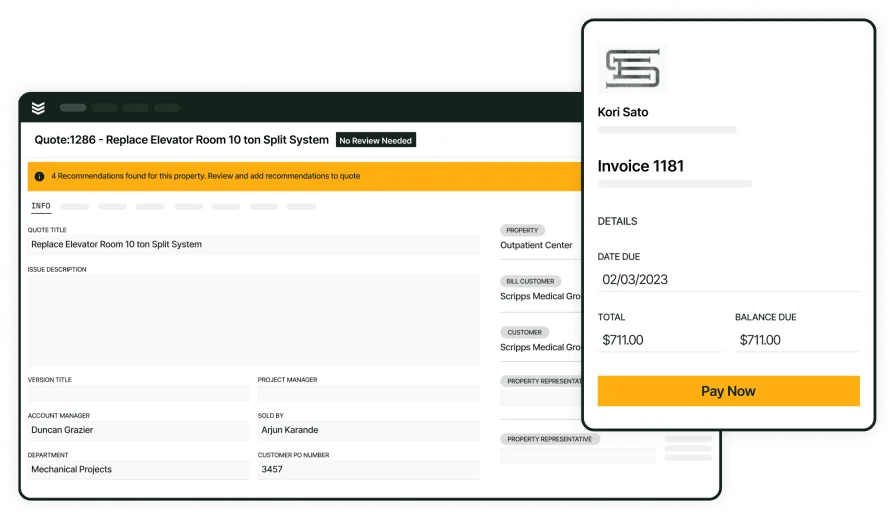
Estimators need a clean handoff once a client says yes. With connected invoicing and secure payments, an approved quote turns into an invoice with tax, burden, and alternates carried through, and the client can pay by card or ACH without waiting on accounting. For a real-world example, a tenant requests added circuits during a walk-through, your estimator toggles an alternate in the quote, the system generates the updated invoice immediately, and the client pays a deposit on the spot so the crew can lock in labor and materials without delay.
4. Recurring work and program pricing

Service programs depend on repeatable pricing. Robust service agreements let you store assemblies, visit cadence, and escalation rules so estimates for recurring work take minutes. For instance, a contractor renews a multi-site maintenance program; the estimator clones last year’s template, applies this year’s labor rate, and the schedule auto-populates recurring visits for dispatch.
5. Time tracking that rolls up to labor cost on the estimate
Labor slippage eats margins fast, so time capture must sync to estimate cost codes. With accurate time tracking, hours flow to the job and update earned versus estimated totals without spreadsheets. Consider a roofing crew that stays late after a weather delay; their logged hours hit the job, the PM sees variance against the estimate, and the change order backs into actual labor in minutes.
6. Centralized history, cost tracking, and reporting

Every estimate, revision, and change order should live in one place with audit trails. Centralized job history paired with robust reporting gives leaders a clear view of win rate, estimator productivity, and variance to actuals. For example, a GC questions an upgrade price during closeout; your team pulls the approved estimate, the signed revision, and the labor logs in seconds, ending the debate and protecting the margin.
Other notable features to look for in simple construction estimating software
These additions tighten coordination across operations while keeping simple construction estimating software connected to the field.
- Sales pipeline tracking — Manage leads, proposals, and stages in a practical construction CRM. Forecast capacity and prioritize bids that fit crew availability
- Fleet tracking and route optimization — Use live truck locations and routing through integrated fleet management tools. Protect labor assumptions and arrival windows tied to estimates
- Document control and audit trails — Keep takeoffs, photos, RFIs, and revisions attached to each estimate. Searchable history reduces disputes and speeds closeout
With these in place, your estimating stack stays tight with daily field operations and ready for what comes next.
The 6 easiest to use construction estimating software for crews
Finding simple construction estimating software that matches your jobs comes down to fit. Field service teams need fast takeoff, clean assemblies, and a tight handoff to scheduling and dispatch. The options below focus on estimating first, with a clear tie to field operations. If you want easy construction estimating software or easy-to-use construction estimating software that crews can trust, start here.
1. Best for commercial contractors: BuildOps

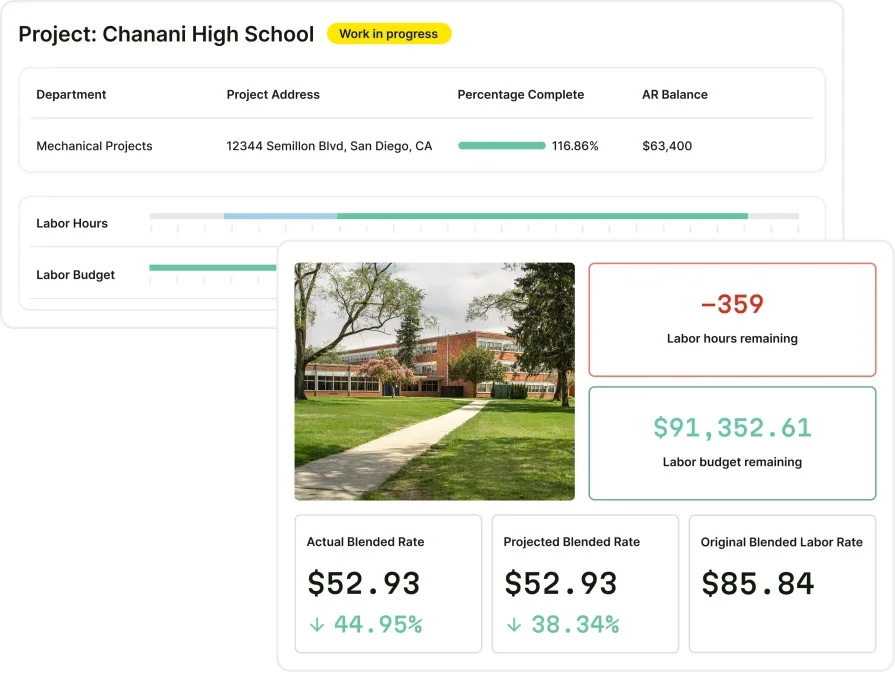
BuildOps gives commercial contractors an all-in-one workflow for estimating and field execution in a single system. Estimators build templates, alternates, and assemblies, then pass approved quotes into real-time scheduling and construction dispatch software without rekeying. Crews review scope and quantities in a technician mobile app, log hours with time tracking, and leadership validates performance with job-level reporting. Program work stays consistent using service agreements. The result is estimating that stays aligned with labor, materials, and the calendar from day one.
How Pricing Works: Flexible plans align to crew size, scope, and required modules. Teams can request custom packaging to match project complexity and growth plans.
Features Beyond Estimating: Customer history, equipment info, and job communications live with each estimate so office and field operate from a shared record.
What Sets It Apart for Commercial Contractors: Strong support for multi-phase work, complex cost codes, and high-volume service programs while keeping the process simple for the field.

2. Best for residential contractors: Housecall Pro
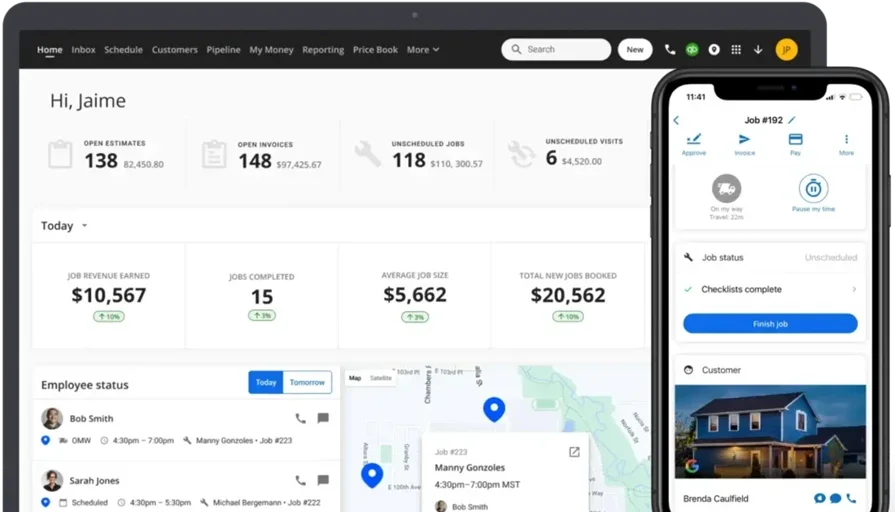
Housecall Pro focuses on fast, straightforward estimating for small service outfits. Teams build simple price books, create proposals on a phone, and send professional estimates within minutes. Calendar tools and customer messaging help keep site visits on track. However, firms handling complex cost structures, phase-based bids, or detailed job costing may outgrow it.
How Pricing Works: Monthly subscriptions scale by team size and feature access with entry options for solo owners or small crews.
Features Beyond Estimating: Automated reminders, online booking, and basic customer management to keep short-duration work moving.
What Sets It Apart for Residential Contractors: Quick setup and a mobile interface that helps technicians quote during site walks without training headaches.
Dive into our comparison on BuildOps vs Housecall Pro if you want to learn more about how they compare to each other.
3. Best for general contractors: Jobber
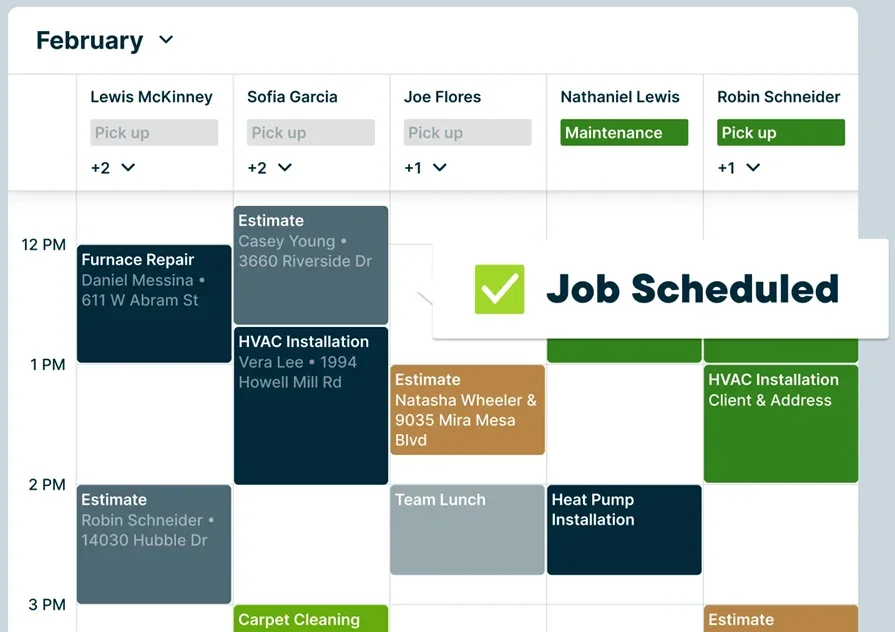
Jobber supports GCs handling repairs, punch lists, and small construction projects. Estimating, client communication, and job tracking sit in one platform, and drag-and-drop scheduling keeps crews aligned as plans change. Mobile access helps field leads review scope and updates while moving between sites. That said, large project teams needing deep cost code structure, program pricing, or advanced estimate versioning may find it limited.
How Pricing Works: Plans start at a flat monthly rate for five users with higher tiers for added tools.
Features Beyond Estimating: Team calendars, client reminders, and basic workflow automation that suits mixed service and light construction.
What Sets It Apart for General Contractors: A single app that helps small GC teams quote, schedule, and coordinate without extra admin.
4. Best for remodeling contractors: Clear Estimates

Clear Estimates gives small remodeling crews a fast way to assemble proposals using a large item database and plug-and-play assemblies. Estimators can tweak labor and material costs, build options, and produce clean proposals that align with field schedules. It may not be ideal for complex cost code structures, multi-phase commercial work, or teams that need deep integration to dispatch and time tracking.
How Pricing Works: Subscription tiers scale by users and catalog access with a free trial option.
Features Beyond Estimating: Prebuilt templates, vendor price updates, and simple change tracking that speeds revisions.
What Sets It Apart for Remodeling Contractors: A curated parts and assemblies library that helps crews price kitchen, bath, and small build-outs quickly.
5. Best for specialty contractors: Estimate Rocket
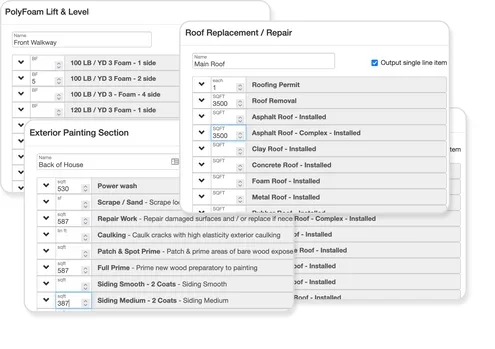
Estimate Rocket focuses on fast quoting for finishing trades and specialty service teams. Estimators create proposals with options, measure progress against estimates, and keep the crew aligned through simple task lists. It may not suit contractors who require advanced cost coding, extensive custom assemblies, or tight links to field scheduling tools.
How Pricing Works: Per-user plans with feature bundles for growing teams.
Features Beyond Estimating: Basic project tracking, client communication, and light reporting to monitor backlog and close rates.
What Sets It Apart for Specialty Contractors: Quick templates tailored to painting, coatings, and restoration that help teams turn around estimates same day.
6. Best for owner-operators and small crews: Joist
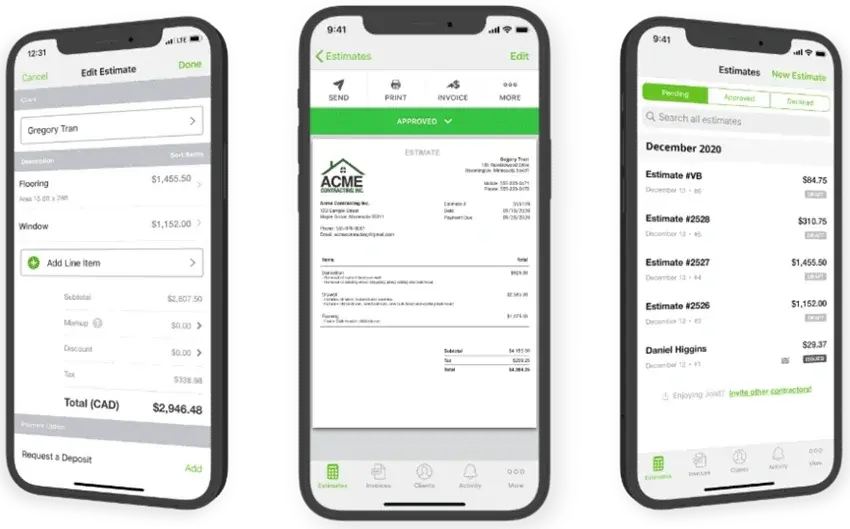
Joist keeps estimating simple for solo contractors and two-to-three person crews. Price lists, quick proposals, and mobile access let techs quote during site walks without slowing down the day. It may fall short for firms that need detailed job costing, multi-phase estimates, or deeper ties to scheduling and job cost systems.
How Pricing Works: Low monthly plans with optional add-ons for advanced features.
Features Beyond Estimating: Customer messaging, appointment reminders, and simple document sharing.
What Sets It Apart for Small Crews: A clean mobile interface that helps crews produce estimates on the spot with minimal setup.

7 real-world benefits of using simple construction estimating software
Simple construction estimating software helps crews work sharper, protect margin, and keep schedules honest. Estimators, PMs, and field leads move in sync when quantities, labor rates, and alternates live in one system. Here’s what pros see on active jobs and across the backlog.
1. Faster cash flow from job to job
Clear scope, clean quantities, and documented assumptions speed approvals and deposits. When the estimate shows phase timing and cost impacts up front, purchasing locks pricing sooner and crews roll without waiting on paperwork. Submittals, long-lead items, and labor plans start earlier because decisions land earlier.

For a deeper dive on the estimate-to-approval handoff, see our comprehensive guide to construction estimate and invoice software.
2. Higher job cost accuracy over time
Accurate bids come from living data. Catalogs, assemblies, and labor burden tables keep rates current, while vendor price updates and historical actuals give estimators a target they can trust. Over a few cycles, trend lines show where crews outperform or where scope routinely overruns, so the next estimate reflects reality instead of guesswork.
3. Stronger client trust and transparency
Clients want to know what they are paying for and why. Itemized estimates with alternates, clarifications, and revision logs answer questions before they turn into disputes. During closeout, your team can point to the approved numbers, the documented changes, and the dates each decision landed. That credibility wins repeat work.
4. Better collaboration across field and office
When estimating, scheduling, and customer context live together, details stop slipping. PMs see what was quoted, field leads reference scope on their phones, and sales understands which options were accepted or declined. Collaboration tightens further when account notes and contacts are tracked in a purpose-built system such as CRM for construction.
5. Project plans that stay aligned with execution
Estimates should drive the plan of the day. Tie labor buckets and quantities to the schedule, purchasing, and sub releases, and changes ripple through without a spreadsheet chase. That alignment keeps deliveries on time, prevents idle crews, and reduces rework because the field is always building against the latest scope.
6. Fewer admin hours and no double entry
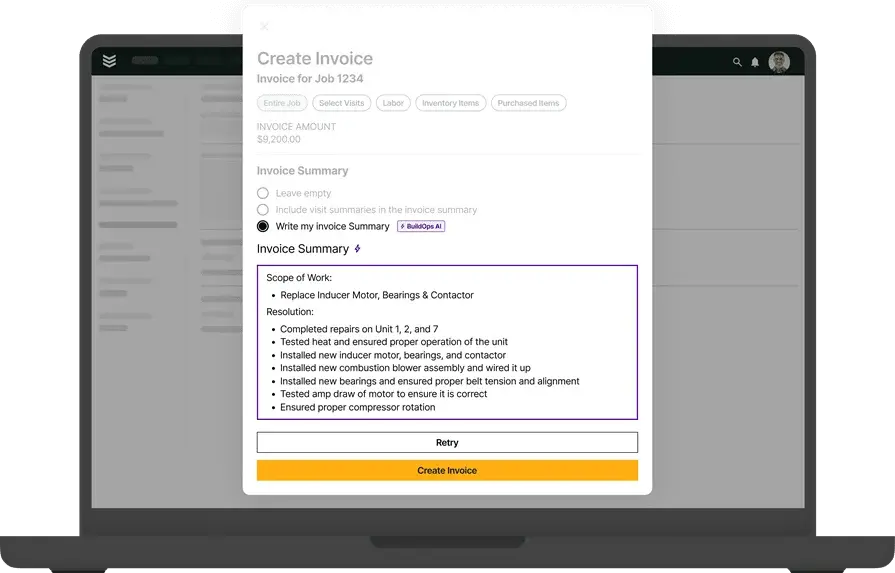
Double-entry burns hours and introduces errors. A connected platform pushes approved quantities into budgets and POs, syncs cost codes with time, and captures revisions as they happen. Mobile tools matter here too; a practical contractor estimate and invoice app lets foremen adjust counts on site and eliminates end-of-day data retyping.
7. Clear reporting for better decisions
Leaders need visibility that tells the truth. When estimates tie to actuals, you can see win rate by estimator, variance by scope type, and where margin gets squeezed. For teams mapping the full estimate-to-bill picture, an overview of construction invoice software shows how downstream billing data completes the feedback loop without changing the focus on estimating.
{{related-content-block="/resources/construction-field-service-management-software"}}
Answers to 4 common questions construction teams ask about estimating tools
Veteran crews know the pain points already. These answers cut straight to how simple construction estimating software fits into a pro workflow in the field and back office.
1. What makes a construction estimating software “simple”?
Construction estimating tools exist on a really big spectrum in terms of what they can do and the features they offer you. Getting your workers to adopt to new software is one of the biggest challenges construction teams face as they scale. Using a software that’s ‘simple’ can help with this adoption, because the ‘simple’ software your team actually uses is more valuable than the complicated tool that no one does.
You want to find the balance between a tool that offers you the features you need, without bogging you down with things you don’t that make the software overly complicated to train your team on. Simple means easy for your contractors to use, but it doesn’t mean it doesn’t have the essential features built in that are most useful for estimating.
For example, BuildOps Quoting lets you snap a photo on site while looking over a potential jobsite, and attach those images right into your quote. That is ‘simple’ for your team to use (all they have to do is snap a photo), but it’s very useful when it comes to getting more quotes approved by your prospects.
2. Do I still need estimating software if I already use accounting tools?
Accounting closes the books; estimating defines scope, cost, and risk. Dedicated software handles takeoff, assemblies, versions, and approvals, then syncs with scheduling and purchasing. It gives your team speed, control, and a clean audit trail that general ledger systems do not provide.
3. Is easy construction estimating software worth the price?
For most teams, yes. Count estimator hours saved on takeoff and revisions, faster turnaround that lifts hit rate, and fewer disputes from version tracking. Add accuracy from maintained assemblies and pricing. The gains typically cover the subscription within a few wins.
{{related-content-block="/resources/sloan-mechanical-build-ops"}}
4. What are the best practices for using simple construction estimating software?
Pros get results by treating the tool as part of daily operations, not an add-on. Keep data current, lock process, and measure outcomes so estimates match field reality.
- Standardize templates and assemblies by scope and trade
- Align cost codes with job costing and payroll for clean rollups
- Set markup and margin rules by customer and project type
- Update vendor pricing on a fixed cadence or via integrations
- Capture takeoff quantities on site with mobile tools
- Require version control and approvals for every revision
- Link estimates to schedules, POs, and sub releases to avoid rekeying
- Review estimate vs actual weekly and report variance by estimator
- Use alternates and options to handle scope choices without new quotes
- Train estimators and field leads; assign roles and permissions for control
Simple construction estimating software keeps crews, purchasing, and schedules on the same page. Estimates land fast, alternates stay traceable, and handoffs to the field stay clean. Teams that want easy construction estimating software gain speed without sacrificing control, while leaders get data they can trust
For commercial field service outfits, BuildOps serves as an all-in-one platform that links estimating with dispatch, scheduling, mobile field tools, purchasing, time tracking, service agreements, and reporting. It goes past time tracking and ties the bid to the daily plan so office and field work from the same playbook
Want to see if it fits your operation? You can book a quick demo and kick the tires yourself. No pressure, just a clear look at how easy-to-use construction estimating software plugs into your crews and day-to-day workflow.