


When you run field crews all day, inventory problems never stay in the warehouse. A tech pulls a part off the truck, the work order shifts, dispatch reroutes the call, and a missing fitting turns a clean visit into a return trip. If your ops live inside a field service management workflow, inventory has to move at the same speed as scheduling, dispatch, job notes, and billing. That is why inventory tracking software field service teams rely on live counts across trucks, cages, and job sites—without forcing the office to play detective.
This guide breaks down what matters when you are evaluating field service inventory software for real-world service work. Here is what we will cover:
- Choosing the right field service inventory management software
- 5 key features to look for in a field service inventory management software
- Best field service inventory software for commercial
- Best field service inventory software for residential
- Best field service inventory software for general contractors
- Other notable field inventory management solutions
- 7 benefits of using a field inventory management software
- 4 important field service inventory management software FAQs answered
Field inventory management software should keep every issue, return, and restock connected to how your team actually runs service: PM routes, emergency calls, small projects, and multi-site accounts. Next, we will break down what to look for when you start comparing platforms.
Choosing the right field service inventory management software
Seasoned field service teams do not lose profit on labor alone. They lose it when parts drift between the shop, the truck, and the work order, then dispatch and accounting spend hours cleaning up the trail. When you evaluate field service inventory software, pressure-test it against inventory control and how it supports day-to-day service execution:
- Dispatch-aware stock planning — Can dispatch see truck and branch availability before booking the call? Can the system reserve parts against scheduled work orders? Can planners build kits for PM routes and recurring service?
- Mobile tech workflow — Can techs issue, return, and transfer parts from the work order screen? Can they scan barcodes/QR codes to reduce fat-finger errors? Can the app handle offline work and sync cleanly after signal returns?
- Job costing, billing, and margin accountability — Can every part post to the job with taxable status and correct pricing? Can it push clean data into invoicing without rekeying? Can you see material margin by customer, contract, and call type?
- Controls that match real ops — Can you set approvals for high-dollar parts, transfers, and adjustments? Can you limit who can override costs, swap SKUs, or edit after invoice? Can you track shrink patterns by truck, tech, and warehouse?
- Purchasing and vendor execution — Can it generate POs based on usage, min/max, and scheduled backlog? Can it track lead times, backorders, and substitutions tied to specific jobs? Can it support vendor catalogs, contract pricing, and returns?
- Wider field service operations fit — Does it tie inventory moves to service agreements and SLA commitments? Does it support asset history so parts used today inform future troubleshooting and warranty work? Does it connect to scheduling, dispatch, timesheets, and customer comms so the work order stays the source of truth?
Lock in those operational checks, and inventory stops being a daily fire drill. Then you can judge platforms on what actually moves the needle for service teams. Up next: the key features that separate a basic parts tracker from a system your field crews will stick with.

5 key features to look for in a field service inventory management software
A dispatcher reshuffles the board after a priority call hits. A tech rolls up, pulls the last kit off the truck, and the work order still shows it “in stock” because the transfer never got logged. That is where inventory tracking software field service teams rely on either keeps you in control, or leaves you chasing parts while the customer watches the clock.
1. Scheduling and dispatch that prevent “assigned, but not stocked” calls
Good field service scheduling paired with smart dispatch software should check stock before a job lands on a tech’s calendar, then reserve key items to that work order so another crew cannot burn them first. In the field, it looks like this: midway through the day, dispatch swaps two jobs, and the system flags that Truck 12 cannot cover the new call without a transfer—so you reroute the truck that actually has the kit and keep the parts tied to the updated assignment.
2. Mobile inventory moves that techs can complete at the work order

A technician mobile app has to let techs scan, issue, return, and transfer parts from the job screen, with notes that explain exceptions and lock in the trail for the office. On a busy service day, you will see the difference when a lead tech hands off a specialty component at the jobsite—both techs scan the transfer, the truck counts update instantly, and the part stays posted to the correct ticket instead of drifting into “missing” status.
3. Quoting that keeps add-ons tied to real SKUs and availability
Strong service quoting software should build quotes from your catalog, apply pricing rules, and keep quoted materials aligned with what the field pulls so material accountability does not break after approval. To put it in real terms: a tech opens a panel and finds extra damage, then sends an add-on tied to specific SKUs; once approved, the parts flow into the work order and your field inventory management software has a clean record of what was planned versus what was used.
4. Invoicing and payments that close the loop without office clean-up
Your system should push parts used straight onto the invoice and support fast collection without rekeying line items. When invoicing stays connected to payments, the bill reflects the actual SKUs issued to the job, and the office does not chase tech notes to justify charges. Here is how it plays out: the tech completes a same-day repair, logs the parts as they install them, and the customer pays against an invoice that already matches the work order.
5. Reporting that supports contract readiness and recurring demand planning
Look for reporting that shows stockouts by SKU, adjustments by truck, transfer patterns, and material margin by customer—then connect that visibility to recurring commitments through service agreements. In day-to-day ops, that means your agreements drive predictable kits and replenishment, and reports prove where readiness breaks before it turns into missed SLAs. One common scenario: recurring PM work ramps up at a site, reports show a repeating shortage on a specific kit, and you reset truck min/max levels before the next cycle hits.
Other valuable field service inventory management features
Once the essentials are covered, these add-ons help mature operations without adding admin load.
- Customer and asset context for fewer wrong-part runs — Keep model numbers, prior fixes, and part history tied to each account so techs pull the correct SKU on the first trip, using a field service CRM that stays connected to inventory activity
- Truck readiness and restock discipline across vehicles — Maintain accurate counts per vehicle, trigger restock off min/max, and log truck-to-truck transfers when crews swap routes, supported by fleet management tools that keep custody clear
- Labor context that sharpens job costing alongside parts — Match time entries to material usage so you can pinpoint where profit leaks on specific calls, with time tracking that aligns labor, parts, and work orders
Inventory discipline only matters if it holds up when the day gets messy. Once you have the core features and supporting tools locked in, you can start comparing options based on how they fit your mix of service calls, contract work, and fleet coverage. Next up, we will break down which field service inventory management software tends to fit best by contractor type.
Best field service inventory software for commercial: BuildOps

Commercial service teams deal with inventory pressure all day—multi-site accounts, on-call swaps, truck transfers, and parts that need a clean paper trail. BuildOps supports field service inventory software workflows where every issue, return, transfer, and adjustment stays tied to the work order, the tech, and the location. That means dispatch stops guessing, techs stop hunting, and the office stops patching job costing after the fact.
How Pricing Works: BuildOps runs weekly live demos and guided walkthroughs, then maps the platform to your service workflows so you can evaluate fit across trucks, branches, and job volume.
Features Beyond Inventory Management:
- End-to-end service workflow — Keep scheduling, dispatch, job notes, and closeout connected so inventory activity never drifts from the ticket
- Job-cost visibility — Track material usage by work order and customer so you can defend chargebacks and protect margin
- Asset and equipment tracking — Log equipment history and parts usage so techs show up prepared for repeat issues and warranty work
- Mobile field execution — Let techs handle parts activity from the job, including transfers, returns, and usage notes, without office calls
What Sets It Apart for Commercial: Commercial teams need control across trucks, cages, branches, and recurring contract work. BuildOps keeps the inventory trail tied to service execution, so you get clean accountability without slowing the field down.
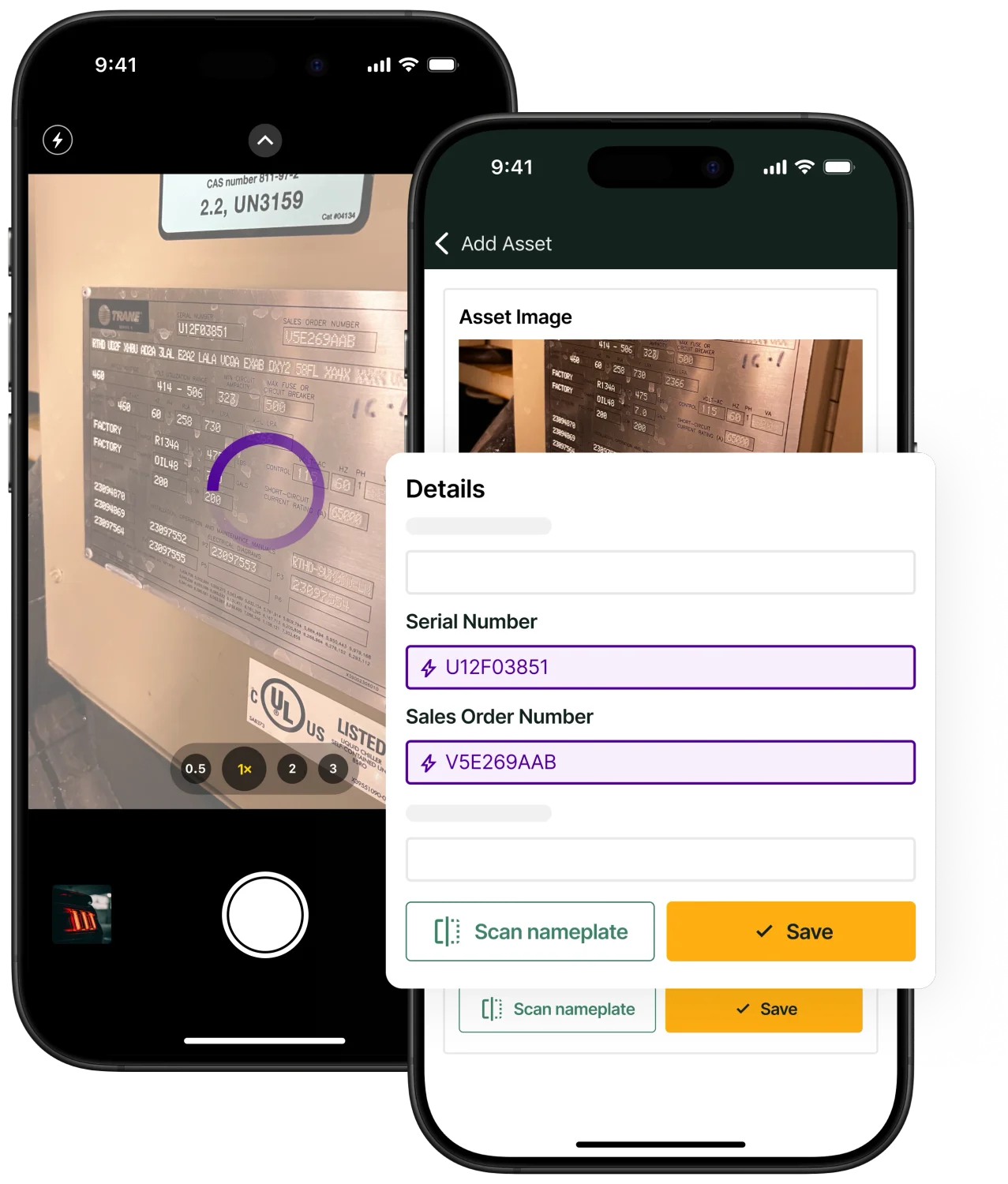
BuildOps field service inventory management software
Our equipment and asset tracking powers commercial contractors.
Best field service inventory software for residential: Housecall Pro

Image Source: Housecall Pro
For residential crews running tight routes, the job often comes down to speed, communication, and getting paid without leftovers. That is where Housecall Pro can fit in, since the software combines scheduling, invoicing, and basic item tracking in one place. If you need field inventory management software that handles multi-location stock, truck replenishment rules, and higher-volume materials across teams, you may hit limits fast.
How Pricing Works: Housecall Pro uses subscription pricing with tiers based on feature access and team size.
Features Beyond Inventory Management:
- Scheduling and dispatching – Route work based on availability and geography
- Invoicing and payment collection – Close out jobs and collect payment on-site
- Customer communication – Automated updates, reminders, and status messages
What Sets It Apart for Residential Contractors: Housecall Pro keeps day-to-day admin simple for service-heavy residential work where speed and ease of use matter.
See who comes out on top when you compare Housecall Pro to BuildOps directly for their inventory management and HVAC-related features.
Best field service inventory software for general contractors: Jobber

Image Source: Jobber
If you juggle mixed job types across trades—service calls, small installs, punch work—Jobber gives you a clean way to manage scheduling, quotes, and customer communication. Jobber works well when you want a simple system that keeps the front office and the field on the same page. For inventory tracking software field service teams rely on in complex environments—truck stock, transfers, equipment history, and job-cost ties—Jobber typically depends on add-ons or external tools, which can create gaps.
How Pricing Works: Jobber offers tiered subscriptions, usually priced per user with feature sets tied to each tier.
Features Beyond Inventory Management:
- Job scheduling and dispatching – Coordinate crews across job calendars
- Quoting and invoicing – Move from estimate to bill without extra admin loops
- Time tracking – Capture hours for payroll and job costing
What Sets It Apart for General Contractors: Jobber stays approachable for teams that need broad field workflows, but teams that want deep inventory control often outgrow its native stock capabilities.
Other notable field inventory management solutions
Some teams want field inventory management software that plugs into day-to-day service work without forcing a full platform change on day one. The tools below can help you track parts and tools while still covering pieces like scheduling, invoicing, and customer follow-up, depending on how your operation runs.
FieldEdge

Image Source: FieldEdge
FieldEdge focuses on service contractors who need tighter control of truck stock, common parts, and call-by-call usage without burying techs in admin work. It ties inventory activity back to service workflows so the office can keep jobs moving while techs stay focused on the work in front of them. That said, it can fall short for operations that run multi-warehouse inventory, complex project-style installs, or heavy commercial tracking across many sites.
How Pricing Works: FieldEdge typically quotes based on company requirements and user count, so you will likely need to request a custom quote.
Features Beyond Inventory Management:
- Scheduling and dispatching – Route work and assign techs based on availability and job demand
- Invoicing and payment processing – Generate invoices tied to completed service work
- Customer relationship management (CRM) – Store customer history and service details for faster follow-ups
What Sets It Apart: FieldEdge leans into high-volume service flow, where speed from call intake to completion matters and the office needs clean visibility into what techs used in the field.
Workiz

Image Source: Workiz
Workiz works well for growing field service teams that want job management and inventory basics in one system, especially when the goal centers on keeping dispatch, customer updates, and billing connected. Crews can track usage during service calls and keep stock records cleaner than spreadsheet-driven processes. However, larger contractors can run into limits when they need deeper inventory controls like advanced forecasting, multi-location governance, or detailed materials planning across bigger scopes.
How Pricing Works: Workiz offers tiered subscription plans, usually priced per user, with options that change based on feature access.
Features Beyond Inventory Management:
- Scheduling and dispatching – Assign calls and keep the board updated as priorities shift
- Invoicing and payment processing – Send invoices fast and collect payment without delays
- Customer relationship management (CRM) – Track customer conversations, approvals, and job history
What Sets It Apart: Workiz fits teams that need a practical all-in-one setup while they add techs, trucks, and daily call volume.
Sortly

Image Source: Sortly
Sortly runs as a visual inventory system that helps field teams identify parts, tools, and assets quickly, especially when different techs share stock across trucks, cages, or a small shop. The photo-first approach can cut down mis-picks and reduce “we have it somewhere” confusion during service weeks. Still, Sortly can feel limited when you need tight connections between inventory, dispatch, job costing, and billing inside one workflow.
How Pricing Works: Sortly offers subscription plans with a free tier and paid tiers that unlock additional users, advanced features, and expanded tracking.
Features Beyond Inventory Management:
- Barcode and QR code scanning – Update counts fast from a phone while loading out
- Customizable alerts – Flag low stock and prevent last-minute supply runs
- Multi-user access – Control who can adjust counts, locations, and item details
What Sets It Apart: Sortly works best for teams that want faster identification and cleaner accountability for tools and parts, without a heavy operational system layered on top.
Ply

Image Source: Ply
Ply focuses on keeping parts and materials in check as crews bounce between service calls, install work, and warranty returns. It puts a lot of weight on real-time updates and automation, so your office stops playing phone tag with techs to confirm what left the cage and what stayed on the truck. However, if you want one system that covers scheduling, dispatch, customer records, and billing in the same workflow, Ply can leave you stitching tools together with integrations.
How Pricing Works: Ply typically prices based on business needs and scale, so you will need to talk with their team for a clean quote
Features Beyond Inventory Management:
- Automated parts tracking – Cut manual entry by logging inventory changes as parts move
- Job preparation tools – Stage parts against upcoming work so techs roll with what the job needs
- Integration capabilities – Connect with other systems so inventory updates match your job flow
What Sets It Apart: Ply leans hard into automation, which helps crews reduce count errors and keep materials visible across trucks, the shop, and job sites without constant manual cleanup
FieldBin

Image Source: FieldBin
FieldBin combines inventory tracking with day-to-day field ops like scheduling and invoicing, which can help smaller teams keep work moving without bouncing between apps. It also calls out technician tool usage, which matters when you want accountability for high-dollar gear riding in multiple trucks. However, if your operation depends on deep reporting, complex permissions, or multi-location inventory controls across a large footprint, FieldBin may feel limited.
How Pricing Works: FieldBin offers plan options by business size and needs, and you can confirm the best fit on their site or with their team
Features Beyond Inventory Management:
- Job scheduling and dispatching – Coordinate field work so the office and techs stay aligned
- Invoicing and payment processing – Handle billing steps without duplicating entry
- Technician tool tracking – Track who has what tool and where it last showed up
What Sets It Apart: FieldBin keeps things simple for crews that want a single place to manage jobs, materials, and basic business admin without a heavy rollout process
7 benefits of using a field inventory management software
Field inventory lives in motion. Truck stock, cage stock, staged materials for installs, and the parts that vanish during an after-hours emergency call. When field service inventory software stays accurate across all of it, your team stops paying the parts tax in delays, write-offs, and office cleanup.
If you want a wider look at how inventory fits into scheduling, dispatch, and job execution, this overview of field service operations breaks down the moving pieces inventory has to support.
1. Fewer job delays and last-minute part shortages
Schedule changes expose weak inventory controls fast. With contractor scheduling software tied to inventory activity, you can reserve key SKUs to work orders, flag low stock before the morning rollout, and avoid sending a tech to a call they cannot finish. That translates to fewer return trips, fewer emergency supply runs, and fewer “we thought it was on Truck 3” conversations at 4 p.m.
2. Higher profit by cutting dead stock and write-offs
Parts sitting in bins do not earn revenue. They tie up cash, age out, get lost, or get “borrowed” across trucks with no trail. Inventory tracking software field service teams rely on helps you see what moves, what stays parked, and what gets adjusted too often, so you can tighten min/max by location, standardize truck loadouts, and reduce quiet losses that hit material margin.
3. Faster service calls with truck and warehouse visibility
A service call goes sideways when the only truck with the part sits across town and nobody knows it. Connecting inventory visibility with fleet dispatch software helps you locate the closest stocked truck, coordinate a transfer, and keep the original tech working instead of driving back to the shop. This is where first-time completion rate improves, especially on critical accounts where response time and uptime drive renewals.
4. Cleaner job costing and fewer billing disputes
Material costs drift when parts do not post to the work order as they get used. Techs forget line items, the office guesses, and customers push back when the invoice does not match what happened onsite. When inventory stays tied to customer and site history through field service CRM software, you get a tighter record of what was used, why it was used, and how it maps to the asset or scope, so billing has backup and job costing stays clean.
5. Smarter purchasing based on backlog and real demand
Purchasing should follow usage and upcoming work, not last week’s gut feel. When inventory and dispatch data stay connected, you can buy around known demand, cut panic orders, and reduce rush freight that eats profit. That connection gets easier to maintain with contractor dispatch management practices that keep work orders organized and priorities visible, so purchasing can plan against what the field is actually walking into.
6. Better compliance for warranties, serialized parts, and asset history
Warranty claims fall apart when parts get installed without documentation. A solid system tracks which part went on which asset, who installed it, and when, so you can validate warranty coverage, support audits, and protect techs when a manufacturer challenges a claim. This also tightens repeat visits since techs can see what got replaced last time before they start swapping parts again.
7. Easier audits, cleaner counts, and simpler tax prep
Physical counts are unavoidable, but they do not have to be a week-long mess. With digital transaction history and location-based stock levels, cycle counts become manageable and year-end inventory valuation gets cleaner. Finance gets dependable inventory value, ops gets accountability by truck and cage, and you cut the time spent reconciling mystery adjustments.
Deep Dive
AI helps inventory stay accurate when the field moves fast. Asset capture from photos, automated tagging, and suggested replenishment based on usage patterns cut down manual entry and missed parts.
If you want examples of how teams apply this in the real world, this rundown of AI field service use cases shows where inventory intelligence connects to dispatch, job execution, and closeout.
4 important field service inventory management software FAQs answered
When you run service work at scale, inventory problems show up fast: missed chargeables, trucks that look stocked on paper, and “where did that kit go” debates at closeout. These FAQs focus on the decisions and controls that matter for experienced field teams.
1. What is field service inventory management software?
Field service inventory management software keeps a live ledger of parts across trucks, cages, and jobs, with every issue, transfer, return, and adjustment tied to a work order and tech. It gives dispatch and billing one source of truth for what got used, where, and why. So crews close calls fast.
It also supports repeatable loadouts, kit tracking, and clean accountability when multiple techs touch the same material.
2. How does field service inventory management software work?
At a high level, it connects inventory transactions to the work order lifecycle. Techs issue parts to the job as they work, record returns when scope changes, and log transfers when another truck bails them out. The system updates counts by location and keeps an audit trail that ties each movement to a person, time, and ticket.
Pros get the value when it enforces controls: role-based permissions, required part selection instead of “misc,” and consistent item catalogs so the field and office speak the same SKU language.
3. Is field service inventory management software worth the price?
Yes, when you measure it against avoidable truck rolls, shrinkage, and missed chargeables. One prevented return trip, one recovered material line item, or one caught pattern of “inventory adjustments” can cover a meaningful chunk of the cost in a busy service operation. You also buy speed: faster closeout, cleaner job costing, and fewer disputes because you can show exactly what the tech used and when.
4. What are best practices for keeping field inventory accurate during service work?
Accuracy comes from habits plus enforcement. Set the rules, make them easy for techs, and audit the exceptions. Use these ten practices as your baseline:
- Standardize SKUs, naming, and units across every location
- Set truck loadouts by call type, not by tech preference
- Require parts issuance from the work order, not from memory at invoicing
- Use scan-first workflows for issue, return, and transfer
- Lock edits after invoice approval and route exceptions to review
- Run cycle counts weekly by truck and cage, rotate high-value bins
- Track transfers as custody changes, tie them to tickets or stock moves
- Separate “job material” from “shop supply,” price them differently
- Review adjustment reports by tech and truck, coach patterns fast
- Reset min/max levels quarterly using usage and upcoming contract demand
Inventory only helps when it stays glued to the work order. When parts move with the schedule, transfers leave a trail, and every item used lands on the job record, your crews finish calls without the second trip, and your office closes out clean without chasing notes. If you run commercial service, that connection matters across trucks, branches, PM routes, and emergency calls.
If you want to see how an all-in-one platform handles inventory plus scheduling, dispatch, quoting, invoicing, reporting, and customer history in a single workflow, schedule a free demo with BuildOps. No pressure, no hard pitch. Just a look at whether it fits the way your team runs work in the field.
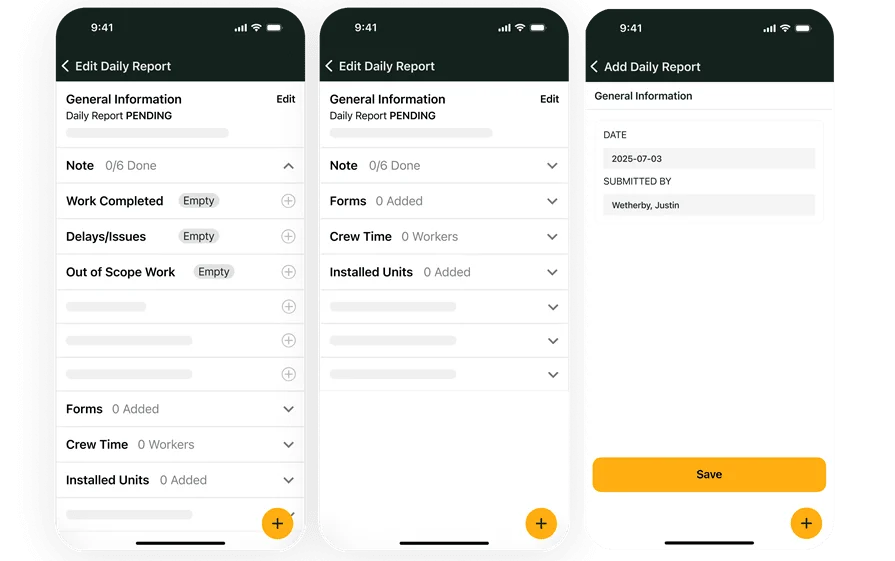
Curious to see BuildOps in action?
Keep teams aligned on the jobsite so you can stay organized and boost profits.