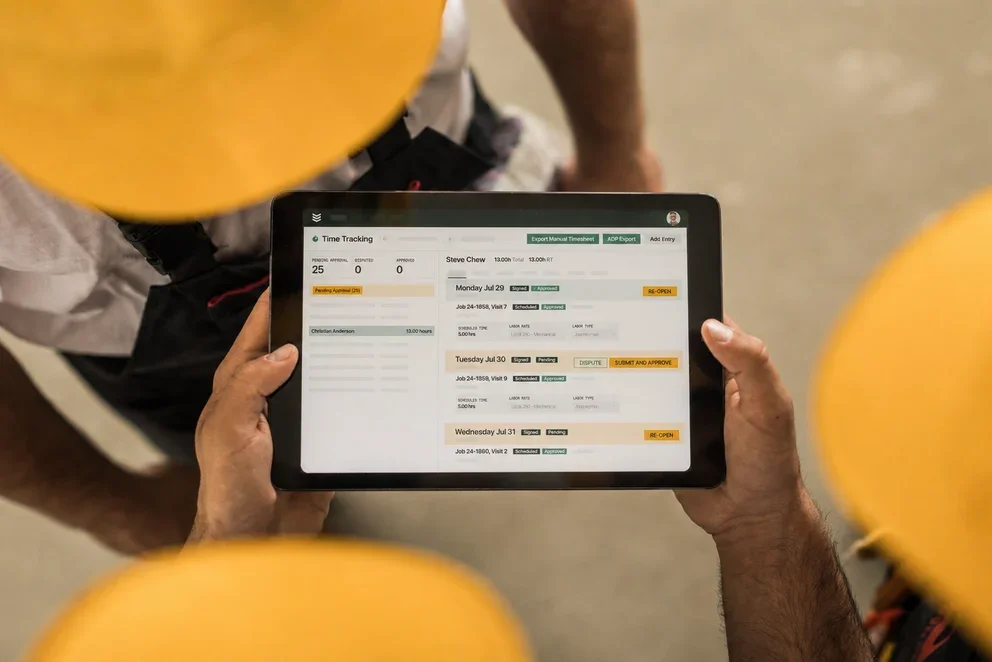


In the alarm trade, management software decides whether your day runs clean or chaotic. You’re juggling installs, test-and-inspect cycles, monitoring handoffs, and punch-list work under GCs. The platform has to tighten dispatch, capture compliance details, and keep RMR steady while jobs move from submittals to closeout. Many teams weigh options alongside construction software and construction management software because project tracking and service live side by side.
Within the broader world of field service management, alarm companies need tools that align office workflows with field crews—so this guide highlights the traits that separate contenders and points to the best construction management software characteristics that carry over to alarm operations. Here’s what we’ll cover:
- Choosing the right alarm company service software for your needs
- 6 key features to look for in an alarm company service software
- Best alarm company service software for commercial
- Best alarm company service software for residential
- Best alarm company service software for general contractors
- Other notable alarm company management software
- 5 benefits of using service software for alarm companies
- 4 important alarm company software FAQs answered
Let’s kick off with how to choose an alarm company management software that fits your operation—what it must handle on busy service days, how it supports techs in the field and coordinators in the office, and where it connects cleanly to construction workflows and compliance requirements.
Choosing the right alarm company service software for your needs
Start with how your operation actually runs. You manage installs, device-level testing, inspection routes, and signal-driven emergencies while keeping AHJ and UL requirements tight and RMR predictable. The platform has to support dispatch, field execution, and cradle-to-cash without adding friction. Use these questions to pressure-test candidates.
- Work mix and volume: What install-to-service ratio do you carry each month? How many inspections, PM stops, and emergency calls hit the board on peak days? Can the system handle multi-site enterprise programs without lag?
- Compliance and documentation: Does it enforce NFPA workflows with device results, timestamps, photos, and signatures? Can it generate AHJ-ready and UL audit packets without manual rebuild?
- Technician visibility and scheduling: Do dispatchers see live GPS, capacity, and job status by crew? Can it schedule by license, certification, and skill while honoring SLAs and arrival windows?
- Central station and monitoring handoffs: How cleanly does it pass accounts, zones, and signals between service and monitoring teams? Can techs place systems on test and clear restorals from the mobile app?
- Billing, contracts, and RMR: Can service agreements trigger renewals, inspection reminders, and price updates automatically? Do invoices, payments, and collections post without duplicate entry?
- Features: Which field service management capabilities are mandatory for your team? Do you need mobile checklists, configurable digital test forms, barcode or QR device scans, offline mode, photo and video capture, route and capacity planning, parts and truck-stock usage, timecards, and customer portal access?
With these answers captured, build a weighted scorecard and you will be ready for the feature breakdown in the next section.

6 key features to look for in an alarm company service software
The best alarm company management software should remove daily friction for dispatchers and field techs, keep AHJ compliance tight, and protect RMR while cash moves cleanly from quote to invoice. Whether crews handle ground-up installs, tenant improvements, or heavy inspection routes, these features make a measurable difference.
1. Real-time dispatching
Assign work from a live board that respects SLAs, licenses, crew capacity, and travel rules. Priority signals and rush calls should drop into the day without breaking established routes, and coordinators need clear visibility on status changes and ETAs. The scheduling and coordination layer behind this approach is described in scheduling and dispatching.
Deep Dive
For advanced alarm dispatch scenarios like midday signal escalations, multi-site inspection routes, and license-based crew assignments, see our guide to scheduling & dispatching.
2. Route optimization
Plan multi-stop inspection and PM routes with traffic, time windows, site access rules, and technician skills factored in. When an emergency hits midday, the board should recalc drive time and crew capacity with one action so SLAs hold and windshield time stays low. Tying vehicle data into planning through the fleet management layer keeps routing accurate and helps coordinators make fast swaps without guesswork.
3. Service CRM

Organize enterprise clients with a service-first CRM that supports parent accounts, facilities, buildings, and device lists, so pricing, contracts, and reporting inherit correctly. With the service CRM foundation in place, techs can open a site record and see panel types, zone maps, permits, and prior deficiencies in seconds, while sales and ops share the same account history for quotes, renewals, and compliance packets.
4. Mobile accessibility
Field crews should view schedules, get turn-by-turn routing, complete digital test forms, and access histories from one app. Basements, garages, and pump rooms require offline operation with dependable sync. Barcode or QR scans, photo and video capture, and signatures must land on the work order without data loss. These workflows match the technician mobile app experience teams rely on in tight spaces and low-signal sites.
5. Full service history

Maintain device-level records across installs, inspections, deficiencies, and repairs so troubleshooting starts with facts. Search by panel, zone, or tag to prep parts before rolling a truck, and keep history tied to contracts for accurate pricing on quoted work. Long-term continuity comes from well-structured terms in service agreements, which also drive reminders and renewals.
6. Job completion checklists
Use configurable checklists that match NFPA workflows and local AHJ requirements. Capture pass or fail outcomes with timestamps, readings, photos, and signatures. Enforce closeout rules so a ticket cannot finish until every device tests clean, which cuts callbacks and failed inspections.
Other valuable features for alarm service companies
These additions round out field service coverage without bloating your stack.
- Quoting from the field: Convert deficiencies into priced proposals with parts and labor pulled from a master list using the quoting workspace so techs and sales operate from the same source of truth
- Billing and settlement: Push approved work to invoice and capture card or ACH through invoicing and payments to accelerate cash without double entry
- Labor and job costing: Record regular, OT, travel, and nonproductive time from the mobile app with time tracking so payroll and job costs stay accurate across contracts
Executive reporting: Track contract margins, inspection throughput, callback rate, and first-time fix with dashboards in reporting for fast operational reviews
Gain access to field-tested productivity plays
Practical checklists and workflows to tighten dispatch, lift first-time fix, and protect RMR.
Best alarm company service software for commercial: BuildOps

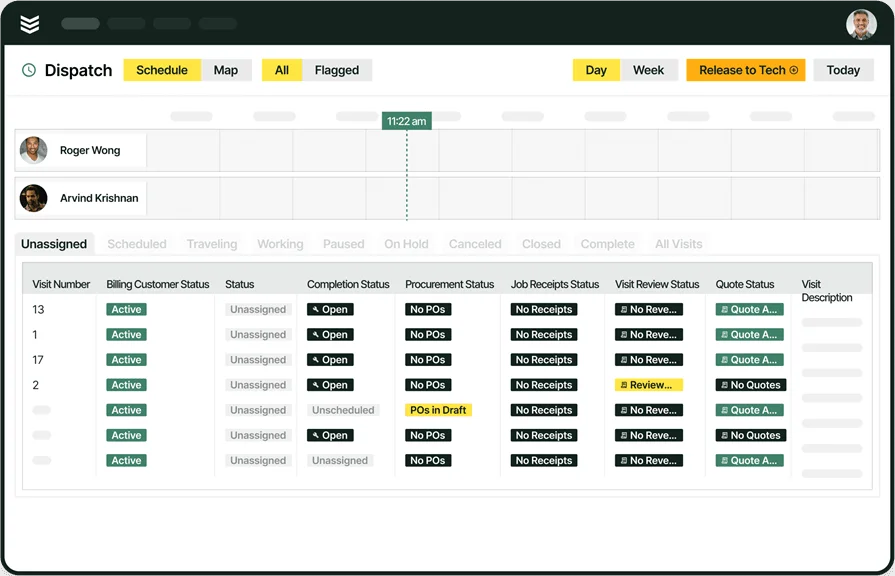
BuildOps supports commercial alarm operations at scale with real-time dispatch, device-level histories, and field-ready mobile workflows. Coordinators balance inspection routes, emergency signals, and construction tie-ins while the platform keeps AHJ documentation and RMR contracts in sync. Teams rely on integrated scheduling, deep reporting, and a unified customer hierarchy so office and field stay aligned on deadlines and scope.
How pricing works: BuildOps hosts weekly live demos and offers customized sessions to scope requirements before presenting a proposal.
Other notable features:
- Homeowner portal for approvals, history, and payments
- Simple estimate templates and deposits for residential installs
- Email and SMS notifications for appointment reminders
What sets it apart for commercial: Geared to handle complex service days, BuildOps brings live dispatch, contract-driven workflows, and compliance reporting into one system so multi-site programs stay on track.
Explore BuildOps alarm service software
Coordinate dispatch, inspections, and monitoring handoffs with one platform.
Best alarm company service software for residential: Kickserv

Image Source: Kickserv
Kickserv serves small residential alarm teams that want straightforward scheduling, estimating, and basic invoicing with light setup. The clean job board and simple customer records help techs track warranty work and repeat visits without back-office overhead. It may not be the ideal choice for firms that require strict AHJ reporting or granular device-level testing.
How pricing works: Tiered plans start with core features at entry levels, with advanced capabilities available on higher tiers.
Other notable features:
- Homeowner portal for approvals, history, and payments
- Simple estimate templates and deposits for residential installs
- Email and SMS notifications for appointment reminders
What sets it apart for residential: A simple interface and quick onboarding fit lean teams handling installs and service calls without complex inspection programs.
Best alarm company service software for general contractors: FieldEdge

Image Source: FieldEdge
FieldEdge fits multi-trade contractors that include alarm service alongside other disciplines. The platform centralizes dispatch, customer management, and invoicing, with tooling for inventory and marketing that supports job growth across trades. It may not be the ideal choice for alarm-focused firms that need NFPA-specific test workflows or extensive device-level audit trails.
How pricing works: Pricing scales by user count and package level, with options suited to expanding teams.
Other notable features:
- Truck-stock and warehouse parts tracking with transfer logs
- Maintenance plan scheduling with renewal reminders
- Accounting sync and standard operational reportsled
What sets it apart for general contractors: Cross-trade coverage and broad operational tooling help GC-led teams coordinate multiple services while maintaining a single customer record.
Other notable alarm company management software
Your mix of inspections, emergency calls, monitoring handoffs, and territory size may point you to tools that lean into fleet visibility or simple residential workflows. The options below can fit specific use cases for alarm service contractors depending on compliance needs and team size.
Samsara

Image Source: Samsara
Samsara centers on fleet intelligence and field visibility, which helps alarm teams running large inspection routes and rapid-response crews. Real-time GPS, vehicle diagnostics, and driver safety data inform dispatch decisions and keep coordinators current throughout the day. The fleet-first focus may not be ideal for firms that need deep AHJ reporting or device-level testing workflows.
How pricing works: Subscription pricing with optional hardware add-ons such as gateways and cameras.
Other notable features:
- Route analytics and geofencing alerts for multi-site programs
- Mobile status updates and proof-of-service capture
- Driver scorecards that support safety policies
What sets it apart: A strong telematics layer that pairs well with high-velocity inspection routes and signal-driven service across wide territories.
Jobber

Image Source: Jobber
Jobber targets small to midsize service businesses with an emphasis on ease of use and quick setup. Residential alarm contractors value its straightforward scheduling, simple quoting, and customer messaging that keeps homeowners informed. It may not be the ideal choice for teams that require NFPA-specific checklists, device histories, or robust multi-location reporting.
How pricing works: Tiered plans at an accessible entry level with premium tiers for added capability.
Other notable features:
- Customer hub for approvals, payments, and job history
- Basic quote-to-invoice flow suitable for direct-to-home work
- Email and SMS appointment notifications
What sets it apart: An approachable toolset that helps lean residential teams organize calls without heavy configuration.
Housecall Pro

Image Source: Housecall Pro
Housecall Pro focuses on simple operating rhythm for residential service providers. Online booking, automated reminders, and mobile job management help keep schedules tight and customers updated during installs and service visits. Larger alarm firms with strict compliance or device-level documentation needs may find the office tooling limited.
How pricing works: Plans sized for small service teams with optional add-ons for extended functionality.
Other notable features:
- Customer booking and reminder automations
- Visual day board for fast rescheduling
- On-site payment capture with basic receivables tracking
What sets it apart: Customer-friendly scheduling and communication that suits residential alarm contractors handling steady volumes of installs and repairs.
5 benefits of using service software for alarm companies
Pros lean on alarm company management software to cut noise from dispatch to cash. The gains below show up fast when crews handle installs, inspections, and signal-driven work.
1. Faster quote-to-win cycles
A clean quotation flow trims dead time between site walk and install date. Templates, price books, and approval tracking keep scope tight and margins intact. For a detailed look at how quoting ties into operations, see this overview of a quotation management system. Strong quoting shortens lead aging and reduces rework during handoff to ops.
2. Optimized routes and capacity

Smart scheduling balances inspections, PM routes, and hot calls without blowing SLAs. Capacity planning, skills rules, and travel logic keep crews productive and fuel spend in check. If you want a quick primer on schedule design for field teams, this guide to field service scheduling software lays out the building blocks. These controls help any alarm company software run steady even on peak days.
3. Cleaner ticket control and audit trail
Tight ticketing prevents lost notes, missing photos, and incomplete device tests. Each step lands in the record with timestamps, signatures, and checklists that pass AHJ scrutiny. For a deeper dive on ticketing structure and handoffs, take a look at the field service ticketing system fundamentals. Clear audit history also accelerates warranty calls and deficiency follow-up.
4. Stronger field execution and data capture
A single mobile app keeps techs productive in basements, garages, and low-signal areas. Digital test forms, barcode or QR scans, and media capture flow straight into the job without duplicate entry. The field service app breakdown shows how offline sync and device-level forms prevent callbacks. These habits turn alarm company service software into a reliable source of truth.
5. Dispatch clarity and faster response

Coordinators need live status, ETA shifts, and license rules to place the best crew on each call. A structured board with priority handling reduces radio chatter and keeps emergency signals moving. For workflow patterns that support this, review the playbook on work order dispatch. Clear assignments and clean handoffs lift first-time fix rates and customer trust.
4 important alarm company software FAQs answered
Pros use this section to sanity-check decisions that affect dispatch, compliance, and RMR. Answers assume you already run inspections, emergency calls, and portfolio work across wide territories.
1. What is alarm company management software?
Alarm company management software functions as a unified field-and-office system coordinating dispatch, inspection routes, device tests, contracts, and billing for alarm contractors. It links AHJ compliance, monitoring handoffs, and RMR so techs and coordinators stay aligned. APIs connect with accounting and monitoring platforms.
2. What’s the difference between dispatching and scheduling?
Scheduling allocates planned work by capacity, skills, and windows. Dispatching assigns the live call, sets the ETA, and handles day-of changes when signals and emergencies hit. Pros need both functions sharing data, price books, and contract rules to avoid rework.
3. Is alarm company software worth the price?
Yes, when the stack reduces windshield time, raises first-time fix, and keeps AHJ packets audit-ready. Gains usually show up in RMR retention, technician utilization, and cash velocity from quote to invoice. Teams that standardize digital test forms and device histories see the largest lift.

4. What are best practices for rolling out alarm company service software?
You already know the workflows; the challenge is codifying them without slowing crews. Use a staged approach that protects SLAs while you migrate tickets, contracts, and device lists.
- Build a single price book with labor classes and kit rules
- Normalize contract terms and map them to inspection schedules
- Import device lists with unique IDs, zones, and test procedures
- Stand up mobile forms per AHJ requirement with pass or fail gating
- Pilot with one territory and a mixed crew of senior and junior techs
- Enable live GPS and capacity planning before routing goes live
- Lock timecard categories and travel rules to prevent payroll drift
- Tie quoting to deficiencies so upsell never leaves the ticket
- Reconcile GL accounts and tax codes before first invoice
- Publish dashboards for SLAs, callbacks, and contract margins
Choosing alarm company management software comes down to how well it fits your workload, compliance pressure, and crew style. The standouts handle real-time scheduling, mobile test forms, device-level histories, and clean quote-to-cash while keeping AHJ packets audit ready. When those pieces live in one system, dispatch gets quieter, first-time fix climbs, and RMR stays healthy.
If you run mixed work across inspections, emergency calls, and install punch lists, an all-in-one platform helps your office and field operate from the same source of truth. BuildOps brings scheduling, mobile, agreements, invoicing, and reporting together so commercial field service teams can move quickly without sacrificing accuracy. Pick the tool that supports how your crews actually work, integrates with your accounting and monitoring stack, and gives you clear visibility into margins and SLAs.
Ready to see how this can look in your world. You can walk through a live environment with your scenarios and decide if it fits, or keep the ideas for your roadmap.
See BuildOps in action
Simplify your operations and service for your alarm company.