Spreadsheets, whiteboards, and scattered apps are quietly killing your margins. AI-powered construction management software pulls crews, jobs, contracts, equipment, and cash flow into one place—so you see problems early, move faster, and scale without losing control.
For a closer look at how the construction field service management landscape is evolving, we put together a dedicated breakdown worth reading alongside this guide.
Here’s what we’ll cover:
- Key features to look for in AI construction business management software
- 8 best AI construction business management software
- 7 benefits of using AI construction business management software
- Questions to ask when choosing AI construction business management software
- 4 important AI construction business management software FAQs answered
Before we get into specific tools, let's walk through what to look for and how to evaluate your options.

Key features to look for in AI construction business management software
The features baked into your platform determine whether it actually saves time, improves cash flow, and protects your bottom line. Here are the capabilities that matter most when evaluating AI software designed to optimize the business side of construction management.
1. Real-time resource optimization and dispatch

Coordinating crews and equipment across multiple jobs requires instant visibility into labor productivity and asset utilization. Scheduling and smart dispatch software uses AI to optimize assignments, reassign, and reroute crews on the fly—ensuring maximum billable time and reducing non-productive labor costs. This is critical for scaling a profitable operation.
2. AI-powered financial forecasting and risk management
AI should move beyond tracking tasks and actively help you protect profit margins. Construction AI analyzes historical and real-time job data to predict financial risks, flag potential budget overruns, and forecast cash flow. This intelligence allows leadership to make proactive business decisions that safeguard profitability across their entire portfolio of contracts.
3. Seamless field-to-office data integration

For accurate business reporting, data must flow instantly from the job site back to the financial systems. A technician mobile app gives field crews access to work orders, site documents, and reporting tools, ensuring all billable hours, change orders, and material consumption are captured accurately in real time—closing the gap between work performed and revenue recognized.
4. Automated cash flow acceleration
Maintaining healthy working capital is vital for growth. Automated invoicing and payment processing tools generate accurate invoices immediately upon job completion and accelerate payment collection. By reducing days sales outstanding (DSO), this automation directly improves cash flow for the entire business.
5. Executive-level business intelligence and reporting
Profitability is driven by clear, actionable business data, not just project metrics. Construction reporting tools provide comprehensive business intelligence, tracking key performance indicators (KPIs) like profit margins, labor utilization rates, cost-of-goods-sold variances, and overall financial health—giving executives the oversight needed to strategize and scale the company.
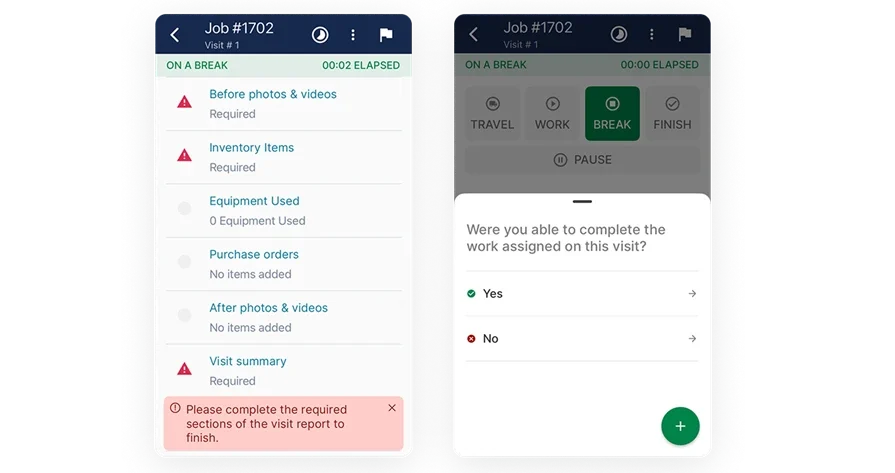
Plan, bid, and execute with BuildOps
See how quantities move from dispatch to billing without duplicate entry.
Other valuable AI capabilities for overall construction business intelligence
Beyond the core capabilities above, a few additional features add serious operational value for construction contractors managing complex field operations.
- Service quoting — Fast, accurate quotes keep the sales pipeline moving. Service quoting software lets teams build and send professional quotes from the field or the office, reducing turnaround time and improving close rates.
- Customer and project relationship management — Tracking client history, project details, and communication in one place prevents things from falling through the cracks. A field service CRM centralizes every interaction so teams can manage relationships without digging through emails or spreadsheets.
- Fleet tracking and management — Knowing where trucks and equipment are at all times reduces wasted trips and improves response times. Construction fleet management software provides real-time GPS tracking, maintenance alerts, and utilization data across your entire fleet.
- Service agreements and recurring work — Managing ongoing maintenance contracts manually leads to missed visits and lost revenue. Service agreement management tools automate scheduling, renewals, and reminders so no contract obligation slips.
- Automated time tracking — Manual timesheets create payroll headaches and compliance risks. Construction time tracking software logs hours automatically based on job check-ins, keeping labor records accurate without extra admin work.
With these business-critical features in mind, the next step is identifying which platforms provide the best AI tools for construction business management. Let’s evaluate the top solutions and how they impact your overall operational strategy.
8 best AI construction business management software
AI only creates real value for construction firms when it improves financial performance, streamlines operations, and gives leaders clear P&L visibility. These eight platforms help contractors and field teams manage the full lifecycle, from first dispatch to final closeout.
1. BuildOps: best for commercial construction teams

BuildOps connects AI directly to the workflows that run your construction business — from dispatch adjustments and technician documentation to asset capture, invoicing, and financial reporting — all feeding into a single job record and source of truth your office can use to manage margins, utilization, and customer commitments without chasing updates.
OpsAI turns messy field inputs — crew notes, photos, receipts — into clean, trusted operational and financial data your back office can act on. From emergency break-fix calls to tenant improvements and large HVAC retrofits, every job, contract, and service agreement runs with the same operational discipline, so nothing slips between the field, the office, or the balance sheet from first dispatch to final closeout.
AI for Construction Business Management: AI powers Smart Dispatch for real-time tech recommendations to maximize utilization and protect SLAs. Nameplate capture builds asset records for risk and replacement analysis. Automated field notes and invoice scanning provide reliable data for performance analysis and reduce revenue leakage.
Platform Capabilities Beyond AI: The platform manages core workflows: scheduling, dispatch, quoting, invoicing, payments, and customer history. It includes service agreements, fleet tracking, and time tracking tied to cost codes, all feeding into accurate payroll, job costing, and business reporting for executive strategic steering.
How Pricing Works: BuildOps prices based on team size, user count, and the capabilities your operation needs, quoted per user per month with options scaled for larger construction teams and multi-branch businesses.
What Sets It Apart for Commercial Construction Businesses: BuildOps links every phase of construction business management — dispatch, field documentation, asset tracking, invoicing, service agreements, and reporting — inside one AI-powered platform. For commercial contractors managing many assets across multiple properties and contracts, that eliminates data silos and gives both field and office teams a single, trusted system to run operations, protect margins, and grow the business at every stage.
Rating: 4.4 on Capterra from 177 user reviews
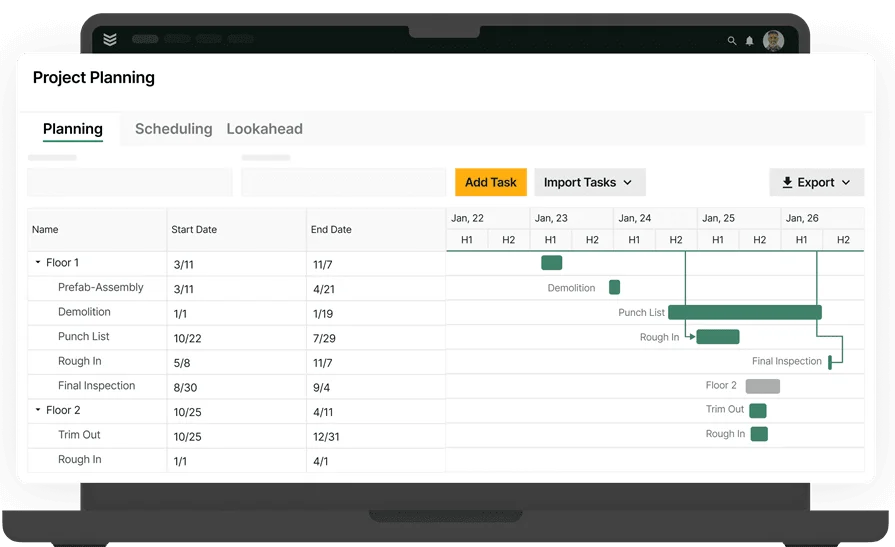
Want to see BuildOps in action?
We bring office and field tech together—so nothing slips through the cracks.
2. ServiceTrade: best for field documentation cleanup

Image Source: ServiceTrade
ServiceTrade centers on job documentation and customer-ready wrap-ups, providing the visibility needed to manage a construction business effectively. Its AI helps streamline the transition from field capture to back-office processing by converting crew notes and equipment details into consistent, usable business data—ensuring documentation quality doesn't hinder billing or operational oversight.
While it excels at recurring maintenance and service-heavy business models, it may lack the depth required for firms needing unified AI across complex dispatching and large-scale project-based business units.
AI Features: ServiceTrade's AI capabilities focus on converting technician audio into text, refining raw job notes into professional-grade language, generating consolidated job summaries from full ticket histories, scanning nameplate details into asset records, and surfacing operational answers from historical data so managers spend less time searching through past tickets.
Features Beyond AI: Outside of AI, the platform supports day-to-day construction service operations with dispatching and recurring work management, a technician mobile workflow for photos and on-site updates, and customer-facing reporting and documentation that helps standardize closeouts across accounts.
How Pricing Works: Pricing is typically provided by quote and varies based on team size and the package selected.
What Sets It Apart for Business Operations: ServiceTrade standardizes field-to-office communication, reducing review cycles and accelerating the administrative workflows that keep a construction business running smoothly.
Rating: 4.6 on Capterra from 341 user reviews
3. Simpro: best for service and project cost tracking

Image Source: Simpro
Simpro provides construction business management software that handles both service and project work inside one system. This helps contractors who move between reactive maintenance, scheduled repairs, and longer installation jobs while needing to track business-wide costs and profitability against each one.
Simpro’s mobile AI improves job notes and mixed-work cost tracking, but its primary value lies in operational visibility rather than advanced AI-driven dispatch or asset capture across complex commercial business units.
AI Features: Simpro’s AI support focuses on streamlining the business-to-field loop by generating professional work-completed notes and ensuring clear, accurate documentation that reduces administrative back-and-forth between field crews and the billing office.
Features Beyond AI: Beyond its AI capabilities, Simpro provides a full suite of business management tools, including multi-stage quoting, complex scheduling for diverse work types, and deep reporting that ties field labor directly to project and service-level profitability.
How Pricing Works: Pricing is quote-based and often depends on user count and selected modules, with setup and onboarding costs common for configuration, training, and data migration.
What Sets It Apart for Business Operations: Simpro excels at unifying fragmented business units, giving contractors who manage both recurring service contracts and large-scale project installations a single, integrated view of their total operational costs and margins.
Rating: 4.0 on Capterra from 145 user reviews
See how to choose the right Simpro alternative for your team.
4. Procore: best for general contractors

Image Source: Procore
Procore is primarily used by general contractors to maintain financial control and operational oversight across a portfolio of complex construction projects. It centralizes critical business functions, spanning pre-construction through closeout, including cost management, document control, and resource allocation, ensuring executives have real-time visibility into project financials and overall business health.
However, Procore's primary focus on large-scale project delivery means it typically lacks the specialized, trade-specific business workflows essential for commercial service units, such as asset tracking, recurring maintenance, equipment capture, and AI-driven dispatch optimization.
AI Features: Procore's AI is deployed to enhance strategic decision-making and mitigate financial risks inherent in large projects. It automates essential project management tasks to increase team efficiency, helping executives gain foresight, surface financial risks earlier, and accelerate the review of critical cost management and project execution documents.
Features Beyond AI:
- Enterprise-wide project execution tools connecting the back office and field operations.
- Real-time cost management providing continuous visibility into overall project financials.
- Resource allocation management for strategic optimization of crews, labor hours, and heavy equipment.
- Full project lifecycle management that unifies budgets, contracts, and field progress for executive reporting.
- 500+ out-of-the-box integrations through the Procore App Marketplace
How Pricing Works: Procore uses a custom pricing model based on company size and annual construction volume. Demos are available to evaluate the platform before committing to a contract.
What Sets It Apart for General Contractors: Procore's strength lies in providing centralized financial control, business oversight, and multi-team coordination. It is best suited for general contractors managing large-scale builds where maintaining budget integrity and collaborative control across owners, subcontractors, and trades is the highest business priority.
Rating: 4.5 on Capterra from 2,657 user reviews
5. Buildertrend: best for home builders and remodelers

Image Source: Buildertrend
Buildertrend focuses on residential construction business management, helping home builders and remodelers centralize sales, financials, and operations. By moving beyond basic project tracking, it provides a hub for managing the full business lifecycle—from lead capture and automated client communication to job costing and final handoff—giving residential teams the data visibility needed to protect margins on every build.
Buildertrend is built for residential construction and remodeling, not the complex multi-trade, multi-property service work commercial contractors need, so key workflows like dispatch, asset tracking, and recurring service are lacking.
AI Features: Buildertrend uses AI-powered progress updates to keep clients informed automatically, reducing the communication burden on project managers. Its AI capabilities focus on client-facing communication and scheduling optimization rather than field-level dispatch intelligence or technician documentation cleanup.
Features Beyond AI:
- End-to-end sales management with CRM, email marketing, and professional proposals
- Centralized project management connecting schedules, change orders, and daily logs
- Financial management with budgets, job costing, and connected accounting
- Dedicated client portal with online payment options
How Pricing Works: Buildertrend offers tiered pricing plans. Specific pricing details are available through their website, with plan levels scaling based on features and team size.
What Sets It Apart for Residential Builders: Buildertrend integrates the financial and operational sides of a residential construction business into a single AI-assisted workflow. It standardizes how builders manage leads, estimates, and client updates, ensuring that business-critical data flows seamlessly from the first sales call to the final payment.
Rating: 4.5 on Capterra from 2,484 user reviews
6. Buildxact: best for residential estimating and takeoffs

Image Source: Buildxact
Buildxact is tailored for small-to-midsize builders seeking to protect their financial margins through rigorous pre-construction control. Its automated takeoff and cost estimation capabilities are essential business management tools that empower contractors to quickly generate profitable bids and maintain a tight grip on material costs, critical for residential financial health.
While it excels at the estimating phase, Buildxact may lack the continuous operational visibility commercial teams require, as it does not include AI-driven features for real-time dispatch optimization, service management, or broader field execution oversight.
AI Features: Buildxact leverages AI to enhance business efficiency by automating estimating workflows. Its AI capabilities focus entirely on pre-construction, helping managers rapidly generate takeoffs and accurate cost estimates from material databases and historical pricing, thereby mitigating financial risk from inaccurate bidding.
Features Beyond AI:
- Automated digital takeoffs from uploaded plans
- Job costing and budget tracking tied to estimates
- Procurement tools for managing material orders and supplier pricing
- Scheduling tools for sequencing residential build phases
How Pricing Works: Plans start at $133 per month, positioning it as an accessible option for small builders focused on streamlining pre-construction financials.
What Sets It Apart for Estimating-Focused Teams: Buildxact is a focused financial control solution that tightens the bid-to-build process for residential contractors. It transforms plan uploads into detailed cost estimates and material lists faster than manual methods, directly improving profitability by eliminating estimating errors.
Rating: 4.6 on Capterra from 183 user reviews
7. Knowify: best for trade contractors on QuickBooks

Image Source: Knowify
Knowify is a construction business management platform designed for trade contractors who need to bridge the gap between field operations and back-office financials. By integrating project management and service workflows directly with QuickBooks, it provides the real-time visibility needed to manage cash flow and profitability across both long-term contracts and reactive service calls.
While Knowify is excellent for financial synchronization, it lacks the advanced AI-driven engines for dispatch optimization and business intelligence found in more robust commercial management suites.
AI for Business Management: Knowify focus on automating the administrative side of the business. Its current capabilities center on streamlining financial data entry and contract workflows rather than utilizing AI for predictive project risk analysis or automated field-to-office documentation cleanup.
Features Beyond AI:
- Estimating, proposals, and contract management
- Change orders, RFIs, and submittals
- Scheduling, time tracking, and daily logs
- Subcontractor management and inventory tracking
- Service dispatch, invoicing, and online payment processing
- AIA billing, budgeting, job costing, and reporting
- Client portal and CRM
How Pricing Works: Plans start at $99 per month, with pricing scaled based on the features and modules your team needs.
What Sets It Apart for Trade Business Operations: Knowify provides trade contractors with a unified system of record that keeps their project costs and service revenue perfectly synced with their accounting, eliminating the data silos that often hinder business growth.
Rating: 4.5 on Capterra from 109 user reviews
Compare Knowify against BuildOps right here to see who comes out on top.
8. Contractor Foreman: best for budget-conscious small contractors

Image Source: ContractorForeman
Contractor Foreman packs a wide feature set into an affordable package, starting at $49 per month. While often used for project tracking, its broader utility for small-to-medium residential and commercial contractors lies in centralizing essential business operations—including financials, people management, and document control—across phone, tablet, and desktop.
Contractor Foreman offers strong, affordable operational coverage, but businesses looking for advanced AI-driven business intelligence and deep automation for complex commercial portfolios may find its current feature set limited compared to specialized AI construction business management suites.
AI for Business Operations: Contractor Foreman uses AI to assist with the administrative side of a construction business, such as generating professional client communications and project summaries. This allows small business owners to maintain a professional presence while automating the repetitive documentation tasks that often consume management time.
Features Beyond AI:
- Project management with daily logs, scheduling, work orders, and inspections
- Estimating, bid management, and change orders
- AIA and progress invoicing with online payments
- Time cards, crew scheduling, and incident tracking
- RFIs, submittals, drawings, and PDF markup
- Vehicle and equipment logs
- Client portal and team chat
- Integrations with QuickBooks, CompanyCam, Zapier, Google Calendar, Outlook 365, Gusto, and Angi Leads
How Pricing Works: Plans start at $49 per month, making it one of the most affordable construction management platforms available. Higher-tier plans unlock additional features and user capacity.
What Sets It Apart for Small Business Owners: Contractor Foreman delivers a full business management toolkit at a fraction of the cost of enterprise platforms—giving small teams access to financial oversight, people management, and client communication tools without a steep monthly commitment. It is an ideal entry point for contractors looking to modernize their business operations with AI-assisted workflows.
Rating: 4.5 on Capterra from 816 user reviews
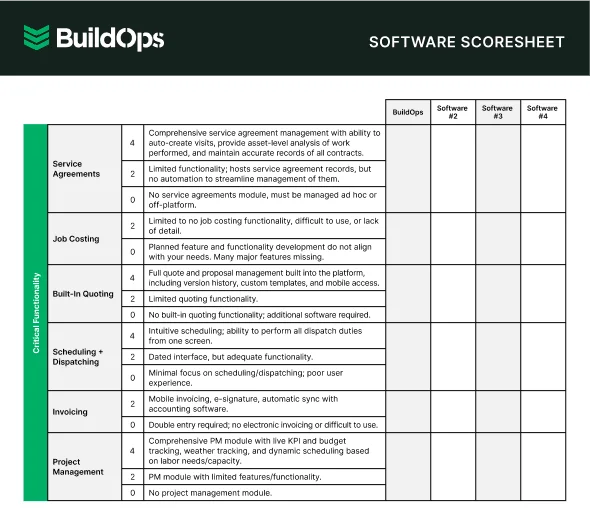
Compare software at a glance
Find the right software with this easy-to-use software scoresheet.
7 benefits of using AI construction business management software
AI tools don’t just automate tasks—they transform how contractors manage every stage of their business in the field. Here are seven ways AI delivers measurable value, boosting profitability and overall operational health for construction teams.
1. Tighter scheduling and fewer crew conflicts
AI-powered construction business management software builds and continuously updates optimized technician schedules in real time, keeping labor productive and minimizing downtime between jobs. For contractors managing on-site field services across multiple locations, that level of operational intelligence stops the overlaps and gaps that quietly erode margins.
2. Faster, more accurate project documentation
AI-driven construction platforms turn raw technician notes—voice, bullets, nameplate scans—into clean, structured reports in seconds, automatically feeding invoicing, compliance, and asset history records so the entire business runs on accurate, searchable data.
3. Stronger cost control across complex builds
AI construction management software tracks labor, materials, and budgets in real time to catch and fix cost overruns early. For contractors working on commercial construction megaprojects, where research shows cost overruns averaging 79% with delays of 52%, that kind of visibility can be the difference between a profitable business and a write-off.
4. Reduced administrative burden across the organization
AI-enabled construction business management systems automate repetitive admin work—data entry, timesheets, invoicing, and parts tracking—so field and office teams spend more time on billable work, not paperwork. When it comes to modernizing procurement in construction, AI-driven automation shrinks the lag between field activity and back-office processing while meeting a younger workforce’s expectations for digital-first tools from day one.
Did you know
AI has already started shifting how construction contractors handle their field service workflows. What used to take hours can now happen in minutes — with more accuracy and fewer surprises.
In our 2025 survey, The Pivot Point: AI and the Future of Commercial Contracting, 78% of contractors said they believe AI improves efficiency, and 47% are already using AI in some capacity for their field ops.
5. Drives repeat business and account expansion
AI keeps commercial clients informed with automated real-time updates and professional job summaries, building trust that encourages long-term retention and account expansion. Pairing AI with a construction contractor CRM centralizes client history and communication, allowing the sales and service teams to manage key relationships from a single source of truth.
6. Scalable growth without proportional headcount
AI enables the business to absorb more work volume with the existing team by automating critical functions like scheduling, dispatch, documentation, and executive reporting. This operational leverage is vital for scaling a profitable construction firm without the prohibitive cost of proportional headcount growth. Agentic AI in field service takes this further by autonomously detecting issues and triggering follow-up actions without human input.
7. Ensure financial health through predictive asset management
AI doesn’t just react to failures—it predicts them. By analyzing asset performance and service data, it proactively spots component failures before they occur, shifting the business model from emergency calls to high-margin planned maintenance that boosts uptime, cuts total cost of ownership, and extends asset life across managed properties.

Questions to ask when choosing AI construction business management software
When evaluating AI construction business management platforms, shift your focus from feature lists to strategic value. The right software should be a unified operating system that directly improves your P&L, minimizes risk, and enables scalable growth.
Here are the critical questions executives must ask:
- P&L and job mix alignment — Can the platform successfully manage the financial life cycle of your entire business—from recurring service contracts to large, multi-phase construction projects—without forcing separate software tools? Does it ensure every revenue stream is accurately accounted for and tied to cost of goods sold (COGS)?
- Reliable data capture for financial closeout — Is the field mobile experience intuitive enough to guarantee accurate and timely data capture? Will crews reliably document billable hours, materials used, and change orders so the back office can close out jobs and invoice without delay, protecting your cash flow?
- AI’s impact on predictive business risk — Does the AI move beyond simple documentation to provide predictive financial forecasting? Can the system actively flag risks like potential budget overruns, cash flow gaps, or under-utilized assets before they impact your quarterly performance?
- Time-to-value and scalability — What is the realistic timeline for implementation and achieving a measurable return on investment (ROI)? How is the platform structured to support rapid scaling, onboarding new business units, or adding hundreds of users without a loss of performance?
- Seamless back-office financial integration — Does the software offer real-time, bi-directional integration with your core accounting or ERP system? This is crucial for accurate job costing, payroll processing, and generating trustworthy P&L statements for executive review.
- Unified operational control and single source of truth — Does the platform eliminate data silos by unifying dispatch, field documentation, invoicing, asset management, and executive reporting? Or will you still need to stitch together multiple, disconnected applications to get a complete view of your business health?
With the evaluation criteria locked in, contractors still have practical questions about how AI shows up in daily field operations and whether it delivers real value on active job sites. Next, we answer the most common ones.
4 important AI construction business management software FAQs answered
These questions address common concerns from construction leaders evaluating how AI can impact their overall business profitability and operational control.
1. What is AI construction business management software?
It’s an AI-powered platform that automates key admin, financial, and operational workflows across the entire construction business, unifying field and back-office data so executives can see real-time financial health, manage cash flow, optimize resources, and scale profitably.
2. How does AI software improve overall business profitability and cash flow?
AI strengthens the P&L by speeding up revenue recognition, automating cash flow tasks, cutting admin labor, and using predictive models to catch budget risks early—protecting margins on every contract.
3. Is AI construction business management software worth the investment for scaling my firm?
AI-driven platforms let growth-focused contractors scale service and project work without adding overhead—automating dispatch, documentation, and reporting to reduce rework, speed up billing, and typically pay for themselves within the first year.
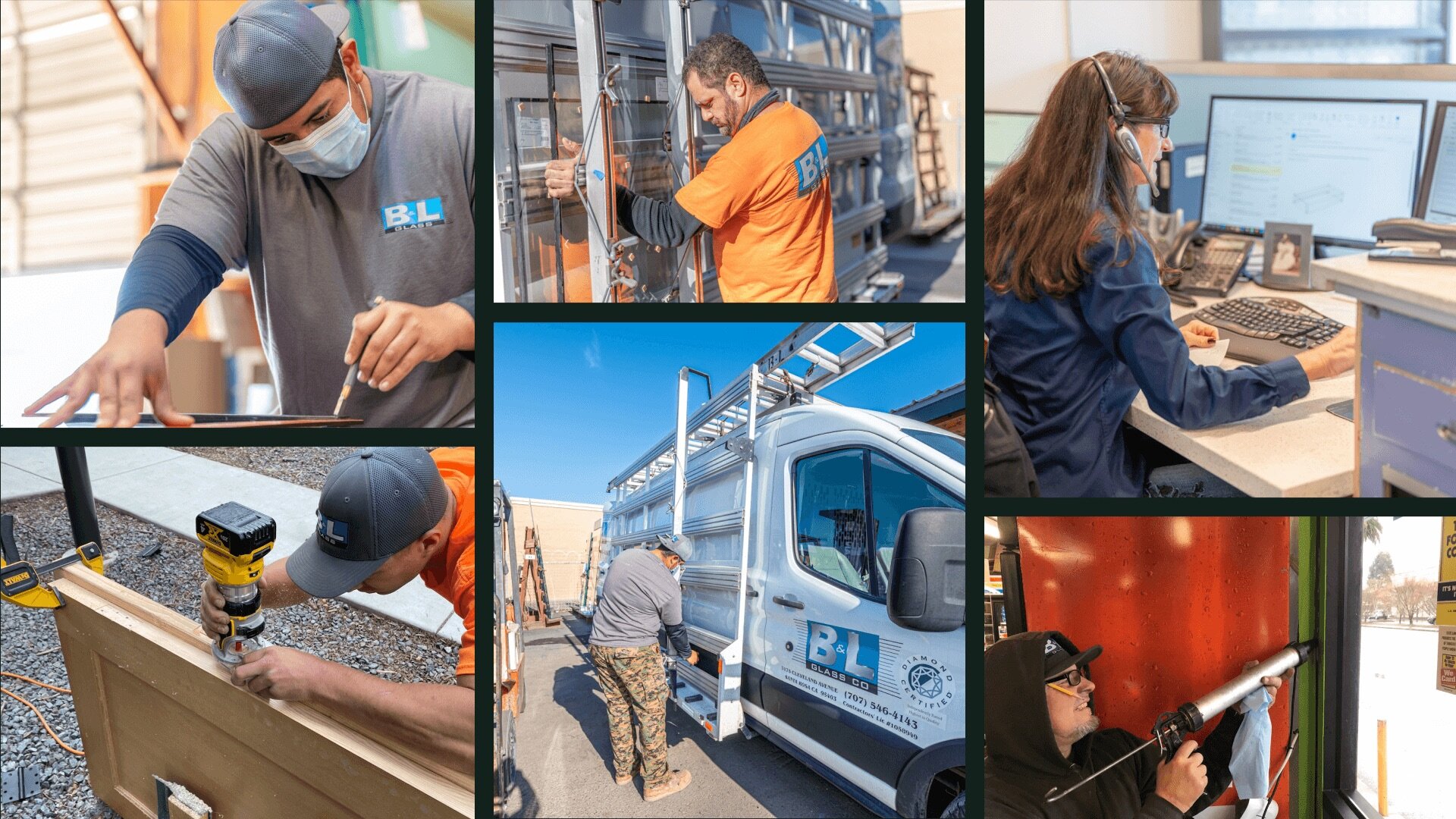
See how B&L Glass made that shift, cutting quote approval time from nearly 10 days down to 3.5 days after moving to one connected platform.
4. What are the best practices for maximizing financial oversight using AI construction business management tools?
AI construction business management software only delivers compounding gains when your team uses it intentionally and with strong operational discipline.
- Use AI to schedule crews and equipment by skills, certs, location, and load.
- Keep customer, job, and asset data clean so AI can forecast, price, and bill.
- Have field teams use the mobile app for time, photos, notes, and sign-offs.
- Connect AI to accounting so contracts, change orders, invoices, and payroll sync.
- Use AI reports to track crews, durations, costs, and margins by trade or phase.
- Enable AI customer updates for ETAs, schedule changes, progress, and invoices.
- Link inventory, materials, and rentals to jobs so AI can flag shortages early.
- Review AI pricing and approval insights to refine bids, change orders, and markups.
- Train office, field, and accounting teams quarterly on new AI workflows.
- Regularly audit AI rules for scheduling, approvals, and escalations.
Fragmented systems and manual handoffs don’t just slow jobs down—they quietly eat into the profit of every project and service contract.
BuildOps gives commercial contractors a single, connected operations platform from the field to the back office. Dispatch, field tickets, work orders, and financials all live in one source of truth, so your teams stay aligned, your data stays clean, and your margins stay protected.
With OpsAI, your operational data becomes a real-time decision engine. From job-level and portfolio forecasting to risk alerts and intelligent cash flow acceleration, your leadership team gets the visibility they need to grow confidently and profitably.
See how AI-powered operations built for commercial contractors can transform your bottom line. Schedule a free demo.
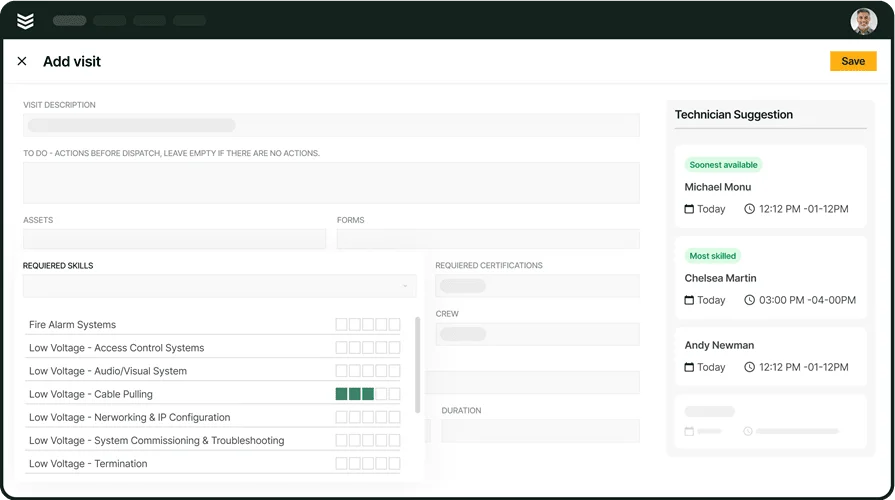
Unlock efficiency for your team with BuildOps
AI-powered tools for dispatching, invoicing, reporting, and everything in between.