Managing multiple crews through constant emergencies and shrinking margins isn’t sustainable anymore. That’s when AI stops being a nice-to-have and becomes essential—powering smarter dispatching, faster quotes, and laser-focused sales. AI-powered platforms are transforming the competitive landscape for the plumbing service industry, enabling contractors to scale operations without plumbing crew burnout.
This guide reviews key AI tools for plumbing—from field service to CRM—and helps you choose the right platform for your team. Here’s what we’ll cover:
- Top plumbing app AI features to look for & evaluate
- 6 best plumbing AI management apps for field service teams
- 4 best plumbing business, CRM, & sales apps with AI
- 3 best plumbing system design & simulation apps with AI
- 7 benefits of using an AI plumbing management app
- How to choose the right AI-powered plumbing app for your team
- 4 important plumbing AI app FAQs answered
Start by comparing the AI features that actually move the needle on plumbing performance—not just the ones riding the AI buzzword wave.
Top plumbing app AI features to look for & evaluate
Plumbing AI apps typically fall into three primary categories, and the specific features you should evaluate depend on which segment of your operation you are looking to optimize. Here is a breakdown of what to look for in each.
Field service management plumbing AI app features

These core capabilities keep your field operations moving—from ensuring your plumbers arrive on time to monitoring labor hours and managing vehicle logistics.
- AI-powered scheduling & dispatch – Leverages AI to match technicians to assignments based on technical proficiency, location, and availability, adjusting schedules in real time as new priorities arise. Look for tools with integrated scheduling and smart dispatch software that function on a unified board.
- Technician mobile app – Provides plumbing teams with job specifications, customer service history, and AI-assisted notetaking. A robust technician mobile app reduces office visits and accelerates the generation of field reports.
- Fleet tracking & route optimization – Analyzes vehicle positioning, fuel consumption, and driving behavior to minimize travel time and operational costs. Fleet management tools using AI can identify more efficient routes and predict maintenance requirements before a breakdown occurs.
- Time tracking – Automatically records technician labor, travel duration, and overtime via GPS and geofencing. Accurate time tracking integrates directly with payroll and job costing, removing the need for manual data entry.
- AI-assisted documentation & workflows – Employs AI to draft reports, summarize plumber notes, and populate forms, allowing crews to focus on wrench time. Platforms with built-in AI for field service can transform raw notes into professional invoices and documentation in moments.
CRM, sales & financial plumbing AI app features

These functionalities manage the client-facing and financial aspects of a plumbing business—from securing new contracts to processing final payments.
- Field service CRM – Centralizes client records, equipment history, and site hierarchies so your team remains fully informed. A CRM built for field service with AI can identify sales opportunities based on asset age and historical service data.
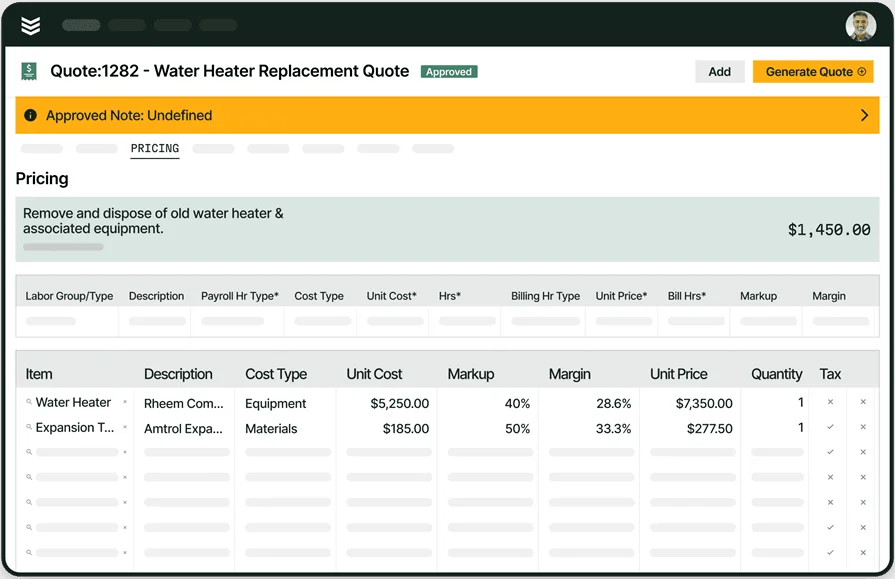
- Service quoting – Produces precise estimates more quickly by automatically factoring in labor rates and material expenses. AI-enhanced quoting software minimizes pricing discrepancies and gets proposals in front of customers ahead of the competition.
- Service agreements – Streamlines recurring maintenance contracts, renewal notifications, and scheduled inspections for specific assets. Digitizing service agreements ensures consistent revenue and long-term customer retention.
- Invoicing & payments – Generates invoices from verified job data, providing customers with on-site and online payment options. Pairing invoicing with integrated payments accelerates the cash cycle and prevents billing errors.
- Reporting & analytics – Monitors critical KPIs such as technician utilization and first-time fix rates. AI-driven reporting tools identify operational trends and anomalies that may be hidden in standard spreadsheets.
Plumbing system design, architecture & simulation AI features

These features assist the technical and engineering requirements of plumbing projects—integrating with construction plans, performing load calculations, and simulating system performance prior to install.
- AI-enhanced load calculation – Evaluates building geometry, climate statistics, and occupancy data to determine plumbing requirements with higher accuracy than traditional manual methods.
- System design & layout planning – Utilizes AI to optimize pipe sizing and routing for superior flow distribution and reduced material waste.
- Simulation & troubleshooting – Models plumbing system performance in a virtual environment, enabling engineers to test for efficiency or troubleshoot issues before work begins on-site.
Most plumbing apps give you a few tools. Almost none give you all of them—powered by AI—out of the box. BuildOps does. AI-driven dispatch, field notes, CRM, estimating, reporting: every feature you see here comes standard in one platform built for commercial plumbing contractors.

6 best plumbing AI management apps for field service teams
AI-powered plumbing apps run your service operations—from scheduling and emergency dispatch to job tracking, reporting, and automated invoicing.
1. Best for commercial field service teams: BuildOps

BuildOps is the only AI-native field service app purpose-built specifically for commercial plumbing companies. Its advanced search and organization functions handle the complexities of commercial clients — you can view and search all assets at all properties managed by a specific client, including the contact person you need to deal with at each property.
OpsAI supercharges the BuildOps mobile app with real-time dispatching and AI-powered notetaking, so techs always know where to go next and never waste time on paperwork. They get clear instructions, instant updates, and automated job notes—all from one app—so more of their day is spent actually getting work done.
Industry Specialization: Commercial
How Pricing Works: BuildOps prices based on team size, user count, and the capabilities your operation needs, quoted per user per month with options scaled for larger plumbing teams.
What Sets It Apart: Built-in customer hierarchies that organize and display assets split between multiple properties managed by the same customer, knowing what work needs to be done, on which property, and who needs to be notified about it, which is especially useful for commercial-scale and larger plumbing projects.
Key Features for Commercial Plumbing Teams:
- AI-powered, real-time Smart Dispatching that makes suggestions based on tech skills and availability
- Nameplate scanner lets you snap a photo of a plumbing asset (such as water heaters, pumps, or boilers), and the app will fill in the serial number and other details for you
- Integrates with Enterprise ERP tools like QuickBooks, Vista, and Sage, as well as with Bluon
Rating: 4.5 on Capterra from 151 user reviews
Built for the challenges of commercial plumbing
BuildOps has helped plumbing shops see 30% revenue growth + 75% quote approval rates.
2. Best for residential plumbing service teams: Jobber

Image Source: Jobber
Jobber is a plumbing app for residential contractors, helping them manage their field operations while growing their service business. You can automatically follow up with customers to get quick responses about emergency appointments and invoices, and easily sync timesheets for payroll and payment.
Jobber’s AI focuses on basic automation (scheduling, follow-ups, templates) and may lack the depth contractors need for complex commercial or multi-property work.
Industry Specialization: Residential
How Pricing Works: Monthly subscription based on the number of users and features
What Sets It Apart: Exclusively geared towards residential contractors and home services
Key Features for Residential HVAC Teams:
- Customers can easily book jobs with you online, with Jobber doing the rest of the scheduling work
- Whether they're for your clients or just your team, build intuitive job forms and checklists to make sure you finish all tasks on time
Rating: 4.6 on Capterra from 1438 user reviews
3. Best for general contractors that offer plumbing services: Service Fusion

Image Source: Service Fusion
Service Fusion is an FSM app designed for both residential and commercial businesses. It enables you to manage your jobs, as well as your entire fleet with GPS tracking. This gives you added visibility over your vehicles so you can reduce fuel costs and maximize the efficiency of your fleet at all times.
Service Fusion handles scheduling, dispatch, and fleet tracking for plumbing fleets well, but its AI features lag behind platforms with built-in machine learning for complex routing.
Industry Specialization: Residential and Commercial
How Pricing Works: Monthly subscription based on included features
What Sets It Apart: GPS tracking for advanced fleet management
Key Features for Plumbing General Contractors:
- Easily schedule your construction jobs from a single dashboard, and then dispatch them when it's time to start the project
- Don't just track which job site your vehicles are at with GPS tracking, but actually analyze downtime and fuel efficiency to get the most out of your fleet
Rating: 4.3 on Capterra from 308 user reviews
4. Best for small and medium-sized plumbing service businesses: Sera

Image Source: Sera
Sera is a newer plumbing app built to help small and medium-sized contractors streamline operations without being overwhelmed by too many features. It offers simple yet powerful scheduling, dispatching, and financial functions for local plumbing shops.
Sera handles the fundamentals well for smaller teams, but its AI capabilities are minimal — contractors looking for machine learning–driven dispatching, predictive analytics, or AI-assisted documentation will find the platform limited in those areas.
Industry Specialization: Residential
How Pricing Works: $399/month for a team of up to 4 technicians, additional tech seats can be purchased for $149/month
What Sets It Apart: Fast and easy onboarding with dedicated training, data migration, and business coaching support
Key Features for Plumbing:
- Batch invoicing, automated customer appointment reminders, and custom templates for contacting clients
- Plenty of available integrations for added functionality while keeping the base software lean
Rating: 4.4 on Capterra from 23 user reviews
5. Best for managing subcontractors: Tradify

Image Source: Tradify
Tradify covers the essentials of plumbing field service management: inquiries, quotes, scheduling, job tracking, and receiving payments. It also has some handy functions for integrating subcontractor schedules into your master calendar for large plumbing projects.
Tradify is solid for coordinating plumbing subcontractors and keeping basic workflows organized, but it lacks AI-driven features like smart dispatching or automated documentation.
Industry Specialization: Commercial
How Pricing Works: Tier-based monthly per-user subscription, and free trial available
What Sets It Apart: Pro and Plus tiers have dedicated tools for coordinating subcontractors' schedules
Key Features for Plumbing Subcontractors:
- Integrates with Google Calendar to make lining up your schedules easy
- Cloud-based software gives anyone on your team access to the information they need, anywhere
Rating: 4.7 on Capterra from 152 user reviews
6. Best for home services: mHelpDesk

Image Source: mHelpDesk
mHelpDesk is an FSM app designed for a series of residential field services, including plumbing, home cleaning, and landscaping. Intuitively schedule service for your customers and manage dispatch for leak repairs and installations.
mHelpDesk covers a wide range of home services, but its plumbing-specific depth is limited compared to specialized commercial platforms.
Industry Specialization: Residential
How Pricing Works: Contact them for a private quote
What Sets It Apart: Supports a wide range of home-related field services, including landscaping and cleaning
Key Features for Plumbing & Home Services Contractors:
- Lead management enables you to close more leads and take on more projects, as well as maximize your outreach efforts
- Job quotes provide more accurate estimates for the projects you're working on, and pre-built templates make them easy to create
Rating: 4.3 on Capterra from 824 user reviews
4 best plumbing business, CRM, & sales apps with AI
CRM and sales apps handle the customer-facing side of your plumbing operation — finding new clients, managing service histories, and closing maintenance deals faster.
7. Best for sales management: Buildertrend

Image Source: Buildertrend
Buildertrend is a customer and sales management app for construction professionals, designed to help them capture and close leads. Craft customized proposals that help you nurture leads and get closer to greenlighting your proposals. Connect with prospects with targeted email marketing efforts that show them you understand — and can help them accelerate — their business. Keep homeowners involved in the process with clear lines of communication, helping you maintain a great relationship with clients and helping them achieve results.
Buildertrend is strong in lead nurturing and proposals, but its AI is basic and lacks predictive analytics, AI upsell tools, and intelligent customer segmentation.
Industry Specialization: Home builders & Remodelers
How Pricing Works: Monthly subscription model (starting at $499/mo)
What Sets It Apart: Nurture lead funnels with email marketing and targeted proposals
Key Features for Sales Teams:
- CRM hub connects you with everything you need to create, capture, and track leads
- Draft contract proposals and execute outreach using email marketing
- Daily logs allow techs to track construction job progress with a record of the work
Rating: 4.5 on Capterra from 2483 user reviews
8. Best CRM for residential contractors: Housecall Pro

Image Source: Housecall Pro
Housecall Pro is a CRM and sales solution built for residential contractors. It specializes in plumbing, electrical, and cleaning services. The platform offers advanced reporting and accounting tools that make it easy to manage all aspects of the customer relationship.
Housecall Pro automates pipelines and follow-ups, but its AI is basic, lacking advanced dispatching, predictive insights, and AI-assisted quoting for complex commercial work.
Industry Specialization: Residential Contractors
How Pricing Works: Monthly subscription based on the number of seats you'll use
What Sets It Apart: Features that cater towards residential contractors
Key Residential CRM Features:
- Use pipeline management to intake and manage customers more effectively, automating the process from estimate through to invoice
- Creates engaging sales proposals that lead to more closed contracts
- Boosts upsell success to increase job ticket sizes
Rating: 4.7 on Capterra from 2739 user reviews
Make sure to check out our comparison of Housecall Pro vs BuildOps right here to see which one is the better fit for your plumbing team.
9. Best for tender management: Procore

Image Source: Procore
Procore is an FSM platform designed for general contractors and specialty subcontractors. Among its notable features are pre-construction tools that facilitate accurate and professional-looking proposals. Make bidding for jobs — and transitioning from bid management to project management — easier with financial integrations, templates, filters, and AI automations.
Procore uses AI mainly for pre-construction bidding and estimating (like filtering, counts, and document formatting), with minimal AI for field service, dispatching, and CRM.
Industry Specialization: General and Specialty Contractors
How Pricing Works: Contact them for a custom quote
What Sets It Apart: Financial features and integrations make shift from estimates to proposals to budgets easy
Key Features for Tender Management:
- Integrates with over 15 accounting integrations (and over 500 apps in total) to get sales & CRM tasks done faster and easier without needing separate platforms
- Use AI and filtering tools to properly count items, view material/labor rates, and format documents so you can move between pre-project phases quickly and seamlessly
Rating: 4.5 on Capterra from 2657 user reviews
10. Best for inventory management: ServiceTrade

Image Source: ServiceTrade
ServiceTrade is an end-to-end FSM solution that helps commercial contractors with office coordination, sales management, and inventory management. Increase visibility into jobs for all team members, from office admin to field service technicians, ensuring everyone is in the loop. ServiceTrade improves operational efficiency and effectively manages your inventory so you always have the parts you need, and your technicians aren't waiting for parts they need to complete jobs.
ServiceTrade handles inventory and job tracking for commercial contractors, but offers little AI for dispatching, CRM insights, or documentation.
Industry Specialization: Commercial
How Pricing Works: Subscription pricing based on the number of seats you need
What Sets It Apart: Inventory management solutions that ensure your technicians always have the parts they need
Key Features for Inventory Management:
- Tracks jobs with absolute precision using timecards, helping you limit unnecessary office visits and estimate future jobs with even better accuracy
- Forecasts the parts you'll need so you can keep your inventory fully stocked, without running into overstock issues and limiting available storage
Rating: 4.6 on Capterra from 340 user reviews
3 best plumbing system design & simulation apps with AI
Design and simulation apps handle the engineering side of plumbing — load calculations, pipe layouts, and water flow modeling. These picks offer some of the strongest tools for those functions.
11. Best for plumbing drafting and drawing: Tejjy

Image Source: Tejjy
Tejjy is a leading property and facility management company in the architecture, engineering, and construction (AEC) sector. They offer MEP drafting and drawing for plumbing, fire protection, and gas systems.
Tejjy offers strong BIM and MEP drafting for visualization and documentation, but its AI-driven automation is limited, favoring traditional CAD workflows over intelligent design tools.
Industry Specialization: Architectural Design & Engineering
How Pricing Works: Contact them directly for a quote
What Sets It Apart: Specialization in BIM consultation and design services
Key Features for Drafting & Drawing:
- Get precise mechanical and plumbing drawings that help with fixture fabrication, assembly, and installation
- In-house 3D scanning
- Create MEP designs that account for variable conditions in residential, commercial, and infrastructure projects
Rating: 4.8 on Goodfirms from 3 user reviews
12. Best for plumbing design and planning: Flatworld Solutions

Image Source: Flatworld
Flatworld Solutions specializes in plumbing design for both residential and commercial industries. With advanced modeling and pipe design services, they find the right fit for your facility by accurately calculating flow requirements.
Flatworld offers solid, energy-efficient design and planning, but its AI is minimal, lacking ML-based load optimization, automated duct layouts, and predictive simulation.
Industry Specialization: Residential & Commercial
How Pricing Works: Contact them to request a quote
What Sets It Apart: Focus on delivering high-efficiency plumbing and sanitation installations through cutting-edge designs
Key Design & Planning Features:
- Services a range of commercial plumbing installations, emergency leak repairs, and routine backflow maintenance
- Specializes in designing residential heating and cooling systems that deliver reliable, consistent results
Rating: 4.7 on Clutch.co from 23 user reviews
13. Best for plumbing engineering: TrueCADD

Image Source: TrueCADD
TrueCADD is a leading CAD company that specializes in BIM design and 3D modeling. They provide plumbing design, load calculation, 2D drawings, and complex pipe sizing & layout planning.
They provide end-to-end plumbing engineering but rely on traditional CAD/BIM workflows rather than fully automated AI design.
Industry Specialization: Industrial
How Pricing Works: Contact them to request a quote
What Sets It Apart: Multidisciplinary engineering company that specializes in BIM and mechanical engineering
Key HVAC Engineering Features:
- Spatially plan the assembly, fabrication, and piping to ensure you install the best layout for the plumbing system
- Design and draft schematics for heating and cooling systems
- Create final documentation and specifications for finalizing equipment development
Rating: Not yet rated on any popular software rating websites
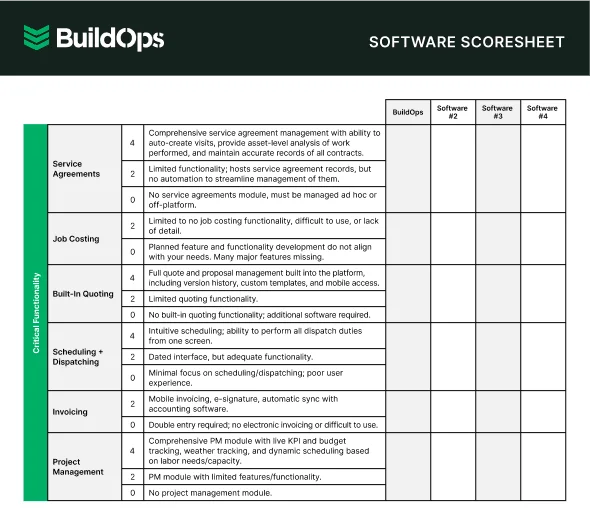
Get the software scoresheet
Compare top tools at a glance with this easy-to-use scoresheet.
7 benefits of using an AI plumbing management app
Transitioning to an AI-powered plumbing platform delivers fast ROI—from smarter dispatching to faster cash cycles—helping contractors boost performance and profitability.
1. AI-powered scheduling & smart dispatching
AI automatically matches technicians to service calls based on technical proficiency, real-time location, and availability, adjusting the board as priorities shift. Teams utilizing AI-powered field service scheduling report significantly tighter turnaround times and eliminate gaps in the daily schedule.
2. AI-assisted documentation & automated workflows
Advanced AI transforms voice notes, site photos, and asset readings into professional service reports in moments. By removing the manual admin load, technicians recapture time for wrench work while the office receives verified data the instant a job is completed, accelerating on-site field service closeout procedures.
3. Optimized first-time fix rates
AI analyzes asset history and identifies likely failure points before a plumber even arrives on-site. Providing this critical context ensures fewer return trips and higher customer satisfaction—a competitive advantage that AI-native field service management uses to lead the market in service quality.
Did you know
A Kickstand report surveying over 600 contractors found that 78% are now using AI tools on the jobsite, helping to bridge the gap as 47% of firms struggle to fill open positions. AI-backed workflows reduce the administrative burden, allowing existing teams to maintain high output regardless of headcount challenges.
4. Fleet tracking & route optimization
AI sequences work orders based on job priority and real-time traffic patterns to minimize travel time and fuel costs. When emergency leaks drop onto the board, the system instantly recalculates the most efficient routes and reassigns the nearest technician, protecting billable hours and reducing windshield time.
5. Accurate quoting & accelerated payments
AI factors in labor rates and material expenses to produce precise service quotes on the spot. By integrating quoting with automated invoicing, plumbing service platforms shorten the gap between completion and collection, keeping cash flow predictable and consistent.
6. Predictive maintenance & service agreements
AI monitors equipment performance and service history to flag assets heading toward failure before an emergency occurs. This allows contractors to turn reactive repairs into planned maintenance, securing recurring revenue through proactive service agreements.
7. AI-driven reporting & operational analytics
Intelligent reporting identifies operational trends, such as technician utilization and profit margins, across every crew and location. This real-time visibility allows smart dispatch and operations teams to identify margin leaks and productivity gaps without the guesswork of manual spreadsheets.

How to choose the right AI-powered plumbing app for your team
The right plumbing AI platform depends on how you run your shop. Some tools fit fast-moving residential teams, while others support complex commercial systems. Many vendors offer tiered AI, from simple automation to advanced predictive insights, so you can upgrade your tech stack without paying for analytics your team is not ready to use yet.
Evaluating which AI-powered plumbing app fits your workflow requires looking past the buzzwords. Ask these critical questions to determine the true ROI:
- Cost & Pricing Structure – How is the AI functionality packaged? Are core features like smart dispatching included, or do they require a premium tier? Is there a significant price gap between monthly and annual commitments? Most importantly, is there a pilot program or demo available to verify the AI's accuracy before signing?
- User Complexity & Adoption – Can your plumbers actually use these features in the field without extensive office support? How steep is the learning curve for trusting AI-generated reports or schedules? Look for platforms that deliver actionable insights through a clean mobile interface rather than burying crews in technical data.
- Onboarding & Integration Support – Will the vendor assist in tuning the AI models to your specific plumbing workflows and service mix? Does the app integrate seamlessly with your existing accounting and ERP systems? Ensure they provide ongoing guidance on maintaining the data quality that keeps AI predictions accurate.
- Industry Reviews & Outcomes – What are other contractors in your specific plumbing niche—residential service vs. commercial projects—saying about the platform? Do user reviews highlight measurable business outcomes, such as reduced windshield time or higher first-time fix rates, rather than just general software ease-of-use?
- Feature Utility & Scalability – Does the platform include the specific AI features that move the needle for your team right now, such as automated nameplate scanning or route optimization? Is there a clear roadmap for adding agentic AI or predictive analytics as your shop grows, or will you outgrow the software within two years?
4 important plumbing AI app FAQs answered
If we haven’t addressed all of your concerns yet, these answers to critical questions should provide the technical clarity you need to finalize your evaluation.
1. What is an AI plumbing app & how does it work?
An AI plumbing app uses machine learning to automate everyday tasks and improve how your team works. It tracks your past jobs to sharpen scheduling and dispatch, tighten up quotes, flag design issues, and support troubleshooting in the field.
Available on desktop and mobile, it keeps office staff and techs on the same page. Some tools focus on one area, like predictive maintenance. The best platforms bundle these AI features to support the full plumbing workflow—from first call to final closeout.
2. What does a typical job workflow look like in an AI plumbing app?
Plumbing AI operates on a unified board, ensuring all stakeholders access the same real-time operational data. Incoming calls are managed by an AI-enhanced CRM that surfaces asset history and suggests service paths, while smart dispatching reassigns the optimal technician based on live board priorities.
In the field, the mobile app facilitates AI-assisted notetaking and documentation, instantly converting raw site data into professional quotes, invoices, and performance dashboards.
3. Are AI plumbing apps worth the cost?
Standard FSM software typically delivers ROI through basic automation, but AI-powered plumbing apps drive significantly higher profit growth. By accelerating diagnostics, minimizing windshield time, and securing recurring revenue through predictive maintenance, these platforms often more than offset their subscription costs by eliminating operational margin leaks.
4. What are the best practices for getting sustained value from AI plumbing apps?
AI plumbing platforms deliver maximum long-term ROI when your team maintains high data quality and utilizes the full feature set consistently.
- Use AI dispatch to send the best-qualified plumber based on skills, licenses, and location.
- Keep customer, site, and plumbing asset data clean so AI can predict issues accurately.
- Have plumbers capture notes, photos, and time in the app to fuel AI-driven insights.
- Connect your app to accounting and ERP so AI can see the full job-to-cash picture.
- Review AI plumbing performance and tech utilization reports every month.
- Let AI automate customer updates for ETAs and digital invoices on plumbing jobs.
- Tie plumbing materials to work orders so AI can flag stock needs before you run out.
- Use AI quoting analytics each quarter to refine plumbing pricing and improve win rates.
- Train your plumbing team regularly on new AI features so they get full value in the field.
- Tune AI dispatch and workflows as your business grows and your services evolve.
AI in plumbing shouldn’t just clean up data—it should tame field chaos. No more digging through text threads, chasing photos, or patching spreadsheets. Every call, asset, and signature should land in one clean, searchable record automatically.
That’s what OpsAI from BuildOps does for commercial plumbing contractors.
Built for field service and projects, OpsAI tracks every job in real time—who was dispatched, what was found, what was repaired—and turns it into structured, audit-ready data. From AI-powered dispatching and routing to automatic nameplate capture, work summaries, and closeout docs, everyone works from a single source of truth.
See how OpsAI fits your agreements, documentation standards, and field realities—schedule a personalized demo to pressure-test it against your workflows.
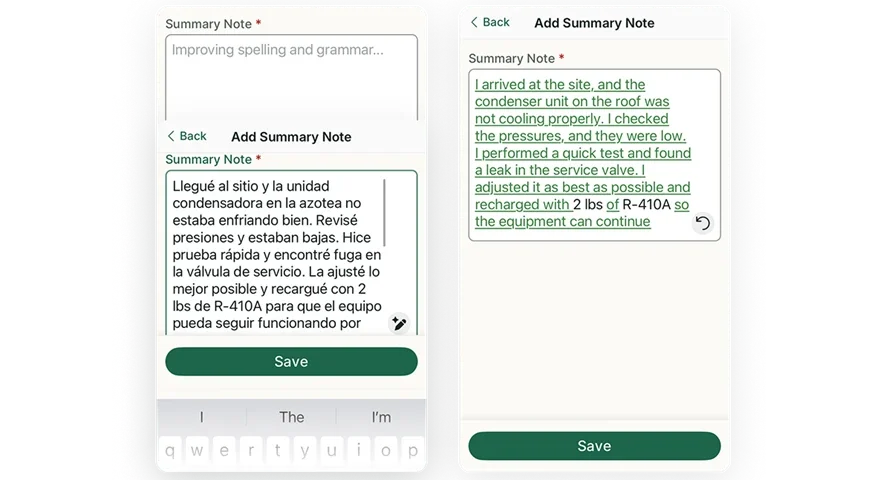
BuildOps: AI-powered plumbing FSM app
See how we connect scheduling, invoicing, and reporting in one AI-native platform