


When you’re managing fire protection work in the field, you need more than spreadsheets. You need a fire extinguisher management system that keeps every asset, inspection, and service call organized, compliant, and profitable—so nothing gets missed and your team stays ahead of every deadline.
In the fire safety industry, where field service management demands speed and accuracy, fire extinguisher management deserves a dedicated system built for the pace and precision of the work. Here’s what we’ll cover:
- Key fire extinguisher management system features
- Best for commercial contractors
- Best for residential contractors
- Best for general contractors
- Other notable fire extinguisher management systems
- 7 benefits of using a fire extinguisher management system
- Choosing a fire extinguisher management system
- 4 important FAQs about fire extinguisher management systems answered
Ensuring every bid is accurate, professional, and transparent, bridging the gap between your field technicians and your customers is key. We’ll dive into the essential factors for finding a system that fits your workflow and keeps your operations running smoothly.
Key fire extinguisher management system features
An effective fire extinguisher management system streamlines compliance, centralizes records, and automates workflows so teams can handle high-volume inspections without friction.
1. Smart scheduling and dispatch coordination

Fire extinguisher inspections operate on rigid timelines—including monthly checks, annual maintenance, and six-year teardowns—where a single missed cycle can compromise a property’s compliance. Prioritize a system with a field service scheduling tool that allows you to manage recurring inspection routes based on property, extinguisher type, and local jurisdiction. Integrating these tools with smart dispatch gives your office real-time visibility into technician availability and location, ensuring approved repairs transition into booked jobs without administrative delays.
2. Mobile-first field access for technicians

Technicians spend their days in stairwells and mechanical rooms, requiring mobile tools that operate even without a signal. A dedicated mobile technician app allows them to scan barcodes, log pass/fail results, and capture deficiency photos directly from the job site. Mobile access lets techs instantly see customer history, document issues with evidence, and send quotes or reports to the office in real time—no manual follow-ups needed.
3. CRM integration and asset tracking

Every inspection should be supported by historical context. Integrating your management tools with a contractor-focused CRM allows technicians to review past service records, property specifications, and active service agreements within the ticket. This synergy keeps asset hierarchies accurate, letting technicians instantly check manufacture dates and service milestones for every cylinder so no detail is missed and fire safety stays aligned with overall field operations.
4. Field service quoting

Maintaining clear oversight of outstanding repair quotes prevents revenue leakage and compliance gaps. With transparent quote status tracking tied to inspection fail codes, managers can prioritize follow-ups and quickly turn stalled, high-value estimates into approved work orders and scheduled jobs before the AHJ window closes.
5. Invoicing and payment readiness

To maximize cash flow, integrated invoicing and payment processing should turn every completed inspection or repair directly into an invoice with no manual reentry, letting technicians convert approved bids to invoices and collect payment on-site with just a few taps.
6. Compliance reporting and inspection analytics

Logging extinguisher inspection results is only the first step—you also need asset reporting for fire extinguishers to track pass/fail trends, spot high-deficiency extinguisher groups, and monitor technician performance so you can stay ahead of NFPA and AHJ requirements.
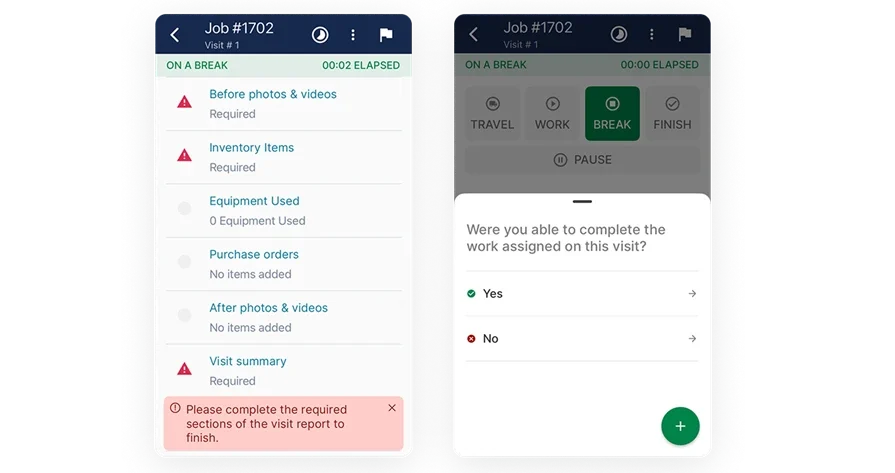
Plan, bid, and execute with BuildOps
See how quantities move from dispatch to billing without duplicate entry.
Other notable features to look for in a fire extinguisher management system
Beyond core functionality, specialized tools can further streamline the field-to-office connection. These capabilities reduce operational friction and help your team maintain a high standard of precision throughout the service lifecycle.
- Integrated time tracking: Accurate labor analysis is fundamental for profitable quoting and job costing. By linking your estimates with real-time field data through time tracking tools, you can refine bids to better reflect the actual duration of service calls. This visibility ensures technician labor is fully accounted for and prevents revenue loss on complex inspections.
- Service agreement oversight: For fire safety operations managing long-term contracts, connecting service agreement software to your workflow enables precise monitoring of covered assets and tiered pricing. This integration ensures technicians only bid on out-of-scope work, maintaining administrative clarity and ensuring renewals are never missed.
- Fleet and asset coordination: While not a direct part of the inspection, visibility into your equipment and vehicles impacts technician readiness and quote accuracy. Integrating fleet tracking software provides real-time awareness of resource availability, allowing for smarter scheduling and more reliable commitments to your multi-site customers.
Best for commercial contractors: BuildOps
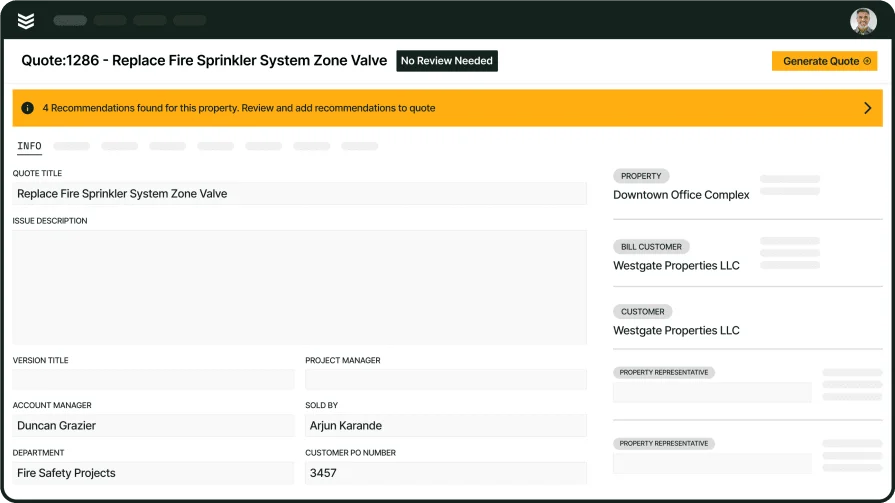
BuildOps gives commercial fire and life safety contractors a complete fire extinguisher management system, centralizing extinguisher inspections, deficiency tracking, quoting, and dispatch in one workflow. Technicians complete NFPA extinguisher checklists in the field, with photos and device readings flowing automatically into priced repairs, while office teams track progress in real time and deliver clear, professional reports and full extinguisher service histories to customers and AHJs.
How pricing works: BuildOps utilizes package-based pricing shaped by operation size and required modules. Their sales team will work with you to tailor a package during a platform walkthrough.
Features beyond fire extinguisher management: Offline-ready mobile ITM forms supporting barcode and NFC scanning. Advanced skill-based routing for recurring inspections. Deep integrations with CRM, inventory, and accounting tools. Dedicated customer portals and AHJ-compliant PDFs. Performance analytics highlighting pass rates, close times, and technician labor trends.
What sets it apart for commercial contractors: Device-level asset records, a streamlined deficiency-to-work-order flow, and dependable offline mobile performance empower large teams to manage multi-site portfolios with precision. BuildOps serves as a robust fire safety management tool built to handle strict compliance and high-volume field operations at scale.
Rating: 4.5 on Capterra from 151 user reviews
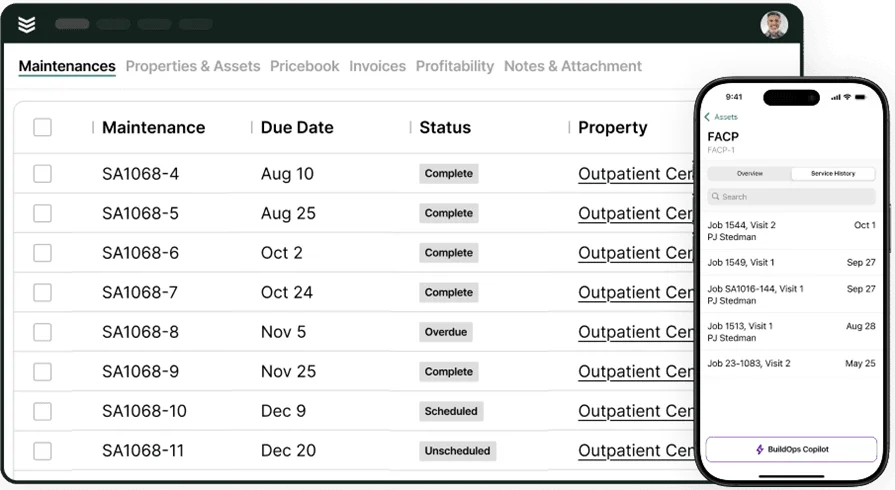
See BuildOps in action
Quick tour of inspections, deficiency-to-work-order, and reporting for fire service teams.
Best for residential contractors: FieldEquip

Image Source: FieldEquip
FieldEquip suits residential-focused teams that want quick estimates tied to simple scheduling and customer history. Techs can create quotes from a phone, attach photos, and move approved work into basic work orders with minimal admin. It may not fit larger fire safety companies that need deep NFPA template control, advanced automation, or coordination across many branches.
How pricing works: Modular pricing that varies by users and features. You will work with their sales team to shape a package.
Features beyond fire extinguisher management: Work order tracking, asset records, and service history in one place. Helpful for recurring visits and small property portfolios.
What sets it apart for residential contractors: Fast setup and a light learning curve help smaller FLS teams move off spreadsheets while keeping a dependable fire safety management system for day-to-day service.
Rating: 4.0 on Capterra from 3 user reviews
Best for general contractors: Fieldpoint

Image Source: Fieldpoint
Fieldpoint targets general contractors handling complex projects that span estimating, scheduling, labor tracking, and project accounting. Detailed estimates can include equipment, parts, labor, and subcontractors, and the platform connects with ERPs for tight back-office control. It may not be ideal for FLS providers that rely on robust mobile workflows for on-site quoting and instant office-to-field updates.
How pricing works: Quote-based pricing shaped by operation size and required modules. Expect a tailored estimate.
Features beyond fire extinguisher management: Job costing, project planning, dispatch, and integrations with CRMs and inventory tools. Solid for teams that split time between construction and service.
What sets it apart for general contractors: Strong support for project-driven work with layered budgets and long timelines, giving contractors a fire safety management tool that maintains cost visibility while handling complex engagements.
Rating: 4.1 on Capterra from 16 user reviews
Other notable fire management systems
Additional tools can enhance fire extinguisher management systems, with summaries of their fit, pricing, key strengths, and field-service limitations.
Simpro

Image Source: Simpro
Simpro covers quoting, scheduling, inventory, asset maintenance, and job costing in one suite geared to trade service. Fire protection teams can manage recurring testing, price deficiency repairs, and track parts usage from warehouse to truck. Larger FLS operations may need deeper configuration to match device-level NFPA records and AHJ-specific report layouts.
How pricing works: Subscription pricing varies by user count and modules. Their team provides a tailored quote.
Features beyond fire extinguisher management: Inventory control, planned maintenance cycles, purchase orders, and project job costing. Useful for firms that connect service with install work.
What sets it apart for fire service: Strong operational backbone with asset and inventory depth that supports high-volume service and retrofit programs inside a single fire management software platform.
Compare Simpro vs BuildOps features directly here to see which one has the necessary features to handle fire management system inspections, reporting, and anything else in your custom workflow.
Rating: 4.0 on Capterra from 145 user reviews
InspectNTrack

Image Source: InspectnTrack
InspectNTrack works well for smaller crews that need tight control over asset-based extinguisher inspections and repeatable field capture. It separates itself with barcode-driven workflows that keep inspection history tied to the specific unit, which helps when nameplate details, locations, and past deficiencies need to show up fast during a customer review. It may not be the best fit if your extinguisher program needs dispatch, billing, and closeout to run inside the same system as your inspection data.
How pricing works: InspectNTrack offers package options and enterprise subscriptions depending on asset counts and rollout size.
Features beyond fire extinguisher inspection: InspectNTrack leans into broader fire and life safety asset tracking, so your team can manage different inspection categories with the same scan-and-log approach. That helps when extinguisher checks sit next to other compliance items that still need consistent documentation and a clean audit trail.
What sets it apart for small service teams: If you run lean and rely on repeatable routes, barcode capture cuts down on field guesswork and office cleanup. Techs can move unit to unit, log results with consistent inputs, and keep history attached to the asset record instead of scattered across photos and notes.
Rating: 4.3 on Capterra from 56 user reviews
PlanRadar

Image Source: PlanRadar
PlanRadar focuses on site documentation and task tracking for fire safety work. Inspectors capture evidence, tag rooms and devices on drawings, assign remedial tasks, and track them to closeout. It may not cover deep estimating or granular NFPA templates that a full fire safety management system would provide.
How pricing works: Tiered subscription plans based on seats and project volume.
Features beyond fire extinguisher management: Markups on plans, photo logs, punch items, and document control that help managers coordinate corrective actions after inspections.
What sets it apart for fire service: Strong field evidence and task flow that complements a fire safety management tool when documentation and follow-up tracking drive the workload.
Rating: 4.4 on Capterra from 68 user reviews
ZenTrades

Image Source: ZenTrades
ZenTrades Zenfire targets service contractors with mobile-first estimates, jobs, and invoicing. Crews can create quick estimates, collect signatures, and convert approvals into job tickets without heavy admin. Larger FLS providers may outgrow it if they require extensive NFPA-driven templates, complex pricing, or deep accounting and inventory integrations.
How pricing works: Subscription tiers with optional add-ons. Contact sales for a package aligned to team size.
Features beyond fire extinguisher management: Client portal access, offline capability, and simple assignments that keep smaller teams moving.
What sets it apart for fire service: A direct path from inspection finding to estimate to job ticket that favors speed and clarity inside compact fire management systems.
Rating: 4.7 on Capterra from 25 user reviews
7 benefits of using a fire extinguisher management system
Fire extinguisher data errors derail ITM days. A dedicated system centralizes all records so scheduling, dispatch, follow-up, and closeout run from one source of truth.
1. Cut return trips caused by missing unit-level proof
Your techs capture the pass/fail, photos, and nameplate details at the cabinet, not later in the truck. When a fire extinguisher inspection app enforces a consistent shot list (tag, gauge, pin/seal, mount, clearance, and nameplate), you stop burning slots on “we forgot the serial” callbacks.
2. Keep routes moving when access windows blow up
Access changes happen mid-route, especially in hospitals, schools, and Class A offices. When inspections sit inside a system that supports scheduling and dispatching, your coordinator can reroute the day while keeping each deferred extinguisher logged to the same visit trail.
3. Deliver closeout packages owners accept without back-and-forth
Owners and AHJs want consistency across sites, techs, and inspection days. If your extinguisher results roll into the same reporting discipline you use in fire alarm inspection report software, you send a clean packet with clear deficiencies, photo proof, and timestamps that holds up in review.
4. Turn deficiencies into approved follow-up work without retyping the story
Issues such as failed gauges, missing brackets, or blocked access require an immediate, actionable path to resolution. By utilizing a fire safety service app, technicians can link each deficiency directly to a specific asset and location, allowing the office to generate quotes and schedule repairs without the need to manually re-enter field notes.
5. Keep continuity across every stakeholder on the account
Extinguisher programs touch property managers, facilities, EHS, and the AHJ, so the contact trail matters. With customer and site history organized in a system like fire CRM, your team answers “what happened to the stairwell unit on level 4” in one call.
6. Standardize asset IDs across every extinguisher, every site
Portfolio work falls apart when tag IDs drift across buildings, floors, and tenants. If your team already runs fire extinguisher barcode inspection software, you keep scan-to-record discipline tight so each inspection stays tied to the correct unit, not a look-alike down the hall.
7. Build defensible records when an incident triggers scrutiny
After an event, customers want a timeline, corrective actions, and proof that you handled documented issues. The same defensibility mindset behind fire investigation software applies here: clean timestamps, consistent evidence, and a complete chain from inspection to correction.

Choosing a fire extinguisher management system for field service jobs
Your crews need fast inspections, solid evidence, and clear next steps in the field—without calling the office. Choose a fire management system that closes ITM work quickly, impresses AHJs, and moves repairs forward as smoothly as your senior techs expect.
- Scalability and coverage: Can the platform manage single fire extinguisher inspections and large extinguisher service programs across many sites? Does it support thousands of extinguishers with different types, sizes, and ratings without slowing dispatchers down? Can it handle mixed extinguisher portfolios (portable, wheeled, specialty units) in one system?
- Speed and offline access: Can technicians complete fire extinguisher checklists and log results when there’s no signal in a parking garage or basement? Can they capture extinguisher photos and tag locations offline? Do extinguisher inspection records sync to the office in real time once the device reconnects?
- Compliance and documentation: Do fire extinguisher ITM templates follow NFPA and local code requirements with version control? Are timestamps, GPS, tech signatures, and photos tied to each extinguisher record for AHJ review? Can the system easily produce extinguisher compliance reports by building, floor, or customer?
- Automation and lifecycle flow: Can a failed extinguisher inspection automatically generate a quote for replacement, recharge, or hydrostatic test? Can approved quotes convert to scheduled work orders with extinguisher parts, labor, and materials preloaded? Will the system create recurring extinguisher inspection cycles and automated reminders without manual setup each time?
- Integrations and data continuity: Does it integrate extinguisher asset data with your CRM so sales and service see the same inventory? Can extinguisher usage, refills, and parts pull from your inventory and update accounting automatically? Do customer portals show extinguisher locations, inspection reports, and open deficiencies to property managers and AHJs?
- Features: Does the software support barcode or NFC tagging for each extinguisher to speed inspections and reduce errors? Can it manage extinguisher asset hierarchies (building, floor, area, device) and technician certifications specific to extinguisher work? Does it track extinguisher parts usage on each ticket and support payment capture in the field for recharge or replacement?
Once you lock in these priorities, you can compare fire safety systems with confidence. The next section highlights FAQs that FLS contractors want answered.
4 important FAQs about fire extinguisher management systems answered
Managing inspections and repairs at scale takes structure. These FAQs address how a fire management system and related tools support seasoned FLS teams in the field and at the office.
1. What is a fire extinguisher management system
A fire extinguisher management system centralizes inspections, unit histories, deficiency tracking, scheduling, and reporting so field techs work from the same record. It ties photos and tags to specific extinguishers, creates AHJ-ready reports, and turns failed inspections into booked recharge or replacement work.
2. How fire extinguisher management systems operate in the field
A unified fire management workflow lets techs complete NFPA inspections offline, scan barcodes, capture photos, and flag failures in real time. Deficiencies automatically convert into priced repairs on the dispatch board, office teams approve findings without re-entry, and customer/AHJ portals keep everyone aligned across the service lifecycle.
3. Is fire extinguisher management software worth the cost
Yes. Fire extinguisher management systems deliver ROI by speeding up inspections, closing deficiencies faster, and cutting repeat visits. Owners gain real-time visibility into extinguisher status and compliance, reducing disputes and fines so the system quickly pays for itself.
4. What are the best practices for implementing a fire extinguisher management system
Successful implementation demands alignment between leadership and field operations. To ensure a durable rollout, focus on proving immediate value on day one and locking in operational standards before scaling across your organization.
- Conduct role-specific training using real-world field scenarios.
- Standardize all NFPA inspection templates and deficiency codes.
- Align dispatch logic with technician skills, certifications, and service regions.
- Enforce scan-to-record discipline via barcodes or NFC tags for every device.
- Convert field failures into on-site quotes to prevent revenue leakage.
- Mandate that photos, device readings, and signatures are attached directly to the asset record.
- Automate recurring inspection cycles and service renewal reminders.
- Verify deep integrations with CRM, accounting, and inventory tools prior to go-live.
- Audit KPIs weekly to optimize technician routes and pricing structures.
- Maintain documented playbooks to ensure new hires deliver veteran-level output.
Following these core principles ensures your platform functions as a robust fire safety management tool, providing the transparency and precision necessary for high-volume fire and life safety operations.
BuildOps doesn’t just track extinguishers—it closes the loop. From ITM to recharge or replacement, your techs move fast, your office sees everything, and nothing gets missed.
Field-ready NFPA workflows, smart checklists, and full device history keep every visit tight and traceable. OpsAI adds intelligent routing and scheduling so you cover more ground with the same crew.
Want to see an inspection flow from deficiency capture to payment? Book a quick walkthrough and see if it fits your team and timelines. No pressure.
Run your FLS operation with BuildOps
From inspection to invoice, see ITM, repairs, and AHJ reporting move in one clean flow.


