
Scale your operation with the #1 software for fire & life safety contractors
- BuildOps + Inspect Point Integration: 1 connected workflow to see you through quoting, scheduling, inspections, invoicing, and more
- Features built for FLS: Centralize AHJ audit data, NFPA-compliant reporting, and deficiencies tracking
- 40% increased productivity: Reduces the time for invoicing, scheduling, and managing projects by up to 40%
- 90% faster payment processing: Slash payment processing time by up to 90%




Proven outcomes
Rated best FLS software in 2026 by commercial contractors
See for yourself why leading commercial contractors trust BuildOps to manage their fire and life safety service operations
Verified in your industry
Top commercial fire & life safety crews choose BuildOps



What makes BuildOps different
Built from the ground up for contractors who run projects, service, and everything in between. Not adapted. Made for the work.
Commercial work isn't an add‑on
Most platforms started in residential and stretched to fit. BuildOps starts with the complexity of commercial work.
Run the work in one connected system
Field, office, finance, and sales — all in one place. No duct-taped tools, no double entry, no dropped balls.
OpsAI is built in, not bolted on
OpsAI is already in your workflows. It recaps the day, calls out risks, and gives every role a clear next step.
Proven Results
Built to perform
More crews in the field, faster invoices out the door, and margins you can see, that's what BuildOps delivers.
More revenue per tech
Get more out of every tech in the field.
Tools replaced on average
Scale without stacking more tools.
More work without more overhead
Handle more volume without adding headcount.
Built for compliance
The details that power fire & life safety work

Inspections, standardized
Standardized NFPA-compliant reports with custom forms, and centralized inspection data for easy AHJ audits

BuildOps + Inspect Point
A clean handoff from inspection to quoting, scheduling, and invoicing, all in one connected workflow and built for fire safety work

Deficiency flagging
Automate maintenance schedules and flag aging systems to unlock long-term contracts and new sources of revenue

OpsAI efficiency
AI-native platform unifies the entire operation from end-to-end, optimizing your custom workflows and jobs

Field-ready mobile app
Techs enter jobsite information on the jobsite, so data is refreshed daily and project margins stay on track

Custom reports & dashboards
OpsAI turns job data into clear priorities, helping leaders protect profitability before issues hit the financials

Proven results
Real-world impact for commercial fire & life safety


"We've seen an increase in day-to-day operations efficiencies that's going to add up to significant savings in time and energy over the course of a year."

"If we didn't have BuildOps and the additional cyber security they give our company, we would be dead in the water."

"The ability to produce reports either on an individual job basis, a quarterly basis, or a project basis is something we'd never seen before in other software that we've used."

"We've cut down in our receivables from about 120 days to 30 days on average."


"Before we knew it, we were seeing quicker turnaround times on job closeout and a huge improvement in the time it took for quotes to be accepted by our customers."


"With BuildOps, we feel like we can go after anything. The sky is the limit as far as the size of the project."
.webp)

"BuildOps gave us an all‑in‑one system for both service and projects. Once we saw that, it was a no‑brainer."

"With the integration of BuildOps and Sage Intacct, our accounting system, we've been able to speed up the time it takes for us to bill customers."


"Our consulting division increased 300% because we were able to free up more time from the office to help other customers."
![Service First Logo]](https://cdn.prod.website-files.com/69cad9cd3a5ef3196ea9bb65/69fa0ca0adc28a56d26717c9_Service%201st%20white.webp)
"Sometimes systems promise you the moon, then you use them and see the weaknesses. It's been the exact opposite with BuildOps. Everything we wanted it to do, it could do."

"We used to be two weeks behind on job costing. Now we're up to date daily."

Highly-rated
Top fire & life safety teams choose BuildOps
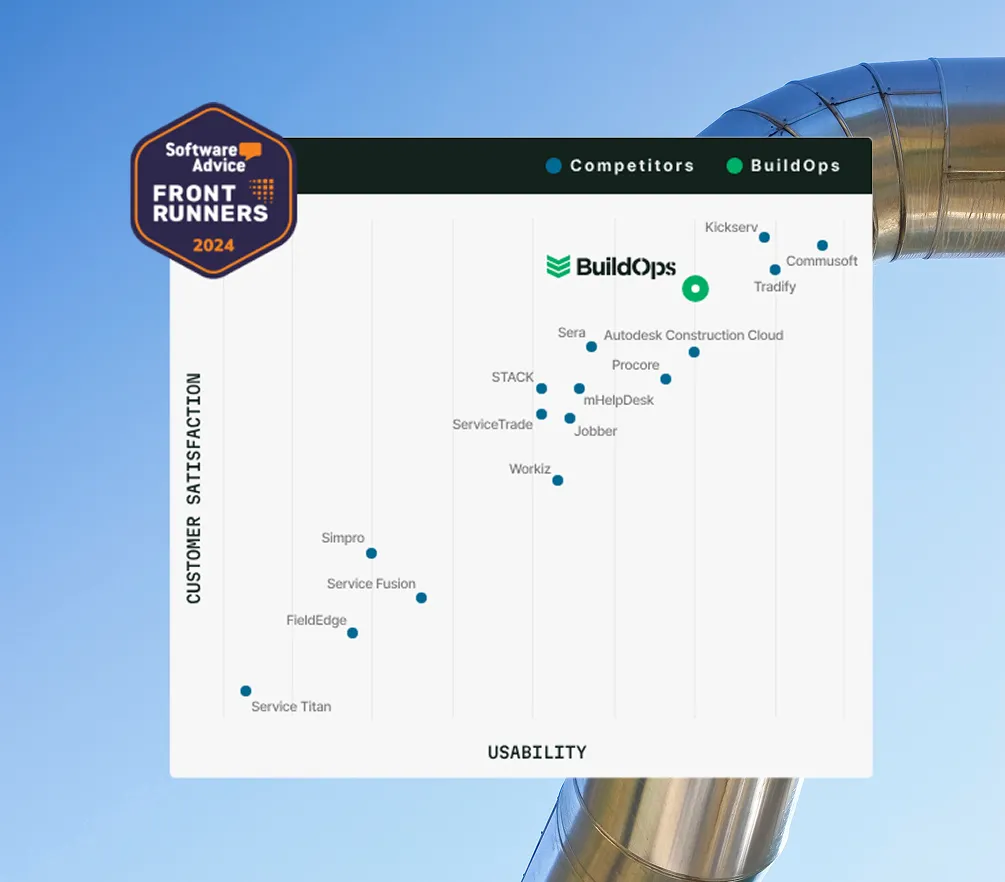
Thousands of software users agree that BuildOps is one of the top choices when it comes to customer satisfaction and usability, according to Gartner (Software Advice).
Common Questions
Your fire and life safety software questions, answered
How does BuildOps handle integration with my existing ERP (Sage, Viewpoint, etc.)?
BuildOps syncs with your ERP—Sage, Vista, QuickBooks, and more. Field data flows directly into job costing and payroll modules, so your books stay accurate without manual re-entry.
What is the typical implementation timeline for BuildOps?
Most commercial contractors are up and running in a matter of weeks, not months. The timeline depends on team size, existing systems, and how much data migration is involved. Your implementation team will tailor a project plan specific to your organization.
What can BuildOps do that's specifically useful for fire & life safety work?
BuildOps takes every complex and critical part of a fire and life safety service workflow and unifies it in a single system of action. From first quote to on-site compliance checklists to deficiency flagging, everything lives under the BuildOps umbrella, with information ready to access from every role in your business.
Our fire and life safety customers in particular love the unique and custom workflows you can build inside the platform that work for larger projects or critical compliance rules that have to be followed, unlike other solutions that treat a $1M project the same as a $2K service job.
Using BuildOps, our customer Certified Fire saw a 250% increase in profits, 4% monthly service billing increase, and a jump from 75% to 95% in service employee billable time. All thanks to BuildOps' data accessibility, unique workflows, and customer-first approach.
Why is BuildOps so great for commercial fire and life safety teams?
BuildOps was built from the ground up for commercial teams, so our features are already in place to support long-term, multi-site, big crew fire and life safety jobs and projects rather than having features tacked on to a one-size-fits-all solution.We don't think one size fits all when it comes to fire and life safety work, so we made BuildOps knowing what teams with complex fire and life safety projects need.
Is the platform's AI (OpsAI) ready for use now?
Yes. OpsAI is live — writing invoice summaries, recapping tech visits, and helping dispatchers match the right tech to every job. It works inside your existing workflows, not on top of them.