November Product Update: What's New in BuildOps
Introducing Standard Dashboards, plus updates across BuildOps that give your teams one project for multi-trade work, estimates that carry from quote to job, and a more complete record of time.
Every job starts with a quote, runs through the field, and ends in the books. This month, we built for all three, so work keeps moving without starting over or retyping. Here’s what we built.
Standard Dashboards
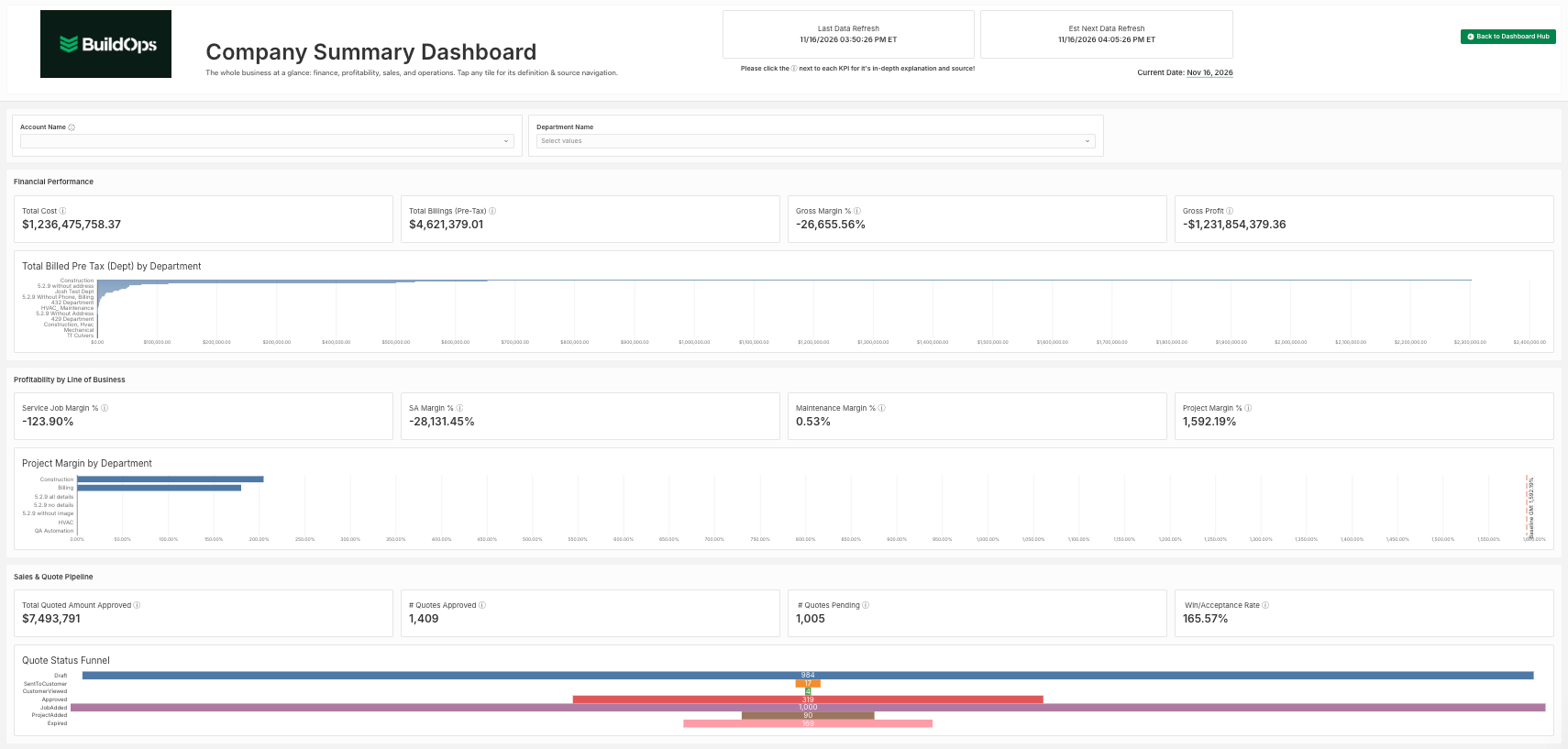
Every team needs a clear place to start with reporting. This month, BuildOps officially releases Standard Dashboards: one consistent set of financial, operational, and project dashboards, with a new Dashboard Hub as the front door and a new Company Summary for the big picture.
Every dashboard uses the same layout and the same definitions. A number reads the same wherever you find it.
Module: Dashboards
Availability: Releasing November 17. Customers that have already set a custom default landing page keep it.
What’s new:
- Dashboard Hub: the new default landing page for Dashboards. It lists every standard dashboard, with an FAQ and links that map each earlier report to its standard counterpart. The previous landing page stays available as a legacy view.
- Company Summary: a new executive view of the whole company. Drill through to the detailed dashboards.
- A complete standard set: AR Aging, Finance, Operations, Project Analysis, Tech Profitability, and the renamed Service Dashboard (formerly Service WIP) and Project Dashboard (formerly Project WIP).
- Easier to navigate: the Dashboards menu is sorted by category, with the standard dashboards grouped under New Standard. Every dashboard has the same header and tenant filter, with help links built in.
Why it matters: Finance, operations, and project teams get one trusted starting point for reporting, with the same definitions on every dashboard. Leaders can start with the Company Summary and drill into the detail. Every dashboard is documented, so teams know what each one is for.

Projects
New Projects dashboard
Module: Projects
Availability: On for all customers by November 17.
What’s new:
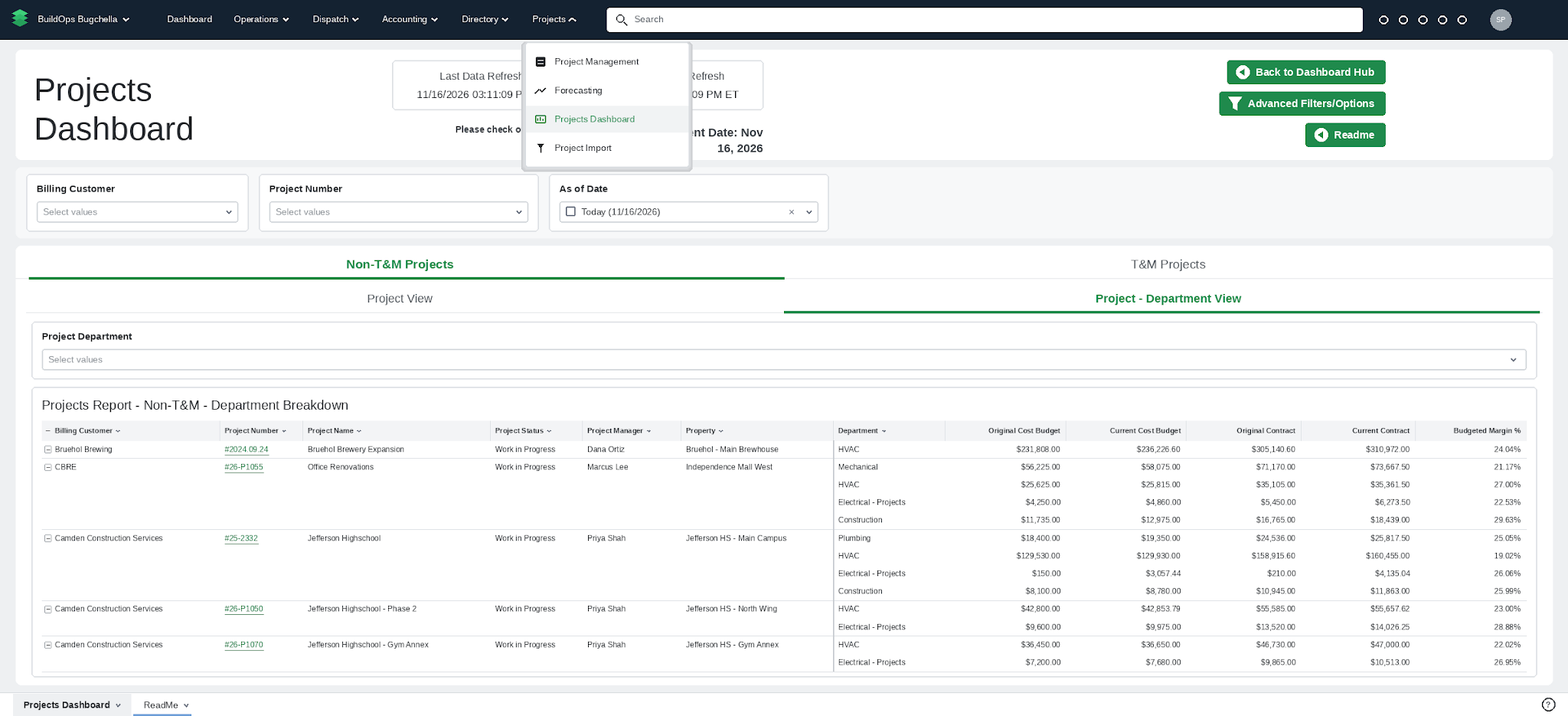
- Projects > WIP Reports is now Projects > Projects Dashboard. It opens the new Projects Dashboard, built on validated data.
- It shows net and gross over/under billing, backlog, margin %, and retainage, with a Project view, a Project - Department view, and a separate tab and table for T&M projects.
- One As-of Date drives both cumulative and month-to-date numbers. A ReadMe tab explains what’s new and how it compares to legacy dashboards.
- On each project, the Dashboard tab is now called Project KPIs (same content, new name).
Why it matters: Finance and project teams get one trusted dashboard to close the month on. Retainage is included in gross billed, and over/under billing shows net and gross of retainage per ASC 606. Access follows existing Projects permissions, so PMs don’t need Dashboards access. Legacy dashboards move to Reports > Legacy dashboards. They’re no longer maintained and their numbers may not match, so we recommend the Projects Dashboard going forward.
Multi-department Projects
Module: Projects
Availability: Open beta now. Generally available November 17, turning on automatically for eligible customers (Sage Intacct or no ERP connected) on Quoted projects. No request needed.
What’s new:
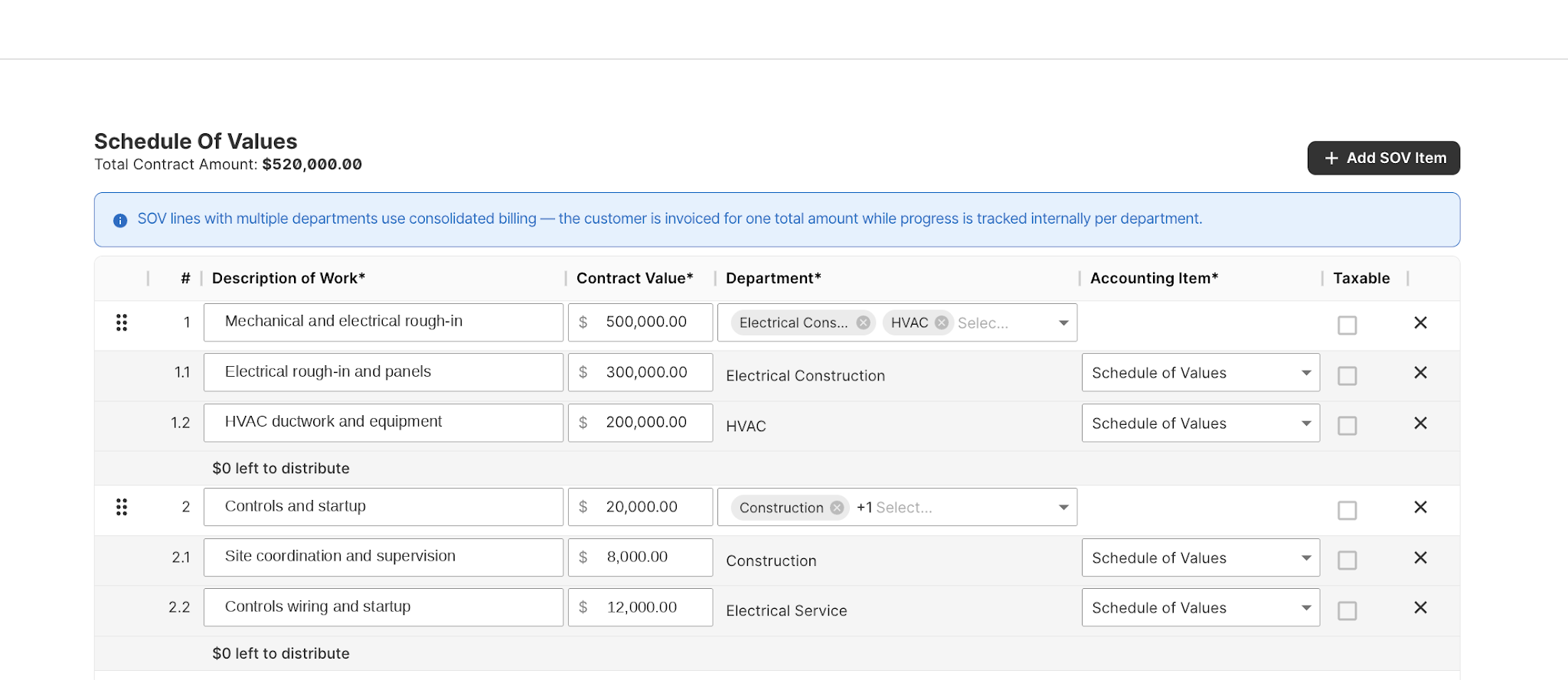
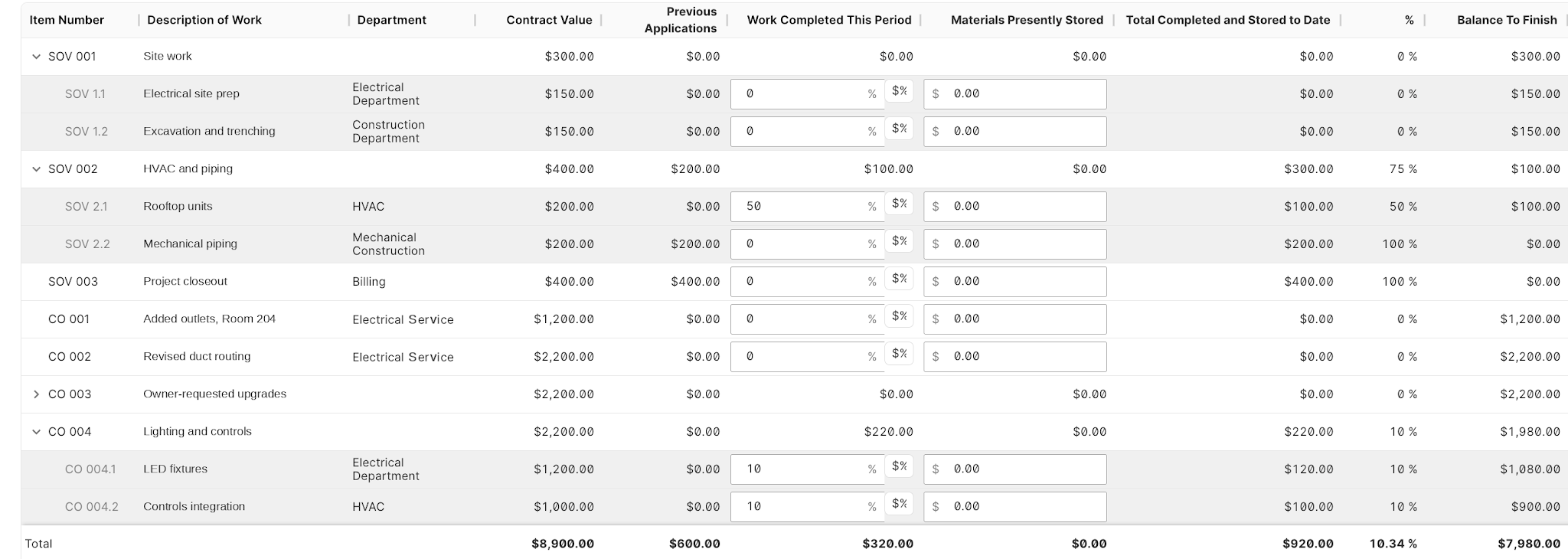
- Split one schedule of values line across the departments doing the work. Budgets, change orders, pay application billing, and retainage follow the split.
- The Projects Dashboard shows WIP, billing, and margin by department.
Why it matters: Multi-trade projects run as one project with one contract, and the customer still gets one consolidated invoice. No more duplicate projects or SOVs. No more reconciling department revenue by hand. Departments split the financials, not access: anyone on the project sees all of its departments.
Submittals redesign
Module: Projects
Availability: Available now, on for all customers.
What’s new:
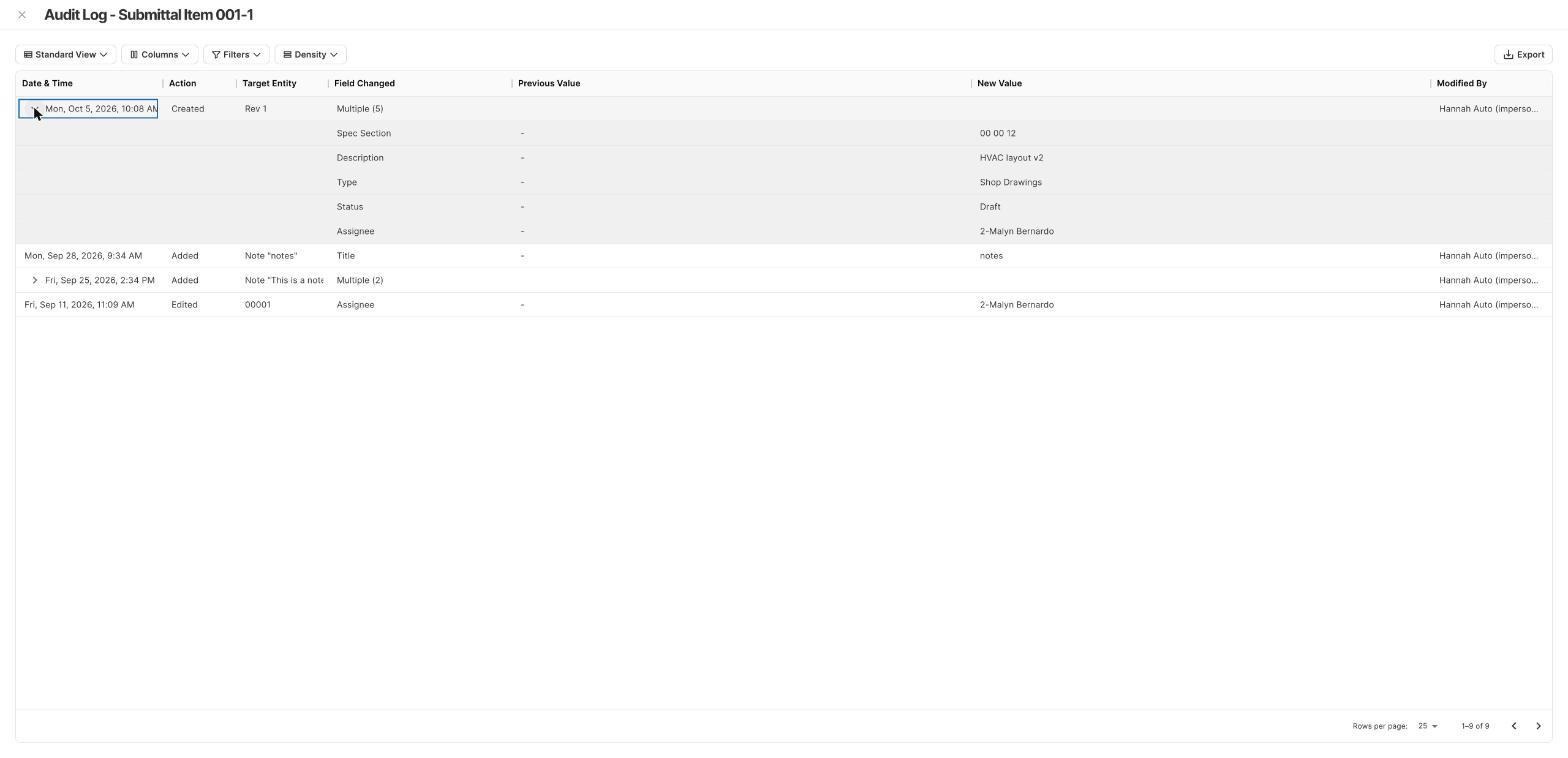
- A Revise and Resubmit status, item-level revisions with a full audit log, bulk import from a template, multi-select to add items to new or existing packages, a searchable Assignee field, titled notes, and per-file controls on package attachments.
- New with this release: revision numbers on item numbers and the package PDF, package status that updates automatically when items are Approved or Approved as Noted, and package PDF updates.
Why it matters: Submittals run from first submission to final approval in one place. The audit log records every revision, note, and change for the team and the contract file.
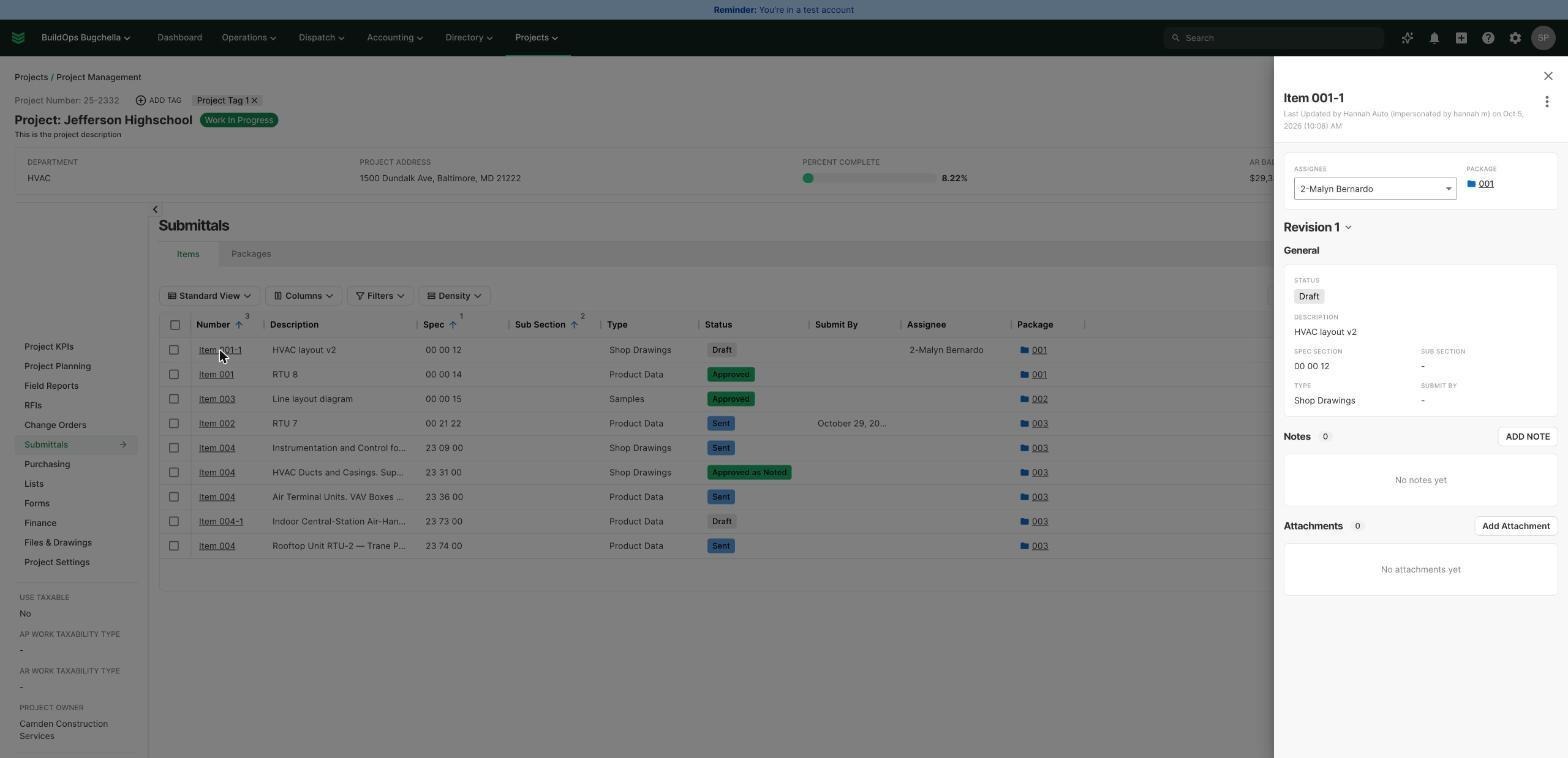
Each item revision keeps its own notes and attachments.
Change Order KPI updates
Module: Projects
Availability: Open beta. Reach out to your CSM to request access.
What’s new:
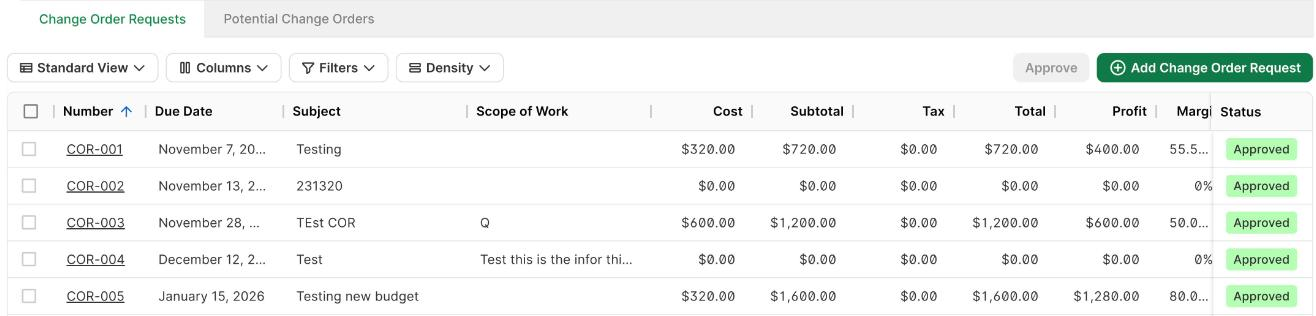
- Change Order KPIs now count external change order requests only.
- Internal change orders get their own Internal Change Orders KPI.
- Revenue shows before tax, every KPI has a tooltip, and the change order list splits revenue into Subtotal, Tax, and Total.
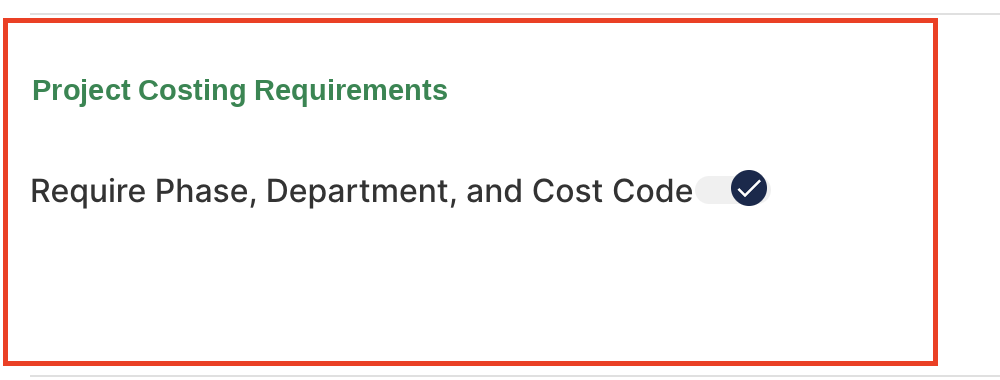
- The existing Require Phase, Department, and Cost Code setting, now under Company Settings > Project Settings > Project Costing Requirements, also applies to change order lines.
Why it matters: Change Order profit and gross margin reflect customer-facing change orders only, so internal budget moves no longer pull margin down. Internal change orders stay visible in their own card. Required cost codes keep change order costs from landing as Unspecified on job cost sheets.


Quotes and CRM+
Select a job template when converting a quote to a job
Module: Quotes
Availability: Available now by request. Please reach out to your CSM to enable.
What’s new:
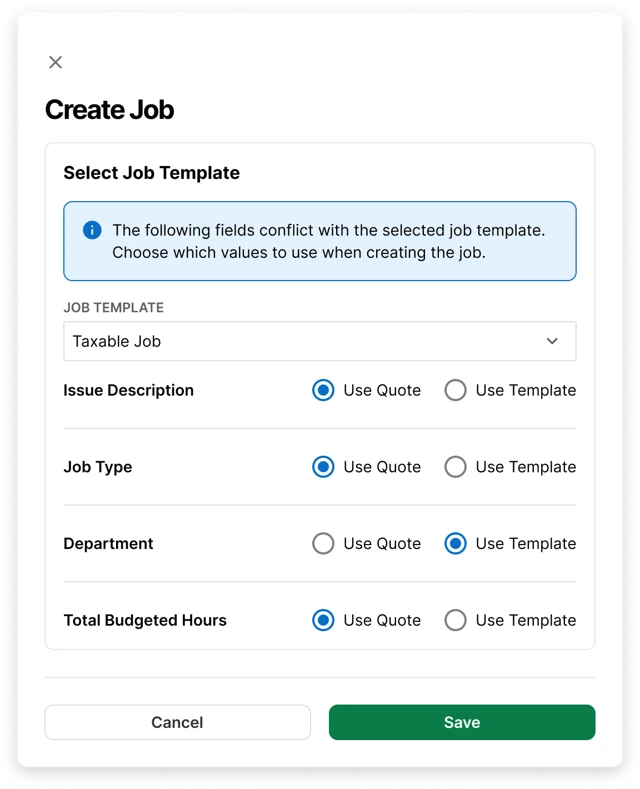
- The Create Job window on Quotes now has an optional Job Template selector. The new Job is set up from the template.
- Where the Quote and template differ on a field, you choose Use Quote or Use Template right in the window. Use Quote is selected by default.
Why it matters: Jobs start with the right settings, such as AR Work Taxability Type, from the moment they’re created. Leave the selector blank and the Job is created from the Quote as always.
Automated AR tax on quotes with Avalara
Module: Quotes
Availability: Available now by request for Avalara integration customers. Please reach out to your CSM to enable.
What’s new:
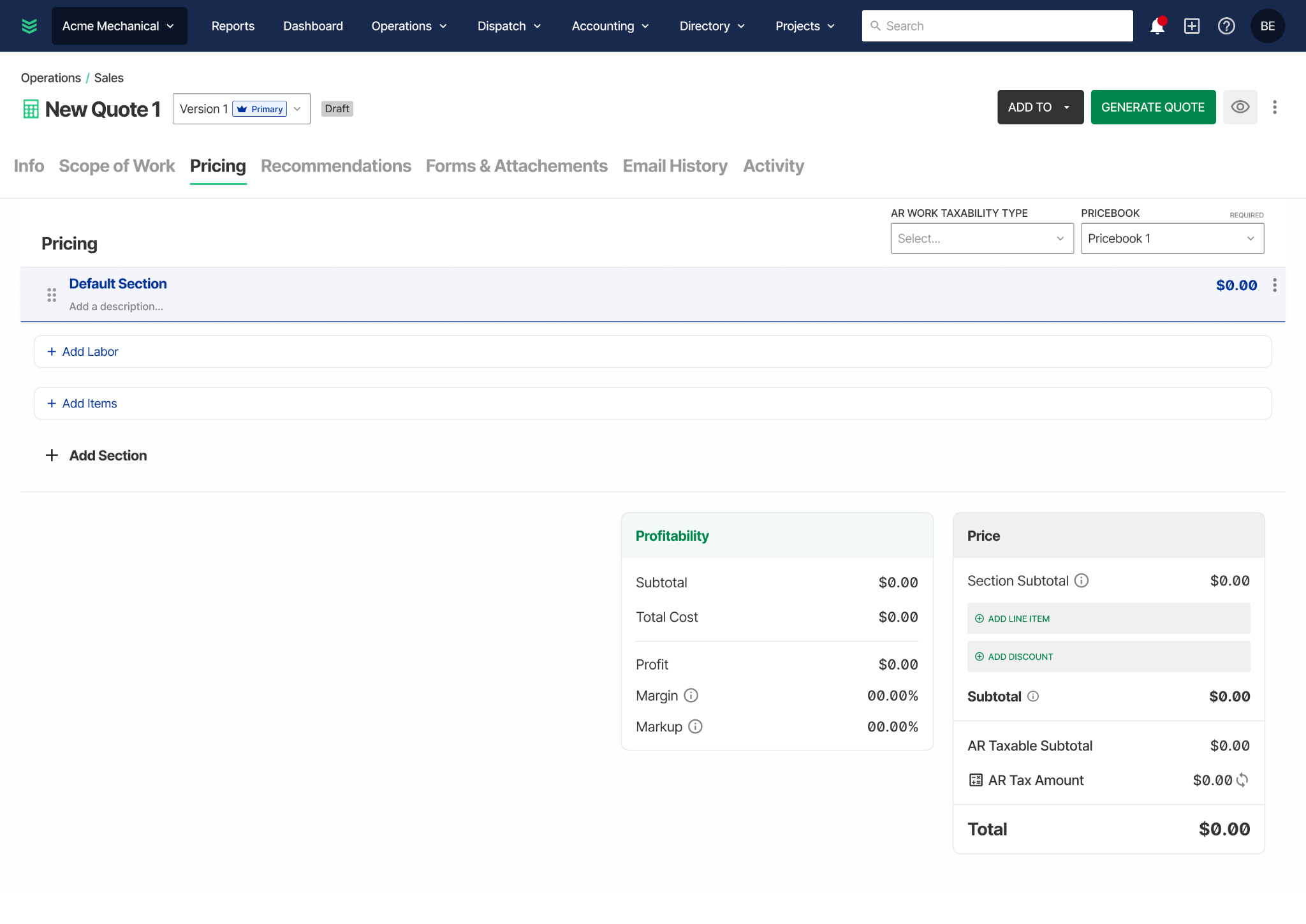
- For Avalara-integrated customers, Avalara-calculated tax replaces the manual tax rate selector on Quotes, using the property address, line-item taxability codes, and customer exemptions.
- The Summary shows a Tax Amount with a breakdown, and a Refresh button recalculates it. Tax also recalculates on Generate Proposal and Approve Quote.
- New Work Taxability Type, Provider Tax Code, and Billing Product fields are available on line items.
Why it matters Quote tax comes from the same engine as Invoice tax, so the numbers customers see on a Quote line up with the Invoice that follows.
Conversion status on Won Opportunities
Module: CRM+
Availability: Already enabled for all CRM+ customers.
What’s new:
- Closed Won Opportunities now carry a Conversion Status: Ready to Convert, Not Converting, or Converted.
- The Won Opportunities tab adds an editable Conversion Status column and a filter. Converted is set automatically when a Job, Project, or Service Agreement is created from the Opportunity.
Why it matters: The Won Opportunities tab works as a clear queue of wins waiting to become work. Wins that won’t convert are marked Not Converting and stay on record for reporting.
Estimate details carry into Jobs
Module: CRM+, Jobs
Availability: Automatically on for all CRM+ customers on November 17, 2026.
What’s new:
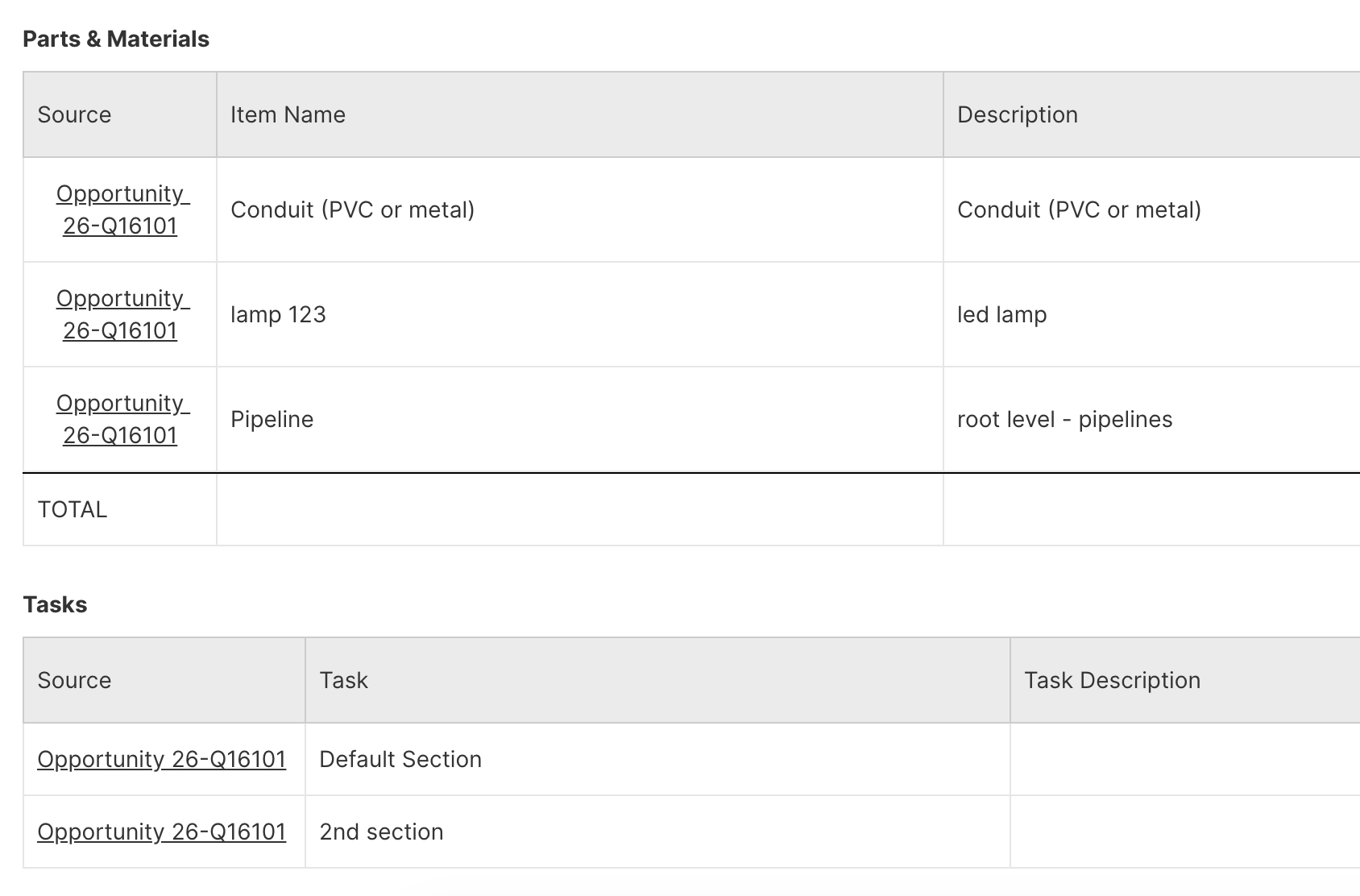
- When a Job is created from a Closed Won Opportunity, the Opportunity’s estimate line items carry over automatically.
- Each Estimate section becomes a Job Task, Labor and Parts & Materials fill the Quote Items section of the Job Report, and a View Opportunity link points back to the source.
Why it matters: Operations sees the estimate built during the sale from day one, so the as-sold scope and the as-executed work sit side by side.
Default Invoice email recipients
Module: Directory (Customers), Invoices
Availability: Automatically on for all Multiple Bill To and Contacts customers on November 17, 2026.
What’s new:
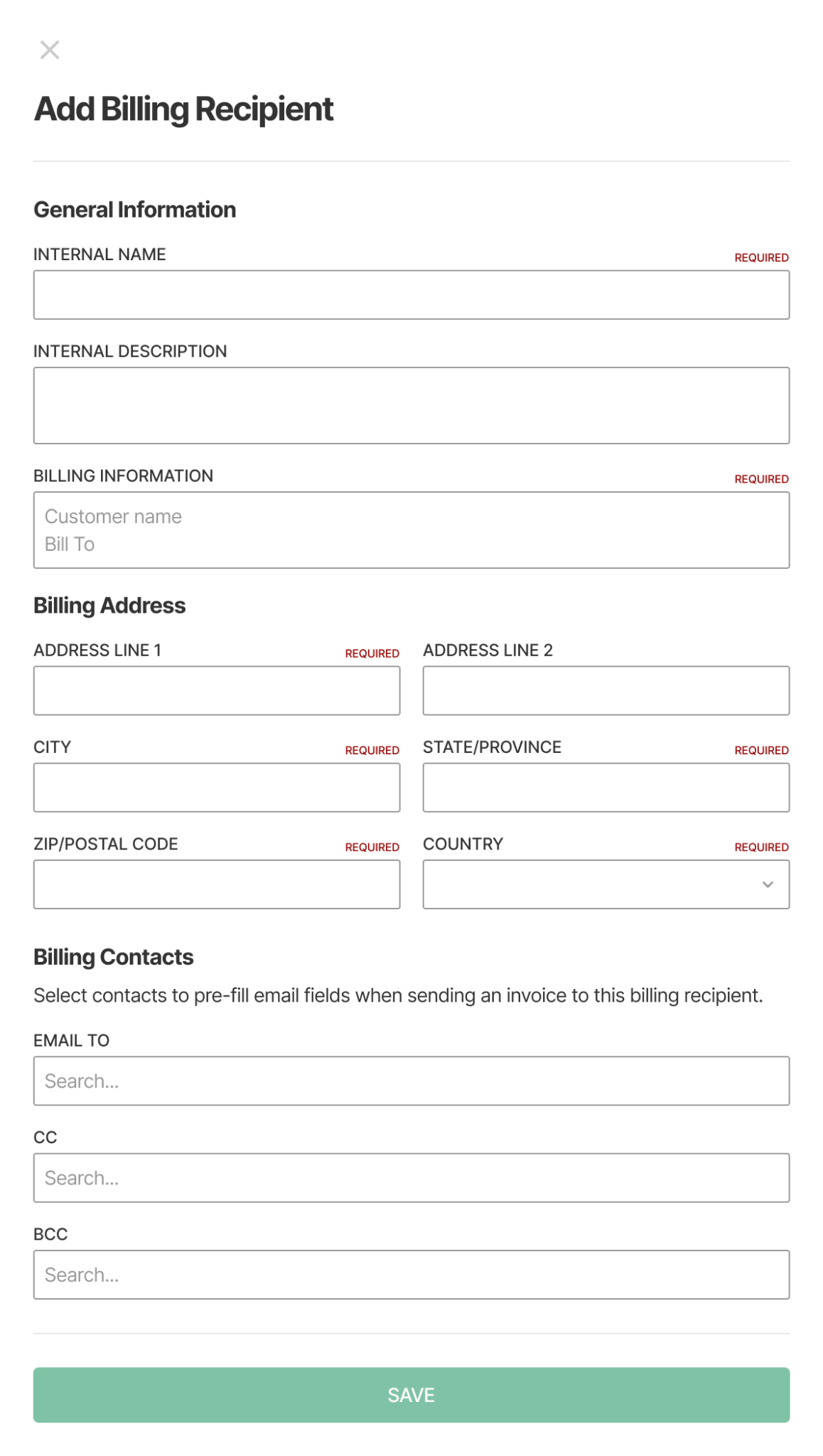
- Set default Email To, CC, and BCC contacts on each Billing Recipient.
- Send Invoice opens with those recipients already filled in, and you can still add or remove anyone before sending.
Why it matters: Set the right accounts payable contact once and every invoice for that Billing Recipient goes out ready to send.
Time Tracking
Time Tracking 2.0
Time is the number everything else is built on: payroll, job costing, billing. Time Tracking 2.0 gives office teams and technicians a clearer, more complete way to record, review, and approve it, on web and mobile.
Every entry now stands on its own, with the details payroll needs, from meal break confirmations to overnight shifts that split cleanly at midnight. Technicians get a simpler way to clock in or add time, and a single place in Company Settings to manage how it all works.
Module: Service, Projects, Mobile
Availability: Generally available with the November 17 release. Every customer moves to 2.0 on its own scheduled Saturday cutover, and your CSM will reach out two weeks ahead. All customers not using the public API are on 2.0 by December 26. Customers with public API integrations move once their integration plan is agreed.
What’s new:
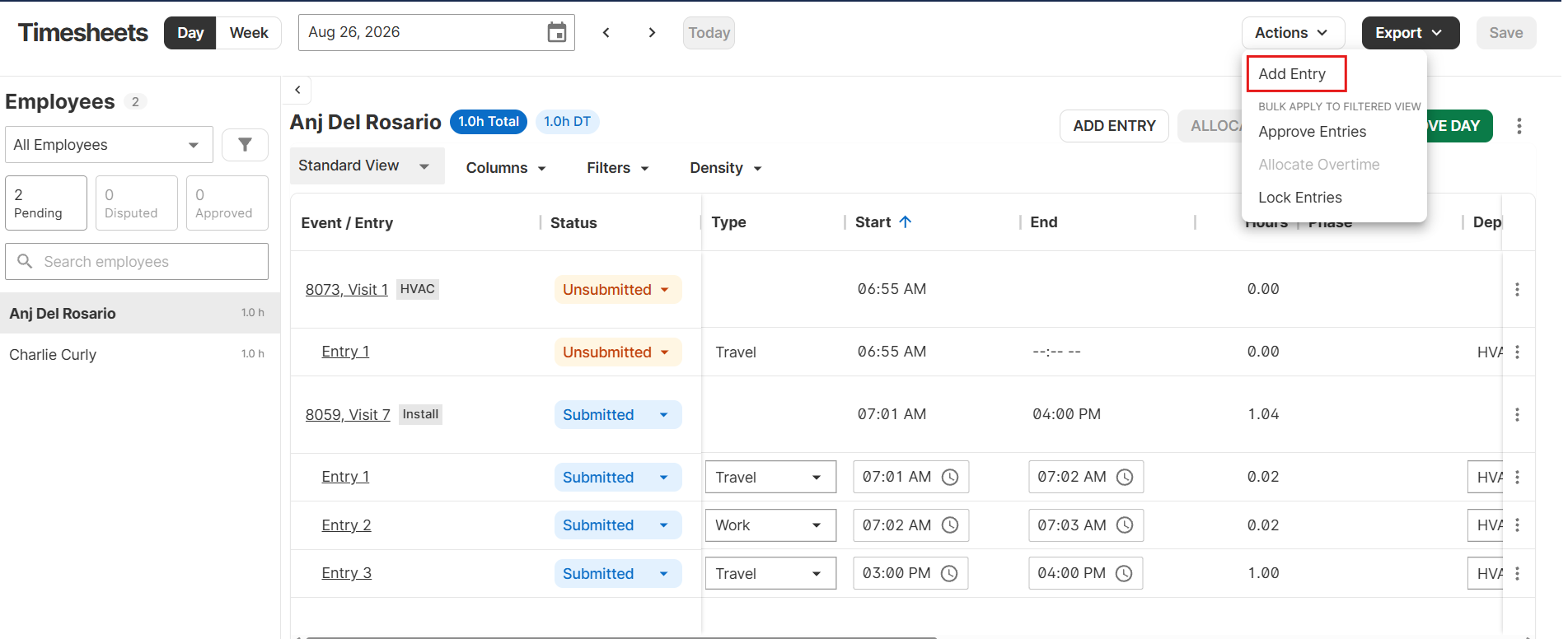
- Web (Accounting > Time Tracking): each row is one time entry, with Day and Week views, filters and saved views, inline status changes (Submitted, Approved, Disputed, Dismissed), one-click Allocate Overtime and Approve Week, and the option to lock timesheets once payroll is generated. Time exports in the payroll format of your choice, including ADP.
- Mobile: the Time Sheets page becomes Time Tracking, with a Time Card tab for clocking in or adding time and a Time Sheets tab where every entry rolls up for submission. It supports service visits, project visits, project time without a visit, general time, and billable and non-billable events.
- Crew time: a Primary Tech can track time for their whole crew in one step.
- Compliance and accuracy: optional meal and rest break attestation at submission, overnight entries split at midnight, and time dated to when the work happened.
- Scheduled events without time: events with no time logged yet now appear in Time Tracking on their scheduled day, with an Add Entry option right in the row. Live now for all customers.
- Settings: time settings and permissions come together under Company Settings > Labor Settings. Existing settings carry over automatically.
Why it matters: Payroll and accounting teams get a complete, auditable record of every hour, including scheduled work that hasn’t been logged yet. Technicians get one place to track time on every kind of work. Customers in states with meal and rest break requirements get a recorded attestation for every shift.
Mobile polish
Availability: Available now for all customers. Techs get it by closing and reopening the app, with no app store update needed.
What’s new:
- Enhancements and customer requests that improve the mobile experience for technicians. Small touches that add up over a day in the field.
- Typing a message on the Send Visit Report screen is smoother, the in-app camera takes sharper close-ups on iPhone, and photos waiting to upload take up less space on the phone.
Why it matters: Techs finish the end of a visit faster, close-up photos come back to the office clear enough to use, and phones that carry a full day of photos keep more room free.
Visit Summary updated
Availability: Available now. Techs get it by closing and reopening the app, with no app update needed. Visit Summary titles retire account by account starting around November 17 with the next app store release.
What’s new:
- Updates to the Visit Summary workflow that help technicians keep what they enter and capture the work they performed more smoothly.
- The Visit Summary editor has a clear Save button and an always-visible Polish button.
- A new Copy button on each entry puts the summary on the clipboard, ready to paste into Service Channel, Corrigo, or any other app.
- Titles go away, so the list shows the first three lines of every summary, and each entry opens ready to type.
Why it matters: Visit Summaries are what the office, the customer, and the next tech read about the work. Techs write them faster, the office sees the actual summary in the list instead of a title, and nobody retypes a summary into a customer’s work order portal.
Clearer mobile notifications
Availability: Available now for all customers. No setup or app update needed.
What’s new:
- Updates to Notifications on mobile that make it clear what’s actionable and keep technicians on top of updates.
- Visit status alerts now say Visit instead of Job, so a finished visit no longer reads like a finished job.
- Tapping a Visit Report alert opens the report and shows its status. Disputed and dismissed timesheet alerts open the tech’s timesheet for that day.
Why it matters: Techs can tell a visit update from a job update at a glance, and one tap takes them to the report or timesheet that needs them.
Check back next month for more
That’s a wrap on November. As always, for questions on rollout timing or access to any of the above, go straight to your CSM.