How FLS Contractors Can Keep Retrofit Work From Becoming a Change-Order Nightmare
BuildOps gives commercial fire and life safety contractors one place to manage retrofits without losing track of what's changed, who's approved it, or what it's costing.
Retrofitting a fire protection system in an occupied building is tricky enough without unexpected problems throwing the job off track. But between aging infrastructure, stricter safety requirements, and facilities that can't afford downtime, FLS contractors have a lot to juggle.
Fire safety codes keep changing, too. The 2027 IEBC spells out when changes in how a building is used call for additional safety upgrades, while the 2026 edition of NFPA 25 updates requirements for inspecting and maintaining existing sprinkler systems.
Depending on which codes your area follows, a project might need more devices or changes to the original plans than you expected.
And even approved plans don't always settle the issue.
During a 2024 fire alarm replacement project at Florida's Orange County Administration Center, an inspector required additional notification devices in 17 locations before signing off. That meant nearly $20,000 in extra work that wasn't part of the approved plans.
These surprises come with the territory on commercial retrofits. Here's how to keep change orders under control, avoid costly delays, and protect your margins throughout a project.
Why retrofit work is a breeding ground for change orders
When you're bidding on a new installation, you generally know what you're working with. Retrofits are another story.
As-built drawings might be decades old, piping and wiring are hidden behind finished walls and ceilings, and building owners can't always give you access to every area before work starts. That leaves you estimating labor and materials based on what you can see, plus a few assumptions about what you can't.
A similar issue came up at Orlando International Airport in 2025. During a project to convert an existing area into storage, a fire inspector found that the sprinkler spacing and head types didn't meet the requirements for the new use. The resulting redesign led to an $83,847 change order.
It's a reminder that unexpected work doesn't always come from what crews uncover behind walls or ceilings. Changes in how a building is used can create just as many surprises.
Other common issues that lead to additional work on fire safety retrofits:
- Inspection surprises: Fire inspectors require additional devices or modifications before signing off.
- System compatibility: Existing alarm panels or sprinkler components can't support the planned upgrades.
- Additional testing: System modifications require more testing, commissioning, or coordination than originally scoped.
And managing those changes brings another set of headaches:
- Slow approvals: Pending change orders hold up installation or leave contractors deciding whether to proceed without written authorization.
- Underpriced changes: Estimates miss overtime, remobilization, retesting, or other costs beyond the additional installation work.
- Payment disputes: Missing documentation or unclear approvals make it harder to bill for extra work and recover costs.
The sooner you catch and document a potential scope change, the easier it is to get answers, secure approvals, and account for the extra costs. That starts with making sure your field teams capture the right information as soon as an issue comes up.
Document field issues before they become expensive problems
When a sprinkler installer discovers piping that doesn't match the drawings or a fire alarm device needs to be relocated, the office needs more than a phone call saying the plans are wrong. Your PM needs to know exactly where the issue is, what's holding up work, and whether the fix falls outside the original scope.
Delays in getting answers can throw off scheduled shutdowns, delay system testing, or force another trip to the site. A 2024 construction study found that using a centralized RFI system instead of email reduced average response times by 49%.
For FLS contractors, that means keeping requests organized and giving engineers or GCs the details they need to respond.
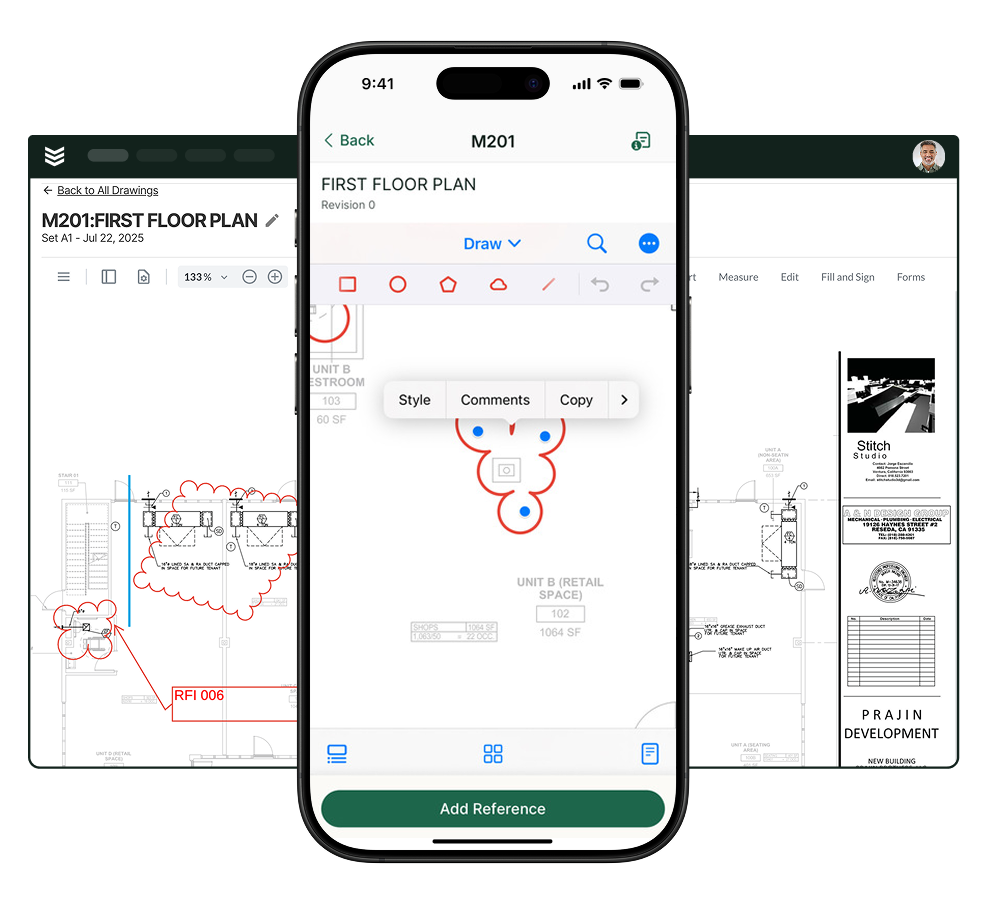
Have your field leads photograph unexpected conditions, mark their exact locations on drawings, and submit formal RFIs explaining what needs clarification. Mobile drawing markups, photo attachments, and centralized RFI tracking give the office the information needed to follow up and keep installation work on track.
Keep change orders moving with a clear approval process
A clear change-order process helps keep unexpected sprinkler, fire alarm, and testing work from eating into your margins during retrofits. Every potential change should have a defined scope, a complete cost estimate that accounts for additional shutdowns or return visits, an identified approver, and a clear status.
That consistency also helps keep projects on schedule. FMI's 2026 Project Management Study found that contractors with consistent change-order processes met or exceeded schedule expectations 80% of the time, compared with 65% for those with less consistent processes.
Written authorization is especially important when you're working around an occupied building's schedule. A GC's verbal go-ahead might keep installation moving, but it leaves your company exposed if there's a disagreement about the cost of extra work or another shutdown later.
Change-order management tools with approval workflows and status tracking help your team see which retrofit changes need attention and which have authorization to proceed, so you're not scheduling installers or system testing around approvals that haven't come through.
Protect your margins with a paper trail that holds up
Completing additional work doesn't guarantee you'll get paid for it. When a GC questions a change-order invoice, your PM needs records showing what changed, who authorized it, and how much additional labor and material the work required.
That kind of documentation makes a difference to your bottom line.
FMI's research found that specialty contractors with highly effective change-order processes met or exceeded their project profit targets 87% of the time, compared with 64% for those with less effective processes.
To protect your retrofit project profits, keep original drawings, field photos, RFIs, cost breakdowns, and written approvals together.
If a GC disputes the cost of another sprinkler shutdown, relocated alarm devices, or additional system testing, your PM has the evidence to back up the charges rather than negotiating down a legitimate invoice.
Review outstanding change orders before each billing cycle, too. Unapproved retrofit work often sits outside regular progress billing, leaving your business carrying the costs of extra labor, equipment, and return visits. Across multiple commercial projects, those unpaid amounts quickly add up.
How BuildOps keeps retrofit change orders connected
BuildOps gives commercial fire and life safety contractors one place to manage retrofits without losing track of what's changed, who's approved it, or what it's costing.
Here's how BuildOps helps:
- Documents field issues: Pin locations on drawings, attach photos, and submit RFIs from mobile so the office gets the full picture without chasing details.
- Keeps change orders moving: Multi-tier approvals, status tracking, and one-click emails help prevent requests from getting lost or stalled.
- Tracks the financial impact: Updated project forecasts show how approved scope changes affect expected costs, revenue, and margins.
- Keeps records that hold up: Contractor-owned RFI records and approval histories help back up charges for extra retrofit work and resolve disputes.
With the documentation, approvals, and costs connected, your team spends less time tracking down information and has a clearer picture of where each change stands.
Find the gaps in your retrofit change-order process
Pull a few recent sprinkler or fire alarm retrofit change orders, especially ones involving unexpected equipment upgrades, additional shutdowns, or return visits.
Follow each change from the first field report through the RFI, approval, cost tracking, and final billing. Look for places where someone had to chase down photos, wait for authorization, manually update costs, or track down records to justify an invoice.
Those gaps show where your current process puts schedules, payments, and margins at risk. They're also a useful starting point for evaluating software that keeps field issues, approvals, and project costs connected.