6 Best Plumbing Service Software for Every Contractor
Running a business in the plumbing service industry means juggling service calls, assigning the right tech to the right job, and keeping customers in the loop. Plumbing service software pulls all of this into a single, streamlined platform—so you can schedule, dispatch, invoice, and track every job without the manual back-and-forth.
In this guide, we'll break down what to look for in a plumbing service company software, compare top platforms across commercial, residential, and general contracting use cases, and cover the features and benefits that matter most for your team.
- Choosing the right plumbing service management software for your team
- 8 key features to look for in a plumbing service management software
- Best plumbing service software for commercial
- Best plumbing service software for residential
- Best plumbing service software for general contractors
- Other notable plumbing field service management software
- 7 benefits of using plumbing service management software
- 4 important plumbing service software FAQs answered
Let's start with how to find the best plumbing service software for your team and what to prioritize when evaluating your options.
Choosing the right plumbing service management software for your team
The right plumbing service software keeps techs prepared, reduces dispatcher chaos, and gets invoices out same-day—so choose a platform that solves your team’s real, everyday problems, not just one with a flashy demo.
Here are the key things to consider:
- Ease of Use – Can your dispatchers and techs start using it without weeks of training? Plumbing crews move fast, and if the software slows them down, it won't get adopted. The simpler the learning curve, the faster you see a return.
- Scalability – Whether you're running five trucks or fifty, your software needs to keep pace. A platform that works for your current crew but buckles when you add techs or open a second location will cost you more in the long run than investing in something built to grow.
- Integration – Does it connect with your accounting system, parts suppliers, or inventory tools? A plumbing service software system that syncs with what you already use eliminates double entry and keeps your financial data clean without extra workarounds.
- Customization – Every plumbing operation has its own workflow — from how you handle emergency calls to how you close out multi-day jobs. Your software should adapt to your process, not force you into someone else's.
- Support and Training – What happens when something breaks or your team hits a wall during onboarding? Reliable support and hands-on training can make or break adoption, especially for techs who spend their entire day in the field and can't afford to troubleshoot software issues between calls.
- Features – Does it cover scheduling, dispatching, invoicing, and customer history in one place? A strong platform delivers on the essentials and connects them so data flows from the first dispatch to the final payment without gaps.
Once you know what your operation needs, focus on the features that turn those needs into daily results. The right, well-integrated tools will streamline your team instead of becoming just another system to manage.
{{related-content-block="/resources/plumbing-field-service-software"}}
8 key features to look for in a plumbing service management software
For plumbing service teams evaluating ERPs to serve as their field service backbone, the platform needs to connect dispatch, scheduling, invoicing, customer data, and field execution into one system. These nine features define what separates an ERP-level platform from a basic scheduling tool.
1. Scheduling & dispatching
Every billable hour lost to scheduling gaps or dispatch lag compounds across your fleet. A unified scheduling platform tracks each plumber's location, availability, certifications, and current job status from a single board — so dispatchers can assign incoming calls instantly and rebalance workloads when priorities shift mid-day. AI-powered technician suggestions match the plumber with the correct backflow or gas license to the job that requires it, reducing mismatches and callbacks. Drag-and-drop functionality, real-time dispatching, and skill-based filtering keep urgent requests like sewer backups and water main breaks from sitting in a queue while your closest tech drives the opposite direction.
2. Centralized customer information
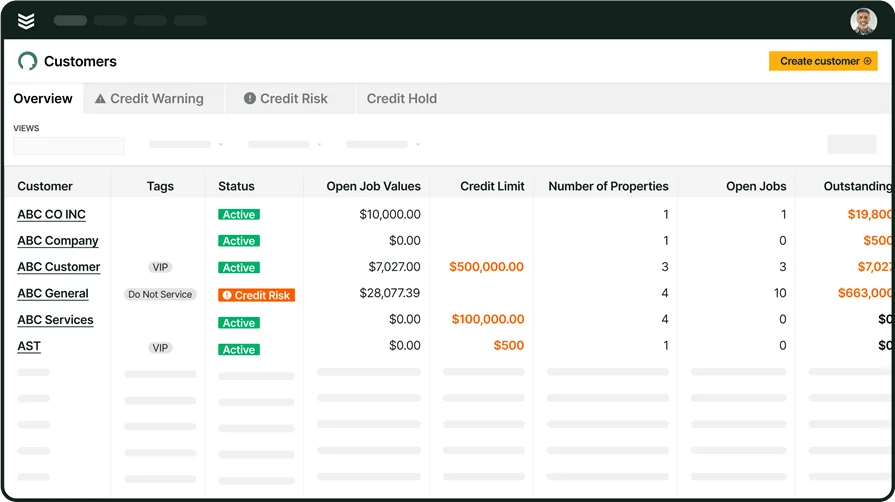
Plumbing teams servicing commercial accounts need instant access to property details, equipment specs, and full service history before a tech leaves the truck. A field service CRM stores past work orders, site access codes, and contact hierarchies in one searchable hub. AI-assisted search surfaces relevant records even with partial inputs, so your crew pulls up a building's complete plumbing history in seconds — not minutes spent calling the office.
3. Mobile work orders
Field techs need job details, customer history, and work order updates on their phone — not on a clipboard. A plumbing service company software with a dedicated technician field app lets plumbers view scope, capture photos of pipe conditions, collect signatures, and update statuses from the field. Full offline capability means techs working in basements or mechanical rooms complete their work orders and sync once they regain service.
4. Service quoting

Speed on estimates wins jobs. When a tech spots a corroded supply line during a routine fixture replacement, they need to build a quote on site — not wait for the office to price it out. Integrated service quoting tools pull from pre-loaded pricebook items so plumbers can present multi-option proposals with transparent pricing before work begins, turning single service calls into additional closed revenue.
5. Time tracking
Accurate labor data drives payroll, job costing, and bid accuracy. Built-in time tracking features capture clock-in, clock-out, and drive time automatically — tying every hour to a specific work order. Geo-stamped entries verify on-site presence, and managers can identify which jobs consistently exceed labor estimates to adjust future pricing.
6. Invoicing & payments

The gap between finishing a job and collecting payment is one of the biggest cash flow killers in plumbing. Automated invoicing solutions convert completed work orders into accurate invoices the moment a job closes out, and integrated payment processing lets customers pay on the spot — by card, ACH, or digital wallet — so your office stops chasing checks weeks after the work is done. AI-generated invoice summaries pull directly from tech field notes, reducing admin formatting time and catching billable items that might otherwise slip through.
7. Route optimization
Plumbing teams dispatching trucks across scattered commercial properties burn fuel and hours on inefficient routes. Fleet management tools with route optimization plan the fastest path between service calls, factoring in technician skills, property addresses, and traffic data. Fewer miles per truck means lower overhead on fuel and vehicle wear — and more completed calls per day.
8. AI-powered reporting
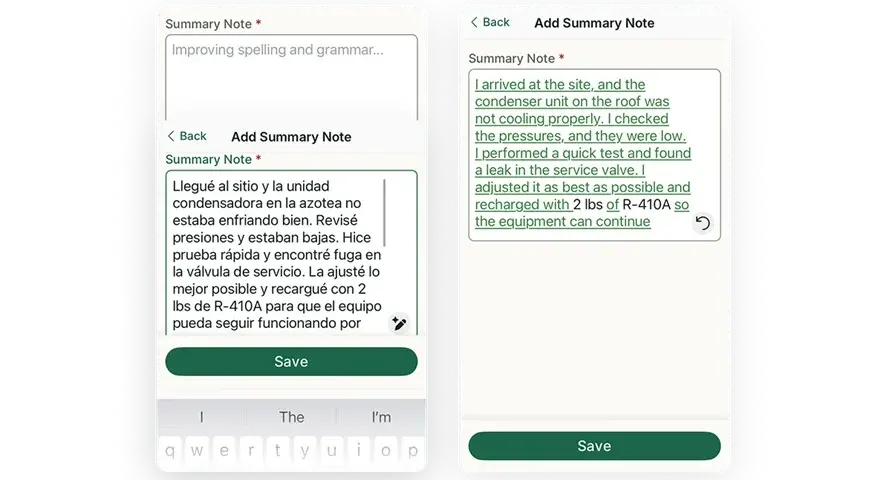
Handwritten field notes rarely make it into clean reports without hours of office reformatting. AI-driven reporting tools automatically summarize technician notes into professional visit reports, flag recurring issues at specific properties, and surface trends in job performance. For plumbing contractors managing high call volumes, this automation keeps reporting accurate without adding admin headcount.
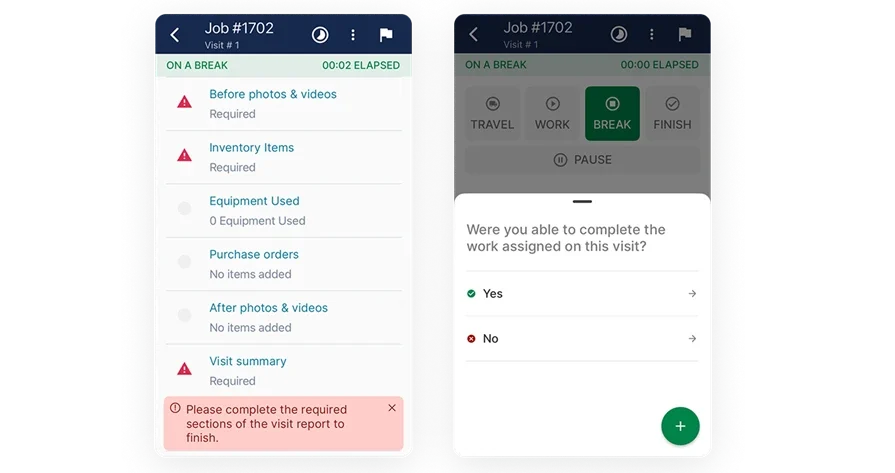
Best plumbing service software for commercial: BuildOps
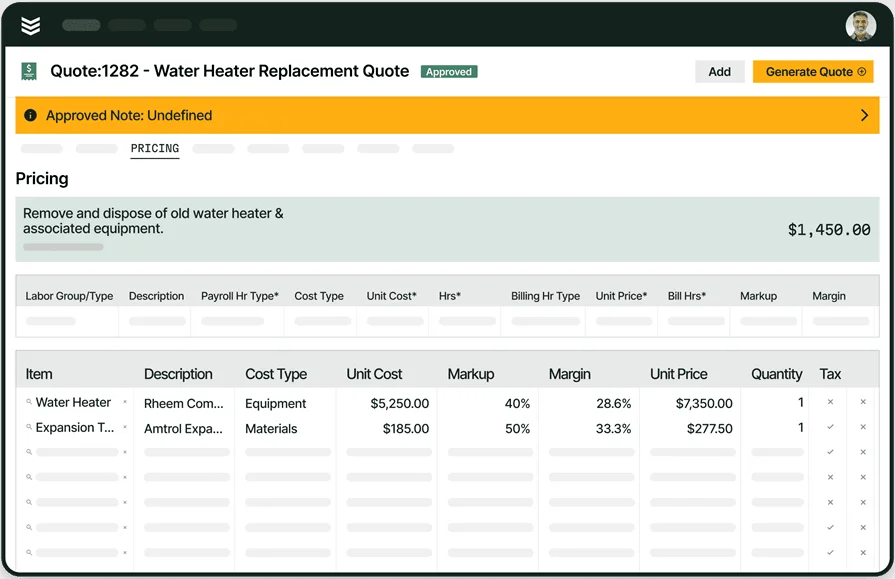
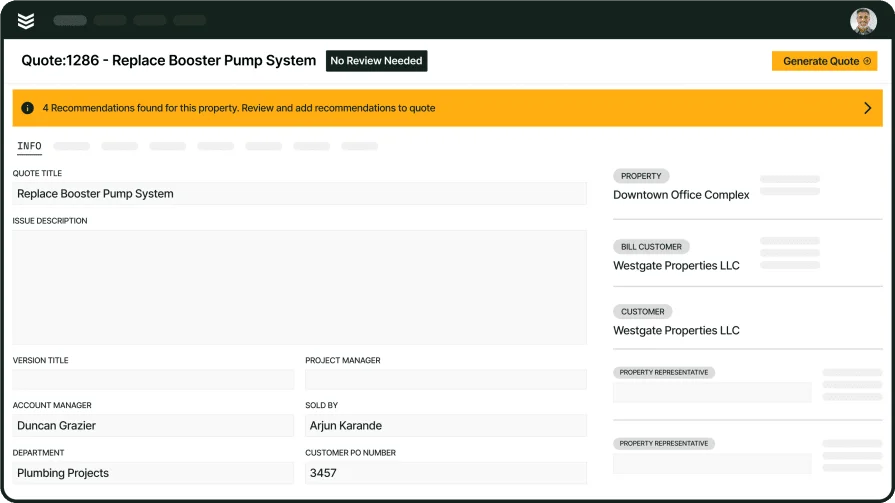
BuildOps connects dispatch, scheduling, quoting, invoicing, and project management in a single system designed for commercial plumbing contractors. Built-in AI tools like OpsAI turn tech field notes into clean reports, flag unbilled work before a job closes out, and surface property history so your crew shows up prepared. Everything syncs with your accounting system, so nothing falls through the cracks between the field and the back office.
For plumbing service software teams managing multi-property accounts, BuildOps organizes customer hierarchies so dispatchers always know which asset needs service, at which site, and who to notify on the account.
Industry Specialization: Commercial
How Pricing Works: BuildOps pricing is based on the size of your team and the features your business needs, so you only pay for what you actually use.
What Sets It Apart for Commercial: Customer asset hierarchies, AI-powered reporting that converts tech field notes into professional visit summaries, and a real-time dispatch board with skill-based filtering give commercial plumbing operations depth that general-purpose tools lack.
Best plumbing service software for residential: ServiceTitan

ServiceTitan combines scheduling, dispatching, CRM, invoicing, and reporting in a single platform used by residential plumbing contractors. Its dispatch board provides drag-and-drop scheduling with real-time technician tracking, while the mobile app equips techs with job details, a pricebook, and customer history on every call so they can quote and close work on site.
That said, ServiceTitan's residential focus means plumbing service company software needs for commercial operations — like multi-property account management and complex job hierarchies — may exceed what the platform delivers.
Industry Specialization: Residential
How Pricing Works: Custom pricing based on technician count and selected modules.
What Sets It Apart for Residential: Deep reporting and analytics — including technician scorecards and CSR performance tracking — give you granular visibility into how your field crews are performing.
Compare ServiceTitan against BuildOps directly to see who comes out on top.
Best plumbing service software for general contractors: Service Fusion
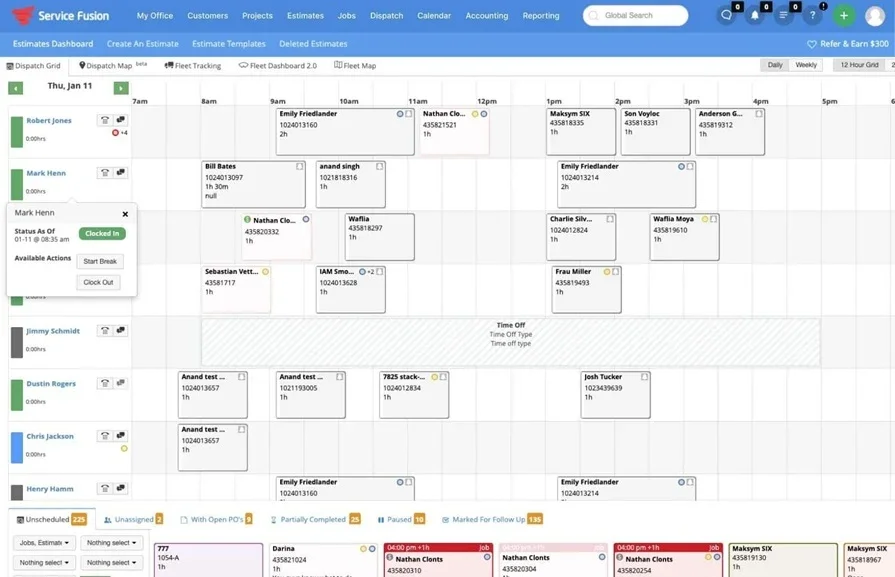
Service Fusion is an all-in-one FSM platform designed for residential and multi-trade businesses. It lets you manage jobs and your entire fleet with GPS tracking, giving dispatchers visibility over vehicle locations to reduce fuel costs and keep trucks moving between calls.
However, plumbing teams running deep commercial portfolios should evaluate whether Service Fusion's feature set matches the complexity of their day-to-day — multi-property hierarchies, AI-assisted reporting, and gated technician workflows may exceed what the platform offers.
Industry Specialization: Residential and multi-trade operations
How Pricing Works: Monthly subscription custom pricing based on included features.
What Sets It Apart for General Contractors: GPS tracking for advanced fleet management, ideal for plumbing teams dispatching multiple crews across different service areas daily.
Other notable plumbing field service management software
Beyond the top picks, several other field service management platforms handle core plumbing workflows but vary in strengths for high-volume, multi-account teams.
Housecall Pro
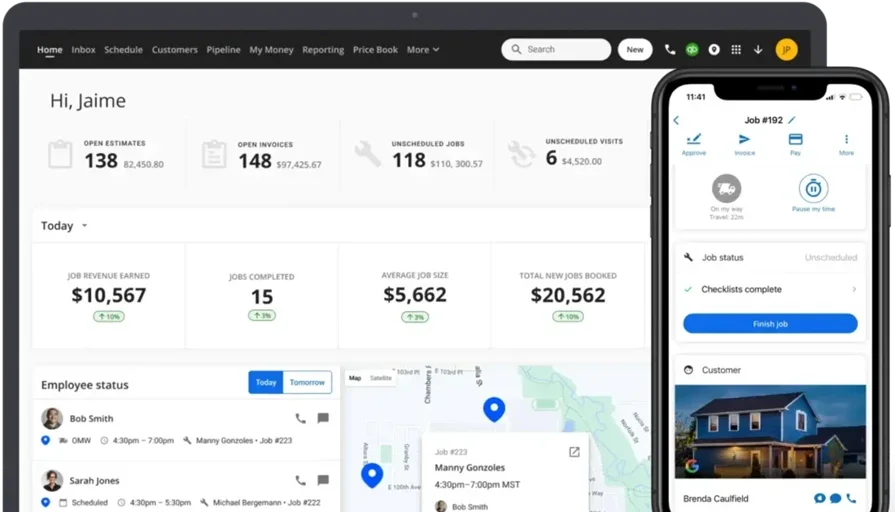
Housecall Pro is a platform designed for small to mid-sized plumbing businesses, offering online booking, invoicing, and customer communication tools accessible via mobile or desktop. Its automated reminders help reduce no-shows and keep scheduling tight — a common pain point for plumbing teams juggling same-day service calls across residential accounts.
However, its capabilities lean toward residential contractors and smaller crews, making it less suited for larger commercial plumbing operations that need multi-property management or complex job hierarchies.
How Pricing Works: Housecall Pro offers tiered plans starting at an affordable rate, with advanced features reserved for higher pricing tiers.
What Sets It Apart: Automated customer communication — including appointment reminders and review requests — keeps clients informed without adding work to your dispatch team.
How It Stacks Up Against BuildOps: Find out here, in our head-to-head comparison of Housecall Pro vs BuildOps.
Jobber
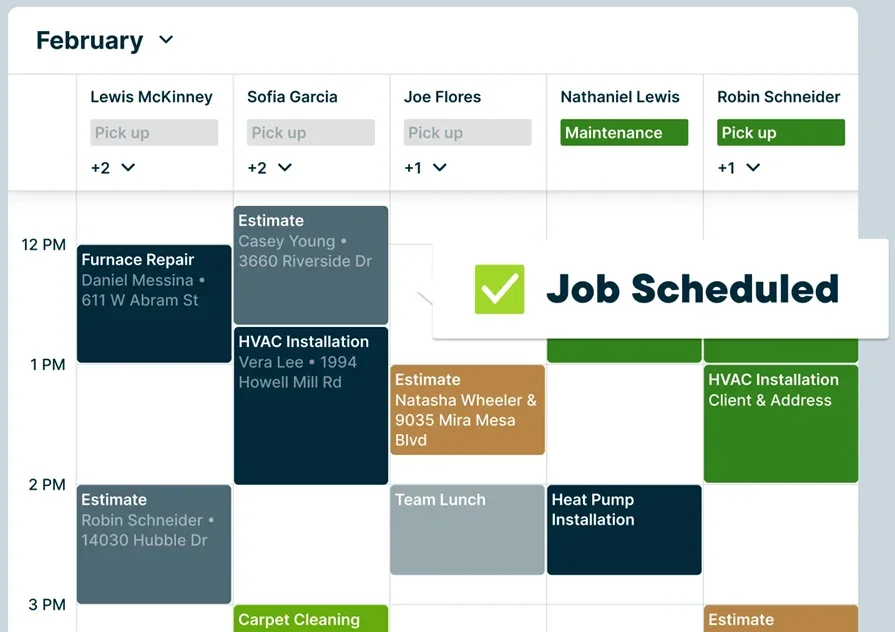
Jobber provides scheduling, dispatching, invoicing, and CRM tools built to simplify daily operations for residential plumbing contractors. Its client portal lets customers book services, view job details, and track invoices — reducing the back-and-forth between your office and homeowners.
That said, Jobber is better suited for smaller teams or businesses focused on residential services. Plumbing service company software needs for commercial operations — like asset tracking across multi-property accounts or gated technician workflows — may exceed what Jobber delivers.
How Pricing Works: Jobber offers flexible pricing plans with monthly and annual payment options tailored to small and mid-sized operations.
What Sets It Apart: Client-focused tools like a self-service portal streamline customer interactions and reduce admin overhead on your office staff.
FieldEdge

FieldEdge is a cloud-based field service management solution tailored for home service contractors in plumbing, HVAC, and electrical. It streamlines operations with a smart dispatch board, reporting tools, and a mobile app that puts customer details and pricing directly in techs' hands on every call. Its built-in pricebook comes loaded with thousands of plumbing parts and supports on-site price presentations for transparent quoting.
Plumbing teams that have outgrown basic tools and need tighter field-to-office data flow will find FieldEdge a solid step up, though contractors managing complex commercial portfolios may hit its ceiling on multi-property and project management depth.
How Pricing Works: Tiered licensing model based on business needs. Contact them for custom pricing.
What Sets It Apart: A comprehensive built-in flat-rate pricebook with thousands of parts and automatic alternative product suggestions helps techs present options at the job site without flipping through catalogs.
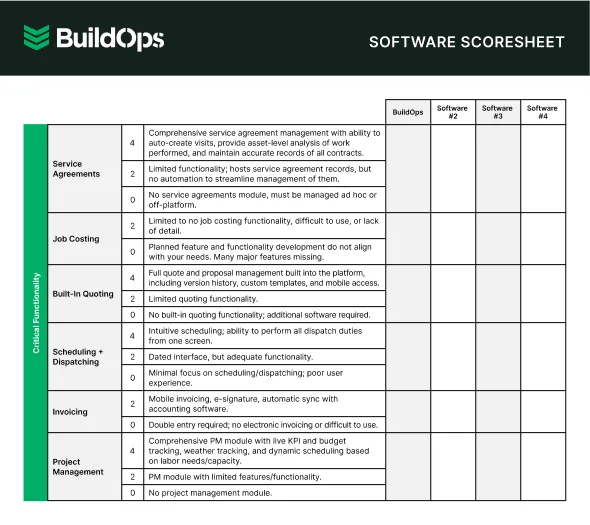
7 benefits of using plumbing service management software
Evaluating platforms is one thing. Understanding what changes when your team actually adopts one is another. Here are seven ways plumbing service management software improves daily operations, from the field to the back office.
1. Stronger customer relationships and repeat business
Plumbing teams that track every service call, equipment detail, and customer preference in one system build trust faster. When a tech pulls up a property's full history before arriving on site, the customer notices. A CRM built for plumbers keeps contact hierarchies, past invoices, and service notes organized so follow-ups happen on time and nothing falls through the cracks.
2. Higher field crew productivity
Techs spend less time calling the office and more time completing jobs when they have schedules, work orders, and customer details on their phone. A dedicated plumbing field service app lets crews capture photos, collect signatures, and update statuses from the job site, even in areas with limited connectivity.
3. Faster payments and tighter cash flow
The gap between finishing a job and sending the bill is one of the biggest cash flow killers in plumbing. Contractors who invoice the same day a job wraps get paid significantly faster than those who wait. A structured plumbing invoicing process ties completed work orders directly to billing so invoices go out before the truck leaves the driveway.
4. Less admin work through AI automation
Handwritten field notes, manual report formatting, and data entry eat hours every week. AI field service assistants can auto-generate visit summaries from tech notes, flag unbilled items, and surface relevant property history without anyone in the office lifting a finger.
5. Faster quoting and higher close rates
Speed on estimates wins jobs. When a tech spots additional work during a routine call, they need to price it and present options before leaving the site. Plumbing quoting software with pre-loaded pricebooks lets crews build professional, multi-option proposals on the spot, turning single service calls into additional closed revenue.
6. Ability to scale without adding overhead
Hiring enough staff to keep up with growing demand is a challenge across the trades. Agentic AI tools for field service handle routine tasks like schedule rebalancing, parts ordering, and compliance tracking automatically, so your existing team can take on more work without piling on administrative headcount.
7. Smarter scheduling and data-driven decisions
Plumbing service software that collects data on job duration, labor costs, and technician performance gives managers the visibility to tighten bids, balance workloads, and spot inefficiencies before they compound. AI-powered field service management takes this further by analyzing technician skills, certifications, and real-time availability to assign the closest qualified plumber to every call.
{{related-content-block="/resources/ai-field-service-management-software"}}
4 important plumbing service software FAQs answered
Plumbing contractors evaluating or already running field service platforms face these questions every day. Below are clear, no-fluff answers for teams that know the basics and want practical guidance on execution, ROI, and building a long-term service tech stack that actually works in the field.
1. What separates plumbing service software from a general FSM platform?
Plumbing service software unifies scheduling, dispatching, estimating, invoicing, CRM, and reporting into a single platform built around plumbing workflows, from service calls and backflow testing to repipes and emergency response.
General FSM tools handle basic scheduling, but they lack plumbing-specific depth—like property-based asset hierarchies, gated workflows that stop techs from closing incomplete jobs, and pricebooks with plumbing parts and labor tied directly to quotes, invoices, and customer history.
2. How does plumbing service company software handle multi-property commercial accounts?
Commercial plumbing teams juggle portfolios with dozens of buildings, each with its own gear, access rules, and billing setup. BuildOps keeps it all straight with customer hierarchies that connect parent accounts to every site, asset, and service history.
Dispatch can instantly filter by property, surface past work for a specific building, and send the nearest qualified tech—no back-and-forth phone calls. Recurring agreements are tied to each location, so PM visits auto-generate and billing stays clean and accurate across the entire portfolio.
3. Is plumbing service software worth the investment?
Plumbing software can run from $20 per tech to $500+ a month—but the only number that matters is what you recover. Teams that tighten dispatch, kill double entry, and invoice the same day see faster cash, cleaner job costs, and fewer missed billables.
The real risk isn’t the price tag. It’s rolling software out to only half the team. Full adoption across dispatch, techs, and accounting is where ROI actually shows up.
{{related-content-block="/resources/how-jbs-took-back-control-with-build-ops"}}
4. What are the best practices for getting maximum value from plumbing service software?
Buying the platform is step one. Getting everyone to use it consistently is where the value compounds. These ten practices help plumbing contractors avoid adoption pitfalls and unlock real gains.
- Run full-team onboarding before the platform goes live, including field techs, dispatchers, and office staff.
- Map your existing job workflows before configuring the software to match them.
- Make mobile app usage mandatory for every tech from day one.
- Audit and update your pricebook on a monthly or quarterly schedule.
- Use required fields and gated workflows so techs cannot close a work order without capturing critical data.
- Automate recurring job generation from your service agreements.
- Review your reporting dashboard on a weekly cadence to catch trends early.
- Integrate with your accounting software before the first invoice goes out.
- Assign one internal team member to own platform configuration and train new hires.
- Clean up duplicate records, outdated properties, and inactive agreements every quarter.
Plumbing software should do more than schedule jobs and send invoices. BuildOps uses AI to optimize dispatch in real time, surface key property data before your techs arrive, and automate the reports your office lives on.
Built for commercial contractors, BuildOps connects every step of the workflow—calls, quotes, scheduling, dispatch, invoicing, fleet tracking, and reporting—so your team isn’t stuck in disconnected tools.
See how it handles real plumbing workflows in a live, free demo with your team.