Get More From Your Dispatch Board: How to Complete More Work Orders Without Adding Techs
When the schedule isn’t built around the right tech, the right location, and the actual time available, crews lose hours to extra driving, waiting, and repeat visits.

Your dispatch board can look full and still leave a surprising amount of work on the table.
Torque 2026, BuildOps’ commercial contractor benchmark report, found that contractors average 1.16 completed work orders per technician per day, compared with 1.55 for best-in-class contractors — a 34% gap.
That gap points to a real opportunity to get more work out of the dispatch operation you already have. The first step is understanding where the day is breaking down and what’s keeping more assigned work from getting completed.
How dispatch friction cuts into completed work
Dispatchers are making constant tradeoffs throughout the day as new calls come in, jobs run long, and customer commitments shift.
When the schedule isn’t built around the right tech, the right location, and the actual time available, crews lose hours to extra driving, waiting, and repeat visits.
That’s the Wrench Tax in dispatch: the portion of the day spent managing the work instead of completing it.
Across a full crew, those lost minutes add up to fewer completed work orders and less revenue from the technicians and trucks you’re already paying for.
For a 20-tech crew working 250 days a year, the difference between average and best-in-class performance works out to roughly 1,950 additional completed work orders a year without adding technicians or trucks.
4 ways to improve dispatch efficiency
Recovering that lost time comes down to tightening the way work moves onto the schedule, across the day, and into the hands of the right technician.
Here are four ways to move your dispatch operation closer to best-in-class performance.
1. Find work that’s ready but not on the schedule
Before anyone starts rearranging the day, your dispatch team needs to know what work is waiting to be scheduled.
That sounds basic, but it’s easy for a visit to fall outside the working schedule because one piece is missing.
A call might already have a date and time, for example, but no primary technician. If no one catches it, that work can sit while a technician elsewhere on the board finishes early and suddenly has room in the day.
That’s why unscheduled work needs to stay visible alongside the schedule your team is actively managing. Dispatchers should be able to see what’s waiting, where the openings are, and which crew or department has room without sorting through the entire operation at once.
How BuildOps improves schedule visibility
- The Unassigned tray keeps visits with missing schedule details visible until they’re fully scheduled.
- Day and Week views, plus crew, department, and technician filters, help dispatchers zero in on the part of the schedule they need to manage.
2. Reduce the dead time between calls
A schedule can look full at the start of the day and still come up short on completed work if the route between calls is inefficient.
Poor sequencing can send someone across town for one call, then back toward the same area for the next. That extra drive time pushes later appointments back and can leave assigned work unfinished by the end of the day.
The schedule needs to account for where the jobs are, not just whether every technician has something assigned. Grouping nearby calls and catching unnecessary backtracking early helps your team fit in more service work without stretching the day longer.
How BuildOps improves routing and schedule planning
- Map View shows job locations and technicians’ last-known activity locations, helping dispatchers spot backtracking and group nearby calls.
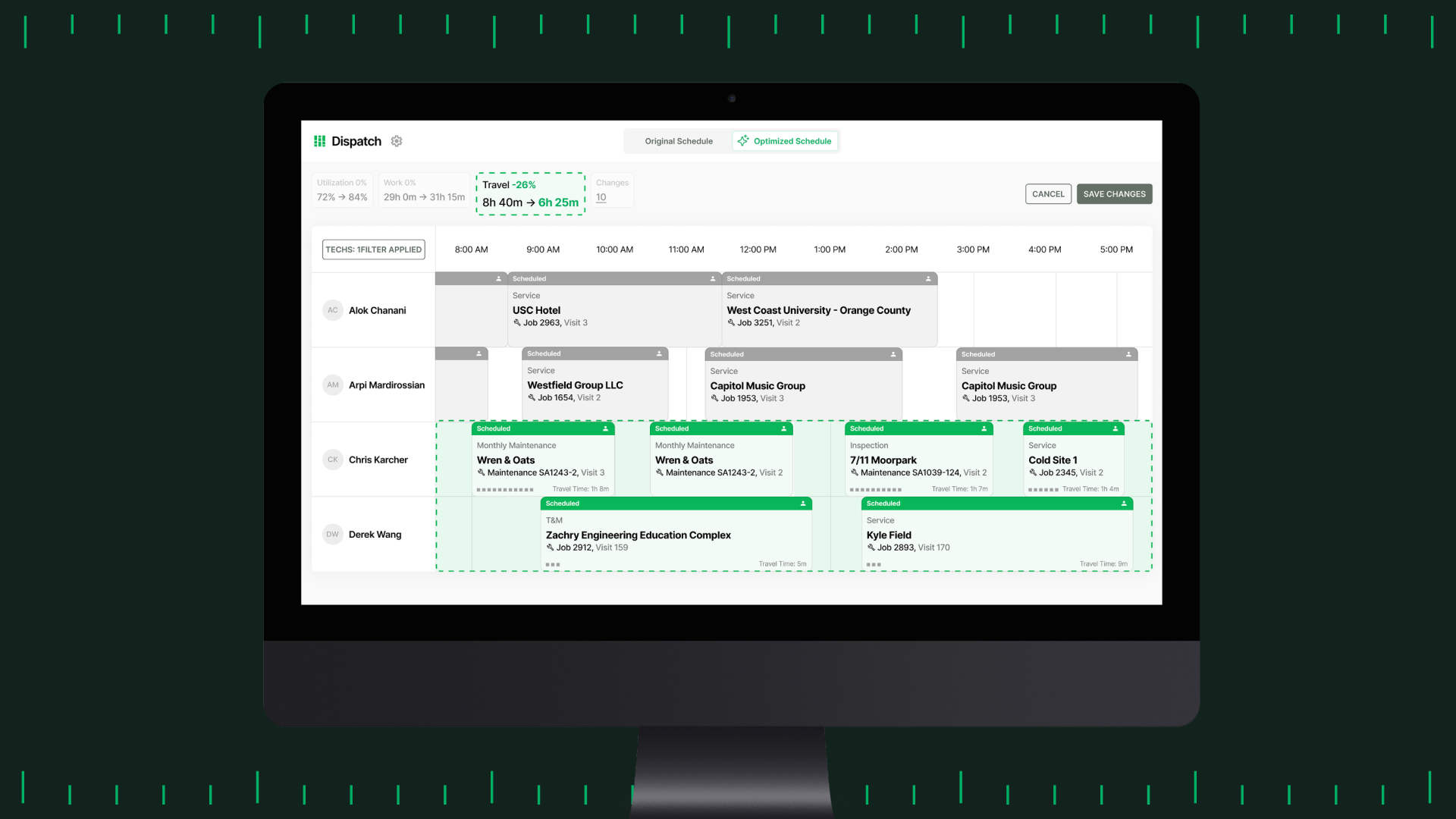
- Smart Dispatch uses location, availability, skills, certifications, and visit requirements to build a stronger schedule.
- Dispatch settings and exclusions keep fixed work in place while the rest of the day is adjusted around it.
Standard Map View isn’t continuous live GPS; live tracking requires Fleet+.
3. Match the right tech, not just the first open tech
The first available technician isn’t always the right choice for the call. When your dispatch team assigns work without checking the required skills, certifications, or familiarity, the business pays for it in extra troubleshooting, callbacks, and lost time on the next appointment.
Your dispatch process should match job requirements with technician qualifications before the call is assigned.
Availability and location still matter, but they shouldn’t outweigh whether the tech is equipped to handle the work. Mismatched assignments can turn one service call into two and throw the rest of the day off schedule.
Same-day and emergency calls put even more pressure on that process. Your team needs a fast way to identify qualified technicians without guessing or digging through multiple records.
How BuildOps improves job-to-tech matching
- Skills, certifications, and visit requirements help dispatchers match qualified techs to the work. Keeping that data current makes Smart Dispatch more targeted.
- Schedule Assistant narrows same-day options by department, next available time, distance, skills, and certifications, helping dispatchers make faster assignments without sacrificing fit.
4. Get more visibility into what’s affecting work-order output
The Torque benchmark gives you a reference point for how much work commercial field teams are completing, but the number alone doesn’t explain what’s holding your operation back.
If completed work orders per technician per day trail the best-in-class benchmark, look at what’s happening across the dispatch day. Are technicians spending too much time traveling? Are callbacks disrupting the schedule? Is work sitting unassigned while technicians have room?
Better visibility helps your team connect those patterns to the number and focus on the parts of dispatch that need attention.
How BuildOps improves dispatch visibility
- The Dispatch Board shows progress, visit status, flagged work, and unassigned visits so teams can spot issues as the day unfolds.
- Smart Dispatch compares the original and proposed schedule across work, travel, utilization, and errors so teams can see the impact of schedule changes before applying them.
Bring the whole dispatch day into one view with BuildOps
BuildOps gives dispatchers one place to manage the day instead of piecing it together from spreadsheets, texts, sticky notes, and separate apps.
With the schedule, technician activity, and open work in one place, dispatchers can spot gaps faster and make better decisions as the day changes.
For leadership, that same information helps answer an expensive staffing question: does the business really need another technician, or could the current field team be completing more work with tighter dispatch?
Before adding headcount or another truck, make sure your dispatch process is helping the current team complete as much work as possible.
See how BuildOps helps commercial contractors tighten dispatch and complete more work with the team they already have. Book a demo to see the Dispatch Board in action.