6 Best AI Scheduling Software for Field Service Teams

Key Takeaways
- When using AI for field service scheduling, you should be able to connect it to other parts of your operations, using a single platform to unify every aspect of your workflow
- Choosing the best AI-powered platform for scheduling depends on whether you do commercial, residential, or other scales of work
- Some of the top AI schedulers for field staff includes BuildOps for commercial service teams, Kickserv for residential, and Procore for general contractors
No matter the trade, scheduling is where every field service operation either holds together or falls apart. When you're coordinating dozens of techs across multiple job sites, the difference between a profitable day and a chaotic one often comes down to how fast you can assign, adjust, and communicate changes. That pressure is exactly why AI scheduling tools for contractors have moved from a nice-to-have to a baseline expectation across the field service industry.
This guide breaks down what to look for in AI scheduling software, compares the top platforms on the market, and walks through how to evaluate which one fits your operation.
- Top key features to look for in an AI field service scheduling software
- 6 best AI scheduling software to power your field service operations
- 7 benefits of using an AI-powered scheduling software
- Questions to ask when choosing an AI scheduling tool for your team
- 4 important FAQs about AI field service scheduling software
Next, we’ll cover what AI scheduling tools do and how they differ from basic calendar systems that many contractors have outgrown.
Top key features to look for in an AI field service scheduling software
AI scheduling software for field service teams should do more than fill empty time slots. The best tools tie scheduling into your entire operation so dispatchers can instantly see availability, travel, and real-time field activity—unlocking five key capabilities that prevent extra work.
1. Real-time scheduling and dispatch coordination
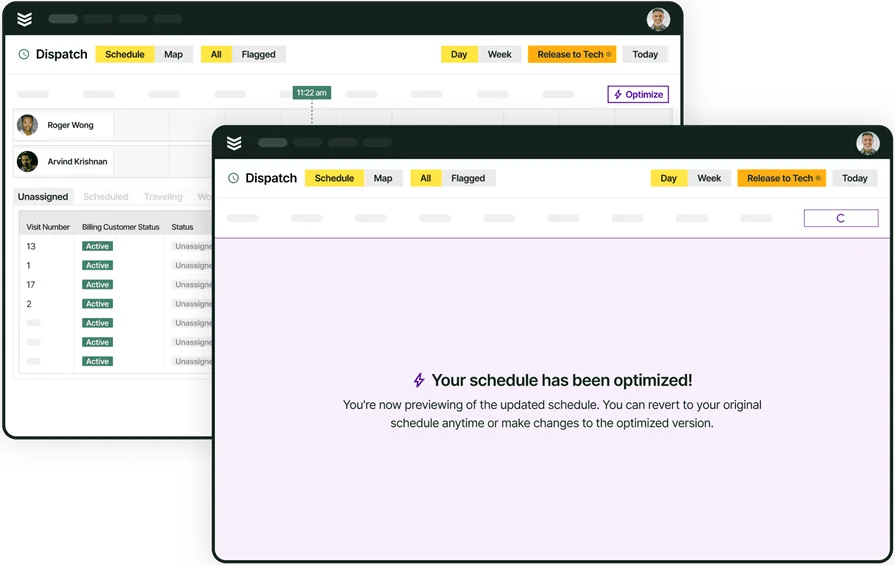
Scheduling determines when a job happens and who handles it, but without a direct line into dispatching, that plan falls apart the moment something changes. A scheduling platform that connects to smart dispatch capabilities lets dispatchers see open slots, reassign techs, and adjust for cancellations or emergencies without leaving the board. When a new service call comes in, the schedule updates instantly, routes recalculate, and the tech is notified with everything they need—keeping your board accurate and every job fully covered before a truck rolls out.
2. Time tracking tied to scheduling accuracy
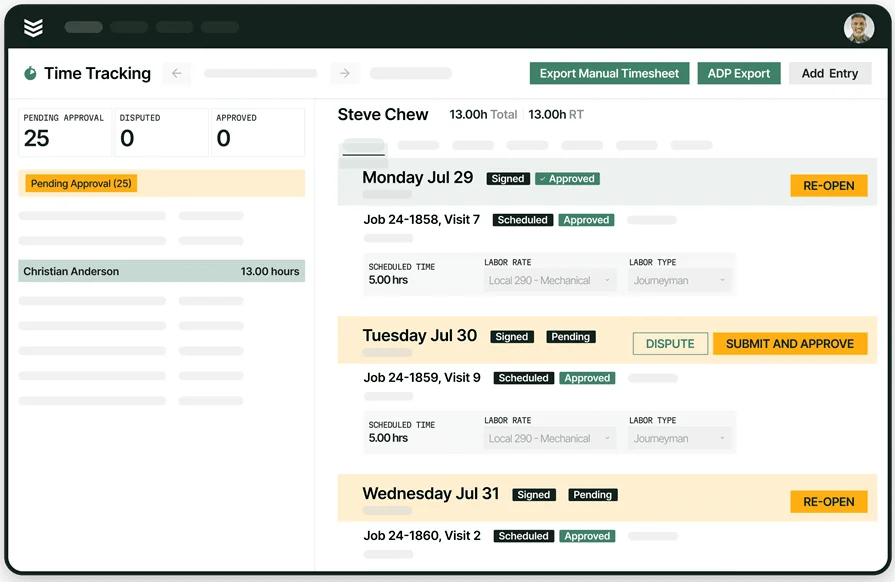
Scheduling decisions are only as good as the data behind them. If estimated job durations are off, every appointment after the first one drifts. Platforms with built-in time tracking capture clock-ins, travel time, on-site hours, and break duration automatically, feeding that data back into the scheduling engine. Dispatchers quickly see which jobs run long and which techs are fastest, tightening schedules, cutting overtime, and giving payroll and job costing accurate data without manual timesheets.
3. Technician mobile app
A schedule only works if the tech in the field can actually see it, act on it, and report back in real time. A dedicated technician mobile app puts job details, customer history, checklists, and notes directly on a tech's phone or tablet, syncing every update back to the office the moment it happens. When a tech completes a job, the schedule updates instantly and frees the slot, while photos, signatures, and status changes all flow through one system to keep dispatchers current all day.
4. Fleet management
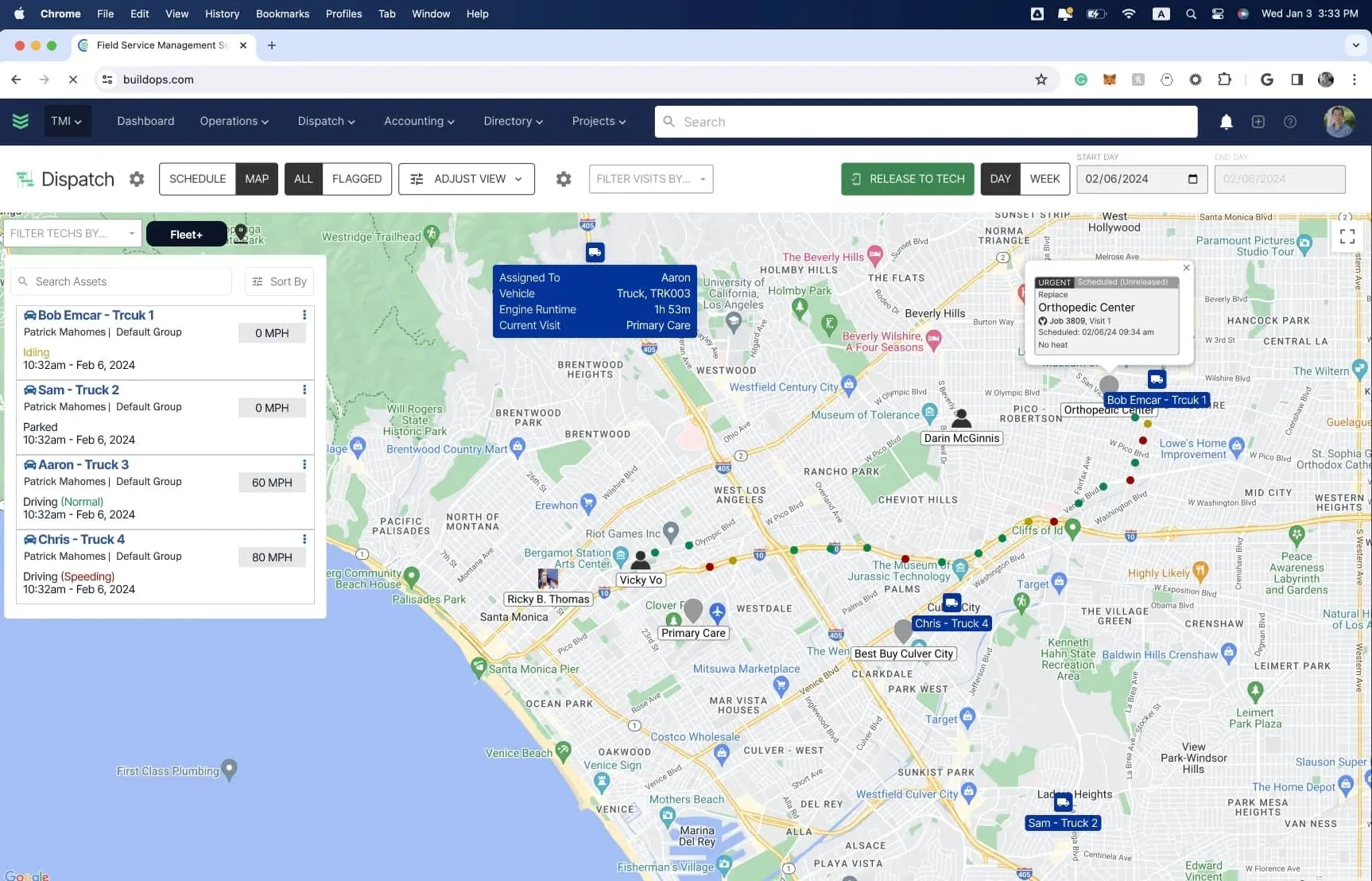
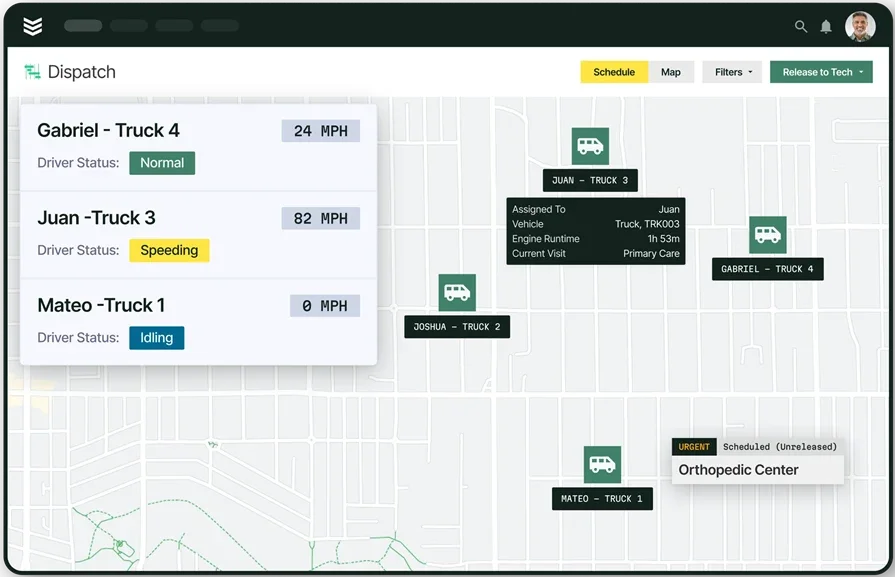
A perfectly built schedule means nothing if the truck assigned to a job is across town, low on fuel, or sitting in a shop for repairs. Fleet tracking and management tools give dispatchers real-time insight into vehicle status before assigning. Schedulers can instantly see which trucks are closest, which vehicles are due for maintenance, and how to distribute work across the fleet—turning every schedule into a plan that cuts drive time and keeps crews focused on billable work, not the road.
5. AI-powered automation for field service scheduling
Manual scheduling can’t keep up once you’re managing many techs, trades, skills, and shifting priorities. AI built into field service platforms can analyze technician certifications, location, current workload, job urgency, and historical performance data to recommend optimal assignments automatically. It catches issues early, suggests better routes in real time, learns from every job, and frees dispatchers to focus on exceptions instead of building the schedule.
6 best AI scheduling software to power your field service operations
The AI scheduling platforms below vary in how they handle assignments, schedule changes, and dispatcher workload. The biggest difference is how well scheduling connects with dispatch, tracking, and field communication — and how much is automated.
Here are six AI scheduling tools for contractors worth evaluating, ranked by how well they support the full scheduling workflow field service teams depend on every day.
1. BuildOps: best for commercial field service teams

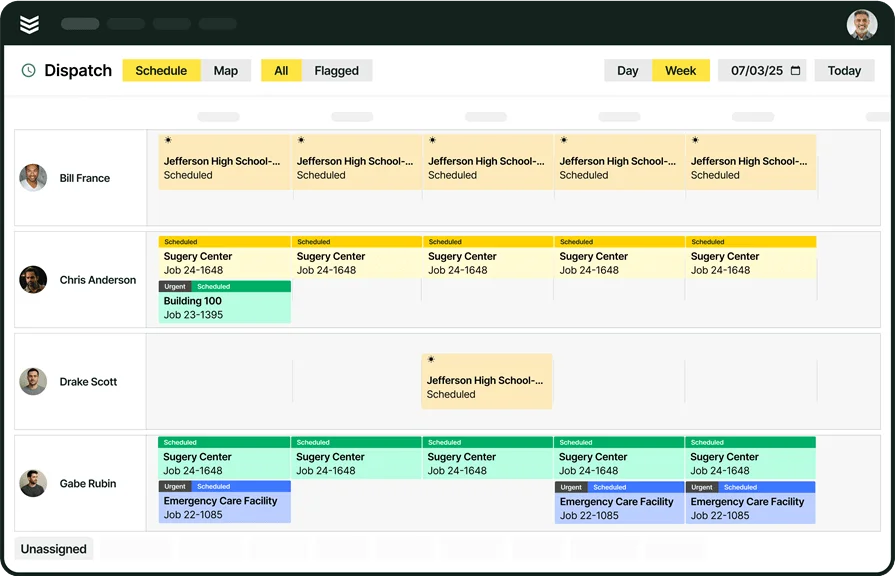
BuildOps brings AI to the core of field service scheduling, giving commercial contractors one platform to plan, adjust, and optimize work across multi-trade crews and multiple jobsites. With AI-powered scheduling, BuildOps helps teams build smarter schedules based on technician skills, certifications, availability, location, and job requirements—so the right people are lined up for the right work at the right time.
Schedulers can easily manage shifting priorities, rebalance workloads, and make quick changes from a single screen, while AI continuously helps optimize the schedule as conditions change throughout the day. When updates happen, they sync instantly to technicians in the field, keeping everyone aligned and reducing delays, miscommunication, and manual coordination.
How Pricing Works: BuildOps provides weekly live demos and an opportunity to arrange a personalized session to help you explore features and choose a solution that suits your needs.
Features Beyond Scheduling:
- Real-time scheduling and dispatching with drag-and-drop functionality
- AI-powered technician assignment based on skills, location, and availability
- Advanced customer hierarchy management for multi-location clients
- Technician mobile app with real-time job updates and automated checklists
What Sets It Apart for Commercial Service Teams: BuildOps keeps your schedule optimized in real time—booking and adjusting time slots across locations and trades—while giving office and field teams a shared live view of every scheduled job, from installs to maintenance to emergency calls.
Rating: 4.4 on Capterra from 177 user reviews
2. Kickserv: best for residential teams
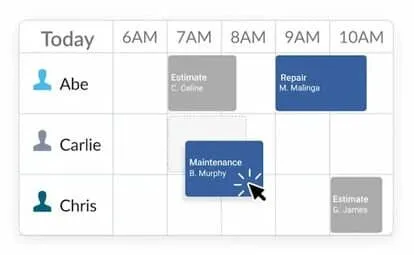
Kickserv works well for residential service contractors who need straightforward tools to schedule and dispatch smaller crews. It emphasizes customer-facing tools like a self-service portal where homeowners can review job history, approve estimates, and track upcoming visits.
The scheduling interface is simple and easy for office staff to use, but it lacks advanced features like capacity planning, multi-crew scheduling, and support for complex, multi-jobsite projects, which can limit growing commercial teams.
How Pricing Works: Kickserv offers tiered pricing, with key features like payment processing and customer management available at higher tiers.
Features Beyond Scheduling:
- Customer self-service portal for easy interaction
- Integration with payment systems like Stripe and QuickBooks
- Simplified job scheduling for smaller-scale teams
What Sets It Apart for Residential: Its customer portal streamlines communication between office staff and homeowners, reducing administrative back-and-forth and keeping residential service visits on schedule.
Rating: 4.4 on Capterra from 386 user reviews
3. Procore: best for general contractors
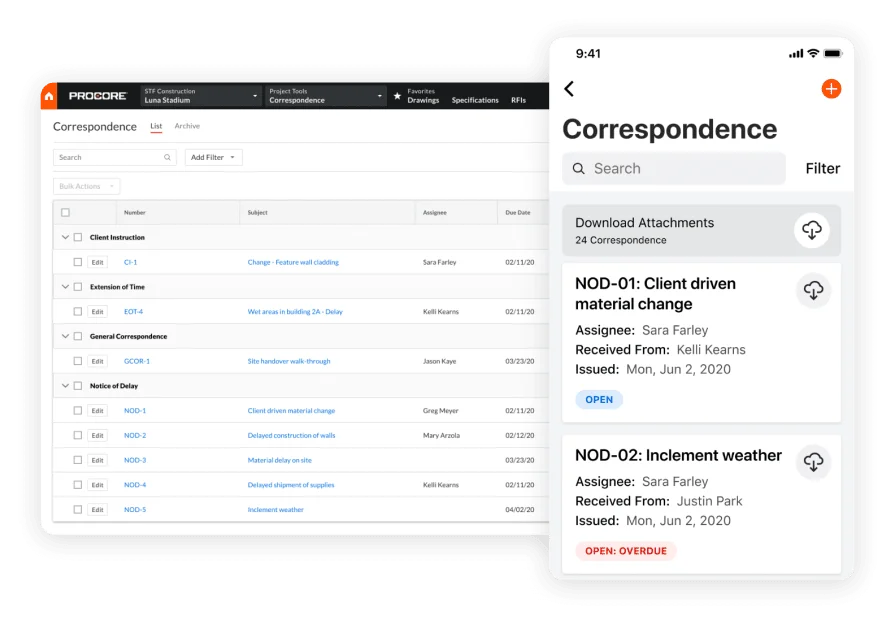
Procore is designed for general contractors overseeing complex, multi-phase projects that involve coordinating several teams and subcontractors at once.Its project management tools excel at large-scale builds, but service contractors needing granular AI dispatch — like optimized routes, emergency reshuffling, and skill‑based assignments — may find it lacks the specific features they rely on.
How Pricing Works: Procore's pricing is customized based on company size and project scope, making it suited for large-scale operations.
Features Beyond Scheduling:
- Comprehensive project management tools
- Collaboration features for teams and subcontractors
- Detailed reporting and analytics for job performance
What Sets It Apart for General Contracting: Procore excels at giving general contractors a high-level view of crew coordination and project timelines across diverse trades and large-scale construction builds.
Rating: 4.5 on Capterra from 2652 user reviews
4. FieldPulse: best for small teams
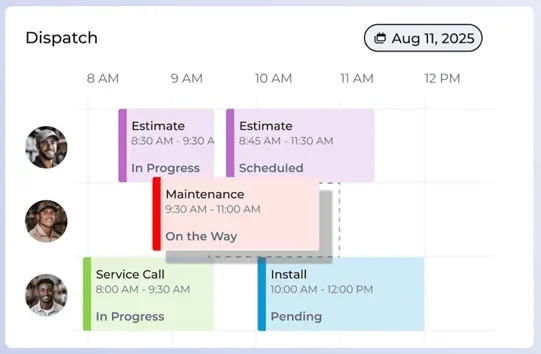
FieldPulse provides a lightweight, easy-to-navigate platform suited for small field service teams that need basic scheduling without a complex setup. Its streamlined interface makes scheduling straightforward, allowing office staff to assign jobs, track technician status, and manage appointments from a single dashboard.
However, if you’re juggling multiple crews, overlapping time slots, and need AI-powered scheduling that automatically optimizes routes and assignments in real time, FieldPulse’s simplicity can quickly become a constraint as your calendar gets more complex.
How Pricing Works: FieldPulse offers flexible pricing tailored to smaller businesses, with a focus on affordability.
Features Beyond Scheduling:
- Built-in time tracking for job accuracy
- Simple invoicing and payment processing
- Task delegation tools to keep your team on track
What Sets It Apart for Small Teams: FieldPulse keeps small field service teams productive with a streamlined, no-frills interface that focuses on core dispatching and operational needs without overwhelming users with features they don't use.
Rating: 4.6 on Capterra from 410 user reviews
Check out our breakdown of how FieldPulse stacks up when compared to BuildOps.
5. Service Fusion: best for fleet management
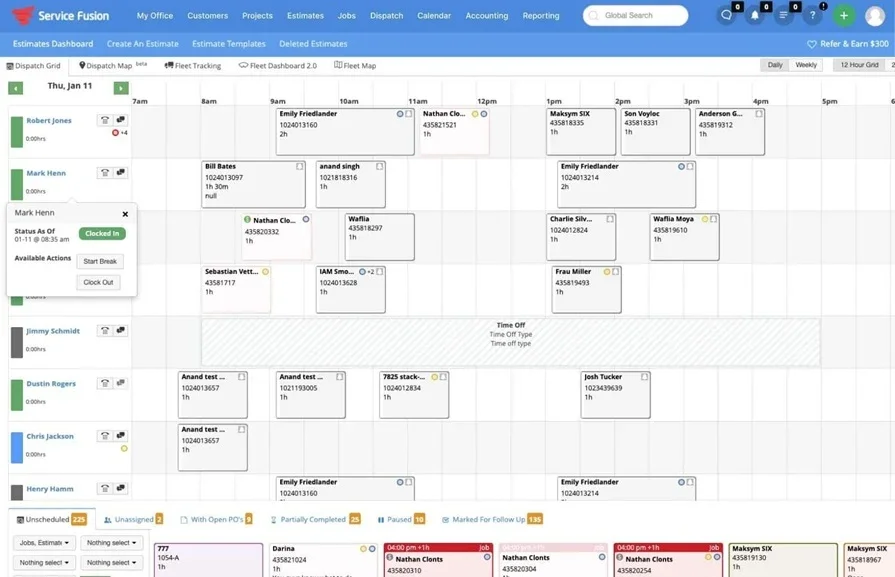
ServiceFusion combines strong scheduling with built-in fleet managemImage Source: Service Fusionent tools, making it a solid option for field service businesses that rely heavily on vehicle coordination. Its GPS tracking and real-time vehicle insights feed directly into the scheduler, helping teams see where technicians are, adjust daily calendars on the fly, and optimize routes to reduce fuel costs across service runs.
However, it still lacks advanced AI-driven scheduling features—like automated skill-based technician assignment or predictive, capacity-based planning—that larger or faster-growing service operations need to stay competitive.
How Pricing Works: ServiceFusion offers straightforward, tiered pricing plans with features expanding at higher levels.
Features Beyond Scheduling:
- GPS fleet tracking for monitoring technician locations
- Route optimization to save time and fuel
- Vehicle maintenance tracking for better fleet performance
What Sets It Apart for Fleet Management: ServiceFusion gives field service businesses direct visibility into their fleet operations alongside dispatching, helping teams reduce drive time and keep technicians on schedule across wide service areas.
Rating: 4.3 on Capterra from 289 user reviews
6. ServiceTitan: best for growing teams

ServiceTitan is a platform that serves both residential and commercial service contractors across a wide range of trades, including HVAC, plumbing, electrical, and roofing.
It centralizes scheduling, dispatch, and field communication with tools for call booking, marketing, reporting, and accounting. However, contractors needing deep AI scheduling features—like automated capacity planning, predictive calendar optimization, and real-time appointment reshuffling—may find it broad but not purpose-built for advanced scheduling intelligence.
How Pricing Works: ServiceTitan offers custom pricing based on business size and selected products, with optional Pro add-ons like Dispatch Pro, Scheduling Pro, and Fleet Pro available at additional cost.
Features Beyond Scheduling:
- Call booking and marketing tools tied to customer acquisition
- Integrated accounting and invoicing workflows
- Customer experience portal for self-service access
- Service agreement management for recurring maintenance contracts
What Sets It Apart for Residential: ServiceTitan connects the full residential service cycle — from the first inbound call through dispatching, field work, invoicing, and follow-up — giving residential contractors a single platform to manage customer relationships and daily operations across multiple trades.
Rating: 4.3 on Capterra from 325 user reviews
See how BuildOps and ServiceTitan compare directly right here.
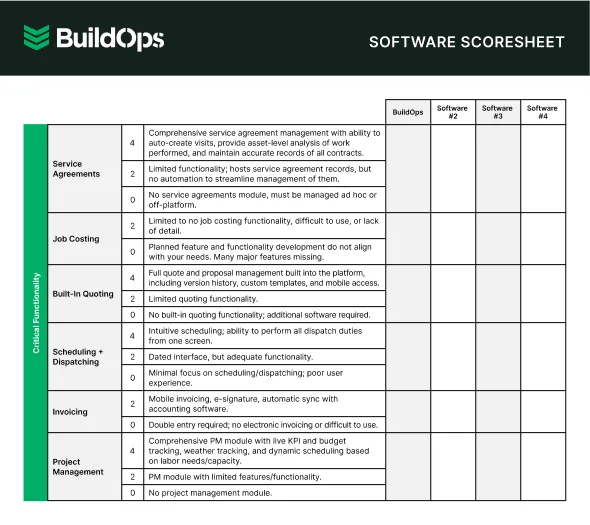
7 benefits of using an AI-powered scheduling software
AI-powered scheduling automates planning and replaces guesswork with data, keeping your board accurate and your crews productive.
1. Faster technician assignments
Coordinating schedules by hand means scanning calendars, double-checking availability, and confirming qualifications before a technician is even assigned. AI instantly weighs certifications, location, current workload, and job urgency, so dispatchers can finalize assignments faster and concentrate their expertise on the select situations that truly demand human judgment.
2. Fewer scheduling conflicts and missed appointments
Double-bookings happen when too many variables are managed by hand. AI scheduling software continuously monitors the board, flags conflicts, and automatically adjusts when there are delays or cancellations, preventing cascades of rescheduled visits that throw off the rest of the day.

A Kickstand report based on a survey of 606 contractors across the U.S. and Canada found that 78% are using AI tools on the jobsite, while 47% say one in five positions remain unfilled. That combination explains why AI-backed scheduling workflows matter in field ops: they reduce admin load and help teams keep output steady with the headcount they have.
3. Reduced drive time and fuel costs
Assigning jobs by list instead of location wastes time and fuel. AI scheduling uses real-time location, traffic, and job sequence to minimize drive time between stops, cutting fuel costs and increasing billable hours per technician over time.
4. Stronger first-time fix rates
AI-driven scheduling matches each job's requirements with technician skills and history, helping ensure the qualified tech shows up and completes the work on the first visit. Agentic AI in field service operations takes this further by surfacing asset history, service records, and troubleshooting guidance the moment a tech arrives on site, so the schedule accounts for preparation before the truck even rolls out.
5. Better visibility across field operations
When schedulers, project managers, and office staff are all working from different data, decisions get made in silos. AI scheduling software centralizes job status, technician location, and schedule changes into one real-time view. That shared visibility means fewer phone calls chasing updates, faster escalation when something goes wrong, and tighter coordination between on-site field service teams and the back office.
6. Scalable operations without proportional headcount increases
AI takes on the extra coordination work — reassigning jobs, rebalancing boards, and optimizing routes — so your existing schedulers can handle higher volume and grow the business without adding headcount or burning out. Pairing AI scheduling tools with a strong contractor CRM keeps customer data, job history, and service agreements connected to every scheduling decision as volume climbs.
7. Cleaner work order handoffs and faster closeouts
Scheduling decisions affect everything downstream — from what information a tech sees when they arrive to how quickly a job gets invoiced after completion. When AI connects scheduling to work order management, job details, checklists, and customer notes travel with the assignment automatically. Techs close out jobs with complete documentation, and the office doesn't have to chase missing information before billing.

Questions to ask when choosing an AI scheduling tool for your team
Choosing an AI scheduling software platform impacts every part of your operation, from how quickly time slots get filled to how efficiently jobs are completed. Here are the key factors to evaluate before you commit.
- Scheduling speed and AI automation — How does the platform handle booking and assigning time slots? Can it automatically suggest the best appointment window and technician based on skills, certifications, availability, and location, or does it still rely on manual scheduling for each job? Does the AI refine its suggestions over time as it learns your team’s patterns and preferred schedules?
- Fit with your existing scheduling workflows — Will the platform support how your office currently creates and manages schedules, or will it require a complete overhaul of your process? Can it adapt to how your office staff, coordinators, and field teams communicate about schedule changes and updates today?
- Scalability as your calendar fills up — As you add more technicians, crews, and service territories, will the scheduling engine keep pace without needing a major rework? Can it handle seasonal rushes, emergency calls, and rapid growth without bogging down your calendar or creating bottlenecks?
- Training and onboarding for schedulers and techs — How quickly can your coordinators and technicians become confident using the scheduling tools? Does the vendor provide hands-on implementation, playbooks, and live support, or are you on your own to figure it out? Is there a dedicated team guiding you through rollout and early optimization?
- Features that connect scheduling to the rest of your ops — Does the platform link scheduling with dispatching, routing, time tracking, fleet management, CRM, and invoicing? Can appointment details, technician updates, and customer information move seamlessly across your systems without duplicate data entry? Does it give office staff and field techs a shared, real-time view of each day’s schedule and job status?
Clear answers to these questions will lead you to a scheduling platform that strengthens your entire operation instead of just filling a gap in your tech stack.
4 important FAQs about AI field service scheduling software
Field service professionals evaluating AI scheduling tools for contractors run into the same operational questions regardless of trade or team size. These four cut straight to what matters when you're already running crews and deciding whether a platform fits how your operation actually works.
1. What is AI scheduling software?
AI scheduling software uses machine learning to take the guesswork out of assignments. It automatically matches the right technician to the right job, sharpens routes, and reshapes the schedule in real time based on skills, location, availability, and how urgent each call is.
The best tools don’t stop at a prettier calendar. They tie scheduling into dispatch, fleet tracking, time tracking, and CRM in one connected workflow — keeping the board accurate even when the day blows up, techs drop off the schedule, or last-minute emergencies push everything else down the list.
2. How does AI scheduling handle emergency calls and last-minute schedule changes?
When an emergency hits, AI scheduling looks at every tech at once—their location, skills, and workload—and instantly reshuffles the day.
It slots in the urgent call, adjusts the rest of the schedule to absorb the shock, and sends updated details to each tech. Over time, as it learns which jobs usually run long and who’s fastest at what, its recommendations quietly get better—without anyone babysitting a rule book.
3. Is AI scheduling software worth the price for field service contractors?
With a team of 10+ techs, manual scheduling quietly kills your margins. Smart, automated scheduling and routing quickly pay for themselves with fewer no-shows, more first-time fixes, and less overtime—while pen-and-paper leads to extra drive time, mix-ups, and slower billing.
{{related-content-block="/resources/how-service-1st-got-rid-of-the-work-arounds"}}
4. What are the best practices for getting the most out of AI scheduling tools?
AI scheduling only works if your house is in order: clean data, tight process, aligned team. Feed it junk, get junk back. Here are ten best practices to help keep things in order.
- Standardize tech profiles (skills, certs, areas, availability) before go-live.
- Normalize job types and complexity tiers for consistent AI matching.
- Run at least two full cycles before overriding AI recommendations.
- Give one owner control of all scheduling rules and thresholds.
- Integrate scheduling with dispatch, time tracking, and invoicing on day one.
- Use reports to spot recurring bottlenecks and coverage gaps.
- Flag job types the AI must never auto-assign (high-risk, VIP, specialized).
- Train schedulers to treat AI suggestions as a starting point, not the final call.
- Review accuracy monthly and refine skills and job classifications.
- Automate gradually: start with routine calls, then move to complex work.
Scheduling is where your operation either clicks—or cracks.
Most tools only fix one slice of the problem. BuildOps connects the whole thing: scheduling, dispatch, fleet, time, CRM, invoicing, and field documentation in a single system, with AI steering every assignment.
The impact: cleaner boards, smarter jobs, higher first-time fix rates, and a team that grows without extra headcount.
Want to see how it runs for your crew? Book a demo and walk through the scheduling board with your dispatchers, techs, and back office in mind.