How to Use AI Smart Recap Software for Field Notes
Paperwork bottlenecks. Half-finished notes. Illegible scribbles. For busy field service management teams, these gaps quietly drain billable hours. AI-powered Smart Recap tools plug those leaks—automatically pulling from field notes, asset history, and service data to highlight only the insights technicians need, so jobs move forward while the admin work happens in the background.
We’ll dive into how AI-driven Smart Recap automates field notes, eliminating manual entry and ensuring technicians have the precise job history they need to succeed, clearly demonstrating how intelligent documentation optimizes your workflow.
What does AI Smart Recap software do?
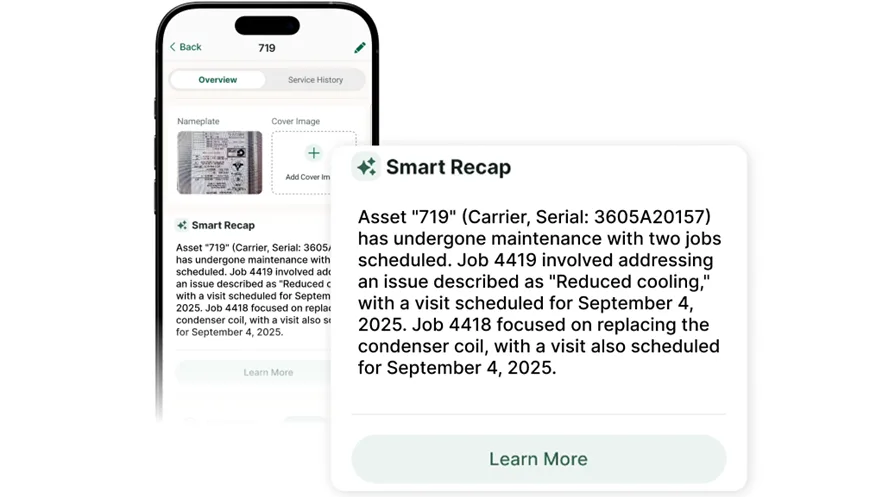
Smart Recap gives field teams the full story of the job before they walk on site. It pulls key history from past visits into a clear briefing inside the visit itself, so techs can see what happened last time, what parts were used, and what equipment was serviced without digging through old tickets or calling the office for details.
It is designed to live where field work and documentation already happen. Instead of sending techs to a separate app or screen, Smart Recap appears directly in the visit workflow and can summarize the records commercial contractors depend on, including Jobs, Visits, Daily Reports, and Assets.
The value is straightforward: less time hunting through notes, fewer calls back to the office, faster handoffs between techs, and cleaner, more consistent reporting. As more visit history is captured in BuildOps, the recap becomes even more accurate over time, helping service managers close context gaps and giving newer techs access to the kind of job memory that usually only experienced technicians have.
{{related-content-block="/resources/ai-field-service-assistant"}}
How does Smart Recap software work?
Smart Recap works by using the job history your team is already putting into the system as the input. That includes things like visit notes, parts used, asset history, and the records tied to Jobs, Visits, Daily Reports, and Assets.
Instead of making someone re-read that history manually, OpsAI distills it into a concise briefing inside the workflow.
What it puts out for you is a short, usable recap right when the tech opens the visit. The output is the context that matters before work starts: what happened last time, what parts were used, and what’s already been worked on, without digging through notes or calling the office.
The more real work history your team captures over time, the sharper that recap gets.
What distinguishes a “Smart Recap” software from regular field service notes software?
Regular field service notes software mostly stores what happened. Smart Recap goes a step further by turning that stored history into a briefing the next person can actually use. Instead of leaving someone to open past records one by one, it surfaces the important context inline when they open the visit.
The real difference is that regular notes software gives you raw inputs, while Smart Recap gives you a usable output. Notes software collects the record; Smart Recap distills that record into faster handoffs, less searching, and better continuity from one tech to the next.
It is not just a place to save notes. It is a way to put the history back to work.
{{related-content-block="/resources/your-pm-is-retyping-field-notes-into-excel-in-2026-theres-a-better-way"}}
How is Smart Recap used in field service operations?
Service techs showing up blind. Calling the office mid-visit. Typing recaps from memory at the end of a long day. Smart Recap ends all of that with a tight, in-workflow summary of what was done, which assets and parts were involved, and what still needs attention—so every visit starts informed and ends confident.
- When a technician opens a visit, job, property, or asset, Smart Recap instantly surfaces the most relevant history so they can get up to speed fast—while also reducing questions to the office.
- During the job, Smart Recap shows what happened before, which parts and equipment were involved, and any open issues, with optional deeper detail—cutting prep time, mental load, office calls, and repeat visits.
- After the visit, the technician’s new notes and summaries feed back into BuildOps, strengthening Smart Recap for next time and preserving institutional knowledge beyond any single tech.
What issues do field recap notes commonly cause within an operation?
Field recap notes usually break down when techs are forced to do too much manual entry or when the note-taking tool is too limited for real field work. The result is not just slower closeout. It creates bad handoffs, weak customer documentation, and extra cleanup for the office.
- Double or triple entry — The tech writes notes once, then someone in the office rewrites them for billing, reporting, or customer updates. More than one person ends up doing the same work.
- Notes that aren’t detailed enough — The recap says the job is done, but not what was found, what was fixed, or what still needs attention. That leaves the next tech and the customer without a clear record.
- No photo or video proof — If the software can’t support attachments well, the team loses visual proof of conditions, completed work, and customer-facing evidence.
- Thin work history — Weak notes turn into weak job history. When the next visit happens, the tech has less to work with and spends more time figuring out what happened last time.
- Tech notes and finance notes don’t match — The field team records one version of the job, then finance or admin rewrites it another way. That creates confusion, rework, and customer questions.
- Slow closeout — If it takes too long to write a solid recap, techs delay it, rush it, or leave it incomplete. That slows job closeout and holds up the next step downstream.
- Sloppy customer-facing notes — Spelling, grammar, and rushed wording make the work look less professional, even when the job itself was done right.
- More callbacks to the office — When the notes don’t stand on their own, techs have to call dispatch, managers, or other techs to fill in the gaps.
{{related-content-block="/resources/ai-for-contractors"}}
How does AI power the work of generating field note summaries?
AI takes messy field notes and turns them into a sharp, usable recap fast. Instead of digging through raw details, techs and office staff get a clear summary that highlights what matters and what to do next.
- Drafts the summary from the work already captured — AI takes the notes, parts used, asset history, and visit activity already in the system and turns them into a concise summary instead of making someone rewrite everything by hand.
- Pulls out the details that matter most — Instead of showing every raw note, AI surfaces the key context: what happened, what was worked on, what parts were used, and what someone needs to know next.
- Makes the recap easier to use in the workflow — AI works best when the summary shows up where the work is already happening, so the user gets the recap in context rather than hunting through old records or opening a separate tool.
- Speeds up closeout and handoff — By cutting down the typing and cleanup, AI helps techs finish documentation faster and gives the next person a clearer starting point for the next visit.
- Gets better as more job history builds up — The more complete the work history is, the more useful AI can be at producing sharper summaries and stronger continuity from one visit to the next.
How BuildOps OpsAI does AI-powered Smart Recap for field service notes
AI job recaps stall for the same reason invoices do: the office is stuck decoding techs’ shorthand, loose emails, and scattered notes. With OpsAI, raw field data becomes clear, structured smart recaps the moment work is completed before details get lost or delay billing.
Visit smart recap
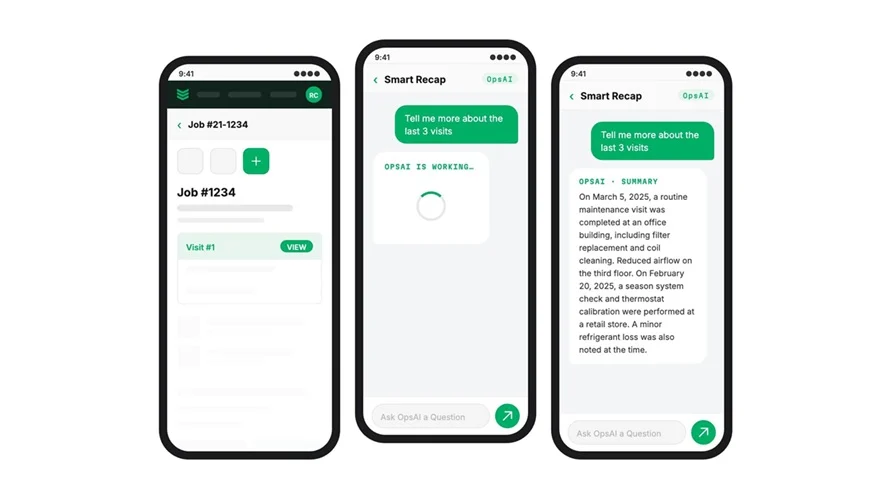
When a tech wraps up a visit, OpsAI for the field gets to work, quietly building the story of the job behind the scenes. It stitches together what was done, what was found, and which materials were used or still needed, all in a clean, readable recap.
Techs don’t start from scratch. They skim the AI recap, confirm the details, verify the materials list, and they’re on to the next call. If more parts are needed, those materials are captured in the recap so nothing gets lost in translation later.
Invoice and payment dashboard
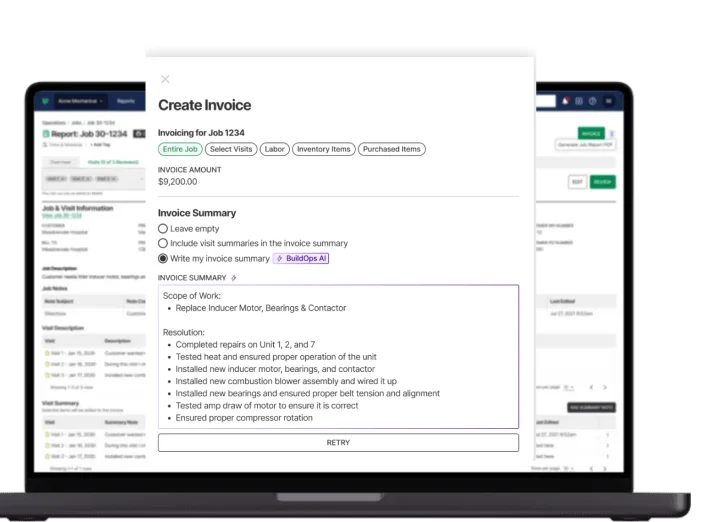
OpsAI pulls in field notes, visit details, job scope, and material usage to draft a clear, customer-ready visit summary, in plain language, not shorthand only the tech understands.
It spells out what happened, what was found, and what’s recommended next, so office teams and customers don’t chase context. The office reviews, tweaks if needed, and sends. No blank page. No missing details.
Because recaps run directly inside invoicing and payments workflows, the same AI summary that explains the work also supports billing and collections, shrinking the gap between completed work, approved charges, and recovered costs. One contractor cut receivables from 120 days to 30 days.
Smart dispatch
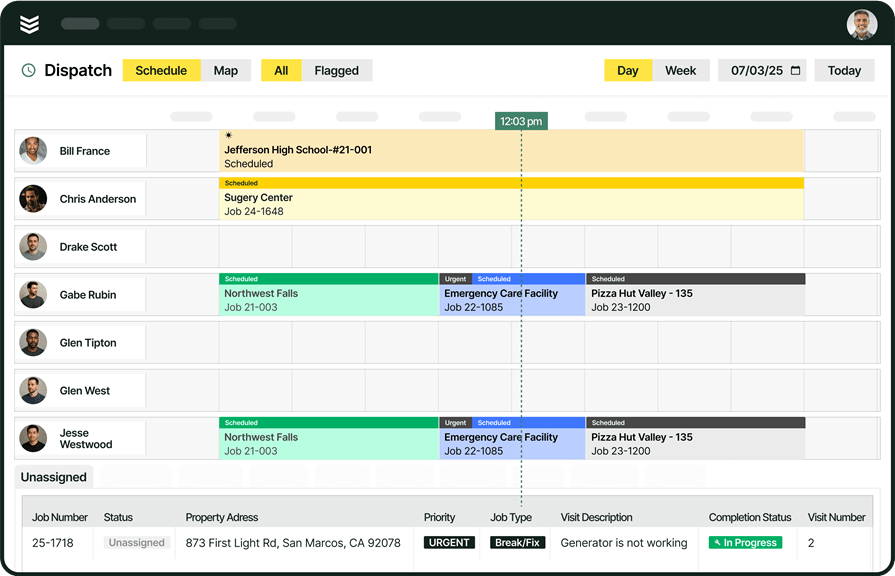
Accurate AI recaps start with the right tech on the right job. Before a visit ever happens, OpsAI recommends the best match by skill, certifications, availability, and distance, so dispatchers stop guessing and techs stop making extra parts runs.
Contractors using Smart Dispatch have cut travel time by 50%. The Schedule Assistant surfaces the recommended tech and time slot as soon as the dispatcher opens the job. That’s intelligence built into scheduling and dispatch, and it feeds better job data and better recaps without adding another system to manage.
Technician daily reports
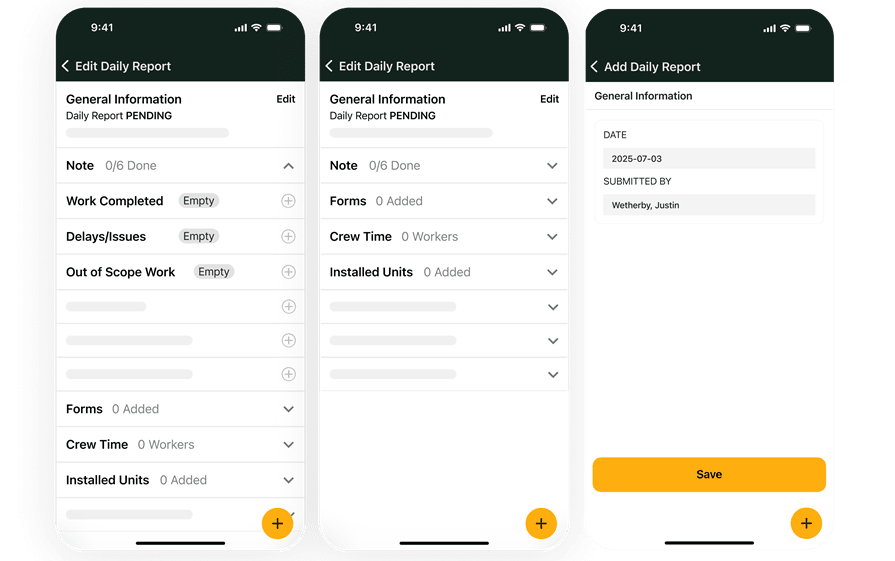
Techs log detailed daily reports in the field through the technician’s mobile app. Every OpsAI Smart Recap ties those notes to the job and customer record, so work, materials, and costs flow straight into invoices the day the job closes. With clear, AI-polished recaps, the office spends less time chasing details, payment scanning auto-applies remittances, and cash comes in faster.
Job-level reporting
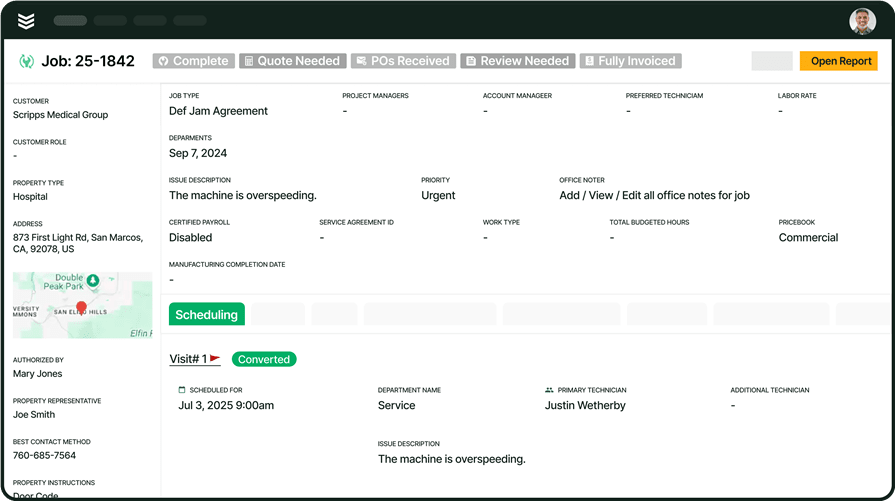
Every visit recap, every dispatched job, every material used becomes a data point inside reporting.
OpsAI pulls out what matters: overdue invoices, hidden upsell cues in visit recaps, and spending trends by job or customer. Instantly see which jobs trigger repeat calls, where standardizing parts cuts costs, and which contracts actually turn a profit without spreadsheets.
The longer you run it, the sharper your picture becomes. Each AI Smart Recap turns individual visits into a connected narrative, from first site visit and recommended work to final invoice and payment.

AI has already started shifting how field service contractors handle their workflows. What used to take hours can now happen in minutes — with more accuracy and fewer surprises.
In our 2025 survey, The Pivot Point: AI and the Future of Commercial Contracting, 78% of contractors said they believe AI improves efficiency, and 47% are already using AI in some capacity for their field ops.
Which departments benefit most using an AI-powered field service Smart Recap tool?
Different departments all need something different from a site visit, but they’re all stuck with the same problem: scattered notes, photos, and side conversations that never quite add up to a single source of truth.
- Service operations — Service managers normally chase techs for details after the visit: what was done, what’s pending, what the customer actually approved. Visit Smart Recap turns visit recordings, notes, and checklists into structured summaries tied to each work order, so ops leaders review the recap instead of piecing together the story from texts and voicemails.
- Field technicians — Techs document while standing at the unit: issues found, tests performed, recommendations made. Visit Smart Recap converts those on-site notes, photos, and voice memos into clean, job-ready documentation linked to the right asset and customer. No rewriting notes at the end of the day, no “can you remind me what happened?” calls from the office.
- Construction operations — Project managers rely on daily reports, site walks, and coordination meetings to understand progress and risks. Visit Smart Recap turns these visit interactions into consistent logs mapped to phase, cost code, and scope, so everyone sees what was discussed, what changed, and what’s at risk—without digging through email threads and loose PDFs.
- Finance — Controllers and AP teams need clear backup for every invoice, change order, and dispute. Visit Smart Recap provides structured visit documentation that explains why work was done, what was approved, and when, so finance can validate charges, reduce write‑offs, and defend margins with clean, time‑stamped records.
- Sales & marketing — Account managers use visit recaps to see what’s really happening at each account: recurring issues, deferred recommendations, and emerging opportunities. When visit documentation is structured and consistent, sales teams can build data-backed proposals, create targeted renewal and upsell plays, and walk into QBRs with clear visit histories instead of piecing together notes from scattered systems.
{{related-content-block="/resources/layer-one"}}
Notes taken care of, and customers happy. That’s OpsAI.
Commercial contractors and field techs don’t struggle with documentation because they’re careless, they’re moving fast on-site while critical details end up buried in tech notes, PDFs, and disconnected systems.
BuildOps fixes that with OpsAI, our AI-powered smart recap engine built for commercial service work. It automatically turns field tickets, photos, and asset data into clean, accurate visit recaps, capturing scope, work performed, parts used, and next steps without extra admin time.
With OpsAI, every visit is documented while you work, so leadership gets reliable detail, techs stay focused on the job, and the office has the information they need to bill, quote, and dispatch with confidence.
Want to see how AI smart recaps can transform your field documentation? Book a demo built for commercial contractors.