BuildOps and Viewpoint Vista Integration for Contractors


Most contractors go looking for a Viewpoint Vista integration because the handoff between the field and accounting is breaking down. Techs finish the work, the office rebuilds the details, and finance still has to double-check whether the invoice, customer record, and job cost setup match what actually happened on the job.
This guide is for contractors evaluating how BuildOps works with Viewpoint Vista. You will see what syncs between the two systems, where BuildOps takes over the day-to-day operational work, how rollout usually works, and what limitations your team should plan around before moving forward.
Why Viewpoint Vista integration matters for commercial contractors
A typical commercial-contractor workflow begins with Viewpoint Vista holding the project contract, cost codes, budget, and billing structure. As work progresses, field teams record labor, materials, equipment, and production details, while accounting tracks commitments, invoices, and job costs. An integration connects these records with the systems teams use each day, reducing re-entry, improving cost visibility, and keeping operational and financial reporting aligned.
BuildOps fits into that gap. Vista stays focused on accounting and job cost structure. BuildOps handles the operational side of the business, from dispatch to field notes, approvals, and billing, so your team captures the work once and moves it forward from there.
For commercial contractors, this matters because service and project work rarely break neatly across departments. A tech updates the job in the field. The office reviews it. Billing turns it into an invoice. That handoff matters because it’s where disconnected workflows create duplicate data entry, delays, and errors. Most teams already know the problem exists; the challenge is unifying operations and the business side around shared data without adding more administrative work.
According to our research, getting invoices out quicker can get you paid up to 5x faster. That is exactly why this integration matters for contractors. When job details, customer records, terms, and cost structure stay aligned from the field to accounting, your team can send invoices out faster and avoid the back-office cleanup that slows down how quickly cash comes in.
{{related-content-block="/resources/invoicing-sweet-spot"}}
What syncs between BuildOps and Viewpoint Vista
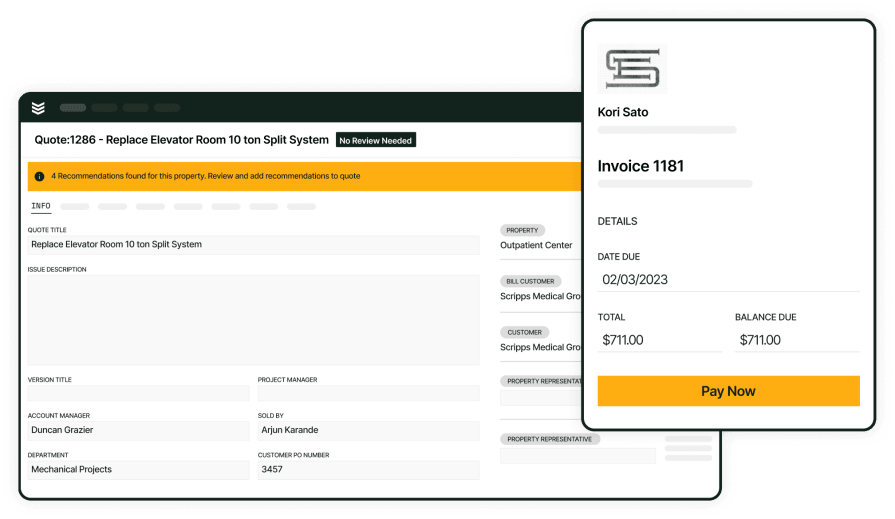
BuildOps and Viewpoint Vista work together to keep operational and financial records connected. Business and job data can sync both ways. Vista sends vendors, GL accounts, GL departments, payment terms, tax rates, and posted payments into BuildOps. BuildOps sends jobs, service agreement maintenance, AR invoices, and purchase order receipts into Vista.
The integration is built around a clear handoff between the two systems. BuildOps handles the operational records your team creates in the field and office, while Vista receives the accounting records your back office needs to keep work financially aligned. BuildOps also supports Vista user-defined fields during onboarding, which helps contractors preserve the accounting and job data they already rely on.
There are a few scope rules to plan around:
- Invoices for Vista-integrated accounts need to come from a job, not from an ad hoc invoice flow
- If a job has more than one Vista contract item, each invoice line needs the correct contract item selected before the invoice can sync.
Those rules help the integration send records into Vista with the right job-cost structure attached.
A few BuildOps features make that integration more useful in practice. Scheduling & dispatch keeps the right job details moving to the field, the technician mobile app captures labor, notes, and job activity as the work happens, invoicing turns completed work into billable records, and project financials gives the office clearer visibility into billing and job performance as records move into Vista.

How setup works and what your team should prepare for
A strong rollout starts with a clean setup in both systems. Before go-live, the BuildOps team configures the Vista connection, imports the accounting records BuildOps needs, and confirms the template-job and contract-item structure required for job and invoice sync.
For most contractors, rollout usually includes four practical steps:
- Confirm the core accounting data. Align customers, vendors, GL accounts, departments, payment terms, tax rates, and other records Vista will share with BuildOps.
- Set the template-job structure. Define the phases, cost types, and contract items new jobs and maintenance work need in order to land in Vista correctly.
- Import and validate the initial records. Bring the needed Vista records into BuildOps and confirm the sync is behaving the way your team expects before activation.
- Prepare your team for live sync. Make sure the right users, notifications, and ownership are in place so operations and accounting can catch issues early once the integration is active.
If your team wants a broader view of how BuildOps integrations support the operation as a whole, you can explore the BuildOps integrations ecosystem built to connect your ERP, field, and back-office workflows without more manual re-entry.
Who this integration fits best and what to watch for
This integration is a strong fit for commercial contractors that want to keep Vista as the accounting system of record while giving service, project, and field teams a better operating layer. It is especially useful when your team wants faster invoicing, cleaner handoffs, and fewer manual touches between the truck and the back office.
It is also important to set expectations early:
- Legacy service workflows should be mapped carefully during onboarding so jobs, phases, cost types, and contract items land correctly in Vista.
- Payments are created in Vista and imported back into BuildOps, so field-payment workflows should be defined before go-live.
- Payroll is not a direct bidirectional sync. Approved timesheets can be exported from BuildOps and imported into Vista Payroll by CSV.
- Closing a job in BuildOps does not close that same job in Vista, so your team should define who owns that final accounting step.
- When multiple contract items exist on a job, each invoice line needs the correct contract item selected before export.
For contractors comparing options, the value of a Viewpoint Vista integration comes down to one thing: keeping field execution and financial records connected without adding more manual cleanup between the jobsite and the back office.
That is where BuildOps comes in. BuildOps gives commercial contractors one connected system to run service and operational workflows while Viewpoint Vista continues to own the accounting backbone. And because OpsAI is built into BuildOps, it can draft a customer-ready invoice summary from the job’s labor, materials, and visit notes; so finance reviews and sends it while the completed work moves cleanly into Vista.
If you want to see how the Vista integration fits into your workflow, book a demo to walk through how BuildOps supports the handoff from completed work to posted financial records.





