Contractor’s Guide to Field Service Automation Process

Commercial contractors are under pressure to run more calls, keep jobs moving, and protect margins without adding the same amount of overhead. Shops with a strong field service management foundation can put automation to work faster across dispatch, field reporting, billing, and follow-up without adding more admin drag.
Before you get into its benefits, features, actionable steps, and the bigger trends, start with the basics. Here’s what field service automation looks like in the day-to-day and why it matters for field teams.
What is field service automation & why is it critical for field teams?
Software that automates scheduling, dispatch, field updates, reporting, invoicing, and follow-up work defines field service automation. It keeps jobs moving with fewer manual handoffs, cleaner data, and faster decisions across the office, the field, and billing teams without daily double entry.
Manual handoffs slow down every part of the day. One connected workflow gives dispatchers, techs, and office teams live job updates, cleaner records, and faster billing, so nobody wastes time chasing notes, photos, or missing details before the next job can move forward.
Competitive service teams are already using automation to scale without adding the same amount of overhead. Faster scheduling, cleaner documentation, and quicker billing help contractors protect margins, take on more work, and avoid falling behind shops that already run with tighter, better-connected operations.
{{related-content-block="/resources/field-service-automation-software"}}
5 benefits of field service automation for your crew’s operations
AI only matters if it actually improves how field operations run. When automation is built into everyday workflows like dispatching, documentation, invoicing, and customer communication, contractors see faster jobs, lower overhead, and more predictable revenue. Here are five ways automating field service operations pays off.
1. Faster, more accurate dispatching with fewer manual steps
Automation removes the guesswork from dispatch. It can automatically match the right technician to every job based on certifications, location, and workload, even when the board is packed with emergency calls and scheduled work. Contractors who streamline their work order dispatch through automated workflows consistently see fewer missed appointments, shorter response windows, and less time spent reshuffling the schedule during the day.
2. Less admin drag so techs stay billable in the field
Manual admin work slows down both technicians and office staff. Automated tools handle repetitive tasks in the background, such as writing reports, extracting line items, and flagging missing documentation before it delays billing. With the rise of agentic AI in field service, systems can act on pre-set rules without waiting for a person to trigger every step, which keeps crews focused on revenue-generating work instead of paperwork.
3. Stronger on-site execution and more first-visit completions
Automated field workflows ensure technicians arrive prepared. Systems can pull service history, asset details, and required parts into a single view so techs know exactly what they are walking into. Contractors who standardize their on-site field services around automated mobile tools reduce return trips, shorten diagnostic time, and deliver consistent results that keep customers from shopping around.
4. Deeper customer visibility that drives recurring work
One-off jobs keep trucks moving, but recurring work drives growth. Automated systems centralize every customer interaction so the team never starts from zero. A well-integrated contractor CRM powered by automation can surface upcoming renewals, identify upsell opportunities based on past work, and send timely follow-ups that keep your company top of mind without adding extra tasks to anyone’s to-do list.
5. Lower operational costs with connected, automated workflows
Disconnected manual workflows quietly erode profit through rework, errors, and bottlenecks. When field service operations are automated end to end, BuildOps can connect quoting, scheduling, field work, invoicing, and payments so data flows once and updates everywhere. This reduces overhead, cuts down on avoidable mistakes, and improves margins without requiring cuts to headcount.
4 actionable steps for integrating field service automation in your processes
Field service automation works best when every handoff gets tighter from dispatch to closeout. The strongest rollout does not start with adding more tools. It starts with fixing the parts of the day where jobs stall, updates get lost, and billing slows down.
1. Map the full workflow before you automate anything
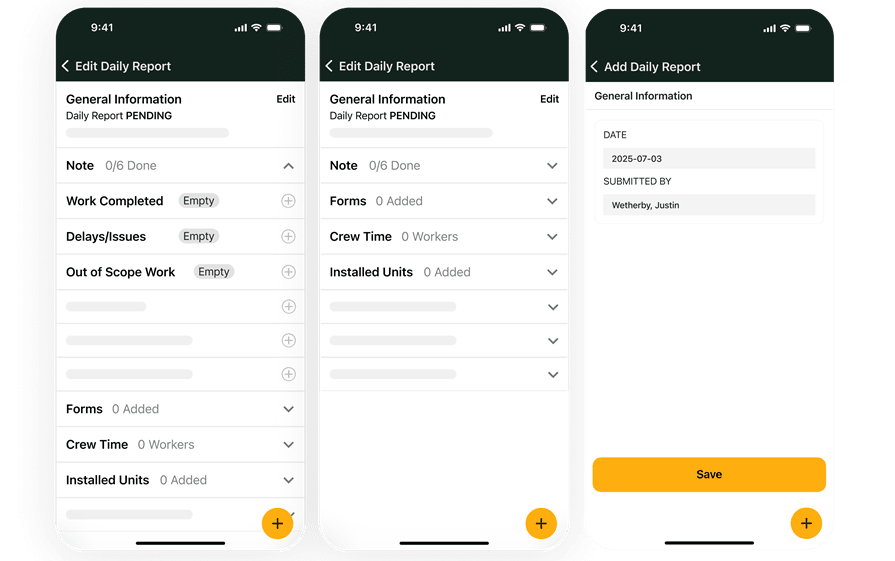
Write out how work moves from the first call to scheduling, dispatch, field execution, closeout, and invoicing. That gives you a clear view of where double entry, missed details, and approval delays are actually hurting the day. In BuildOps, this starts with the Service Management Suite, which is designed to keep service work moving from first dispatch to final invoice in one connected workflow.
2. Standardize what techs capture in the field
Set one clean process for notes, photos, asset details, signatures, and time so the office is not rebuilding the job after the tech leaves the site. Cleaner field data means faster follow-up, fewer mistakes, and less back-and-forth at the end of the day. With BuildOps, that gets easier through OpsAI, which can draft recaps, clean up records, and pull useful context into the workflow while the work is still happening.
3. Give dispatch live visibility instead of end-of-day updates
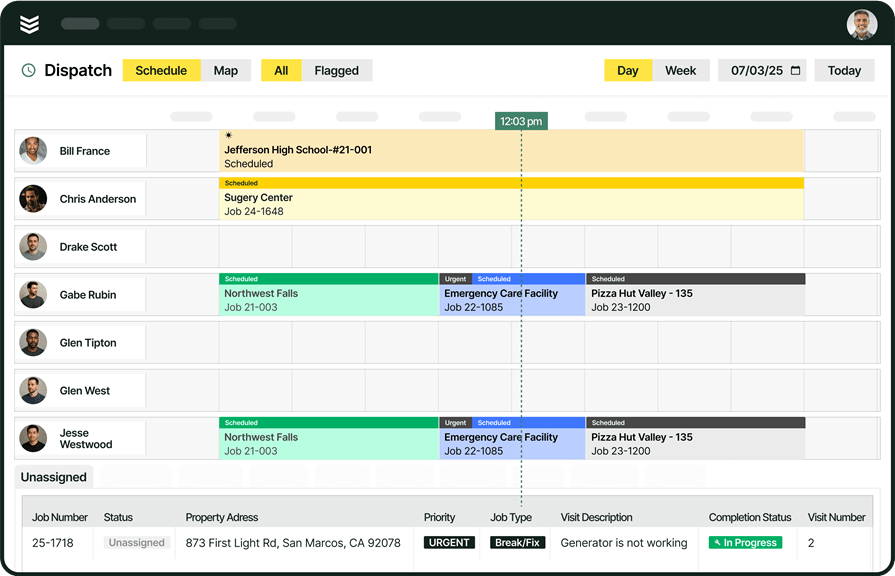
Automation falls apart when dispatch still works from stale information. Dispatchers need real-time job status, truck visibility, and the ability to react fast when jobs run long, emergency calls come in, or the schedule changes. On the field side, BuildOps supports that with Fleet and Smart Scheduling and Dispatch, giving teams a tighter view of locations, availability, and smarter daily routing decisions.
4. Tie closeout to billing and measure what changed
Do not stop at faster field updates. Make sure completed work turns into invoices, payment follow-up, and usable reporting without extra cleanup from the office. At the last mile, BuildOps extends that workflow with Invoicing and Payments, helping contractors move from completed work to faster billing, cleaner cash flow, and clearer performance tracking across the business.
{{related-content-block="/resources/ai-field-service-erp"}}
Key field service automation features to look for in field business software
OpsAI works inside BuildOps workflows, not in a separate tool. The point is simple: cut busywork, keep records cleaner, and help the field and office move faster without adding another system to manage.
- Voice-to-text reporting and clean closeout: BuildOps helps techs talk through the work, turn rough notes into cleaner visit summaries, and close jobs with more complete documentation. It can also clarify rough notes in English and Spanish, which means less rewriting in the truck and fewer follow-up calls from the office.
- Smart dispatch and tech matching: BuildOps ranks the right tech based on skills, certifications, availability, and proximity, then helps optimize the board around that recommendation. Dispatchers still review the plan, so the team gets faster scheduling without giving up control.
- Purchasing document scanning: BuildOps can scan supplier invoices, receipts, and POs, then pull vendors, dates, and line items into the system faster. The win is less manual re-entry and cleaner job cost data, not hands-off AP automation.
- Asset nameplate capture: A tech can snap a photo of an equipment nameplate and BuildOps fills in key asset details automatically. That makes it easier to build cleaner service history while the team is still on site.
- Invoice summary generation: When a job is ready to bill, BuildOps can turn raw field notes into a cleaner customer-ready invoice summary. The billing team still reviews and edits before it goes out, which helps speed closeout without losing oversight.
- Pull-through revenue capture: BuildOps can surface repair, replacement, and upsell opportunities from the work your techs already documented. That gives service and sales teams a better shot at acting on revenue before it goes cold.
Business automation trends for field services
For today’s leading contractors, the real transformation isn’t just going paperless; it’s putting AI and connected workflows to work. Instead of simply digitizing forms, they’re using smart automation to cut admin tasks, tighten schedules, and let office and field teams accomplish more without piling on overhead.
1. AI is moving into everyday field work
AI is no longer something contractors test on the side. It is becoming part of the daily workflow for reporting, closeout, dispatch decisions, and follow-up work, which means teams that adopt it early have a better shot at moving faster with the same headcount.
2. Dispatch is shifting from reactive to optimized
Getting jobs on the board is no longer enough when schedules change by the hour. Contractors are leaning toward smarter dispatching that weighs skills, drive time, urgency, and workload together so the day holds up better when emergency calls, delays, and last-minute changes hit.
3. Faster field reporting is becoming the standard
Manual end-of-day writeups create delays that show up everywhere else, especially in billing and customer communication. More contractors are pushing reporting closer to the moment the work happens so notes, photos, and job details are cleaner before the tech ever leaves the site.

Our survey of 606 contractors across North America found that 78% are using AI tools on the jobsite, while 47% say one in five positions remain unfilled. That combination explains why AI workflows matter in field ops: less admin, steady output with the same team.
4. Back-office intake is getting automated
Office teams are under pressure to process more purchasing and billing paperwork without growing headcount at the same pace. Automation helps contractors pull invoice, PO, and document data into the system faster, which cuts manual re-entry and keeps routine admin work from turning into a bottleneck.
5. Asset data capture is moving to the job site
Equipment records are more useful when the right details get captured on the first visit instead of getting patched together later. Contractors are putting more focus on field-ready tools that help techs log nameplate details, asset history, and service context while they are still standing in front of the equipment.
Paper workarounds, disconnected tools, and one-off updates don’t just create extra admin. They blind you to what’s happening in the field, stall decision-making, and quietly stall growth across every service operation.
BuildOps replaces disconnected spreadsheets and inboxes with a single hub built to automate your field service workflow. From capturing requests and assigning technicians to field updates, photos, sign‑offs, and completion, every step follows one integrated process your office and field teams share. No double entry, no email chasing, and no confusion over the latest status.
With OpsAI, every service record becomes a structured, usable data point that strengthens your process. AI-driven notes, technician recommendations, draft invoice summaries, and revenue signals help you standardize your workflows, reduce errors, and move faster without more manual work.
Your data no longer sits in PDFs. It drives consistent processes, faster closeouts, tighter compliance, and better protection against disputes across your portfolio. See how AI-connected field service automation can plug into your existing operations and standardize the way your teams work. Schedule a free demo.