Contractor’s Guide to Choosing the Best Jobber Alternative

If Jobber feels stronger on basic service management than on the complex, day-to-day work your crews actually handle, you’re not the only one looking for other options. Many contractors need software that can support both larger, more complex jobs and all their field service management needs without forcing techs, office staff, and job data into separate systems.
In this guide, we’ll cover what to look for in a Jobber alternative, which types of platforms tend to stand out, and how to make the switch without slowing your team down.
Before you compare tools, it helps to get clear on what your team actually needs the new system to handle every day.
3 key questions to consider when choosing a Jobber alternative
For HVAC, electrical, plumbing, fire life safety, refrigeration, and other specialty contractors, the best alternative is not just the one with the longest feature list. It is the one that fits how your team runs jobs, handles service work, and keeps field and office teams on the same page.
1. Does the new tool have features built specifically for commercial and specialty contractors?
Some platforms handle basic scheduling, quotes, and invoices well, but fall short once you need tighter coordination across multiple trades, contract types, and long-term customer relationships. If your team manages a mix of maintenance agreements, service calls, quoted work, and larger jobs, you need software that can support all of it without creating extra handoffs.
Questions to ask yourself about this when looking for an alternative:
- Can it connect service work, recurring maintenance, project-style jobs, and billing in one workflow?
- Does it support scheduling and dispatch for multiple techs, trucks, and trades without forcing your team into separate tools?
- Can field teams, managers, and office staff all work from the same job, site, and asset information?
2. Does the solution cater to your trade and typical customers?
Field service software can look strong on paper but still miss the mark for specialty contractors. The needs of HVAC, electrical, plumbing, fire life safety, refrigeration, and other specialty trades are different from those of simpler residential service teams. The closer a system matches your workflows, the less your team has to work around it.
Questions to ask yourself about this when looking for an alternative:
- Does it handle the mix of service calls, PMs, inspections, quoted jobs, and emergency work your team runs every week?
- Can it track customers, sites, assets, and job history in a way that makes sense for your trade, contracts, and equipment types?
- Will it still fit if you grow into more techs, more routes, more locations, or more complex maintenance agreements and service-level expectations?
3. How difficult will it be to transition to a new system?
Switching platforms always takes work, but the real issue is how much disruption it creates. A good alternative should make it easier to move your data, train your team, and clean up workflows instead of dragging out the change for months.
Questions to ask yourself about this when looking for an alternative:
- How hard will it be to migrate customer, site, asset, and job history data from Jobber?
- Does the platform give you enough structure to standardize workflows for quoting, dispatching, work orders, and invoicing during the switch?
- Will your field and office teams be able to learn it quickly and use it with confidence on day one, without slowing down calls or delaying invoices?
3 best Jobber alternatives for field service management
Contractors looking at Jobber alternatives usually need more than simple scheduling and invoicing. They need software that can handle commercial relationships, recurring service, dispatch decisions, reporting, and field-to-office coordination without forcing teams to patch together extra systems.
1. Best for commercial: BuildOps
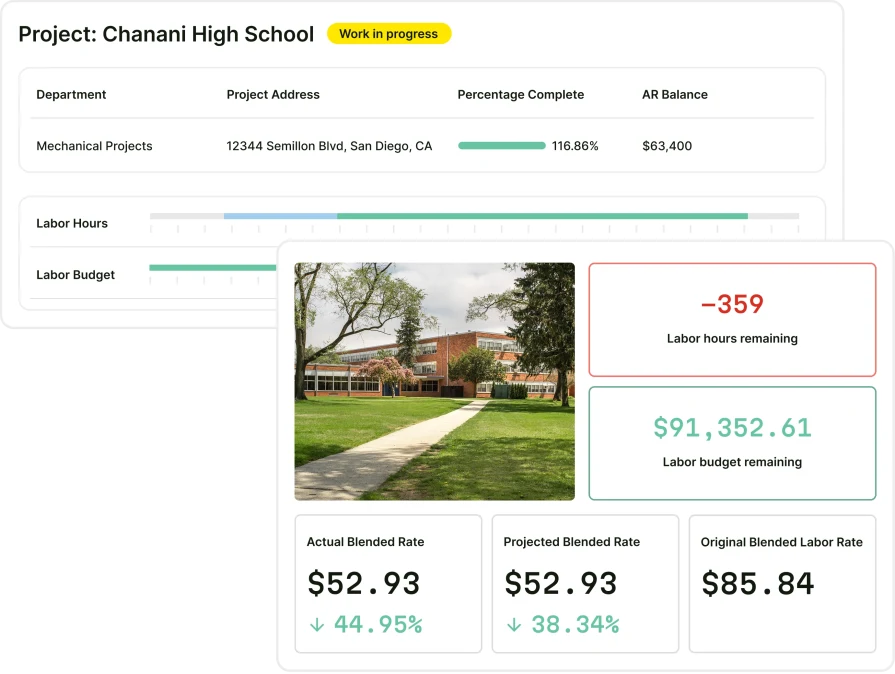
BuildOps is the AI-native platform for commercial contractors. It brings service, projects, and financials into one system, with OpsAI built into the workflow from dispatch to invoicing to payment matching. That matters for teams that have outgrown lighter field service software and need one place to run more of the business.
Where Jobber is positioned internally as an SMB/residential-first product reaching toward commercial billing, BuildOps was built commercial-first from day one. That difference shows up in the workflow depth, the reporting, and the way the platform connects the field, office, and financial side of the operation.
Cost: BuildOps pricing is tailored to your team structure, workflows, and operational needs. Book a demo to get a custom walkthrough and pricing for your business.
Rating: 4.7 on Capterra from 177 user reviews
Standout Feature: OpsAI and connected service-plus-project workflows. BuildOps combines scheduling, dispatch, quoting, invoicing, reporting, and workforce data in one system, while OpsAI helps teams move faster inside the workflow instead of adding another tool beside it.
Why It’s Best for Commercial: BuildOps is best for commercial field service teams because it was built around recurring service, asset-heavy accounts, dispatch complexity, and office-to-field coordination. It gives growing contractors the structure and visibility they need once the work gets too layered for a simpler SMB platform.
Link To a Platform Tour: Schedule a Demo with BuildOps.
What BuildOps has that Jobber doesn’t:
The points below are grounded in current BuildOps products.
A) Built for commercial contractors and field service pros
BuildOps was built around commercial service complexity, not lighter homeowner-first workflows. The Service Management suite connects dispatch, assets, maintenance, and billing in one place, while the technician mobile app gives techs work orders, asset history, time tracking, and invoicing in the field.
B) Synchronized scheduling & dispatch capabilities
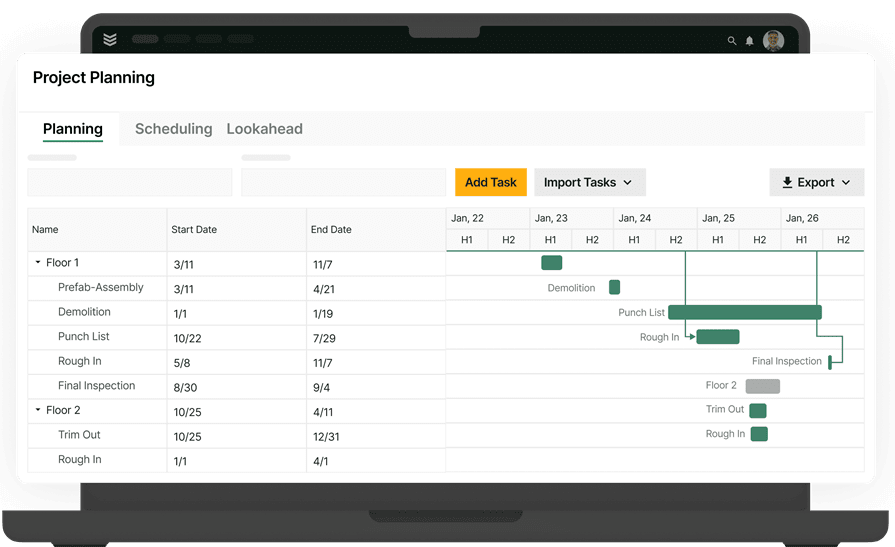
BuildOps stands out in schedule & dispatch because dispatchers can match jobs by skill, certification, and distance instead of guessing. Teams that also need a broader labor view can use resource planning to spot staffing gaps, crew conflicts, and upcoming demand before the board gets messy.
C) Advanced reporting & predictive analytics
BuildOps gives teams a stronger reporting layer through Reporting & Analytics, with real-time dashboards across service, labor, projects, and financials. On top of that, OpsAI surfaces overdue invoices, upsell signals, and operational risks faster, so leaders spend less time digging through raw data and more time acting on it.
D) Project management & workforce management
BuildOps is stronger when labor planning and field execution need to stay connected. Field execution keeps reports, photos, issues, and jobsite updates structured in real time, while resource planning helps teams balance crews, skills, and workload across active work without relying on disconnected spreadsheets.
E) Responsive, reliable customer support
Customer follow-through gets easier when work closes cleanly and the office already has the details it needs. With Service Operations and invoicing connected in one system, teams can turn completed work into customer-ready follow-up faster, with notes, signatures, and billing details already tied to the job.
2. Best for residential: ServiceTitan
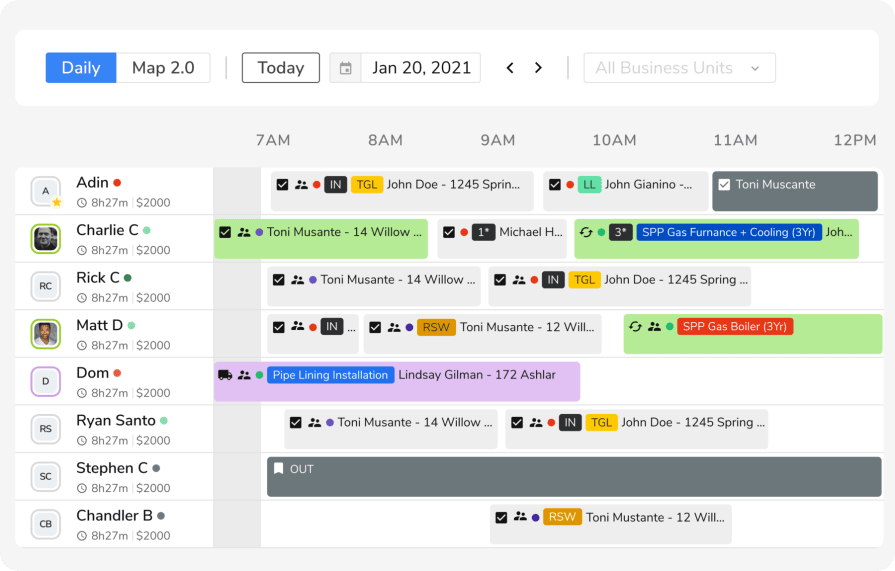
ServiceTitan is a strong Jobber alternative for residential contractors that have moved beyond basic scheduling and invoicing and want a broader system across call booking, dispatch, customer experience, invoicing, memberships, and reporting. Jobber has been adding more depth for home service teams with automated job costing, Jobber Voice, live fleet tracking through Azuga, and AI-powered marketing tools. But ServiceTitan still offers the more built-out residential operating stack for contractors who want more structure from the first phone call through the final invoice.
ServiceTitan also continues to expand beyond its core residential strengths. Their 2026 product updates added AI-driven financial reporting, bulk service agreement renewals, equipment system management, and deeper CRM pipeline controls, which shows how much operational coverage the platform is trying to bring under one roof.
Cost: ServiceTitan typically uses custom pricing based on business size, trade, and the modules selected, with tiered packaging that changes with operational scope and feature requirements.
Rating: 4.3 on Capterra from 335 user reviews
Standout Feature: AI Voice Agent paired with ServiceTitan’s residential growth stack. ServiceTitan is publicly promoting AI Voice Agent, Contact Center Pro, and other Pro products alongside dispatch, call booking, payments, and customer experience tools designed for service businesses running high volumes of homeowner work.
Why It’s Best for Residential: ServiceTitan is best for residential contractors because it is built around the speed and structure that home service teams need: call booking, dispatching, mobile estimates, invoicing, memberships, reporting, and homeowner-facing service workflows all inside one platform. Its recent press and product announcements also show strong investment in residential AI and call-handling performance, including a published example of a contractor booking more than 90% of calls with ServiceTitan AI Voice Agent.
Link To a Platform Tour: Request a demo with ServiceTitan.
What ServiceTitan has that Jobber doesn’t: ServiceTitan gives residential contractors two things Jobber doesn’t emphasize: deeper call handling and a flat-rate pricebook for in-home sales. Phones Pro links calls to jobs and adds tools like transcription and booking analytics, while Pricebook Pro provides regional pricing and clear homeowner-facing explanations. Jobber focuses more on core workflows like quoting, invoicing, scheduling, online booking, and add-ons like Reviews, Campaigns, and Receptionist. For shops that win work over the phone and at the kitchen table, ServiceTitan’s sales and call depth can be a key edge.
See how BuildOps and ServiceTitan compare directly right here.
3. Best for general contractors: Workiz
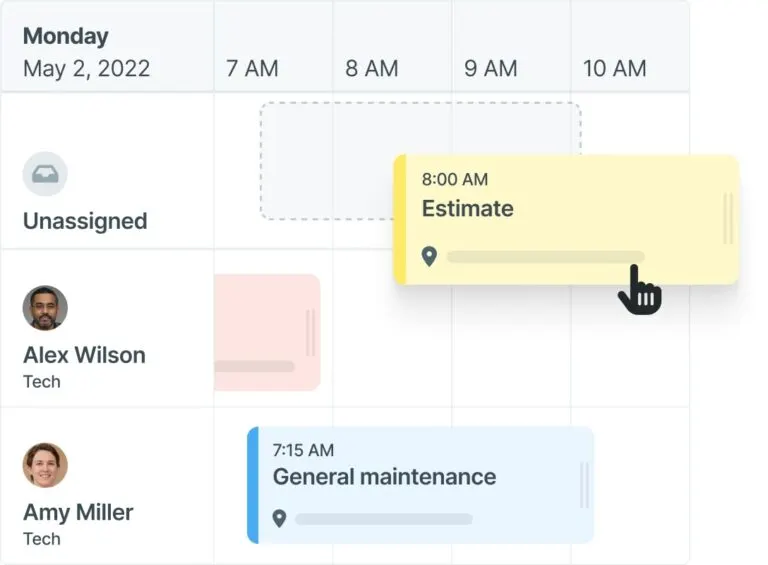
Workiz is field service management software built for growing home service teams. For residential general contractors, its appeal is that it combines scheduling, dispatching, estimates and proposals, invoicing, inventory management, reporting, a mobile app, and customer communication in one platform. That gives office staff and field crews one place to manage work from lead intake to final payment without adding a stack of separate tools.
Cost: Workiz offers subscription-based pricing, with plans that scale based on the number of users and included features.
Rating: 4.4 on Capterra from 218 user reviews
Standout Feature: One standout feature is Workiz’s built-in phone and AI communication layer. The platform includes built-in phone and messaging, AI answering, AI lead capture, AI call insights, and call recordings and tags. For residential general contractors, that matters because missed calls and slow follow-up can cost real jobs, and Workiz is clearly built to keep lead capture, customer communication, and booking inside the same system as scheduling and invoicing.
Why It’s Best for General Contractors: Workiz is a strong fit for residential general contractors who run a high volume of smaller jobs, service calls, repair work, or remodel coordination across multiple crews. It is especially useful when the business needs tighter scheduling, dispatching, communication, payments, and reporting in one place, without the heavier setup that comes with software aimed at large commercial construction workflows.
Link To a Platform Tour: Book a demo with Workiz.
What Workiz has that Jobber doesn’t: Workiz adds operational features Jobber doesn’t emphasize, like inventory, purchase orders/expenses, and a built-in AI-enabled phone system for lead capture. Jobber excels at quoting, invoicing, scheduling, online booking, customer communication, and team management, while Workiz better suits contractors who need phone-first lead handling and inventory-aware job management.
6 migration strategies for switching from Jobber to a commercial alternative
Most contractors moving from Jobber to BuildOps are looking for more than basic scheduling and invoicing. They need service workflows, quoting, billing, and reporting that stay connected across the field, office, sales, and finance teams.
That is why a Jobber-to-BuildOps migration is not a 1:1 transfer. You are not just moving data over. You are re-mapping customer records, service history, agreements, billing workflows, and reports into a platform built to connect the whole operation.
Below are six essential migration tips when switching from Jobber to BuildOps.
1. Outline all essential steps and set a realistic timeline
Moving from Jobber to BuildOps will not be instant. It takes planning, configuration, field mapping, reconciliation, and testing before cutover.
Define a clear timeline that covers:
- Account and configuration setup
- Data export from Jobber and import into BuildOps
- Workflow and permissions setup for office and field
- Team training and go-live support
Balance speed with accuracy so your team launches with clean data, working workflows, and a clear plan for day one.
2. Build a migration team with clear ownership
Because BuildOps connects service, sales, financials, and reporting, you need a dedicated internal team to guide the move and make decisions quickly.
Include stakeholders from:
Assign clear owners for data, workflows, approvals, and training so the new setup reflects how your business actually runs, not just how the old system was organized.
3. Automate and streamline data migration where possible
A Jobber migration can get tedious fast when you are moving customer records, contacts, service history, active agreements, billing data, and reporting history. BuildOps handles these transitions in phases so active work can keep moving while data is being re-mapped and validated.
Automate or bulk-import as much as possible, including:
- Customers and service locations
- Contacts and account history
- Asset and equipment records
- Agreements, invoices, and key documents
Use this as a chance to clean up your data structure in BuildOps so you can get more out of dispatch, asset history, invoicing, and reporting once the switch is done.
4. Document your migration and setup for future scale
Quick fixes may have worked in Jobber, but growth needs repeatable structure. BuildOps supports role-based access, ERP sync, and shared workflows across teams, so it is worth documenting how everything is set up from the start.
During the migration:
- Capture how data is mapped from Jobber to BuildOps
- Document naming conventions, workflows, and approval paths
- Record how integrations such as accounting are configured
These records make it easier to troubleshoot issues, onboard new employees, and keep your operation consistent as you add more people, customers, and work.
5. Test thoroughly and fix issues before go-live
You do not want to find missing records or broken workflows on your first live day in BuildOps. Before launch, validate the data and confirm the workflows your team will rely on every day actually work as expected.
As you migrate:
- Validate data accuracy across customers, jobs, invoices, and assets
- Confirm scheduling, quoting, and invoicing workflows work the way your team needs
- Track key field service metrics to make sure visibility and performance are actually improving
Fixing issues during migration helps your team hit the ground running with better visibility, faster billing, and fewer manual workarounds than before.
6. Lean on BuildOps onboarding and support
BuildOps does not just hand over the software and leave your team to figure it out. Implementation, customer success, and support are built into the rollout, with structured touchpoints before go-live, right after launch, and through the transition period that follows.
During migration and onboarding:
- Work with BuildOps implementation and support teams
- Align your workflows with BuildOps best practices
- Structure your data so teams can use customer records, agreements, billing, and reporting more effectively
Choose BuildOps for the product and for the partner behind it. A good migration does not just move your data. It sets your team up to run tighter from the first day forward.
4 important FAQs answered about Jobber alternatives
If you are comparing Jobber alternatives through a field service management lens, these questions can help narrow the list fast.
1. What are the main reasons people look for a Jobber alternative?
If you're moving on from Jobber, it's usually because the business outgrew what got you here. You may still like the basics, but now you need tighter dispatch, stronger reporting, asset and service agreement tracking, and a platform that fits how HVAC, electrical, plumbing, fire life safety, refrigeration, and specialty contractors actually run work.
That shift usually happens when more jobs, more customers, and more field activity start creating gaps between the office and the field. Quoting and invoicing alone are no longer enough. Your team needs customer records, locations, assets, PMs, work orders, and billing tied together in one place so nothing slips through the cracks.
{{related-content-block="/resources/how-service-1st-got-rid-of-the-work-arounds"}}
2. How does field service software like Jobber work?
Field service software helps contractors coordinate the full cycle of daily work in the field and the office. That usually includes scheduling, dispatching, quoting, customer communication, work tracking, invoicing, payments, and service history, all tied to the jobs your team is running.
Lighter FSM tools cover the basics well. But when a contractor needs stronger routing, asset tracking, recurring service workflows, deeper reporting, or tighter coordination across techs and office staff, they often start looking for a platform with more operational depth.
3. What are the biggest factors that affect the price of Jobber alternatives?
Price usually changes based on how many people need the system, how much functionality you need, and how much setup is involved. For contractors in HVAC, electrical, plumbing, refrigeration, fire life safety, and other specialty trades, pricing also tends to rise as workflows get more connected across dispatch, quoting, service history, reporting, and billing.
Include a short bulleted list of the factors:
- Users and team size: More office users, more techs, and more departments usually mean a bigger investment.
- Features and workflow depth: Scheduling, dispatch, reporting, asset history, service agreements, and financial workflows can all raise the total cost.
- Setup and support: Data migration, onboarding, training, and implementation work can also affect pricing.
4. How can I easily and effectively compare Jobber alternatives?
Start with the work you cannot afford to get wrong. Then look at how each platform handles dispatch, quoting, invoicing, reporting, service history, and customer records, and how fast your team can actually adopt it. If Jobber feels too light, choose the platform built for how your techs and office staff actually work.
BuildOps unites service, quoting, invoicing, reporting, and customer data in one place, while OpsAI clears busywork so your team can focus on the field. For growing HVAC, electrical, plumbing, fire life safety, refrigeration, and specialty contractors, BuildOps delivers the visibility, coordination, and follow up lighter tools miss.
The right Jobber alternative depends on where your business is headed next. If your team has outgrown basic scheduling and invoicing, BuildOps gives commercial and specialty contractors one place to run service, quoting, billing, reporting, and customer workflows. With OpsAI built into the platform, your team can cut back on admin work and keep jobs moving with less friction from the office to the field.