5 Best Material Calculator Apps for Construction Teams

Key Takeaways
- A construction material calculator app helps automates the estimating side of operations, by templating costs so you can get proposals out faster
- Choosing a good material calculator app depends on the scale of work you do, like commercial, residential, home building, etc.
- Some of the top construction material calculator apps include BuildOps for commercial construction teams, Housecall Pro for residential teams, and PlanRadar for industrial projects
Miscalculated material quantities on a commercial jobsite cascade fast. You get stuck with delayed procurement, blown budgets, and crews standing idle waiting on reorders. A construction material calculator app eliminates that chain reaction by locking in accurate takeoffs and cost projections before a single truck rolls out.
To help template and automate the costing side of your operations, you’ll want a construction material calculator app suited to the type of construction you do. This guide will help you get there by covering:
- 6 key app features for construction businesses
- 5 best material calculator apps for construction
- 7 benefits of using construction material calculator apps
- How to choose the right construction material calculator app
- 4 important construction material calculator app FAQs answered
The difference between a useful tool and wasted screen time comes down to calculation accuracy, field usability, and how well the app ties into your existing workflow. Let’s start with a breakdown of the features you need to evaluate to choose the right app.
6 key construction material calculator features to evaluate
A construction material calculator should fit into the way your business already works: scheduling, dispatch, quoting, and billing. It should not become another disconnected tool that duplicates data. These six features are what separate a platform built for real commercial job sites from a simple unit converter.
1. Quoting and estimating integration

Material quantities only matter if they flow into a quote that goes out the same day, not three days later after the office re-enters numbers from a screenshot. An app that feeds calculations directly into service quoting software eliminates the gap between the takeoff and the proposal, locking in accurate material costs and labor projections in a single pass.
For multi-trade commercial projects where scope changes hit mid-bid, that direct connection keeps the quote current without manual reconciliation between the field estimate and the office number.
2. Mobile access for field techs
Spreadsheet-based takeoffs locked on an office desktop do nothing for a crew standing on a slab trying to confirm rebar quantities. A construction material calculator app that works through a capable technician mobile app—offline included—lets field teams run, adjust, and share calculations at the point of work without calling in or driving back.
Mobile access also allows techs to add costs while right on the jobsite, so costs get tracked in real-time, not tallied up later when you’re way off margin and it’s far too late.
3. Scheduling and dispatch integration

Material calculations tied to a job assignment either travel with the crew or they get recalculated from scratch on-site. An app that connects quantity takeoffs directly to field service scheduling and construction dispatch software ensures every dispatched job carries the material list, quantities, and procurement status the crew needs before they roll out.
When the dispatch auto-attaches material requirements to the work order, your crew arrives with the exact inventory loaded on the truck instead of burning an hour driving back to the supply house for what should have been pulled that morning.
4. AI-powered calculation accuracy
Manual formulas break down when jobs involve irregular dimensions, mixed material types, or phased installations across multiple zones. Platforms leveraging construction AI can factor in waste percentages, regional material specs, and historical usage patterns from past jobs to deliver quantities that hold up against what actually gets consumed on-site.
The difference between a 3% variance and a 15% variance on a commercial drywall job often comes down to whether the calculator accounts for real-world cut loss or assumes perfect conditions that never exist in the field.
5. Invoicing and payment collection

Material costs captured during a job—quantities used, supplier pricing, scope changes—have to flow into billing without re-entry. A best construction material calculator app connects field calculations to invoicing tools and payment collection so the office bills exactly what was installed, with the quantity backup already attached.
On a commercial retrofit where the GC added two floors mid-project, the updated material totals feed directly into the invoice instead of requiring a manual audit between what was originally scoped and what actually went into the building.
6. Reporting and job costing visibility
A construction material calculator should tell you where estimates hold and where they consistently miss. Platforms with built-in reporting tools for service businesses surface patterns—which material categories run over budget, where waste factors need adjustment, and which job types carry the widest gap between estimated and actual quantities.
That data turns every completed project into a calibration point for the next bid, tightening margins project over project instead of repeating the same overages.
With the feature landscape covered, the next step is stacking up the platforms that actually deliver on these capabilities for construction field service teams.
5 best construction material calculator apps for different industries
Every construction material calculator app promises accuracy and ease of use, but the real advantage comes from how well it’s built for your specific operation, whether that’s commercial, residential, industrial, or institutional. Below is a breakdown of the top options organized by industry focus.
1. Best for commercial construction companies: BuildOps

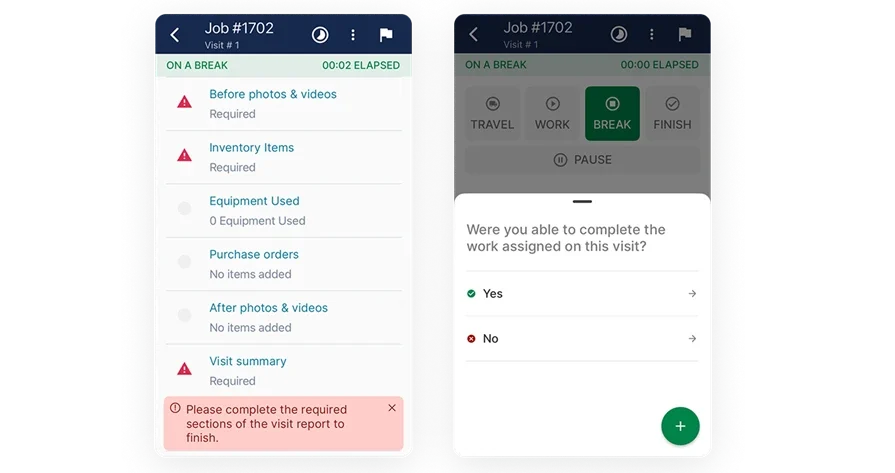
BuildOps gives commercial contractors an AI-powered material calculator built right into the same platform their teams already use for dispatch, scheduling, and job execution. The system automatically suggests material quantities, refines cost projections, and tracks procurement details, then attaches everything to the right work order—so when a tech is dispatched to a commercial build-out across town, they can quickly verify quantities, confirm what’s been ordered, and see what’s arriving next.
Because material calculations are connected to estimating, invoicing, and job costing in one place, every number stays in sync from takeoff to final invoice—without manual re-entry, spreadsheet juggling, or reconciling data across disconnected tools.
How Pricing Works: BuildOps offers live demos on a weekly basis. You can request a live demo at your convenience to explore the features and benefits of the product and determine if it fits your needs.
What Sets It Apart for Commercial: BuildOps is built for the realities of commercial work—high-volume service, multi-trade projects, and strict compliance. It provides real-time dispatching, multi-site visibility, and automated job costing so teams can move fast without losing control. With integrations for invoicing, reporting, and asset management, BuildOps keeps projects on schedule and service calls consistently profitable.
Rating: 4.5 on Capterra from 149 user reviews
2. Best for residential construction companies: Housecall Pro
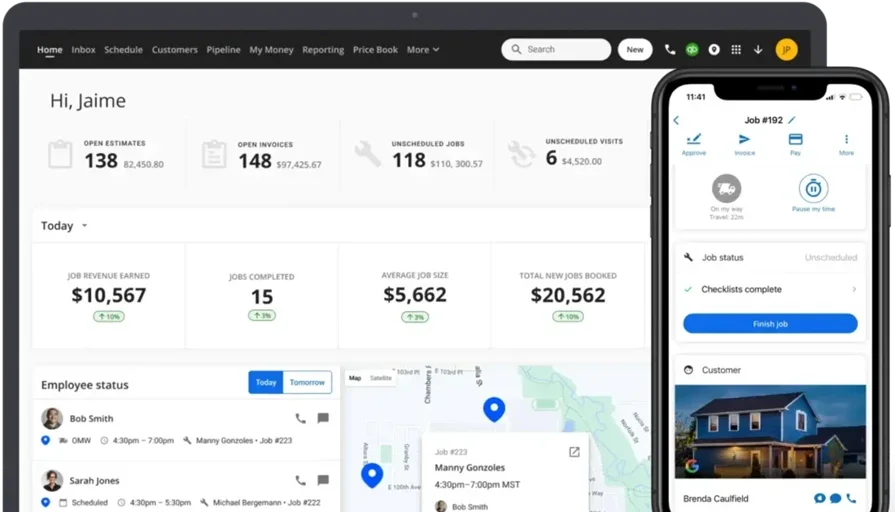
Housecall Pro is geared toward small residential contractors, particularly home service businesses like HVAC, plumbing, and electrical. It provides basic scheduling, invoicing, and customer management features, making it a solid fit for solo contractors or small teams that handle straightforward material needs on single-property jobs. However, it lacks the advanced job tracking, multi-trade dispatching, and deep material calculation features needed for larger-scale operations.
How Pricing Works: Housecall Pro operates on a tiered pricing model, with entry-level plans starting at around $59 per month, but advanced features require higher-tier subscriptions.
What Sets It Apart for Residential: Housecall Pro is designed for home service contractors who need a simple solution for scheduling, invoicing, and customer communication. Its user-friendly interface and built-in payment processing make it easy for small residential teams to manage appointments, collect payments on-site, and keep homeowners informed with automated text updates.
Rating: 4.7 on Capterra from 2736 user reviews
Check out Housecall Pro vs BuildOps to see their features stacked up side by side.
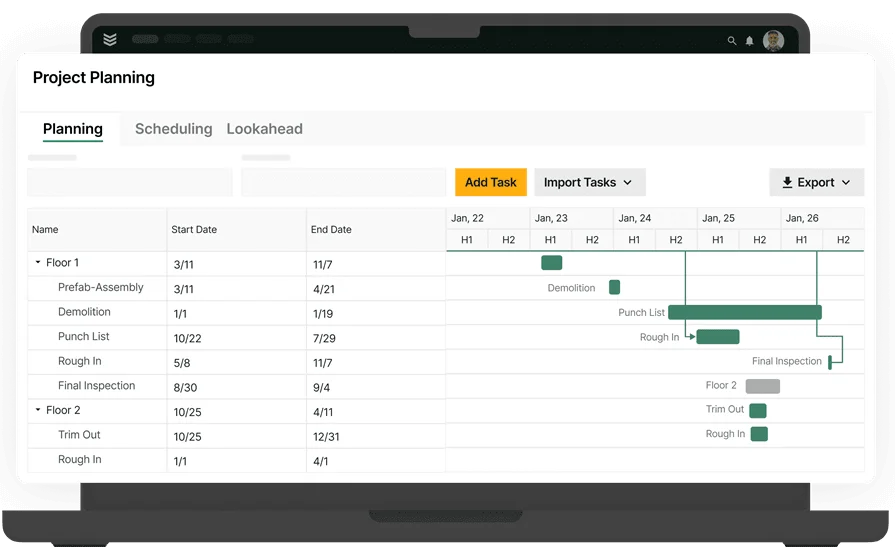
3. Best for industrial construction companies: PlanRadar
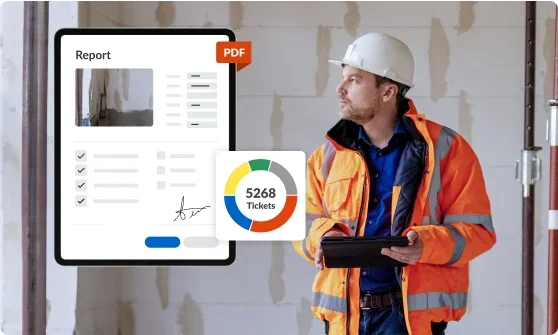
PlanRadar focuses on general construction project management rather than specialized field service workflows. It offers solid tools for document management, site tracking, and collaboration but lacks real-time field dispatching and mobile workforce automation—features that industrial contractors managing service teams may need.
How Pricing Works: Pricing is based on the number of users, starting at $32 per user per month, making it costly for large teams needing full access.
What Sets It Apart for Industrial: PlanRadar handles documentation and compliance tracking well for industrial construction teams that prioritize blueprint annotation, project change tracking, and centralized report storage. It works particularly well for industrial contractors managing large-scale infrastructure projects that require detailed documentation and regulatory compliance.
Rating: 4.4 on Capterra from 67 user reviews
4. Best for institutional construction companies: Buildxact
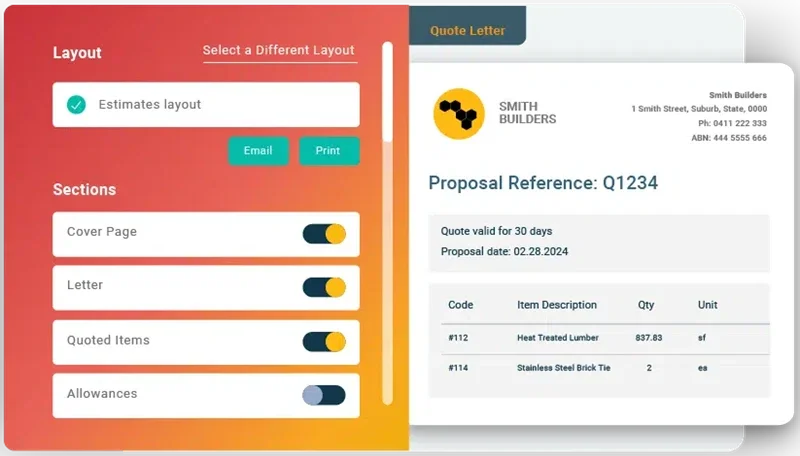
Buildxact is a construction estimating platform with built-in digital takeoffs, live material pricing from dealer integrations, and AI-assisted quantity calculations. It connects estimates to scheduling, purchasing, and invoicing within a single workflow—making it a fit for institutional contractors handling repetitive builds with standardized material specs. However, Buildxact leans heavily toward residential and light commercial work, and teams running complex multi-trade field service operations may find its dispatching and mobile capabilities limited compared to dedicated FSM platforms.
How Pricing Works: Buildxact offers tiered plans—Foundation, Pro, and Master—starting at around $199 per month billed annually, with pricing that scales based on features and user count.
What Sets It Apart for Institutional: Buildxact excels at template-based estimating for contractors who handle standardized institutional projects like schools, healthcare facilities, and government buildings. Its digital takeoff tools and integrated dealer pricing let teams generate accurate material quantities and cost projections from uploaded plans without manual measurement, and the ability to reuse estimate templates across similar builds keeps the quoting process fast and consistent.
Rating: 4.6 on Capterra from 179 user reviews
5. Best for general construction companies: Jobber
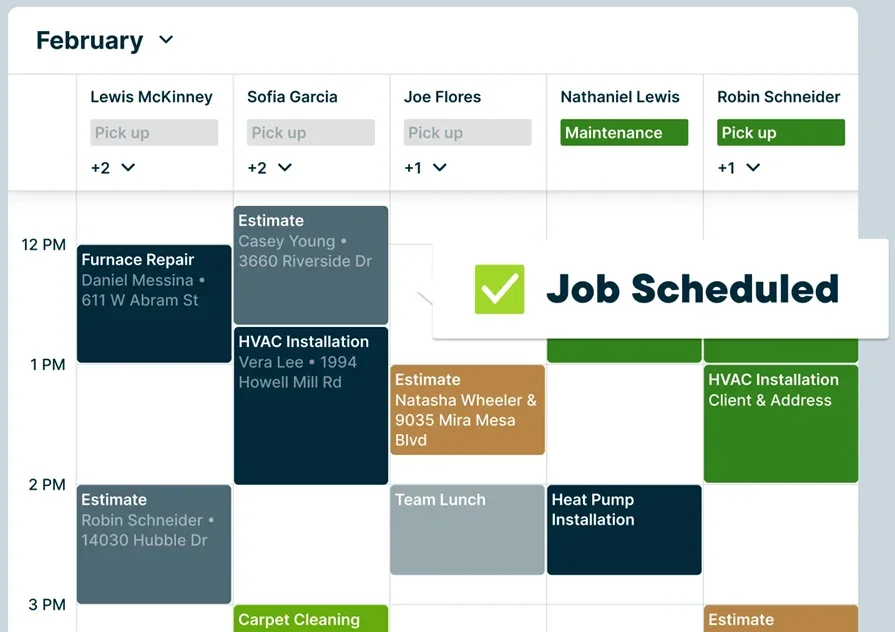
Jobber gives general contractors a centralized platform to manage job details, client records, and material documentation from the field through a mobile app. It integrates with QuickBooks, supports custom job forms and expense tracking, and organizes everything by customer profile for easy reference on repeat visits. That said, Jobber may fall short for contractors managing large-scale commercial operations or multi-phase projects—its structure leans toward individual job records rather than deep asset-level tracking or cross-project material analysis.
How Pricing Works: Jobber operates on a tier-based monthly or annual subscription, with a limited number of users allowed at each tier.
What Sets It Apart for General Contractors: Jobber organizes all job and client information in a single profile—quotes, invoices, photos, job forms, and notes—so the next crew on-site picks up exactly where the last one left off. For general contractors juggling active jobs across different properties, that single-profile approach keeps material records and cost data from falling through the cracks between projects.
Rating: 4.6 on Capterra from 1404 user reviews
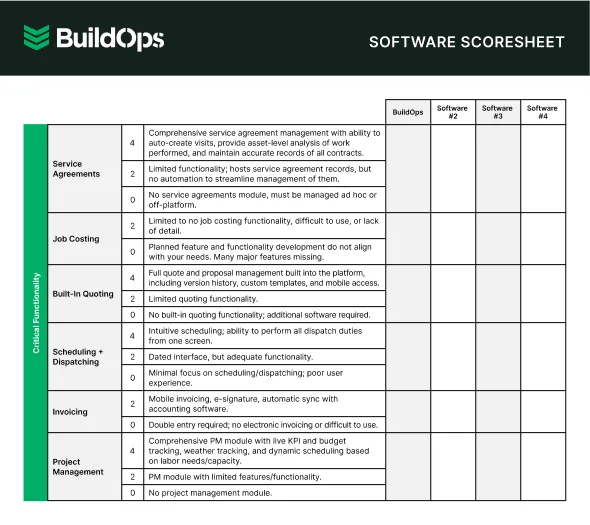
7 benefits of using a construction material calculator app
Accurate material calculations touch every part of a field service operation—from the initial estimate through procurement, job execution, and final billing. Here's how a construction material calculator app delivers measurable returns across each stage.
1. Tighter estimates with fewer cost overruns
Material miscalculations compound fast—overestimate and your margins shrink before the job starts, underestimate and you eat the cost of emergency reorders plus the idle labor waiting on them.
A construction material calculator app locks in quantities based on actual dimensions and trade-specific formulas, keeping estimates aligned with what the job actually consumes. That precision feeds directly into the broader construction software ecosystem your team already relies on for quoting, scheduling, and job costing.
2. Streamlined procurement and material ordering
Quantities that flow from the calculator into a purchase order—without manual re-entry—cut days off the procurement cycle. When a PM can push a verified material list to a supplier the same afternoon the takeoff closes, the lead time between estimate approval and material delivery compresses significantly.
For contractors already modernizing procurement in construction, calculator integration removes one of the last manual bottlenecks in the ordering workflow.
3. Reduced material waste on the job site
Waste factors built into manual calculations tend to default to generous round-ups because nobody wants to come up short. A dedicated calculator app applies trade-specific waste percentages—accounting for cut loss, overlap, and breakage—without padding the order beyond what the job demands.
Less overstock on-site means fewer materials sitting in the weather, fewer disposal costs at close-out, and a cleaner margin on every completed project.
4. Faster invoicing tied to actual material usage
When the quantities your crew installs match the quantities the office bills, disputes drop and payment cycles shorten. A construction material calculator app that connects field data to construction invoice software ensures every line item on the bill traces back to a verified calculation—giving property managers and GCs the documentation they need to approve payment without a back-and-forth audit.
5. Stronger field reporting and job costing accuracy
Material data captured at the point of work—quantities installed, scope changes documented, variances flagged—feeds directly into construction field report software. That gives PMs and owners a real-time view of where each job stands against its original estimate, without waiting for the office to reconcile numbers after the fact.

AI is changing how contractors handle material calculations and job management across field service operations. From automated quantity takeoffs to waste-factor adjustments based on historical job data—teams are tightening procurement, catching overages earlier, and scaling project volume without adding headcount.
The top AI use cases in field service break down exactly how leading contractors turn material and job data into faster estimates, sharper bids, and tighter field execution.
6. Improved visibility across active projects
When material calculations, procurement status, and usage data live inside a centralized platform, the operations team sees the full picture without chasing updates across spreadsheets, texts, and email threads.
Integrated field service dashboards surface material cost trends, budget variances, and inventory status across every active job—so decisions about reorders, crew allocation, and scope changes happen with data behind them instead of gut calls.
7. Scalable operations without proportional overhead
Adding crews and jobs should not require adding the same number of estimators to re-run calculations from scratch for every project. A construction material calculator app lets your operation scale project volume while keeping material accuracy consistent—same formulas, same waste factors, same integration into procurement and billing—whether you're running five active jobs or fifty.
How to choose the right construction material calculator app for your crew
Every busted material count on a commercial job usually comes down to one thing: bad numbers from old spreadsheets, guesswork, or tools that don’t match what’s happening on-site. Before you choose a construction material calculator app, here’s what to look for.
- Calculation accuracy & material coverage – Does it handle concrete, steel, lumber, drywall, and specialty materials with trade-specific formulas? Can it account for waste factors, overlap, and cut loss without manual adjustments?
- Field usability & mobile access – Can techs run quantity takeoffs directly from the job site on a phone or tablet? Does it perform reliably in areas with poor connectivity, or does it require constant cloud access to function?
- Estimating & cost integration – Does the app tie material quantities to real-time pricing or supplier catalogs? Can it generate cost projections that feed directly into your estimating workflow without re-entry?
- Collaboration across office and field – Can PMs and field crews view and update the same calculations in real time? Does it support version control so changes on-site don't overwrite the office estimate?
- Reporting & job costing visibility – Does it track material usage against original estimates to flag overruns early? Can you pull variance reports per job, per trade, or per material type?
- Features tied to field service operations – Does the app connect material calculations to dispatch, scheduling, and work order platforms within a single system? Can techs push quantities directly into procurement or invoicing without switching tools? Does it feed into job costing, reporting, or compliance workflows that your FSM or ERP already handles?
Once you know where bad quantity data drains profit—emergency reorders, crews waiting, or margins shrinking from overestimated materials—the next step is choosing a construction material calculator app that fixes those issues in the field. Below, we break down the features that separate a true jobsite tool from a basic unit converter.
4 important construction material calculator app FAQs answered
Field service contractors running material calculations across active jobs tend to hit the same operational questions—regardless of trade or project size. Here are the four that come up most.
1. What is a construction material calculator app?
A construction material calculator app is a focused digital tool that takes care of quantity takeoffs, cost projections, and waste-factor calculations for your jobs, so you can move beyond messy spreadsheets and get fast, formula-driven numbers tailored to the materials your trade actually uses.
For field service operations, the value sits in how that calculation data connects to the rest of your workflow. The app should feed quantities directly into procurement, quoting, dispatch, and invoicing—so the numbers a tech pulls on-site become the same numbers the office uses to order materials, build the quote, and close out the invoice.
2. What should field crews track alongside material calculations on active jobs?
Every material calculation in the field should be tied to clear, job-ready documentation—photos of what was installed, notes on substitutions, and callouts for any variances between the original takeoff and what was actually used. Without that field-level backup, your numbers are just an estimate, not a source of record.
When crews capture this data at the point of work—instead of guessing later—project managers get a live view of material usage, scope changes, and budget impact on every active job. That’s how field activity becomes actionable, real-time operations data.
3. Is a construction material calculator app worth the cost for established contractors?
A construction material calculator app pays for itself the first time it prevents a last-minute reorder on a job with tight margins. For established contractors, the ROI shows up in three places—fewer delays from bad quantity takeoffs, tighter job costing from real field data, and faster invoicing tied to actual usage instead of guesswork.
The real question for a seasoned operation is not whether the app saves money—it's how much margin you're currently losing to manual calculations, duplicate data entry, and quantity disputes that drag out payment cycles.
{{related-content-block="/resources/bl-glass-buildops"}}
4. What are the best practices for running material calculations across multi-trade construction projects?
Multi-trade projects magnify every calculation error, since one trade’s quantity mistake ripples through scheduling, procurement, and job costing for every following crew. These ten practices keep material data accurate and connected across the entire project.
- Run takeoffs from verified, scaled plans—never from markups or verbal dimensions passed between trades.
- Apply trade-specific waste factors rather than a blanket percentage across all material types.
- Lock quantity baselines before dispatch and track every field adjustment as a documented change order.
- Assign material calculation ownership per trade so no scope overlap or gap goes uncaught between crews.
- Sync calculator outputs directly to procurement—eliminating manual re-entry between the takeoff and the purchase order.
- Reconcile installed quantities against the original estimate at each project phase, not just at close-out.
- Use mobile-accessible calculators so field crews adjust quantities on-site instead of flagging discrepancies after the fact.
- Tie every material variance to a job cost code so reporting captures exactly where overages or savings occurred.
- Standardize unit measurements across trades to prevent conversion errors between metric and imperial within the same project.
- Review historical variance data from completed projects to calibrate waste factors, supplier lead times, and quantity buffers for future bids.
Material counts affect everything on a job: purchasing, crew schedules, budgets, and invoices.The right construction material calculator app removes guesswork by tying takeoffs into your field operations so quantities move cleanly from estimate to dispatch to billing, with no re-entry, no messy reconciliations, and no profit lost to bad numbers.
For contractors running multi-trade projects at scale, BuildOps brings that calculation accuracy into an AI-native platform where scheduling, dispatching, quoting, invoicing, and reporting all operate from the same data—no bolt-on integrations, no disconnected spreadsheets, no duplicate entry across systems.
If you want to see how material calculations fit into the full job cycle—from the first takeoff to the final invoice—BuildOps runs live walkthroughs tailored to your operation. No commitment required, just a clear look at how the platform handles it end-to-end.