The Field Service Management Workflow, Step by Step

A customer calls in. The dispatcher checks one system. The tech checks another. The invoice sits in a third. Every step of the field service management process lives somewhere different, and no one has the full picture when it counts. For contractors across the field service industry, that gap between request, dispatch, execution, and billing is where jobs slow down, details fall through, and money gets left on the table.
Most commercial contractors aren't short on work. They're short on visibility across the entire lifecycle.
This guide breaks down how the field service management process actually works, step by step, and where the biggest breakdowns happen. Every one of those steps hits real jobs, real crews, real money. The contractors winning are the ones tying their field service workflow together with software that keeps dispatch, field work, and billing in lockstep. Here’s how that workflow actually unfolds.
How the field service management process works
Every field service workflow looks the same: a request comes in, it gets scheduled, a tech shows up, does the work, logs the visit, and the customer gets billed. Six simple steps until each one lives in a different system, a different brain, or a different spreadsheet.
Here's how each step works, why it matters, and where the field service management process breaks down without the tools holding it together.
1. Request
The field service management process starts the moment a customer picks up the phone, submits a portal request, or triggers an alert from a connected system. Someone in the office needs to capture what's wrong, where it is, who the customer is, and what equipment is involved. Fast enough to keep the caller on the line and accurate enough to avoid a wasted truck roll.
This step sets the tone for everything downstream. A vague or incomplete work order closeout means the dispatcher is guessing, the tech shows up unprepared, and the invoice takes twice as long to close.
A field service platform automatically pulls customer, site, and equipment history into the work order. OpsAI opens the work order from the call, fills in the details from past visits, and flags warranty coverage and open items upfront.
Fewer follow-up calls, fewer missed details, and a work order that's ready to schedule the second it's created. Contractors running service agreements can also see contract terms and coverage status in real time, so nothing billable slips through.
2. Schedule
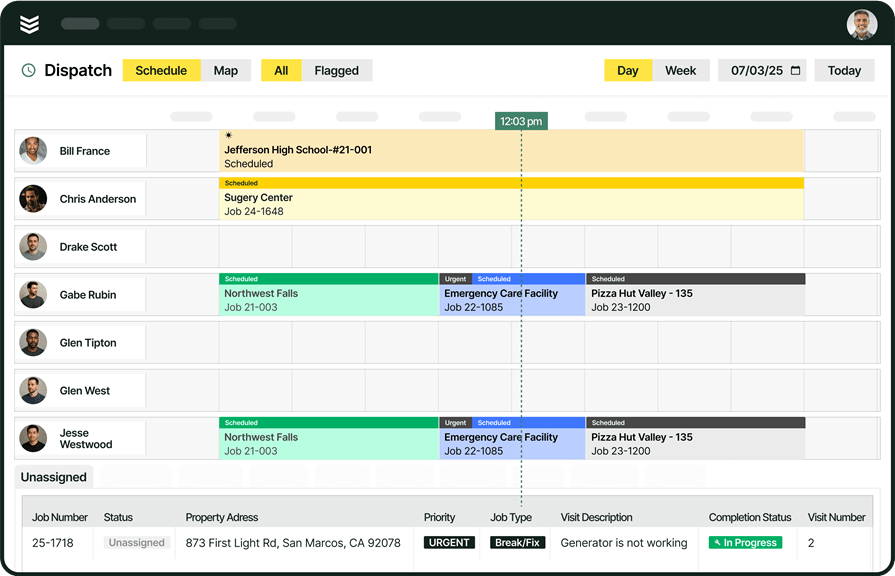
Once a work order is created, it has to earn its place on the schedule. In field service, that means lining up job priority, location, trade, and timing with each tech’s availability, certifications, and workload, without blowing up tomorrow. Miss the mark, and it snowballs: overbooked techs show up late, the wrong skill set triggers callbacks, and a missed priority window can cost you the customer.
With smart field service scheduling, dispatchers see availability, skills, and distance to the job in one view. OpsAI reads the job's priority, location, and required skills, then suggests time windows that fit the board. It accounts for travel and current commitments so the slot holds. Instead of rebuilding the day from scratch every morning, the dispatcher adjusts it.
3. Dispatch
Scheduling decides when. Dispatch decides who. This step matches the work to a specific technician based on certifications, parts on the truck, proximity to the job site, and familiarity with the customer or equipment.
The difference between a good dispatch and a bad one shows up in first-time fix rates. Send the wrong tech and you're paying for two trips instead of one, plus the customer's patience runs out. Scheduling and dispatch software goes beyond a pin on a map.
OpsAI matches the work to a tech by certification, parts on the truck, and proximity. It shows why each tech fits, so the dispatcher keeps the final call. That transparency matters. Dispatchers trust the recommendation because they can see the reasoning and override it when they know something the system doesn't.
4. On-site
This is where the work actually happens. The tech arrives, assesses the situation, diagnoses the issue, pulls or orders parts, and executes the repair or installation. Every minute on-site is billable time, and every detail the tech captures (or doesn't) affects what happens next.
Techs who show up without context waste time figuring out what they're walking into. They call the office. They dig through emails. They guess at part numbers. All of that eats margin.
A field service management platform puts everything on the tech's phone before they climb the ladder. OpsAI brings the asset's service history, manuals, and prior notes to the tech's phone and lists the parts the job usually needs before the tech is on the roof.
Fewer calls back to the office, fewer return trips for parts, and faster resolution on every visit.

A Kickstand report based on a survey of 606 contractors across the U.S. and Canada found that 78% are using AI tools on the jobsite, while 47% say one in five positions remain unfilled. That combination explains why AI workflows matter in field ops: less admin, steady output with the same team.
5. Complete
The visit is over, but the job is not finished until the work is documented. This is where the tech logs visit summaries, photos, checklists, recommendations for follow-up, and any notes from the field. It is the handoff between what happened onsite and what happens in the office.
When this step breaks down, details get lost on the drive back. Recommendations never make it into the system. Follow-up work vanishes. And the invoice stalls because no one can say with certainty what was actually done.
OpsAI turns the tech's photos and checklist into a draft visit summary as work wraps. It captures recommendations and follow-up work so nothing is lost on the drive back.
The office gets a clean, complete record without chasing the tech for details three days later.
6. Invoice and pay
The last step in field service management is getting paid. That means turning labor hours, materials, and job notes into a clear invoice, applying the right billing terms, matching any purchase orders, and tracking payment.
Slow invoicing wrecks cash flow in commercial contracting. Every extra day between finishing a job and sending the invoice is another day the contractor is bankrolling the work.
Invoicing software and payment processing tools built for commercial contractors connect field data directly to the bill.
OpsAI reads incoming POs, matches them to the work order, and drafts the invoice from logged labor and parts. It applies the billing terms and matches payments as they land.
Contractors using BuildOps have cut receivables from 120 days to 30 days on average.
Field service management process flow with OpsAI
The previous section broke down each step of the field service management process on its own: what happens, why it matters, and where things fall apart. In reality, none of those steps stand alone. Miss one detail at intake and scheduling slips. Send the wrong tech and your first-time fix rate drops. Rush the visit summary and the invoice stalls for a week.
The process works when every step feeds the next automatically, without extra calls, sticky notes, or re-entering data.
That is where OpsAI comes in. It lives inside each stage of the workflow and carries the right context forward. Dispatchers still dispatch, techs still do the work, and the office still sends invoices. OpsAI makes every decision faster and more accurate by connecting what just happened to what needs to happen next.
Here's how the full field service management process flows with OpsAI at every stage:
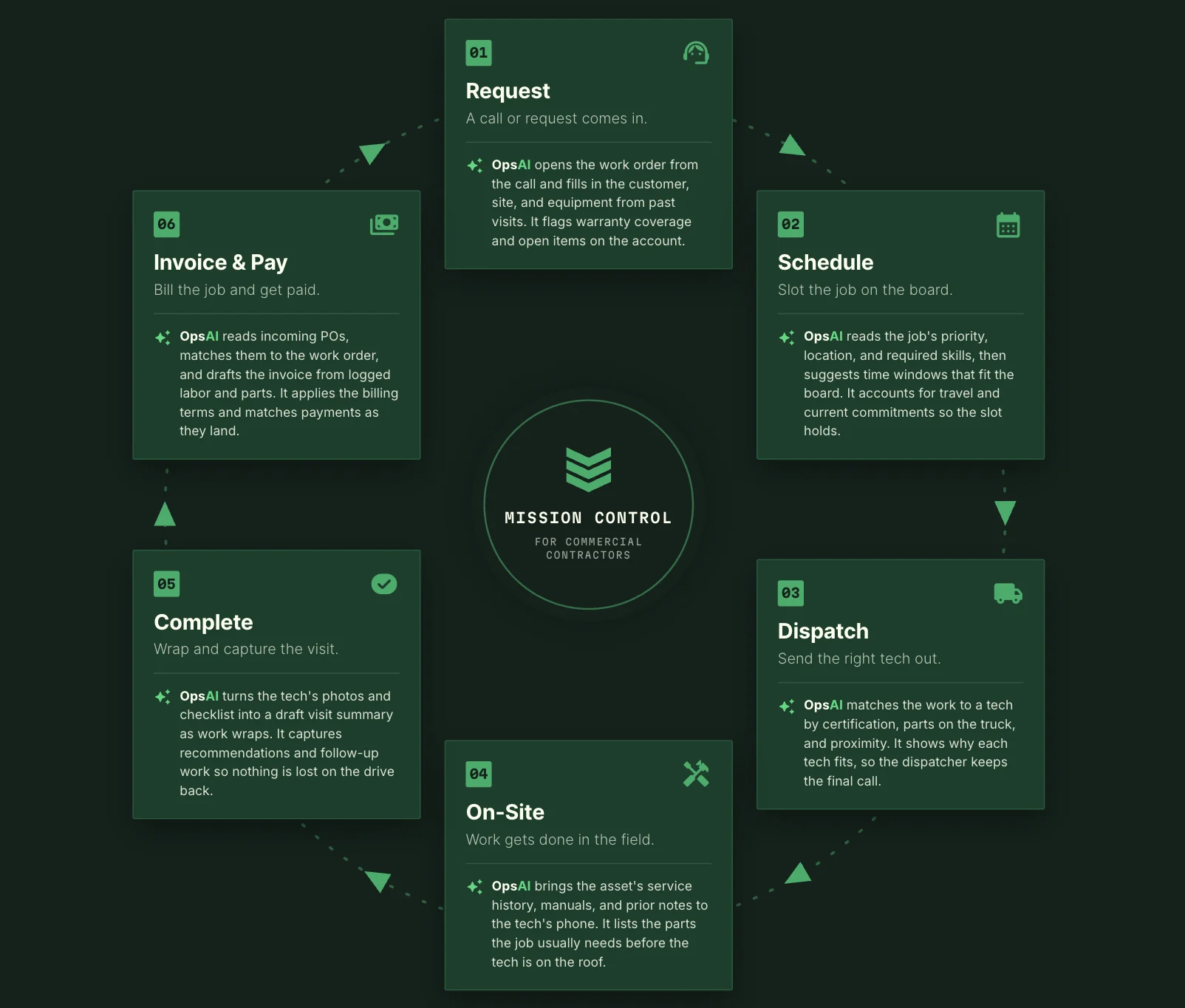
Every handoff moves smoothly from request to schedule, dispatch, field, office, and invoice. No one re-enters data. No one hunts for what happened last. The process stays connected because the platform keeps it that way.
That is a true system of action for commercial contractors. Not a patchwork of tools and email, but one platform where every job, tech, and work order makes the whole operation smarter.
7 best practices for enhancing your field service management process
The steps above cover what happens during a job. These best practices cover what happens around it. The habits, decisions, and systems that separate contractors who stay busy from contractors who stay profitable.
1. Let AI handle the repetitive work so your team handles the exceptions
The field service management process generates repetitive admin at every stage: logging visit notes, matching POs, updating schedules, writing invoice summaries. When agentic AI field service tools handle those tasks automatically, your dispatchers, techs, and office staff spend their time on the decisions that actually need a human. The contractors pulling ahead aren't hiring more admin. They're removing the admin from the workflow entirely.
2. Standardize on-site documentation before it leaves the job site
A tech's memory of the job is sharpest while they're still standing next to the equipment. Build checklists, photo requirements, and closeout steps directly into the mobile workflow so documentation happens during the visit, not three days later from the cab of a truck. When on-site field services follow the same documentation standard on every call, the office gets clean records, invoices go out faster, and follow-up work doesn't disappear between visits.
3. Treat dispatch as a decision, not a task
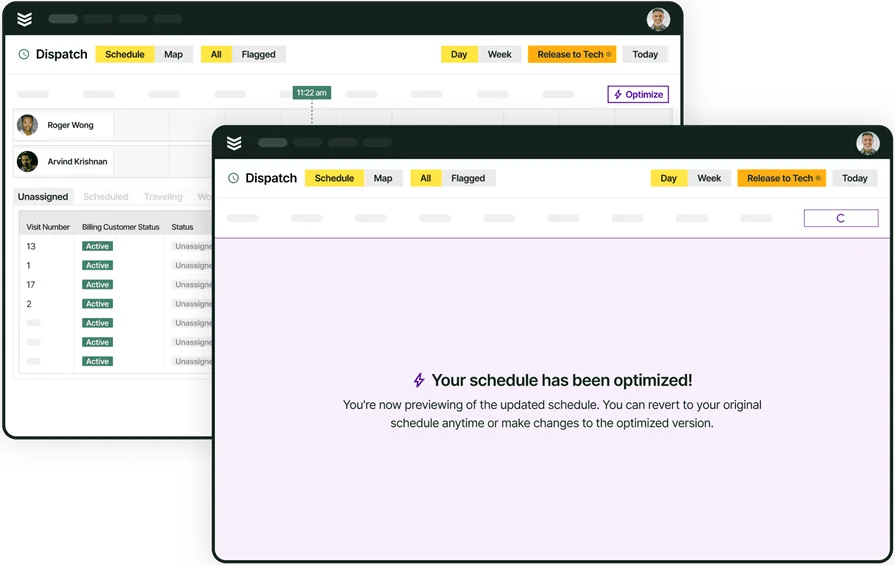
Dispatch isn't about sending the closest tech. It's matching certifications, parts on the truck, customer history, and job complexity against every available option, in real time. Contractors who invest in a dedicated field service dispatch app give dispatchers the visibility to make that call in seconds instead of minutes.
The payoff shows up in first-time fix rates, fewer return trips, and techs who arrive prepared instead of guessing.
4. Connect the field to the office in one system, not five
Scheduling in one tool, dispatch in another, invoicing in a third, and customer records in a fourth. Every gap between systems means re-entered data, lost details, and 20 minutes wasted on what should be automatic. Field service workflows run best when every handoff—from request to schedule, dispatch to field, and field to invoice—stays inside one connected platform.
5. Phase in AI adoption instead of flipping a switch
The biggest barrier to adopting AI for field service isn't the technology. It's the rollout. 31% of non-users say lack of training is the number one blocker.
Start with one or two high-impact workflows like dispatching and scheduling, let the team see results, then expand into documentation, invoicing, and reporting. Contractors who treat AI adoption as a build, not a launch, get compounding returns instead of shelf-ware.
6. Use reporting to coach, not just to count
Dashboards packed with numbers don’t change behavior. Reports only matter when they answer clear questions: Which techs close fastest? Where are callbacks clustering? Which jobs blow past budget? Field service data is captured at every step. The contractors who use it to adjust routes, rebalance workloads, and refine pricing run tighter operations without adding headcount.
7. Evaluate your software by how deeply AI is built in, not how loudly it's marketed
Most platforms bolt on a chatbot or an automated reminder and call it AI. That's not the same as intelligence built into dispatching, documentation, invoicing, and reporting across the entire field service management workflow. When evaluating contractor software with AI features, ask where the AI actually runs: Does it recommend techs based on certifications and proximity? Does it draft invoices from completed work? Does it surface patterns from your job history? If the answer is "only in one place," the rest of your operation is still manual.
{{related-content-block="/resources/how-service-1st-got-rid-of-the-work-arounds"}}
Commercial contractors aren’t failing at service. They’re failing to find what they need. Work orders in one system. Tech notes in another. PDFs, emails, portals; each holding a different piece of the story, so no one sees the full picture when it’s time to do the job right.
BuildOps fixes that. It’s the AI-powered platform built for commercial contractors, unifying work orders, field tickets, asset histories, and financials so every step of your workflow reflects what’s really happening on-site.
With OpsAI, field documentation and summaries build themselves. The right scope, labor, materials, and approvals are pulled in automatically, so dispatch runs smoother, technicians stay on task, and your back office finally stays in lockstep with the field.
Want to see how AI-powered field service workflows can streamline operations, accelerate billing, and keep projects moving? Book a demo built for commercial contractors.