5 Best Field-to-Invoice Solutions: Speed Up Pay Cycles

Finishing a job should turn into dollars fast. That handoff from field-to-invoice sets cash flow, customer trust, and crew morale. Paper slips get lost, prices change, and approvals stall when job details live in separate places.
A field-to-invoice solution pulls time, parts, photos, and signatures from the work order straight into billing, so nothing gets missed. Across the field service industry, contractors use field-to-invoice solutions to tighten handoffs between techs and the office, cut errors, and bill the same day.
- How to choose the best field-to-invoice solution for your team
- 5 key features to look for in a field-to-invoice software
- Types of field-to-invoice solutions and their key differences
- 5 best field-to-invoice solutions for contractors
- 7 benefits of using a field-to-invoice system
- 3 common FAQs about field-to-invoice invoice software
Next, we’ll show how to select a field-to-invoice solution that fits your crew size, job mix, and billing rules. You’ll see which features matter for dispatchers, technicians, and accounting, the tool types on the market, and the options contractors pick today.
How to choose the best field-to-invoice solution for your team
Selecting a field-to-invoice solution comes down to how cleanly your work orders move from dispatch to accounts receivable. You need accurate capture in the field, clear approvals, and invoices that reflect contract rules without retyping. Use these prompts to vet vendors against real job conditions, not demos.
- Dispatch-to-billing workflow: Can the system convert a completed work order into an invoice without reentry? How does it handle multi-day or return visits? Can dispatchers see invoice status from the same console?
- Labor and materials accuracy: Can techs capture labor by rate code and overtime rules on mobile? Does the catalog sync parts, price levels, and taxes to the invoice in real time? How are photos, forms, and signatures bound to the line items?
- Contract and pricing rules: Does it apply contract pricing, trip charges, and markups automatically? Can you flag warranty, quoted, and T&M billing on a single ticket? How are change orders and not-to-exceed limits enforced?
- Integrations and data flow: Does it post invoices and payments to your accounting system without double entry? How are customer, site, and asset records kept in sync? What reporting is available for WIP, DSO, and margin by customer? How does it tie in with the rest of your field service operations?
- Controls and approvals: Can field supervisors approve time and materials before billing? Are audit logs available for edits to rates, discounts, and taxes? Can you require photos or checklists before an invoice is released?
- Software features: Which mobile features keep techs productive when offline? What automation handles recurring maintenance invoices and batch billing? How flexible are templates for multi-site or multi-entity invoicing? Does it connect with your scheduling & dispatch functions?
Next, we will break down the features that matter for dispatchers, technicians, and accounting, and how they speed the field-to-invoice handoff.
{{related-content-block="/resources/field-service-invoicing-guide"}}
5 key features to look for in a field-to-invoice software
A strong field-to-invoice workflow keeps job data clean from dispatch through payment. Capture labor, parts, approvals, photos, and signatures in the field, then push that data into billing without retyping. The features below shape a field-to-invoice solution that supports service operations at scale.
1. Scheduling and dispatch that feed clean billing

Your calendar and board set the contract, price level, and tax logic before the truck rolls. Look for live capacity, crew skills, site history, and status codes that follow the job into billing so invoices reflect the actual visit. See how scheduling and smart dispatch software anchor a dependable flow. For example, a dispatcher flags a return visit as warranty and assigns a two-man crew. That status and crew mix carry to the invoice, which prevents billable labor on warranty lines and applies the correct rates on the additional tech.
2. Technician mobile app that captures billable detail
Your techs decide what lands on the invoice, so the mobile experience must make accuracy quick. You want labor by rate code, parts pulled from a live catalog, forms tied to assets, and photos bound to line items even when offline. A technician mobile app that syncs reliably keeps the office out of guesswork. For instance, a chiller repair adds refrigerant and a motor. The app applies the correct environmental fee and price level on the spot, and the signed work order arrives in billing with proof photos.
3. Time tracking that respects rules and approvals
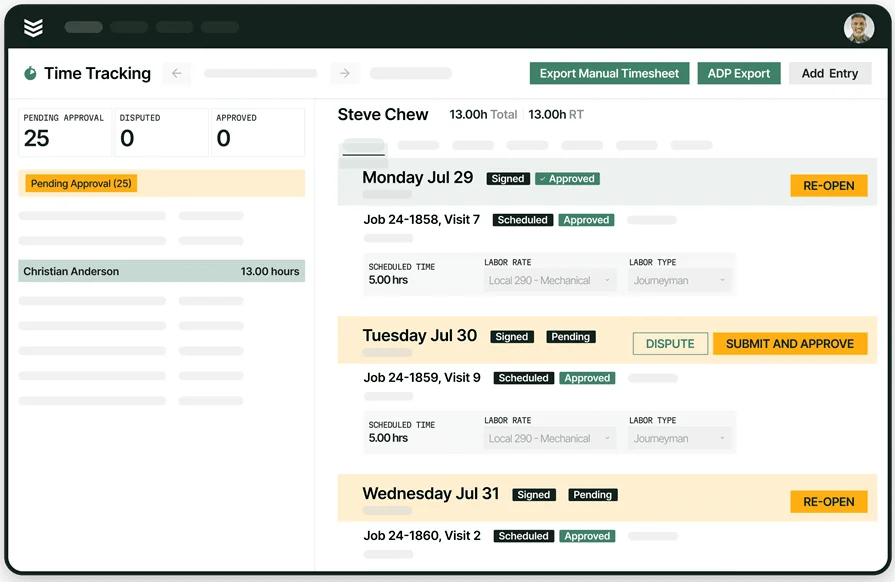
Labor drives margin and customer trust. Geofenced punches, start and stop timers, and supervisor approvals keep hours clean before anything reaches accounts receivable. With time tracking that encodes overtime and shift rules, invoices stay consistent. As an example, a controls tech clocks out at 6:45 p.m., the system tags 45 minutes as overtime, and the invoice waits for a service manager approval that happens from his phone in traffic.
4. Invoicing automation that applies contracts and tax logic
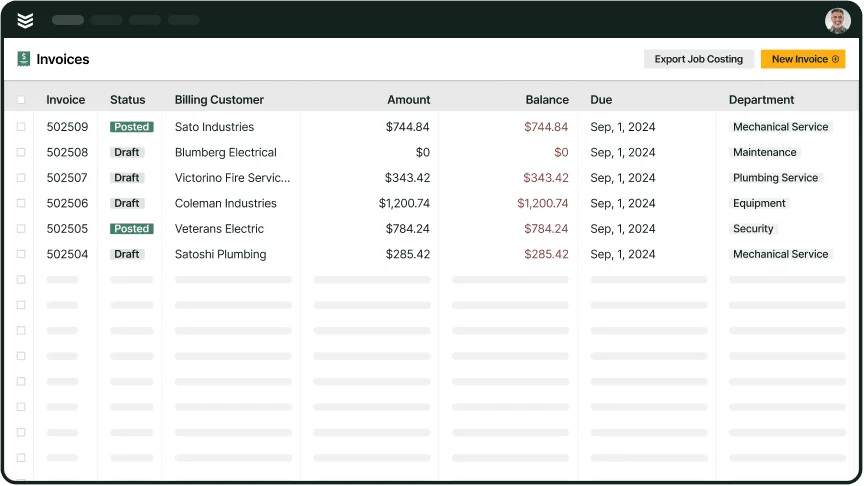
Invoices should assemble from the completed ticket with contract pricing, trip charges, taxes, markups, and not-to-exceed limits already in place. Templates for T&M, fixed price, and progress billing keep billing consistent across customers. Modern invoicing turns finished work orders into drafts that follow your rules. Consider a PM batch at month-end. The system groups visits by site, applies agreement pricing, and prepares drafts for review so accounting focuses on exceptions instead of data entry.

BuildOps Invoicing assembles drafts from approved quotes, scheduled work, technician time and materials, purchase orders, and agreement pricing so accounting reviews exceptions instead of entering data.
Explore BuildOps Invoicing for a quick walkthrough of how quotes, scheduling, purchasing, and mobile updates connect across field service to speed cash flow.
5. Payments that shorten DSO
Faster payment closes the loop on a healthy field-to-invoice cycle. Look for card and ACH options, payment links on invoices, and automatic reconciliation to your books. Embedded payments let techs collect on-site while the office sends secure links for remote jobs. During an emergency rooftop call, the tech emails the invoice from the truck. The client pays by ACH before the crew leaves the lot, and Finance sees the deposit in the batch that afternoon.
Other notable field-to-invoice solution features to have
These additions round out a field-to-invoice solution. Each one tightens handoffs, protects margin, and keeps contract terms intact across field-to-invoice solutions.
- Service quoting software: Move from scope to job to invoice without rekeying. Using service quoting software, pricing rules, parts, and labor rates carry forward so billed work mirrors the approved quote. Change orders post as new lines with a clear audit trail.
- Field service CRM: Keep customer, site, and asset records aligned with contract pricing and tax settings. A unified field service CRM gives dispatch, techs, and accounting the same source of truth, which keeps tickets and invoices in step with SLAs and exemptions.
- Reporting: See WIP, DSO, write-offs, and margin by customer, tech, or agreement. Target exceptions like unbilled tickets and stalled approvals using reporting so managers clear blockers before month-end.
- Service agreements: Generate recurring PM visits with matching invoice cadence automatically. With service agreements, escalations trigger when visits slip, and annual price increases apply on schedule.
- Fleet: Tie GPS and timestamps to jobs for verified arrivals, departures, and route history. Linking activity through fleet supports accurate travel charges, on-site time, and SLA response windows, which reduces disputes and speeds approvals.
Next, we will compare types of field-to-invoice solutions and when each fit makes sense for a growing service shop.
Types of field-to-invoice solutions and their key differences
Choosing a platform shapes the speed and accuracy of the field-to-invoice handoff. Each approach affects connectivity, control, and how smoothly a field-to-invoice solution moves data from the job site to billing.
- Desktop software: Installed on office servers or workstations. Strengths include direct control of data location and limited dependence on internet access. Tradeoffs include VPN or RDP for remote use, batch imports from the field, and IT-managed updates that can slow billing. Works for single-office teams but can bottleneck field-to-invoice flow across branches.
- Cloud-based software: Delivered in the browser with API-driven integrations. Real-time sync keeps dispatch, technicians, and accounting aligned so invoices assemble as work closes. Updates, backups, and storage scale without IT tickets. Ideal for distributed crews and rapid field-to-invoice cycles, provided your mobile layer covers dead zones.
- Mobile app: The capture layer for labor, parts, photos, forms, signatures, GPS stamps, and timekeeping. Store-and-forward keeps tickets moving when signal drops, then pushes clean data to the back office. When paired with cloud, invoices build instantly as tasks finish; with desktop systems, data often lands through end-of-day imports.
Next, we will review field-to-invoice solutions contractors rely on today and where each fits.
5 best field-to-invoice solutions for contractors
Service teams need tools that push clean field data into billing without retyping. These platforms stand out for connecting work orders, time, parts, approvals, and payments into a single field-to-invoice solution.
1. Best for commercial construction teams: BuildOps

BuildOps focuses on commercial service workflows where jobs span multi-site assets, contract rules, and strict approval chains. Techs log labor and parts on mobile; the office sees clean drafts that honor service agreements, taxes, and rate codes. Dispatch, work orders, invoicing, and payments stay connected so billing follows actual field activity.
How pricing works: We provide weekly live demos and the opportunity to schedule a customized session where we help you explore features and select the best option for the needs of your business.
Features that connect invoicing to field work: Mobile time capture with approval, catalog pricing that flows to line items, contract pricing and trip charges applied automatically, batch PM invoicing, and integrations that post invoices and payments back to accounting without double entry.
What sets it apart for commercial: Strong asset history and agreement billing keep large portfolios tidy; technicians attach photos, forms, and signatures to invoice lines; managers track WIP and DSO to spot bottlenecks before month-end. The result is a faster handoff from ticket close to cash.

2. Best for residential: Housecall Pro
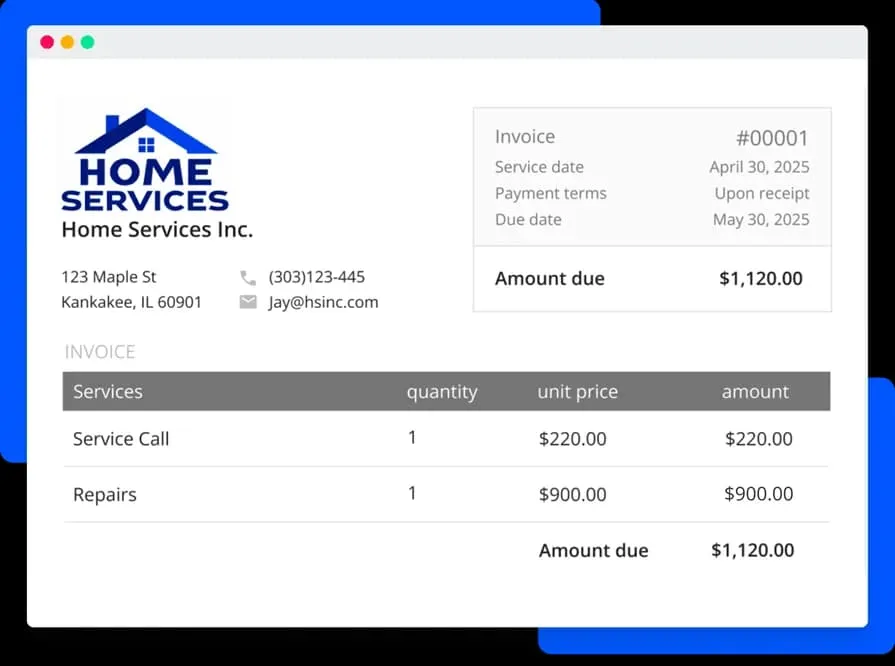
Housecall Pro serves residential service shops that want a simple flow from job to invoice. It shines with mobile-friendly billing, quick payment collection, and customer communication tools suited to single-site homeowners. It may not fit contractors handling complex commercial portfolios or multi-location agreements.
How pricing works: Monthly subscription that starts at $59 per user, with tiers that unlock features.
Features that connect invoicing to field work: Techs create invoices directly from completed jobs, capture signatures, and accept payments in the driveway; automated reminders support collections after send.
What sets it apart for residential: A mobile-first experience keeps owner-operators moving; customers receive professional invoices quickly after service, which helps cash flow for smaller teams.
Want to see how Housecall Pro stacks up against BuildOps? Check out our comparison of BuildOps vs Housecall Pro right here.
3. Best for general contractors: Jobber
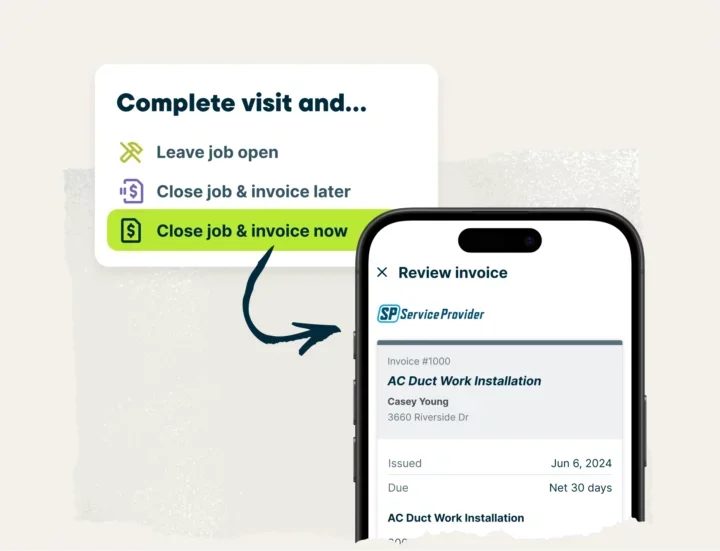
Jobber covers a wide range of field services with scheduling, quoting, invoicing, and client messaging in one hub. The platform supports quick quote-to-invoice moves and handy field invoicing for crews that handle varied ticket types. It may lack deeper asset tracking or advanced commercial client controls required by multi-property service teams.
How pricing works: Subscription pricing per user, with its most basic plan starting at $25 for 1 user.
Features that connect invoicing to field work: Field invoicing from the job site; approved quotes convert to invoices; payments and communications sit inside the same workflow.
What sets it apart for general contractors: Straightforward setup and a balanced toolset suit mixed-trade teams that prioritize fast admin and clean customer communication alongside dependable invoicing.
4. Best for small to mid-sized businesses: Workiz
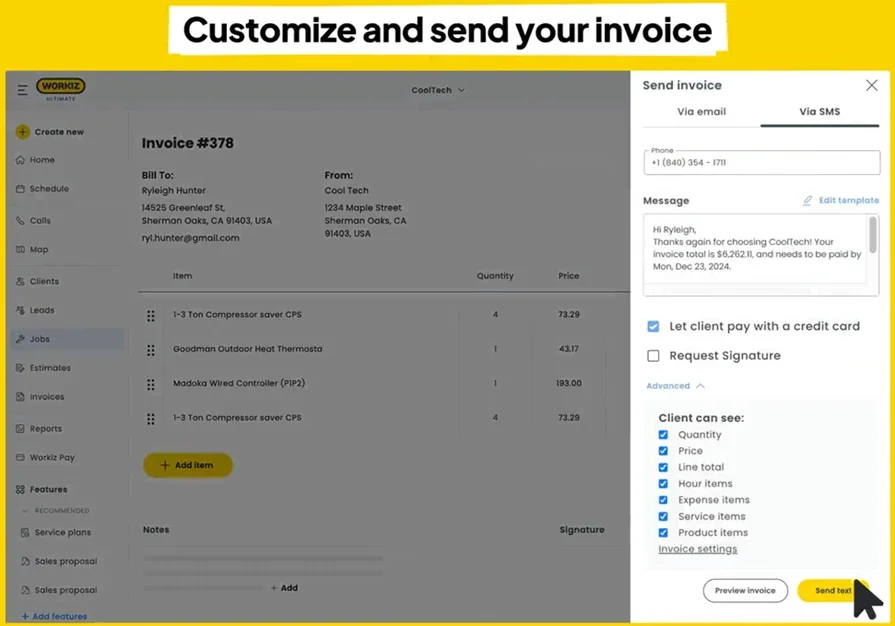
Workiz focuses on SMB service shops that want a clean path from job to invoice with phones, dispatch, and billing in one hub. Techs spin invoices from completed jobs, take payments on site, and sync to QuickBooks Online while the office tracks status in real time. The built-in phone system and mobile tools keep field activity tied to billing, though contractors with complex commercial terms, multi-entity accounting, or strict approvals may hit plan ceilings.
How pricing works: Plans start at $225/month including 3 users, with annual discounts available.
Features that connect invoicing to field work: Job-to-invoice creation, online payments, and QuickBooks Online sync reduce reentry. Location tracking, service areas, and custom fields help invoices reflect actual on-site work, while simple automations handle deposits and follow-ups.
What sets it apart for SMB: The integrated phone system with call tracking and two-way texting sits next to scheduling, estimates, and invoices. That proximity tightens the field-to-invoice chain for owner-operators and compact teams. If you rely on heavy contract pricing, multi-day projects with strict approvals, or franchise controls, Workiz may lack depth.
5. Best for independent contractors: Invoicera
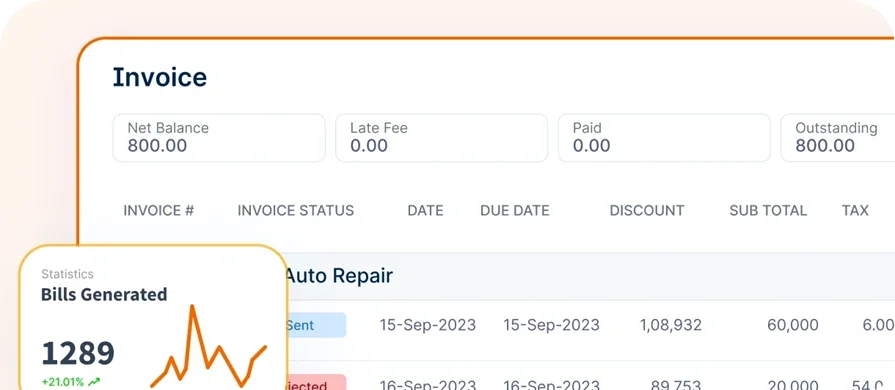
Invoicera centers on billing with recurring invoices, client and vendor portals, unlimited time tracking, and multi-currency support. For solo techs or very small crews that want a lightweight field-to-invoice solution without dispatch complexity, it provides a direct path from hours and expenses to clean invoices. Larger operations that need native scheduling, technician workflows, or asset-level history will likely pair it with another system.
How pricing works: Plans start at $15/month with tiers at $39, $79, and $119/month.
Features that connect invoicing to field work: Scheduled invoices and automated reminders speed collections; unlimited time tracking feeds billable labor into drafts; portals give customers and vendors a clear place to approve, pay, and view history.
What sets it apart for independent contractors: Strong automation for recurring service and straightforward time capture suit one-to-few-truck outfits that invoice right after the job. If you need dispatch, crew assignment, and asset tracking tied to the invoice, Invoicera skews billing-only for a full field-to-invoice workflow.
7 benefits of using a field-to-invoice system
A field-to-invoice setup connects dispatch, field capture, and billing so cash moves without retyping. The wins show up in speed, accuracy, and control for busy service teams.
1. Faster cash flow
Invoices assemble from completed work orders with contract rules, taxes, and approvals already set. Card and ACH links on the invoice cut delays after a job wraps. If you want a deeper look at how billing cadence affects collections, the overview on field service billing software breaks down the levers that accelerate payment.
2. Fewer errors across jobs and sites
Structured forms, rate codes, and curated price books prevent mismatched totals and missing signatures. Photos and checklists attach to line items so accounting and customers see exactly what happened on site. Credits and rebills stay off the board.
3. Real-time job costing and margin control
Labor and materials post as the work occurs, which surfaces job cost before the truck leaves the site. Managers can flag overtime, markups, and parts usage early instead of after month-end. For a wider playbook on tightening processes end to end, see field service operations.
4. Cleaner handoff from dispatch to AR
Dispatchers set job types, warranty flags, and quoted vs. T&M so billing knows the intent without back-and-forth. As visits close, invoice status appears on the same board. The primer on dispatch invoicing software shows how that board-to-billing link reduces stalls.
5. Technician-friendly invoicing in the field
Techs record time by rate code, pull parts from a catalog, and capture signatures on mobile. The work order turns into a draft invoice that mirrors the visit, even when signal drops. A quick read on an invoice app for contractors covers the mobile must-haves that keep billing accurate.
6. Contract compliance and audit readiness
Service agreements, trip charges, and not-to-exceed limits apply automatically. Every edit carries a user and timestamp. During customer audits, you have photos, forms, GPS stamps, and approvals linked to each invoice.
7. Less reentry across the office
Data moves once—from the field to accounting—so swivel-chair work dries up. Approved quotes convert to jobs, and completed jobs convert to invoices. If you want to lock down that paperwork chain, this guide on invoice work order walks through best practices that keep documents aligned.
3 common FAQs about field-to-invoice invoice software
Busy service shops ask a handful of questions before committing to a platform. Here are clear answers tailored to teams that live on work orders, tech time, and fast billing.
1. What is a field-to-invoice solution?
A field-to-invoice solution is software that connects dispatch, work orders, labor, parts, photos, and signatures to billing in one flow. Techs record details on mobile, approvals apply, and invoices build automatically with contract pricing and taxes, speeding cash and keeping records accurate without reentry.
When the capture is tight in the field, the office stops fixing tickets after the fact. That single source of truth reduces disputes, cuts admin hours, and keeps DSO moving in the right direction.
2. How does a field-to-invoice system work?
Dispatch sets job type, pricing rules, and warranty flags. Technicians log labor by rate code, pull items from a price book, attach photos and forms, then capture a signature. The system pushes those details into an invoice template that applies taxes, markups, and limits, routes it for approval, and sends it with a payment link. Accounting sees status updates in real time.
3. Is a field-to-invoice solution worth the cost for contractors?
Yes. Teams recover hours once spent on retyping, reduce write-offs from missing parts or time, and speed collections with card and ACH links. Managers gain live job cost and cleaner WIP, while customers receive precise invoices supported by photos and checklists. Fewer touches, faster cash, stronger audit trails.
{{related-content-block="/resources/dane-electric"}}
Wrapping it up, the strongest gains come when field data flows straight into billing without retyping. A tight field-to-invoice process trims admin time, lowers disputes, and helps cash hit the bank faster. The sections above covered what to look for, how different platforms stack up, and where teams see the biggest lift in speed and accuracy.
For commercial service contractors, BuildOps connects that field-to-invoice flow with the rest of the operation. Scheduling, dispatch, the technician app, time tracking, service agreements, invoicing, payments, reporting, CRM, quoting, and fleet live in one platform. BuildOps goes beyond field-to-invoice solutions by tying asset history, contract rules, and approvals to every ticket so jobs close clean and invoices match what happened on site.
Take a look at the platform in action and talk through your ticket-to-cash steps with a specialist. No pushy pitch, just a walkthrough tailored to how your team runs service.