Construction Project Management Software That Scales



Key Takeaways
- Construction project management software helps commercial specialty contractors keep scope, labor, materials, documentation, and billing tied to the same job from kickoff through closeout.
- For teams running both service work and project work, the biggest advantage is one connected workflow instead of split updates across spreadsheets, email threads, shared folders, and GC portals.
- The most important capabilities are a shared project record, faster field-to-office reporting, tighter change and purchasing control, and clearer financial visibility while the job is still moving.
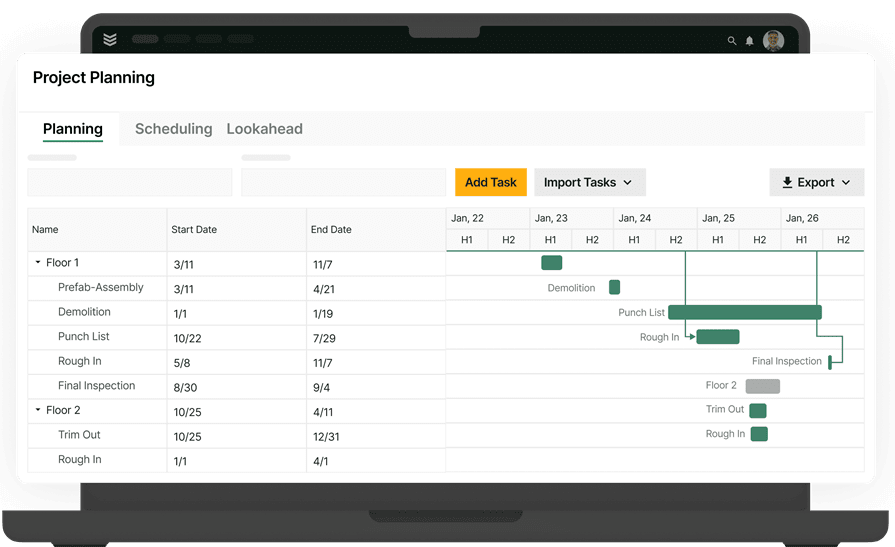
Commercial construction contractors start looking for project management software when project work is spread across spreadsheets, inboxes, shared folders, and GC portals. Change orders get missed, field updates lag, and cost issues surface too late. When PMs, field leaders, purchasing, and billing are all working the same job in different tools, decisions slow down and margins get harder to protect.
Construction project management software gives HVAC, mechanical, plumbing, electrical, and other specialty contractors one place to manage scope, field activity, costs, and billing progress from kickoff through closeout. For teams balancing service calls, tenant improvements, retrofits, modernization work, and larger projects at the same time, that connected view helps protect margin, speed up handoffs, and keep jobs moving.
How construction project management software helps contractors
At a practical level, construction project management software gives contractors a shared operating record for the job. Project managers can track scope and progress, field teams can send back Daily Reports and photos, purchasers can follow materials and commitments, and billing teams can work from the same project data through closeout.
For commercial contractors, that matters because project management software needs to support the full workflow around the job, not just scheduling. It should connect budgets, drawings, change orders, purchasing activity, and billing progress so decisions happen with current job context instead of disconnected updates.
That is especially important for specialty contractors running a mix of service work and project work. When both sides of the business stay connected, teams get a cleaner handoff between the field, office, and financial side of the job.
When contractors evaluate construction project management software, these are five core parts of the job the system should help them manage:
- Scope, phases, and budget setup
- Field updates, photos, forms, and daily reporting
- Change orders and out-of-scope work
- Purchasing, materials, and subcontract commitments
- Costs, billing progress, and overall job health
In BuildOps, field activity and financial follow-through stay connected inside one project workflow from kickoff through closeout. With OpsAI built directly into project, service, and financial workflows, teams can summarize daily Reports, flag missing backup, and surface overdue items faster without switching tools.
{{related-content-block="/resources/ai-construction-project-management-tools"}}
6 key construction project management features to look for
Once those workflows are connected, the next question is which features make the biggest difference in day-to-day project control. For commercial contractors, the most important construction project management capabilities are the ones that keep planning, field execution, documentation, purchasing, and billing tied to the same job.
1. One project record for scope, documents, and job status
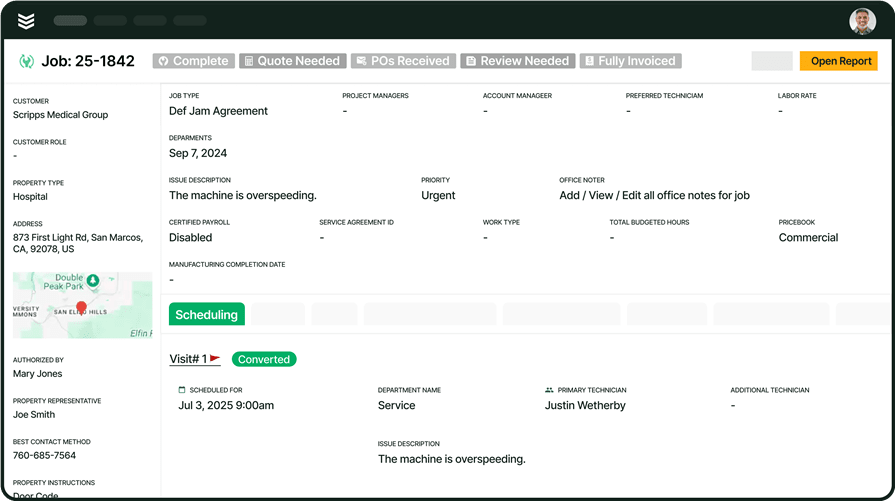
Commercial jobs get harder to manage when the latest drawing, open issue, field photo, and budget update all live in different places. Project managers need one operating record that shows what has changed, what is still open, and what needs attention next.
When project management software is connected with reporting & analytics and document control, teams can track progress with better context and keep a cleaner record of the job from kickoff through closeout.
2. Scheduling and dispatch that stay aligned with project work
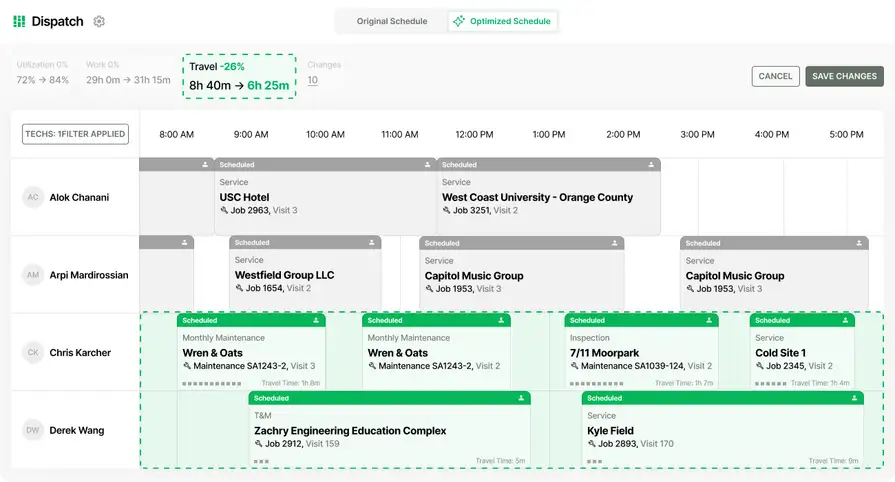
Commercial project work does not move in a straight line. Crews shift between phases, site conditions change, and the office has to keep labor aligned without losing visibility into the rest of the job. When scheduling lives outside the project workflow, handoffs get messy and supervisors spend too much time chasing the latest plan.
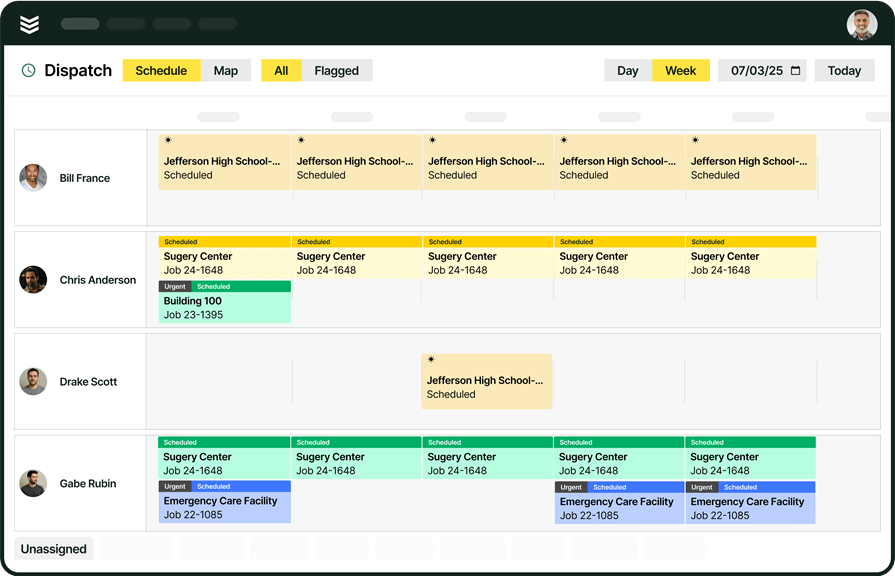
That is why construction project management software should keep scheduling close to the job record itself. With schedule & dispatch, contractors can line assignments up by skills, availability, and distance to the job while keeping the office and field working from the same schedule. That helps teams react faster to changes, reduce avoidable drive time, and keep visits moving without losing project context.
3. Crew planning tied to phases, cost codes, and progress
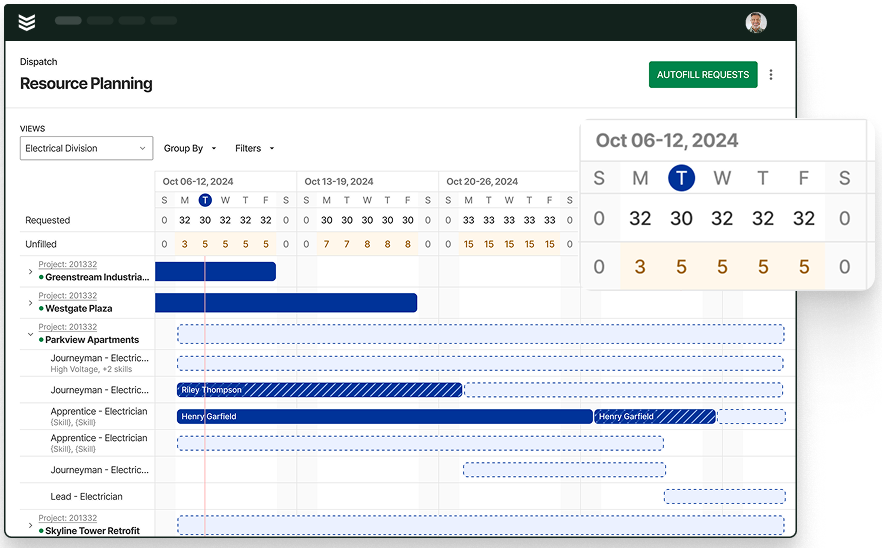
Labor usually decides whether a project stays on track or starts slipping. Construction teams need to see who is assigned, what phase is coming next, and how actual hours are landing against the plan before payroll or month-end reporting exposes the problem. With resource planning, time tracking, and field execution, contractors can line labor up with the work in front of them and catch schedule or cost drift earlier.
4. Daily field reporting that reaches the office fast
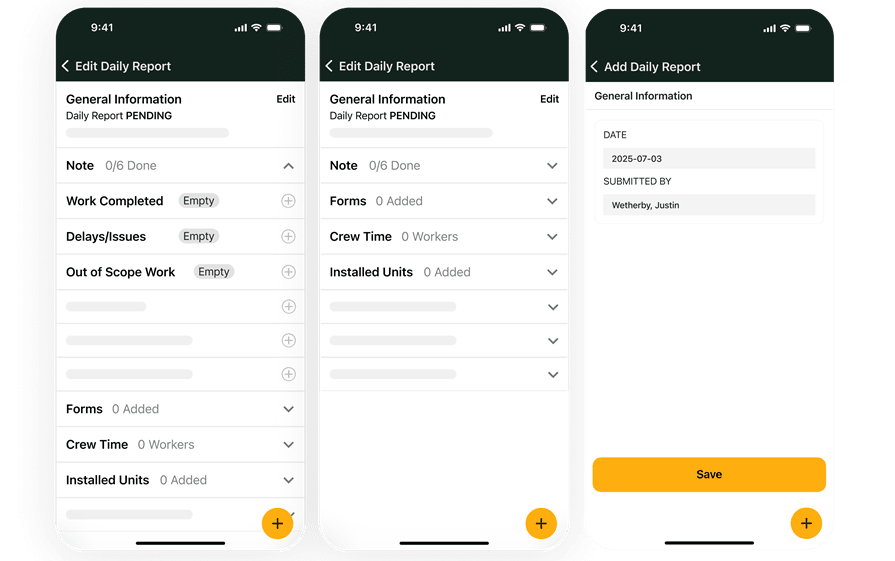
Project managers cannot make timely decisions if updates sit in paper notes, text threads, or end-of-day callbacks. They need daily reports, photos, notes, and jobsite activity to land in the system while the work is still active. A strong technician mobile app with OpsAI Visit Summary can brief team members arriving on the job with a clear view of progress, blockers, completed work, and recommended next steps, helping them get up to speed faster and keep the job moving.
5. Materials and change tracking connected to the budget
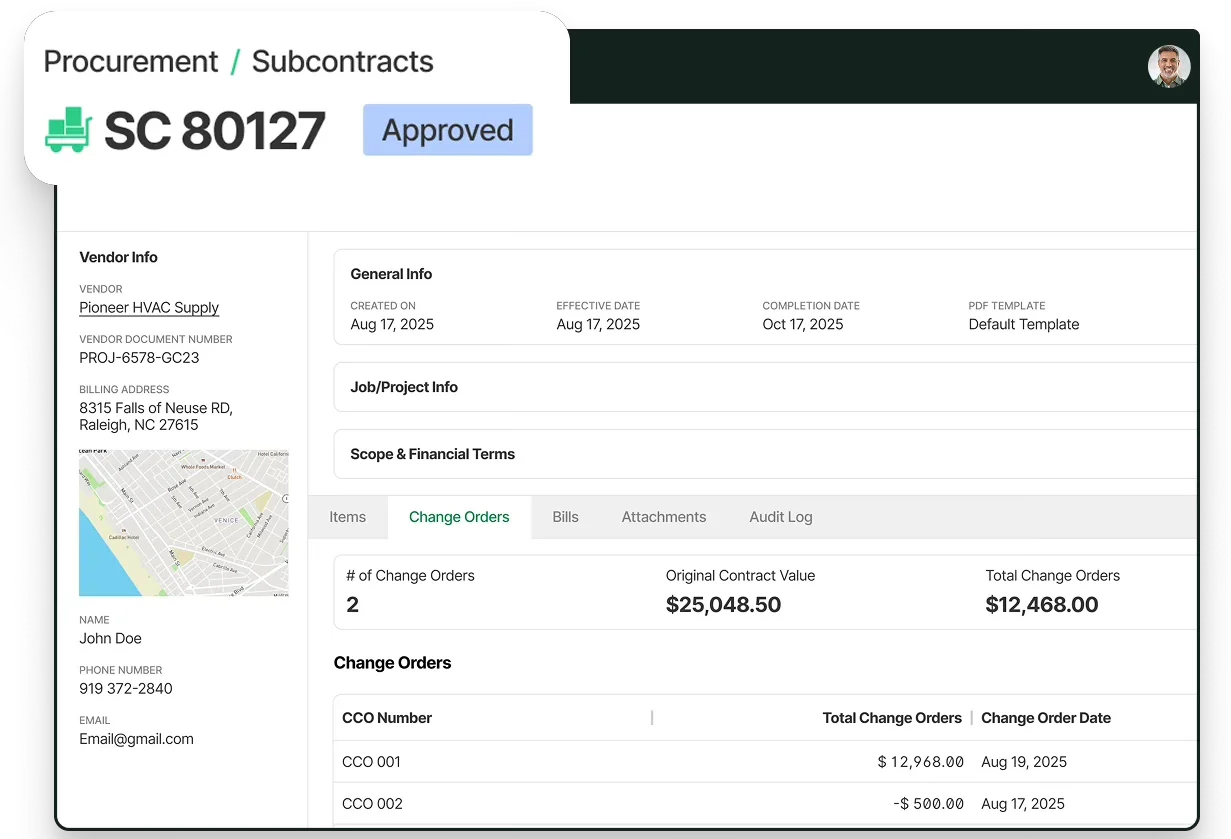
Construction project management software should help contractors stay ahead of cost movement, not discover it after the fact. When material purchases, subcontract commitments, and scope changes are tied back to the job, PMs can see how decisions in the field affect the budget before billing is underway. That is where materials & subcontracts and project financials make a real difference for commercial project control.
6. Billing visibility while the project is still moving

Financial follow-through is part of project management, especially on longer commercial jobs where costs and billing progress move over weeks or months. Contractors need to see what has been earned, what can be billed, and where backup may still be missing before closeout slows everything down. Connected financial management software and invoicing help operations and finance work from the same job picture so billing can keep pace with the work.
Benefits of using construction project management software for your operations
The value of construction project management software is most noticeable when it gives teams better insight and control while the project is still in progress; before issues become too difficult or costly to correct. For commercial contractors, the benefits below help teams identify problems earlier, make informed decisions, and keep the work on track.
1. Cleaner handoffs between the office and the field
Construction project management software tightens the loop between PMs, supers, purchasing, and billing. When job data moves with the work instead of waiting on spreadsheets and callbacks, the same discipline that matters in construction office management starts to show up on every active project, and fewer updates get lost between departments.
2. Faster visibility into field progress
Project managers make better calls when daily reports, photos, notes, and completed work land while the job is still active. That is why teams looking at construction field capture tools usually care about more than documentation alone; they need field updates that support change decisions, issue tracking, and billing follow-through on the same project record.
3. Better control over materials and committed costs
Material timing and committed costs can throw a project off faster than the original schedule suggests. Software that keeps purchasing tied to the job gives PMs a clearer way to stay ahead of buyouts, deliveries, and budget movement, which is one reason more teams are focused on modernizing procurement in construction instead of treating purchasing like a separate spreadsheet process.

4. Earlier warning signs when jobs start drifting
By the time a delay shows up in a month-end review, the margin damage is usually already underway. Connected job data makes it easier to catch slippage sooner, and contractors exploring AI construction risk delay prediction are trying to do exactly that by surfacing schedule, labor, and cost risk while there is still time to adjust.
5. Make faster decisions with AI in your workflow
AI becomes more practical when it works inside the day-to-day flow of the job instead of sitting in a separate reporting layer. As more contractors look at AI for construction management, the value comes from helping teams recap field activity, surface next steps, and keep project decisions tied to current job context.
6. Stronger project visibility at the business level
Construction project management software should help leadership see more than task status. When project data stays connected to billing, labor, and financial follow-through, owners and operations leaders get a clearer read on job health and company performance together — the same broader shift behind interest in AI construction business management software as contractors try to run more work without losing control of margins.
Questions to ask when evaluating construction project management software
If two platforms can both show a schedule and hold documents, the bigger difference usually shows up in how they support day-to-day project control. For commercial contractors, these questions can help separate a basic tracker from software that can support real project work.
- Can it run project work and service work in the same system? Start by checking whether the platform can support both without duplicate entry, split customer records, or separate field workflows.
- Does it give PMs a current view of the job before month-end? Look for live visibility into budget movement, committed costs, billing progress, and field activity while the job is still active.
- Can the field update the job fast enough for the office to act on it? Ask how quickly Daily Reports, photos, notes, and completed work can reach the project record without office cleanup.
- Does purchasing stay tied to the project budget? Make sure material orders, subcontract commitments, and scope changes stay connected to the job before cost issues show up later.
- Who owns the project record after closeout? Check whether your team keeps a durable record of drawings, reports, photos, change history, and billing backup after the job wraps.
- Will it standardize how your team runs projects? Finally, ask whether the system supports repeatable workflows for phases, cost codes, reporting, change orders, purchasing, and billing review.
These questions usually get to the real issue faster than a feature checklist. They also show whether the platform can support field service automation around updates, handoffs, and routine admin as the job moves. Construction project management software should help contractors run tighter field-to-office workflows, catch drift earlier, and keep project control closer to the work itself.
{{related-content-block="/resources/field-service-automation-software"}}
Common FAQs about construction project management software
These are some of the most common questions commercial contractors ask when they compare construction project management software and try to understand how it fits their day-to-day project workflows.
1. Can construction project management software run service work and project work in the same system?
For many commercial contractors, it needs to. A lot of specialty teams are running service calls, quoted work, retrofits, and larger projects at the same time, so using one system helps reduce duplicate entry and split workflows.
2. How do field updates get back to the office fast enough to be useful?
BuildOps gives crews and foremen a mobile Project Visit workflow instead of requiring them to send updates through texts, paper forms, or end-of-day emails. From the BuildOps mobile app, a field user opens the assigned project, clocks in, and adds a Daily Report directly from that Project Visit. The report is connected to the project and can be updated from the jobsite as work progresses.
{{related-content-block="/resources/how-service-1st-got-rid-of-the-work-arounds"}}
3. Can it handle change orders without creating confusion in project financials?
It should help teams keep change activity tied to the project record, cost codes, and billing flow so scope changes are easier to track. That matters because contractors often want cleaner visibility into what changed before it turns into budget or billing issues.
4. Will project managers be able to see labor and job progress before month-end?
Many contractors want that visibility before the period closes. Construction project management software should give PMs a current view of labor, committed costs, field activity, and billing progress while the job is still moving, not only after the period closes.
Commercial contractors need a connected system that keeps scope, field updates, change activity, purchasing, and billing visibility tied to the same job while the work is still moving.
BuildOps gives commercial contractors one platform to manage project setup, daily field activity, change control, materials coordination, and financial follow-through without splitting project work away from the rest of the operation. With OpsAI built directly into project, service, and financial workflows, teams can surface issues earlier, cut manual follow-up, and keep cleaner job records from kickoff through closeout.
If your team is comparing construction project management software because disconnected tools are slowing decisions and making project control harder, book a demo to see how BuildOps supports commercial construction workflows in one system.